
About Maple
Maple is an MCP server that gives a coding agent the review comments collected on a preview deployment, so the agent can read, act on and resolve them. It targets teams reviewing frontend changes on preview builds and is pre-release, at version 0.x.
Key features
- 01Waits for and reads new review comments
- 02Comments include file and line, viewport and screenshot context
- 03Marks comments resolved against the fixing commit
- 04Stop hook keeps the agent from finishing with open comments
- 05GitHub store or local .maple/ file store
Use cases
- 01Having a coding agent apply preview-page comments one by one
- 02Handling frontend review feedback without a pull request locally
- 03Publishing review gate results from CI with a gate App token
MCP support
Maple runs as an MCP server that gives clients tools such as list_comments, wait_for_comments, resolve_comment, get_comment_context and start_solo.
Configuration
Local server config is the same for every client. Copy it into your client’s MCP config file.
npx -y @maple-kit/mcpGITHUB_TOKENSecretA token that can read and write the repository's pull request comments. Required for the github store.MAPLE_GITHUB_OWNERThe repository's owner. Required for the github store.MAPLE_GITHUB_REPOThe repository. Required for the github store.MAPLE_STOREgithub, the default when a forge is configured, or file, the comments under .maple/ on this machine.Local servers need a runtime on your machine (e.g. Node.js 18+). Config file locations differ by client; see your client’s docs.
Tools
5Saved tool list · updated 2w ago
| Parameter | Type | Required | Description |
|---|---|---|---|
| branch | string | Yes | Head branch of the pull request the comments are on, such as `feat/login`. Not a pull request number. |
| statuses | array | No | Only these states. Omit for all of them. |
Details
From the project README@maple-kit/mcp
The Model Context Protocol server that hands a coding agent the review comments Maple collected on a preview deployment.
Pre-release. Every package here is 0.x and makes no compatibility promise.
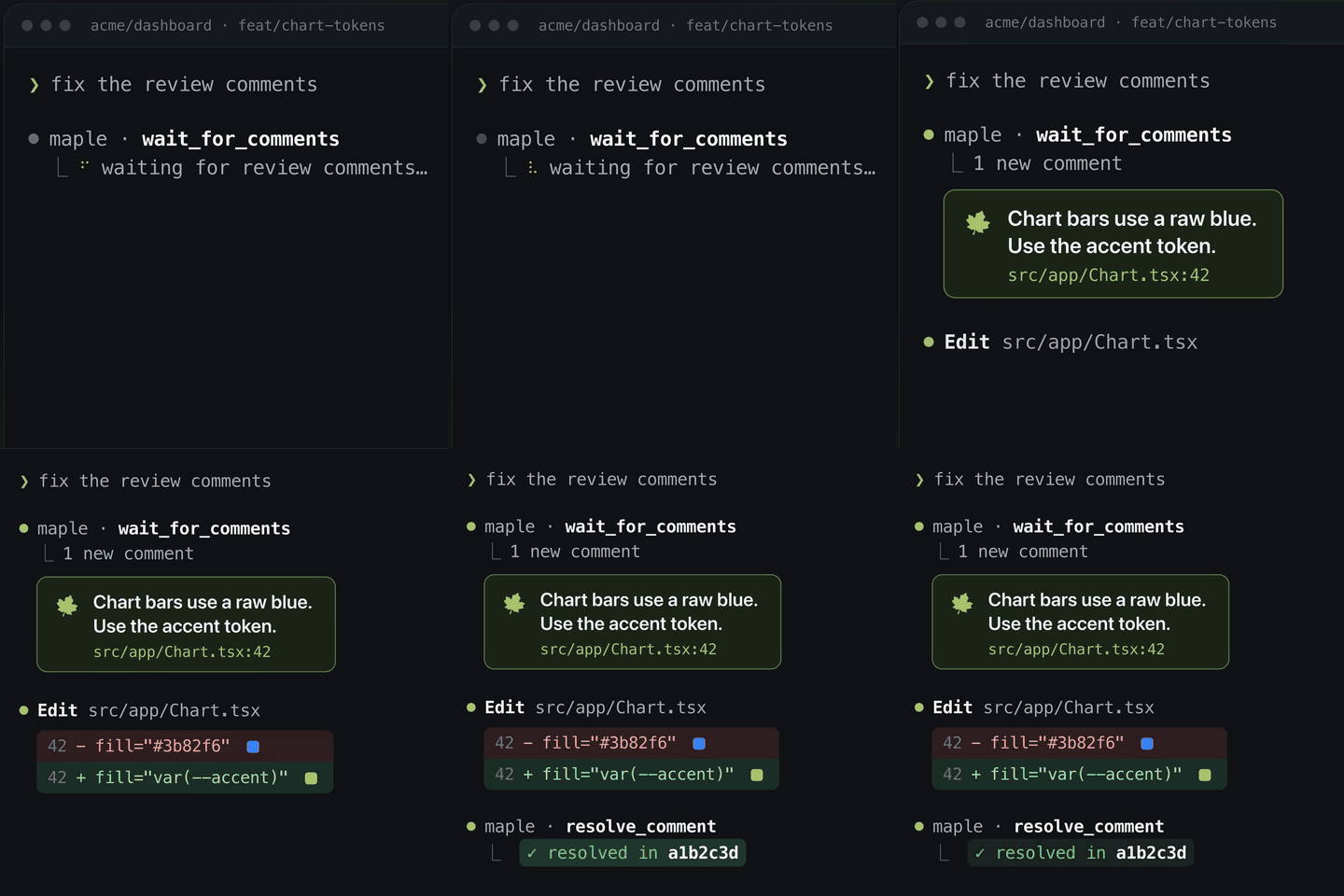
The agent waits for a comment, reads it with its context — file:line from
the tagger, the viewport, the screenshot, the mock it was written under — makes
the change, and resolves it against the commit that fixed it. The reviewer's
half is the overlay; the two meet in the store.
Install
npm install @maple-kit/mcp
Two binaries ship: maple-mcp, the server, and maple-stop-hook, which stops
an agent from calling itself finished while comments are still open.
Connect an agent
A client starts the server with no arguments, so it is configured through the
environment. In Claude Code's .mcp.json:
{
  "mcpServers": {
    "maple": {
      "command": "npx",
      "args": ["-y", "-p", "@maple-kit/mcp", "maple-mcp"],
      "env": { "MAPLE_GITHUB_OWNER": "acme", "MAPLE_GITHUB_REPO": "web" }
    }
  }
}
and run the client under op run --env-file so GITHUB_TOKEN never lands in a
file. A missing value fails at startup rather than on the first tool call.
| Name | Secret | What it is |
|---|---|---|
GITHUB_TOKEN | Yes | A token that can read and write pull-request comments. Required for the github store. |
MAPLE_GITHUB_OWNER | No | The repository's owner. Required for the github store. |
MAPLE_GITHUB_REPO | No | The repository. Required for the github store. |
MAPLE_GITHUB_API | No | The API root, for Enterprise Server. |
MAPLE_STORE | No | github, the default when a forge is configured, or file, the default when none is: the comments under .maple/. |
MAPLE_BRANCH | No | The branch the Stop hook checks, else the one checked out. The server ignores it. |
MAPLE_URL | No | The deployed route's mount URL. A resolve asks it to republish the gate. |
MAPLE_GATE_TOKEN | Yes | For CI only: the gate App's installation token. Not with MAPLE_URL. |
MAPLE_GATE_APP_ID | No | The gate App's id, so it updates its own check run rather than another's. |
MAPLE_REQUIRE_APPROVAL | No | true to hold the gate until somebody approves, matching the route and CI. |
With no forge
Set none of GITHUB_TOKEN, MAPLE_GITHUB_OWNER and MAPLE_GITHUB_REPO and the
server reads and writes the comments fileStore() keeps under .maple/ in its
working directory's repository, so the loop works on a laptop with no pull
request. MAPLE_STORE=file says so explicitly. It is a laptop's store, not a
preview pod's: docs/connectors.md has the argument. The Stop hook reads the
same folder for the branch checked out in the session's working directory, and
stays silent where there is no .maple/ folder, no comments for the branch or
no repository.
Tools
| Tool | Reads | What it does |
|---|---|---|
list_comments(branch, statuses?) | ✓ | Return the review comments on a branch, newest first. |
wait_for_comments(branch, cursor?, timeoutMs?) | ✓ | Block until a new comment arrives or the wait elapses. Returns status "timeout" rather than failing when nothing arrives. |
resolve_comment(id, sha, note?) | Mark a comment resolved, recording the commit that addressed it. | |
get_comment_context(id, branch) | ✓ | Return everything needed to act on one comment: anchor, viewport, surrounding markup and any replay link. A comment written under a Maple Mock carries mock.recipe and mock.replay, a link to the page in that state. |
start_solo(previewUrl) | Start a bridge on localhost and return the link that pairs a deployed preview with it. The reviewer opens the link in their browser and the comments they write there land in .maple/ for list_comments and wait_for_comments to read. They never count toward the merge gate. |
wait_for_comments is clamped to 55 seconds because every coding client cuts a
tool call off at 60, and it emits notifications/progress every 15 seconds. A
timeout is a result: an agent that treats one as an error stops looping the
first time nobody is looking. Its cursor is a timestamp; omit it on the first
call to drain whatever is already waiting.
The Stop hook
MCP gives a server no way to interrupt a client, so the loop is closed from the
other end. Claude Code's Stop hook runs when the agent believes it is
finished, and Maple's answers with the comments still open:
{
  "hooks": {
    "Stop": [
      { "hooks": [{ "type": "command", "command": "npx -y -p @maple-kit/mcp maple-stop-hook" }] }
    ]
  }
}
The Maple Claude Code plugin registers it for you. It blocks while a comment
is open or needs_reverify, at most eight stops in a row per session; on the
ninth it lets the session end and says what is still open, which beats an agent
resolving comments to escape. The count is kept per session_id in the system
temp directory, and a stop no block caused starts it again.
The hook does not see .mcp.json's env. That block is handed to the MCP
server alone; a hook runs in the client's own environment. So
MAPLE_GITHUB_OWNER, MAPLE_GITHUB_REPO and GITHUB_TOKEN have to be set
where the client itself starts — under the same op run --env-file — or the
hook fails naming the one missing. With neither of the first two set, it reads
the comments under .maple/ for the current branch instead, and lets every
stop through where there are none. MAPLE_BRANCH defaults to the branch checked out in the
session's working directory.
Resolving clears the gate
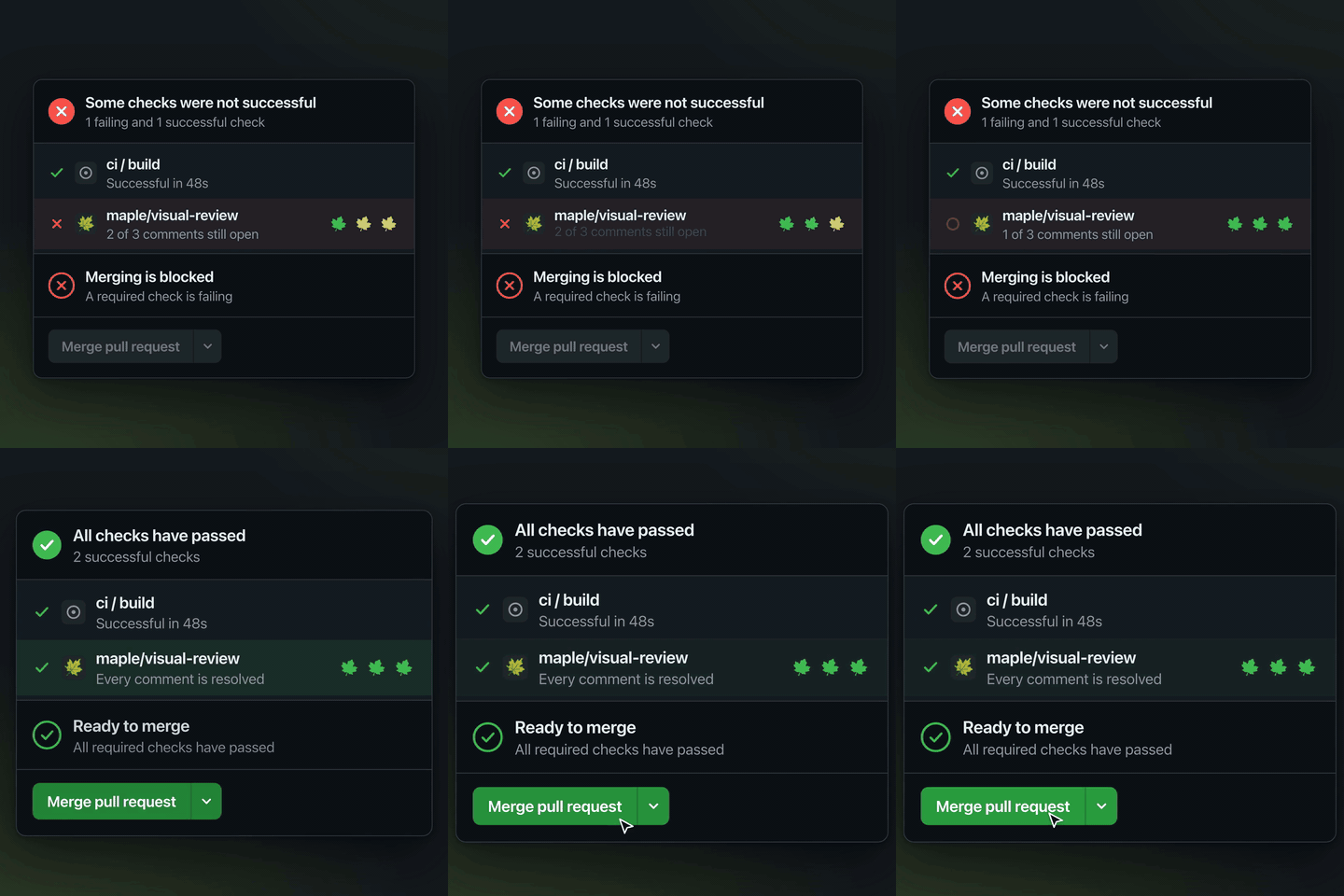
With MAPLE_URL set to a deployed route's mount URL, such as
https://web-482.preview.acme.dev/api/maple, resolve_comment asks that route
to republish maple/visual-review, so an agent that resolves the last comment
with nothing left to push does not leave the check holding on finished work.
The request carries the branch and GITHUB_TOKEN, which must be able to push
to the repository. The route decides the verdict and publishes with the gate
App's own credentials, which never leave it. A failed refresh is logged to
stderr and the resolve is still recorded.
MAPLE_GATE_TOKEN is the other way, for CI: a gate App installation token the
server publishes with directly. It expires an hour after it is minted, so it
suits a job, not a session. Setting both fails at startup.
Documentation
- The agent loop
- The merge gate
- The
maple-reviewskill turns a pull request's```maplecomments into a worklist without the server.
Licence
Apache-2.0. See LICENSE and NOTICE.
Comments
New to MCP?
From what the protocol is to installing your first server, these answers cover most first questions.
An open protocol that defines how AI applications connect to external tools and data in a uniform way. Clients talk to the model; MCP servers provide tools, resources and prompt templates. They exchange standard messages, so one server can be reused by many clients.