
About okama-mcp
okama-mcp exposes the okama investment portfolio toolkit and okama Planner to MCP-compatible AI assistants. It is for portfolio analysis and financial planning, with tools for historical metrics, simulations, and multi-stage plans, plus local or self-hosted HTTP operation.
Key features
- 01Analyze assets and portfolio returns
- 02Backtest portfolios and calculate risk metrics
- 03Run Monte Carlo forecasts and withdrawal analyses
- 04Build multi-stage financial plans
- 05Serve over stdio or Streamable HTTP
Use cases
- 01Compare asset histories, returns, and correlations
- 02Test portfolio performance and drawdowns
- 03Model retirement withdrawals with Monte Carlo
- 04Plan accumulation and retirement across stages
MCP support
Exposes okama and okama Planner financial tools to MCP-compatible clients. It supports local `stdio` and self-hosted Streamable HTTP transports.
Configuration
Local server config is the same for every client. Copy it into your client’s MCP config file.
Tools
Local servers expose tools only once running on your machine, and the maintainer has not provided a tool list.
Details
From the project READMEokama-mcp




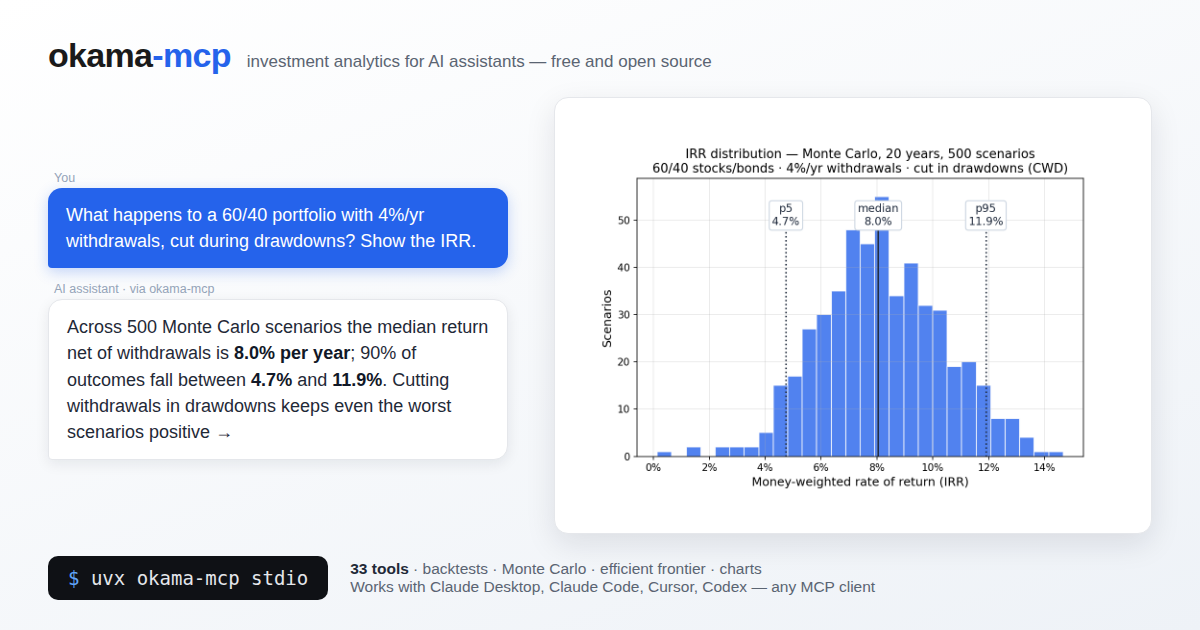
MCP (Model Context Protocol) server that exposes the okama investment portfolio toolkit and okama Planner to AI assistants — Claude Desktop, Claude Code, Cursor, Codex, and any other MCP-compatible client.
With okama-mcp installed, you can ask an AI things like:
"Backtest a portfolio of 30% gold and 70% real estate over the last 15 years."
"Run a Monte Carlo retirement forecast on that portfolio, withdrawing $1,000/month indexed to inflation, over 25 years."
"What's the tangency portfolio of SPY, BND, and GLD with a 3% risk-free rate?"
…and the AI uses the MCP tools to call okama directly — no Python code needed.
Built on FastMCP. Single codebase, two transports:
stdio (for local clients) and streamable-http (for self-hosting).
okama-mcp is free and open source. Run it locally or on your own server. The HTTP
transport is intended for self-hosting; mcp.okama.io serves the project
landing page, not a public MCP endpoint. Client registry tools and Excel exports
require a compatible Planner companion and a configured local stdio installation.
Install
Development status (26 October 2026): main prepares MCP 3.1.0 with Planner
0.5.0; neither version has been published yet. Use the source setup below.
PyPI still provides MCP 3.0.0 with Planner 0.4.1 and its earlier contracts.
Requires Python ≥ 3.11 (same floor as okama itself); okama ≥ 4.0.0 and
okama-planner[reports]>=0.5.0,<0.6.0 are required.
Client data modes (source checkout): local MCP defaults to anonymous reads.
client_data_mode_set({"mode":"personal_data"}) enables full client CRUD;
{"mode":"anonymous"} disables client writes again. The setting persists per
database across connections. uv sync installs a pinned Planner 0.5.0 source
revision with the required access API. PyPI still provides Planner 0.4.1, so the prepared release remains blocked until the compatible companion is published;
see installation and release gates.
Market and finplan_* tools remain available independently. See the
3.0 migration notes for the earlier release behavior.
The easiest way — no clone, no venv — is uv or pipx:
uvx okama-mcp stdio          # run straight from PyPI
# or
pipx install okama-mcp
Plain pip works too:
pip install okama-mcp
Warning
With pip, prefer a dedicated virtual environment: on most modern Linux distros the system Python is marked externally managed (PEP 668), so
pip installoutside a venv fails, and a shared environment risks dependency conflicts. In your MCP client config, pointcommandat the absolute path of theokama-mcpscript inside the venv — GUI clients don't see your shellPATH.uvxandpipxavoid all of this by isolating the install automatically.
To work on the code, install from source instead:
git clone https://github.com/mbk-dev/okama-mcp
cd okama-mcp
uv python install 3.14
uv sync --python 3.14 --all-groups
Until Planner 0.5.0 is published, tool.uv.sources pins an immutable development
companion. Release gates use uv sync --all-groups --no-sources and require
published dependencies; no source substitution is used for publication.
Remove the development pin after published-pair acceptance passes.
Run
# stdio — for Claude Desktop, Claude Code, Cursor (local IPC)
okama-mcp stdio

# streamable HTTP — for self-hosting on your own server
okama-mcp http --host 127.0.0.1 --port 8765
When running from a source checkout, prefix each command with uv run.
Each worktree has its own .venv; test and dev groups are installed by default.
uv.lock is generated locally and is not committed, so fresh checkouts resolve
compatible versions independently. Orca runs the bootstrap in orca.yaml before
starting the agent; its source MCP configuration uses uv run --no-sync after setup.
Connect a client
Claude Desktop
Edit ~/Library/Application Support/Claude/claude_desktop_config.json (macOS) or
%APPDATA%\Claude\claude_desktop_config.json (Windows):
{
  "mcpServers": {
    "okama": {
      "command": "uvx",
      "args": ["okama-mcp", "stdio"]
    }
  }
}
Restart Claude Desktop; the server appears in the tools menu.
Claude Code
To make the server available in every project (works from any directory):
claude mcp add --scope user okama -- uvx okama-mcp stdio
Developers running from a source checkout can use claude mcp add okama -- uv run okama-mcp stdio from the project root instead.
Or commit a .mcp.json at the project root so the whole team picks it up:
{
  "mcpServers": {
    "okama": {
      "command": "uvx",
      "args": ["okama-mcp", "stdio"]
    }
  }
}
Cursor
Add the server to .cursor/mcp.json in your project (or ~/.cursor/mcp.json to make
it global):
{
  "mcpServers": {
    "okama": {
      "command": "uvx",
      "args": ["okama-mcp", "stdio"]
    }
  }
}
Codex (CLI & Desktop)
Add the server with one command:
codex mcp add okama -- uvx okama-mcp stdio
Or declare it in ~/.codex/config.toml (or a project-scoped .codex/config.toml
in trusted projects):
[mcp_servers.okama]
command = "uvx"
args = ["okama-mcp", "stdio"]
The Codex CLI, desktop app, and IDE extension share this configuration — set it up once and it works in all three.
Self-hosting (streamable HTTP)
Run okama-mcp on your own server and share it across your MCP clients:
okama-mcp http --host 127.0.0.1 --port 8765 --path /mcp
(From source: uv run okama-mcp http ...)
Then point your MCP client at http://<your-server>:8765/mcp. For a production
setup put nginx + TLS in front; ready-made examples live in deploy/:
deploy/systemd/okama-mcp.service— systemd unit (hardened, runs as a dedicated user)deploy/nginx/self-hosted.conf— nginx vhost: TLS, SSE-friendly proxying of/mcp
The server is open by design — free to run, no registration. If your instance must not be public, restrict access at the nginx level (allow-list, VPN, or HTTP basic auth).
Tool catalog
A multi-stage financial plan (contribute $1,000/month for 20 years into a 70/30 SPY/AGG portfolio, then withdraw $6,000/month indexed to inflation for 25 years), a Monte Carlo retirement forecast (30% gold / 70% real estate, withdrawing $1,000/month indexed to inflation over 25 years) and the efficient frontier of SPY/BND/GLD:
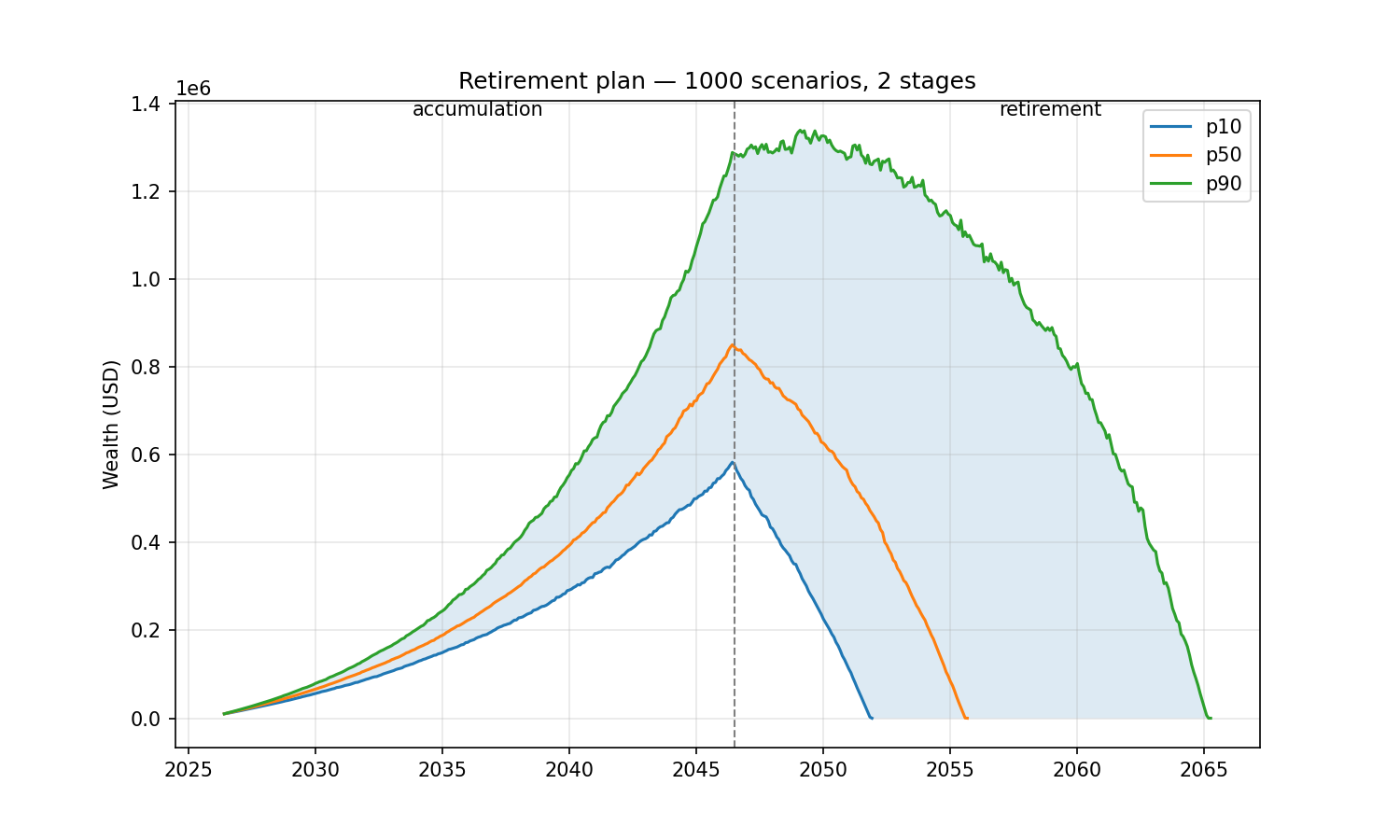
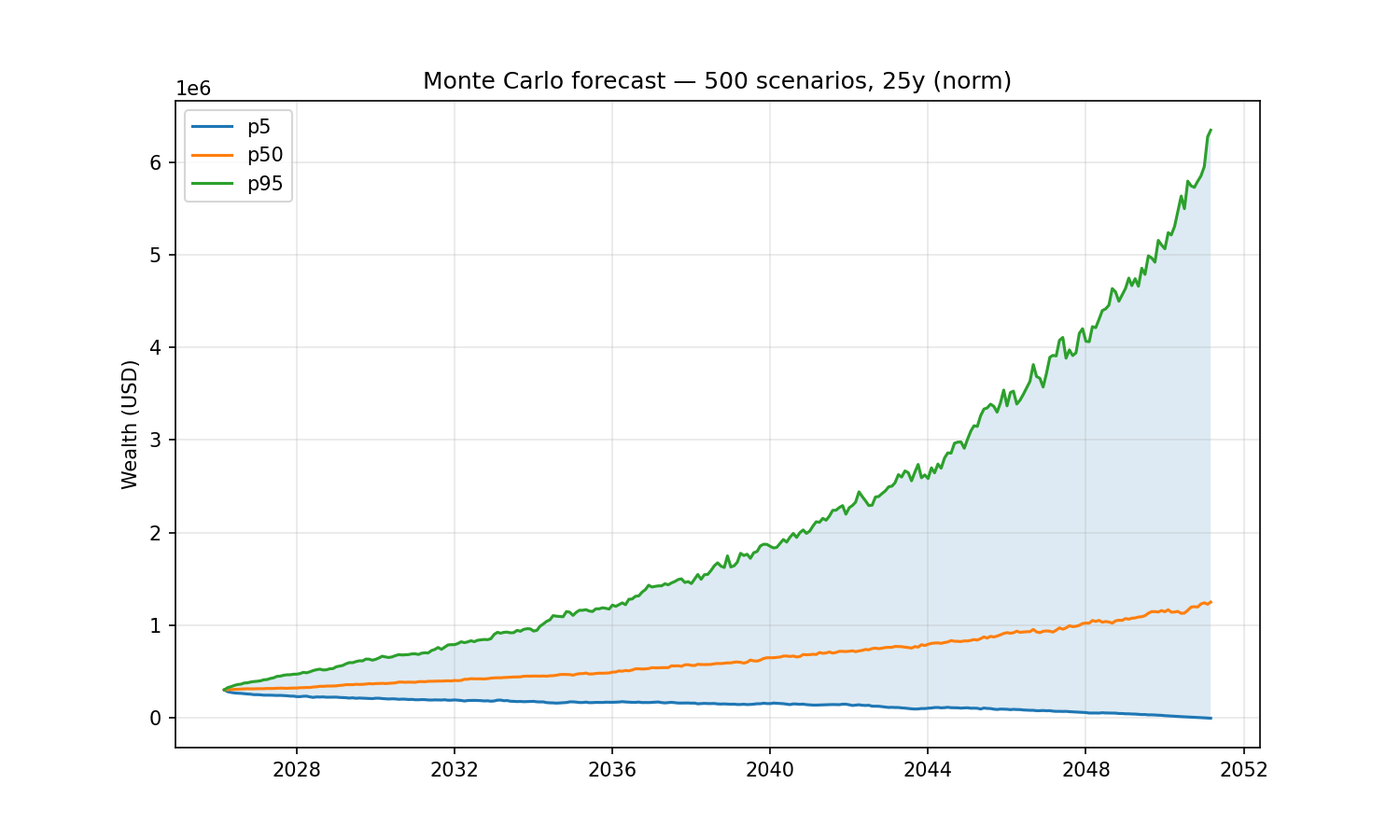
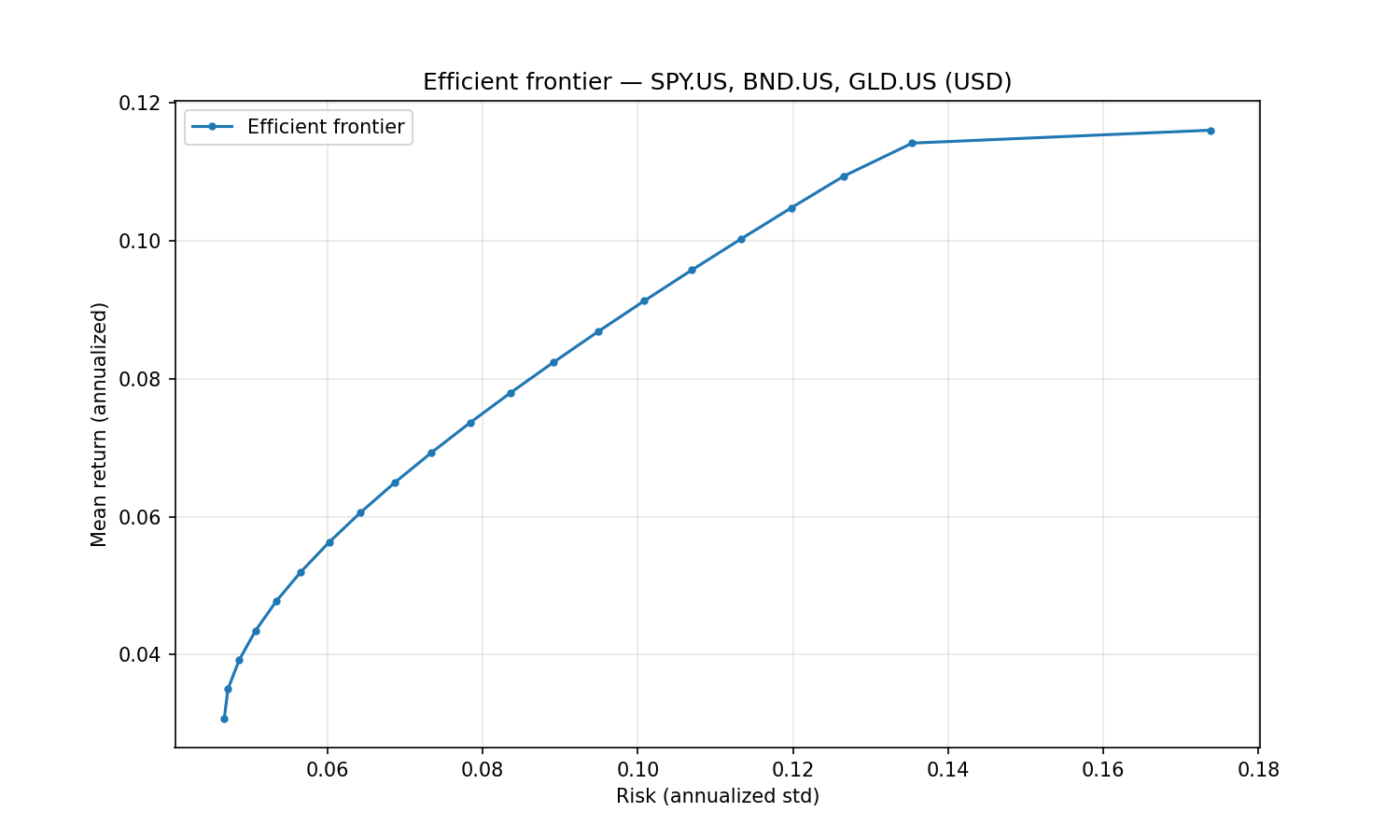
Financial tools are stateless — pass the full portfolio specification with every call.
Optional local client tools use stable registry codes and a persistent, database-scoped access mode.
Client creation is not idempotent: inspect the registry before retrying an ambiguous creation result.
The server caches expensive okama objects (Portfolio, EfficientFrontier) by content
hash, so repeated calls on the same spec are fast.
Nested portfolios. Wherever a list of assets is accepted — the assets field of
PortfolioSpec/FrontierSpec, or the portfolios argument on the comparison tools —
an entry may be a ticker string or a nested portfolio object (the same spec shape).
This lets you treat a whole portfolio as a single component: e.g. compare a 60/40
portfolio against gold, or put a sub-portfolio on the efficient frontier.
Search & metadata
| Tool | Purpose |
|---|---|
search_assets(query="", namespace?, asset_type?, oldest_first?, limit=50, offset=0) | Search by name / local name / ticker / ISIN, with exact identifiers and names ranked first; follow next_offset while has_more is true. Filter by okama type and sort by first_date; for example, namespace="MOEX", asset_type="ETF", oldest_first=true, limit=5 finds the five oldest MOEX-listed BPIFs. |
list_namespaces(kind="all"|"assets"|"macro") | Show namespace descriptions plus usage: asset/macro classification, support for asset returns, and available MCP tools. |
get_asset_info(symbol) | Metadata for one symbol — name, country, currency, type, date range. |
Single asset & comparisons
| Tool | Purpose |
|---|---|
get_asset_history(symbol, kind, first_date?, last_date?) | Time series for one asset. kind ∈ {close_monthly, close_daily, adj_close, ror, dividends}. |
compare_assets(symbols, ccy, ..., portfolios?, rf_return?, t_return?) | Side-by-side statistics (describe() table: CAGR, risk, drawdowns by period) plus Sharpe & Sortino per asset. |
get_correlations(symbols, ccy, ..., portfolios?) | Correlation matrix of monthly returns. |
get_rolling_risk(symbols, ccy, window_months=12, ..., portfolios?) | Rolling annualized risk per asset. |
get_asset_returns(symbols, ccy, ..., portfolios?, period?, real=False) | Return metrics per asset: CAGR, cumulative return, mean / real mean return, monthly geometric mean, annual returns table. With inflation=False, nominal metrics remain available and real_mean_return is null; real=True requires inflation=True. |
get_rolling_returns(symbols, ccy, window_months=12, real=False, ..., portfolios?) | Rolling CAGR and rolling cumulative return per asset. |
get_benchmark_metrics(benchmark, symbols, ccy, ..., portfolios?, rolling_window?) | Beta, correlation, annualized tracking difference and tracking error of each asset vs a benchmark/index. |
get_dividend_info(symbols, ccy, ...) | LTM dividend yield, 5y mean yield, paying/growing streaks per asset. |
Portfolio backtest
| Tool | Purpose |
|---|---|
analyze_portfolio(portfolio, rf_return=0, t_return=0) | Headline metrics (CAGR, annual mean/risk, Sharpe, Sortino) + full describe() for a PortfolioSpec. |
get_portfolio_drawdowns(portfolio) | Drawdown time series + max drawdown / recovery period. |
get_portfolio_var_cvar(portfolio, time_frame=12, level=1) | Historical Value at Risk and CVaR. |
get_portfolio_wealth_index(portfolio, full=False) | Wealth-index series (cumulative growth of 1000). |
get_rolling_cagr(portfolio, window_months=12, real=False) | Rolling CAGR time series (optionally inflation-adjusted). |
get_cagr_probability(portfolio, years, cagr_target) | Historical probability of CAGR below a target (e.g. of a loss) over N-year periods. |
Monte Carlo DCF
| Tool | Purpose |
|---|---|
monte_carlo_forecast(portfolio, mc, cashflow) | Forward simulation with one of five cash-flow strategies (indexation, percentage, time_series, vanguard, cut_if_drawdown). Returns percentile wealth bands, terminal-wealth stats, survival metrics. Includes the money-weighted IRR distribution (percentiles + mean). |
get_portfolio_irr(portfolio, cashflow) | Historical money-weighted return (IRR) for a contribution/withdrawal plan. |
find_the_largest_withdrawals_size(portfolio, mc, cashflow, goal, ...) | Largest sustainable withdrawal (Monte Carlo) for a goal: keep real purchasing power, keep nominal balance, or survive N years. |
get_monte_carlo_cash_flow(portfolio, mc, cashflow, discounting?) | Monte Carlo distribution of future cash flows over time (percentile bands). |
The mc argument accepts distribution_parameters to override the fitted distribution (e.g. a fixed Student-t df); see the MCSpec shape below.
Financial plan (multi-stage)
A plan is an ordered sequence of stages, each with its own portfolio, horizon and
cash-flow regime. Scenarios are chained: the balance a Monte Carlo scenario ends a
stage with is the balance it starts the next one with, so the retirement stage is
funded by whatever the accumulation stage produced in that same scenario — not by
a percentile of it. Use these instead of monte_carlo_forecast whenever the portfolio
or the contribution/withdrawal regime changes partway through the horizon.
| Tool | Purpose |
|---|---|
finplan_forecast(plan, success_threshold=0) | Monte Carlo forecast of the whole plan: percentile wealth bands, terminal-wealth stats, survival metrics, the share of scenarios finishing above success_threshold, the balance distribution at every stage boundary, and the IRR distribution. |
finplan_backtest(plan, discounting?, first_date?) | Replay the same plan over real history — a glide-path backtest. Requires the window covered by every stage portfolio to be at least as long as the plan. |
Distribution diagnostics
| Tool | Purpose |
|---|---|
get_distribution_fit(portfolio, mc) | Goodness-of-fit for the return distribution: fitted parameters, Jarque-Bera, Kolmogorov-Smirnov (chosen + all distributions), and backtesting error (theoretical vs empirical mean/VaR/CVaR). |
get_return_moments(portfolio, mc, rolling_window?) | Skewness & kurtosis time series — expanding, or rolling when a window (months) is given. |
optimize_students_df(portfolio, mc, var_level?) | Degrees of freedom for a Student-t that best matches empirical VaR/CVaR. |
get_cagr_distribution(portfolio, mc, percentiles?, score?) | Simulated CAGR at each percentile, plus the probability of a CAGR at/below score (e.g. score=0 → probability of a loss). |
DCF (historical cash-flow analysis)
| Tool | Purpose |
|---|---|
get_dcf_wealth_index(portfolio, cashflow, discounting?, include_negative_values?, discount_rate?) | Historical wealth index with the cash-flow plan (FV nominal or PV discounted). |
get_dcf_cash_flow_ts(portfolio, cashflow, discounting?, remove_if_wealth_index_negative?, discount_rate?) | Historical contribution/withdrawal time series (FV or PV). |
get_dcf_wealth_with_assets(portfolio, cashflow) | Historical wealth index for the portfolio and each underlying asset. |
get_survival_period(portfolio, cashflow, threshold?, discount_rate?) | Historical longevity: survival period (years) and depletion date. |
get_initial_investment_values(portfolio, cashflow, discount_rate?) | Present value (PV) and future value (FV) of the initial investment. |
Efficient Frontier
| Tool | Purpose |
|---|---|
build_efficient_frontier(frontier) | Full EF point table (Risk / Mean return / CAGR + per-asset weights). |
get_tangency_portfolio(frontier, rf_return, rate_of_return) | Max-Sharpe portfolio on the EF. |
get_min_variance_portfolio(frontier) | Global Minimum Variance portfolio. |
get_most_diversified_portfolio(frontier, target_return?) | Most Diversified Portfolio (maximises the diversification ratio) on the EF. |
Macro
| Tool | Purpose |
|---|---|
get_inflation(currency, first_date?, last_date?, include_cumulative?, include_rolling?, include_describe?) | Inflation series for a currency (USD, EUR, RUB, …). Optional: cumulative inflation, 12-month rolling inflation, describe() table. |
get_central_bank_rate(country, first_date?, last_date?, frequency="monthly"|"daily", include_describe?) | Central-bank policy rate (US→US_EFFR, EU/ECB→EU_MRO, RUS→RUS_CBR, UK/GB→UK_BR, ISR→ISR_IR, CN/CHN→CHN_LPR1, or full symbol). Monthly or daily series; optional describe() table. |
get_indicator(symbol, first_date?, last_date?, include_describe?) | Macro indicator from the RATIO namespace (e.g. USA_CAPE10.RATIO); bare country code defaults to that country's CAPE10. |
Charts
Each tool renders a PNG (default 1500×900) and returns it as MCP image content —
clients like Claude Desktop display it inline. Every chart tool also accepts
optional width / height (pixels, 300–4000) for custom sizes and aspect ratios,
and an optional save_path — the chart is then also written to that file and the
path reported back. Use save_path in clients that don't render MCP images in
their UI (e.g. Claude Code's terminal): ask for a chart "saved to /tmp/chart.png"
and open the file reference. Note: in self-hosted (streamable-http) deployments
save_path is written on the server's filesystem, not the client's machine.
| Tool | Chart |
|---|---|
plot_wealth_index(portfolio) | Portfolio wealth index (+ inflation line). |
plot_drawdowns(portfolio) | Drawdown depth over time. |
plot_monte_carlo(portfolio, mc, cashflow) | Monte Carlo forecast fan (percentile bands). |
plot_finplan_forecast(plan) | Financial-plan forecast fan: percentile bands with dashed stage boundaries and stage labels. |
plot_irr_distribution(portfolio, mc, cashflow) | Histogram of IRR across Monte Carlo scenarios (percentile markers). |
plot_qq(portfolio, mc) | Q-Q plot of historical returns against the fitted distribution (norm/lognorm/t). |
plot_hist_fit(portfolio, mc, bins?) | Histogram of historical returns with the fitted distribution PDF overlaid. |
plot_efficient_frontier(frontier) | EF curve with individual asset points. |
plot_transition_map(frontier, x_axe="risk") | Transition map: asset weights along the efficient frontier (x-axis = risk or CAGR). |
plot_assets(symbols, ccy, ..., portfolios?) | Wealth-index comparison of individual assets. |
plot_macro(symbols, first_date?, last_date?, frequency="monthly"|"daily") | Line chart of inflation / central-bank rate / CAPE10 series. Overlay multiple symbols (e.g. ["USA_CAPE10.RATIO", "EUR_CAPE10.RATIO"]). frequency='daily' valid only for .RATE symbols. |
Finding symbols and choosing tools
Start with list_namespaces(): its original namespaces description mapping is
preserved, and usage explains what each namespace supports. Use
search_assets(namespace="INDX") to browse an index catalog, or
search_assets(query="bitcoin", namespace="CC") for cryptocurrencies. Search rows
include namespace and supports_asset_returns (null when unknown).
Search is case-insensitive; exact symbol/ticker/ISIN matches rank first, then
exact names, prefixes and other matches. Scoped queries match punctuation
literally. With oldest_first=true, date order takes precedence. Symbol order
breaks ties. Results are ordered before paging: repeat the same query and filters
with offset=next_offset until has_more=false. count describes all filtered
matches; truncated means the current page is not the entire result set, including
the last page of a multi-page result. Pages reflect the current catalog, so data
updates between calls can move page boundaries.
RATE, INFL and RATIO are macroeconomic series. Read their values and metadata
with get_central_bank_rate, get_inflation and get_indicator, respectively.
For example, RUS_RUB.RATE describes a deposit rate, whereas OKID.INDX is an
investment-return index: they are different inputs. Asset tools reject a macro
symbol with the appropriate next call; they never replace it with an index.
Discover the intended index separately before comparing returns. Unknown upstream
namespaces have no advertised MCP routes until support is implemented.
Spec shapes
The complex tools accept JSON objects described by complete Pydantic-generated
input schemas in MCP tools/list: nested fields, required values, constraints,
defaults and cash-flow variants are visible to the client. Definitions live in
src/okama_mcp/schemas.py; here are the headline shapes:
// PortfolioSpec
{
  "assets":   ["GLD.US", "VNQ.US"],  // each entry: a ticker OR a nested PortfolioSpec
  "weights":  [0.3, 0.7],            // optional, must sum to 1.0
  "ccy":      "USD",
  "first_date": "2010-01",
  "last_date":  "2024-12",
  "rebalancing_strategy": {            // mirrors okama.Rebalance
    "period": "year",                  // month | quarter | half-year | year | none
    "abs_deviation": 0.05,             // optional, |actual - target| threshold, 0 < x <= 1
    "rel_deviation": 0.1               // optional, |actual / target - 1| threshold, > 0
  },
  "inflation": true
}

// MCSpec
{
  "distribution":  "norm",            // norm | lognorm | t
  "period_years":  25,
  "scenarios":     500,                // ≥ 1, no upper limit
  "percentiles":   [5, 50, 95],
  "random_seed":   42,                 // optional, for reproducibility
  "distribution_parameters": null      // optional; null = fit from history (MLE). Lengths: norm [mu, sigma]; lognorm/t [shape|df, loc, scale]. Any element null = fit that one (e.g. [4, null, null])
}

// CashflowSpec — discriminated by `type`
{ "type": "indexation",       "initial_investment": 1000000, "frequency": "month", "amount": -1000, "indexation": "inflation" }
{ "type": "percentage",       "initial_investment": 1000000, "frequency": "year",  "percentage": -0.04 }
{ "type": "time_series",      "initial_investment": 100000,  "events":    { "2030-06": -50000 }, "time_series_discounted_values": false }
{ "type": "vanguard",         "initial_investment": 1000000, "percentage": -0.04, "floor_ceiling": [-0.025, 0.05], "indexation": "inflation" }
{ "type": "cut_if_drawdown",  "initial_investment": 1000000, "frequency": "year",  "amount": -60000, "indexation": "inflation",
  "crash_threshold_reduction": [[0.2, 0.4], [0.5, 1.0]] }

// FinPlanSpec — a plan is a sequence of stages, chained per scenario
{
  "stages": [
    { "portfolio": { "assets": ["SPY.US", "AGG.US"], "weights": [0.7, 0.3] },
      "period_years": 20, "name": "accumulation",
      "cashflow": { "type": "indexation", "initial_investment": 100000, "frequency": "year", "amount": 12000, "indexation": 0.03 } },
    { "portfolio": { "assets": ["SPY.US", "AGG.US"], "weights": [0.3, 0.7] },
      "period_years": 25, "name": "retirement",
      "distribution": "t", "distribution_parameters": [5, null, null],
      "cashflow": { "type": "percentage", "initial_investment": 100000, "frequency": "year", "percentage": -0.04 } }
  ],
  "initial_investment": 100000,       // balance the first stage starts with
  "discount_rate": null,               // optional; null lets okama use inflation
  "scenarios": 500,
  "random_seed": 42,                   // optional
  "percentiles": [10, 50, 90],
  "name": "retirement plan"
}

// FrontierSpec
{
  "assets":   ["SPY.US", "BND.US", "GLD.US"],
  "ccy":      "USD",
  "bounds":   [[0.0, 0.7], [0.1, 1.0], [0.0, 0.3]],   // optional
  "n_points": 20,
  "rebalancing_strategy": { "period": "year" },
  "inflation": false
}

// Nesting — a portfolio used as a single component (works in PortfolioSpec /
// FrontierSpec `assets`, and the `portfolios` argument of the comparison tools):
{
  "assets": [
    "GLD.US",
    { "assets": ["SPY.US", "AGG.US"], "weights": [0.6, 0.4], "symbol": "bench6040.PF" }
  ],
  "weights": [0.3, 0.7]              // one weight per top-level entry
}
Development
The project follows TDD (see AGENTS.md). After every code change run:
uv run pytest -q
uv run ruff check .
To run the live-API integration test (hits api.okama.io):
uv run pytest -m integration
Project layout
src/okama_mcp/
├── server.py          # FastMCP instance + registration entry point
├── transport.py       # CLI: `okama-mcp stdio | http`
├── schemas.py         # PortfolioSpec, MCSpec, CashflowSpec, FrontierSpec, FinPlanSpec
├── cache.py           # TTL+LRU cache keyed by sha256 of canonical spec
├── serialization.py   # pandas → JSON-safe with smart truncation
├── errors.py          # Translate okama exceptions to actionable MCP errors
└── tools/
    ├── search.py, asset.py, asset_list.py
    ├── portfolio.py, monte_carlo.py, finplan.py
    ├── frontier.py, macro.py
    └── plots.py
License
MIT — same license as okama itself.
Planner and local client workflows
Planner tools require a companion providing okama_planner.ai; local client
modes additionally require PlannerClientAccess. uv sync resolves the pinned
compatible source. Missing APIs fail closed. Configured local stdio exposes
17 client tools and Excel export (70 tools total); HTTP has no client or local report tools.
The default anonymous mode returns pseudonyms and refuses all persistent client
writes. Personal details are maintained in Planner. Call client_data_mode_set
with mode="personal_data" to read full records, create, update or delete clients,
and save residency notes and plan versions through Planner's API. Call it with
mode="anonymous" to return to anonymous access. client_data_mode_get shows the
saved mode, shared by connections using the same database and retained on restart.
Deletion includes the selected client's linked Planner records. Sparse updates
preserve omitted fields; explicit null clears an optional field where Planner
permits it. Forecasts and reports stay anonymous in both modes. Errors use fixed
messages without private values, database details or filesystem paths.
The legacy --allow-personal-data flag only initializes a missing saved setting;
it never overrides a mode explicitly saved through MCP. Meetings and bounded
history pages use the same access policy. The former packaged intake skill remains retired.
See configuration and tool contracts and
language behavior.
Explore the okama family
Tools for investing and financial planning.
| Project | What it helps you do |
|---|---|
| okama.io | Explore portfolios with interactive web tools. |
| okama | Analyze investments and portfolios in Python. |
| okama Data API | Access historical market and economic data. |
| okama-macro | Work with inflation and central-bank rate series. |
| okama Planner | Build financial plans and manage client planning history. |
Ask questions, share examples and discuss financial planning.
Comments
New to MCP?
From what the protocol is to installing your first server, these answers cover most first questions.
An open protocol that defines how AI applications connect to external tools and data in a uniform way. Clients talk to the model; MCP servers provide tools, resources and prompt templates. They exchange standard messages, so one server can be reused by many clients.