
About Flomo MCP Server
An MCP server for creating Flomo notes from natural-language requests in AI chat, aimed at users of Cursor, Claude Desktop, and other MCP hosts. It converts requests into Flomo API calls and reports note creation status.
Key features
- 01Create Flomo notes from chat
- 02Convert natural language to API calls
- 03Format and submit notes
- 04Report note creation status
Use cases
- 01Save an AI chat response to Flomo
- 02Capture an idea as a Flomo note
- 03Submit formatted notes through an MCP host
MCP support
Exposes Flomo note creation through MCP tools, communicating with Flomo via its REST API. It runs over stdio for integration with MCP clients.
Configuration
Local server config is the same for every client. Copy it into your client’s MCP config file.
Tools
1Saved tool list · updated 3w ago
| Parameter | Type | Required | Description |
|---|---|---|---|
| input | string | Yes |
Details
From the project READMEFlomo MCP Server


https://github.com/xianminx/mcp-server-flomo
A Model Context Protocol (MCP) server that lets you create notes in Flomo directly through AI chat interactions in Cursor or Claude desktop. Write and organize your thoughts seamlessly through natural language commands.
Usage
Installing via Smithery
To install mcp-server-flomo for Claude Desktop automatically via Smithery:
npx -y @smithery/cli install mcp-server-flomo --client claude
mcp-get

npx @michaellatman/mcp-get@latest install mcp-server-flomo
mcp.so
https://mcp.so/protocol/mcp-server-flomo/wss://mcp.smithery.ai:443
Manually configure
Configure Claude / Cursor / Windsurf / Cline / ChatWise / Cherry Studio etc.
FLOMO_API_URL=your_api_url_here npx mcp-server-flomo
Or configure for your MCP Host / Client. See https://mcp.so/protocol/mcp-server-flomo/wss://mcp.smithery.ai:443 for configuration detail.
Get your Flomo API URL from Flomo API Settings
{
  "mcpServers": {
    "mcp-server-flomo": {
      "command": "npx",
      "args": [
        "mcp-server-flomo"
      ],
      "env": {
        "FLOMO_API_URL": "your_api_url_here"
      }
    }
  }
}
Once the server is running, you can create notes in Flomo through natural language commands in your AI chat. Here are some examples:
"How to publish a mcp server? Could you save the answer to flomo note after answering it"
This will save the Cursor AI Agent response to Flomo directly in the chat conversation!
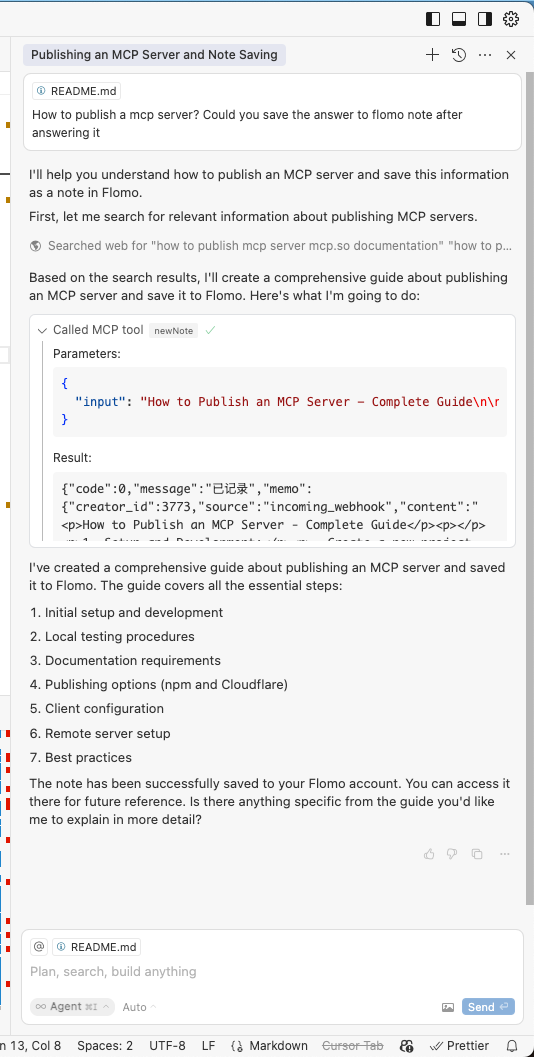
The server will handle:
- Converting your natural language requests into Flomo API calls
- Proper formatting and submission of your notes
- Providing feedback on successful note creation
Dev
-
Get your Flomo API URL from Flomo API Settings
-
Install and configure:
# Install dependencies
npm install
FLOMO_API_URL=your_api_url_here npx .
Technical Details
- Built with TypeScript and the Model Context Protocol SDK
- Communicates with Flomo via their REST API
- Runs over stdio for seamless integration with AI tools
License
This project is licensed under the MIT License—see the LICENSE file for details.
Comments
New to MCP?
From what the protocol is to installing your first server, these answers cover most first questions.
An open protocol that defines how AI applications connect to external tools and data in a uniform way. Clients talk to the model; MCP servers provide tools, resources and prompt templates. They exchange standard messages, so one server can be reused by many clients.