
About MCP Server Rememberizer
MCP Server Rememberizer is an MCP server for the Rememberizer document and knowledge management API. It is still in development and its functionality may change. It lets LLMs search, retrieve and save content in personal or team knowledge repositories.
Key features
- 01Semantic similarity search over internal knowledge chunks
- 02Agentic search across connected document sources
- 03Date range filtering using ISO 8601 timestamps
- 04Listing knowledge sources and documents
- 05Saving text information for later recall
Use cases
- 01Finding related material in a team knowledge repository
- 02Giving an LLM previously saved background information
- 03Checking Rememberizer account details and document lists
MCP support
The project is an MCP server that exposes tools such as retrieve_semantically_similar_internal_knowledge and remember_this to MCP clients for searching, listing and saving knowledge.
Configuration
Local server config is the same for every client. Copy it into your client’s MCP config file.
Tools
Local servers expose tools only once running on your machine, and the maintainer has not provided a tool list.
Details
From the project README
MCP Server Rememberizer

A Model Context Protocol server for interacting with Rememberizer's document and knowledge management API. This server enables Large Language Models to search, retrieve, and manage documents and integrations through Rememberizer.
Please note that mcp-server-rememberizer is currently in development and the functionality may be subject to change.
Components
Resources
The server provides access to two types of resources: Documents or Slack discussions
Tools
-
retrieve_semantically_similar_internal_knowledge- Send a block of text and retrieve cosine similar matches from your connected Rememberizer personal/team internal knowledge and memory repository
- Input:
match_this(string): Up to a 400-word sentence for which you wish to find semantically similar chunks of knowledgen_results(integer, optional): Number of semantically similar chunks of text to return. Use 'n_results=3' for up to 5, and 'n_results=10' for more informationfrom_datetime_ISO8601(string, optional): Start date in ISO 8601 format with timezone (e.g., 2023-01-01T00:00:00Z). Use this to filter results from a specific dateto_datetime_ISO8601(string, optional): End date in ISO 8601 format with timezone (e.g., 2024-01-01T00:00:00Z). Use this to filter results until a specific date
- Returns: Search results as text output
-
smart_search_internal_knowledge- Search for documents in Rememberizer in its personal/team internal knowledge and memory repository using a simple query that returns the results of an agentic search. The search may include sources such as Slack discussions, Gmail, Dropbox documents, Google Drive documents, and uploaded files
- Input:
query(string): Up to a 400-word sentence for which you wish to find semantically similar chunks of knowledgeuser_context(string, optional): The additional context for the query. You might need to summarize the conversation up to this point for better context-awared resultsn_results(integer, optional): Number of semantically similar chunks of text to return. Use 'n_results=3' for up to 5, and 'n_results=10' for more informationfrom_datetime_ISO8601(string, optional): Start date in ISO 8601 format with timezone (e.g., 2023-01-01T00:00:00Z). Use this to filter results from a specific dateto_datetime_ISO8601(string, optional): End date in ISO 8601 format with timezone (e.g., 2024-01-01T00:00:00Z). Use this to filter results until a specific date
- Returns: Search results as text output
-
list_internal_knowledge_systems- List the sources of personal/team internal knowledge. These may include Slack discussions, Gmail, Dropbox documents, Google Drive documents, and uploaded files
- Input: None required
- Returns: List of available integrations
-
rememberizer_account_information- Get information about your Rememberizer.ai personal/team knowledge repository account. This includes account holder name and email address
- Input: None required
- Returns: Account information details
-
list_personal_team_knowledge_documents- Retrieves a paginated list of all documents in your personal/team knowledge system. Sources could include Slack discussions, Gmail, Dropbox documents, Google Drive documents, and uploaded files
- Input:
page(integer, optional): Page number for pagination, starts at 1 (default: 1)page_size(integer, optional): Number of documents per page, range 1-1000 (default: 100)
- Returns: List of documents
-
remember_this- Save a piece of text information in your Rememberizer.ai knowledge system so that it may be recalled in future through tools retrieve_semantically_similar_internal_knowledge or smart_search_internal_knowledge
- Input:
name(string): Name of the information. This is used to identify the information in the futurecontent(string): The information you wish to memorize
- Returns: Confirmation data
Installation
Manual Installation
uvx mcp-server-rememberizer
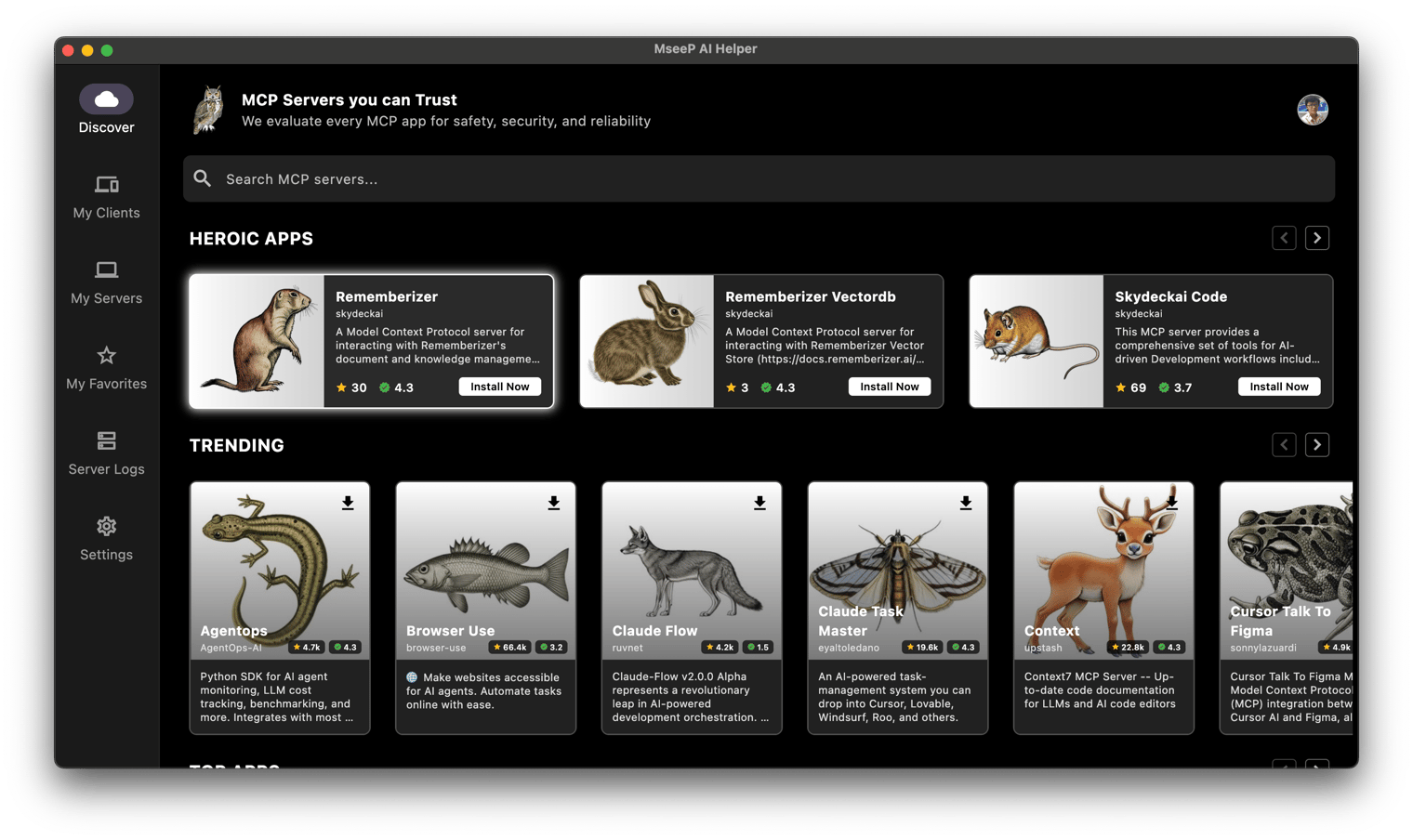
Via MseeP AI Helper App
If you have MseeP AI Helper app installed, you can search for "Rememberizer" and install the mcp-server-rememberizer.
Configuration
Environment Variables
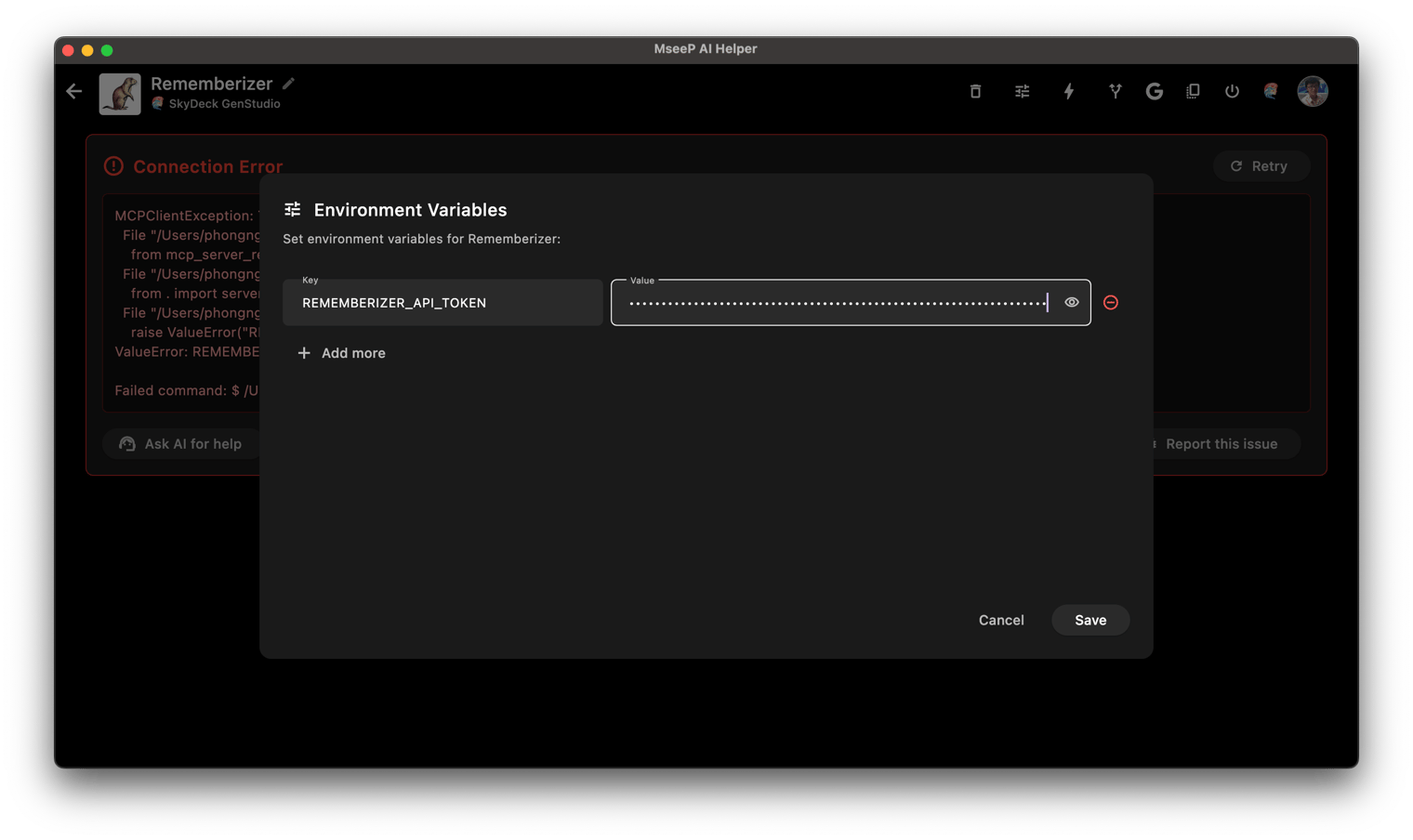
The following environment variables are required:
REMEMBERIZER_API_TOKEN: Your Rememberizer API token
You can register an API key by creating your own Common Knowledge in Rememberizer.
Usage with Claude Desktop
Add this to your claude_desktop_config.json:
"mcpServers": {
  "rememberizer": {
      "command": "uvx",
      "args": ["mcp-server-rememberizer"],
      "env": {
        "REMEMBERIZER_API_TOKEN": "your_rememberizer_api_token"
      }
    },
}
Usage with MseeP AI Helper App
Add the env REMEMBERIZER_API_TOKEN to mcp-server-rememberizer.
With support from the Rememberizer MCP server, you can now ask the following questions in your Claude Desktop app or SkyDeck AI GenStudio
-
What is my Rememberizer account?
-
List all documents that I have there.
-
Give me a quick summary about "..."
-
and so on...
To learn more about Rememberizer MCP Server: https://docs.rememberizer.ai/personal-use/integrations/rememberizer-mcp-servers
License
This project is licensed under the Apache License 2.0 - see the LICENSE file for details.
Comments
New to MCP?
From what the protocol is to installing your first server, these answers cover most first questions.
An open protocol that defines how AI applications connect to external tools and data in a uniform way. Clients talk to the model; MCP servers provide tools, resources and prompt templates. They exchange standard messages, so one server can be reused by many clients.