
About 🐇 MCP SQLite Server
MCP SQLite Server is a Model Context Protocol server for interacting with SQLite databases from MCP clients. It runs through npx and is configured in IDEs such as Cursor and VSCode.
Key features
- 01CRUD operations for table records
- 02Database information and schema inspection
- 03Custom SQL query execution
- 04Parameterized queries via values array
Use cases
- 01Browsing tables and schemas of a SQLite database from an IDE
- 02Creating, reading, updating and deleting rows through an MCP client
- 03Running custom SQL queries during a coding session
MCP support
This is an MCP server that exposes tools such as db_info, list_tables, get_table_schema, create_record, read_records, update_records, delete_records and query to MCP clients. The database path is passed as a required argument.
Configuration
Local server config is the same for every client. Copy it into your client’s MCP config file.
Tools
8Saved tool list · updated 3w ago
This tool takes no parameters.
Details
From the project README🐇 MCP SQLite Server
This is a Model Context Protocol (MCP) server that provides comprehensive SQLite database interaction capabilities.

Maintained by

Features
- Complete CRUD operations (Create, Read, Update, Delete)
- Database exploration and introspection
- Execute custom SQL queries
Setup
Define the command in your IDE's MCP Server settings:
e.g. Cursor:
{
    "mcpServers": {
        "MCP SQLite Server": {
            "command": "npx",
            "args": [
                "-y",
                "mcp-sqlite",
                "<path-to-your-sqlite-database.db>"
            ]
        }
    }
}
e.g. VSCode:
{
    "servers": {
        "MCP SQLite Server": {
            "type": "stdio",
            "command": "npx",
            "args": [
                "-y",
                "mcp-sqlite",
                "<path-to-your-sqlite-database.db>"
            ]
        }
    }
}
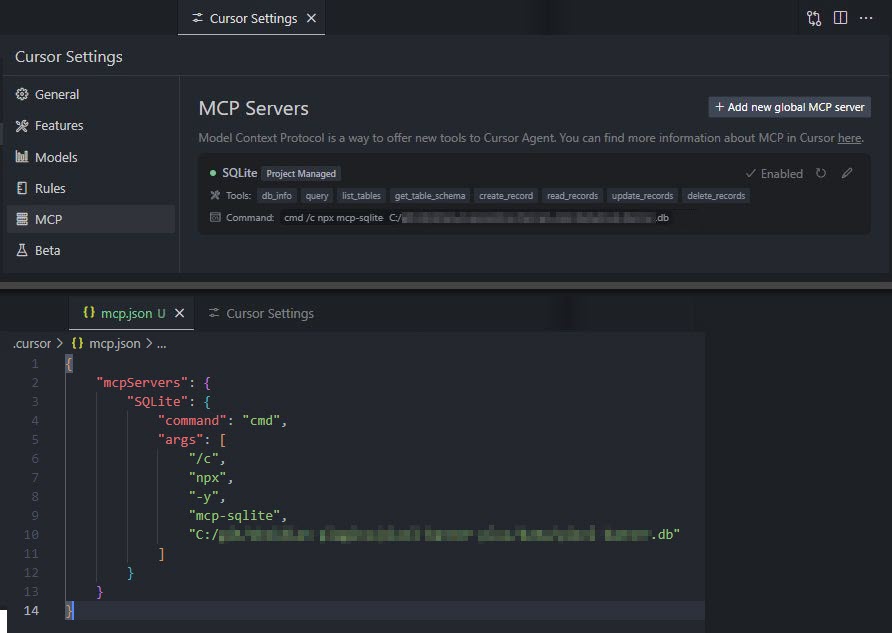
Your database path must be provided as an argument.
Available Tools
Database Information
db_info
Get detailed information about the connected database.
Example:
{
  "method": "tools/call",
  "params": {
    "name": "db_info",
    "arguments": {}
  }
}
list_tables
List all tables in the database.
Example:
{
  "method": "tools/call",
  "params": {
    "name": "list_tables",
    "arguments": {}
  }
}
get_table_schema
Get detailed information about a table's schema.
Parameters:
tableName(string): Name of the table
Example:
{
  "method": "tools/call",
  "params": {
    "name": "get_table_schema",
    "arguments": {
      "tableName": "users"
    }
  }
}
CRUD Operations
create_record
Insert a new record into a table.
Parameters:
table(string): Name of the tabledata(object): Record data as key-value pairs
Example:
{
  "method": "tools/call",
  "params": {
    "name": "create_record",
    "arguments": {
      "table": "users",
      "data": {
        "name": "John Doe",
        "email": "[email protected]",
        "age": 30
      }
    }
  }
}
read_records
Query records from a table with optional filtering.
Parameters:
table(string): Name of the tableconditions(object, optional): Filter conditions as key-value pairslimit(number, optional): Maximum number of records to returnoffset(number, optional): Number of records to skip
Example:
{
  "method": "tools/call",
  "params": {
    "name": "read_records",
    "arguments": {
      "table": "users",
      "conditions": {
        "age": 30
      },
      "limit": 10,
      "offset": 0
    }
  }
}
update_records
Update records in a table that match specified conditions.
Parameters:
table(string): Name of the tabledata(object): New values as key-value pairsconditions(object): Filter conditions as key-value pairs
Example:
{
  "method": "tools/call",
  "params": {
    "name": "update_records",
    "arguments": {
      "table": "users",
      "data": {
        "email": "[email protected]"
      },
      "conditions": {
        "id": 1
      }
    }
  }
}
delete_records
Delete records from a table that match specified conditions.
Parameters:
table(string): Name of the tableconditions(object): Filter conditions as key-value pairs
Example:
{
  "method": "tools/call",
  "params": {
    "name": "delete_records",
    "arguments": {
      "table": "users",
      "conditions": {
        "id": 1
      }
    }
  }
}
Custom Queries
query
Execute a custom SQL query against the connected SQLite database.
Parameters:
sql(string): The SQL query to executevalues(array, optional): Array of parameter values to use in the query
Example:
{
  "method": "tools/call",
  "params": {
    "name": "query",
    "arguments": {
      "sql": "SELECT * FROM users WHERE id = ?",
      "values": [1]
    }
  }
}
Built with
Appreciation
If you enjoy this library please consider sending me a tip to support my work 😀
🍵 tip me here
Comments
New to MCP?
From what the protocol is to installing your first server, these answers cover most first questions.
An open protocol that defines how AI applications connect to external tools and data in a uniform way. Clients talk to the model; MCP servers provide tools, resources and prompt templates. They exchange standard messages, so one server can be reused by many clients.