About Memory Quality Mcp
Memory Quality MCP is a Claude Code plugin for reviewing and cleaning stored AI memories. It scores memories across four dimensions, identifies conflicts, and provides cleanup recommendations with a visual dashboard.
Key features
- 01Score memory importance, recency, credibility, and accuracy
- 02Find stale and conflicting memories
- 03Check memory store health
- 04Review results in a visual dashboard
- 05Preview and back up before deletion
Use cases
- 01Audit stored memories across projects
- 02Identify outdated or contradictory memories
- 03Review suggested deletions before cleanup
- 04Inspect an individual memory’s score
MCP support
The plugin connects to Claude Code through MCP and provides tools for memory audits, scoring, dashboard display, and cleanup. Deletions require confirmation and are backed up automatically.
Configuration
Local server config is the same for every client. Copy it into your client’s MCP config file.
Tools
Local servers expose tools only once running on your machine, and the maintainer has not provided a tool list.
Details
From the project READMEMemory Quality MCP
A Claude Code MCP plugin that audits and cleans up your AI memory.
中文版 · Report a Bug · Request a Feature

Claude Code v2.1.59+ automatically saves memories from your conversations. Over time, your memory store accumulates:
- Stale memories — "working on Project X this week" from months ago
- Junk memories — offhand remarks treated as permanent facts
- Conflicting memories — "prefers detailed comments" and "keep code clean and minimal" coexisting
- Misrecorded memories — AI over-interpreted a one-time comment as a fixed habit
This plugin audits your memory store with a 4-dimension quality score (Importance / Recency / Credibility / Accuracy) and gives you actionable cleanup recommendations — with a visual dashboard.
Requirements
- Claude Code v2.1.59+ (run
claude --versionto check) - Python 3.10+
- LLM API Key — OpenAI, Kimi, MiniMax, or Anthropic (any one will do)
Installation
Option 1: uvx (recommended — no manual install)
Add to your Claude Code MCP config (~/.claude/settings.json or your project's .claude/settings.json):
{
  "mcpServers": {
    "memory-quality": {
      "command": "uvx",
      "args": ["memory-quality-mcp"],
      "env": {
        "OPENAI_API_KEY": "your-key-here"
      }
    }
  }
}
Option 2: pip
pip install memory-quality-mcp
Then in your MCP config:
{
  "mcpServers": {
    "memory-quality": {
      "command": "memory-quality-mcp",
      "env": {
        "MINIMAX_API_KEY": "your-key-here"
      }
    }
  }
}
Configure your LLM
Set one of these environment variables in the env field above:
| Provider | Env Variable | Default Model |
|---|---|---|
| OpenAI | OPENAI_API_KEY | gpt-4o-mini |
| Kimi | KIMI_API_KEY | moonshot-v1-8k |
| MiniMax | MINIMAX_API_KEY | MiniMax-M2.5 |
| Anthropic | ANTHROPIC_API_KEY | claude-haiku-4-5 |
The plugin auto-detects which provider to use based on whichever key is set.
For advanced config (custom model, thresholds), edit ~/.memory-quality-mcp/config.yaml — generated automatically on first run.
Usage
After setup, restart Claude Code and talk to it naturally:
1. Try the demo first (no memories needed)
Open the memory dashboard in demo mode
Claude calls memory_dashboard(demo=True) → opens a browser page with example data so you can see what the tool does before running it on your real memories.
2. Quick health check (no LLM cost)
Check my memory store health
Returns: total memories across all projects, stale count, index usage, estimated LLM calls for a full report.
3. Full quality analysis
Run a detailed memory quality analysis
Scores every memory on 4 dimensions, detects conflicts, flags rule violations. Results are cached — cleanup and dashboard reuse them without calling the LLM again.
Cost estimate:
8–9 LLM calls for 50 memories ($0.01 with gpt-4o-mini)
4. Open visual dashboard
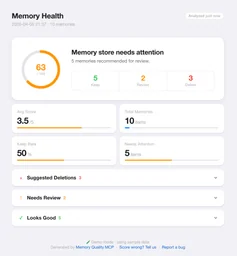
Open the memory health dashboard
Opens a local HTML page in your browser:
- Health score ring (0–100)
- Summary stats (kept / review / delete)
- Collapsible memory list — click any item to expand score details

5. Clean up
Clean up the memories marked for deletion
Claude previews with memory_cleanup(dry_run=True) first, then executes on confirmation.
Safety guarantees:
- Preview before every deletion
- Auto-backup to
.trash/<timestamp>/before deleting - Never silent-deletes anything
6. Score a single memory (debug)
Score this memory: "User always codes late at night"
7. Analyze a specific project
Analyze memories for ~/my-project only
How scoring works
| Dimension | Weight | What it measures |
|---|---|---|
| Importance | 40% | How useful is this for future conversations? |
| Recency | 25% | Is this information still accurate? |
| Credibility | 15% | Is there a clear source (user stated it explicitly)? |
| Accuracy | 20% | Did the AI record it faithfully, without over-interpreting? |
Score > 3.5 → Keep | 2.5–3.5 → Review | < 2.5 → Delete
Typical workflow
You: Check my memory health

Claude: [memory_audit()]
        47 memories across 3 projects
        - Possibly stale: 8
        - Project memories past threshold: 3
        - MEMORY.md usage: 23% (46/200 lines)
        Estimated ~9 LLM calls for a full report.

You: Run the full analysis

Claude: [memory_report()]
        47 memories | 🗑 delete 8 | 🔄 review 5 | ✅ keep 34

        ⚡ 1 conflict found
        - 🔴 feedback_comments_a.md × feedback_comments_b.md
          One says "detailed comments", the other says "minimal comments"

        🗑 Suggested deletions (8)
        - project_q1_plan.md [project] · 120 days ago
          Score 1.5 · project memory past 90-day threshold

        Report cached — cleanup won't need to re-analyze

You: Open the dashboard

Claude: [memory_dashboard()]
        ✅ Dashboard opened in browser

You: Clean those up

Claude: [memory_cleanup(dry_run=True)]
        🔍 Preview (nothing deleted yet)
        8 memories will be removed: project_q1_plan.md ...

You: Confirm

Claude: [memory_cleanup(dry_run=False)]
        ✅ Cleaned up 8 memories
        Backup: ~/.claude/.../memory/.trash/20260405_143022/
        MEMORY.md index updated
FAQ
Q: "No memory files found"
Requires Claude Code v2.1.59+. Check:
claude --version              # must be >= v2.1.59
ls ~/.claude/projects/        # should list your projects
If the version is new enough but no files exist yet, Claude hasn't decided anything is worth remembering yet. Keep using Claude Code normally — files will appear within a few sessions.
Want to see the tool in action first? Run memory_dashboard(demo=True).
Q: Are the scores accurate?
Scores are suggestions, not commands. You make the final call. Every deletion requires confirmation and is backed up. If you find consistent scoring errors, please open a Wrong Score issue — each report directly improves the model.
Q: Which LLMs are supported?
Any OpenAI-compatible API. Built-in presets: OpenAI, Kimi, MiniMax, Anthropic. Custom providers via MEMORY_QUALITY_BASE_URL environment variable.
Q: Will it delete something important?
No. Every operation: ① shows a preview ② requires explicit confirmation ③ auto-backs up to .trash/ before deleting.
Q: Where are my memory files?
ls ~/.claude/projects/*/memory/
Or type /memory inside Claude Code to browse and edit them directly.
Contributing
Found a scoring error? Tell us — your feedback directly calibrates the model.
Bug or feature idea? Open an issue.
License
MIT
Comments
New to MCP?
From what the protocol is to installing your first server, these answers cover most first questions.
An open protocol that defines how AI applications connect to external tools and data in a uniform way. Clients talk to the model; MCP servers provide tools, resources and prompt templates. They exchange standard messages, so one server can be reused by many clients.