
About Frugal Blender MCP
Frugal Blender MCP is an MCP server for AI agents that build and inspect Blender scenes. Four compact tools, batched operations, and permission controls keep interactions focused while providing access to Blender operations.
Key features
- 01Four tools: discover, execute, inspect, capture
- 02Batch up to 100 operations per call
- 03Inspect scenes with paging and filters
- 04Capture previews and render outputs
- 05Optional access to the full bpy API
- 06Permission controls for risky actions
Use cases
- 01Build and refine Blender scenes through an AI agent
- 02Batch scene edits and check results with captures
- 03Render or save scene outputs
- 04Run Blender operations from scripts with the CLI
MCP support
Exposes four MCP tools—discover, execute, inspect, and capture—to MCP clients. The tools provide operation discovery, batched Blender actions, filtered scene inspection, and image captures.
Configuration
Local server config is the same for every client. Copy it into your client’s MCP config file.
Tools
4Saved tool list · updated 2w ago
| Parameter | Type | Required | Description |
|---|---|---|---|
| limit | integer | No | |
| names | array | No | |
| offset | integer | No |
Details
From the project READMEFrugal Blender MCP
Let your AI agent build Blender scenes. All of Blender, four tools, 338 tokens.





Quick start · How it saves tokens · Benchmark · Safety · Example

Five execute calls (109 operations) written by Claude, rendered with Cycles in Blender 5.1.
Replay the exact calls: they run in under a second.
4MCP tools | 338tokens of fixed context | 100operations per call | 14–22xless context than other Blender servers |
Why it matters
Every MCP client sends each server's tool definitions to the model on every request, before you type anything. Most Blender servers expose 26 to 31 tools and spend thousands of tokens that way. That's context your agent can't use for your scene, your code or its own reasoning.
Frugal Blender MCP exposes four tools, discover, execute, inspect and capture,
and still reaches the whole Blender API.
Quick start
1. Install the Blender add-on
uvx frugal-blender-mcp install-addon
In Blender, open Edit → Preferences → Add-ons and enable Frugal Blender MCP. Then press N in
the 3D Viewport, open the Frugal MCP tab and click Start bridge.
2. Connect your agent
| Claude Code |
|
| Codex CLI |
|
| Claude Desktop, Cursor, Windsurf |
|
If a desktop app can't find uvx, use its absolute path (which uvx or where uvx).
3. Ask for something
Build a small lighthouse island at golden hour: a red-and-white tower, a keeper's house, a few pines, rocks and a sailboat. Batch your edits, then capture a preview.
How four tools reach all of Blender
Most servers ship one tool per action, and every definition rides along with every request. This server keeps the menu short and hands the details over only when the agent asks for them:
sequenceDiagram
    autonumber
    participant A as AI agent
    participant M as Frugal Blender MCP
    participant B as Blender
    Note over A,M: Each request carries only 4 tool definitions, 338 tokens
    A->>M: discover()
    M-->>A: 16 operation summaries, 189 tokens, once
    A->>M: discover("array")
    M-->>A: argument contract for one operation
    A->>M: execute(43 steps)
    M->>B: validated batch, run on Blender's main thread
    M-->>A: ok, completed 43, 28 tokens
    A->>M: capture()
    M-->>A: preview image at the scene's aspect ratio
| Technique | What it does | Effect |
|---|---|---|
| Lazy schemas | Operation arguments live behind discover. The agent fetches each one once, only if it uses it. | Fixed cost stays at 338 tokens. Even fetching every schema totals 1,256. |
| Batching | One execute carries up to 100 operations. array makes up to 200 copies in one step, keyframes sets up to 1,000 keys. | The lighthouse took 5 calls, not 109. |
| Compact results | execute returns counts and errors, never the scene echoed back. | 109 operations returned 202 tokens in total. |
| Look, don't dump | capture returns an image. inspect is paged and filtered by name. | The agent checks its work without reading huge scene dumps. |
| Lean definitions | Generated schema titles, null unions and docstring whitespace are stripped before tools are listed. | Definitions shrank from 406 to 289 tokens. A test fails if they grow past 300. |
| One escape hatch | python runs any bpy code through the same execute call, so it needs no extra tool. | Geometry Nodes, rigging, simulation and import/export at zero fixed cost. |
The five calls behind the animation above, and what each one added:

Benchmark
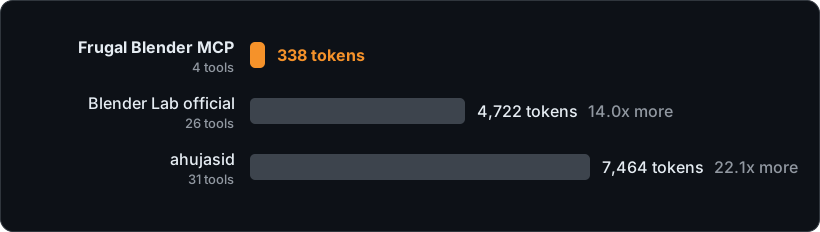
| Server | Tools | Fixed context per request |
|---|---|---|
| Frugal Blender MCP | 4 | 338 tokens |
| Blender Lab official | 26 | 4,722 tokens (14.0x) |
| ahujasid mcp-for-blender | 31 | 7,464 tokens (22.1x) |
Tool definitions plus server instructions from each server's real initialize and
tools/list responses, tokenized with tiktoken o200k_base.
Method, raw data, discovery costs and caveats.
What the agent can do
| Need | Operations | |
|---|---|---|
| 🧱 | Build | primitive, array, transform, material, assign_material, light, camera, delete |
| 🎨 | Refine | modifier (any Blender modifier), properties (any RNA property on objects, data, scene or render), rna (look up property names and enums) |
| 🎬 | Animate | keyframes, frame |
| 📸 | Output | capture (preview back to the agent; EEVEE, or Cycles on request), render (stills or animations), save (a .blend copy) |
| 🐍 | Anything else | python: the full bpy API. Off by default. |
Safety
Blender stays in control. You choose permissions in the add-on panel when you start the bridge, and the agent can't change them.
- Write and render are on by default. Delete, save and python are off.
- Python is unrestricted local code execution. Turn it on only for agents you trust.
- The bridge listens on loopback only and needs a fresh random token each time you start it.
- Deletes need
confirm: true. Saves and renders never overwrite existing files. - Interactive sessions get an undo checkpoint before every batch.
- No telemetry.
Details: SECURITY.md.
How it compares
Choose by what you need, not just context size:
- Blender Lab's official server also searches Blender's manual and API docs, which helps agents
write correct
bpy. - ahujasid's server bundles asset providers (Poly Haven, Sketchfab, Hyper3D and others).
- This server keeps the fixed context small, batches edits, gates risky actions behind
permissions, and still reaches the whole API through
pythonwhen you allow it.
More
CLI: drive Blender from scripts with the same code path
uvx --from frugal-blender-mcp frugal-blender discover
uvx --from frugal-blender-mcp frugal-blender inspect
uvx --from frugal-blender-mcp frugal-blender execute --params '{"steps":[{"op":"primitive","kind":"cube","name":"Demo"}]}'
uvx --from frugal-blender-mcp frugal-blender capture --params '{"filename":"preview.png","size":768}'
PowerShell can pipe a file instead of quoting JSON:
Get-Content -Raw examples/lighthouse/01-sky-and-sea.json | uvx --from frugal-blender-mcp frugal-blender execute --params -
Captures, renders and saves go to the bridge's exports/ folder, and the CLI prints the filename.
Multiple Blender instances
Each running bridge writes a connection descriptor. If more than one exists, set
BLENDER_COMPACT_CONNECTION to the one you want:
- Windows:
%LOCALAPPDATA%/blender-compact-mcp/connection-<pid>.json - Linux/macOS:
${XDG_STATE_HOME:-~/.local/state}/blender-compact-mcp/connection-<pid>.json
Ambiguous discovery fails rather than picking a scene at random. Opening a different file stops the bridge. After a crash, delete only the stale descriptor.
Install without uvx
- Add-on: download
frugal-blender-mcp-addon-<version>.zipfrom Releases and use Install from Disk in Blender's add-on preferences, or runuvx frugal-blender-mcp install-addon --zip addon.zip. - Server from source: clone the repository, run
uv sync --frozen, and point your client atuv run --directory /absolute/path/to/frugal-blender-mcp frugal-blender-mcp.
Configs that use the old blender-astra-mcp or blender-compact-mcp commands keep working.
Architecture
AI client -- MCP stdio --> Python bridge -- authenticated loopback JSON --> Blender add-on
CLI ----------------------------^                                         bpy.app.timers
Blender's timer accepts bounded socket input and runs operations on Blender's main thread. No
background thread touches Blender data. discover returns readable argument contracts, and the add-on
validates every batch again before running it. A batch that fails partway reports which step failed
and what already ran. See design.
Development
uv sync --frozen
uv run ruff check --config pyproject.toml .
uv run ruff format --check --config pyproject.toml .
uv run pytest -q
Tests that need Blender skip unless BLENDER_EXE points at a Blender executable. Set
BLENDER_TEST_UI=1 to also test interactive timers and undo. They launch separate factory-startup
Blender processes and never touch your scenes or preferences. Results:
validation.
scripts/demo_host.py runs a headless bridge on an empty scene for replaying examples/.
scripts/bench_tool_context.py and scripts/context_chart.py reproduce the benchmark and chart.
If this saves your agent some tokens, a ⭐ helps other people find it.
MIT licensed. Independent project, not affiliated with the Blender Foundation or any model provider.
Comments
New to MCP?
From what the protocol is to installing your first server, these answers cover most first questions.
An open protocol that defines how AI applications connect to external tools and data in a uniform way. Clients talk to the model; MCP servers provide tools, resources and prompt templates. They exchange standard messages, so one server can be reused by many clients.