
About M-Pesa Daraja
M-Pesa Daraja is an MCP server for developers, learners, and businesses that exposes Safaricom Daraja payment operations to AI agents. Sandbox-first defaults, idempotent requests, and safeguards around live money movement distinguish its payment tools.
Key features
- 01STK Push and payment status checks
- 02C2B, B2C, and B2B operations
- 03QR, Ratiba, and Bill Manager tools
- 04Sandbox default and live-payment safeguard
- 05Idempotent requests and callback results
Use cases
- 01Test Daraja integrations in the sandbox
- 02Collect and verify M-Pesa payments
- 03Make business payouts and reconcile transactions
MCP support
Exposes Safaricom Daraja APIs as tools for MCP clients, including payment, status, callback, and account operations. Money-moving tools are marked for client approval.
Configuration
Local server config is the same for every client. Copy it into your client’s MCP config file.
uvx mpesa-daraja-mcpDARAJA_CONSUMER_KEYSecretDaraja app Consumer KeyDARAJA_CONSUMER_SECRETSecretDaraja app Consumer SecretDARAJA_ENVsandbox (default) or productionDARAJA_SHORTCODEPaybill / store number (174379 in sandbox)DARAJA_PASSKEYSecretM-Pesa Express passkey (STK Push)DARAJA_INITIATOR_NAMEAPI operator username (B2C, B2B, status, balance, reversal)DARAJA_SECURITY_CREDENTIALSecretEncrypted initiator passwordDARAJA_CALLBACK_BASE_URLPublic HTTPS base for callback URLsDARAJA_CALLBACK_LISTENhost:port for the built-in callback receiverDARAJA_CALLBACK_TOKENSecret16+ random characters; secret path for callbacksDARAJA_TOOLSETSComma list: stk,c2b,payouts,ops,qr,ratiba,billmanagerDARAJA_ALLOW_LIVE_MONEY_MOVEMENTtrue to allow production charges and payoutsDARAJA_INITIATOR_PASSWORDSecretInitiator password, encrypted into SecurityCredential at startup (alternative to DARAJA_SECURITY_CREDENTIAL)DARAJA_CERT_PATHPath to Safaricom's public certificate, used with DARAJA_INITIATOR_PASSWORDDARAJA_STATE_DBPath of the SQLite file that stores request state and callbacksDARAJA_OUTPUT_DIRDirectory where generated QR PNGs are savedDARAJA_CONFIG_DIRDirectory holding the saved config (default: user config dir)DARAJA_DOTENVPath of a .env file to load instead of the project oneLocal servers need a runtime on your machine (e.g. Node.js 18+). Config file locations differ by client; see your client’s docs.
Tools
Local servers expose tools only once running on your machine, and the maintainer has not provided a tool list.
Details
From the project README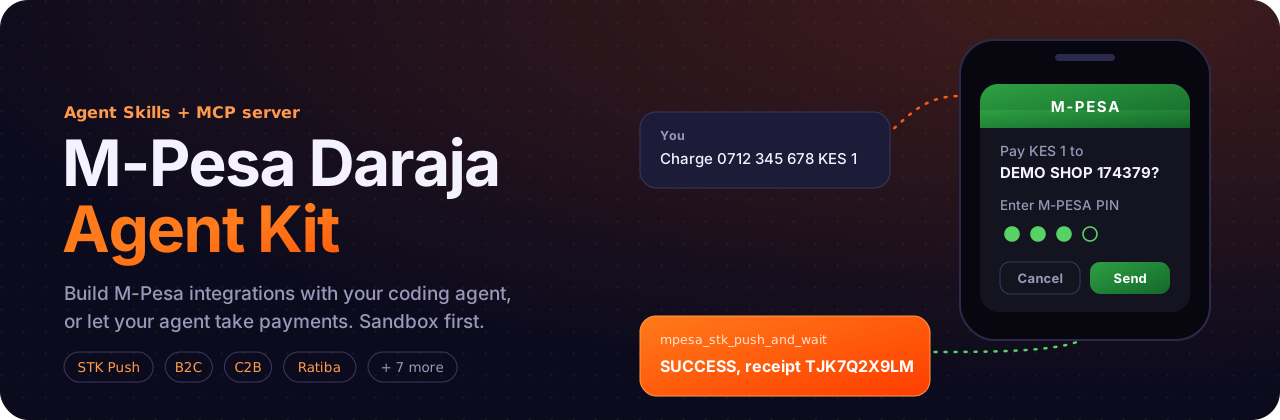
mpesa-daraja-mcp
The MCP server in the M-Pesa Daraja Agent Kit. It lets an AI agent call Safaricom's Daraja API safely.
An MCP server that exposes Safaricom's Daraja APIs as tools, so an agent (Claude Code, Codex, Cursor, Gemini CLI, any MCP client) can collect payments, check whether they went through, and operate M-Pesa from a chat. It starts in the sandbox, and nothing live happens until you switch it on.
It pairs with the Agent Skills in the same kit: the skills teach an agent how to integrate M-Pesa, and this server lets it call Daraja. You can use either on its own.
Who it's for
- Developers building payment integrations: ask your agent to run a request against the sandbox and read the real response.
- Learners finding out how the Daraja API works: send real requests to a safe test environment and see what comes back.
- Businesses and teams that want an AI agent to handle payments: collecting them, checking whether they went through, and reconciling them.
Install
Let your agent do it. Paste this into Claude Code, Codex, Cursor, Gemini CLI or any coding agent:
Add the M-Pesa Daraja MCP server to yourself, named "mpesa", with the command: uvx mpesa-daraja-mcp
It needs no keys in your config. If uv is missing, tell me how to install it first.
Don't ask me for my Daraja keys. Tell me to run `uvx mpesa-daraja-mcp setup` in my own terminal,
which saves them privately, then to restart you.
After I restart you, call mpesa_check_credentials and tell me if everything works.
Or do it yourself. You need uv. The wizard asks for your Daraja keys (secrets are typed hidden), checks them live with Safaricom, saves them to a file only you can read, and registers the server with Claude Code, Codex, Gemini CLI or Cursor:
uvx mpesa-daraja-mcp setup
Then restart your agent and ask: "Check my M-Pesa credentials, then send a KES 1 STK push to 0712345678 and tell me when it's paid." The full Agent Kit, with the skills and more examples, is in the main README.
Tools
| Tool | Daraja API | Moves money |
|---|---|---|
mpesa_explain_code | — offline error/result code lookup | |
mpesa_normalize_phone | — offline 07… → 2547… | |
mpesa_generate_stk_password | — offline Password + EAT Timestamp | |
mpesa_parse_callback | — offline parse of any callback payload | |
mpesa_setup_status | — offline: what's configured and missing per toolset (no values) | |
mpesa_check_credentials | OAuth token (never returned) | |
mpesa_get_result | Final status by idempotency key or any Daraja ID (from captured callbacks; STK falls back to STK Query) | |
mpesa_stk_push_and_wait | M-Pesa Express: push, then wait for callback / poll query; returns SUCCESS, FAILED or UNKNOWN | ✅ |
mpesa_stk_push / mpesa_stk_query | M-Pesa Express, fire-and-forget / status | ✅ / |
mpesa_c2b_register_urls / mpesa_c2b_simulate | C2B v2 (simulate = sandbox only) | |
mpesa_pull_transactions | Pull Transactions query | |
mpesa_b2c_payment | B2C v3, B2Pochi | ✅ |
mpesa_b2b_payment | BusinessPayBill, BusinessBuyGoods, BusinessPayToBulk (B2C top-up), PayTaxToKRA | ✅ |
mpesa_b2b_express_checkout | B2B USSD push | ✅ |
mpesa_transaction_status / mpesa_account_balance | Status / Balance (async result) | |
mpesa_reverse_transaction | Reversal | ✅ |
mpesa_generate_dynamic_qr | Dynamic QR, saved as a PNG file (path returned, not the image) | |
mpesa_ratiba_create_standing_order | M-Pesa Ratiba | ✅ |
mpesa_bill_manager_optin / mpesa_bill_manager_send_invoice / mpesa_bill_manager_cancel_invoice | Bill Manager |
Tool annotations mark money-moving tools as destructiveHint, so MCP clients ask for approval.
Safety
- Defaults to the sandbox.
- In production, money-moving tools refuse to run unless
DARAJA_ALLOW_LIVE_MONEY_MOVEMENT=true. - Callback URLs must be HTTPS; C2B URLs with
mpesa/safaricomin them are rejected up front. - Tokens and secrets are never returned in tool output.
- Responses with
ResponseCode "0"are tagged_note: ACCEPTED for processing only, so the agent does not report them as completed payments. - Idempotent money tools. Each request is stored under an idempotency key. Repeating the key returns the stored request (
duplicate: true) instead of paying again.- Only a definitively FAILED request is re-sent.
- ACCEPTED or UNKNOWN requests (queue timeouts, network errors) are never re-sent until their result is known.
- B2C, B2B and B2B Express require an explicit
idempotency_key, e.g.refund-order-1042. Reversal, tax and Ratiba derive one from the transaction ID, the PRN and phone + name respectively. For STK the key is optional.
Configuration
| Variable | Required | Notes |
|---|---|---|
DARAJA_ENV | sandbox (default) or production | |
DARAJA_CONSUMER_KEY, DARAJA_CONSUMER_SECRET | ✅ | From your Daraja app |
DARAJA_SHORTCODE | most tools | Paybill / store number (174379 in sandbox) |
DARAJA_PASSKEY | STK | Lipa na M-Pesa passkey |
DARAJA_INITIATOR_NAME | B2C/B2B/status/balance/reversal | API operator username |
DARAJA_SECURITY_CREDENTIAL | same | Pre-encrypted credential, or set the next two |
DARAJA_INITIATOR_PASSWORD + DARAJA_CERT_PATH | Server encrypts the password with the cert at startup | |
DARAJA_CALLBACK_BASE_URL | e.g. https://abc.ngrok-free.app; tools append /mpesa/stk/callback, /mpesa/b2c/result, … | |
DARAJA_ALLOW_LIVE_MONEY_MOVEMENT | true to allow production charges/payouts | |
DARAJA_CALLBACK_LISTEN | e.g. 127.0.0.1:8787: starts the built-in callback receiver | |
DARAJA_CALLBACK_TOKEN | with receiver | 16+ random characters. Callback URLs become <base>/cb/<token>/… |
DARAJA_STATE_DB | SQLite file for requests and results (default ~/.mpesa-mcp/state.db) | |
DARAJA_TOOLSETS | Comma list of stk,c2b,payouts,ops,qr,ratiba,billmanager (core is always on). Default: all | |
DARAJA_OUTPUT_DIR | Where QR PNGs are saved (default ~/.mpesa-mcp/qr) |
Commands and configuration files
uvx mpesa-daraja-mcp setup     # guided: keys (hidden input), live check, save, register with your agents
uvx mpesa-daraja-mcp status    # what's configured (masked) + a live key check
uvx mpesa-daraja-mcp           # the MCP server itself, on stdio: what your agent runs
The server needs no flags or environment variables in your agent's config. Settings are read in this order, highest first:
- Environment variables, e.g. from the client's
envblock. - A project
.envin the folder the agent starts the server in, or the file named byDARAJA_DOTENV. OnlyDARAJA_*lines are read. - The user config file that
setupwrites:~/.config/mpesa-daraja-mcp/config.env(Windows:%APPDATA%\mpesa-daraja-mcp\config.env; override the folder withDARAJA_CONFIG_DIR). It is readable only by you.
The server starts even when unconfigured. Tools then explain what's missing, and mpesa_setup_status lists the gaps for each toolset without revealing any values.
To register by hand: claude mcp add --scope user mpesa -- uvx mpesa-daraja-mcp. Every other agent is covered in docs/clients.md. The older mpesa-mcp command still works.
Results and callbacks
Every money or async tool returns one shape:
{"status": "ACCEPTED | SUCCESS | FAILED | UNKNOWN", "message": "...", "idempotency_key": "...",
 "duplicate": false, "ids": {"checkout_request_id": "..."}, "receipt": "...", "result_code": "...",
 "explanation": "...", "raw": {}}
To let the agent see final results, enable the built-in receiver:
export DARAJA_CALLBACK_LISTEN=127.0.0.1:8787
export DARAJA_CALLBACK_TOKEN=$(python -c "import secrets; print(secrets.token_urlsafe(24))")
ngrok http 8787                        # sandbox; use a reverse proxy with TLS in production
export DARAJA_CALLBACK_BASE_URL=https://<tunnel-host>
Callbacks are stored in DARAJA_STATE_DB:
mpesa_get_result(id)reads them.mpesa_stk_push_and_waitreturns the final outcome in one call.- Queue-timeout callbacks are recorded as UNKNOWN.
- C2B validation requests are always accepted. Use your own receiver if you need to reject payments.
Without the receiver, mpesa_stk_push_and_wait still works through STK Query. For other APIs, paste a received payload into mpesa_parse_callback.
Load only the tools you need
Every tool the server offers takes up space in your agent's context, even when it's never called. Set DARAJA_TOOLSETS to the groups you use, and the agent sees only those tools. The basic tools (core) are always on; leave the setting unset to load everything.
| Setting | You get | Good for |
|---|---|---|
| unset (default) | all 24 tools | exploring everything |
stk | the basic tools plus the 3 STK Push tools | a shop that only takes STK payments |
stk,payouts | the above, plus B2C, B2B and B2B Express | a platform that collects and pays out |
stk,c2b,ops | STK, C2B, then transaction status, balance and reversal | reconciliation and support |
The groups are stk, c2b, payouts, ops, qr, ratiba and billmanager.
Development
pip install -e ".[dev]"
pytest
Tests use respx to mock Daraja. Nothing hits the network.
License
MIT © 2026 Mr-Macharia. An independent open-source project, not affiliated with or endorsed by Safaricom PLC. M-Pesa and Daraja are trademarks of Safaricom PLC.
Comments
New to MCP?
From what the protocol is to installing your first server, these answers cover most first questions.
An open protocol that defines how AI applications connect to external tools and data in a uniform way. Clients talk to the model; MCP servers provide tools, resources and prompt templates. They exchange standard messages, so one server can be reused by many clients.