
About jobd
jobd is a job queue and scheduler for developers running workloads across their own machines. It routes jobs using live VRAM, RAM, CPU, and host capabilities, and includes an MCP interface for agents to manage jobs.
Key features
- 01Routes by live VRAM and host capacity
- 02Queues persistent jobs across machines
- 03Priority preemption with checkpoint grace period
- 04Views status and logs; cancels jobs
- 05Supports job arrays and sweeps
Use cases
- 01Route training jobs to hosts with enough free VRAM
- 02Leave jobs running after closing a terminal
- 03Let agents submit and monitor jobs through MCP
MCP support
jobd-mcp exposes the job queue through nine tools for MCP clients to submit, inspect, cancel, and manage jobs and workers.
Configuration
Local server config is the same for every client. Copy it into your client’s MCP config file.
uvx jobdJOBD_URLBase URL of the jobd broker the MCP server talks to. Defaults to http://127.0.0.1:8765.JOBD_API_TOKENSecretBearer token; must match the broker's JOBD_API_TOKEN. Required unless the broker runs with JOBD_ALLOW_NO_AUTH=1.Local servers need a runtime on your machine (e.g. Node.js 18+). Config file locations differ by client; see your client’s docs.
Tools
Local servers expose tools only once running on your machine, and the maintainer has not provided a tool list.
Details
From the project READMEjobd
jobd is a job broker with an MCP server that lets AI agents submit, route and babysit jobs on a few machines of your own. Like task-spooler or pueue, but across all your machines on Tailscale or a LAN, routing each job to a worker with the VRAM free, with no cloud, Kubernetes or Slurm.





# from any machine on your tailnet:
job submit --project myproj --gpu --vram-required 16 --wait -- python train.py
# → routed to whichever worker has ≥16 GB VRAM free, streamed back to your terminal
VRAM routing tracks one GPU per host: the worker reports free memory on GPU index 0 only.
Why it exists
- VRAM-fit routing. Each job goes to a worker whose live free VRAM, RAM, CPUs, capability tags and arch/OS fit it, instead of you guessing which box is free.
- Preemption with a checkpoint window. A higher-priority job can preempt a running one:
SIGTERM, a grace window for the workload to save into itsJOBD_CHECKPOINT_DIR, thenSIGKILL. A preempted job is not re-run; to resume, submit a new job pointed at the checkpoint (docs/preemption.md). - Survives sessions. Jobs live in the broker, not your shell. Submit, close the laptop, check back tomorrow.
- Agent-native. An MCP server lets an AI agent submit, monitor and babysit jobs as tool calls (benchmark).
- Yours. One broker process on a machine you own. No accounts, no telemetry, no per-GPU-hour billing. Only the optional self-update scripts go online (runbook).
Why not just use…?
| Tool | What it gives you | Why jobd instead |
|---|---|---|
nohup / tmux / ssh | Runs a command on one box | No queue, VRAM-aware routing, preemption, or record of what ran where |
| task-spooler | A job queue on one machine | jobd queues across all your machines and routes by live VRAM/CPU fit |
| Pueue | A mature single-machine queue daemon | Pueue's README puts distributed execution out of scope; jobd is that layer, plus GPU awareness |
| HyperQueue | Multi-machine scheduling with HPC roots, single binary | Counts GPUs but doesn't track VRAM; no preemption/checkpoint contract or agent interface |
| Slurm | Datacenter-grade scheduling | Heavy to stand up and operate for 2–3 personal boxes |
| SkyPilot / dstack | Runs on clouds and your own machines | SkyPilot's "existing machines" mode installs Kubernetes (k3s) on your boxes; dstack wants Docker and passwordless sudo on every host |
| Modal | Serverless GPU compute | Runs on Modal's machines, not yours |
| Ray | Distributed compute; Ray Jobs runs any shell command on a Ray cluster | You first stand up and run a Ray cluster |
Install
pip install jobd               # broker + CLI
pip install "jobd[mcp]"        # adds the MCP server
pip install "jobd[worker]"     # adds the worker daemon (jobd-worker)
Requires Python ≥ 3.11. scripts/install-worker.sh sets up a worker under ~/jobd-worker with its own venv and a generated config.
Quickstart (single host)
# 1. start the broker (binds 127.0.0.1:8765 by default)
JOBD_ALLOW_NO_AUTH=1 jobd          # no-auth is fine for a loopback-only broker

# 2. in another shell, install + start a worker pointed at it
pip install "jobd[worker]"
JOBD_URL=http://127.0.0.1:8765 JOBD_WORKER_HOST=local jobd-worker

# 3. submit a job and wait for it
job submit --project demo --wait -- echo hello
job list
job logs <id>
For a multi-host deployment (Docker broker, systemd workers, Tailscale binding, shared auth token), see docs/security.md and the templates in docker-compose.yml and scripts/. Adding a worker to a running fleet is one command:
job fleet add user@newbox      # ssh in, install pinned to the broker's version,
                               # wire systemd units + the self-update timer,
                               # verify it registers. `job fleet status` shows drift.
Day-2 operations (health, draining a worker, upgrades, token rotation, backups) are in docs/runbook.md.
How it works

The broker (FastAPI + SQLite) holds the queue, runs the matcher and resolves per-project priorities. Workers, one per host, poll it, so nothing connects in to a worker: each heartbeats its live capacity, claims jobs it can run, streams logs back and honors preemption. The argv you submit runs as-is (shell=False); job submit --stdin and the MCP jobd_submit tool are the exceptions and run a command string as bash -c <string>. Design notes: docs/ARCHITECTURE.md.
CLI
job submit -p PROJ [options] -- CMD...       # queue a job
job list [--state STATE] [--project P]       # queue + recent jobs
job status ID | A<id> [--watch]              # one job, or an array's aggregate
job logs ID [-n BYTES]                       # tail captured output
job wait ID                                  # block until terminal
job cancel ID  /  job preempt ID             # stop a job
job adopt --pid N -p PROJ [--gpu]            # track a process started outside jobd (Linux)
job workers                                  # fleet snapshot + health
job projects list | set NAME PRI | nudge NAME DELTA
job audit [--project P] [--since 24h]        # event history
Job arrays and sweeps, --explain dry runs, job adopt, and a pueue/task-spooler command map: docs/cli.md.
MCP / agent integration
jobd-mcp exposes the queue as nine tools: jobd_submit, jobd_status, jobd_logs, jobd_list, jobd_cancel, jobd_preempt, jobd_events, jobd_workers, jobd_worker_delete. docs/agent-cookbook.md walks through babysitting, preemption, sweeps, and asking why a job won't schedule.
For Claude Code:
claude mcp add jobd \
  --env JOBD_URL=http://127.0.0.1:8765 \
  --env JOBD_API_TOKEN=<your-token> \
  -- jobd-mcp
Any other MCP client:
{
  "mcpServers": {
    "jobd": {
      "command": "jobd-mcp",
      "env": {
        "JOBD_URL": "http://127.0.0.1:8765",
        "JOBD_API_TOKEN": "<your-token>"
      }
    }
  }
}
JOBD_API_TOKEN must match the broker's token, or every call returns 401. examples/claude-code-hooks/ has optional hooks that nudge (or hard-block) an agent toward submitting heavy commands through jobd.
What the benchmark shows
Claude with the server was compared with Claude using jobd's own job CLI, on 38 questions about a live broker, 3 runs each. With Claude Haiku 5.5 the server got all 38 right in every run and the CLI 29: a pre-registered win (Holm-adjusted McNemar p = 0.008). With Sonnet 5.5 it was 36 against 30 and with Opus 5.5 38 against 37, neither separated. On all three models the server's answers were cheaper and faster; with Sonnet, 0.20 times the cost and 0.17 times the time.
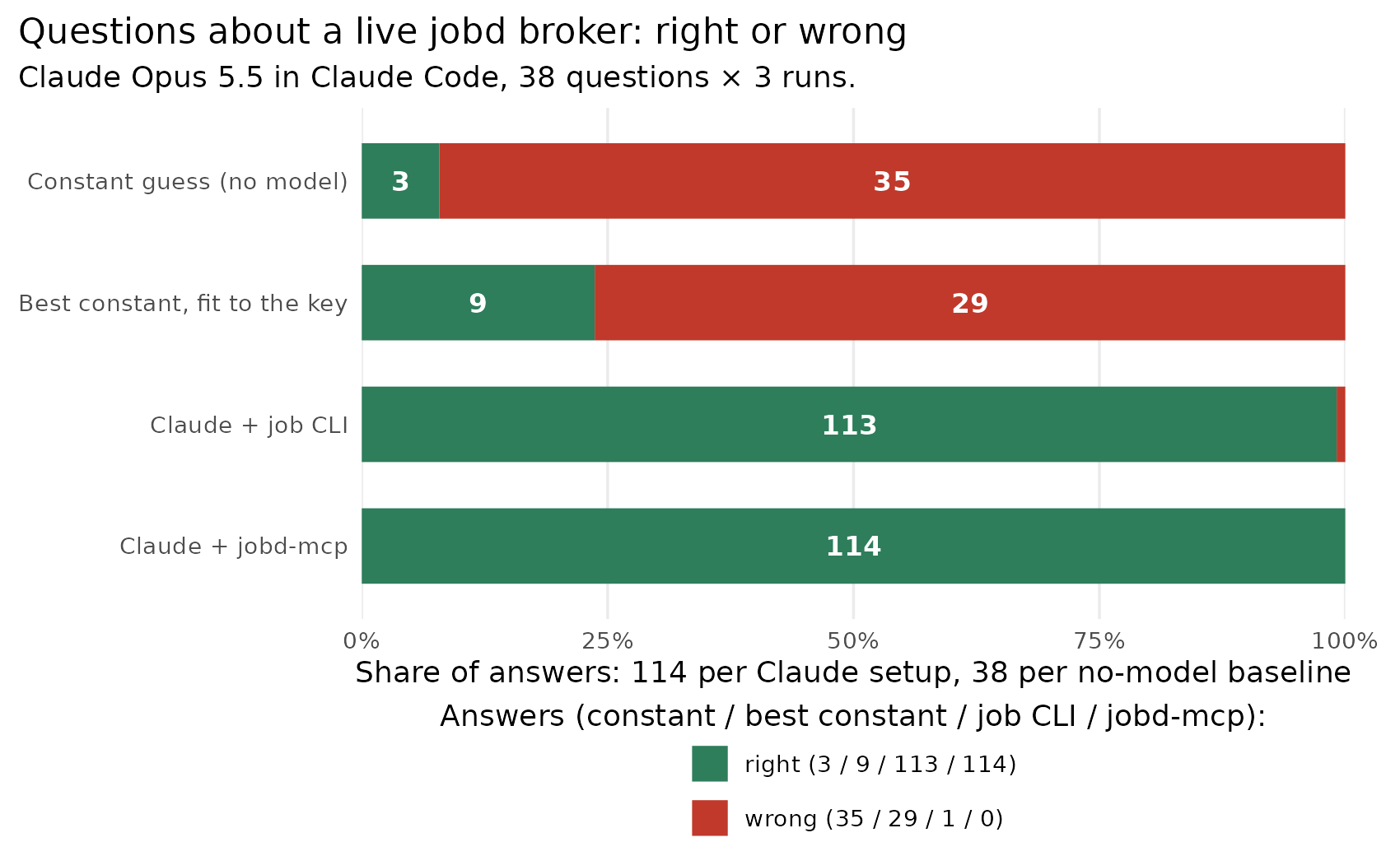
The chart is the Opus 5.5 run (2026-10-18). There the server's median answer cost 0.20 times as much (95% CI 0.15 to 0.28) and took 0.16 times as long (0.13 to 0.20), and it was cheaper and faster on all 38 questions. These were secondary endpoints, measured on an unreleased commit that adds a finished_at window to jobd_list. On an earlier, easier set both setups got 123 of 123.
We wrote the questions and ran the benchmark ourselves; an outside re-run is welcome. Method, controls and limitations: benchmarks/agent_qa; the Haiku and Sonnet runs: 2026-10-20 re-run.
Supported platforms
| Component | Linux | macOS | Windows |
|---|---|---|---|
Broker (jobd) | tested | expected | expected (WSL recommended) |
CLI (job) / MCP (jobd-mcp) | tested | expected | expected |
Worker (jobd-worker) | tested | degraded | untested |
CI runs on Ubuntu with no GPU runner (VRAM paths are tested against mocks), and without a systemd user instance the worker still runs jobs but drops its memory caps, process reaping and preemption guarantees.
Configuration
- Config files (
projects.yaml,profiles.yaml,classifier.yaml) are all optional and read fromJOBD_CONFIG_DIR; see docs/projects-yaml.md. - Environment variables: every
JOBD_*variable is in docs/configuration.md. - Concurrency (several jobs per worker): docs/concurrency.md. Retention of logs and job records: docs/runbook.md.
Security
Run the broker on loopback or a Tailscale tailnet, never a public interface. Three stacked controls:
- Bind:
JOBD_HOSTis127.0.0.1by default; set it to a Tailscale address (100.64.0.0/10), never0.0.0.0. The broker does not enforce this. - Source IP: requests from outside loopback and
100.64.0.0/10get403(JOBD_DISABLE_TAILNET_ACL=1turns this off). - Token: every host sets
JOBD_API_TOKEN;JOBD_ALLOW_NO_AUTH=1is for a loopback-only broker, and on any other bind exposes unauthenticated code execution to your tailnet.
/livez, /readyz and /metrics are exempt from both the source-IP check and the token; /metrics shows every worker's hostname and version, so don't port-forward the broker. Threat model and token rotation: docs/security.md.
License
MIT; see LICENSE.
Comments
New to MCP?
From what the protocol is to installing your first server, these answers cover most first questions.
An open protocol that defines how AI applications connect to external tools and data in a uniform way. Clients talk to the model; MCP servers provide tools, resources and prompt templates. They exchange standard messages, so one server can be reused by many clients.