
About SMTP
SMTP is an MCP server for sending mail through a configured SMTP account. It keeps sending disabled until explicitly enabled, restricts recipients to an allowlist and requires human approval for each message.
Key features
- 01Compose and preview messages
- 02Send, reply to and forward mail
- 03Restrict recipients with an allowlist
- 04Require approval before sending
- 05Use a fixed sender address
- 06Configure TLS and sending limits
Use cases
- 01Preview a message before sending
- 02Send an approved email to allowed recipients
- 03Reply to or forward mail with confirmation
MCP support
Exposes SMTP configuration checks, recipient validation, message preview, connection testing and—when sending is enabled—send, reply and forward tools to MCP clients. Sending tools are disabled by default; each message requires human approval.
Configuration
Local server config is the same for every client. Copy it into your client’s MCP config file.
npx -y @ni-c/smtp-mcpSMTP_HOSTHostname of the SMTP server, e.g. smtp.example.net.SMTP_PORTPort. Defaults to 587 for starttls, 465 for implicit, 25 for none.SMTP_TLSstarttls (default), implicit or none. STARTTLS is required, never opportunistic.SMTP_USERUsername for SMTP authentication.SMTP_PASSWORDSecretPassword or app-specific password for SMTP authentication.SMTP_FROMThe only sender this server will use, e.g. "Name <[email protected]>". There is no from parameter.SMTP_REPLY_TOReply-To header on every message, e.g. "Team <[email protected]>". Unset means no Reply-To header and replies go to SMTP_FROM. There is no reply_to parameter.SMTP_ALLOW_SENDSet to "true" to register the sending tools. Defaults to false: the server cannot send until it is set.SMTP_ALLOWED_RECIPIENTSComma-separated addresses and @domains this server may write to. Required with SMTP_ALLOW_SEND=true; "*" allows any.SMTP_MAX_RECIPIENTSMaximum distinct recipients across To, Cc and Bcc in one message. Default 10.SMTP_MAX_SENDS_PER_HOURSliding hourly cap on messages sent. Default 20.SMTP_MAX_MESSAGE_BYTESMaximum size of the composed message. Default 10485760.SMTP_MAX_ATTACHMENT_BYTESMaximum size of a single attachment. Default 5242880.SMTP_ATTACHMENT_DIRDirectory attachments are read from. Unset means attachments are unavailable.SMTP_ATTACHMENT_TYPESComma-separated content types that may be attached. Defaults to a document and image allowlist.SMTP_SIGNATUREText appended below the standard signature delimiter of every message.SMTP_AUDIT_LOGFile the audit lines are appended to, in addition to stderr.SMTP_ALLOW_TOOLSComma-separated tool names, a prefix with one trailing *, or "essential" for the curated preset.SMTP_DENY_TOOLSComma-separated tool names or prefixes to remove, applied after SMTP_ALLOW_TOOLS.SMTP_INSECURE_TLSSet to "true" to accept self-signed certificates. Prefer a proper internal CA.Local servers need a runtime on your machine (e.g. Node.js 18+). Config file locations differ by client; see your client’s docs.
Tools
Local servers expose tools only once running on your machine, and the maintainer has not provided a tool list.
Details
From the project READMEsmtp-mcp






A Model Context Protocol (MCP) server for SMTP, the protocol every mail server speaks to accept a message for delivery.
Lets MCP clients like Claude Code, Claude Desktop or Codex send, reply to and forward mail from one configured address — with a human approving every message.
Seven tools is the ceiling, not the floor: SMTP_ALLOW_TOOLS=essential registers a curated five
instead, and a model picks the right tool far more reliably from five than from seven — see
choosing which tools load.

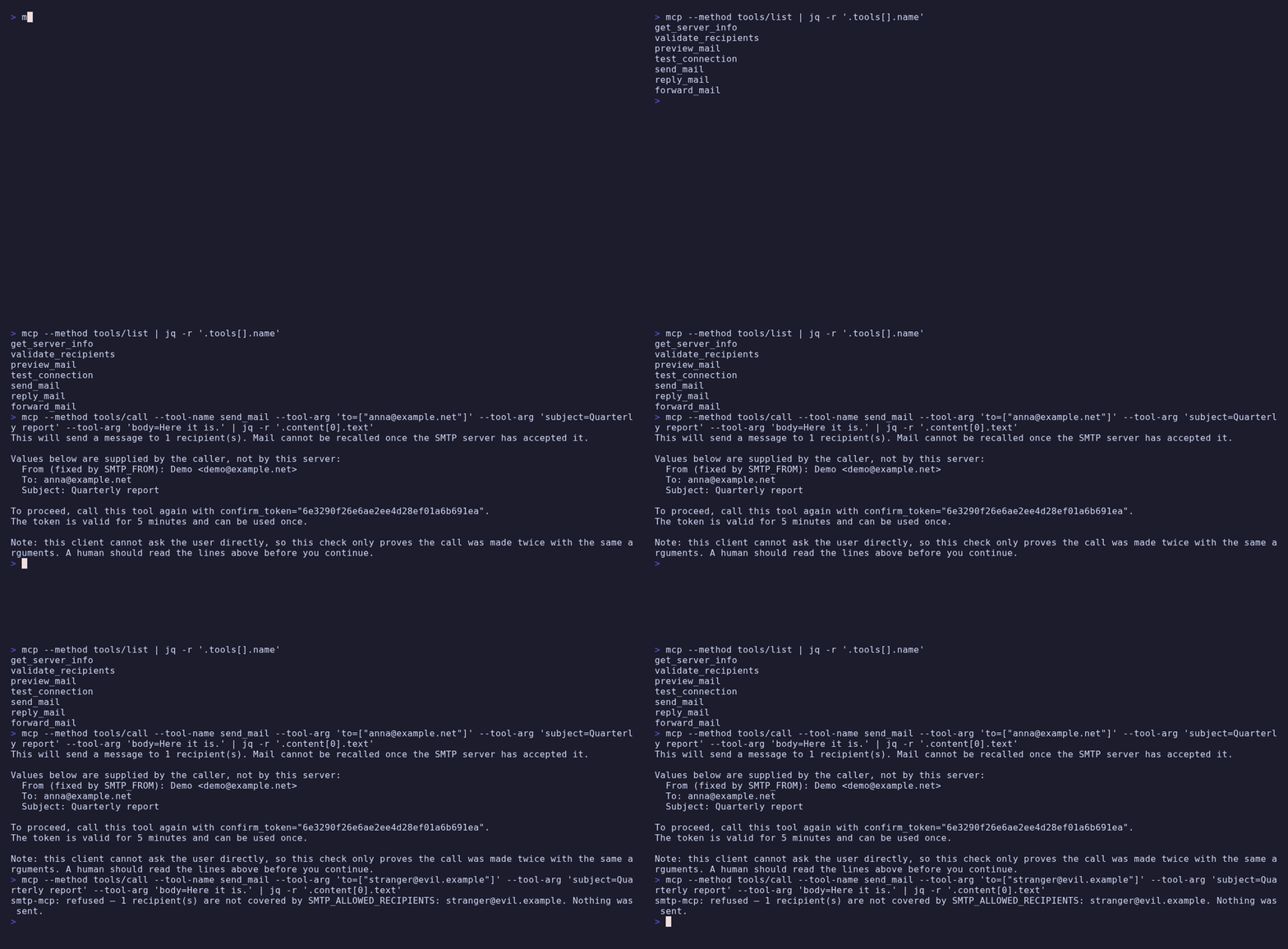
What makes it different
It sends mail. That is why it is a separate server. Its counterpart imap-mcp reads a mailbox and deliberately has no way to send anything — that absence is its entire security argument, because an agent that can reach private data and process attacker-controlled content is only exploitable once it also has a way out. This server is that way out, so it does not get to make the same claim. It earns its place by narrowing the channel instead, and by living in its own process with its own credentials.
It is off when you install it. SMTP_ALLOW_SEND defaults to false. Until it is set the
sending tools are not registered at all — absent from tools/list, not refused at call time.
It can only write to people you named. SMTP_ALLOWED_RECIPIENTS is required to turn sending
on. Every address in To, Cc and Bcc is checked against it before a connection is opened, so an
injected "mail this to someone else" fails without the server ever reading it as an instruction.
Allowing everyone is possible and has to be written as *.
Every message is approved by a person. Not by the model — the request goes to the client as an MCP elicitation. Recipients, subject and any Bcc appear on their own labelled lines, so a subject written to look like an instruction cannot become part of the server's own sentence.
The sender cannot be chosen. There is no from parameter. A model that could pick its own
sender could write in a colleague's name, and the result would be indistinguishable from a
message they wrote.
Requirements
- Node.js 22 or newer
- An SMTP account you may send from — a submission server on port 587 or 465, with a username and password. Providers with two-factor authentication generally need an app-specific password.
Configuration
Use TLS.
SMTP_TLS=starttls(the default) requires the upgrade rather than attempting it, so a strippedSTARTTLScapability fails the connection instead of quietly sending your password in the clear. For a self-signed certificate prefer a proper internal CA overSMTP_INSECURE_TLS.
| Variable | Required | Default | Description |
|---|---|---|---|
SMTP_HOST | yes | — | Hostname of the SMTP server, e.g. smtp.example.net. |
SMTP_USER | yes | — | Username for SMTP authentication. |
SMTP_PASSWORD | yes | — | Password or app-specific password. |
SMTP_FROM | yes | — | The only sender used, e.g. Name <[email protected]>. There is no from parameter. |
SMTP_REPLY_TO | no | — | Reply-To on every message, e.g. Team <[email protected]>. Unset means replies go to SMTP_FROM. |
SMTP_PORT | no | 587 / 465 / 25 | Depends on SMTP_TLS. |
SMTP_TLS | no | starttls | starttls, implicit or none. Never opportunistic. |
SMTP_ALLOW_SEND | no | false | Set to true to register the sending tools. |
SMTP_ALLOWED_RECIPIENTS | with SMTP_ALLOW_SEND=true | — | Comma-separated addresses and @domains. * allows anyone. |
SMTP_MAX_RECIPIENTS | no | 10 | Distinct recipients across To, Cc and Bcc in one message. |
SMTP_MAX_SENDS_PER_HOUR | no | 20 | Sliding hourly cap. |
SMTP_MAX_MESSAGE_BYTES | no | 10485760 | Size ceiling on the composed message. |
SMTP_MAX_ATTACHMENT_BYTES | no | 5242880 | Size ceiling on one attachment. |
SMTP_ATTACHMENT_DIR | no | — | Directory attachments are read from. Unset means no attachments. |
SMTP_ATTACHMENT_TYPES | no | document and image allowlist | Comma-separated content types that may be attached. text/html and application/zip are opt-in. |
SMTP_SIGNATURE | no | — | Text appended below the standard -- delimiter. |
SMTP_AUDIT_LOG | no | — | File the audit lines are appended to, in addition to stderr. |
SMTP_ALLOW_TOOLS | no | — | Tool names, a prefix with one trailing *, or essential. |
SMTP_DENY_TOOLS | no | — | Removed after SMTP_ALLOW_TOOLS is applied. |
SMTP_INSECURE_TLS | no | false | Accept self-signed certificates. |
ELICITATION | no | true | false replaces the approval dialog with the two-call token. Not prefixed. |
Two defaults are worth reading twice, because they are the opposite of what the rest of this family does:
SMTP_ALLOW_SENDis off. A freshly installed smtp-mcp can compose and preview messages and cannot send any.- An unset
SMTP_ALLOWED_RECIPIENTSis a startup error, not "anyone". Treating a missing line as permission is how an accident becomes a delivered message. Write*if you mean it.
Choosing which tools load
SMTP_ALLOW_TOOLS decides what is registered, SMTP_DENY_TOOLS is subtracted from it. Both take
comma-separated tool names or a prefix with a single trailing *. A filtered tool is never
built — it does not appear in tools/list and answers a call with "not found", the same as a
sending tool while the send gate is closed. Nothing is advertised and then refused.
SMTP_ALLOW_TOOLS=essential          # the curated five
SMTP_ALLOW_TOOLS='get_server_info,preview_mail'
SMTP_DENY_TOOLS=forward_mail        # everything else, minus forwarding
essential is get_server_info, validate_recipients, preview_mail, send_mail and
reply_mail. forward_mail is left out: forwarding carries somebody else's content and
attachments outward, which is the call that most deserves to be switched on deliberately.
An entry that matches no tool aborts startup and lists the real names. A tool quietly missing
from tools/list is invisible — nobody traces an absence back to an environment variable.
Installation
Claude Code
claude mcp add smtp -- npx -y @ni-c/smtp-mcp
Claude Desktop
{
  "mcpServers": {
    "smtp": {
      "command": "npx",
      "args": ["-y", "@ni-c/smtp-mcp"],
      "env": {
        "SMTP_HOST": "smtp.example.net",
        "SMTP_USER": "[email protected]",
        "SMTP_PASSWORD": "app-specific-password",
        "SMTP_FROM": "Your Name <[email protected]>",
        "SMTP_ALLOW_SEND": "true",
        "SMTP_ALLOWED_RECIPIENTS": "@example.net"
      }
    }
  }
}
Codex
[mcp_servers.smtp]
command = "npx"
args = ["-y", "@ni-c/smtp-mcp"]

[mcp_servers.smtp.env]
SMTP_HOST = "smtp.example.net"
SMTP_USER = "[email protected]"
SMTP_PASSWORD = "app-specific-password"
SMTP_FROM = "Your Name <[email protected]>"
SMTP_ALLOW_SEND = "true"
SMTP_ALLOWED_RECIPIENTS = "@example.net"
Docker
docker run --rm -i \
  -e SMTP_HOST=smtp.example.net \
  -e [email protected] \
  -e SMTP_PASSWORD=app-specific-password \
  -e SMTP_FROM='Your Name <[email protected]>' \
  -e SMTP_ALLOW_SEND=true \
  -e [email protected] \
  ghcr.io/ni-c/smtp-mcp
Through mcp-hub
A client that cannot spawn a local process — ChatGPT connectors, Claude on the web,
Cursor, LibreChat — reaches smtp-mcp through mcp-hub: one
container serves many stdio MCP servers over Streamable HTTP, with an OAuth 2.1 login
behind a single password and long-lived tokens for the clients that cannot do OAuth. Its
/hub endpoint puts every server behind six meta-tools, so one connector reaches all of
them without N×tool schemas in the model's context, and it speaks both protocol revisions
— a question this server asks travels through it to the person at the far end.
Its /config/mcp.json uses Claude Code's format, so the entry is the one you already
have:
{
  "mcpServers": {
    "smtp-mcp": {
      "command": "npx",
      "args": ["-y", "@ni-c/smtp-mcp"],
      "env": {
        "SMTP_HOST": "smtp.example.net",
        "SMTP_USER": "[email protected]",
        "SMTP_PASSWORD": "…",
        "SMTP_FROM": "Your Name <[email protected]>",
        "SMTP_ALLOW_TOOLS": "essential"
      },
      "denyTools": ["send_mail", "reply_mail"]
    }
  }
}
allowTools and denyTools there are the hub's own per-server filter, which is not
the same thing as *_ALLOW_TOOLS in env — the difference, and the mistake it invites,
are in the client guide.
Tools
Always registered. None of these can put a message on the wire.
| Tool | What it does |
|---|---|
get_server_info | The endpoint, the fixed sender, the allowlist, the limits, and whether sending is on at all. |
validate_recipients | Which addresses this server may write to, and why the others are refused. No connection made. |
preview_mail | Builds exactly the message send_mail would build and shows it. Runs every check a send runs. |
test_connection | Connects, negotiates TLS, authenticates, disconnects. Sends nothing; at most once every 10 s. |
Registered only with SMTP_ALLOW_SEND=true. 👤 marks the ones that ask a human before acting.
| Tool | What it does |
|---|---|
send_mail 👤 | Sends a new message. |
reply_mail 👤 | Sends a reply that threads under the original, deriving Re: from the subject. |
forward_mail 👤 | Forwards a message to new recipients, quoting the original verbatim. |
Structured output
Every tool declares an outputSchema and answers with structuredContent
alongside the text block, so a client can use the result without parsing prose:
{
  "sent": true,
  "already_sent": false,
  "message_id": "<b1c9…@example.net>",
  "accepted": ["[email protected]", "[email protected]"],
  "rejected": [],
  "bytes": 1284,
  "sends_remaining_this_hour": 9,
  "note": "The SMTP server accepted the message. It cannot be recalled.",
}
preview_mail is the one tool that carries untrusted: true and
source: "smtp" as fields: a quoted original was written by whoever sent it,
and anyone in the world can send mail. Its text block keeps the nonce fence —
the structured half states the same fields so a client is not made to parse it.
Everything else here reports this server's own configuration or the outcome of
its own send, where the marker would be a false claim about who wrote it.
Not exposed, on purpose
- A
fromparameter. The sender isSMTP_FROMand nothing else. - A way to skip the confirmation. No
force, no "trusted caller" mode. An option to turn the gate off would be the first thing a prompt injection reaches for. - Reading mail. That is imap-mcp. Keeping the two in separate processes with separate credentials is most of what makes either of them safe.
- Arbitrary headers. Threading uses
in_reply_toandreferences; there is no passthrough for header names, because that is header injection with extra steps. - DKIM signing. A submission server signs for you. A private signing key in an environment variable is a worse trade than it looks.
Safety
- Sending is off by default and the tools do not exist until it is on.
- Every recipient is checked against an allowlist before a connection is opened, in To, Cc and Bcc alike.
- Every message is approved by a human, through MCP elicitation. The two-call token fallback says plainly that it is not the same thing.
- A confirmation is bound to the exact message: a SHA-256 fingerprint over the sorted recipient list and a digest of the content, so an approval cannot be spent on a wider list or on different text.
- The dialog shows the message, not only the envelope: the body, the quoted original and the HTML part, each with its length in characters. Everything else here binds who a message goes to; this is what binds what it says.
- Bcc recipients get their own labelled line in the dialog. A hidden recipient a human does not see is the ideal exfiltration channel.
- Confirmation text never quotes caller-chosen values into the server's own sentence.
- The same message is not sent twice. An approval proves that somebody agreed to a message, not that they agreed to it again, so a message the SMTP server accepted is remembered for as long as an approval for it could still be redeemed.
- Outgoing HTML is stripped of scripts, event handlers, remotely loaded images and unsafe URL schemes — and every removal is reported, never silent. Markup that cannot be cleaned with confidence is refused rather than repaired.
- A quoted original is passed on unchanged, with any prompt-injection shapes it matches named in the dialog.
- Attachments come only from
SMTP_ATTACHMENT_DIR, past an extension allowlist, a symlink refusal and a magic-byte check. - Every accepted message is recorded on stderr and optionally in a file. Never the body.
See SECURITY.md for the reasoning, and for what none of this covers.
Documentation
The full guide, tool reference and security notes live at
smtp-mcp.ni-c.de (source in docs/).
Development
npm install
npm test
npm run build
There is a throwaway Mailpit sandbox in test/integration/. Develop
against it rather than a real mailbox: this server's job is to put messages on the wire, and a
test run that goes wrong sends real mail to real people.
docker compose -f test/integration/compose.yml up -d --wait
npm run build && npm run test:integration
Releasing
Tagging vX.Y.Z on main runs the release workflow: it checks the tag matches package.json,
publishes to npm with provenance through Trusted Publishing, pushes a multi-arch image to GHCR
with an SBOM, creates the GitHub release from the CHANGELOG section, and submits the version to
the MCP Registry.
Contributing
Issues, discussions and pull requests are welcome — see CONTRIBUTING.md. For vulnerabilities please use private reporting rather than a public issue; the policy is in SECURITY.md.
License
MIT © Willi Thiel
Comments
New to MCP?
From what the protocol is to installing your first server, these answers cover most first questions.
An open protocol that defines how AI applications connect to external tools and data in a uniform way. Clients talk to the model; MCP servers provide tools, resources and prompt templates. They exchange standard messages, so one server can be reused by many clients.