
About OpenDigger MCP Server
OpenDigger MCP Server provides repository analytics through MCP tools and prompts. It is for analyzing repository metrics, comparing projects, and examining trends and developer activity.
Key features
- 01Fetch individual and batch metrics
- 02Compare repositories
- 03Analyze metric trends
- 04Retrieve ecosystem insights
- 05Generate health and developer analyses
Use cases
- 01Compare repository metrics across projects
- 02Review repository health with a prompt
- 03Track contributor growth over time
- 04Analyze developer activity and contributions
MCP support
The MCP server exposes six repository analytics tools and three prompts, including metric retrieval, comparisons, trend analysis, and repository health analysis.
Configuration
Local server config is the same for every client. Copy it into your client’s MCP config file.
We haven’t collected a package or remote endpoint for this server. Follow the instructions in the project README.
Tools
Local servers expose tools only once running on your machine, and the maintainer has not provided a tool list.
Details
From the project READMEOpenDigger MCP Server
A Model Context Protocol (MCP) server for OpenDigger enabling advanced repository analytics and insights through tools and prompts.
Quick Start
# Setup
git clone https://github.com/X-lab2017/open-digger-mcp-server.git

# (Optional) Ensure you're on the master branch
git checkout master

cd open-digger-mcp-server && cd mcp-server
npm install
npm run build

# Start server
npm start
Important
Don't forget to configure Cursor (update path in .cursor/mcp.json)
Expected output:
OpenDigger MCP Server running (on stdio)...
Important
If you are using Cursor AI IDE, you should see the MCP server (open-digger-mcp) toast in the bottom-left corner. You should enable it, & now you can start using the tools and prompts provided by the MCP server. To verify, open Cursor Settings and check the MCP Servers section → you should seeopen-digger-mcplisted there.
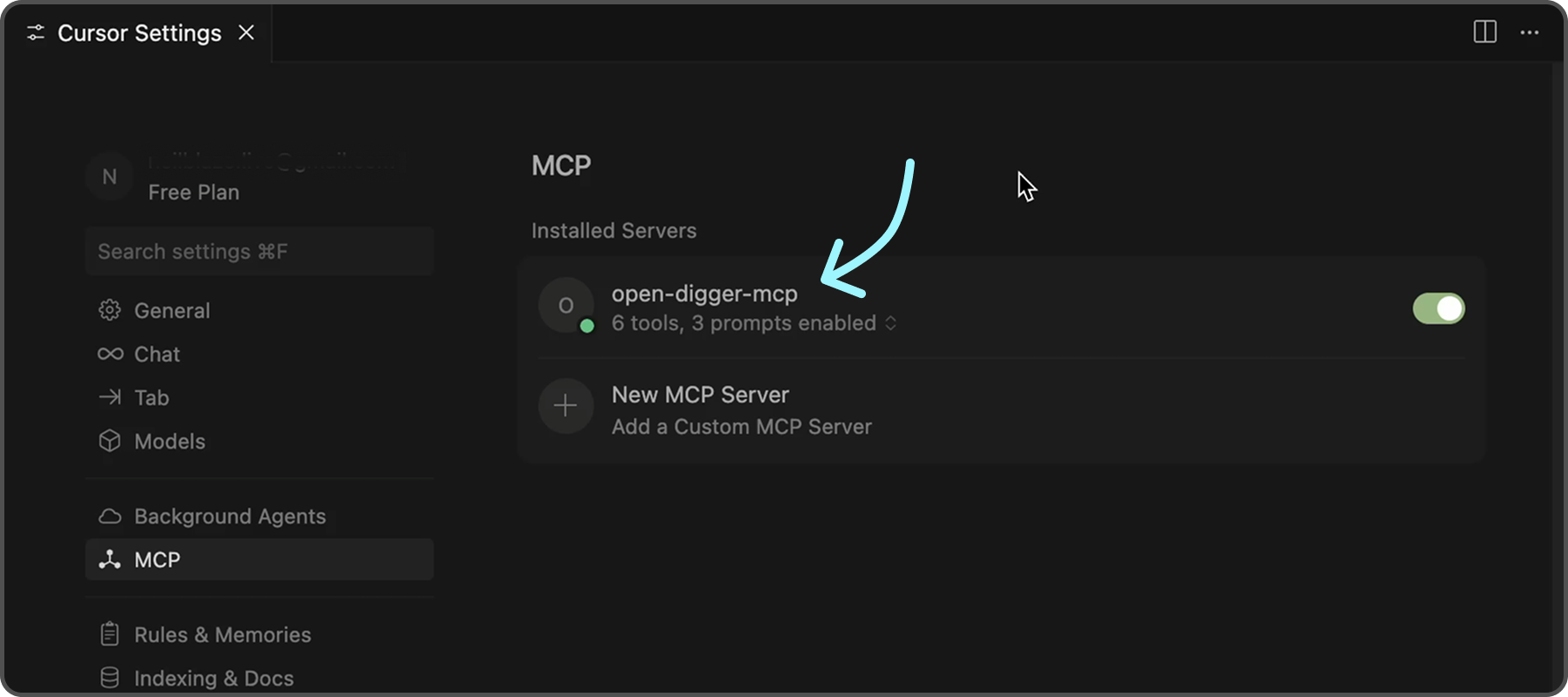
To further confirm that the server is functioning correctly, you can check the following indicators in Cursor:
- ✅ Green dot next to "open-digger-mcp" title
- ✅ "6 tools" displayed in server status
- ✅ "3 prompts" displayed in server status
- ✅ No error messages or red indicators
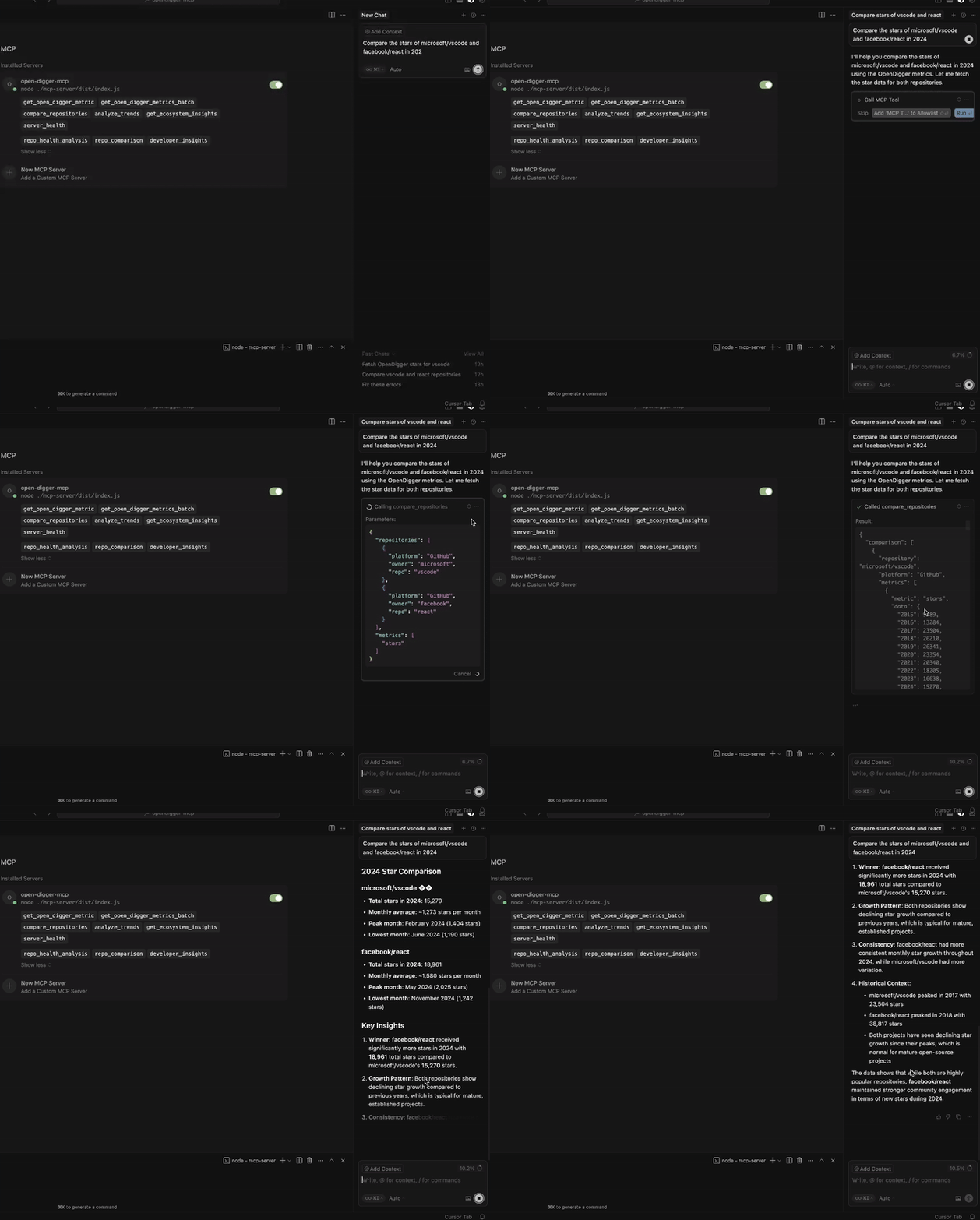
Tip
Please refer to
Installation.mdfor detailed installation instructions and configuration options for different IDEs.
Features
Tools (6 Available)
| No. | Tool | Description |
|---|---|---|
| 1 | get_open_digger_metric | Fetch single repository metrics |
| 2 | get_open_digger_metrics_batch | Batch operations for multiple metrics |
| 3 | compare_repositories | Multi-repository comparative analysis |
| 4 | analyze_trends | Growth trend analysis over time periods |
| 5 | get_ecosystem_insights | Ecosystem analytics & insights |
| 6 | server_health | System diagnostics and health monitoring (Beta) |
Prompts (3 Available)
repo_health_analysis- Comprehensive repository health reportsrepo_comparison- Competitive repository analysisdeveloper_insights- Developer activity and contribution analysis
Metrics
-
Core Metrics:
openrank,stars,forks,contributors,participants,issues_new,issues_closed,pull_requests,commits,activity -
Extended Metrics:
technical_fork,bus_factor,releases,inactive_contributors,maintainer_count,community_activity -
Additional Metrics:
change_requests,pull_requests_accepted,pull_requests_merged,issue_comments,issue_response_time,code_change_lines,developer_network
💡 Usage Examples
💠 Repository Comparison
Compare microsoft/vscode and facebook/react using the compare_repositories tool
💠 Health Analysis
Generate a health report for microsoft/vscode using the repo_health_analysis prompt
💠 Trend Analysis
Analyze the growth trends for contributors in microsoft/vscode over 2 years
Server Status Check
After starting the server, verify it's working:
# In a new terminal
echo '{"jsonrpc":"2.0","id":1,"method":"tools/list","params":{}}' | node dist/index.js
Expected response should list all 6 tools.
Configuration
Environment Variables (.env)
# Cache configuration (recommended)
CACHE_TTL_SECONDS=300

# Optional SSE server
SSE_PORT=3001
SSE_HOST=127.0.0.1
Cursor MCP (.cursor/mcp.json)
{
  "mcpServers": {
    "open-digger": {
      "command": "node",
      "args": ["/full/path/to/dist/index.js"],
      "cwd": "/full/path/to/project",
      "env": {
        "CACHE_TTL_SECONDS": "300"
      }
    }
  }
}
Tip
Replace
/full/path/to/open-digger-mcp-serverwith your actual project directory path. Usepwdto get the current directory path.
Development
npm run watch           # Development mode
npm run build           # Compile TypeScript
npm run clean           # Clean build files
npm run sse:test        # Test SSE server
Tip
Beside Cursor, you can also use other MCP clients like VS Code, Claude Chat, or the official MCP Inspector.
Troubleshooting
Common Issues
Server not appearing in Cursor:
- Verify absolute paths in
.cursor/mcp.json - Restart Cursor completely (Cmd+Q / Alt+F4)
- Check MCP Settings section for error messages
Permission errors:
chmod +x dist/index.js
Build errors:
npm run clean
npm install
npm run build
Cache issues:
# Clear npm cache
npm cache clean --force

# Rebuild
npm run clean && npm run build
Contributing
- Fork the repository
- Create your feature branch (
git checkout -b feature/amazing-feature) - Commit changes (
git commit -m 'Add amazing feature') - Push to branch (
git push origin feature/amazing-feature) - Open a Pull Request
License
Apache-2.0 License - see LICENSE file for details.
Comments
New to MCP?
From what the protocol is to installing your first server, these answers cover most first questions.
An open protocol that defines how AI applications connect to external tools and data in a uniform way. Clients talk to the model; MCP servers provide tools, resources and prompt templates. They exchange standard messages, so one server can be reused by many clients.