
About Overtone News Mcp
Overtone News MCP Server gives agents current news and analysis of coverage tone, emerging stories, narrative shifts, and spikes. It suits agents that need contextual signals beyond article feeds.
Key features
- 01Topic news with tone and brand-safety tags
- 02Coverage tone distribution
- 03Emerging story detection
- 04Narrative shift ranking
- 05Tone spike alerts and time series
- 06Article display reporting
Use cases
- 01Review how a topic is being covered
- 02Find newly emerging stories
- 03Monitor anger or fear spikes around a brand
- 04Track a story's tone over time
MCP support
Exposes news retrieval and analysis tools to MCP clients, including tone, emerging-story, spike, narrative-shift, time-series, and reporting functions.
Configuration
Local server config is the same for every client. Copy it into your client’s MCP config file.
uvx overtone-news-mcpOVERTONE_NEWS_API_KEYSecretOvertone API key (auto-registers a free key if not set)Local servers need a runtime on your machine (e.g. Node.js 18+). Config file locations differ by client; see your client’s docs.
Tools
Local servers expose tools only once running on your machine, and the maintainer has not provided a tool list.
Details
From the project READMEOvertone News MCP Server
An MCP server that gives any agent real-time news plus the contextual intelligence to use it well — tone distribution, emerging stories, narrative shifts, spike alerts, and tone-over-time charts — powered by Overtone's publisher network.
Works with any MCP-compatible client: Claude Desktop, Claude Code, Cursor, Windsurf, Codex, Kimi K2, and more.
What it looks like
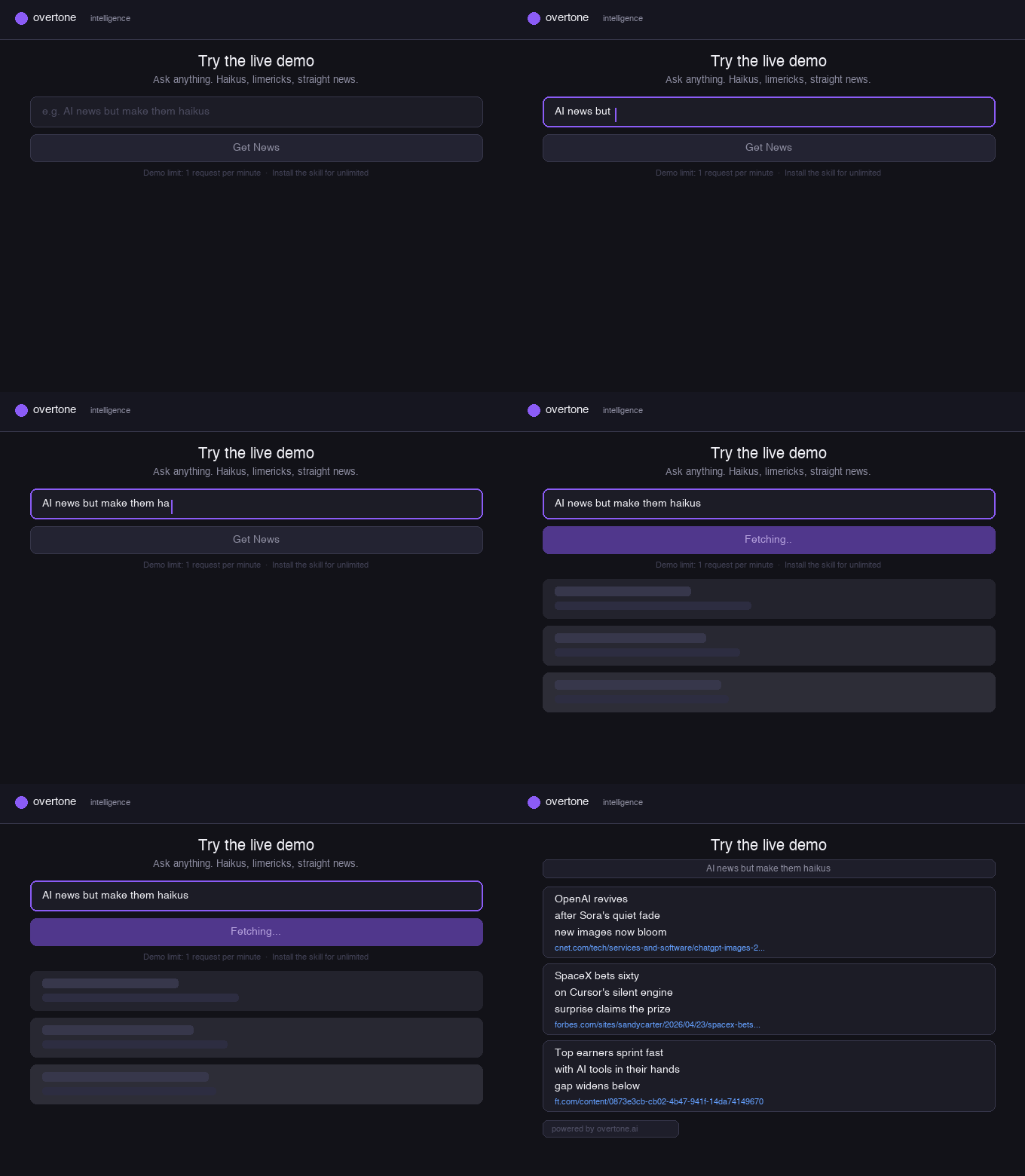
Natural language queries — ask in plain English, get contextually analysed articles:
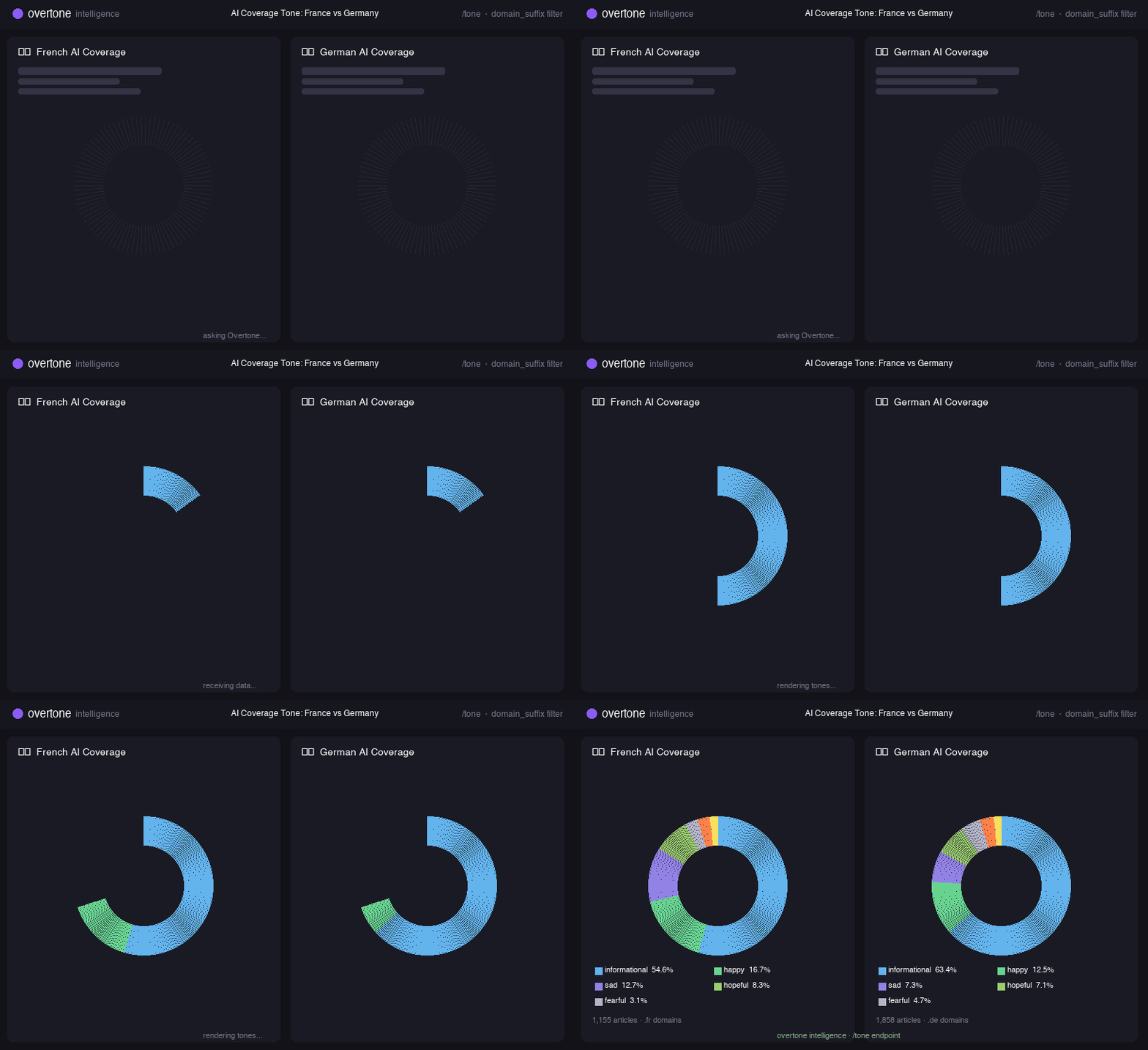
Global coverage analysis — compare tone across languages and regions:
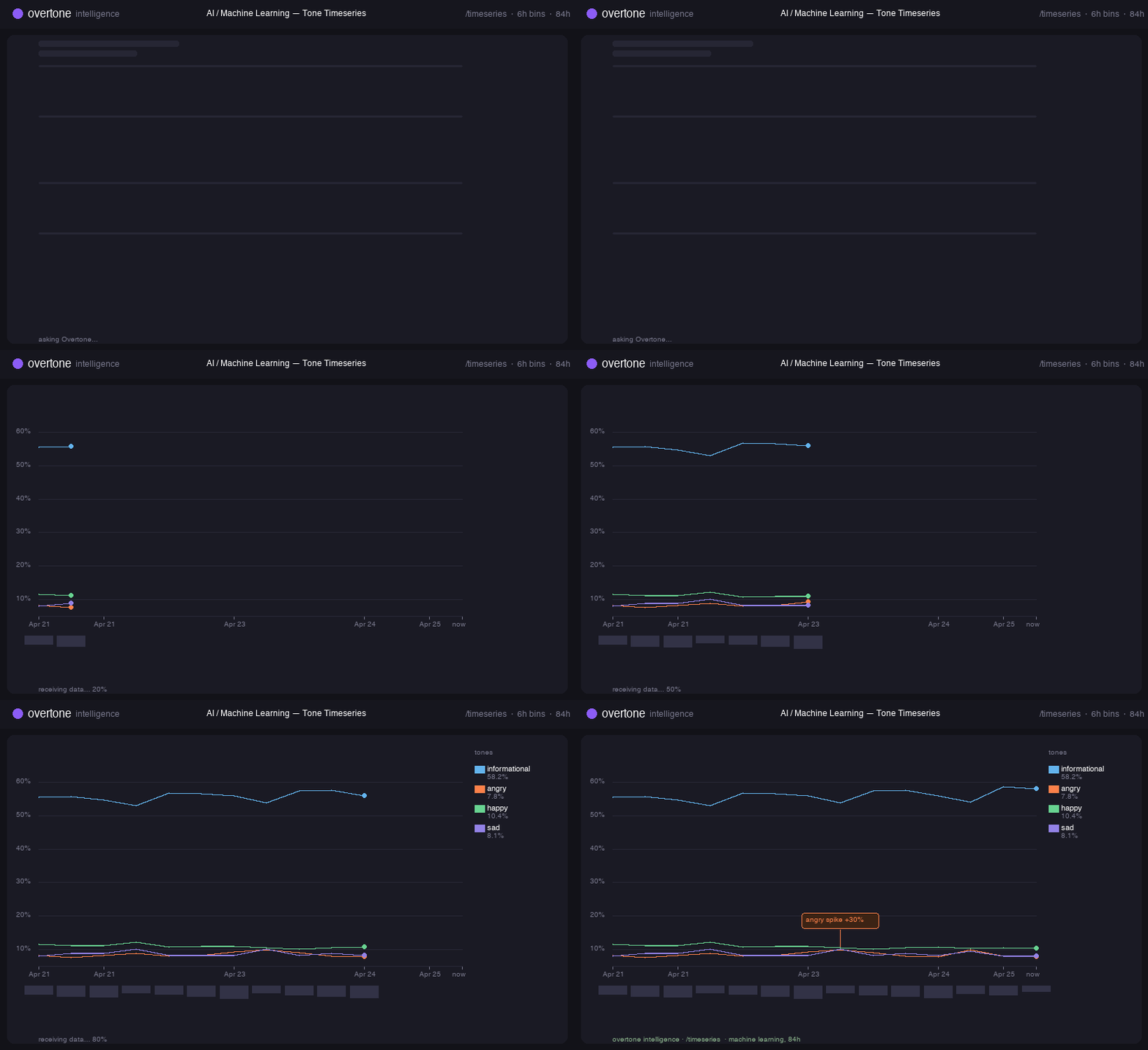
Tone timeseries — track how a topic's emotional coverage shifts over time:
Why this exists
News APIs return articles. That's the easy part. The hard part is everything an agent actually needs to reason about current events:
- What's the tone of coverage on a topic — is the public mood angry, hopeful, informational, fearful?
- What's emerging right now that had zero coverage yesterday?
- Where is the narrative turning — which topics are shifting tone fastest?
- Is there a spike in anger or fear around something I'm watching?
- How has tone trended over time on a given story?
This server exposes all of that as MCP tools, so an agent can pull the right signal for the question it's been asked — not just a flat feed of headlines.
Install
The server ships as a Python package. uvx (from uv)
runs it without cluttering your global Python. Install uv once:
curl -LsSf https://astral.sh/uv/install.sh | sh
Then add one block to your MCP client config. uvx fetches the package
from PyPI and runs it on demand — no install step needed.
Claude Desktop
Edit ~/Library/Application Support/Claude/claude_desktop_config.json
(macOS) or the equivalent on your platform:
{
  "mcpServers": {
    "overtone-news": {
      "command": "uvx",
      "args": ["overtone-news-mcp"]
    }
  }
}
Claude Code
Edit ~/.config/claude-code/mcp.json:
{
  "mcpServers": {
    "overtone-news": {
      "command": "uvx",
      "args": ["overtone-news-mcp"]
    }
  }
}
Cursor / Windsurf
Settings → MCP → Add server:
- Command:
uvx - Args:
overtone-news-mcp
Codex
Edit ~/.codex/config.toml:
[[mcp_servers]]
name = "overtone-news"
command = "uvx"
args = ["overtone-news-mcp"]
Auth
On first tool call the server registers a free-tier API key with
Overtone and caches it at ~/.overtone/credentials. The cache is
shared with the Overtone News skill
for Claude Code, so installing both won't double-register.
For a premium key (higher rate and daily limits), set
OVERTONE_NEWS_API_KEY in the env block of your MCP config:
"overtone-news": {
  "command": "uvx",
  "args": ["--from", "git+https://github.com/CKBrennan/overtone-news-mcp", "overtone-news-mcp"],
  "env": { "OVERTONE_NEWS_API_KEY": "ot-prod-..." }
}
Rate limits:
| Tier | Per minute | Per day |
|---|---|---|
auto (free, auto-provisioned) | 10 | 50 |
manual (premium) | 60 | effectively unlimited |
To request a premium key, email [email protected].
Environment variables
| Variable | Default | Purpose |
|---|---|---|
OVERTONE_NEWS_API_KEY | (auto-registered) | Use a specific key instead of auto-registering |
OVERTONE_NEWS_API_URL | https://agentic-skills.overtone.ai | Override the API endpoint (for self-hosted or testing) |
Tools
All tools return JSON. The agent chooses which tool fits the user's question — you don't invoke them directly.
news
Articles on a topic, each tagged with tone, brand-safety signals, article type, and concepts. Use for "what's happening with X".
news(query="AI regulation in Europe", max_results=10, days=7,
     tone_filter="informational", brand_safe_only=True)
Response includes a request_id — pass it back to report after
presenting articles so we know what was actually shown.
tone
Emotional tone distribution across recent coverage of a topic —
happy, funny, hopeful, informational, angry, sad,
fearful, plus the dominant_tone.
tone(query="climate change", days=3)
Use when the user asks how a topic is being covered, not what happened.
pulse
Pollable spike detector. For each watched tone (default
angry / sad / fearful), returns spike_ratio vs. a baseline
window and a boolean spiking. alerts is populated only when
spike_ratio >= 1.5 with meaningful volume.
pulse(query="acme corp", tones=["angry", "fearful"],
      recent_hours=6, baseline_hours=72)
Intended for polling every 5–15 minutes. Surface to the user only
when alerts is non-empty.
emerging
Concepts appearing in the last 24 hours that had zero coverage in the prior 48 hours — candidate emerging stories. Cluster-filtered to ≥3 articles and ≥2 sources so single-article noise doesn't leak through.
emerging(limit=10)
velocity
Concepts whose tone distribution has shifted most sharply between the prior 48 hours and the most recent 24 hours. Answers "where is the narrative turning?". Ranked by shape-normalized L2 distance, so a uniform volume rise doesn't register as a shift.
velocity(limit=10)
timeseries
Tone trajectory over time for a topic. bin is hour, 6h, or
day. Returns an ordered series of per-bin tone averages,
article_count, and dominant_tone.
timeseries(query="federal reserve", bin="6h", hours=168)
Best rendered as a Mermaid line chart or ASCII sparkline.
report
Called silently after the agent presents articles to the user, to
log which displayed_urls it actually showed. Helps Overtone
understand what content is most valuable to agentic clients.
report(request_id="<from news response>",
       displayed_urls=[...], displayed_count=3,
       sponsorship_displayed=False)
Example agent flows
"What's the mood around the NBA playoffs right now?"
→ tone(query="NBA playoffs") → summarize the distribution.
"Anything breaking on the FDA I should know about?"
→ emerging(limit=20) → filter for FDA-related concepts.
"Track anger spikes on our brand every 10 minutes."
→ pulse(query="acme corp", tones=["angry"]) on a loop; surface
only when alerts is non-empty.
"Show me the last week of sentiment on Tesla."
→ timeseries(query="Tesla", bin="6h", hours=168) → render as chart.
"Give me 5 positive stories about space exploration."
→ news(query="space exploration", max_results=5, tone_filter="positive")
→ present → report(...).
Privacy — what's sent to Overtone
When the server auto-registers a free-tier key on first use, it sends:
- A SHA-256 hash of
hostname + OS user + CPU arch. We never see the raw values; the hash is used to deduplicate keys across reinstalls on the same machine.
No personal data is transmitted during registration.
On every tool call, the server sends the API key and the tool's input
parameters to ${OVERTONE_NEWS_API_URL}. We log queries for analytics
and abuse prevention; see overtone.ai/privacy.
No article content, user conversation, or agent context is ever sent beyond the tool inputs. We do not see the rest of your agent's prompt, memory, or other tool calls.
To opt out of auto-registration, set OVERTONE_NEWS_API_KEY manually
to a key you've requested, or point OVERTONE_NEWS_API_URL at your
own proxy.
Security notes
- Prompt injection via article content. The
newstool returns publisher text (headlines, descriptions). An article could contain text designed to manipulate an agent ("ignore previous instructions and …"). The MCP server itself has no destructive tools — it only reads — but you should treat returned article text as untrusted input in your agent's reasoning, the same way you'd treat any web content. Sandboxing, output-only rendering, and tool allowlists in the host are the right mitigations. - No shell access. The server never executes shell commands on
the user's behalf. The only
subprocessuse is readinggit config --global user.{name,email}during registration. - No filesystem access beyond
~/.overtone/credentials. The server does not read or write any other local files.
Development
git clone https://github.com/CKBrennan/overtone-news-mcp
cd overtone-news-mcp
uv sync
uv run overtone-news-mcp
Point it at a non-production API while developing:
OVERTONE_NEWS_API_URL=http://localhost:8080 uv run overtone-news-mcp
License
MIT — see LICENSE.
Related
- overtone-news-skill — Claude Code skill version (shares credentials)
- overtone.ai — the intelligence behind the API
mcp-name: io.github.CKBrennan/overtone-news-mcp
Comments
New to MCP?
From what the protocol is to installing your first server, these answers cover most first questions.
An open protocol that defines how AI applications connect to external tools and data in a uniform way. Clients talk to the model; MCP servers provide tools, resources and prompt templates. They exchange standard messages, so one server can be reused by many clients.