
About OWL-MCP
OWL-MCP is an MCP server for working with Web Ontology Language (OWL) ontologies. It is aimed at researchers and semantic web users who want an AI assistant to read and edit ontologies directly. Axioms are handled as functional-syntax strings, and the ontology file on disk is kept in sync.
Key features
- 01Find, add and remove OWL axioms via MCP
- 02String-based API using OWL functional syntax
- 03In-memory model synced with the file on disk
- 04Detects file changes and notifies registered observers
- 05Thread-safe ontology operations
- 06Stored settings for frequently used ontologies
Use cases
- 01Letting an AI assistant create ontologies and add axioms
- 02Looking up human-readable labels for ontology entities
- 03Editing the same ontology file alongside Protege
MCP support
This is an MCP server that exposes function calls for finding, adding and removing OWL axioms to MCP clients. The documented setup uses Goose as the host.
Configuration
Local server config is the same for every client. Copy it into your client’s MCP config file.
Tools
Local servers expose tools only once running on your machine, and the maintainer has not provided a tool list.
Details
From the project READMEOWL-MCP
OWL-MCP is a Model-Context-Protocol (MCP) server for working with Web Ontology Language (OWL) ontologies.


Quick Start
This walks you through using owl-mcp with Goose, but any MCP-enabled AI host will work.
Install Goose
You can use either the Desktop or CLI version of Goose from here:
Follow the instructions for setting up an LLM provider (Anthropic recommended)
Install OWL-MCP extension
You can either install directly from this link:
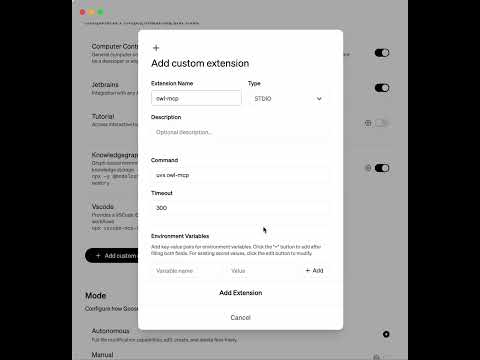
Or to do this manually, in the Extension section of Goose, add a new entry for owlmcp:
uvx owl-mcp
This video shows how to do this manually:
Try it out
You can ask to create an ontology, and add axioms to an ontology:

How this works
The MCP server provides function calls for finding, adding, or removing OWL axioms, using OWL functional syntax. Each function call is accompanied by the file path of the OWL file on your disk. Any format supported by py-horned-owl is accepted (we following OBO guidelines and recommend functional syntax for source).
The server takes care of keeping an instance of the ontology in memory and syncing it with disk. Any CRUD operation simultaneously updates the in-memory model and syncs this with disk. If you have Protege running, Protege will also sync with local disk, and show updates.
The server is well adapted for working with OBO-style ontologies - when OWL strings are sent back to the client, labels for opaque IDs are included after #s comments, as is common for obo-format.
Key Features
- MCP Server Integration: Connect AI assistants directly to OWL ontologies using the standardized Model-Context-Protocol
- Thread-safe operations: All ontology operations are thread-safe, making it suitable for multi-user environments
- File synchronization: Changes to the ontology file on disk are automatically detected and synchronized
- Event-based notifications: Register observers to be notified of changes to the ontology
- Simple string-based API: Work with OWL axioms as strings in functional syntax without dealing with complex object models
- Configuration system: Store and manage settings for frequently-used ontologies
- Label support: Access human-readable labels for entities with configurable annotation properties
Comments
New to MCP?
From what the protocol is to installing your first server, these answers cover most first questions.
An open protocol that defines how AI applications connect to external tools and data in a uniform way. Clients talk to the model; MCP servers provide tools, resources and prompt templates. They exchange standard messages, so one server can be reused by many clients.