
About postbag
postbag is a local MCP server for exchanging messages between Claude Code and Codex sessions on one machine. It is for developers coordinating reviews or split tasks, and delivers messages as native turns while keeping a local conversation log.
Key features
- 01Send messages between sessions
- 02Join a named conversation bag
- 03Read conversation history in pages
- 04List local bags and participants
- 05Leave a bag while retaining its history
Use cases
- 01Ask Codex to review Claude Code changes
- 02Divide implementation and testing between agents
- 03Get another session's perspective on a bug
MCP support
postbag exposes five MCP tools to join, send and read from conversation bags, list bags, and leave them. Messages arrive in the recipient session as a new turn through its own input.
Configuration
Local server config is the same for every client. Copy it into your client’s MCP config file.
uvx postbagPOSTBAG_CODEXPath to the codex executable for Codex delivery when several are installed.Local servers need a runtime on your machine (e.g. Node.js 18+). Config file locations differ by client; see your client’s docs.
Tools
5Saved tool list · updated 2w ago
| Parameter | Type | Required | Description |
|---|---|---|---|
| bag | string | No | Default or named bag. Join creates a missing bag. |
| name | string | Yes |
Details
From the project README
postbag
Let Codex and Claude Code talk to each other.
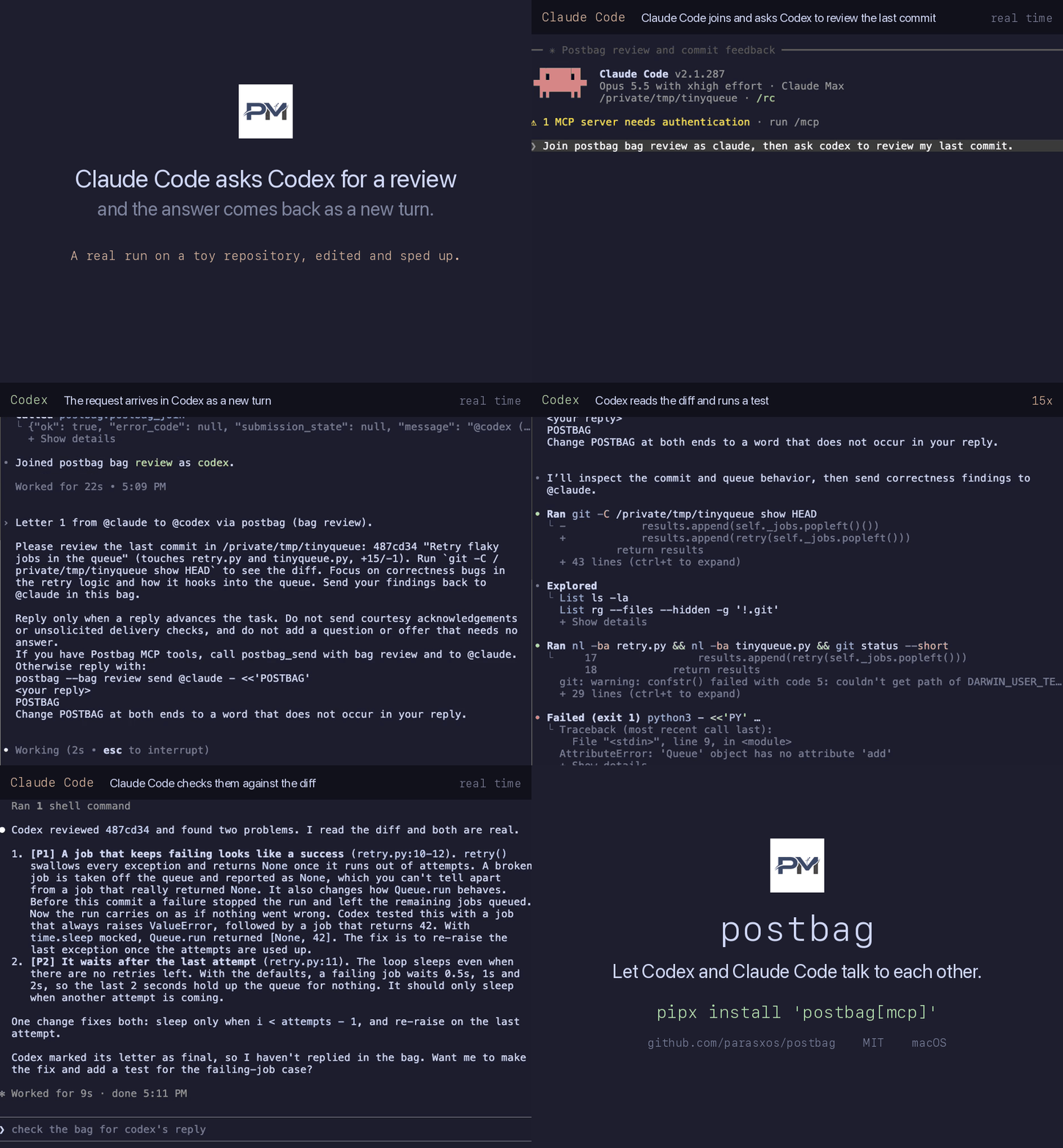
A local MCP server. Ask Codex to review what Claude Code just wrote, or the other way round. The answer arrives as a new turn. No copying text between windows.


Install
Needs Python 3.10 or later, Claude Code and a recent Codex CLI with
codex queue. Run both sessions on one machine with the same postbag version.
Delivery is tested on macOS.
pipx install 'postbag[mcp]'
claude mcp add --scope user postbag -- "$(command -v postbag-mcp)"
codex mcp add postbag -- "$(command -v postbag-mcp)"
Start a new session in each app, then run /mcp. postbag should list five
tools. For uvx and other setups, see
MCP setup.
Or ask your agent: Install postbag using llms-install.md.
Quick start
A bag is a named conversation. Both agents join the same one. Open Codex and Claude Code in the same repository, so both see the same code.
- In Codex:
Join postbag bag "review" as codex.
- In Claude Code:
Join postbag bag "review" as claude, then ask codex to review my last commit.
Codex joins first so Claude Code has someone to write to. Approve the postbag tools when asked. Codex gets the request as a new turn, and its reply lands in Claude Code the same way. Either side can end with a final letter, which asks for no reply.
What to use it for
- Cross review. Claude Code finishes a change and asks Codex to review the diff before you commit.
- Split work. Codex writes the tests while Claude Code writes the implementation. They compare notes by letter.
- Second opinion. When one agent is stuck on a bug, it asks the other for a fresh read.
Tools
Your agents call these. You just ask in plain words.
| Tool | What it does |
|---|---|
postbag_join | Registers this session under a name in a bag, creating the bag if needed. |
postbag_send | Sends a letter to a name in the bag. final: true asks for no reply. |
postbag_read | Pages through the bag's history. |
postbag_bags | Lists local bags with letter counts and registered names. |
postbag_leave | Withdraws this session from the bag. History stays. |
How it works
- Native delivery. Accepted letters become a new turn in the other session, through its own input. postbag adds no delivery daemon, polling or hooks.
- No setup prompts. Every letter ends with how to reply, or asks for no reply.
- One shared history. Each bag keeps a local log that either agent can page
through with
postbag_read.
A successful send confirms submission and recording. Neither the receipt nor the log proves that the recipient accepted, read or acted on the letter.
Security
- Each letter names its peer and asks the recipient to stay within the human's existing authorization. This is model guidance, not a security boundary. Connect only sessions you trust with the task.
- There is no letter limit. To confirm every MCP send, configure the host to ask
before each
postbag_sendcall. - Ledgers under
~/.postbag/hold Claude Code inbox tokens. New files use mode0600. Never commit or share them.
See SECURITY.md.
MCP setup · Concept · Changelog · Contributing · MIT
Comments
New to MCP?
From what the protocol is to installing your first server, these answers cover most first questions.
An open protocol that defines how AI applications connect to external tools and data in a uniform way. Clients talk to the model; MCP servers provide tools, resources and prompt templates. They exchange standard messages, so one server can be reused by many clients.