
About Pdf Export For Ai Agents
PDF Export for AI Agents is an MCP server that turns prompts into formatted PDFs, including reports and technical documents. It is for AI agents that need to produce documents; source code remains local while the rendered document is sent to PDFCrowd for conversion.
Key features
- 01Generate PDFs from prompts
- 02Create reports and technical documents
- 03Built-in document layout guidance
- 04Source code stays on the local machine
Use cases
- 01Create a project architecture overview
- 02Export an API reference as a PDF
- 03Produce a report from a prompt
MCP support
The MCP server lets compatible clients request PDF creation from prompts. The rendered document is sent to PDFCrowd for conversion.
Configuration
Local server config is the same for every client. Copy it into your client’s MCP config file.
npx -y pdfcrowd-mcp-pdf-exportPDFCROWD_USERNAMEPDFCrowd username for watermark-free output. Can also be set in ~/.pdfcrowd-mcp.PDFCROWD_API_KEYSecretPDFCrowd API key for watermark-free output. Can also be set in ~/.pdfcrowd-mcp.Local servers need a runtime on your machine (e.g. Node.js 18+). Config file locations differ by client; see your client’s docs.
Tools
2Saved tool list · updated 3w ago
This tool takes no parameters.
Details
From the project README



PDF Export for AI Agents
Well-designed PDFs from a single prompt. Describe what you need, get a professional document.
Powered by PDFCrowd. Learn more →
Example
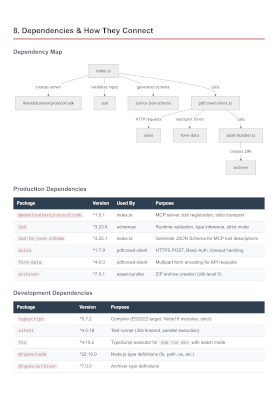
Analyze this project and create a comprehensive architecture overview PDF.
Include component diagrams and data flow. Save to architecture-overview.pdf
Configuration
Prerequisites: Node.js 18 or later.
Claude Code
Option A — Install as a plugin (Recommended):
/plugin marketplace add pdfcrowd/pdfcrowd-mcp-pdf-export
/plugin install pdfcrowd-export-pdf@pdfcrowd
Option B — Register the MCP server:
claude mcp add --scope user pdfcrowd-export-pdf -- npx -y pdfcrowd-mcp-pdf-export
Or add the equivalent JSON to ~/.claude.json (user scope) or .mcp.json (project scope):
{
  "mcpServers": {
    "pdfcrowd-export-pdf": {
      "command": "npx",
      "args": ["-y", "pdfcrowd-mcp-pdf-export"]
    }
  }
}
Codex CLI
codex mcp add pdfcrowd-export-pdf -- npx -y pdfcrowd-mcp-pdf-export
Or add manually to ~/.codex/config.toml:
[mcp_servers.pdfcrowd-export-pdf]
command = "npx"
args = ["-y", "pdfcrowd-mcp-pdf-export"]
Gemini CLI
gemini mcp add -s user pdfcrowd-export-pdf npx -y pdfcrowd-mcp-pdf-export
Or add manually to ~/.gemini/settings.json:
{
  "mcpServers": {
    "pdfcrowd-export-pdf": {
      "command": "npx",
      "args": ["-y", "pdfcrowd-mcp-pdf-export"]
    }
  }
}
Notes
- Restart your CLI after configuration to load the server
Personal Credentials
Get started right away — no credentials or signup needed. Output includes a watermark. For watermark-free PDFs, sign up for personal credentials.
Personal credentials can be set in:
- Config file
~/.pdfcrowd-mcp:PDFCROWD_USERNAME=your_username PDFCROWD_API_KEY=your_api_key - Environment variables
PDFCROWD_USERNAMEandPDFCROWD_API_KEY.
Privacy
Your source code never leaves your machine — only the rendered document is sent to PDFCrowd for PDF conversion.
License
Comments
New to MCP?
From what the protocol is to installing your first server, these answers cover most first questions.
An open protocol that defines how AI applications connect to external tools and data in a uniform way. Clients talk to the model; MCP servers provide tools, resources and prompt templates. They exchange standard messages, so one server can be reused by many clients.