
About GridPath
GridPath is a spreadsheet engine for editing real Excel workbooks, aimed at application developers and coding agents. It preserves formulas and writes changes back to the original .xlsx, with agent edits available for review before saving.
Key features
- 01Edit real .xlsx workbooks
- 02Recalculate formulas live
- 03Review and accept or reject agent edits
- 04Write changes back to the original file
- 05Embed a spreadsheet interface
- 06Import CSV and delimited text
Use cases
- 01Edit and review workbook changes in a coding agent
- 02Embed a spreadsheet in a web app
- 03Turn CSV data into an editable workbook
MCP support
GridPath provides an MCP server for editing workbook files on disk from clients such as Claude Code, Claude Desktop, Cursor, and Codex, with changes reviewed before saving.
Configuration
Local server config is the same for every client. Copy it into your client’s MCP config file.
Tools
32Saved tool list · updated 1d ago
| Parameter | Type | Required | Description |
|---|---|---|---|
| cell | string | Yes | A1 address. Examples: "A1", "B17", "AA42". |
| path | string | Yes | Path of the .xlsx to operate on (absolute, or ~/… for the user's home directory). |
| sheet | string | Yes | Sheet name (case-sensitive). |
| value | any | No | Literal value (string, number, boolean, or null). Leave null when using `formula`. |
| formula | string|null | No | Excel-style formula starting with '='. References inside use A1 notation. Example: "=SUM(A1:A10)". |
Details
From the project READMEgridpath



Real Excel files, in your web app and in your agent. Open the .xlsx
your users already have, keep every formula live at full size, let AI edit
it with review, and save back the same file.
| In your web app | In your coding agent | |
|---|---|---|
| Install | npm install gridpath | claude mcp add gridpath -- npx -y gridpath mcp |
| What you get | An embeddable spreadsheet: a canvas grid over a Rust/WebAssembly engine in a Web Worker, in-place .xlsx saves, and agent tools for your own model | An MCP server for Claude Code, Claude Desktop, Cursor, Codex: the agent edits files on disk and you review every change before it is saved |
| Docs | In your web app | In your coding agent |
Both run the same engine (a fork of IronCalc): real formulas evaluated in process, and saves that patch the original file so untouched parts come back byte-identical. Recalculated formulas and supported chart data caches carry current values; chart definitions remain native Excel XML.
In your web app
- Quick start · Next.js · What users get
- Workbooks and documents · CSV and text files · Saving · Saving to your backend
- Errors · Excel's saved values · AI
- Options · Methods · Bundlers · How saving works
Quick start
npm install gridpath react react-dom
React and React DOM are peer dependencies. Your app doesn't have to use
React: createSpreadsheet mounts the spreadsheet into any element.
import { Spreadsheet } from "gridpath";

<div style={{ height: 600 }}>
  <Spreadsheet
    file={bytes} // an .xlsx as ArrayBuffer or Uint8Array; omit for a blank workbook
    onReady={(sheet) => (sheetRef.current = sheet)}
    onError={(err) => console.error(err.code, err.message, err.hint)}
  />
</div>;
Without React:
import { createSpreadsheet } from "gridpath";

const sheet = await createSpreadsheet(document.getElementById("sheet")!, { file: await file.arrayBuffer() });
sheet.setCell("Sheet1", "B2", "=SUM(A1:A10)");
console.log(await sheet.getCell("Sheet1", "B2")); // { value: 55, formula: "=SUM(A1:A10)" }
const xlsx = await sheet.save(); // Uint8Array
createSpreadsheet resolves once the workbook is open. If it can't open it
rejects with a GridPathError and leaves the element empty.
Next.js
No configuration is needed. This was tested on Next.js 16 with React 19,
with Turbopack and with webpack, in next dev and in production builds.
- Render the spreadsheet from a client component (
"use client"). The page around it can stay a server component. gridpath/agentworks in a route handler.
examples/nextjs-demo
is a complete app. Each user has a list of workbooks saved to the app's
own API: app/api/books/[[...path]]/route.ts holds the REST routes
httpStore calls, with auth. Each workbook has its own URL. The example
shows:
- uploading and starting new workbooks;
- a loading indicator;
- what to do for each error code;
- switching workbooks, which saves the one being left.
What users get without any code
-
A toolbar for formatting:
- undo and redo;
- font and size;
- bold, italic and underline;
- font and fill colour;
- alignment and wrap;
- currency, percent, comma, and more or fewer decimals;
- number formats;
- inserting and deleting rows and columns;
- sort, filter, freeze panes and clear.
Keyboard shortcuts (⌘B, ⌘Z, ⌘S…) work in the grid.
toolbar={false}hides the toolbar. -
A save status that says where things are saved: "Saved in this browser", "Saved to your account", "Saving…", "Unsaved changes", or "Couldn't save · Retry".
- Edits are saved two seconds after they pause. ⌘S or the Save button saves at once.
-
Reopening where they left off: after a reload, the workbook comes back and so does the cell the user was on.
-
A File menu with Open…, New and Recent workbooks.
fileMenu={false}removes those entries when your app has its own list. -
Version history: restore an earlier version, or download it. Restoring keeps the state it replaces as a version too.
-
Download as
.xlsx, a separate button from Save. -
An "AI changes" panel when an agent works through
sheet.ai. Each change shows what it did ("D2: empty → =C2/B2-1") and where, with Accept and Reject buttons. Clicking a change shows its cells.reviewPanel={false}turns the panel off if your app has its own review UI.
-
Plain explanations in place of the grid when a file can't be opened, for example "an old-format .xls workbook or a password-protected .xlsx".
-
A count of formulas showing Excel's saved value in the toolbar, with a list of them.
-
Its own question before anything is lost: opening another workbook over changes that can't be saved asks "Discard unsaved changes?".
Workbooks and documents
A spreadsheet shows one workbook at a time. You identify a workbook by its
documentId, which defaults to fileName. Together with a
store, the ID is how a workbook is loaded:
<Spreadsheet store={store} documentId={book.id} fileName={book.name} />
The spreadsheet opens the stored state for that ID. If you also pass a
file, the stored state wins only when it was saved from that same file;
otherwise file opens. With nothing stored and no file, the workbook
starts blank.
Switching workbooks can be done in two ways:
- Remount per document. Give the component
key={book.id}, as the Next.js example does with a page per workbook. - Call
open()oropenStored()on the same spreadsheet. Both follow the same rules:
| When you open another workbook… | |
|---|---|
| AI changes are waiting for review | It rejects with PendingChangesError. Accept or reject them first. |
There are unsaved edits and a store or onSave | They are saved first. |
| The save fails or nothing is set up to save to | It rejects with UnsavedChangesError. Pass { discardUnsaved: true } to drop the edits. A remote store's failed save is not counted as a failure here: those edits are kept in this browser. |
| The new file can't be opened | It rejects with unsupported-file or malformed-file, and the previous workbook stays open. Plainly wrong files (empty, old .xls, a PDF or image) are refused before anything changes. |
The File menu follows the same rules and asks the user before it discards anything.
Cleaning up.
- Unmount the component, or call
destroy()(createSpreadsheetonly). If there are edits that aren't saved yet, they are saved first. This covers a client-side navigation, which fires nobeforeunload. Then the engine's worker stops. From then on, every call on the oldsheetobject fails withnot-ready. - Closing the page while edits are unsaved prompts the browser's "Leave site?" warning.
CSV and text files
file, open() and the File menu also take CSV and other delimited text.
It opens as a new workbook, which saves as .xlsx: sales.csv becomes
sales.xlsx, with one sheet named sales, and the toolbar says so.
- Delimiters: comma, tab, semicolon or pipe, whichever the first lines
agree on. Excel's
sep=;first line is honoured. In semicolon files a comma is the decimal point (1.234,5is 1234.5). - Encodings: UTF-8 (with or without a byte-order mark), UTF-16 with a mark (Excel's "Unicode Text"), otherwise Windows-1252.
- Values are read as if typed into the cell: numbers, currency,
percentages, ISO and US dates,
TRUE/FALSE, and=formulas, which calculate. A formula that doesn't parse stays text. - Kept as text, where Excel would lose them: digits with leading zeros (ZIP codes, IDs) and digit strings longer than 15 (card and account numbers).
- Columns are widened to fit their text, up to 60 characters.
Text that isn't a table (.json, .xml, .html, .md…) is refused with
unsupported-file. A 17 MB CSV (2 million cells) opens in 7 to 10 seconds
in Chromium on a recent Mac.
Saving
Saving happens in three ways:
- Autosave: two seconds after edits pause. Change the delay with
autosave(milliseconds), or turn it off withfalse. - ⌘S and the Save button.
sheet.saveNow()from your code.
Each save writes the workbook to the store and calls onSave. Watch it
with onStatusChange or getStatus():
state | The toolbar says | |
|---|---|---|
"saved" | "Saved in this browser" / "Saved to your account" | savedAt, and where: the store's label. |
"unsaved" | "Unsaved changes" | An autosave is coming. |
"saving" | "Saving…" | |
"review" | "Review 2 AI changes to save" | pending. Saving waits for the user to accept or reject the AI's changes. |
"error" | "Couldn't save · Retry", or "Saved in this browser only · Retry" | code, message and hint. keptLocally is set when the edits are safe in this browser, and retryAt when autosave will try again. |
"idle" | (nothing) | A fresh workbook, or no saving set up. |
save() and saveBlob() return the bytes without touching the store,
for an upload of your own.
Saving to your backend
By default, everything is kept in the user's browser (IndexedDB) by
browserStore(). Saves within five minutes of each other share one
version. The newest 20 versions are kept as they are, then one per day for
30 days. Tune this with browserStore({ checkpointMinutes, keepRecent, keepDays }).
To save to the signed-in user's account, point httpStore at your API:
import { httpStore } from "gridpath";

const store = httpStore({
  url: "/api/books",
  // Called before every request, so a refreshed token is picked up. Leave it
  // out with cookie sessions.
  headers: async () => ({ Authorization: `Bearer ${await getToken()}` }),
});

<Spreadsheet store={store} documentId={book.id} />;
The routes it calls, all relative to url. Ids are URL-encoded:
| Request | Response |
|---|---|
PUT /{id}?name=…&source=…[&checkpoint=1], with the .xlsx as the body | Any 2xx. source fingerprints the file the workbook was opened from. checkpoint asks for a version of its own (before and after a restore). |
GET /{id} | The .xlsx, with headers: X-Workbook-Name (percent-encoded), X-Workbook-Saved-At (an ISO time), X-Workbook-Source. A 404 when there's none. |
GET / | [{ id, name, savedAt, size }], newest first (the Recent list). |
GET /{id}/versions | [{ id, savedAt, size }], newest first. A 404 when you keep no history. |
GET /{id}/versions/{versionId} | That version's .xlsx. |
DELETE /{id} | Any 2xx. |
When the backend can't be reached or answers with an error, the user's edits are not lost:
- The status reads "Saved in this browser only · Retry", with
keptLocally: true. - Autosave retries after 2, 5, 15 and 30 seconds, then every minute.
- A copy of the edits waits in this browser.
- If the page is closed first, the copy is reopened next time, newer than the backend's, and saved there. The status line says "Restored changes that weren't saved to your account".
If the backend can't be reached when a workbook opens, the spreadsheet shows the error with Try again. It does not open a blank workbook that autosave would then write over the user's saved one.
Anything else can be a store. httpStore is one implementation of this
interface:
interface WorkbookStore {
  label?: string;   // the status line's "Saved …" wording: "to your account"
  local?: boolean;  // true when it is in this browser (no extra drafts kept)
  save(w: { id: string; name: string; bytes: Uint8Array; source?: string; checkpoint?: boolean }): Promise<void>;
  load(id: string): Promise<{ id; name; bytes; savedAt: string; source?: string } | null>;
  list(): Promise<Array<{ id; name; savedAt: string; size: number }>>;
  versions(id: string): Promise<Array<{ id: string; savedAt: string; size: number }>>;
  loadVersion(id: string, versionId: string): Promise<Uint8Array | null>;
  remove?(id: string): Promise<void>;
}
There are two simpler options:
onSave: receive the bytes on every save and upload them yourself. A rejected promise counts as a failed save and is retried.store={false}: no saving at all; users keep Download, and your code keepssave().
Errors
Everything the spreadsheet reports is a GridPathError. Each one has:
code, for your code to act on;message, which says what happened;hint, a sentence you can show that says what to do.
Errors reach you in four ways:
- Methods reject with them. For example,
open(),openStored(),save()andgetCell(). onErrorreceives engine failures and workbooks that couldn't be opened: the first one, or one opened from the File menu.onStatusChangereports a failed save as{ state: "error", code, message, hint }. Failed saves don't go toonError, because autosave retries them.- The spreadsheet itself shows the problem in place of the grid, so users are never left with an empty box.
try {
  await sheet.open(bytes, { name: file.name });
} catch (e) {
  if (!(e instanceof GridPathError)) throw e;
  if (e.code === "unsaved-changes" && confirm(`${e.message}. Discard them?`)) await sheet.open(bytes, { name: file.name, discardUnsaved: true });
  else showToast(`${e.message}. ${e.hint}`);
}
code | When | What to do |
|---|---|---|
unsupported-file | Not a spreadsheet: an empty file, an old-format .xls, a password-protected workbook, a PDF, image or JSON file. | Ask for an .xlsx or CSV (the hint says how to get one). |
malformed-file | An .xlsx the engine couldn't read (damaged or truncated), or a CSV that couldn't be read as a table. | Open and re-save it in Excel. |
engine-failed | The engine's worker or .wasm didn't load, or the engine stopped later. If it stopped, a banner says calculation stopped and offers Download. | Serve the package's engine.worker.js and .wasm (see Bundlers); reload the page. |
storage-failed | The store failed. With httpStore, the error's cause is an HttpStoreError with the response status. A URL that returns a web page instead of data says so. | On 401/403, sign the user in again. Otherwise autosave retries. |
save-failed | The session's changes couldn't be written into the file. | The edits are still on screen; undo the last change and save again. |
calculation-timeout | getCell() (after 30 s), whenCalculated(ms) or save() (after 60 s) waited for a recalculation that was still running. | Try again once it finishes. |
pending-changes | save() or open() while AI changes await review (PendingChangesError, with pending). | Accept or reject them (sheet.ai.accept() / reject()), or save({ includePending: true }). |
unsaved-changes | open() would drop edits that couldn't be saved (UnsavedChangesError). | Ask the user, then retry with { discardUnsaved: true }. |
not-found | openStored(id) found nothing. | |
not-ready | A method was called before onReady, while another workbook is opening, or after unmount. | Wait for onReady (or the promise from open()). |
Formulas GridPath can't calculate
Some formulas don't calculate in GridPath:
- an Excel add-in function (
_xll.…); - a function GridPath doesn't support yet;
- a link to another workbook.
These cells keep the value Excel saved in the file, and the formulas that read them calculate from that value. The user sees a count in the toolbar and a list that explains each cell. Your code can read the same thing:
await sheet.getCell("Model", "C7");
// { value: 1250, formula: "=_xll.FDS(…)", fromFile: true,
//   note: "Showing Excel's saved value because GridPath couldn't calculate this formula: it calls FDS, an Excel add-in function." }

await sheet.getCalcIssues(); // [{ sheet, ref, row, col, formula, value, calculated, note }]
Options
| Option | |
|---|---|
file | The .xlsx bytes (ArrayBuffer or Uint8Array). Without it, the workbook starts blank or reopens the stored one. Read when the component mounts; to open others, use open(). |
sheets | Sheet names for a blank workbook (default ["Sheet1"]). |
fileName | The workbook's file name, for downloads and the Recent list (default "Untitled.xlsx"). |
documentId | Which stored workbook this is (default: fileName). See Workbooks and documents. |
store | Where saves, recent workbooks and versions go. The default is browserStore(). You can pass httpStore({ url, headers }), your own WorkbookStore, or false. |
autosave | true (the default: two seconds after edits pause), a delay in milliseconds, or false. |
onSave | ({ id, name, bytes }) => …, called on every save. A rejected promise counts as a failed save. |
onStatusChange | Called when the save status changes. |
onReady | (sheet) => …, called once the first workbook is open (React; createSpreadsheet resolves instead). |
onError | (error: GridPathError) => …, for engine failures and workbooks that couldn't be opened. |
onDocumentChange | ({ id, name }) => …, called when another workbook was opened: from the File menu, Recent, a restore, open() or openStored(). |
onEdit | Called after each user edit in the grid. |
onProgress | Loading stages ("Loading workbook…", "Building grid…"), for your loading indicator. |
toolbar | false hides the toolbar. |
fileMenu | false removes Open, New and Recent from the File menu. |
reviewPanel | false turns off the "AI changes" panel. Build your own from sheet.ai.list(), accept() and reject(). |
engine.worker | false runs the engine on the page instead of in a Web Worker. |
engine.workerUrl, engine.wasmUrl | Where to load the worker script and the .wasm from, when your bundler doesn't serve them next to the package. |
Methods
| Method | Contract |
|---|---|
getSheetNames() | Sheet names in order. |
getCell(sheet, "A1") | { value, display?, formula, fromFile?, note? }, or null for an empty cell. Waits for pending writes to recalculate (up to 30 s, then it rejects with calculation-timeout). |
getCalcIssues(limit?) | The formulas showing Excel's saved value (see above). |
setCell(sheet, "A1", value) | Returns at once. Writes are queued and recalculated in order, so a getCell after it sees the result. Strings starting with = are formulas. |
setCells(sheet, [{ row, col, value }]) | Many cells in one step (0-based). |
whenCalculated(ms = 30000) | Resolves once pending writes are recalculated; rejects with calculation-timeout after ms. |
select(sheet, "A1"), focus() | Move the selection; give the grid keyboard focus. |
undo(), redo() | Undo or redo the last change, the user's or an agent's. |
save(options?), saveBlob(options?) | The workbook as .xlsx bytes (or a Blob), with the store untouched. Waits for recalculation (up to 60 s). Rejects with PendingChangesError while AI changes await review, unless you pass { includePending: true }. |
saveNow() | Save to the store and onSave now, as autosave and ⌘S do. Resolves with the new status and never rejects: a failure becomes { state: "error", … }. |
hasUnsavedChanges() | true while there are edits the store doesn't have yet, AI changes awaiting review included. Useful for a route-leave prompt. |
download(fileName?) | Download the .xlsx. |
getStatus(), getDocument() | The save status; the open workbook's { id, name }. |
open(bytes, { name?, id?, discardUnsaved? }) | Open another workbook here, following these rules. Resolves once it is open. |
openStored(id, { discardUnsaved? }) | Open a workbook from the store by ID; rejects with not-found if there is none. The same rules apply. |
destroy() | Save what's unsaved, unmount, and stop the engine (createSpreadsheet only; in React, unmount the component). |
ai | The agent tools; see below. |
AI: your model, your key
sheet.ai is GridPath's agent tool set (the same tools and result shapes as
the MCP server) acting on the grid the user is
looking at. Give the tools to your model, run its tool calls with
sheet.ai.run(), and let the user review: every write lands at once,
highlighted, as a pending batch they accept or reject in the "AI changes"
panel (or your own UI).
GridPath never sees a key. The model call happens on your server; the tool calls run in the browser, where the workbook is.
Server (any Node route; this one is the demo's server/agent.ts). The
system prompt and tools are fixed here; taking them from the request would
make the route a general proxy for your key. Add your own auth and rate
limits.
import Anthropic from "@anthropic-ai/sdk";
import { AGENT_INSTRUCTIONS, agentTools } from "gridpath/agent";

const client = new Anthropic(); // ANTHROPIC_API_KEY
const tools = agentTools() as Anthropic.Beta.BetaTool[];

export async function agentTurn(messages: Anthropic.Beta.BetaMessageParam[]) {
  const response = await client.beta.messages.create({
    model: "claude-opus-5-5",
    max_tokens: 16000,
    output_config: { effort: "high" },
    system: AGENT_INSTRUCTIONS,
    tools,
    cache_control: { type: "ephemeral" }, // system + tools are identical every call
    betas: ["server-side-fallback-2026-07-01"],
    fallbacks: "default", // a declined request re-runs on a fallback model
    messages,
  });
  return { content: response.content, stop_reason: response.stop_reason };
}
Browser (the demo's src/agentLoop.ts, shortened):
const messages = [{ role: "user", content: [
  { type: "text", text: `The open workbook:\n${await sheet.ai.context()}` },
  { type: "text", text: prompt },
] }];
for (;;) {
  const out = await (await fetch("/api/agent", { method: "POST", body: JSON.stringify({ messages }) })).json();
  messages.push({ role: "assistant", content: out.content }); // unchanged, thinking blocks included
  const calls = out.content.filter((b) => b.type === "tool_use");
  if (out.stop_reason !== "tool_use" || calls.length === 0) break;
  const results = [];
  for (const c of calls) {
    const r = await sheet.ai.run(c.name, c.input);
    results.push({ type: "tool_result", tool_use_id: c.id, content: JSON.stringify(r), ...(r?.ok === false ? { is_error: true } : {}) });
  }
  messages.push({ role: "user", content: results }); // all results in one message
}
Already have an agent framework? Use sheet.ai.tools() (Anthropic format)
or sheet.ai.tools("openai") and route tool calls to sheet.ai.run().
sheet.ai | |
|---|---|
tools(format?) | Tool definitions: "anthropic" (default) or "openai". Also exported from gridpath/agent as agentTools(). |
instructions() | How to use them, for the system prompt (AGENT_INSTRUCTIONS). |
context() | The workbook overview for the first turn. |
run(name, input) | Run one tool call; resolves with JSON for the model. Never throws. |
list(), onChange(fn) | The batches, pending or accepted. |
accept(id?) | Keep one batch, or every pending one. |
reject(id?) | Undo a batch and every batch after it, newest first, so rows and columns moved by later batches stay right. Resolves with the ids undone. |
Included: describe_workbook, find_rows, query_rows, read_range, set_cell, set_range, copy_range, set_format, clear_range, run_script (sandboxed in a worker), row/column/sheet structure, freeze, hide, merge, notes, sizes, define_name. Not included: tools that need the desktop app or the network (fetch_web, edgar_lookup, reference workbooks).
save() refuses while changes are pending: it throws a
PendingChangesError (with a pending count) until the user accepts or
rejects them, so nothing unreviewed reaches the file by accident.
save({ includePending: true }) saves them anyway.
How saving works
Every save replays the session's changes (cells, formats, sizes, rows and
columns, sheets, filters) onto the bytes the workbook was opened from. Parts
the session did not touch are copied through unchanged. Formulas carry
their results: every new formula, and every formula the session's edits
recalculated, is saved with its current result as the cached value (the
formula text is left as it was), so a reader that never calculates (pandas,
openpyxl with data_only=True, file previews) sees current numbers. Formulas
the session did not affect keep the values Excel saved. The file is also
marked for recalculation on open, which Excel honours.
Charts
The browser renders imported standard line charts at their worksheet anchors,
using a separately loaded Apache ECharts SVG renderer. Source values come from
the calculation engine, including cells outside the viewport; edits and undo
update the chart after recalculation. await sheet.getCharts() returns the
display descriptors and current values. sheet.getLastEditTimings() reports
the most recent edit's calculation, serialization and transfer/apply timings.
This first version supports direct one-dimensional worksheet references up to 10,000 points per series, basic titles, legends, RGB line colors and numeric axes. It approximates Excel's visual styling. Other chart types, named/external data references, stacked/smoothed lines, date/log/secondary axes, and chart creation or editing controls are not supported. Unsupported charts show a placeholder and retain their native definitions on save.
Browser and headless saves refresh affected direct-reference numeric/string chart caches from the saved worksheet values. Source references, styling and unrelated chart XML stay intact. Unsupported references retain their original caches; Excel's recalculation flag remains set.
Compared with other embeddable spreadsheets
Against the spreadsheet components a web app would otherwise embed, on real models in Chromium (workbooks, method and full results):
| GridPath | SpreadJS 19.2 | Handsontable 18.1 + HyperFormula 3.5 + ExcelJS 4.4 | |
|---|---|---|---|
| 1.4 MB analyst model: open, fully recalculated | 0.6 s, 0.8 s | 1.5 s, 3.6 s | 1.9 s |
| … agrees with Excel's results | 95.5% | 94.0% | 56.9% |
| … lost on save | nothing (75 of 76 parts byte-identical) | custom XML, printer settings | custom XML, printer settings, comments, 3,335 of 3,418 names |
| Data-intensive model over 10 MB (2.3M cells): open, fully recalculated | 4.2 s, 10.9 s | tab crashes (lazy mode: 6.5 s, 3.7 min) | 10.8 min |
| … edit → dependent updated | 2.7 s | — (lazy mode crashes on the first edit) | 64 s |
Bundlers
The package loads its worker and engine with
new URL("…", import.meta.url), which Next.js, Vite, webpack 5 and Rollup
bundle on their own.
-
Next.js: no configuration (see Next.js).
-
Vite: production builds work as is. For the dev server, exclude the package from dependency pre-bundling:
// vite.config.ts export default defineConfig({ optimizeDeps: { exclude: ["gridpath"] } }); -
webpack 5 (outside Next.js): no configuration;
new URLworkers and assets are built in. -
Anything else: copy
engine.worker.js, its chunks andgridpath_engine_bg.wasmfromdist/to your static files and passengine: { workerUrl, wasmUrl }.
Size in the browser: about 120 KB of JavaScript and a 1.3 MB engine, gzipped (0.9 MB with brotli). The engine downloads once and is cached by the browser.
Build from source
crates/engine-wasm/build.sh   # needs rustup target wasm32-unknown-unknown and wasm-bindgen-cli
cd packages/gridpath && npm install && npm pack
examples/embed-demo installs the packed tarball the way an app would.
In your coding agent (MCP)
Let your agent edit Excel files. Review before anything is saved.
An MCP server for Claude Code, Claude Desktop, Cursor, Codex or any MCP host
that edits the .xlsx / .xlsm files you already have, with a review step:
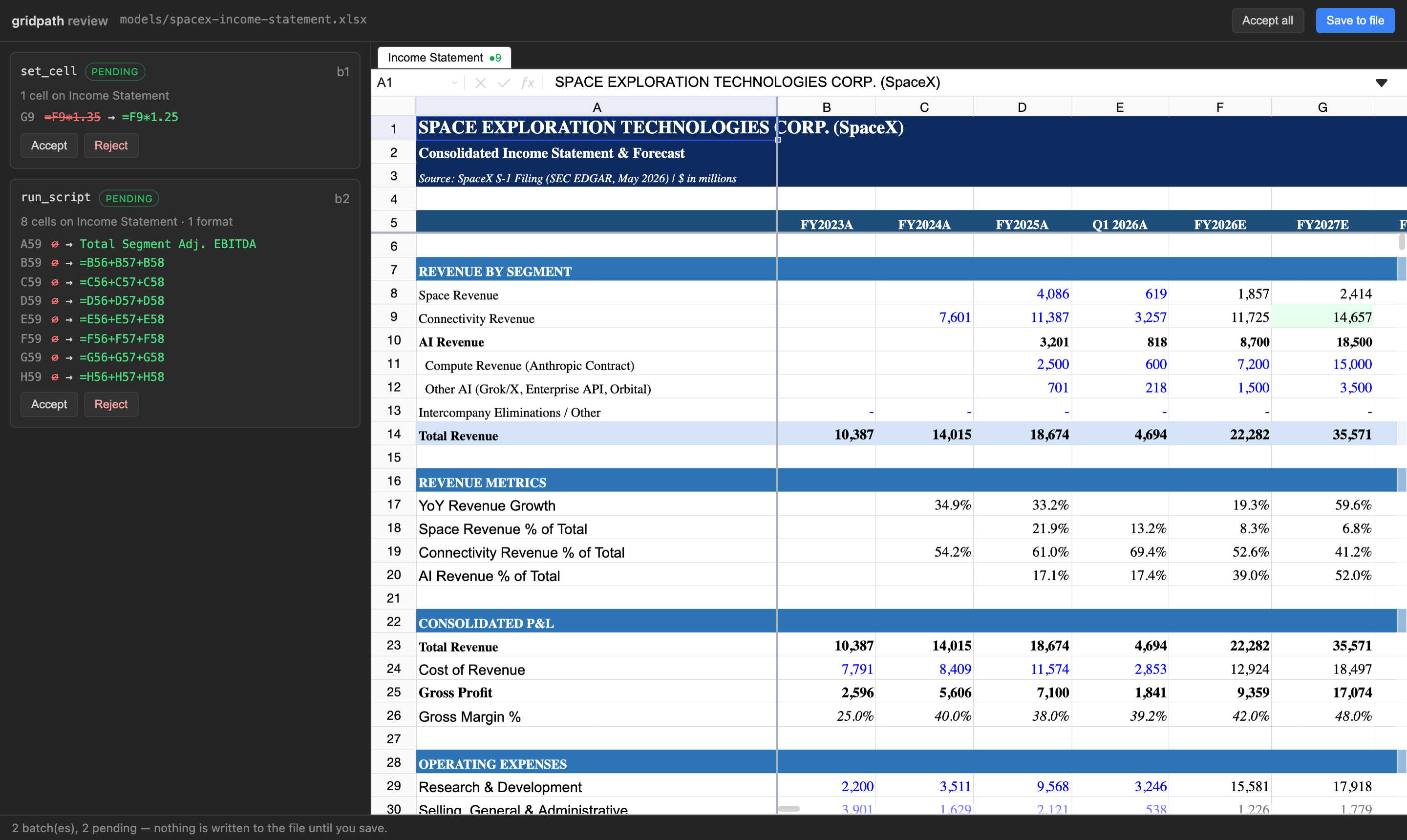
- Review before save. Every write returns a
review_url: a local page with the workbook, changed cells highlighted, before/after per cell, Accept / Reject per batch or per cell, Save or Save as… (a copy). With--review-required, only that page can write the file; the agent just hands you the link. - Leaves your Excel file intact. No re-export through a library, no conversion into another format. Saves patch the original bytes: only the parts an edit touched are rewritten. Untouched parts, including pivots, VBA macros, add-in data and custom XML, come back byte-identical. Referenced chart caches update with recalculated worksheet values.
- Real formulas, in process. A calculation engine (a fork of IronCalc, compiled to WebAssembly) runs inside the server. The agent reads evaluated values and writes formulas that work when the file opens in Excel; inserts and deletes shift references.
- Runs anywhere Node runs. No Python, no openpyxl, no LibreOffice, no Excel install. macOS, Windows, Linux.
- Sandboxed scripts.
run_scriptruns the agent's JavaScript against the workbook in a worker with a hard timeout and lands the result as one reviewable batch.
Install
Claude Desktop (no terminal)
Download gridpath-0.5.1.mcpb
and open it. Claude Desktop shows an install dialog where you pick the folders
Claude may edit and whether saving requires review. Node is bundled; nothing else
to install. Claude Desktop shows its standard "not verified" warning for any
extension installed from a file; the source is public
and nothing is written until you accept and save on the review page.
Claude Code
claude mcp add gridpath -- npx -y gridpath mcp --review-required
Cursor
Add to Cursor
(one click), or add to mcp.json:
{ "mcpServers": { "gridpath": { "command": "npx", "args": ["-y", "gridpath", "mcp", "--review-required"] } } }
Codex (~/.codex/config.toml)
[mcp_servers.gridpath]
command = "npx"
args = ["-y", "gridpath", "mcp", "--review-required"]
Gemini CLI, Windsurf, VS Code, anything else
Same command/args as the Cursor JSON in that host's MCP settings. The server
speaks stdio.
Options
| Flag | Meaning |
|---|---|
--allow <dir> [<dir>...] | Limit the server to these folders. Default: your home directory. |
--review-required | The agent cannot save. save_workbook returns the review link; you accept and save there. Also GRIDPATH_REVIEW_REQUIRED=true. |
--port <n> | Port for the local review server (default: random). |
gridpath review <file> | Reopen the review page for a workbook's pending batches later. |
Pending changes live next to the workbook (.gridpath/<file>.batches.json) until
saved or rejected, so nothing is lost if the agent's session ends.
Tools
Every tool takes path. Cells and ranges are A1 notation.
| Tool | What it does |
|---|---|
describe_workbook (sheet?) | Structural map: sheets, used ranges, header rows, sections, named ranges. Call first. |
find_rows (query, sheet?, max_results?) | Find rows by label across sheets, with an evaluated sample. |
read_range (sheet, range) | Evaluated values, formulas and display text for a range (≤ 500 cells). |
set_cell (sheet, cell, value | formula) | Write one cell. |
set_range (sheet, top_left, values[][]) | Write a block; strings starting with = are formulas. |
copy_range (sheet, source, dest_sheet, dest, mode) | Excel-style copy with reference shifting; all / values / formats. |
run_script (script) | Sandboxed JS with sheet(name).get/set/values/setValues/format/clear; one batch. |
set_format (sheet, range | operations[], format) | Number formats, bold/italic, colors, alignment, wrap. |
clear_range (sheet, range) | Clear values and formulas, keep formatting. |
insert_rows / delete_rows / insert_columns / delete_columns | Structural edits; references, CF and validation ranges follow. |
create_sheet / rename_sheet / delete_sheet | Sheet ops. |
set_column_width / set_row_height / freeze_panes / unfreeze_panes / hide_rows / show_rows / hide_columns / show_columns | Layout. |
merge_cells / unmerge_cells / set_note / delete_note / define_name | Merges, notes, named ranges. |
list_batches | Pending batches and the review link. |
reject_batch (batch_id) | Drop a pending batch; the rest replay onto a fresh model. |
save_workbook (as?) | Patch pending changes into the file, or with as write a patched copy and leave the original untouched. The only tool that writes. In-place saves are gated by --review-required. |
Writes never touch the file. They accumulate as pending batches and every write
returns a readback of what landed (values, formulas, a row_map of labels) plus
the review_url.
What the agent said
Claude, after editing a 1,400-row sell-side model (2,500+ named ranges, hidden sheets) through GridPath in Cursor, asked how it compared with its built-in approach:
It recalculates live. After I changed row 58, I could read back the new growth rates right away (28.0%, 28.0%, 27.9%) and confirm the change worked. My usual approach, a Python library called openpyxl, doesn't calculate formulas. I'd have to run the file through LibreOffice to get values, and that can differ from Excel on some functions.
It finds things fast. Its row search and workbook map located "Product revenue" and the Assumptions structure in a few calls. Otherwise I'd be scanning a 1,400-row sheet cell by cell.
It leaves the rest of the file alone. It rewrites only the cells that changed. When openpyxl opens and re-saves a heavy model like this one, it can quietly drop or damage charts, data validation, pivot caches or some formatting. That's the biggest risk with my built-in approach.
How it compares
| gridpath | File-library MCPs (openpyxl etc.) | Live-Excel MCPs (COM) | Browser spreadsheet SDKs | |
|---|---|---|---|---|
| Edits the file you have | yes, patched in place | rewrites the whole file | yes, via Excel | converts to its own format |
| Formulas evaluated | yes, in process | no | yes, needs Excel open | yes, in a hosted app |
| Review before write | yes | no | no | in the vendor's UI |
| Needs installed | Node | Python | Windows + Excel | a web app + account |
| Macros, pivots, add-in data survive | byte-identical | often dropped | yes | not guaranteed |
Benchmarks and methodology, including runs where a plain coding agent does as well as we do, are in the gridpath-evals repo.
Supported files
.xlsx and .xlsm. Verified on real analyst models: a 1.4 MB, 12-sheet,
55,000-formula workbook (76 package parts, 75 byte-identical after an edit) and a
13-sheet .xlsm bank model whose vbaProject.bin came back byte-identical.
How it works
The engine parses the .xlsx into an in-process model; edits mutate it and
read back evaluated results, recalculating only what an edit affects. Saving
diffs the session's changes against the file as loaded and patches the
original bytes at the zip-part level: untouched parts are copied through,
nothing regenerates the package. In the browser the engine runs in a Web
Worker and the grid draws only the visible window, so large models stay light.
Headless (Node)
gridpath/headless is the engine without the grid: open a workbook, apply
the same tool calls, read results, and save, from a server or a script.
import { WorkbookSession } from "gridpath/headless";
Status
v0.5. Not yet supported:
- In the grid: chart types other than line charts, creating or editing charts, data-validation dropdowns, real-time collaboration.
- For agents: the
fetch_webandedgar_lookupsourcing tools, and edits to charts or pivots.
GridPath is also a desktop app with the same engine and review and its own agent built in.
License
Apache-2.0 (LICENSE, NOTICE); third-party software in the package is listed in THIRD_PARTY_NOTICES.md. Releases before 0.2.0 were FSL-1.1-Apache-2.0. "GridPath" is a trademark of Heelix Technologies Inc.
Comments
New to MCP?
From what the protocol is to installing your first server, these answers cover most first questions.
An open protocol that defines how AI applications connect to external tools and data in a uniform way. Clients talk to the model; MCP servers provide tools, resources and prompt templates. They exchange standard messages, so one server can be reused by many clients.