
About Public Apis Mcp
Public Apis Mcp is an MCP server for developers exploring the public-apis database. It combines API search and filtering with recommendations, integration-code generation, statistics, and repository data synchronization.
Key features
- 01Search APIs by category or keyword
- 02Filter by authentication, HTTPS, and CORS
- 03Recommend APIs for project requirements
- 04Generate API integration examples
- 05View API statistics and authentication analysis
- 06Sync and check repository data
Use cases
- 01Find APIs for a project feature
- 02Check API authentication or HTTPS support
- 03Generate a JavaScript, Python, or curl example
MCP support
It exposes tools for searching, filtering, inspecting, recommending, and generating integration examples for public APIs to MCP clients. Clients can also invoke tools to synchronize the repository data.
Configuration
Local server config is the same for every client. Copy it into your client’s MCP config file.
Tools
15Saved tool list · updated 3w ago
| Parameter | Type | Required | Description |
|---|---|---|---|
| category | string | Yes | API category name (e.g., Animals, Anime, Business, etc.) |
| limit | number | No | Maximum number of results to return, default 10 |
Details
From the project READMEPublic APIs MCP Server
English | 中文
A Model Context Protocol (MCP) server that provides intelligent access and management functionality for the public-apis database.
🚀 Project Overview
Public APIs MCP Server is a professional MCP server implementation designed to provide developers with convenient public API discovery, search, and integration services. Through the standardized MCP protocol, you can easily integrate rich public API resources into various AI assistants and development tools.
Core Features
- 🔍 Smart Search: Multi-dimensional API search by category, keywords, authentication method, etc.
- 🛡️ Security Filtering: Security filtering including HTTPS support, CORS configuration, etc.
- 🎯 Smart Recommendations: Intelligently recommend the most suitable APIs based on project requirements
- 💻 Code Generation: Automatically generate API integration code in multiple programming languages
- 📊 Statistical Analysis: Provide detailed API data statistics and analysis
- 🔄 Real-time Sync: Support synchronizing the latest API data from GitHub repositories
📸 Preview

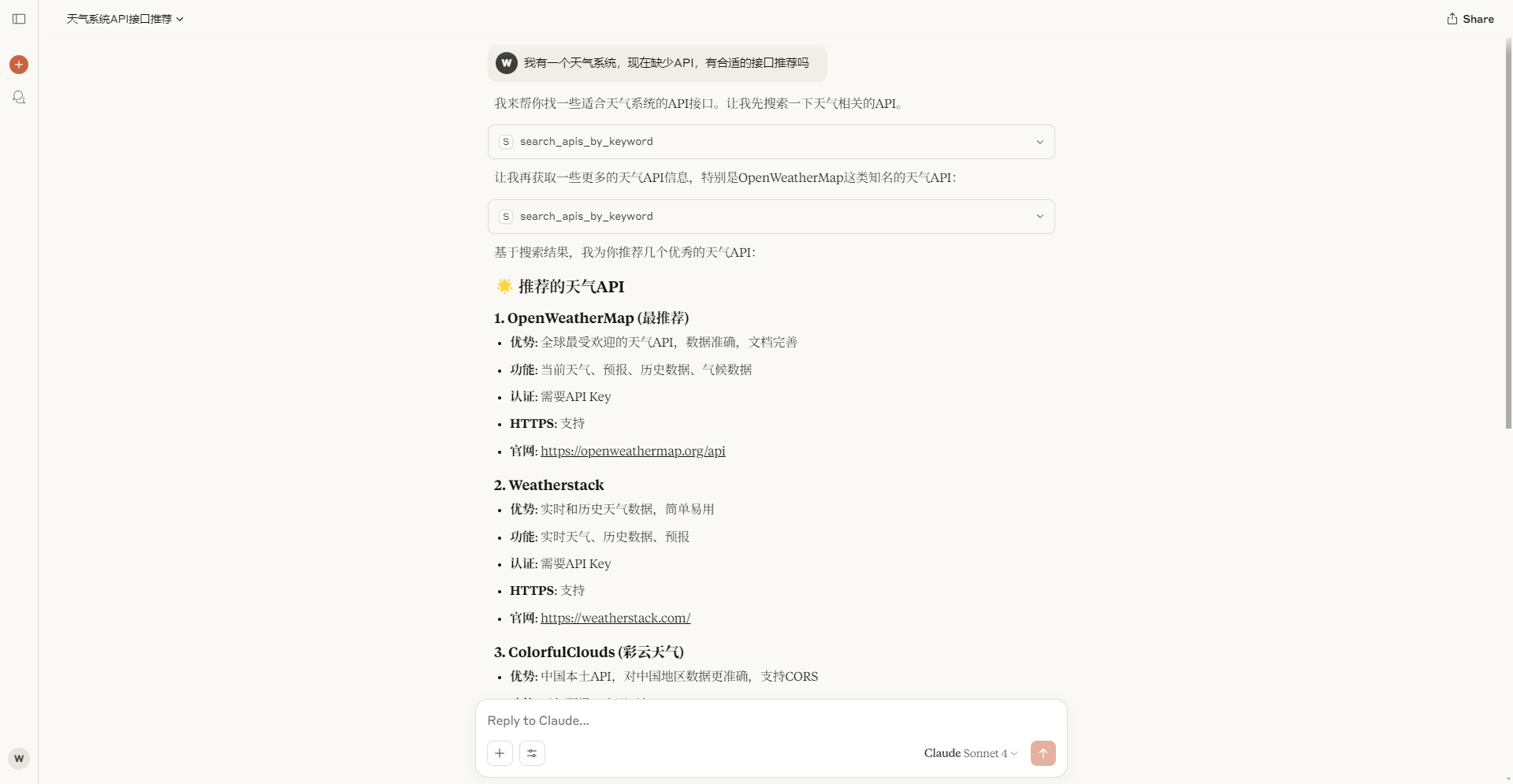
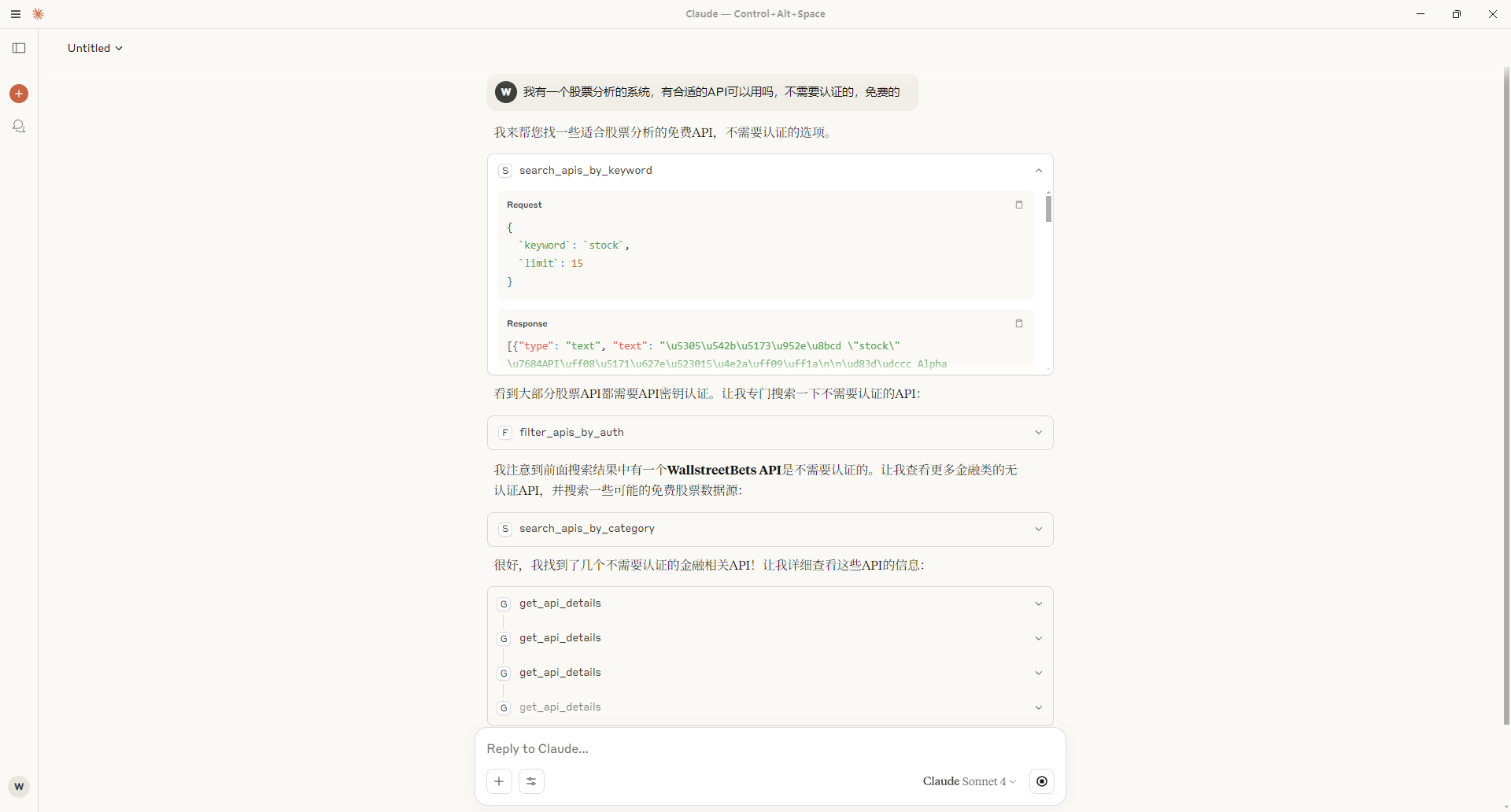
📦 Installation
Requirements
- Node.js >= 18.0.0
- npm >= 8.0.0
Quick Install
# Clone the project
git clone https://github.com/worryzyy/public-apis-mcp.git
cd public-apis-mcp

# Install dependencies
npm install

# Build the project
npm run build

# Start the server
npm start
Development Mode
# Start in development mode (with hot reload)
npm run dev
🛠️ Usage
Basic Configuration
After the server starts, it will communicate with MCP clients through standard input/output. You can configure this server in AI assistants or development tools that support the MCP protocol.
MCP Client Configuration Example
{
  "mcpServers": {
    "public-apis-mcp": {
      "command": "node",
      "args": ["path/to/public-apis-mcp/dist/index.js"]
    }
  }
}
Or
{
  "mcpServers": {
    "public-apis-mcp": {
      "command": "npx",
      "args": ["-y", "@weilei_kyle/public-apis-mcp"]
    }
  }
}
🔧 Available Tools
API Search and Discovery
search_apis_by_category
Search APIs by category
Parameters:
category(string, required): API category namelimit(number, optional): Limit the number of results returned, default 10
Example:
{
  "category": "Weather",
  "limit": 5
}
search_apis_by_keyword
Search APIs by keyword
Parameters:
keyword(string, required): Search keywordlimit(number, optional): Limit the number of results returned, default 10
filter_apis_by_auth
Filter APIs by authentication requirements
Parameters:
authType(string, required): Authentication type (No,apiKey,OAuth,X-Mashape-Key,User-Agent)limit(number, optional): Limit the number of results returned, default 10
filter_apis_by_https
Filter APIs that support HTTPS
Parameters:
httpsOnly(boolean, optional): Whether to return only APIs that support HTTPS, default truelimit(number, optional): Limit the number of results returned, default 10
filter_apis_by_cors
Filter APIs that support cross-origin access
Parameters:
corsSupport(string, required): CORS support status (yes,no,unknown)limit(number, optional): Limit the number of results returned, default 10
API Details and Statistics
get_api_details
Get detailed information for a specific API
Parameters:
apiName(string, required): API name
get_category_list
Get a list of all available API categories
get_random_api
Randomly recommend an API
Parameters:
category(string, optional): Limit random selection within a specific category
get_api_statistics
Get API quantity statistics
analyze_auth_requirements
Analyze the distribution of APIs by different authentication methods
Smart Recommendations
recommend_apis_for_project
Recommend suitable APIs based on project requirements
Parameters:
projectType(string, required): Project type descriptionrequirements(array, optional): List of project requirementslimit(number, optional): Limit the number of recommended APIs, default 5
find_alternative_apis
Find alternative API options
Parameters:
functionality(string, required): Required functionality descriptionlimit(number, optional): Limit the number of results returned, default 5
Code Generation
generate_api_integration_code
Generate integration code examples for selected APIs
Parameters:
apiName(string, required): API namelanguage(string, optional): Programming language (javascript,python,curl), default javascript
Data Management
sync_repository_data
Synchronize the latest API list from GitHub repository
Important Note: This interface currently uses a manual synchronization mechanism to sync the latest data from the public-apis repository to the local server. This mainly ensures data stability and access speed.
How it works:
- Manually trigger fetching the latest API data from the GitHub repository
- Cache data to the local server to improve query performance
- Support both incremental updates and forced full synchronization modes
- Return detailed synchronization status reports after completion
Parameters:
force(boolean, optional): Whether to force re-synchronization, default falsefalse: Only perform incremental synchronization when data is expiredtrue: Force full data synchronization, ignoring local cache
Usage Recommendations:
- It's recommended to perform a forced synchronization (
force: true) before first use - Periodically perform incremental synchronization during daily use to get the latest data
- Use forced synchronization to reset local cache if data anomalies are found
check_new_apis
Check recently added new APIs
Parameters:
days(number, optional): Check new APIs added in recent days, default 7 days
📁 Project Structure
public-apis-mcp/
├── src/
│   ├── index.ts                    # Main entry file
│   ├── server/
│   │   └── server.ts              # MCP server implementation
│   ├── services/
│   │   ├── api-service.ts         # API data management service
│   │   ├── search-service.ts      # Search functionality service
│   │   ├── tool-service.ts        # Tool call handling service
│   │   ├── code-generation-service.ts  # Code generation service
│   │   ├── recommendation-service.ts   # Recommendation algorithm service
│   │   └── formatter-service.ts   # Data formatting service
│   └── types/
│       └── api.ts                 # TypeScript type definitions
├── dist/                          # Compilation output directory
├── package.json                   # Project configuration
├── tsconfig.json                  # TypeScript configuration
└── README.md                      # Project documentation
🔧 Development
Tech Stack
- TypeScript: Type-safe JavaScript superset
- Node.js: JavaScript runtime environment
- MCP SDK: Model Context Protocol software development kit
- Axios: HTTP client library
- Zod: TypeScript-first schema validation library
Build and Test
# Compile TypeScript
npm run build

# Run tests
npm test

# Development mode (hot reload)
npm run dev
Code Standards
The project follows these development standards:
- Use TypeScript for type-safe development
- Adopt modular architecture design
- Comprehensive error handling mechanisms
- Detailed code comments and documentation
🤝 Contributing
Welcome to submit Issues and Pull Requests to improve this project!
Contribution Process
- Fork this repository
- Create your feature branch (
git checkout -b feature/AmazingFeature) - Commit your changes (
git commit -m 'Add some AmazingFeature') - Push to the branch (
git push origin feature/AmazingFeature) - Open a Pull Request
📄 License
This project is licensed under the MIT License - see the LICENSE file for details.
🙏 Acknowledgments
- public-apis - Providing rich public API data sources
📞 Contact
If you have questions or suggestions, please contact us through:
- Submit a GitHub Issue
Note: This project is still under active development, and APIs may change. It is recommended to test carefully before using in production environments.
Comments
New to MCP?
From what the protocol is to installing your first server, these answers cover most first questions.
An open protocol that defines how AI applications connect to external tools and data in a uniform way. Clients talk to the model; MCP servers provide tools, resources and prompt templates. They exchange standard messages, so one server can be reused by many clients.