
About Showboard
Showboard is an MCP server for coding agents that turns SQL databases and Excel or CSV files into charts, tables, and headline figures. It displays results in a browser, an app, or beside the terminal, using read-only queries and guided setup tools.
Key features
- 01Build boards from databases and spreadsheets
- 02Present results as charts, tables, and figures
- 03Display boards in browsers, apps, or terminals
- 04Provide agent setup guidance and diagnostics
- 05Restrict database queries to read-only SELECT
Use cases
- 01Explore database metrics with natural-language questions
- 02Summarize Excel or CSV reports
- 03Display data boards in a custom React app
MCP support
Showboard is an MCP server for coding agents including Claude Code, Codex, Cursor, and Gemini CLI. Agents provide read-only SQL queries and board layouts, which Showboard runs and displays.
Configuration
Local server config is the same for every client. Copy it into your client’s MCP config file.
npx -y showboardSHOWBOARD_DBSecretA Postgres URL or a SQLite file to answer questions about, opened read-only.Local servers need a runtime on your machine (e.g. Node.js 18+). Config file locations differ by client; see your client’s docs.
Tools
Local servers expose tools only once running on your machine, and the maintainer has not provided a tool list.
Details
From the project README
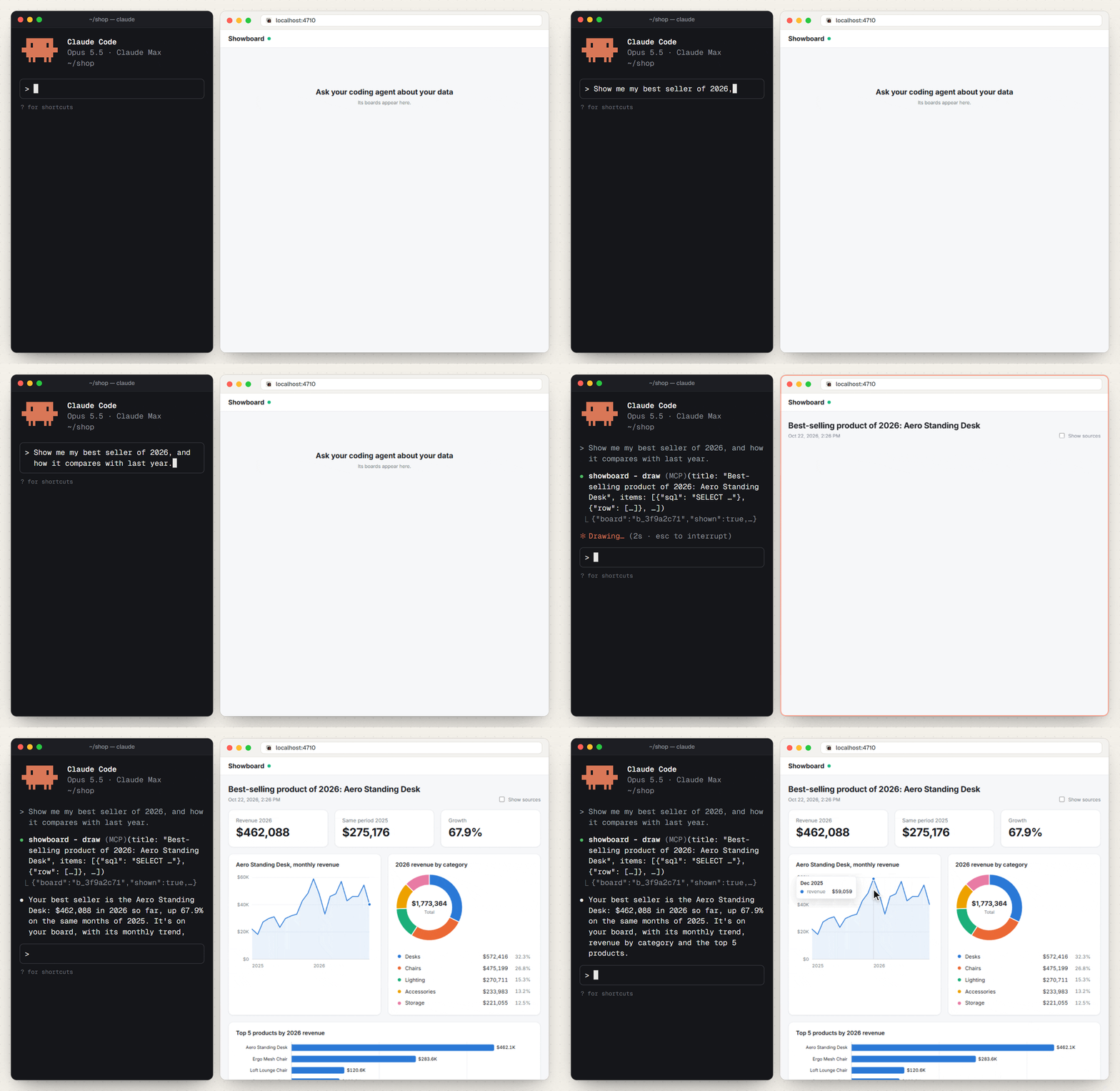
Ask in your terminal. Get a dashboard on your screen.
Showboard is an MCP server that lets Claude Code, Codex, Cursor, Gemini CLI and other coding agents answer questions about your SQL database, or a folder of Excel and CSV files, with charts, tables and headline numbers: in your browser, inside your own app, or beside your terminal.
The agent writes a few read-only SQL queries and a short layout. Showboard runs the queries, picks a chart for each result, lays out the board and puts it on your screen. Every number comes from a query, one click away under its chart.
Let your agent set it up
In your project, ask your coding agent:
Set up Showboard in this project: run
npx showboard guideand follow it.
The guide is written for the agent. It has the agent pick the path that fits the project (spreadsheets, a database, or your own app), run the commands, and check its own work with npx showboard doctor. doctor starts Showboard the way each agent will and says how to fix anything that fails.
Or by hand
You need Node.js 22.13 or later.
A folder of spreadsheets, or a database:
npx showboard init ./reports                 # .xlsx, .xlsm, .csv, .tsv files or folders of them
npx showboard init --db ./shop.sqlite        # or a Postgres URL (or set SHOWBOARD_DB)
npx showboard doctor                         # checks the setup
Restart your agent in that folder, then open http://localhost:4710, or run npx showboard pane in a terminal beside the agent. init writes the settings for Claude Code, plus any agent the folder already has settings for. To name others, pass --agent codex,opencode,bharatcode,gemini,cursor,vscode (or all).
Inside your own app (React 19):
npm install showboard zod
// server: mount the handler. Next.js, Express, Hono and node:http are in the guide.
import { createShowboard } from "showboard/server";

const showboard = await createShowboard({ db: process.env.DATABASE_URL, boardsDir: ".showboard/boards" });
const handle = showboard.handler({ basePath: "/showboard" });   // (req: Request) => Promise<Response>
// page: where boards appear
import { Board, ShowboardProvider } from "showboard/react";
import "showboard/styles.css";

<ShowboardProvider url="/showboard">
  <Board />
</ShowboardProvider>;
Then point the agents at it: npx showboard init --url http://localhost:3000/showboard.
Commands
| Command | What it does |
|---|---|
showboard guide | Setup steps for a coding agent |
showboard init | Adds Showboard to each agent's settings in this folder |
showboard doctor | Checks the setup the way each agent will meet it, with fixes |
showboard mcp | The MCP server the agent starts |
showboard serve | Showboard's own board page, on its own |
showboard pane | The boards as text, in a terminal beside the agent |
Safe by design
- Postgres queries run in a
READ ONLYtransaction, with a time and row limit. SQLite files are opened read-only, and spreadsheets are only read. - Only
SELECTis accepted. - In your app, the agent can run only the actions you register, each checked against its input schema.
- The handler answers only
localhost, and refuses requests from other websites.
More
- README: the benchmark, how it works, and examples.
- SETUP.md: the agent's setup guide.
- Reference: every option, tool, command and route.
MIT licensed. Built with help from AI coding agents, mostly Claude Code.
Comments
New to MCP?
From what the protocol is to installing your first server, these answers cover most first questions.
An open protocol that defines how AI applications connect to external tools and data in a uniform way. Clients talk to the model; MCP servers provide tools, resources and prompt templates. They exchange standard messages, so one server can be reused by many clients.