
About OpenLeads
OpenLeads is a local prospecting workspace that searches public sources for people and companies, labels email evidence, and supports lead management and outreach. It combines a CLI and dashboard with a built-in MCP server for AI assistants to search and update workspace records.
Key features
- 01Search people across public sources
- 02Label email evidence and confidence
- 03Score leads against an ideal customer profile
- 04Manage lists, sequences, tasks, and deals
- 05Import and export CSV records
- 06Run a built-in MCP server
Use cases
- 01Find prospects by location or industry
- 02Separate confirmed addresses from guesses
- 03Organize leads into outreach sequences
- 04Let an AI assistant update lead records
MCP support
OpenLeads includes an MCP server that lets AI assistants search contacts and companies, read records, save leads, and manage stages, tags, notes, tasks, deals, and sequence enrollment. It does not send messages through these tools.
Configuration
Local server config is the same for every client. Copy it into your client’s MCP config file.
Tools
22Saved tool list · updated 2w ago
| Parameter | Type | Required | Description |
|---|---|---|---|
| count | integer | No | |
| query | string | Yes | Who to find, in plain English. |
| save_to_list | string | No | Also save the results to your workspace, in this list (created if new). |
| verified_only | boolean | No | Only return deliverable (safe-tier) emails. |
| budget_seconds | integer | No |
Details
From the project README🧲 OpenLeads
Find people and their work emails from free public data — then work them like you would in Apollo. No API keys. $0.
Type who you want ("dentists in Austin", "fintech founders", "law firms in London") and OpenLeads searches OpenStreetMap, Y Combinator, GitHub, OpenAlex, SEC EDGAR, Wikidata and company websites, finds the real people, and tells you honestly which emails are confirmed and which are guesses. Then it scores them against your ideal customer, organizes them into lists, and runs multi-step email, call and LinkedIn sequences, tasks and a deal pipeline. It runs on your machine.







pipx install openleads        # or: pip install openleads   ·   npx openleads
openleads find "dentists in Austin"
openleads web                 # the dashboard · or `openleads demo` to look around first
Website · Docs · Live benchmark · Changelog
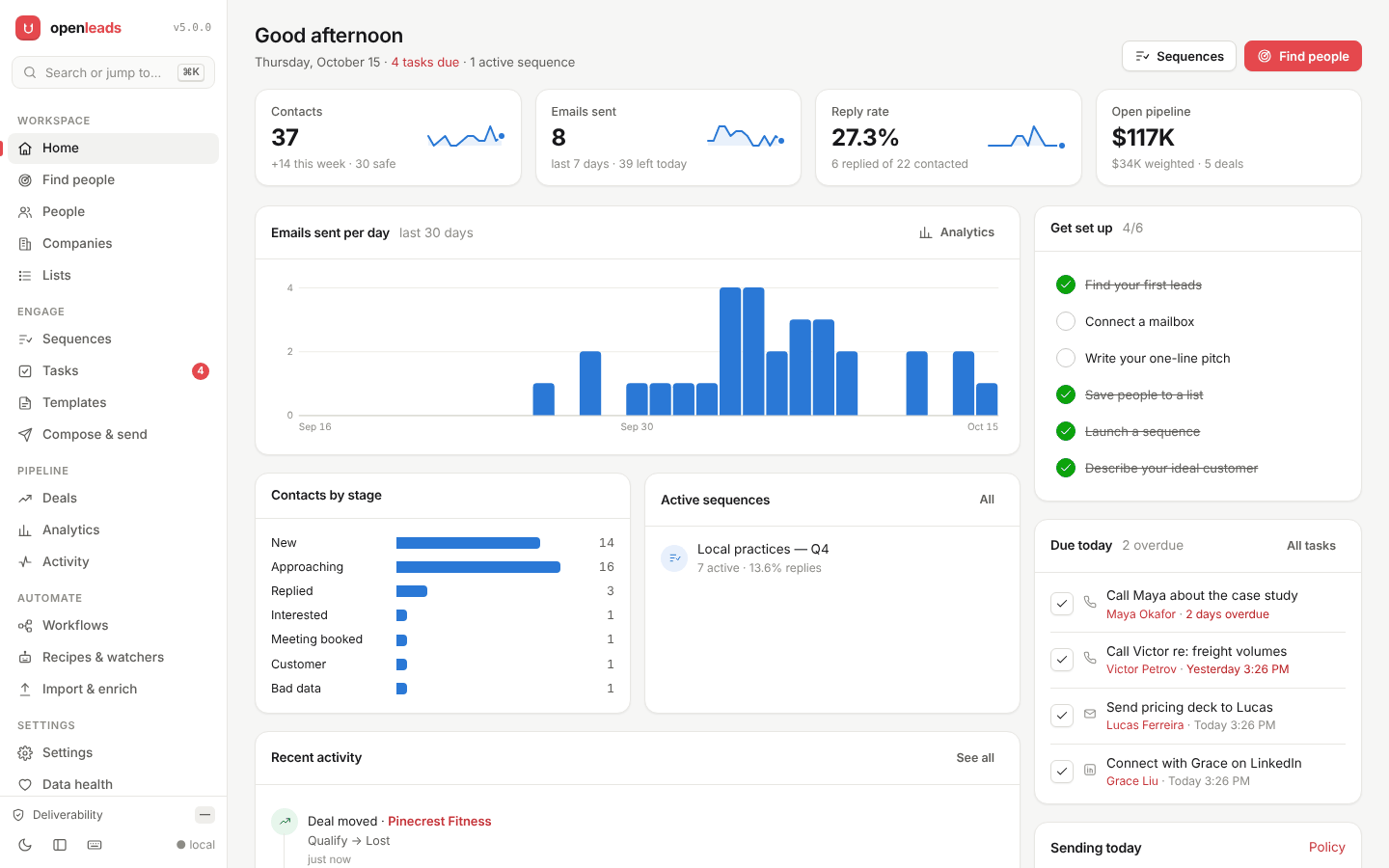
The local dashboard (openleads demo, invented data). Light and dark, keyboard-first, nothing leaves your machine.
$ openleads find "dentists in Austin" -n 6
  ◆ federated search · local …
    1  ▌safe   [email protected]        Example Dental        ▰▰▰▰▰▰▰▰▰▰  98% found
    2  ▌safe   [email protected]        Smile Example Co      ▰▰▰▰▰▰▰▰▰▰  98% found
    3  ▌risky  [email protected]  Maria Lopez           ▰▰▰▰▰▰▱▱▱▱  62% guessed
    4  ▌safe   [email protected]        Daniel Kim            ▰▰▰▰▰▰▰▰▰▱  88% pattern
  ──────────────────────────────────────────────────────
  6 leads   4 safe deliverable   2 risky unconfirmed   ██████████████████░░░░░░
  4 found or built from a seen pattern · 2 guessed
Output shape from a real run; businesses and people renamed.
Why it's different
Apollo, Hunter and ZoomInfo sell a contact database and email verification, then charge again for sending. OpenLeads does all three for free, from public data, on your laptop. Two things matter most:
It's honest about every email. Most free finders label a first.last@ guess as
"valid". OpenLeads marks each address:
| Evidence | Meaning |
|---|---|
| found | Published on the web, or confirmed by the mail server |
| pattern | Built from the format a real address at that company uses |
| guessed | A common format, unconfirmed. It's labelled, so you decide |
Those feed a send decision: safe (send it), risky (held back unless you opt in), bad (dropped). Read how the scoring works.
It's measured against live data every night. Unit tests can't tell you whether
"dentists in Austin" returns dentists. openleads bench runs 12 real
queries against the live sources and publishes the results:
| Real query | v4.0 | v4.5 |
|---|---|---|
| "marketing agencies in Miami" | 6 of 20 "people" were page headings ("Refund Policy") | 0 junk names |
| "dentists in Austin" | chiropractors and transport companies, 0 usable | 10 dentists |
| "machine learning researchers" | 0 results | 10 researchers |
| "rust developers in Berlin" | still running after 4 min | 10 in 5s |
Latest full run (12 queries, 10 leads each): 12/12 return results · 84% fill · 0% junk names · 32% of emails found or pattern-backed, the rest labelled guessed · 54s median. Full scoreboard →
Apollo, on your laptop
| Apollo | OpenLeads | |
|---|---|---|
| Where contacts come from | A licensed database | Public sources, searched on demand for your exact query |
| Email confidence | A status per address (verified, extrapolated, …) | found · pattern · guessed per address, with the reasons |
| People & company search with filters | ✓ | ✓ seniority, department, industry, size, tech stack, location, stage, fit… |
| Lists, tags, notes, saved searches | ✓ | ✓ |
| ICP fit scoring | ✓ | ✓ 0–100 + A–D, with a what-if preview |
| Multi-step sequences (email, call, LinkedIn, tasks) | ✓ | ✓ A/B variants, threading, AI-written steps, auto-stop on reply |
| Task queue · deal pipeline | ✓ | ✓ focus mode · drag-and-drop board with weighted forecast |
| CSV import & export | ✓ | ✓ auto-maps Apollo, HubSpot and LinkedIn exports; exports in Apollo or HubSpot format |
| Use from Claude, Cursor, Claude Code | ✓ built-in MCP server with read and write workspace tools | |
| Where your data lives | Their cloud | A SQLite file on your machine |
| Price | Free tier with credit limits; paid per seat | $0, open source |
What you can search
One query fans out across the sources that fit it. You never pick a source, but
-s name pins one.
| Ask for | Searched | Example |
|---|---|---|
| Local businesses, any city | OpenStreetMap (Overpass + Nominatim) | "accountants in Toronto" |
| Startup founders, companies hiring | Y Combinator, Hacker News | "AI startup founders" |
| Companies by industry | Wikidata, SEC EDGAR | "fintech companies" |
| Developers | GitHub | "rust developers in Berlin" |
| Researchers | OpenAlex | "machine learning researchers" |
| Everyone at one company | the company's own site | "emails at stripe.com" |
| US healthcare providers | NPI Registry | "pediatricians" |
Each company is turned into named people from its team and about pages. Every address then goes through the email checks: published-address harvest, learned company pattern, MX/SPF/DMARC, Gravatar, and SMTP where port 25 is open.
Need a source we don't have? A source is one Python file.
Work your leads
Everything you find lands in a local workspace — the same data in the dashboard, the terminal and your AI assistant.
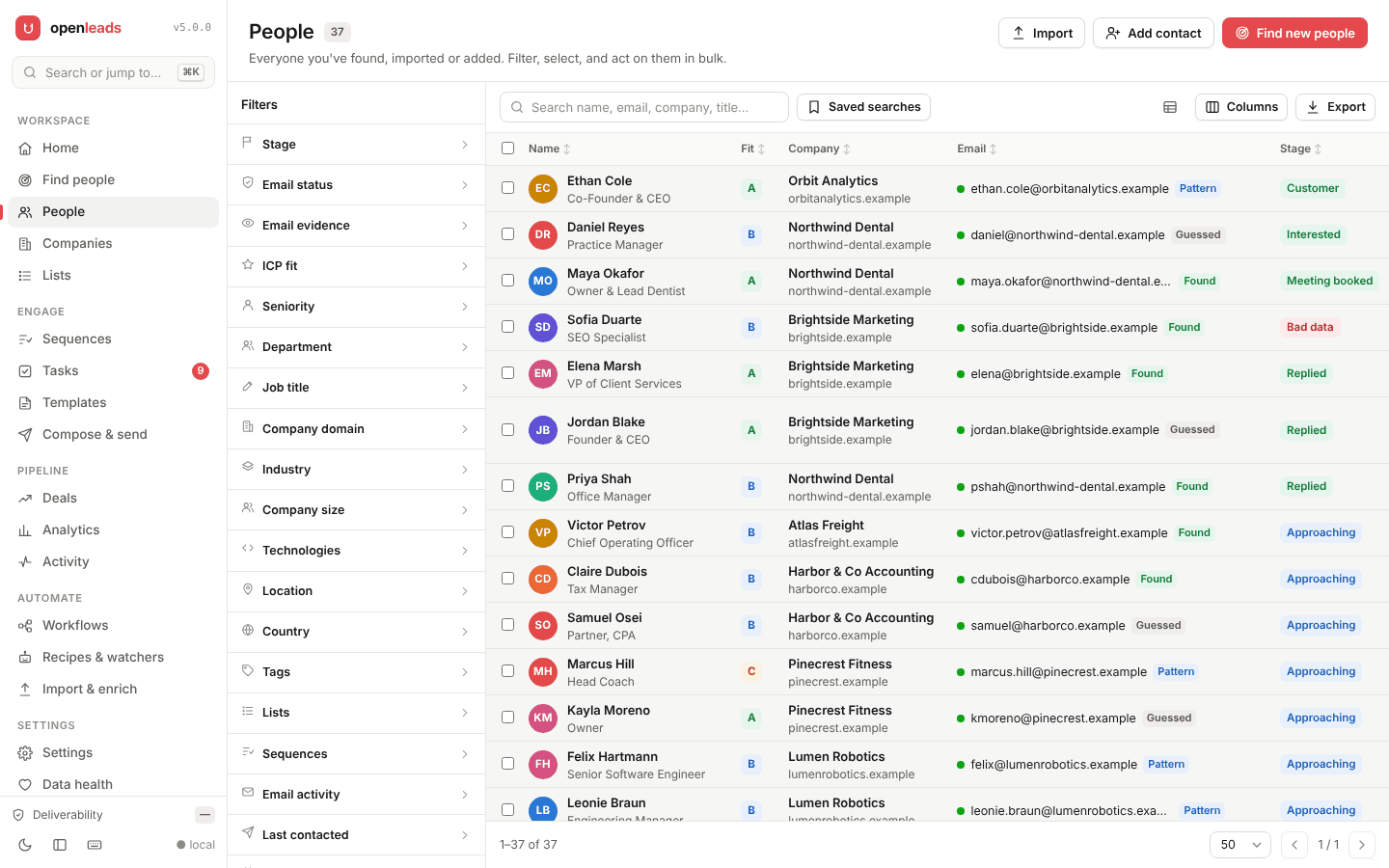 | 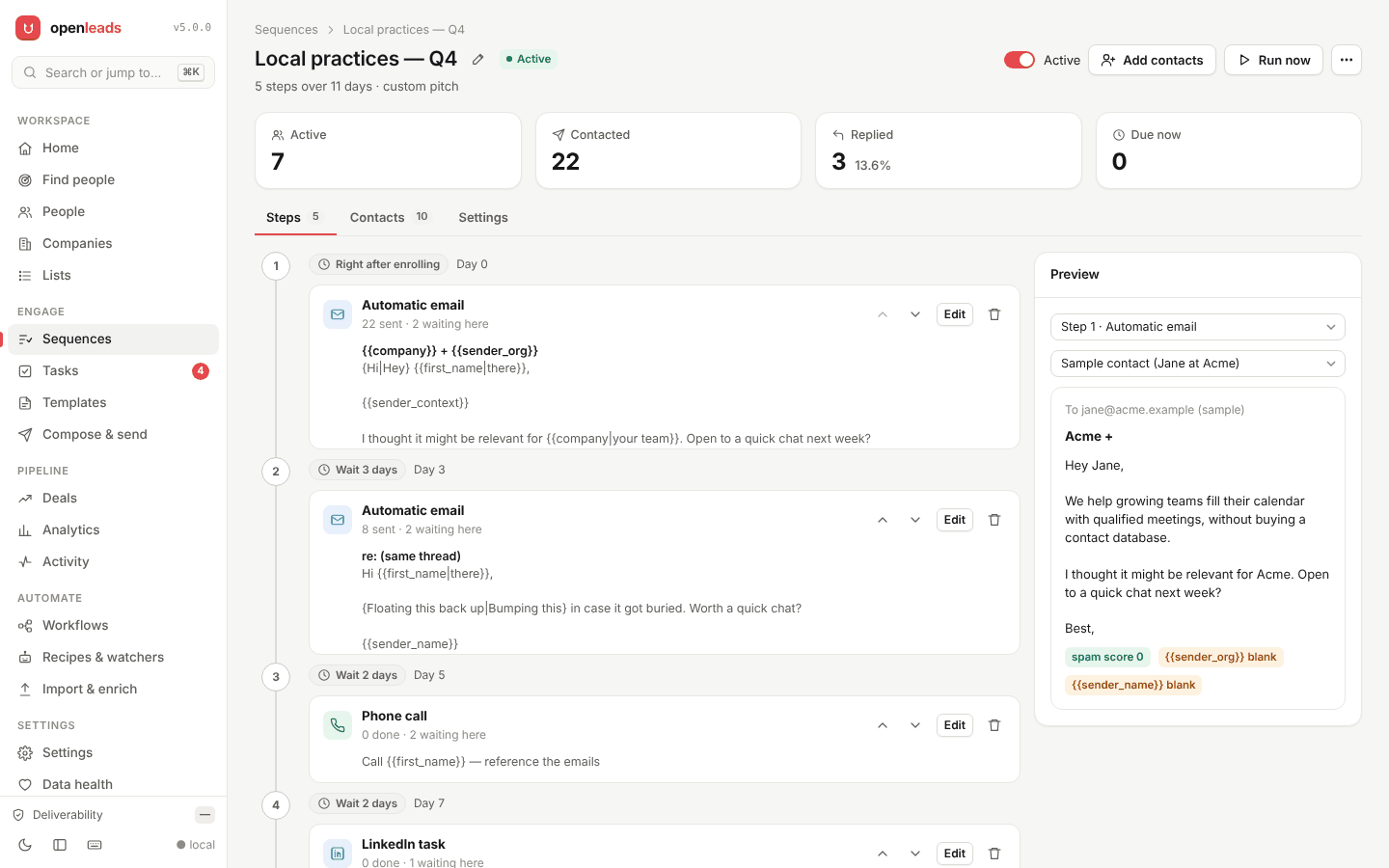 |
| People & companies. Facets with live counts, saved searches, bulk actions on every matching row, full records with timeline, notes, tasks and deals. | Sequences. Email, call, LinkedIn and task steps; A/B variants; same-thread follow-ups; AI-written steps; people leave when they reply. |
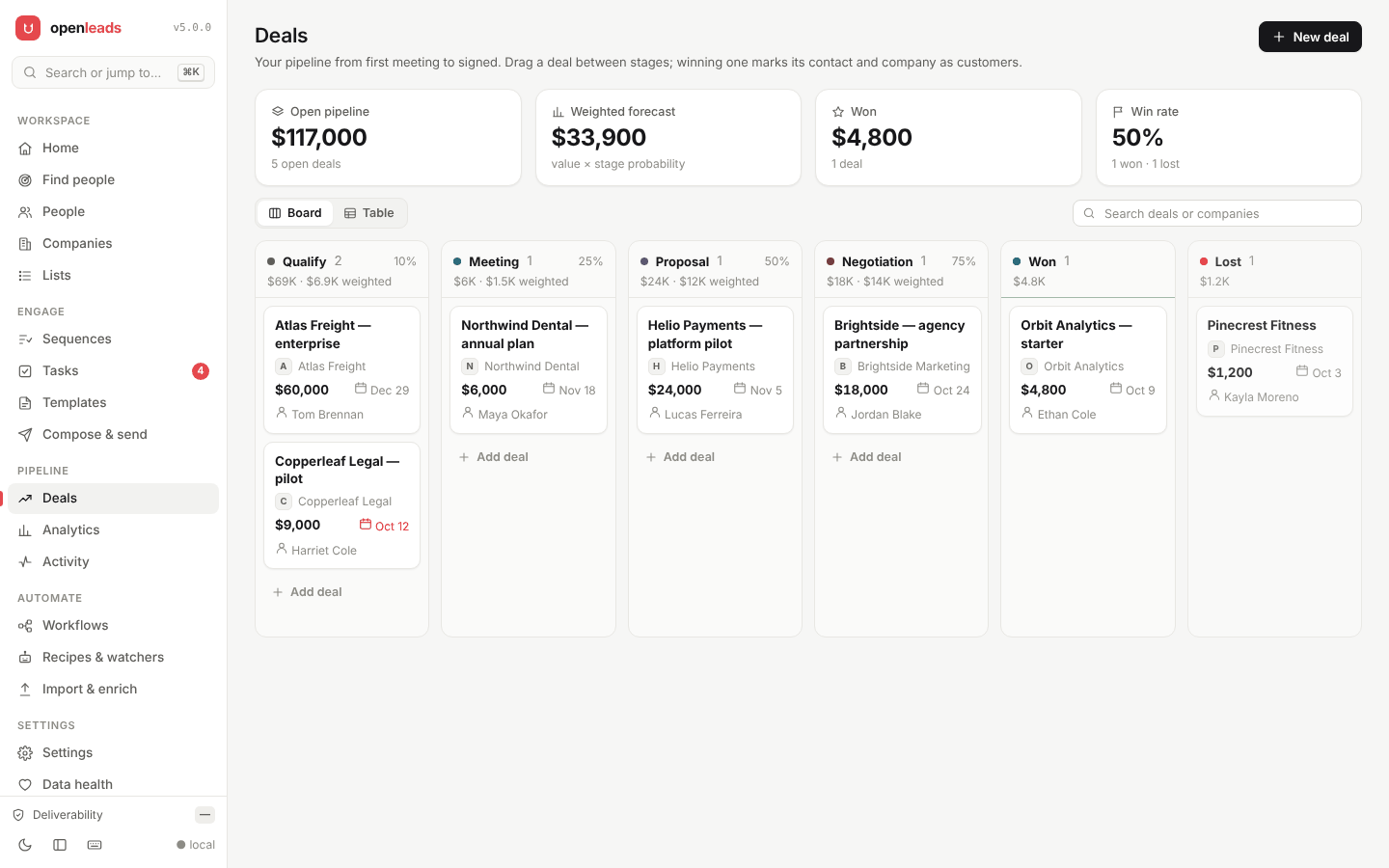 | 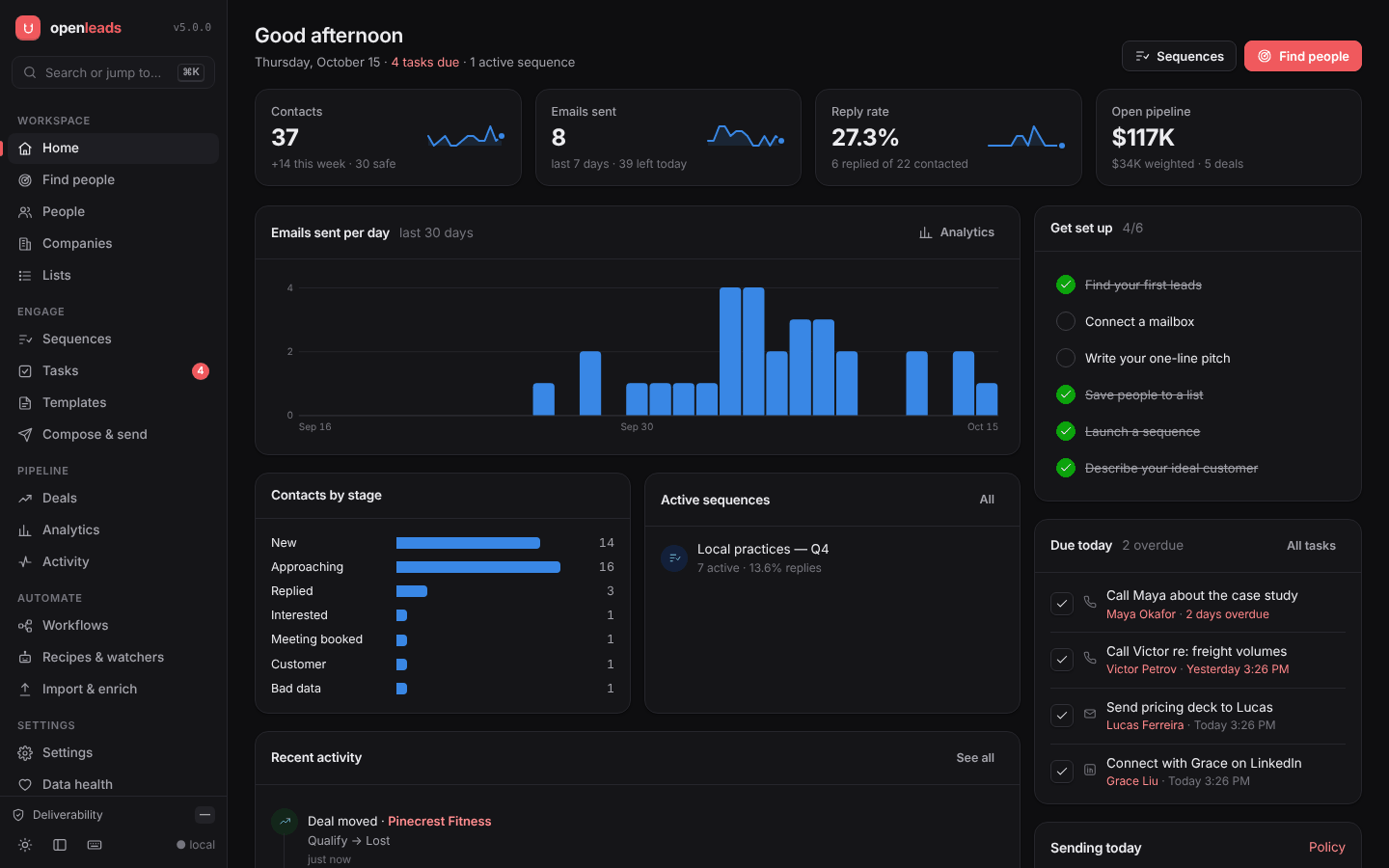 |
| Deals. A drag-and-drop pipeline with weighted forecast; winning a deal makes the contact a customer. | Everything else. Task queue, templates, ICP scoring, CSV import, data health and duplicate merge, a ⌘K palette. |
openleads people --fit A --never-contacted                 # best untouched leads
openleads lists add "Q4 dentists" --where dental
openleads seq enroll "Q4 outbound" --list "Q4 dentists"
openleads tasks --bucket today
openleads import apollo-export.csv --list "Imported"
Workspace guide → · Sequences guide →
Use it from Claude, Cursor or Claude Code
OpenLeads is an MCP server. Your AI assistant can find and verify leads mid-conversation:
claude mcp add openleads -- openleads mcp
{ "mcpServers": { "openleads": { "command": "openleads", "args": ["mcp"] } } }
"Find 10 law firms in London with emails we can actually send to, and draft a two-line intro for each."
"Save them to a list called London law, add the A-grade ones to my Q4 sequence, and give me a call task for each partner."
The workspace tools let an assistant search your contacts and companies, read a full record, and save leads, set stages, tag, take notes, create tasks and deals and enroll people in sequences — never sending anything itself.
Build it as a workflow
The dashboard's Workflows page draws each saved search as a node canvas, like n8n.
Click a node to edit it (who to find, what to offer, when to run, where to export), then hit Test run and watch every node fill in from the live engine. Test runs never send. Workflows guide →
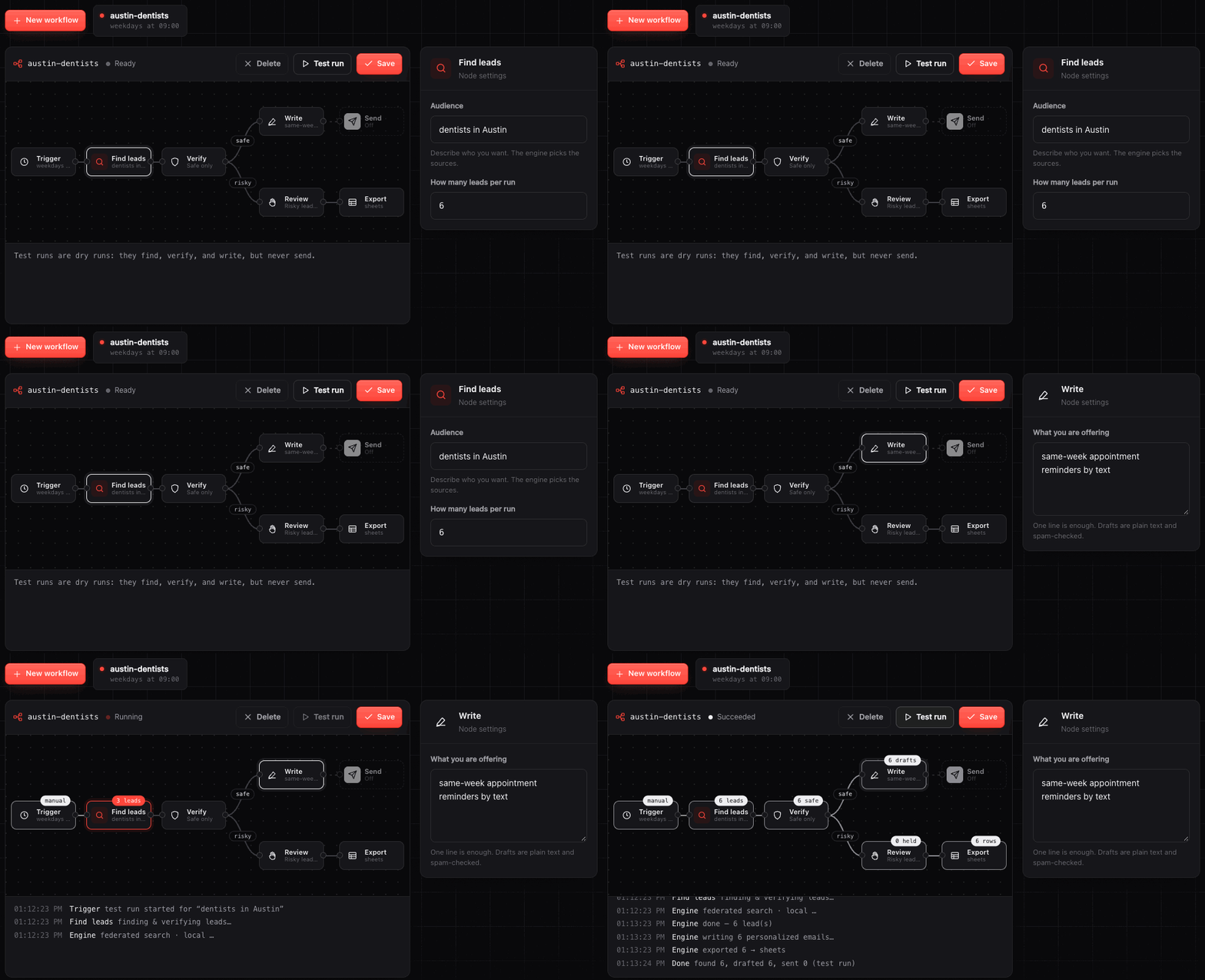
Export nodes push leads to CSV, Google Sheets, Notion, Airtable, or any webhook, so the rest of your stack (n8n, Zapier, Make) can take it from there.
Put it on a schedule
openleads recipe add miami "marketing agencies in Miami" --every "weekdays 9am" --send
openleads schedule on     # one agent: launchd · cron · Windows Task Scheduler
openleads runs            # what ran, what it found, what failed
Schedules can be plain English (every 2h, mon,thu 14:00) or cron. Sends stay
inside your daily cap, warmup ramp and business-hour windows, and stop for anyone
who replies. Failed runs send a desktop alert, plus a webhook if you set one.
Timed runs →
Rather run it in CI? There's a GitHub Action:
- uses: Samyrrrrrr990/[email protected]
  with: { query: "marketing agencies in Miami", count: 50 }
Install
pipx install "openleads[all]"     # recommended
pip install openleads             # minimal: stdlib-only engine + CLI
npx openleads find "…"            # Node: sets up a private Python env on first run
openleads doctor    # checks your setup (DNS, port 25, mailbox)
openleads           # chat: type what you want
openleads web       # local dashboard at http://127.0.0.1:8787
Full walkthrough: docs/quickstart.md.
Commands
openleads find "50 fintech founders, verified only" -o leads.csv
openleads find "emails at stripe.com"
openleads enrich my-list.csv                   # your names/companies → verified emails
openleads verify [email protected]                   # check one address

openleads run "rust developers in Berlin"      # find → write → send (dry-run unless --live)
openleads recipe add NAME "query" --every "…"  # save it, schedule it
openleads watch add NAME "query"               # alert me only on new matches
openleads schedule on | off | status
openleads runs

openleads people · companies · lists · seq       # your workspace (see above)
openleads tasks · deals · import · dedupe · stats · backup
openleads demo                                 # the dashboard on invented data

openleads bench                                # live quality benchmark
openleads mcp                                  # MCP server for AI tools
openleads sources · crm · config · doctor · inbox
Sending is a dry run by default everywhere. Add --live to send.
How it works
flowchart LR
    Q["'dentists in Austin'"] --> P[Intent parser]
    P --> F[Federation<br/>picks sources]
    F --> S1[OpenStreetMap]
    F --> S2[YC · HN · GitHub · OpenAlex · EDGAR · Wikidata]
    S1 & S2 --> D[Team-page people discovery<br/>+ real-name gate]
    D --> E[Email checks<br/>harvest · pattern · MX · SMTP · Gravatar]
    E --> L[Leads with evidence + tier]
    L --> W[Write → Send → Follow up<br/>on your schedule]
    E <--> DB[(Local SQLite<br/>learned patterns · CRM)]
The core is Python standard library only. Everything, including your leads, drafts,
mailbox credentials, learned patterns and your whole workspace (people, companies,
lists, sequences, tasks, deals), lives in ~/.openleads. There's no
hosted backend, no account and no telemetry. Details: docs/architecture.md.
Responsible use
OpenLeads is for legitimate prospecting, recruiting and research. You're responsible for anti-spam law (CAN-SPAM, GDPR, CASL) and each source's terms. It ships the guardrails: dry-run by default, suppression list, one-click unsubscribe, warmup caps, no tracking pixels. Read docs/responsible-use.md.
License
Open source under AGPL-3.0. Using OpenLeads is free, including at your company. If you embed it in a closed-source product, or run a modified version as a service without publishing your changes, you need a commercial license. Releases up to 4.0.1 were PolyForm Noncommercial.
Contributing
The highest-impact PR is a new source (guide). The second is a
query that openleads bench scores badly, along with the fix.
See CONTRIBUTING.md.
Thanks
OpenStreetMap contributors ·
OpenAlex · yc-oss/api ·
NPI Registry · SEC EDGAR · Wikidata · Gravatar ·
US Social Security Administration (given-name data).
If OpenLeads found you a customer, a ⭐ helps other people find it.
Comments
New to MCP?
From what the protocol is to installing your first server, these answers cover most first questions.
An open protocol that defines how AI applications connect to external tools and data in a uniform way. Clients talk to the model; MCP servers provide tools, resources and prompt templates. They exchange standard messages, so one server can be reused by many clients.