About namera
Namera is a naming tool for founders and agents that checks candidate names across domains, trademarks, and social handles. It scores and ranks candidates using configurable business profiles, and is available as a CLI and MCP server.
Key features
- 01Check domains, trademarks, and social handles
- 02Generate name and TLD permutations
- 03Score and rank candidates by profile
- 04Output tables, JSON, NDJSON, or CSV
Use cases
- 01Screen startup names in a business niche
- 02Rank candidates using a fintech or SaaS profile
- 03Find domain and social handle options
MCP support
The MCP server exposes `check_name` for a single candidate and `find_names` to check, score, and rank multiple candidates with business context.
Configuration
Local server config is the same for every client. Copy it into your client’s MCP config file.
Tools
Local servers expose tools only once running on your machine, and the maintainer has not provided a tool list.
Details
From the project READMENamera
Name your startup like a YC founder. Check domain availability, screen for trademark conflicts, and rank everything — so you pick from the best options, not all of them.
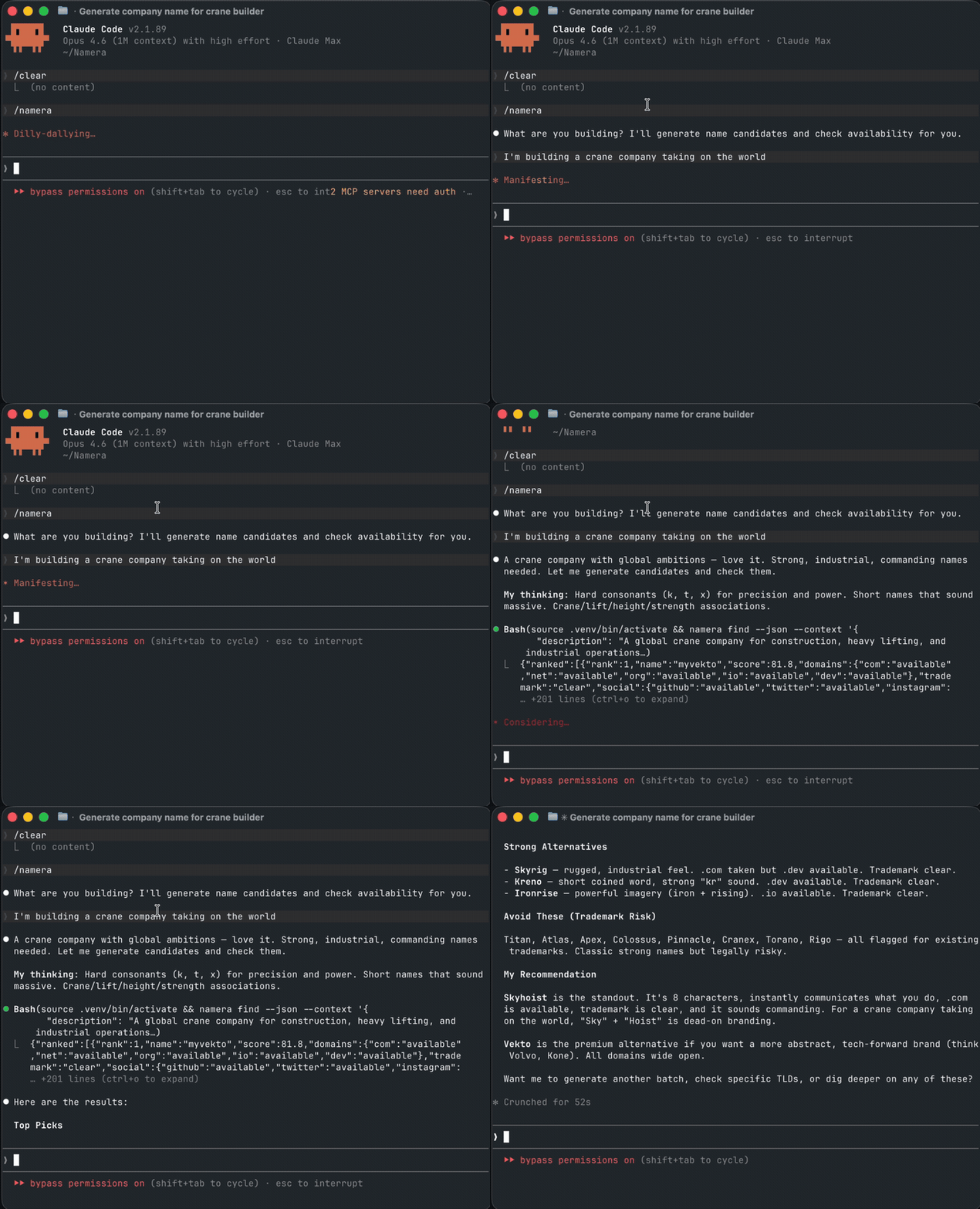
Install
uvx namera
Or install persistently:
uv tool install namera
Install from source
git clone https://github.com/solozerolabs/Namera.git
cd Namera
pip install -e .
uvx namera find --context '{"name_candidates": ["voxly", "dataprime"], "niche": "fintech"}'
 Ranked results
┌──────┬────────────┬───────┬────────────┬───────────┐
│ Rank │ Name       │ Score │ .com       │ Trademark │
├──────┼────────────┼───────┼────────────┼───────────┤
│  1   │ getnamera  │  92   │ Available  │  Clear    │
│  2   │ trynamera  │  87   │ Available  │  Clear    │
│  3   │ namerahq   │  84   │ Available  │  Clear    │
└──────┴────────────┴───────┴────────────┴───────────┘
Features
- Domain availability — DNS, RDAP, and optional pricing lookups
- Trademark screening — 12.7M USPTO trademarks, exact + fuzzy matching
- Social handle checks — GitHub, Twitter/X, Instagram
- Name generation — permutations with prefixes, suffixes, and TLD combinations
- Weighted ranking — composite scores from availability, trademark safety, length, and pronounceability
- Scoring profiles — built-in presets for fintech, SaaS, consumer, developer tools
- 20 TLD presets —
popular,tech,startup,fintech,geo-us,geo-eu, and more - Multiple output formats — table, JSON, NDJSON, CSV
- Agent-friendly — auto-detects piped output and switches to JSON. Designed for Claude Code, Codex, and other AI agents
- Fast — concurrent async checks with caching
Usage
Check a name
namera search voxly
namera domain voxly --tlds com,io,ai
namera trademark voxly
namera whois voxly.com
Discover names with business context
# Interactive wizard
namera find

# Structured input (for agents and scripts)
namera find --context '{"name_candidates": ["voxly", "dataprime"], "description": "fintech analytics platform", "niche": "finance"}'

# Only available names, as JSON
namera find --context '...' --only-available --json
Generate name permutations
namera compose namera --common-prefixes --common-suffixes --check
namera compose namera --prefix get --prefix try --suffix hq --tlds com,io
Rank candidates
namera rank voxly dataprime nimbus
namera rank voxly dataprime --profile fintech --json
TLD presets
# See all presets
namera presets

# Use a preset anywhere TLDs are accepted
namera compose voxly --tlds startup --check
namera domain voxly --tlds tech
MCP Server (for AI agents)
Namera ships as an MCP server so AI agents (Claude Code, ChatGPT, Codex) can call it directly.
pip install namera[mcp]
namera-mcp
Add to Claude Desktop (~/Library/Application Support/Claude/claude_desktop_config.json):
{
  "mcpServers": {
    "namera": {
      "command": "namera-mcp",
      "args": []
    }
  }
}
Two tools are exposed:
check_name— check a single name across domain, trademark, and socialfind_names— check multiple candidates with business context, score, and rank them
Scoring Profiles
| Profile | Optimizes for |
|---|---|
default | Balanced — domain, trademark, length, pronounceability |
startup-saas | .com availability (hard filter: must have .com) |
fintech | Trademark safety (hard filter: must be trademark-clear) |
consumer | Social handles + pronounceability |
developer-tools | .dev/.io TLDs + GitHub handle |
Development
pip install -e ".[dev]"
pytest tests/ -v
ruff check src/ tests/
License
MIT
Comments
New to MCP?
From what the protocol is to installing your first server, these answers cover most first questions.
An open protocol that defines how AI applications connect to external tools and data in a uniform way. Clients talk to the model; MCP servers provide tools, resources and prompt templates. They exchange standard messages, so one server can be reused by many clients.