
About 🚀 Tabby-MCP-Server
Tabby-MCP-Server is a Tabby Terminal plugin that exposes open terminal sessions to MCP-compatible AI clients over SSE. It lists local and SSH-backed sessions, runs commands, and reads terminal buffers. It suits developers who want an AI client to work inside existing Tabby tabs.
Key features
- 01Lists local and SSH-backed terminal sessions
- 02Runs commands in a selected terminal tab
- 03Reads visible and history buffer ranges
- 04Paginates long command output by outputId
- 05Confirmation dialogs in Pair Programming Mode
Use cases
- 01Letting an AI client run commands in open Tabby tabs
- 02Reading terminal history to diagnose a problem
- 03Reviewing AI-issued commands before execution
MCP support
This project is an MCP server that exposes four tools, get_ssh_session_list, exec_command, get_terminal_buffer and get_command_output, over an SSE endpoint at http://localhost:3001/sse.
Configuration
Remote servers need no local install. Pick your client, then copy the config or install in one click.
http://localhost:3001/sseclaude mcp add --transport sse tabby http://localhost:3001/sse{"mcpServers":{"tabby":{"type":"sse","url":"http://localhost:3001/sse"}}}Open in Cursor{"servers":{"tabby":{"type":"sse","url":"http://localhost:3001/sse"}}}Open in VS Code{"mcpServers":{"tabby":{"type":"sse","url":"http://localhost:3001/sse"}}}{"mcpServers":{"tabby":{"serverUrl":"http://localhost:3001/sse"}}}Run commands in a terminal; paste JSON into the client’s MCP config and restart. Servers that need sign-in will prompt on first connect.
Tools
Details
From the project READMETabby MCP Server


A Tabby Terminal plugin that exposes your active terminal sessions through the Model Context Protocol (MCP). It lets MCP-compatible AI clients discover terminal tabs, execute commands, read terminal buffers, and retrieve long command output.
Tabby stays the terminal UI. Your AI client connects to Tabby through MCP.
Highlights
- MCP server inside Tabby — exposes an SSE endpoint at
http://localhost:3001/sse - Terminal session discovery — list local and SSH-backed Tabby terminal sessions
- Command execution — run commands in a selected Tabby terminal tab
- Robust output capture — simple marker protocol with exit-code parsing
- Terminal buffer access — read visible/history buffer ranges from a tab
- Long output pagination — retrieve full command output by
outputId - Pair programming mode — optional confirmation dialogs and user feedback
- Docker-based build — reproducible local plugin builds for Tabby
Demo
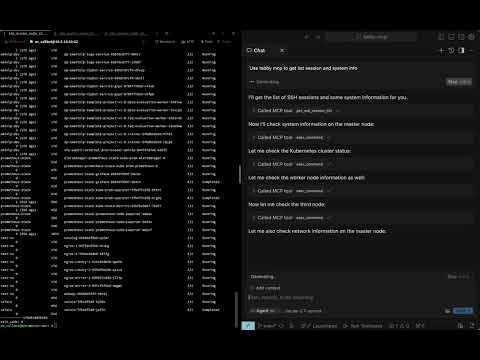
Table of Contents
- Requirements
- Installation
- Quick Start
- Connecting MCP Clients
- Tools
- Configuration
- Development
- License
Requirements
- Tabby Terminal installed and running
- Docker, for local builds
- macOS for the provided install script path
- An MCP-compatible client with SSE support, such as Claude Code, Cursor, Windsurf, Codex, or another SSE-capable MCP client
Installation
Option 1: Tabby Plugin Store
- Open Tabby
- Go to Settings → Plugins
- Install Tabby MCP
- Restart Tabby
- Open Settings → Plugins → MCP and confirm the server configuration
Option 2: Local Docker Build
git clone https://github.com/thuanpham582002/tabby-mcp-server.git
cd tabby-mcp-server

make build-dist
bash scripts/copy_to_plugin_folder.sh
The install script copies the plugin to:
~/Library/Application Support/tabby/plugins/node_modules/tabby-mcp
Restart Tabby after installing or updating the plugin.
If your local Tabby installation requires bundled plugin dependencies, build the full package:
make build-dist-with-deps
bash scripts/copy_to_plugin_folder.sh
Quick Start
- Start or restart Tabby
- Open at least one terminal tab
- Verify the MCP server is running:
curl http://localhost:3001/health
# OK
- List Tabby terminal sessions:
curl -X POST http://localhost:3001/api/tool/get_ssh_session_list \
  -H 'Content-Type: application/json' \
  -d '{}'
- Execute a command in a session:
curl -X POST http://localhost:3001/api/tool/exec_command \
  -H 'Content-Type: application/json' \
  -d '{"command":"pwd","tabId":"0"}'
Connecting MCP Clients
Tabby-MCP provides:
SSE endpoint:    http://localhost:3001/sse
Health endpoint: http://localhost:3001/health
HTTP test API:   http://localhost:3001/api/tool/<tool-name>
The Tabby plugin must be running before clients can connect.
SSE clients
Use this configuration for clients that support SSE MCP servers directly:
{
  "mcpServers": {
    "tabby-mcp": {
      "type": "sse",
      "url": "http://localhost:3001/sse"
    }
  }
}
For Cursor-style clients, place it in the MCP config file, for example:
~/.cursor/mcp.json
Claude Code
If your Claude Code version supports SSE MCP servers:
claude mcp add --transport sse tabby-mcp http://localhost:3001/sse
If your setup uses JSON config, use the SSE clients configuration.
Codex / OpenAI Codex CLI
Use the SSE MCP server configuration supported by your Codex client:
{
  "mcpServers": {
    "tabby-mcp": {
      "type": "sse",
      "url": "http://localhost:3001/sse"
    }
  }
}
For TOML-based configs, map the same SSE URL using your client's supported SSE MCP syntax.
Tools
| Tool | Description | Parameters |
|---|---|---|
get_ssh_session_list | List available Tabby terminal sessions | none |
exec_command | Execute a shell command in a terminal tab | command, tabId, commandExplanation |
get_terminal_buffer | Read terminal buffer content | tabId, startLine, endLine |
get_command_output | Retrieve full/paginated command output | outputId, startLine, maxLines |
Configuration
Default plugin configuration:
{
  "mcp": {
    "enabled": true,
    "startOnBoot": true,
    "port": 3001,
    "listenHost": "127.0.0.1",
    "serverUrl": "http://localhost:3001",
    "enableDebugLogging": true,
    "pairProgrammingMode": {
      "enabled": true,
      "showConfirmationDialog": true,
      "autoFocusTerminal": true
    }
  }
}
Configure these options in Tabby under Settings → Plugins → MCP.
To accept connections from other machines or environments such as WSL, set
listenHost to 0.0.0.0 in the MCP settings. This makes the server reachable
over the network; use an address reachable from your MCP client in its server
URL and apply any needed firewall restrictions.
Pair Programming Mode
Pair Programming Mode adds safety prompts when an AI client executes commands:
- confirmation before command execution
- optional terminal auto-focus
- command rejection with feedback
- command result dialog and history tracking
Development
Clone and build:
git clone https://github.com/thuanpham582002/tabby-mcp-server.git
cd tabby-mcp-server
make build-dist
Install into local Tabby:
bash scripts/copy_to_plugin_folder.sh
Restart Tabby and verify:
curl http://localhost:3001/health
Build targets
make build-dist            # Build dist only
make build-dist-with-deps  # Build dist and copy node_modules
make help                  # Show available targets
License
MIT — see LICENSE.
Made with ❤️ by Pham Tien Thuan
Comments
New to MCP?
From what the protocol is to installing your first server, these answers cover most first questions.
An open protocol that defines how AI applications connect to external tools and data in a uniform way. Clients talk to the model; MCP servers provide tools, resources and prompt templates. They exchange standard messages, so one server can be reused by many clients.