
About buddie
buddie verifies supported claims in AI agent reports against source pages, repository state, GitHub, and recorded command output, and provides permission-scoped machine diagnostics. It is for people using agents who need evidence-based checks; unsupported claims remain explicitly unchecked.
Key features
- 01Verify citations and quotations
- 02Check repository and GitHub claims
- 03Compare test claims with recorded output
- 04Collect permission-scoped diagnostics
- 05Return verification receipts
Use cases
- 01Check a report quotation against its cited page
- 02Verify PR or CI status against GitHub
- 03Compare a claimed test result with its transcript
- 04Give an agent observed system and runtime details
MCP support
Exposes verification and environment-diagnostic tools to MCP clients through a stdio server. Other integrations can also use the checks through MCP.
Configuration
Local server config is the same for every client. Copy it into your client’s MCP config file.
uvx buddieBUDDIE_GITHUB_TOKENSecretOptional GitHub token for pr: and ci: anchors (higher rate limit, private repos)VERBATIM_STOREFolder for page snapshots (default ./.verbatim)Local servers need a runtime on your machine (e.g. Node.js 18+). Config file locations differ by client; see your client’s docs.
Tools
4Saved tool list · updated 1d ago
| Parameter | Type | Required | Description |
|---|---|---|---|
| path | string | No | a Markdown file to check instead of text |
| text | string | No | the report itself (Markdown); or give path |
| fetch | boolean | No | snapshot cited URLs not in the store yet |
| repos | array | No | repo checkouts for anchors (default: the git repo at or under the server's cwd; in Codex none, so pass the workspace path) |
| store | string | No | snapshot store (default $VERBATIM_STORE or ./.verbatim) |
| access | string | No | verbatim --access for unreadable pages, e.g. 'default' |
| github | boolean | No | ask GitHub for pr:/ci: anchors |
| numbers | enum | No | a number of a cited sentence not in its source: gap, fail or offgap | fail | off |
| transcript | string | No | Claude Code session jsonl for run: anchors |
Details
From the project README
Verify the claim. Know the context.
Evidence and environment awareness for AI agents.






Why Buddie?
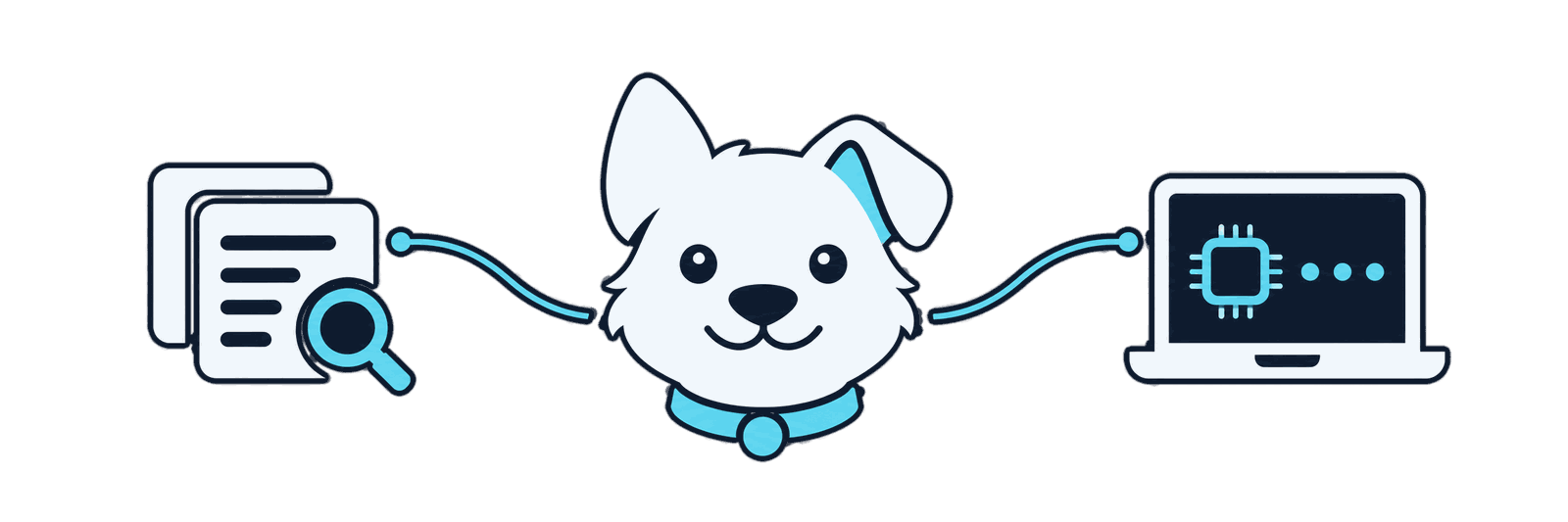
An agent finishes a task and tells you that CI passed, that a source supports its summary, or that your laptop has CUDA and Python 3.12. It sounds certain, and often it is right. When it is wrong, the mistake hides inside a confident sentence.
Buddie separates what can be checked from what is only claimed. It checks supported claims against the evidence itself, gives the agent real observations of your machine instead of guesses, and marks what it could not check as unchecked. In 929 checkable quotations from published deep-research reports, 212 were altered or absent from the page they cited; Buddie flagged 207 of them (research).
What Buddie does
Verify. Buddie checks supported claims against their evidence: a quotation against the page it links to, a file or commit against your repository, a merged PR or a green CI run against GitHub, a test result against the session's record of the command. No language model takes part in the check, so the agent cannot argue its way to a different verdict.
Catch mismatches. In Claude Code and Codex, Buddie's hook checks the agent's answer before it reaches you. When a claim does not hold, the answer goes back to the agent with the reason, so it can fix the claim or say plainly what is unverified. Other clients call the same checks through MCP or the command line and decide what to do with the result.
Observe. Before it suggests a command, an agent can ask Buddie for the parts of your machine the task needs: the operating system, CPU, memory, GPU, Python, runtimes, tools. Buddie reads only the categories you have granted, changes nothing, and records how each value was observed.
See it in action
Verify an agent's claim
An agent reports that it fixed a date parser and that the test suite is green. It marks the claim with a small
anchor, ⚓ run:pytest -q => 41 passed, that Buddie can check. The session transcript records what the test command
actually printed:
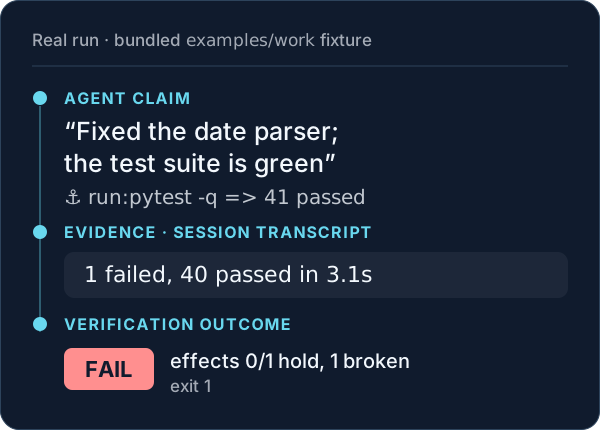
Run it yourself from a clone; the report and transcript are in examples/work:
cd buddie/examples/work
buddie verify report.md --transcript session.jsonl --no-github
BLOCK anchor line 3 ⚓ run:pytest -q => 41 passed: output has no '41 passed'; it ends: ….......................................... 1 failed, 40 passed in 3.1s
note  pr:/ci:/run: anchors show what happened (PR state, checks on a commit, a command and its output), not that the code is correct
buddie FAIL: effects 0/1 hold, 1 broken
The files are a teaching fixture: Buddie reads the recorded output rather than rerunning pytest. --json receipt.json
also writes a receipt naming the evidence behind the verdict. Quotation, PR and CI examples, and which integration
checks what: verification guide.
Know the environment
An agent is asked to set up a local development environment. Instead of guessing the operating system, GPU or Python version, it asks Buddie for three categories, which the person has granted:
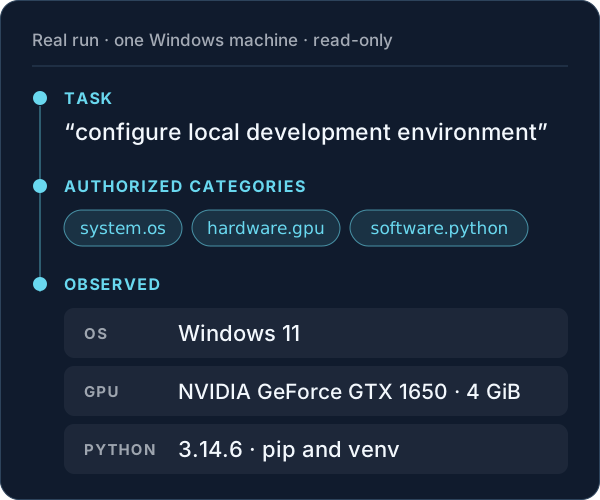
buddie snapshot --category system.os --category hardware.gpu --category software.python \
  --task "configure local development environment" --json diagnostics.json
buddie snapshot: diagnostics of 3 categories (grants active, policy absent; these govern the categories only)
  system.os: collected
    name: Windows 11  [os_interface]
  hardware.gpu: collected
    adapters: [model NVIDIA GeForce GTX 1650, source nvidia_smi_gpus, vendor NVIDIA, vram_bytes 4294967296]  [fixed_program]
  software.python: collected
    buddie_runtime: implementation cpython, pip True, venv True, version 3.14.6  [buddie]
Abridged from a run of buddie 2.0.0: the lines shown are unedited, and the machine's other observed values are left
out. diagnostics.json holds the full document, with the method and time of each value.
A category you have not granted is reported as denied, and its collector never runs. A value Buddie cannot read is marked unavailable, with the reason. Diagnostics is read-only and installs nothing; it gives the agent better facts, not a guarantee that its next command is right. Categories, grants and the document.
Get started
Buddie needs Python 3.11 or newer and has no dependencies.
Claude Code
The recommended start. The plugin adds the answer check, the MCP tools including environment diagnostics, and
run: checks against the session transcript:
/plugin marketplace add tsyyan/buddie
/plugin install buddie@buddie
It installs this repository's default branch. To allow diagnostics, save the categories you choose as
environment.toml in ~/.config/buddie/ (%APPDATA%\buddie\ on Windows). For the demo above:
version = 1
allow = ["system.os", "hardware.gpu", "software.python"]
roots = []
Levels, the intro mode and what the hook reads: Claude Code guide.
Other integrations
- Codex:
codex plugin marketplace add tsyyan/buddie, thencodex plugin add buddie@buddie, and enable its hook in/hooks. The check runs atStop;run:claims stay unchecked. Codex guide - Any MCP client:
uvx buddie servestarts the stdio server. There is no gate: the agent calls the tools. Integrations - Command line and CI:
pip install buddie, thenbuddie verify REPORT.md --json receipt.json. It exits 1 onFAIL;GAPSandEMPTYexit 0, so a CI step that requiresPASSshould read the receipt's outcome. - Claude Desktop: the
.mcpbbundle from Releases, without a gate. Desktop guide
Every surface in detail: getting started.
Release status
| Version | |
|---|---|
| Release described here: PyPI, GitHub Releases, the Desktop bundle, the MCP Registry | 2.0.2 |
Upgrading from 2.0.1 changes nothing you have to do: 2.0.2 adds the local feedback tools (feedback_start,
feedback_resolve, feedback_accept), GitHub citation checks and versioned public release notes. Upgrading from
2.0.0 changes nothing; 2.0.1 fixed how the MCP server reads its input on Windows systems whose code page is not
UTF-8. Upgrading from 1.1.1 changes nothing for a 1.x setup. What can differ, and why, is in the
changelog.
Documentation
| Topic | Read |
|---|---|
| Install on every surface | Getting started |
| What each integration does | Integrations |
| Checks, outcomes and receipts | Verification, receipts |
| Environment diagnostics | Environment |
| Security and privacy | Limitations, security, privacy |
| Contributing | CONTRIBUTING.md |
| Everything else | Documentation index |
Limitations
Buddie is not a truth detector. It checks claims in the forms it recognises, such as quotations with links and
anchored claims about files, PRs, CI and commands, against the evidence it can read. Paraphrases and unanchored claims
stay unchecked. PASS covers only what was checked, and GAPS and EMPTY are not passes.
The answer check exists only in Claude Code and Codex, and it returns an answer rather than locking it: the agent fixes the claim or discloses it as unverified. An agent running as your user can edit local evidence, settings and the diagnostics grants file; only an administrator's protected policy sets limits it cannot raise.
Buddie runs locally, with no model calls and no telemetry. It fetches the pages a report cites and calls GitHub for PR and CI claims. All limitations · Security boundaries · Privacy
Apache-2.0 · Changelog · Citation · Issues
Comments
New to MCP?
From what the protocol is to installing your first server, these answers cover most first questions.
An open protocol that defines how AI applications connect to external tools and data in a uniform way. Clients talk to the model; MCP servers provide tools, resources and prompt templates. They exchange standard messages, so one server can be reused by many clients.