
About jobwatch
jobwatch monitors company career pages, ranks new roles, and helps job seekers manage applications and interview preparation. It does not apply automatically; data stays on the computer, while optional fit scoring uses the selected model.
Key features
- 01Monitor company job boards
- 02Score role fit against a resume
- 03Organize new roles and an application queue
- 04Track application stages and follow-ups
- 05Prepare interview materials
- 06Compare pay and career value
Use cases
- 01Collect new roles from selected companies
- 02Filter openings using a resume
- 03Record application progress and follow-up dates
- 04Draft interview answers and run mock practice
MCP support
Optional MCP server and agent skill let Claude and other assistants work alongside a job search.
Configuration
Local server config is the same for every client. Copy it into your client’s MCP config file.
uvx jobwatchJOBWATCH_CONFIGPath to your watchlist (jobwatch.yaml; `jobwatch init` writes an example). Defaults to ./jobwatch.yaml or ~/.config/jobwatch/config.yamlLocal servers need a runtime on your machine (e.g. Node.js 18+). Config file locations differ by client; see your client’s docs.
Tools
21Saved tool list · updated 4d ago
| Parameter | Type | Required | Description |
|---|---|---|---|
| company | string | Yes | A company name ("Stripe"), or a link to one of its job postings or its careers page. |
Details
From the project READMEjobwatch




Watch the job boards of the companies you care about and get a short, ranked digest of new roles that match you, optionally fit-scored against your resume. jobwatch finds and ranks. It never applies for you.
If jobwatch helps your search, a ⭐ on GitHub is how I know: jobwatch sends nothing home, so stars are the only count of who uses it. If it landed you an interview, a $1 coffee says so too.
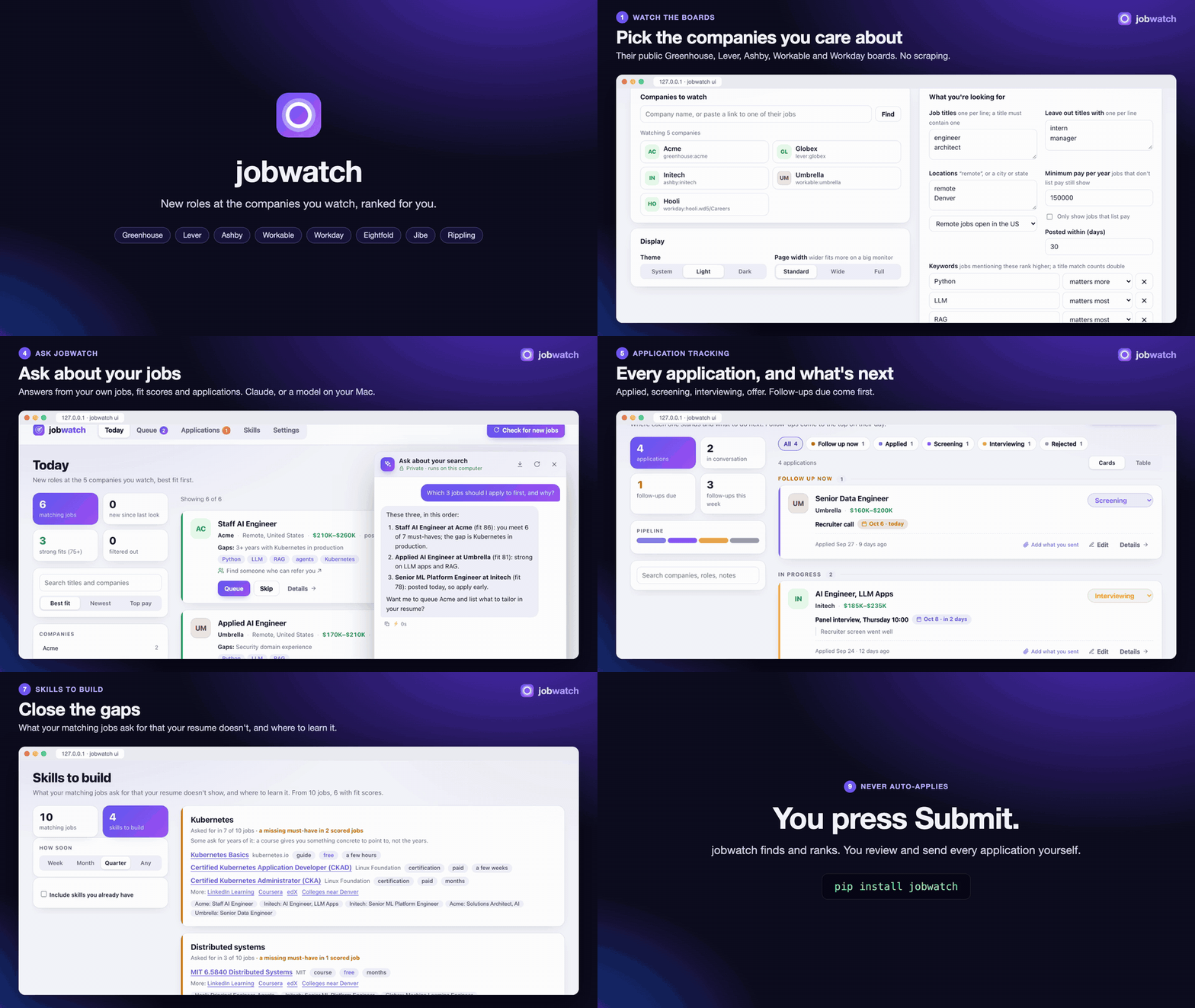
With sound (1½ minutes, made from made-up data):
https://github.com/user-attachments/assets/71b048d0-d372-42fd-a247-c4a59c3ffd71
Tutorials
Seven short videos, two minutes or less each, made from made-up data. GitHub's video links last five minutes, so if one stops after a second or two, reload the page and play it again.
Getting started: install, jobwatch ui, the four onboarding steps, Today.
https://github.com/user-attachments/assets/f95f85df-406f-4ede-b84c-59569d1a586a
Your daily routine: today's picks, a job's details, the queue, "I applied", Applications, the prep sheet.
https://github.com/user-attachments/assets/8653c4ca-a79d-4135-9be1-51ba3c9fccf6
Where the AI runs: the Claude API, Antigravity or this Mac; the fallback chain; what leaves your computer.
https://github.com/user-attachments/assets/40e6f2cb-c201-4da9-ba21-77bdacc464b8
Applying: the queue, jobs found elsewhere, job-alert emails, status emails, companies to watch.
https://github.com/user-attachments/assets/9d021676-85da-4ce1-8d42-f3808b4ae03b
Tracking applications: stages and follow-ups, applications that go quiet, the calendar feed, Interviews.
https://github.com/user-attachments/assets/e2e43a54-83d2-4154-9229-a063fafefe44
Interview prep: prep sheets, answers drafted from your stories, a mock interview, a drill video.
https://github.com/user-attachments/assets/c8ac1030-700f-4cdd-823d-4b92cd411bf3
Comps and who you know: pay, career value and company health side by side; the people you know there.
https://github.com/user-attachments/assets/42eb0edb-945e-4caf-95c0-3eeae6fdada6
Get started
pipx install jobwatch      # or: pip install jobwatch
jobwatch ui
A page opens on your computer and walks you through four short steps: about you and your resume, the jobs you
want, the companies to watch, and (optionally) fit scores and job-alert emails. Then press Check for new
jobs. Install the page as an app from Chrome's address bar to keep it in its own window, or run
jobwatch service install to have it always running on a Mac.
Extras: jobwatch[score] (fit scores with the Claude API), jobwatch[local] (fit scores on-device, Apple
Silicon), jobwatch[mcp] (an MCP server for Claude and other assistants), jobwatch[video] (drill videos for
interview prep). Prefer a terminal? jobwatch init, jobwatch find "Globex", then jobwatch run daily.
More on the page and the command line →
What it does
| Watches company boards | Greenhouse, Lever, Ashby, Workable, Workday, Eightfold, Oracle, SmartRecruiters, Rippling, iCIMS, Jobvite, Avature, Google, Amazon and HN's Who is hiring. Fresh roles, real pay ranges, robots.txt respected. Why boards · the watchlist |
| Scores fit | Your resume against each posting: must-haves met, gaps, a score out of 100. On the Claude API, Antigravity, or this Mac. Fit scores |
| Keeps a short queue | Today's picks, a queue to apply from, job-alert emails and status emails read for you, reposts caught. Applying |
| Tracks applications | Every stage, the next step, follow-ups for the ones gone quiet, a calendar feed. Tracking |
| Preps interviews | A prep sheet per interview, answers drafted from your own stories, a mock interview, a drill video. Interview prep |
| Compares offers | Pay, career value and company health side by side. Comps |
| Shows who you know | Your LinkedIn connections at each company, the people you actually talk to first. Who you know |
| Answers questions | A chat about today's jobs and each posting, and the skills your matches keep asking for. Chat · Skills |
| Works with assistants | An MCP server and an agent skill, so Claude can run your search with you. MCP server |
Everything stays on your computer. The only exception is a model you choose for fit scores and chat: the Claude API or Antigravity get the posting and your resume (and, for drafted interview answers, your stories); on-device models send nothing anywhere.
Why it doesn't auto-apply
Tools that auto-apply to hundreds of jobs make the process worse for everyone and rarely work for the person using them:
- Recruiters recognize mass applications.
- Some companies cap how many roles one person can apply to.
- Application forms ask legal questions (work authorization, export control, signatures) that you answer yourself.
jobwatch's job is to make sure you never miss a role worth applying to, and to spend your time on those. Getting more interviews has what moves an application from the pile to a recruiter's call.
The guide
Everything else, from every watchlist setting to the drill video, is in the guide. Development covers running the tests and making a release. MIT licensed.
Comments
New to MCP?
From what the protocol is to installing your first server, these answers cover most first questions.
An open protocol that defines how AI applications connect to external tools and data in a uniform way. Clients talk to the model; MCP servers provide tools, resources and prompt templates. They exchange standard messages, so one server can be reused by many clients.