
About VMware Fusion MCP Server
VMware Fusion MCP Server lets MCP-compatible clients inspect and control VMware Fusion virtual machines through its REST API. It provides VM details and power operations as MCP tools.
Key features
- 01List registered VMs
- 02Retrieve VM details
- 03Run VM power actions
- 04Check VM power state
Use cases
- 01Review VMs registered in VMware Fusion
- 02Inspect a VM before operating it
- 03Power on, pause, suspend, or reset a VM
MCP support
Exposes VMware Fusion VM listing, information, power actions, and state queries as tools for MCP clients.
Configuration
Local server config is the same for every client. Copy it into your client’s MCP config file.
Tools
4Saved tool list · updated 3w ago
This tool takes no parameters.
Details
From the project READMEVMware Fusion MCP Server


A Model Context Protocol (MCP) server for managing VMware Fusion virtual machines via the Fusion REST API, built with FastMCP.
Features
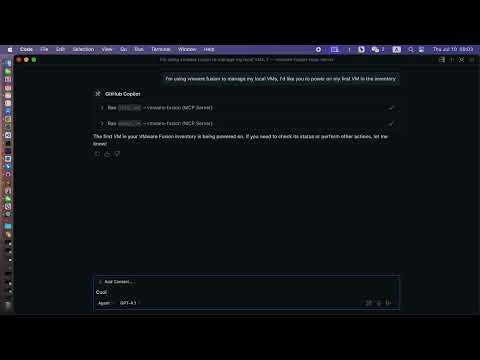
- List VMs: View all VMs registered in VMware Fusion.
- Get VM Info: Retrieve detailed information about a specific VM.
- Power Operations: Perform power actions (on, off, suspend, pause, unpause, reset) on a VM.
- Get Power State: Query the current power state of a VM.
- Modern MCP/LLM Integration: Exposes all features as MCP tools for LLMs and agent frameworks.
Prerequisites
- VMware Fusion Pro (with REST API enabled)
- Python 3.10+
- uv (recommended) or pip
- uvx (for VS Code/LLM integration)
Installation
-
Clone the repository:
git clone https://github.com/yeahdongcn/vmware-fusion-mcp-server.git cd vmware-fusion-mcp-server -
Set up the environment and install dependencies:
make env
VMware Fusion Setup
-
Enable the REST API:
- Open VMware Fusion > Preferences > Advanced
- Check "Enable REST API"
- Note the API port (default: 8697)
-
Start the REST API service:
vmrestThe API will be available at
http://localhost:8697by default.
Configuration
The server connects to VMware Fusion's REST API at http://localhost:8697 by default. You must configure authentication for the vmrest API using environment variables:
VMREST_USER: Username for the vmrest API (required if authentication is enabled)VMREST_PASS: Password for the vmrest API (required if authentication is enabled)
These must be set in your shell, in your VS Code MCP config, or in your deployment environment.
Example: MCP server config for VS Code with credentials
{
  "mcpServers": {
    "vmware-fusion": {
      "command": "uvx",
      "args": ["vmware-fusion-mcp-server"],
      "env": {
        "VMREST_USER": "your-username",
        "VMREST_PASS": "your-password"
      }
    }
  }
}
- Set
VMREST_USERandVMREST_PASSto your vmrest credentials.
Usage
Run the MCP Server
With Make
VMREST_USER=your-username VMREST_PASS=your-password make run
With uvx (recommended for VS Code/LLM)
VMREST_USER=your-username VMREST_PASS=your-password uvx vmware-fusion-mcp-server
VS Code / LLM Integration
To use this server as a tool provider in VS Code (or any MCP-compatible client):
-
Install uvx:
uv pip install uvx -
Add to your MCP server config (e.g.,
.vscode/mcp.json):{ "mcpServers": { "vmware-fusion": { "command": "uvx", "args": ["vmware-fusion-mcp-server"], "env": { "VMREST_USER": "your-username", "VMREST_PASS": "your-password" } } } }- Set
VMREST_USERandVMREST_PASSto your vmrest credentials. - You can now use the VMware Fusion tools in any MCP-enabled LLM or agent in VS Code.
- Set
MCP Tools
list_vms
- Description: List all VMs in VMware Fusion.
- Parameters: None
get_vm_info
- Description: Get detailed information about a specific VM.
- Parameters:
vm_id(string): The ID of the VM
power_vm
- Description: Perform a power action on a VM.
- Parameters:
vm_id(string): The ID of the VMaction(string): One of: "on", "off", "suspend", "pause", "unpause", "reset"
get_vm_power_state
- Description: Get the power state of a specific VM.
- Parameters:
vm_id(string): The ID of the VM
Development
Run Tests
make test
Format Code
make fmt
Lint
make lint
Project Structure
vmware_fusion_mcp/server.py- Main FastMCP server implementationvmware_fusion_mcp/vmware_client.py- VMware Fusion REST API clienttests/- Unit and integration tests
License
MIT License - see LICENSE for details.
Contributing
- Fork the repository
- Create a feature branch
- Make your changes
- Run tests and linting:
make test && make lint - Submit a pull request
References
Comments
New to MCP?
From what the protocol is to installing your first server, these answers cover most first questions.
An open protocol that defines how AI applications connect to external tools and data in a uniform way. Clients talk to the model; MCP servers provide tools, resources and prompt templates. They exchange standard messages, so one server can be reused by many clients.