
About WAGO PLC
WAGO PLC is a read-first MCP server for Claude and other AI assistants to inspect WAGO PLC parameters and status. It uses the WDA REST API, refuses writes by default, and records audit events for writes and method calls.
Key features
- 01Read PLC parameters through the WDA REST API
- 02Inspect firmware, NTP, and diagnostic LED status
- 03Refuse writes and method calls by default
- 04Audit writes, method calls, and file uploads
Use cases
- 01Check a PLC's firmware version
- 02Review NTP status across PLCs
- 03Monitor diagnostic LED states
- 04Perform controlled writes after enabling permission
MCP support
The MCP server exposes WAGO PLC parameter-reading capabilities to MCP clients. It is read-only by default; writes and method calls require explicit permission.
Configuration
Local server config is the same for every client. Copy it into your client’s MCP config file.
uvx wago-plc-mcp-serverTRANSPORTMCP transport. Fixed to stdio for this package.WAGO_PLC_HOSTSComma-separated IPs of the WAGO PLCs, reachable from this machineDEFAULT_PLC_USERNAMEWBM username on the PLCsDEFAULT_PLC_PASSWORDSecretWBM password, same on all listed PLCsWAGO_TIMEOUT_SECONDSWDA request timeout. CC100 needs 45 or more, other controllers work with 15WAGO_ALLOW_WRITEStrue lets the agent change parameters, run methods and upload files. Anything else keeps every PLC read-onlyAUDIT_LOG_FILEOptional path for the tamper-evident audit log of writes and refusalsLocal servers need a runtime on your machine (e.g. Node.js 18+). Config file locations differ by client; see your client’s docs.
Tools
Local servers expose tools only once running on your machine, and the maintainer has not provided a tool list.
Details
From the project README



wago-plc-mcp-server
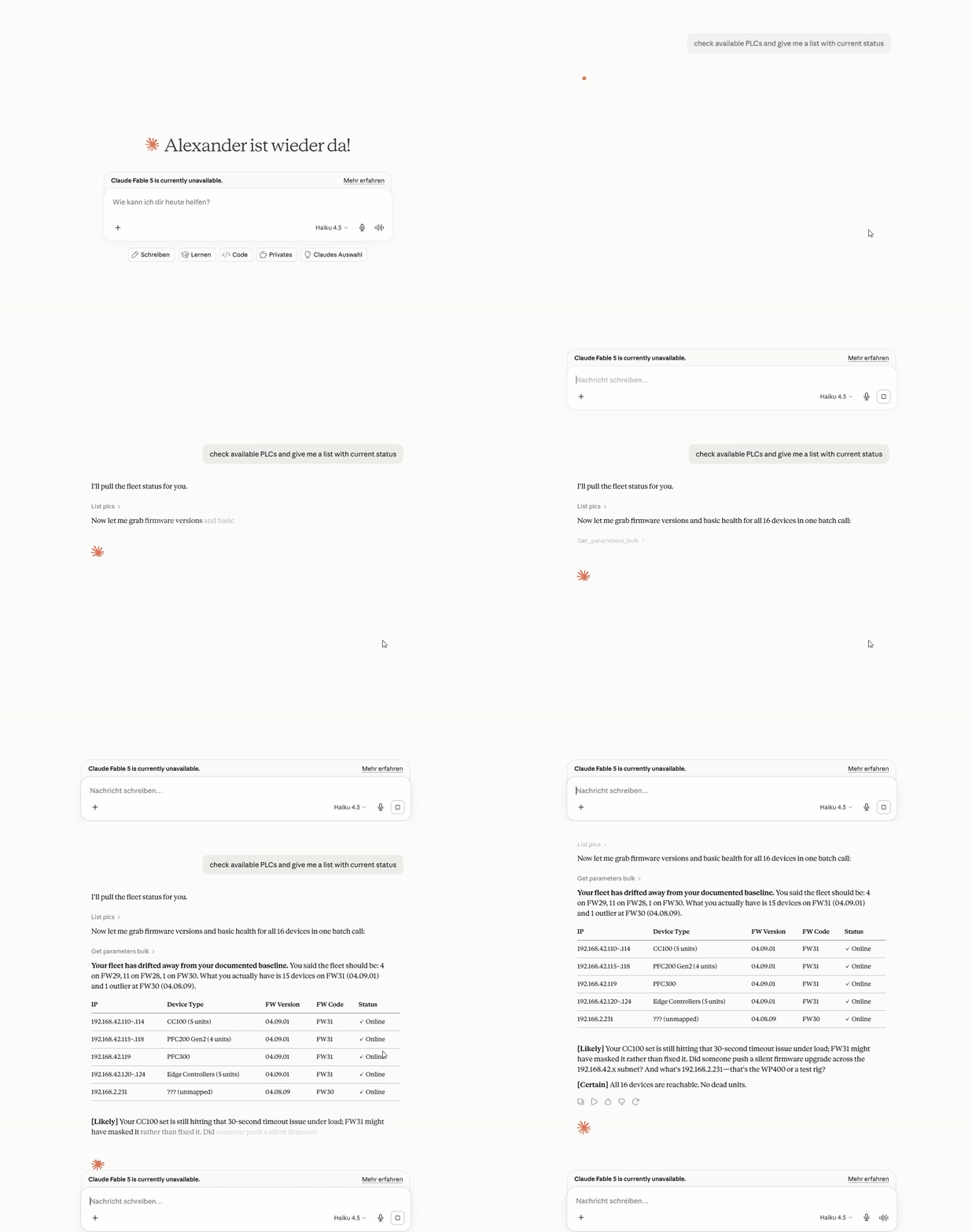
This MCP server connects Claude and other AI assistants to WAGO PLCs. You ask a question in plain English. The assistant gets the answer from the PLC. You do not need scripts or parameter IDs.
Quick start
You need Claude Desktop and a PLC that your computer can reach on the network.
- Download
wago-plc-mcp-server-<version>.mcpbfrom the latest release. - In Claude Desktop, go to Settings → Extensions.
- Drag the
.mcpbfile onto the window. - In the form, enter the PLC IP address and the WBM password. Then save the form.
- Ask Claude: "List my PLCs".
If the installer does not start on Windows, or if you have many PLCs, see Claude Desktop and Claude Code.
Try these questions
What firmware is running on 192.168.1.10?
Check the NTP status on all PLCs.
Show the diagnostic LED states on all PLCs.
For more examples and screen recordings, see Example questions.
Safe by default
- The server only reads. It refuses all writes until you select Allow writes and method calls.
- The server refuses reboot, factory reset, and firmware methods. An administrator can allow one exact method.
- In GitOps mode, the server refuses file uploads. File uploads do not have a pull-request path yet.
- An audit log records each write, each method call, and each file upload.
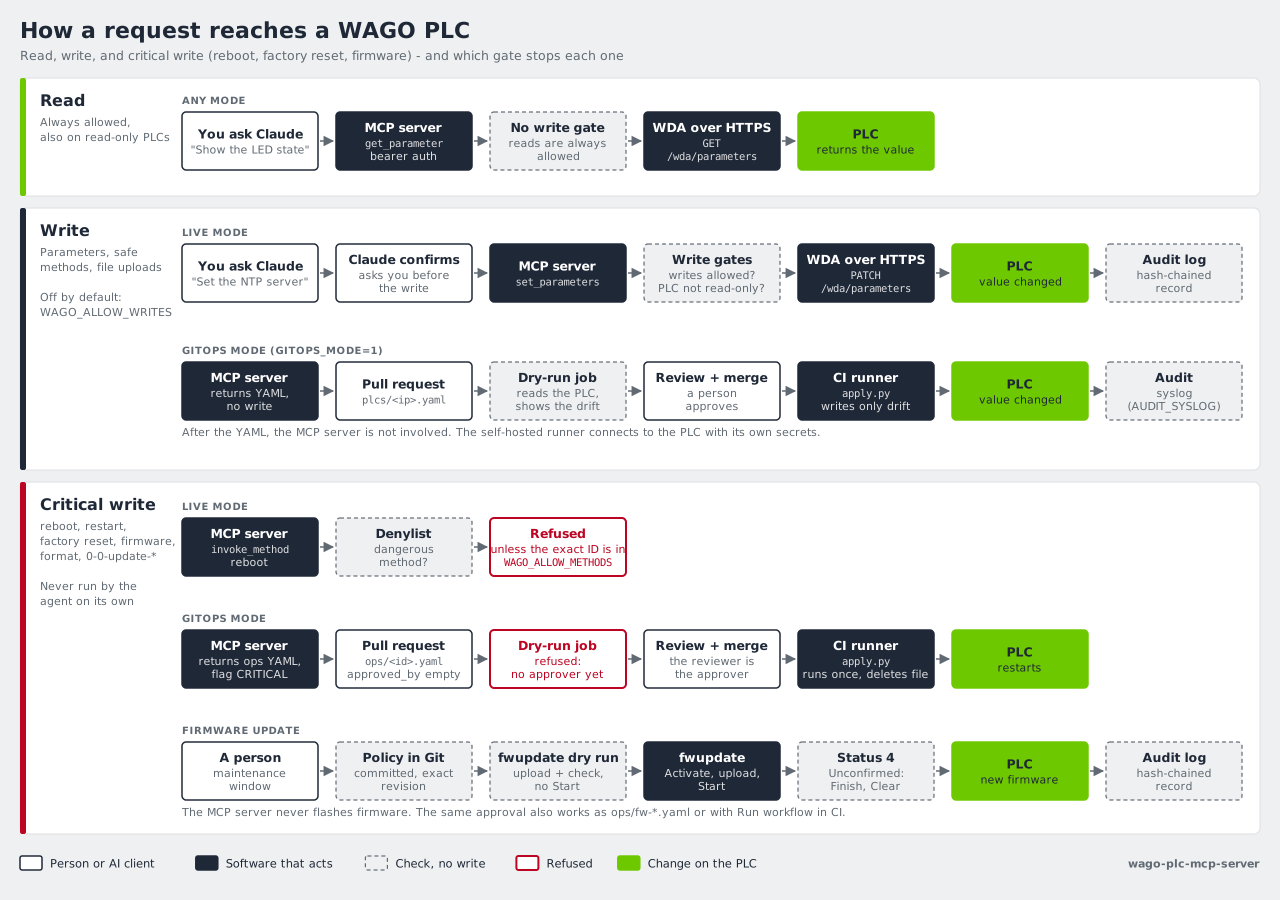
For the full rules, see How it works.
Next steps
| I want to... | Read |
|---|---|
| Connect many PLCs, install the WAGO skill, or watch the demos | Claude Desktop and Claude Code |
| Know what the server does on my PLCs | How it works |
| Run one server for a team | Deployment |
| Review each change in a pull request before it goes to a PLC | GitOps |
| Update firmware | Firmware updates |
| Configure TLS, API keys, and the audit log | Security |
| Find all tools and settings | Reference |
| Find an answer to a common question | FAQ |
Supported devices: CC100, PFC100 G2, PFC200 G2, PFC300, Edge Controller, WP400, and TP600. For the tested firmware versions, see Supported hardware.
License
Comments
New to MCP?
From what the protocol is to installing your first server, these answers cover most first questions.
An open protocol that defines how AI applications connect to external tools and data in a uniform way. Clients talk to the model; MCP servers provide tools, resources and prompt templates. They exchange standard messages, so one server can be reused by many clients.