
About VisualTorch
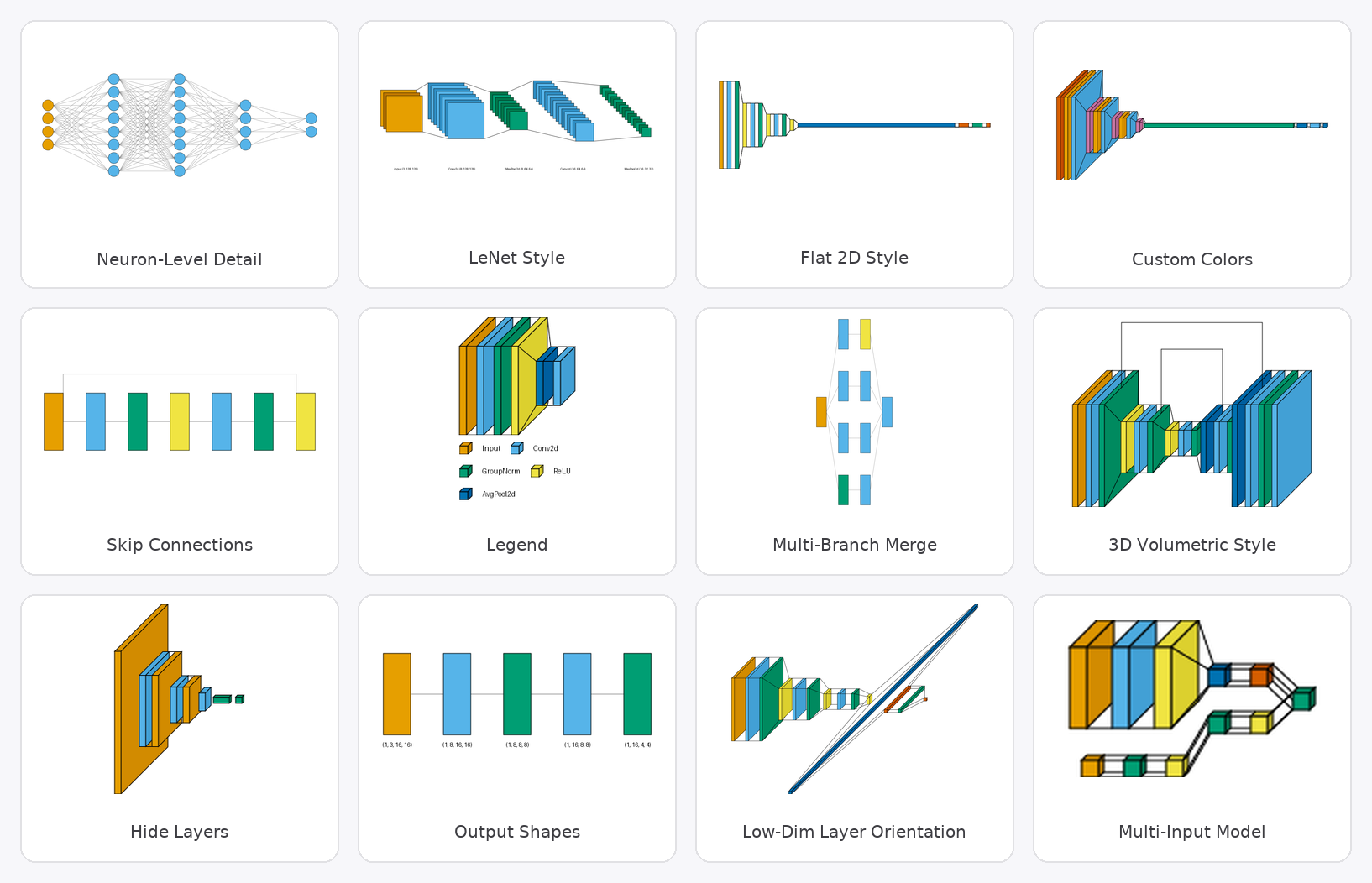
VisualTorch renders architecture diagrams for PyTorch neural networks in flow, graph and LeNet styles, and can produce animated GIF reveals. It is aimed at researchers and developers who need to visualize model structure. It is open source under the MIT License.
Key features
- 01Supports Sequential and Custom PyTorch models
- 02Flow, graph and LeNet diagram styles
- 03Animated GIF reveal layer by layer
- 04Optional client-neutral stdio MCP server
- 05Static PNG output with structured metadata
Use cases
- 01Drawing PyTorch model structure diagrams for papers or docs
- 02Generating architecture diagrams from trusted model source through an MCP client
- 03Creating animations that show layer-by-layer data flow
MCP support
VisualTorch offers an optional stdio MCP server that exposes diagram generation tools, documentation resources and subprocess timeouts for producing PNG diagrams and GIF reveals from PyTorch source.
Configuration
Local server config is the same for every client. Copy it into your client’s MCP config file.
Tools
Local servers expose tools only once running on your machine, and the maintainer has not provided a tool list.
Details
From the project README




VisualTorch aims to help visualize Torch-based neural network architectures. It currently supports generating flow-style, graph-style, and LeNet-style architectures for PyTorch Sequential and Custom models. Its original visual styles were inspired by visualkeras, pytorchviz, pytorch-summary, and torchview; since then, it has grown its own unified tracing backend and architecture-handling logic well beyond its origins.
Note: 1.0+ is a major release with breaking API changes, but with significantly better features and algorithms - upgrading is recommended. For the old API, use 0.2.5 or older.
Limitation: VisualTorch traces a real forward pass to build the diagram, which has an inherent
limitation shared by any tracing-based approach (not a bug, and not fixable without full symbolic
execution): models with data-dependent control flow (e.g. a branch only taken if a tensor
value crosses some threshold) only show whichever branch the traced dummy input happened to take.
Separately, a layer that returns multiple meaningful output tensors (e.g. a custom multi-task
head, or nn.LSTM's (output, (h_n, c_n))) still has its node's size based on only its first
tensor; with show_dimension=True, every output tensor's shape is shown in the label, not just
the first. Downstream connections are correct either way. Contributions are welcome!
Animated Reveal
Every style can also render as an animated GIF, revealing the model one layer/column at a time,
via visualtorch.animate(model, input_shape, style=...) - see it in action for
flow,
graph, and
lenet styles.

Documentation
Online documentation is available at visualtorch.readthedocs.io.
The docs include usage examples, API references, and other useful information.
Installation
See the Installation page.
MCP integration
VisualTorch includes an optional, client-neutral stdio MCP server for generating static PNG
diagrams and animated GIF reveals from PyTorch model source. It exposes capability discovery,
structured output metadata, documentation resources, subprocess timeouts, and all three canonical
styles (graph, flow, and lenet). Install it with pip install "visualtorch[mcp]" and see the
MCP integration guide
for the tool schemas, generic stdio configuration, examples, and trusted-code security boundary.
No client-specific plugin or extension is required.
Used in Research
VisualTorch has been used in published research, including works published in Nature, IEEE, and MDPI.
See the Research Showcase page for the full list.
Used VisualTorch in your research, built something with it, or found a paper that cites it? Tell us about it or open a pull request to add it directly - we'd love to hear.
Examples
See the Usage Examples page.
Contributing
Please feel free to send a pull request to contribute to this project by following this guideline.
Releases
See GOVERNANCE.md for release methodology and cadence, and the PyPI release history for past releases.
License
This poject is available as open source under the terms of the MIT License.
Originally, this project was based on the visualkeras (under the MIT license), with additional modifications inspired by pytorchviz, pytorch-summary, and torchview, all of which are also licensed under the MIT license.
Citation
Please cite this project in your publications if it helps your research.
Note: the paper below describes VisualTorch as of its publication date (2024). The project has since been substantially refactored, including breaking API changes (see the documentation for the current API) - the DOI always resolves to what was actually reviewed and published.
@article{Hendria2024,
  doi = {10.21105/joss.06678},
  url = {https://doi.org/10.21105/joss.06678},
  year = {2024},
  publisher = {The Open Journal},
  volume = {9},
  number = {102},
  pages = {6678},
  author = {Willy Fitra Hendria and Paul Gavrikov},
  title = {VisualTorch: Streamlining Visualization for PyTorch Neural Network Architectures},
  journal = {Journal of Open Source Software}
}
Star History

Comments
New to MCP?
From what the protocol is to installing your first server, these answers cover most first questions.
An open protocol that defines how AI applications connect to external tools and data in a uniform way. Clients talk to the model; MCP servers provide tools, resources and prompt templates. They exchange standard messages, so one server can be reused by many clients.