
Xperience Community MCP Server
LocalAbout Xperience Community MCP Server
Xperience Community MCP Server is an ASP.NET Core MCP server for Xperience by Kentico projects, installed as a NuGet package. It gives AI agents project-specific tools and structured context for developing marketer-facing features; the package is deprecated, and the README recommends native Xperience by Kentico AI capabilities instead.
Key features
- 01For Xperience by Kentico projects
- 02Installed as a NuGet package
- 03Project tools and context for agents
- 04Registered in development environments
Use cases
- 01Inspect web page content types in a project
- 02Understand content type structure and relationships
- 03Use project tools in VS Code agent mode
MCP support
The server exposes project-specific tools from an Xperience by Kentico application for MCP clients and agents. The README marks the package as deprecated and recommends native MCP capabilities instead.
Configuration
Local server config is the same for every client. Copy it into your client’s MCP config file.
We haven’t collected a package or remote endpoint for this server. Follow the instructions in the project README.
Tools
Local servers expose tools only once running on your machine, and the maintainer has not provided a tool list.
Details
From the project READMEXperience Community MCP Server


Description
Warning
This package has been deprecated. Use the following native Xperience by Kentico AI capabilities instead:
An MCP Server built with the .NET MCP Server SDK tailored for Xperience by Kentico projects and installed as a NuGet package.
Why use this library? By exposing a discrete set of documented tools to an AI agent in an Xperience by Kentico project, that agent has more well structured context and capabilities. This means it can be a better copilot to developers building features for marketers using Xperience by Kentico.
For a more detailed explanation of this project, read the blog post Turn your Xperience by Kentico application into an MCP Server.
Screenshots
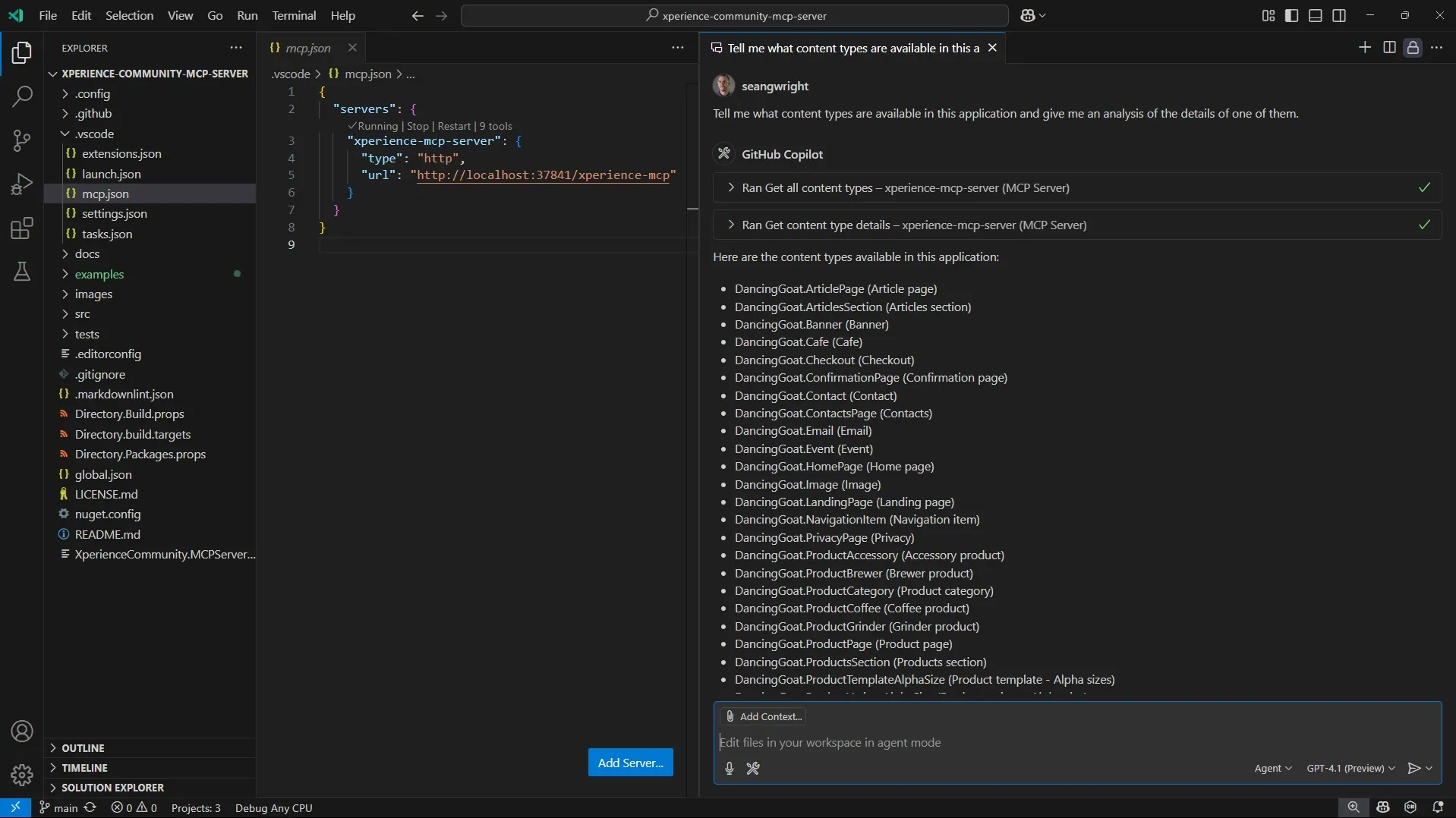
Requirements
Library Version Matrix
| Xperience Version | Library Version |
|---|---|
| >= 30.6.1 | 2.0.x |
| >= 30.4.1 | 1.0.0 |
Dependencies
Other requirements
- The latest April 2025 release of VS Code (v1.100) or newer, which supports MCP Servers using HTTP streaming.
Package Installation
Add the package to your application using the .NET CLI
dotnet add package XperienceCommunity.MCPServer
Quick Start
-
Once the package is installed, update your Xperience by Kentico application
Program.cs// Program.cs // ... // Adds the MCP dependencies if (builder.Environment.IsDevelopment()) { builder.Services.AddXperienceMCPServer(); } // ... // Adds the MCP endpoint if (builder.Environment.IsDevelopment()) { app.UseXperienceMCPServer(); } app.Kentico().MapRoutes(); // ... -
Start your Xperience by Kentico application.
-
Set up your MCP Server configuration VS Code
{
  "servers": {
    "xperience-mcp-server": {
      "type": "http",
      "url": "http://localhost:<your-port-here>/xperience-mcp"
    }
  }
}
You can use the
.vscode/mcp.jsonconfiguration as an example. The scheme, domain, and port come from theexamples/DancingGoat/Properties/launchSettings.jsonfile since the DancingGoat Xperience by Kentico application also runs the MCP Server. The default MCP Server path prefix is/xperience-mcp.You can use the VS Code command palette to manage and start your MCP Server or you can click the "Start" action above your server configuration in
mcp.json.Note: VS Code's MCP client does not yet support self-signed certificates, so you will need to add an http:// binding in your ASP.NET Core
launchSettings.jsonfile if you have been using https:// and dev-certs for your Xperience application. This binding can be any unused localhost port. Ex:http://localhost:34543. After you add the binding, update yourmcp.jsonto use thehttp://URL. -
Use the tools exposed by the Xperience Community MCP Server in agent mode in VS Code with a prompt in GitHub Copilot chat.
Tell me about some of the web page content types in this project and a summary of their structure and relationships. For example, let me know if some of these web page content types have references to content items of other types as part of their field definition.
Full Instructions
View the Usage Guide for more detailed instructions and examples.
Contributing
To see the guidelines for Contributing to Kentico open source software, please see Kentico's CONTRIBUTING.md for more information and follow the Kentico's CODE_OF_CONDUCT.
Instructions and technical details for contributing to this project can be found in Contributing Setup.
License
Distributed under the MIT License. See LICENSE.md for more information.
Security
For any security issues see SECURITY.md.
Comments
New to MCP?
From what the protocol is to installing your first server, these answers cover most first questions.
An open protocol that defines how AI applications connect to external tools and data in a uniform way. Clients talk to the model; MCP servers provide tools, resources and prompt templates. They exchange standard messages, so one server can be reused by many clients.