
About Playwright E2E MCP
Playwright E2E MCP is an MCP server and agent skill for diagnosing and fixing Playwright tests. It analyzes failure evidence, verifies proposed fixes by rerunning tests, and also handles CI reports, test history, and flaky-test investigations.
Key features
- 01Run Playwright tests and diagnose failures
- 02Read CI reports, traces, and failure snapshots
- 03Verify fixes by rerunning and revert failures
- 04Analyze flaky tests and run history
- 05Audit tests and find breaking commits
- 06Check accessibility and Web Vitals
Use cases
- 01Diagnose test failures and app errors from traces
- 02Fix locators and rerun tests to verify changes
- 03Investigate CI failures or find a regression commit
- 04Identify flaky tests and review test changes
MCP support
As an MCP server and agent skill, it provides compatible clients with tools for running, diagnosing, fixing, and auditing Playwright tests. It can be configured locally for multiple MCP clients; the README also describes a Streamable HTTP bridge for remote-only clients.
Configuration
Local server config is the same for every client. Copy it into your client’s MCP config file.
Tools
Local servers expose tools only once running on your machine, and the maintainer has not provided a tool list.
Details
From the project README

playwright-e2e-mcp
The test doctor for AI agents.
Your Playwright test fails. Your AI finds out why, fixes it, and proves the fix works.









⭐ If it saves you a debugging session, a star helps other Playwright users find it.
Getting started · Tools · Tool reference · GitHub Action · Configuration · Changelog · Contributing
An MCP server and agent skill that gives your AI assistant (Claude, Cursor, VS Code Copilot, Gemini, Codex) a full Playwright toolkit: a test runner, a failure detective and a fixer that checks its own work. Other tools let an AI click around a browser. This one lets it keep your test suite green.
❌ Without it / ✅ With it
Without it, your agent sees Timeout 5000ms exceeded waiting for getByTestId('checkout'),
guesses a new selector, edits the test and hopes. Or it "fixes" the test around a real bug.
With it, your agent reads the page as it was when the test failed, swaps in a locator proven unique on that page, re-runs the test, and keeps the edit only if it passes. When the button is really gone, it tells you it's an app bug.
run-test ──────┐
load-report ───┴─▶ get-failure ──▶ suggest-fix (apply + re-run) ──▶ green
 (CI job report)        │                 └─ refuses when the element is really gone (app bug)
                        └─ DOM at failure, failed requests, console errors
every run ──▶ analyze-history (flaky / broken / slow / which commit broke it)
test code ──▶ audit-tests (flake risks, ranked by history, verified rewrites)
red at HEAD ─▶ bisect-failure (runs it across git history, names the breaking commit)
Key features
- Fixes are proven, not guessed. Every fix is re-run before it's kept, and undone if the test is still red.
- Honest. It won't paper over a real bug to make a test pass.
- Works on CI failures too. Load a CI job's report and traces and get the same diagnosis and fixes.
- Flakiness with evidence. Names the flaky test, whether it's a race, shared state or test order, and the seed that reproduces it.
- Lean. With the
coretool set, finding and fixing a broken locator took about 5,500 tokens versus about 7,900 with Playwright MCP plus a shell. All 19 tools add about 16k tokens of definitions to every request, so load only the profiles you use (benchmark). - Free and open source. MIT, no account, no API key, no telemetry. Every tool is free; an optional paid Pro only adds hosted CI history.
🚀 What only this MCP does
Most testing MCPs let an AI drive a browser: Microsoft's Playwright MCP, Chrome DevTools MCP, ExecuteAutomation's mcp-playwright and the Selenium MCP. They're great for clicking through a page. None of them, as of October 2026, does the following. This one does:
| Capability | What you get |
|---|---|
| 🛡️ A guard against "fixes" that check less | check-test-change compares a changed test with its old self and blocks a fix that went green by deleting an assertion, skipping the test or adding .only; it warns on weaker matchers, hard waits, forced clicks and swallowed errors. The same check runs in CI as guard |
| 🧊 Quarantine with an owner and an expiry | quarantine keeps a flaky test running and reported while its failure stops blocking the build, with who fixes it, why, and the date it blocks again |
| 🎯 Find the commit that broke a test | bisect-failure runs the test across your git history, in a temporary worktree that leaves your checkout alone, and names the first bad commit with its diff and the failure |
| 🧪 Flake-risk audit of your test code | audit-tests finds hard waits, one-shot assertions, missing awaits and fragile selectors. It ranks them by how flaky those tests really were, then applies the safe rewrites and re-runs them to prove them |
| ✅ Fixes that prove themselves | suggest-fix swaps in a locator proven unique on the DOM at failure, re-runs the test and reverts if it's still red. It refuses to patch over a real app bug |
| 🔬 Flaky-test verdicts with evidence | diagnose-flaky repeats tests with retries off and tells a race from shared state from test order, naming the test it depends on and the seed that reproduces it |
| 📈 Memory of every run | analyze-history ranks flaky, regressed and broken tests, groups failures by cause, tracks slow tests and names the commit where each one went bad |
| 🏗️ Diagnose CI failures locally | load-report loads a CI job's report and traces (sharded too), so the same diagnosis and verified fixes work on failures from CI |
| 💬 One-click fixes on pull requests | The GitHub Action verifies each fix in CI and posts it as a suggested change reviewers apply with one click |
| ♿⚡ Audits that hand back tests | Accessibility (axe-core) and Web Vitals audits return verified locators for each problem plus a ready regression or budget test |
It works alongside a browser MCP rather than replacing it: that one drives the page, and this one keeps your suite green.
What you can ask
| You ask your AI… | It does this | |
|---|---|---|
| 🏃 | "Run my tests" | Runs the suite and reports every failure with its file, line, cause and a fix hint. One root cause breaking 30 tests shows up as one problem. |
| 🔍 | "Why did this fail?" | Reads Playwright's trace: the page at the moment of failure, the broken request, the console error. No guessing. |
| 🛠️ | "Fix it" | Swaps in a locator proven unique on the page, re-runs the test, and undoes the edit if it's still red. If the button is really gone, it tells you it's an app bug instead of hiding it. |
| 🎲 | "Is this test flaky?" | Re-runs it many ways (repeated, alone, in random order) and names the exact test and seed that cause the flake. |
| 📈 | "What's been breaking lately?" | Keeps a local run history and separates flaky, newly broken and always-broken tests; shows the slowest tests, stability by day and the commit where each test went bad. |
| ☁️ | "Why did CI fail?" | Loads the CI job's report (or merges sharded blob reports), maps its paths onto your checkout and finds the traces in the downloaded artifact, so the same diagnosis and fixes work on CI failures. |
| ✍️ | "Write a test for this flow" | Walks the steps on the live page first, writes a spec that replays them with assertions on where the flow landed (URL and accessibility snapshot), and runs it once to prove it passes. |
| ♿ | "Check this page for accessibility" | Runs axe-core (WCAG 2.2 AA) and returns each problem with a ready-to-paste locator and regression test. |
| ⚡ | "Why is this page slow?" | Measures Web Vitals (LCP, CLS, INP, TBT) on desktop or a throttled phone, names the slow element and the elements that jump, and hands back a budget test. |
| 🧪 | "Show me the error state" | Mocks API responses (500s, empty lists, slow calls) so the AI can inspect, audit or measure states that are hard to reach. |
| 🔑 | "Log in and save the session" | Logs in once (password from an environment variable, authenticator code generated from the TOTP secret), checks the session works and saves it for tests and page tools; reuses it until it expires. The password never passes through the chat. |
| 🛡️ | "Did that fix cheat?" | Compares the changed tests with git and blocks a fix that passes by deleting assertions or skipping tests. |
| 🧊 | "Quarantine this flaky test" | Keeps it running and reported, stops it failing the build, with an owner and an expiry date. |
| 🔐 | "Test the page after login" | Works behind sign-in with saved sessions, headers and click/fill steps, in Chromium, Firefox or WebKit, and can record or replay network traffic from a HAR file. |
| 🤖 | "Do it in CI" | A GitHub Action and ci command post the diagnosis, flaky verdict and fix diffs on your PR. |
Requirements
- Node.js 22 or newer
- A project that uses
@playwright/test, with a browser installed (npx playwright install chromium) - Claude Code, Claude Desktop, Cursor, VS Code, Windsurf, Codex, Gemini CLI or any other MCP client
Getting started
Fastest: run this in your project root. It adds the server to every client config it finds (Claude Code, Cursor, VS Code, Gemini CLI, Codex) and installs the agent skill, leaving your other servers alone:
npx -y playwright-e2e-mcp init            # --client all | cursor,vscode … · --dry-run
npx -y playwright-e2e-mcp doctor          # checks Node, Playwright, browsers and client setup
Or let your agent do it. Paste this into any coding agent:
Install the playwright-e2e-mcp server and skill by following https://raw.githubusercontent.com/xsignon-secure/E2E/main/llms-install.md
Standard config works in most clients:
{
  "mcpServers": {
    "playwright-e2e": {
      "command": "npx",
      "args": ["-y", "playwright-e2e-mcp"]
    }
  }
}
The server uses its working directory as the project root. If your client starts it somewhere
else (such as your home directory), add "env": { "PW_MCP_PROJECT_ROOT": "/path/to/your/project" }.
Claude Code
Server and skill, as a plugin:
/plugin marketplace add xsignon-secure/E2E
/plugin install playwright-e2e-mcp@xsignon-secure
Or the server only:
claude mcp add playwright-e2e -- npx -y playwright-e2e-mcp
Claude Desktop
Download the .mcpb extension from the latest release
and double-click it. It ships its own dependencies, so no Node setup is needed. On install it
asks for your project root: choose the project folder, not your home directory.
You can also add the standard config to claude_desktop_config.json.
Cursor
Click Install in Cursor,
or go to Settings → MCP → Add new MCP server and paste the standard config. For one
project only, put it in .cursor/mcp.json.
VS Code / GitHub Copilot
Click the Install in VS Code button above, or run:
code --add-mcp '{"name":"playwright-e2e","command":"npx","args":["-y","playwright-e2e-mcp"]}'
Codex
codex mcp add playwright-e2e -- npx -y playwright-e2e-mcp
A Playwright run with retries can take longer than Codex's default 60 s tool timeout. Raise
the timeouts in ~/.codex/config.toml:
[mcp_servers.playwright-e2e]
command = "npx"
args = ["-y", "playwright-e2e-mcp"]
startup_timeout_sec = 60
tool_timeout_sec = 600
Gemini CLI / Qwen Code
Server and skill, as an extension:
gemini extensions install https://github.com/xsignon-secure/E2E
Or paste the standard config into .gemini/settings.json (Qwen Code: .qwen/settings.json).
Windsurf, Cline, Zed and other clients
Add the standard config to the client's MCP config file (Cline: MCP Servers → Configure).
Clients that take a command, such as Zed, run npx with the arguments -y playwright-e2e-mcp.
Freebuff / Codebuff
Drop an mcp.json with the standard config into your project's .agents/ folder. This repo
ships one in .agents/mcp.json, so opening the checkout attaches the
server workspace-wide. Freebuff asks you to trust a repository's .agents/ on first run.
ChatGPT and other remote-only clients
Some clients only accept a remote HTTPS server. This repo ships a Streamable HTTP bridge you can host for free on Vercel, with OAuth sign-in for claude.ai connectors. See Hosted endpoint. On Vercel the page tools (inspect a page, check selectors, accessibility and Web Vitals audits) run on a bundled Chromium against public URLs. Running and fixing your own tests needs your project, so use the local install for that.
Other ways to install
| Route | How |
|---|---|
| Skill only, any agent | npx skills add xsignon-secure/E2E |
| MCP Registry | io.github.xsignon-secure/E2E (listing); registry-aware clients find it there |
| Straight from GitHub, no npm | npx -y github:xsignon-secure/E2E#v0.7.0 (pin a release tag) |
| Release tarball | npm install -D https://github.com/xsignon-secure/E2E/releases/download/v0.7.0/playwright-e2e-mcp-0.7.0.tgz |
| Docker | docker run -i --rm -v "$PWD:/work" ghcr.io/xsignon-secure/playwright-e2e-mcp (published on each release; see Development) |
| Local checkout | "command": "node", "args": ["/path/to/E2E/dist/index.js"] |
Your first prompt
Restart your client, then ask:
Run my Playwright tests and fix whatever fails.
Your agent should run the suite, read the failure, and propose a fix it has re-run. To check the
setup without your own tests, ask it to run examples/sample-test.spec.ts from this repo.
What's new in 0.7
- Log in once, safely:
save-loginsigns in (2FA codes included) with secrets read from the environment, checks the session and saves it as astorageStatefile; it reuses the session until it stops working. - Heal guard:
check-test-changeandplaywright-e2e-mcp guardblock a test "fix" that passes by checking less (deleted assertions, skipped tests,.only). - Flaky-test quarantine:
quarantinestops a known flaky test from failing the build for a set time, with an owner and a reason, while it keeps running and being reported.
What's new in 0.6
- Find the commit that broke a test:
bisect-failureruns the test across git history in a temporary worktree and names the first bad commit, its changes and the failure there. - Flake-risk audit:
audit-testsfinds hard waits, one-shot assertions, missingawaits and fragile selectors, ranked by real flakiness, and applies the safe rewrites with a verifying run. - One-click fixes on pull requests: the GitHub Action proves each fix in CI and posts it as a suggested change.
doctor:npx playwright-e2e-mcp doctorchecks Node, Playwright, browsers and client setup.- Structured results: every tool returns JSON next to its Markdown, with output schemas.
- Phones, tablets, Chrome and Edge:
devicepresets andchannelfor every page tool, and a Docker image onghcr.io. - Node 22 or newer is now required, and the hosted endpoint limits guessing of its key.
Tools
| Tool | Purpose |
|---|---|
run-test | Run Playwright tests and return stats, failures, diagnostics and hints; reports progress, and background: true returns a run id for long suites |
get-run-status | Progress or final result of a background run; can wait for it or cancel it |
get-failure | Deep analysis of one failure: stack, expected/actual, DOM snapshot at failure (from the Playwright trace), failed requests, console errors, next steps |
load-report | Load a run from CI: a JSON report or a folder of sharded blob reports; CI paths are mapped onto the checkout and traces found in the unpacked artifact, so get-failure, suggest-fix and diagnose-flaky work on it, and the run joins the history with its commit |
suggest-fix | Patch a failure: a drifted locator is replaced with one proven unique on the DOM at failure, an ambiguous one (strict mode violation) gets the unique locator of the intended match, changed copy gets the new expected text; apply: true writes it, re-runs the test and reverts if still red |
inspect-page | Open a URL headlessly (optionally signed in, after steps) and return elements with verified Playwright locators, CSS selectors, visibility, text and console output, or the accessibility snapshot with a ready toMatchAriaSnapshot assertion |
list-tests | List available tests (file, line, full title, projects) with filtering |
validate-selector | Check a CSS selector, Playwright selector or locator expression against a live page: validity, match count, and a sturdier verified locator for each match |
generate-e2e-test | Scaffold a Playwright test from a description using the project's real selectors and verified locators from the live page, or walk a flow step by step on the live page and write a spec that is run once to prove it passes |
compare-visual-state | Visual regression: screenshot before/after a change and report what moved and how colors shifted |
audit-accessibility | Run axe-core (WCAG 2.2 AA by default) on a page, signed in or after steps, and return violations worst first with verified locators for the offending elements and a regression check |
audit-performance | Measure lab Web Vitals (LCP, CLS, TBT, FCP, TTFB, INP during steps), optionally as a throttled phone and the median of several runs; rate them or check budgets, name the LCP and shifting elements as verified locators, list heavy and render-blocking requests, and return a budget test |
diagnose-flaky | Run a failing test 2–10 times with retries disabled and return an evidence verdict: CONSISTENTLY FAILING, FLAKY or NOT REPRODUCING; tells parallelism and test-order bugs from races |
analyze-history | Rank flaky, regressed and broken tests from the local run history, group failures by cause, list the slowest tests, show stability by day, name the commit where each test went bad, or show one test's timeline |
audit-tests | Audit the test code for flake risks (hard waits, one-shot assertions instead of web-first ones, missing awaits, .only, force clicks, networkidle, element handles, layout selectors), ranked by how flaky those tests have been in the run history; fix: true rewrites the mechanical ones, re-runs the files and reverts if they fail |
save-login | Log in once and save the session (storageState): steps with {{env:E2E_PASSWORD}} and {{totp}} (authenticator code from a secret in the environment), a check that the session works, and reuse until it expires; secrets never pass through the chat |
check-test-change | Heal guard: compare changed tests with git (or a proposed fix with the file) and BLOCK deleted assertions, skipped or removed tests and .only; WARN on weaker matchers, hard waits, force: true, swallowed errors and raised timeouts or retries |
quarantine | Quarantine a flaky test with an owner, a reason and an expiry (default 14 days): it keeps running and being reported, but its failure no longer fails run-test or ci until the entry expires. Stored in playwright-quarantine.json |
bisect-failure | Find the commit that broke a test: binary-search git history between a good and a bad commit, running the test at each step in a temporary worktree (your checkout is untouched), and report the first bad commit, what it changed and how the test failed |
Two prompts package the main workflows for clients that show them as slash commands:
fix-failing-test and triage-flaky-tests.
Every argument and example output is in the tool reference. All tools carry
MCP tool annotations (readOnlyHint, destructiveHint, …), so clients can show accurate safety
prompts.
Only need the fix loop? --tools=core (or PW_MCP_TOOLS=core) exposes seven tools and cuts the
tool-definition context by about three quarters. Other profiles: triage, inspect, author.
Typical workflow
run-test{ "testFiles": ["tests/checkout.spec.ts"] }, or{ "background": true }for a long suite andget-run-status{ "waitSeconds": 30 }until it finishes. For a failure from CI, download the job's artifacts and callload-report{ "report": "ci-artifacts/results.json" }instead.get-failure{ "index": 1 }to read the code frame, expected/actual, the DOM snapshot at failure, the failed network requests and the page's console errors.suggest-fix{ "index": 1 }for a locator or copy change: review the diff, then{ "index": 1, "apply": true }to write it and verify with a re-run. If it reports the element is missing, fix the app, not the test.- For anything it cannot patch:
inspect-page{ "url": "…", "view": "locators" }(addstorageStateoractionsto reach the right screen), thenvalidate-selectorto prove the new locator before editing. - If a failure looks intermittent:
diagnose-flaky{ "runs": 3 }for fresh evidence, andanalyze-historyto see how the test behaved across earlier runs ({ "view": "commits" }names the commit where it went bad). - After changing CSS or components:
compare-visual-state{ "url": "…", "name": "checkout" }. - Re-run only what failed with
run-test{ "lastFailed": true }until green.
To write a new test, find the locators with inspect-page { "view": "locators" }, then call
generate-e2e-test with a description and the steps of the flow; it walks them on the live
page, writes the spec and runs it once. To check a page's speed or accessibility, use
audit-performance and audit-accessibility.
CI: GitHub Action and ci command
The same diagnosis runs without an agent. playwright-e2e-mcp ci runs the
suite (auto-retry once, so flaky tests are reported as flaky, not failed),
optionally drafts suggest-fix diffs and a flaky verdict for the failures, and
writes one Markdown report to stdout, to --output, and to the GitHub job
summary when GITHUB_STEP_SUMMARY is set. Exit code 0 passed, 1 tests
failed, 2 the run itself failed.
npx -y playwright-e2e-mcp ci --flaky-runs 3 --suggest 2 --output report.md
npx -y playwright-e2e-mcp ci --help
As a GitHub Action, it adds the report to the job summary and keeps one PR comment up to date when the run fails. On a pull request it also re-runs each failing test with its suggested fix and posts the fixes that pass as suggested changes on the failing lines, so a reviewer applies one with the Commit suggestion button (only on lines the PR changed; the rest stay in the report):
permissions:
  contents: read
  pull-requests: write   # for the PR comment and the suggested fixes
steps:
  - uses: actions/checkout@v6
  - uses: actions/setup-node@v6
    with: { node-version: 24 }
  - run: npm ci && npx playwright install --with-deps chromium
  - uses: xsignon-secure/[email protected]
    with:
      flaky-runs: 3      # 0 skips the flaky verdict
      suggest: 2         # suggest-fix diffs for the first 2 failures
      # args: --browser chromium tests/checkout
A complete, ready-to-copy workflow is available in examples/github-actions/playwright-e2e.yml, including artifact upload and commented options for guard: true and Pro Cloud.
Inputs: project-root, args, flaky-runs, suggest, comment, review,
verify-fixes, guard, pro-key, pro-url, fail-on-failure, version, github-token. Outputs: exit-code,
report, guard.
Quarantined tests (playwright-quarantine.json, see quarantine)
are honoured here too: when every failure is quarantined and unexpired, ci exits 0 and the
report lists them.
Heal guard in CI. guard: true checks the PR's changed tests against the base branch first
and fails the job if a test was made to pass by checking less. Without the Action:
npx -y playwright-e2e-mcp guard --base origin/main # exit 1 on BLOCK; --strict fails on warnings too
Configuration
Environment variables
| Environment variable | Default | Purpose |
|---|---|---|
PW_MCP_PROJECT_ROOT | server cwd | Default project root for every tool |
PW_MCP_TOOLS | all | Which tools to expose, as tool names and/or profiles, comma separated (same as the --tools= flag). Profiles: core (run, status, failure, fix, flaky, heal guard, list), triage (run, status, failure, CI report, flaky, history, test audit, bisect, quarantine, heal guard, list), inspect (page, selector, accessibility, performance, visual, login), author (list, page, selector, generate, run, login, heal guard). All nineteen tool definitions cost about 16k tokens of context per request; core costs about 5k (12k and 2.6k with PW_MCP_OUTPUT_SCHEMAS=0) |
PW_MCP_OUTPUT_SCHEMAS | on | 0 leaves the output schemas out of the tool list to save context. Results still carry structuredContent (see Structured results) |
PW_MCP_STORAGE_STATE | — | Default storageState file (inside the project) for the page tools |
PW_MCP_SHUFFLE_SEEDS | random | Comma-separated seeds for diagnose-flaky's order pass, to replay the orders a diagnosis reported |
PW_MCP_LOGIN_ENV | — | Extra environment variables save-login may type through {{env:NAME}}, comma separated. Without it only E2E_*, TEST_*, PW_*, PLAYWRIGHT_* and LOGIN_* are allowed |
PW_MCP_PRO_KEY / PW_MCP_PRO_URL | — | Optional, paid: Pro key and Pro Cloud address. CI runs are uploaded with playwright-e2e-mcp upload (or the Action's pro-key / pro-url inputs) and analyze-history merges them with local runs. Unset (the default), nothing is ever sent anywhere |
PW_MCP_HISTORY | on | 0 stops recording runs to .playwright-e2e-mcp/history.jsonl |
PW_MCP_ALLOWED_ROOTS | — | Extra directories a caller may pass as projectRoot (:-separated, ; on Windows). Anything outside these and the default root is rejected |
PW_MCP_HTTP_TOKEN | — | HTTP bridge only: bearer token that unlocks all tools: 16+ characters, 32+ recommended (see Hosted endpoint) |
PW_MCP_ALLOWED_HOSTS | localhost + Vercel hostnames when there is no token | HTTP bridge only: comma-separated Host allowlist; * accepts any |
PW_MCP_MAX_FAILED_AUTH | 20 | HTTP bridge only: wrong tokens or access keys one client address may send in 15 minutes before it gets 429 |
PW_MCP_OAUTH_REDIRECT_HOSTS | any https host | HTTP bridge only: comma-separated hosts OAuth apps may return to, e.g. claude.ai,chatgpt.com; .example.com covers subdomains; localhost always works |
PW_MCP_TRUST_PROXY | off (on for Vercel) | HTTP bridge only: 1 trusts X-Real-IP / X-Forwarded-For from a reverse proxy in front, so the sign-in limit counts per client, not per proxy |
PW_MCP_PASSTHROUGH_ENV | — | HTTP bridge only: comma-separated extra variables passed to test runs (e.g. BASE_URL) |
PW_MCP_MAX_CHILDREN | 4 | HTTP bridge only: how many test runs and browser probes may run at once |
PW_MCP_BLOCK_PRIVATE_URLS | off (on for the HTTP bridge) | 1 makes the URL tools refuse loopback, private-network and cloud-metadata addresses, including redirects and subresources |
PW_MCP_SERVERLESS_CHROMIUM | on for Vercel | Launch the page tools on the bundled serverless Chromium (@sparticuz/chromium, Linux x64, Node 22+); 0 turns it off, 1 turns it on elsewhere |
LOG_LEVEL / MCP_LOG_LEVEL | info | debug | info | warn | error | silent; LOG_LEVEL wins when both are set |
LOG_FORMAT / MCP_LOG_FORMAT | text | text, or json (also ndjson) for one structured JSON object per line — ready for a log ingester |
Logs always go to stderr — stdout is reserved for the MCP protocol. Unrecognized values
fall back to the default, so a typo in LOG_LEVEL logs at info and one in LOG_FORMAT
logs as text rather than silencing the server. With LOG_FORMAT=json each line is a single
object (time, level, message plus context):
{"time":"2026-10-07T08:00:00.000Z","level":"info","message":"server ready","name":"playwright-e2e-mcp"}
Benchmark
bench/token-benchmark.mjs breaks a checkout button's test id
on a storefront page and fixes it two ways: with this server (run-test → suggest-fix →
apply) and with Playwright MCP plus a shell (playwright test, browser_navigate +
browser_snapshot, edit, re-run). Latest result (full output):
| Step | playwright-e2e-mcp (core tools) | playwright-e2e-mcp (all tools) | Playwright MCP + shell |
|---|---|---|---|
| Tool definitions (sent with every request) | 4,826 | 16,121 | 5,225 |
| Run the failing test | 244 | 244 | 323 |
| Find the element / propose the fix | 232 | 232 | 2,286 |
| Apply + verify (re-run) | 230 | 230 | 34 |
| Total for one fix | 5,532 | 16,827 | 7,868 |
Tokens are characters ÷ 4. The work itself (run, diagnose, fix, verify) takes about 700 tokens
here versus about 2,600 with Playwright MCP, but tool definitions are sent with every request:
with all 19 tools loaded they outweigh that saving, so set PW_MCP_TOOLS=core (or another
profile) when you only fix failing tests. The Playwright MCP route is a lower bound: it assumes
the agent picks the right locator from the snapshot on the first try, which the server does for
it here. Run 2026-10-28 with 0.7.0 and Playwright 1.64.1; re-run with
npm run build && node bench/token-benchmark.mjs.
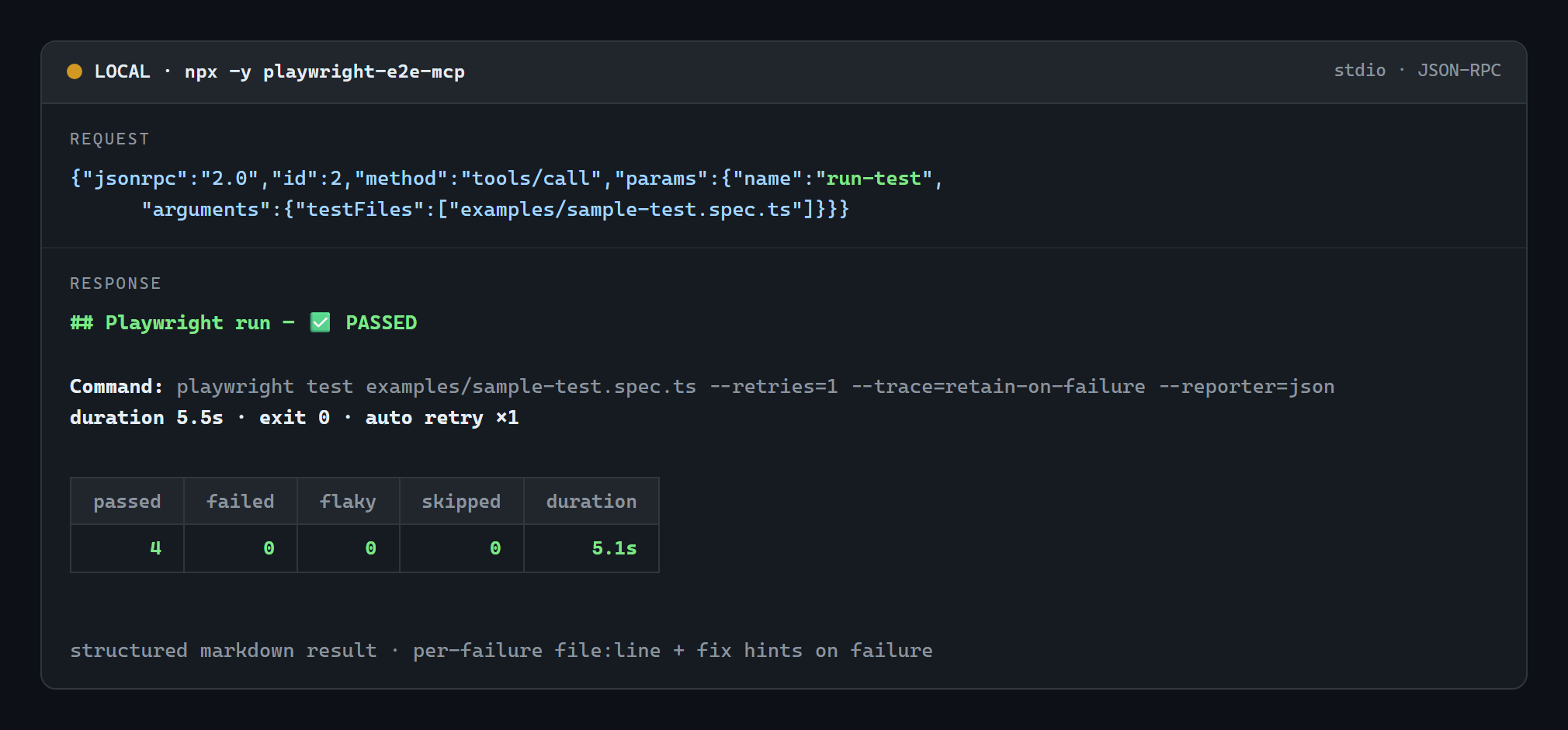
Demo
A real run-test call served over stdio by npx -y playwright-e2e-mcp against the bundled
examples/sample-test.spec.ts (actual output, unedited):
Free and open source
- MIT licensed. Use it, change it, ship it in commercial work; no fees, no feature held back. The optional Pro plan adds a hosted service (CI run history across machines), not tools; nothing here needs it.
- No account, no API key, no sign-up.
npx -y playwright-e2e-mcp initis the whole setup. - No telemetry. It never phones home; your tests, traces and run history stay on your machine unless you set a Pro key and upload them.
- Free dependencies only: the MCP SDK (Apache-2.0), zod (MIT), axe-core (MPL-2.0) and the Playwright your project already has (Apache-2.0).
- Free to host yourself, too: the HTTP bridge deploys to a free Vercel account (see Hosted endpoint).
What it does not do: it doesn't drive an exploratory browsing session step by step, and it doesn't replace Playwright's own Test Agents inside VS Code. Use Playwright MCP for interactive browsing and this server for running, diagnosing and fixing the suite. They work side by side.
More documentation
- Tool reference: every argument, example outputs, edge cases handled
- Hosted endpoint: the HTTP bridge for ChatGPT and claude.ai connectors
- Security: the security model and how to report a vulnerability
- Development: building, tests, Docker, signing and releasing
- Contributing · Code of conduct
License
MIT. If this saves you a debugging session, a ⭐ on the repo helps other Playwright users find it.
Comments
New to MCP?
From what the protocol is to installing your first server, these answers cover most first questions.
An open protocol that defines how AI applications connect to external tools and data in a uniform way. Clients talk to the model; MCP servers provide tools, resources and prompt templates. They exchange standard messages, so one server can be reused by many clients.