
About XTELL Serial
XTELL Serial is a Windows serial-terminal GUI paired with an MCP server for embedded developers and AI assistants. It lets both inspect the same device logs and send data through the same serial port.
Key features
- 01Serial terminal with GUI
- 02Live substring and regex filters
- 03Multiple named terminal windows
- 04Send history and repeat-send
- 05Read logs and send data via MCP
Use cases
- 01Inspecting embedded-device logs
- 02Sending commands to a serial device
- 03Filtering and saving serial output
MCP support
Its MCP server exposes tools to list ports, connect, send data, read received or filtered logs, manage filters and buffers, and save output. The GUI and server communicate through a local TCP hub.
Configuration
Local server config is the same for every client. Copy it into your client’s MCP config file.
We haven’t collected a package or remote endpoint for this server. Follow the instructions in the project README.
Tools
Local servers expose tools only once running on your machine, and the maintainer has not provided a tool list.
Details
From the project READMExtell-serial
About XTELL (www.xtell.cn)
Shenzhen XTELL Future Technology delivers true full-stack development: software, circuit design, mold development and mass production, all from one team. Our work spans embedded software and hardware, cloud platforms and backends, AI algorithms, IoT solutions and mobile internet technology. We provide the full lifecycle from concept design to mass-production delivery, and the close collaboration between hardware and software helps clients bring products to market quickly and succeed commercially.
A serial terminal with a GUI that your AI assistant can drive through MCP. You watch the log scroll in a normal desktop window; Claude, Cursor or any MCP client reads the same log and sends commands to the same port.
Status: early preview (v0.1). Windows only for now. The full MCP setup guide and tool reference is in docs/MCP_SETUP.md (also available in Chinese).
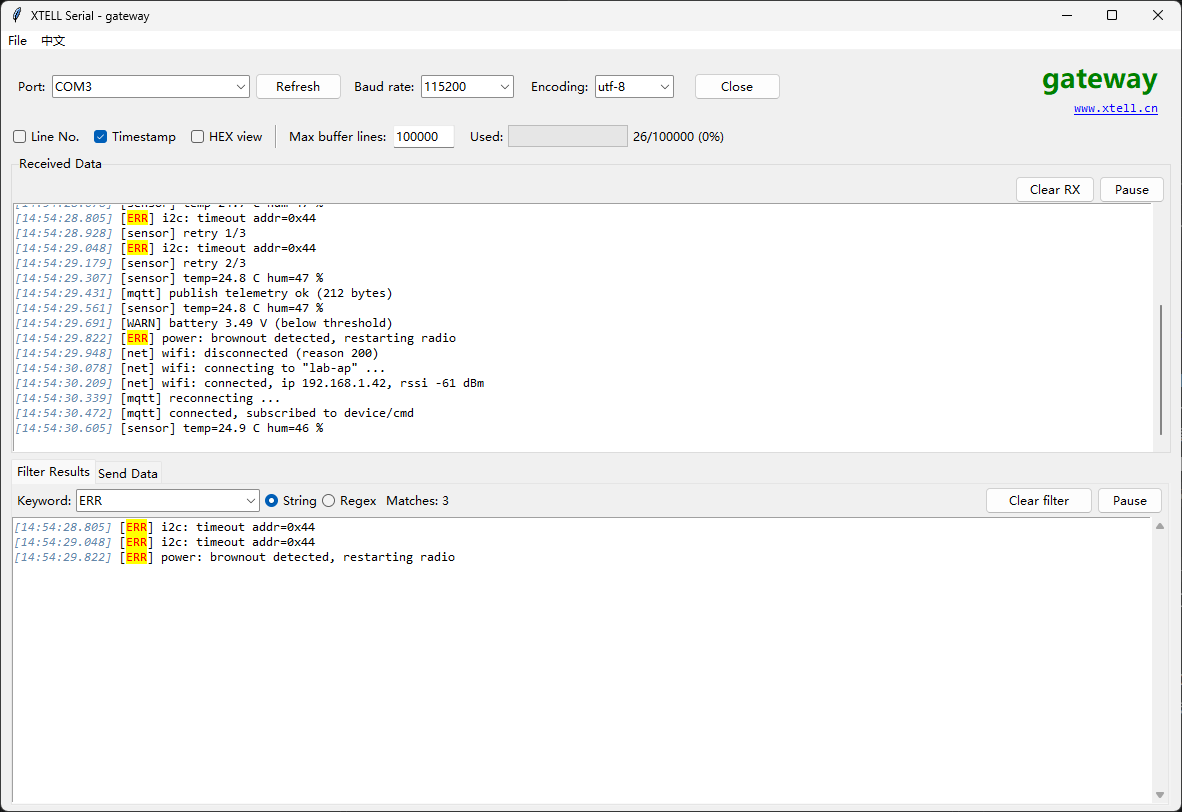
The log in the upper pane, the filter (here ERR) highlighting matches and listing them below. The log is demo data.
What it is
- A full serial terminal: baud rates up to 10 Mbaud, UTF-8 / GBK / GB2312 / ASCII, HEX view and send, timestamps, line numbers.
- Live filtering by substring or regular expression, with highlighting and a separate filtered view.
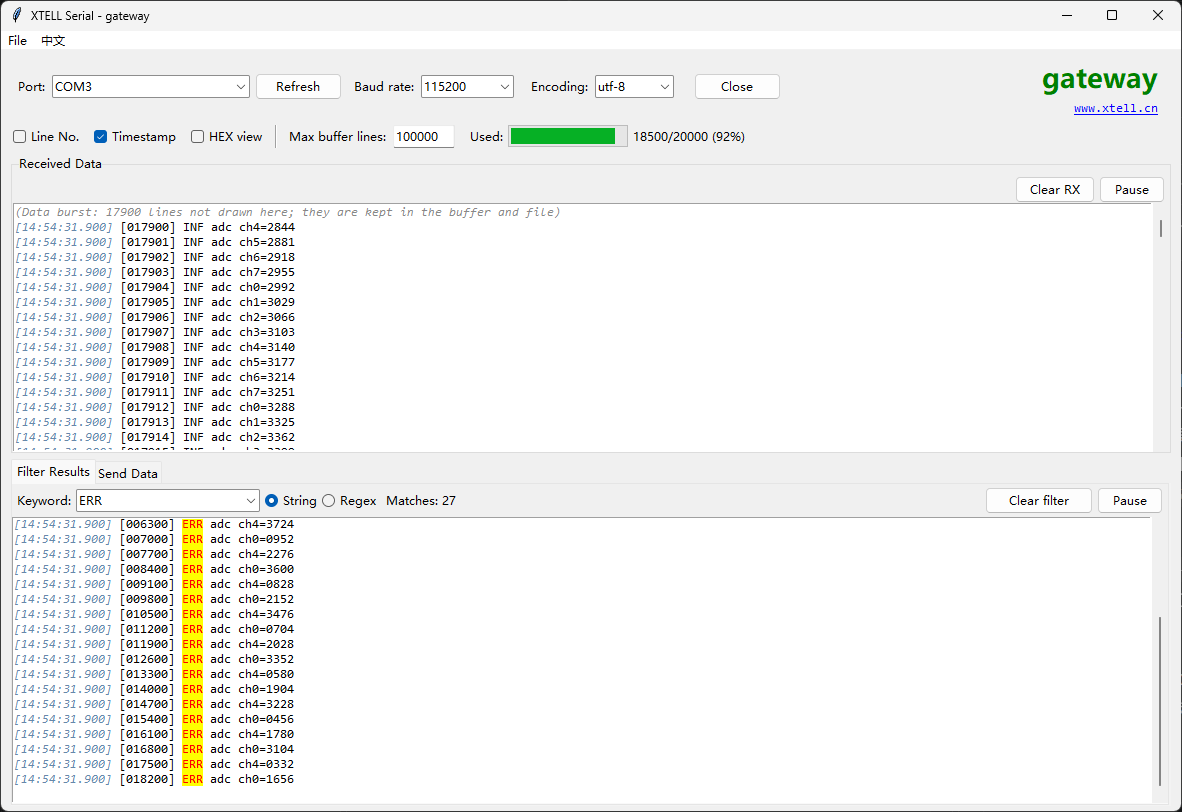
- Repeat-send, send history, save-to-file with append mode, a 100,000-line buffer with a usage bar.
- English and Chinese user interface: use the language item in the menu bar, next to File (ENG / 中文), to switch; the choice is remembered (the first run follows the Windows display language).
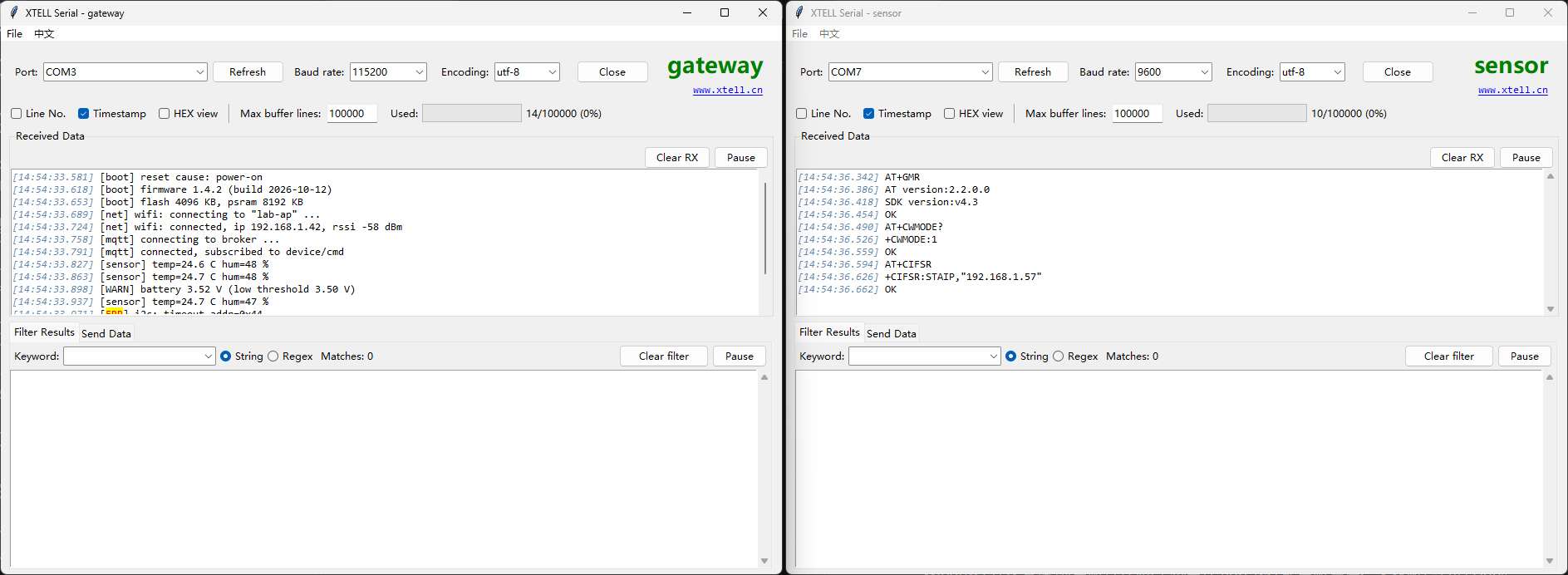
- Several windows at once, each with its own name, for bench setups with more than one board. The first window acts as a local hub; if it closes, another one takes over.
- An MCP server (
xtell-serial-mcp) that exposes 14 tools to AI clients: list ports, connect, send, auto-send, read received / sent / filtered data (with optional time ranges), set a filter, save to file, clear buffers, check buffer status.
The GUI and the MCP server talk over a local TCP hub on 127.0.0.1:50016 (override with XTELL_SERIAL_HUB_PORT). Nothing listens on a public interface.
More screenshots
Run from source
pip install -r requirements.txt
python xtell_serial.py
Build executables (Windows)
pip install pyinstaller
build_exe.bat
This produces dist\xtell-serial.exe (the GUI) and dist\xtell-serial-mcp.exe (the MCP server).
Connect an AI client
Register xtell-serial-mcp.exe (not the GUI) as an MCP server. For Claude Code:
claude mcp add xtell-serial C:\path\to\xtell-serial-mcp.exe
For Claude Desktop, Cursor and others, add this to the client's MCP configuration (see mcp_config.example.json):
{
  "mcpServers": {
    "xtell-serial": {
      "command": "C:\\path\\to\\xtell-serial-mcp.exe",
      "args": []
    }
  }
}
The full tool reference is in docs/MCP_SETUP.md.
Then ask your assistant something like: "Connect to COM3 at 115200, send AT+GMR, and tell me what version the module reports."
Safety notes
- The assistant can send arbitrary bytes to whatever device is on the port. Do not connect it to hardware where an unexpected command could cause harm.
- The local hub accepts connections from
127.0.0.1only.
License
Apache License 2.0, see LICENSE.
Built by XTELL, an embedded hardware and software design house in Shenzhen.
Comments
New to MCP?
From what the protocol is to installing your first server, these answers cover most first questions.
An open protocol that defines how AI applications connect to external tools and data in a uniform way. Clients talk to the model; MCP servers provide tools, resources and prompt templates. They exchange standard messages, so one server can be reused by many clients.