
About mcp-for-maya
mcp-for-maya connects AI agents to Autodesk Maya for scene inspection, planning, modeling, and verification. Its spatial analysis, deterministic audits, rollback checkpoints, and visual review tools support structured 3D workflows.
Key features
- 01Inspect and measure scene geometry
- 02Plan scenes and validate constraints
- 03Audit scenes with deterministic checks
- 04Checkpoint and roll back scene changes
- 05Execute Python and capture visual previews
Use cases
- 01Inspect a Maya scene before adding objects
- 02Check clearances and scene organization
- 03Review modeled changes against constraints
- 04Restore a scene after an unwanted change
MCP support
The MCP server exposes 25 tools for scene inspection, editing, auditing, asset handling, export, and session management to MCP clients.
Configuration
Local server config is the same for every client. Copy it into your client’s MCP config file.
Tools
25Saved tool list · updated 1d ago
| Parameter | Type | Required | Description |
|---|---|---|---|
| detail | string | No | Detail level - "compact" (fast), "standard" (+materials/mesh stats), "full" (+vertices). |
| format | string | No | Output format - "cos" (Chain-of-Symbol, compact), "json" (full JSON). |
| session_key | any | No | Maya session key (auto-selected if only one session). |
Details
From the project READMEEnglish | 简体中文
mcp-for-maya
MCP server giving AI agents spatial awareness of Autodesk Maya scenes



What Is This
mcp-for-maya is a Model Context Protocol (MCP) server that lets LLM agents (Codex, Claude, etc.) directly drive Autodesk Maya for 3D modeling, scene planning, and engineering-grade delivery.
Forked from chadrik/maya-mcp-server, it adds a scene-intelligence layer on top of the upstream connection stack: spatial awareness, deterministic auditing, transactional safety, and a visual loop.
Key capability: the agent stops "writing blind" — it can perceive spatial state, materials, and object relationships, then verify changes against engineering rules.
Warning
This server executes arbitrary Python inside Maya — that is a designed capability, not a bug. The built-in validation / rate-limit / audit pipeline is a safety net for accidents and injected instructions, not a boundary against a malicious client; the connected agent is trusted. See docs/threat-model.md.

Every asset below is a real capture produced by this project's own tool chain — no mockups: scenes were built procedurally through execute_code / write_module (plus one live asset_import), frames rendered through scene_render_preview, the audit pair via scene_review + scene_viewport_snapshot, and the orbit sequence captured frame-by-frame with playblast (Maya 2024 GUI session).
| Prompt | Result |
|---|---|
write_module → t20_movement.build() — "parametric involute gear train caliber: true involute teeth, Geneva-striped plates, blue-steel screws, ruby jewels, spiral hairspring" |  |
write_module → t20_bonsai.build() — "low-poly L-system bonsai: recursive branching, faceted foliage pads, pot + moss + stones" | 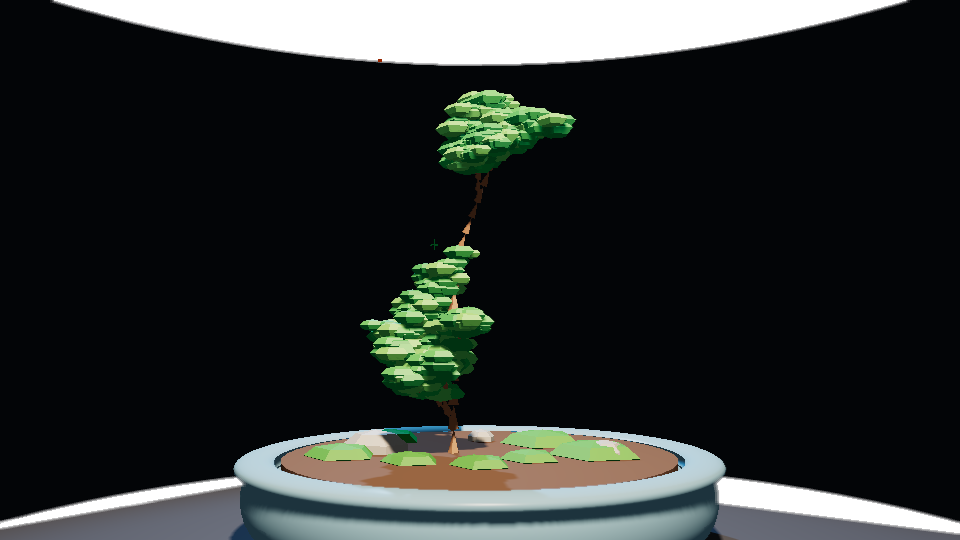 |
asset_import("vintage_pocket_watch") + asset_import("metal_tool_chest") → t20_workbench.build() — "horologist's workbench: imported assets with textures wired, procedural involute spares" |  |
write_module → t20_street.build() — "low-poly corner block: 11 parametric buildings, gable roofs, awnings, street furniture, parked vans" | 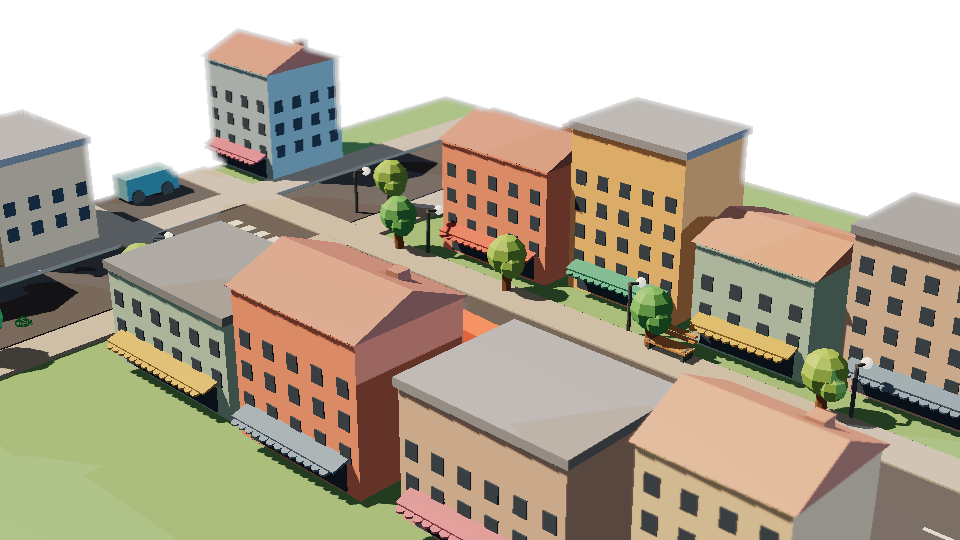 |
write_module → t20_teapot.build() — "Utah teapot recreation: revolve-profile body, Bezier tapered spout, ear handle, checkered floor" | 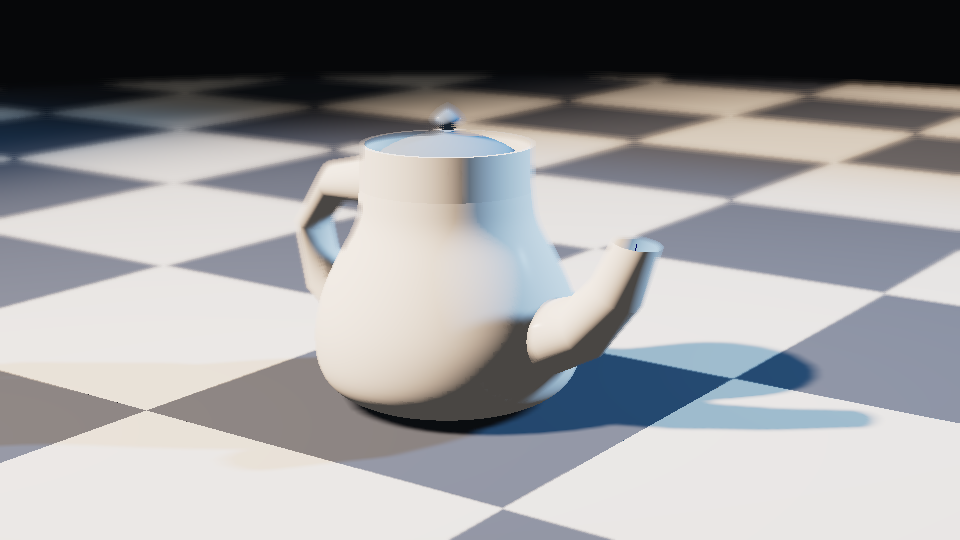 |
scene_review() on a bench littered with junk → scene_plan(auto_fix=True) + cleanup → scene_review() again — score 53.7 → 64.2 | 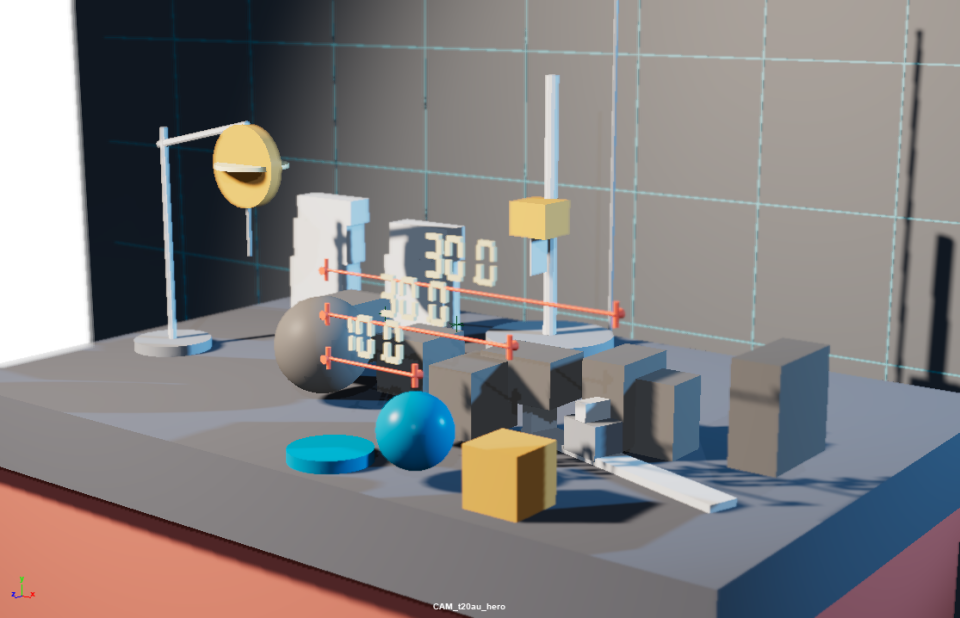 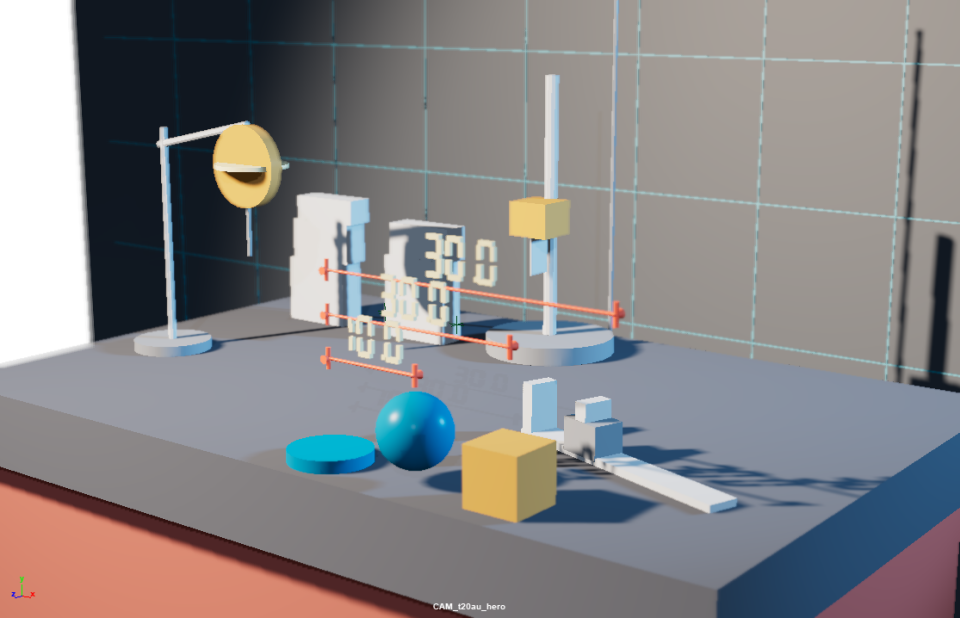 |

Reproduce every frame with the scripts in .github/assets-src/.
vs blender-mcp
An honest three-tier comparison with ahujasid/mcp-for-blender (measured 2026-09):
| Tier | Contents |
|---|---|
| Unique to this project | ICEV enforced workflow (in server instructions), CoS notation output, checkpoint/rollback transactional safety, scene_plan holistic planning (zone mapping + layout suggestions), multi-session management, 11 deterministic audit checks, playblast render preview with metadata |
| Unique to blender-mcp | Asset ecosystem breadth (Sketchfab/Hyper3D/Hunyuan3D), first-class object CRUD tools, AI-generated-model integrations, community scale |
| Shared | MCP tool surface, Poly Haven asset source, viewport screenshot feedback, arbitrary Python execution, local socket connection |
Poly Haven model search + import shipped in 0.2.0 (issue #2 thin slice: FBX + texture wiring; HDRIs and texture packs remain roadmap). AI generation and first-class object CRUD are explicitly out of scope — the latter is already covered by execute_code.
On the shared asset-download path, this project's controls are enforced in code rather than conventional: downloads happen host-side only — https + host allowlist, per-file md5, size caps, filenames sanitized from the URL's last segment (polyhaven.py) — and Maya itself never touches the network. Enforcement detail: docs/threat-model.md.

| Capability | Tools | Notes |
|---|---|---|
| 🧊 Spatial awareness | scene_snapshot scene_inspect scene_measure | One-call full-scene spatial model; precise distance/overlap/gap measurement |
| 🎨 Aesthetic analysis | scene_aesthetics | 5 dimensions: color theory (60-30-10), spatial composition (golden ratio / rule of thirds), proportion & scale (ergonomics), lighting quality (three-point / fill ratio / temperature / decay), visual flow |
| 🎬 Camera planning | camera_create camera_orbit | 8 industry-standard shot types + orbit animation |
| 🛡️ Disaster recovery | scene_checkpoint scene_rollback scene_checkpoint_list | exportAll in-memory snapshots; rollback explicitly rebinds the original path |
| 🧠 Scene planning | scene_plan | Organization health, zone balance, layout suggestions, conflict prevention, natural-language planning |
| 📋 Engineering audit | scene_review scene_validate scene_assert | 11 deterministic checks (0-100 score) + custom constraint validation + state assertions |
| ⚡ Code execution | execute_code write_module | Run arbitrary Python in Maya / inject reusable modules |
| 👁️ Visual loop | scene_viewport_snapshot scene_render_preview | WYSIWYG viewport capture + single-frame playblast preview (GUI sessions only) |
| 🔌 Session management | list_sessions add_session maya_setup_guide | Multi-session discovery/attach + connection diagnosis/install/fallback guidance |
| 📦 Asset library | asset_search asset_import | Poly Haven CC0 models — host-side HTTPS download (host allowlist, md5 verify, size caps, platformdirs cache), Maya-side FBX import with texture wiring, polycount/dims guards, GRP_asset_<id> dedup |
| 📤 Scene export | scene_export | FBX/OBJ/USD export — whole scene or named objects; format inferred from extension (conflict is an error, never a guess), parent dirs auto-created, overwrite opt-in, selection restored |
| 🔎 Scene-graph introspection | scene_describe scene_nodes | API-level node self-description (exact type, per-attribute metadata: keyable/connectable/enum/ranges, connection wiring — size-bounded, *_truncated disclosure, limit up to 1000) + bounded enumeration incl. non-DAG nodes (materials/tool nodes) with has_more/next_cursor pagination |
25 MCP tools in total.

1. Install
# Install from PyPI (recommended)
pip install mcp-for-maya

# or run straight away with uvx
uvx mcp-for-maya

# alternative: install from git with uv
uv tool install git+https://github.com/Xxx91n/mcp-for-maya.git

# or clone the source
git clone https://github.com/Xxx91n/mcp-for-maya.git
cd mcp-for-maya
pip install -e .
Note
Three-layer naming: dist name
mcp-for-maya(PyPI shelf name) → installs import packagemaya_mcp_server(kept from upstream); script namemcp-for-maya(old namemaya-mcp-serverremains as a compat alias).uvx mcp-for-mayaresolves precisely because the command name matches the dist name.
2. Connect Maya
Option A: automatic (recommended)
With the MCP server running, the agent calls maya_setup_guide to walk the connection:
- Make sure Maya is running
- Give the agent any instruction (e.g. "look at my Maya scene")
- If unconnected, the agent runs diagnostics and can install
userSetup.py(idempotent marker-block merge, timestamped backup before writing) - After restarting Maya, the command port opens automatically
Option B: manual
In Maya's Script Editor (Python mode, not MEL):
import maya.cmds as cmds

cmds.commandPort(name=":7001", sourceType="python")
Option C: persistent auto-connect
Save this as userSetup.py in your Maya scripts directory:
| Platform | Path |
|---|---|
| Windows | %MAYA_APP_DIR%\<version>\scripts\ |
| Linux | ~/maya/<version>/scripts/ |
| macOS | ~/Library/Preferences/Autodesk/maya/<version>/scripts/ |
import maya.cmds as cmds

cmds.evalDeferred('cmds.commandPort(name=":7001", sourceType="python")', lowestPriority=True)
Multiple Maya instances
A commandPort is a single listening socket bound to one host:port — a second instance fails to bind the same port, so each Maya instance needs its own port. Typical topology:
| Maya instance | commandPort | Notes |
|---|---|---|
| Instance A | :7001 python | primary |
| Instance B | :7002 python | second instance |
| Instance A | :7011 mel | MEL port (auto-detected and exempted — no error spam) |
Run cmds.commandPort(name=":<port>", sourceType="python") inside each instance (its Script Editor or its own userSetup.py). Auto-scan is the primary path — the server periodically enumerates listening Maya ports and bootstraps them; if a session is missed, add_session(host, port) is the manual fallback. If scanning probes a non-Maya TCP service on the box, bound the probe set with MAYA_MCP_INCLUDE_PORTS=7001,7002 (comma-separated, 7005-7010 ranges allowed) or exclude offenders via MAYA_MCP_EXCLUDE_PORTS=<port>.
Note: a commandPort does not persist across sessions — it dies with Maya; for persistence write it into userSetup.py (Option C).
Troubleshooting
| Problem | Fix |
|---|---|
list_sessions returns empty | call maya_setup_guide(action="diagnose") |
| Port in use | close other Maya instances or pick another port |
| userSetup.py not loading | check it sits in the right scripts dir, restart Maya |
| Firewall blocks | ensure localhost:7001 is reachable |
| Second Maya instance not listed | each instance needs its own commandPort (same port = bind conflict); if scanning still misses it, call add_session(host, port) |
| Script Editor spams syntax errors | legacy symptom of probing a MEL port — current versions auto-exempt non-Python ports; if it persists, exclude the port via MAYA_MCP_EXCLUDE_PORTS |
3. Configure the MCP client
Codex ~/.codex/config.toml:
[mcp_servers.maya]
command = "uvx"
args = ["mcp-for-maya"]
tool_timeout_sec = 120
For the git source use args = ["--from", "git+https://github.com/Xxx91n/mcp-for-maya.git", "mcp-for-maya"]; for a source checkout use command = "python", args = ["-m", "maya_mcp_server"], and point PYTHONPATH at <repo>/src under env.
4. Use it
Talk naturally:
"Look at what's in my Maya scene, then create a display shelf at the entrance"
The agent calls scene_snapshot() → understands the scene → models → scene_review() audits the result.

Every scene modification follows the ICEV loop (also shipped as an agent process card, see skills/icev-workflow):
┌──────────┐     ┌──────────┐     ┌──────────┐     ┌──────────┐
│ INSPECT  │ ──→ │ COMPUTE  │ ──→ │ EXECUTE  │ ──→ │ VERIFY   │
│ snapshot │     │  plan    │     │  apply   │     │  audit   │
└──────────┘     └──────────┘     └──────────┘     └──────────┘
- INSPECT:
scene_snapshot()for full-scene spatial data - COMPUTE: plan positions, sizes, clearances from that data
- EXECUTE:
execute_code()applies Maya Python - VERIFY:
scene_assert()+scene_review()confirm the result; on GUI sessions the visual tools give pixel-level confirmation
Tools Reference
Spatial
scene_snapshot(detail="compact", format="cos")  # full scene in one call
scene_inspect(target="wall_entrance", include_neighbors=True)
scene_measure(obj_a="wall_north", obj_b="counter_A", mode="clearance")
scene_assert(expectations='{"wall": {"exists": true, "position": [0,0,500]}}')
Audit
scene_review()  # 11 deterministic checks, 0-100 score
scene_validate(rules='[{"type": "min_clearance", "value": 180}]')
Cameras
camera_create(target="product_display", shot_type="medium", azimuth=30, elevation=15)
# extreme_wide / wide / medium / close / extreme_close / bird_eye / low_angle / over_shoulder
camera_orbit(center=[0, 100, 0], radius=500, frames=120)
Disaster recovery
scene_checkpoint(name="before_renovation")  # exportAll in-memory snapshot; no undo history
scene_checkpoint_list()
scene_rollback(filename="cp_before_renovation.ma")
# auto safety snapshot first, then rebinds the scene name to the original path
# call scene_snapshot() after a rollback — snapshots carry no undo history
# self-contained: references are flattened (no write-back); one scene file per session assumed
Assets (Poly Haven, host-side download)
asset_search(query="camera", asset_type="models", limit=20)  # Poly Haven index
asset_import(asset_id="Camera_01", resolution="1k")
# HTTPS-only download into a platformdirs cache (per-file md5 verify + sha256 audit),
# then Maya imports the local FBX under GRP_asset_<asset_id> (repeat calls dedup;
# force=True re-imports). Textures auto-wire by filename suffix
# (diff/rough/metal/nor_gl/ao/disp...) with sRGB/Raw color spaces and bump2d normals.
# Single-part assets ship bare map names (Diffuse/Rough/Metal...) — those are
# recognised too and wired onto the asset's single material.
# Guards: 100k-face polycount cap (allow_high_polycount override), dims sanity report.
Scene export
scene_export(path="D:/out/scene.fbx")  # whole scene; format inferred from .fbx
scene_export(path="/tmp/kit", format="obj")  # missing extension is appended -> kit.obj
scene_export(path="D:/out/kit.usd", objects=["GEO_box"])  # exportSelected; prior selection restored
# format {fbx,obj,usd}: an extension/format conflict is an error, never a guess.
# An existing file is rejected unless overwrite=True. prompt=False is forced
# (no modal can hang the channel); the scene's modified flag is untouched.
# Alembic is not supported — AbcExport is not a cmds.file surface.
Visual loop (GUI sessions only)
scene_viewport_snapshot(
    max_size=800, format="jpeg"
)  # HUD/selection included — what the artist sees
scene_render_preview(camera="CAM_hero", width=640, height=360)  # clean single-frame playblast
# both return [image, JSON metadata]; headless sessions get a gui_session_required error
# prefer format="png" for wireframe/line-art review; trust returned metadata for actual size
CoS Notation
Default output uses Chain-of-Symbol notation to compress scene data. The format's paper reports ~65% token savings vs JSON on its demo scenes (arXiv:2305.10276, −65.8%) — this project implements the notation; that figure is the paper's measurement, not a benchmark of this project.
SCENE[164obj, 5zones] UNIT=cm UP=y
shell (23obj) @(-11.8,178.8,145.7)
  GRP_floor[mesh]@(0,0,0) 1121.5x20x1530.5
Agent Skills
Two Experimental process cards ship in skills/:
| Skill | Purpose |
|---|---|
skills/icev-workflow | ICEV discipline: every scene mutation goes through Inspect→Compute→Execute→Verify |
skills/scene-review-playbook | Audit playbook: what the 11 checks weigh and how to map findings to fixes |
Evaluated on Claude Code only; untested on Codex/Gemini CLI/Cursor. Cross-model evaluation is tracked in issue #3.

scene_review() provides 11 universal checks (score normalized to 0-100):
| Check | Max pts | What it looks at |
|---|---|---|
| spatial | 10 | object/camera/light presence |
| overlaps | 10 | bbox collisions (parent-child excluded) |
| conflicts | 10 | penetration between unrelated objects |
| zones | 5 | naming-rule zone coverage |
| naming | 5 | production naming convention |
| components | 10 | GRP_ grouping + nesting depth ≤ 4 |
| orphans | 5 | empty groups / default names |
| aesthetics | 15 | 5-dimension aesthetics (color/composition/scale/lighting/flow) |
| lighting | 10 | three-point setup, fill ratio, decay |
| organization | 10 | overall hierarchy health |
| constraints | 5 | custom rule violations |
Trust & Privacy
- Zero telemetry: no phone-home — the project ships no telemetry or unsolicited outbound traffic; verify in source. The ONLY outbound calls are the two asset tools: HTTPS to
api.polyhaven.com/dl.polyhaven.org|.com(host allowlist + md5 + size caps inpolyhaven.py), and only when you call them. - Local, single-user: the command port binds localhost only; the connected MCP client is trusted.
- Safety net: a unified pipeline (
pipeline.py+security.py) validates arguments + token-bucket rate limits (~100/60s reads, ~20/60s writes, per session) + pattern scan (warn-only by default) + an independent JSONL audit log across all 25 tools. It catches accidents, not malicious clients — full model in docs/threat-model.md. - Transactional safety:
scene_checkpoint/scene_rollbackgive in-memory snapshots and explicit rollback (no undo history; references flattened). - Strict policy mode (optional): set
MAYA_MCP_DISABLE_EXECUTE=1,MAYA_MCP_DISABLE_WRITE_MODULE=1, orMAYA_MCP_DISABLE_ARBITRARY=1(all three) to remove the escape-hatch tools fromtools/listand deny the call with[policy_disabled]. Read-only tools are unaffected. These are misuse guardrails, not a hostile-agent boundary — an agent that still holdsexecute_codeis already inside the trust boundary; what they buy is a smaller blast radius for a demo, a mistake, or a CI sandbox. Rationale: docs/threat-model.md. Per-code reference: docs/guide/error-codes.md. - Vulnerability reporting: SECURITY.md.
Versioning
This project follows Semantic Versioning:
- 0.x (through 0.3.x, Alpha): the tool surface could still change; minor bumps carried features, no compatibility freeze.
- Beta (0.4.0): feature-complete tier — external testing begins here (classifier
4 - Beta). - 1.0.0: public API freeze — tool surface and output schemas stable per semver; breaking changes require 2.0.0. Promoted together with the
5 - Production/Stableclassifier in one commit; gated by the #7 real-machine checklist (Pass-set green + explicit waived items with owner/expiry — three-state gate, D-163).
The public API is the MCP tool surface: tool names, their input/output shapes, the two-layer error contract (host isError failures vs {error:{code,message,suggestion}} domain results), and tool-annotation semantics (docs/threat-model.md §5). Additive changes (new tools, new optional response fields) ship as minor releases; breaking changes ship as a major bump. 1.0.0 is a freeze commitment on this surface — not a quality certification: the remaining real-machine verification surface is tracked explicitly in #7 rather than implied away.
Releases are milestone-driven — no fixed cadence promised. Roadmap lives in GitHub issues: #2 Poly Haven integration (model slice shipped in 0.2.0; scene_plan recommendation residual split to #31), #3 Skills program (v1.x), #4 security & permission model (v1.x), #5 scene export + introspection (scene_export shipped in 0.3.0: FBX/OBJ/USD; scene_describe/scene_nodes introspection shipped in the same 0.3.0), #6 more asset sources (exploratory), #7 real-machine checklist + v1.0 feedback (pinned).
Requirements
| Environment | Requirement |
|---|---|
| Host (runs the MCP server) | Python >= 3.10 (requires-python); Windows / Linux / macOS |
| Injected helper (runs inside Maya) | Maya >= 2023 (bundled Python >= 3.9; relies on ast.unparse — older versions get an explicit refusal at injection) |
| Verified against | Maya 2024 GUI |
The two visual-loop tools need a GUI session (headless/mayapy returns a structured capability error). On the first capture the server probes the VP2 readback direction per-session (a disposable scene probe, net-zero side effects); MAYA_MCP_VP2_BOTTOM_UP=0|1 forces it when a driver misreports.
Development
uv sync --frozen                  # locked dev env from uv.lock (alt: pip install -e . --group dev, pip>=25.1)
python -m pytest tests/ -q       # tests
ruff check src tests             # lint
mypy src                         # typecheck
python -m maya_mcp_server -vv    # run with DEBUG logs (-v=INFO, -vv=DEBUG)
See CONTRIBUTING.md for the PR flow and CHANGELOG.md for the change log.
Credits
Forked from chadrik/maya-mcp-server — upstream MIT copyright retained (see LICENSE); this project adds the scene-intelligence layer on top of its connection stack.
How each upstream open issue maps to a disposition and release version in this fork: docs/upstream-issue-status.md.
Comments
New to MCP?
From what the protocol is to installing your first server, these answers cover most first questions.
An open protocol that defines how AI applications connect to external tools and data in a uniform way. Clients talk to the model; MCP servers provide tools, resources and prompt templates. They exchange standard messages, so one server can be reused by many clients.