
About YADE MCP Server
YADE MCP Server connects AI agents to the YADE discrete element method engine. It serves researchers and developers who need API lookup, live-session code execution, and management of long-running simulations.
Key features
- 01Browse and search the YADE API
- 02Run Python in a live YADE session
- 03Submit and manage background simulation tasks
- 04Inspect task output and status
- 05Read console input in agent context
Use cases
- 01Look up YADE classes and API methods
- 02Run code against a live simulation
- 03Monitor or stop a long-running simulation
- 04Review commands entered in the YADE console
MCP support
It exposes API browsing and search, live Python execution, task lifecycle controls, and console input to MCP clients. Execution tools require the YADE bridge; API documentation tools work without it.
Configuration
Local server config is the same for every client. Copy it into your client’s MCP config file.
Tools
7Saved tool list · updated 6d ago
| Parameter | Type | Required | Description |
|---|---|---|---|
| path | any | No | Dot-separated API path to browse. Progressive disclosure: - None or '': Root — list all categories - 'engines': List all engine classes - 'engines.NewtonIntegrator': Full docs for NewtonIntegrator - 'materials': List all material classes - 'materials.FrictMat': Full docs for FrictMat - 'interactions.geometry': List contact geometry classes - 'interactions.laws.Law2_ScGeom_FrictPhys_CundallStrack': Full docs - 'utils': Utility functions - 'omega': Omega (O) simulation control |
Details
From the project READMEyade-mcp



O.engines += [LLM()] # yet another engine.
yade-mcp connects AI agents to YADE, the open-source discrete element method engine, through the Model Context Protocol. The agent browses the YADE API, runs code in a live YADE session, launches long simulations as background tasks, and reads what you type at the YADE console.
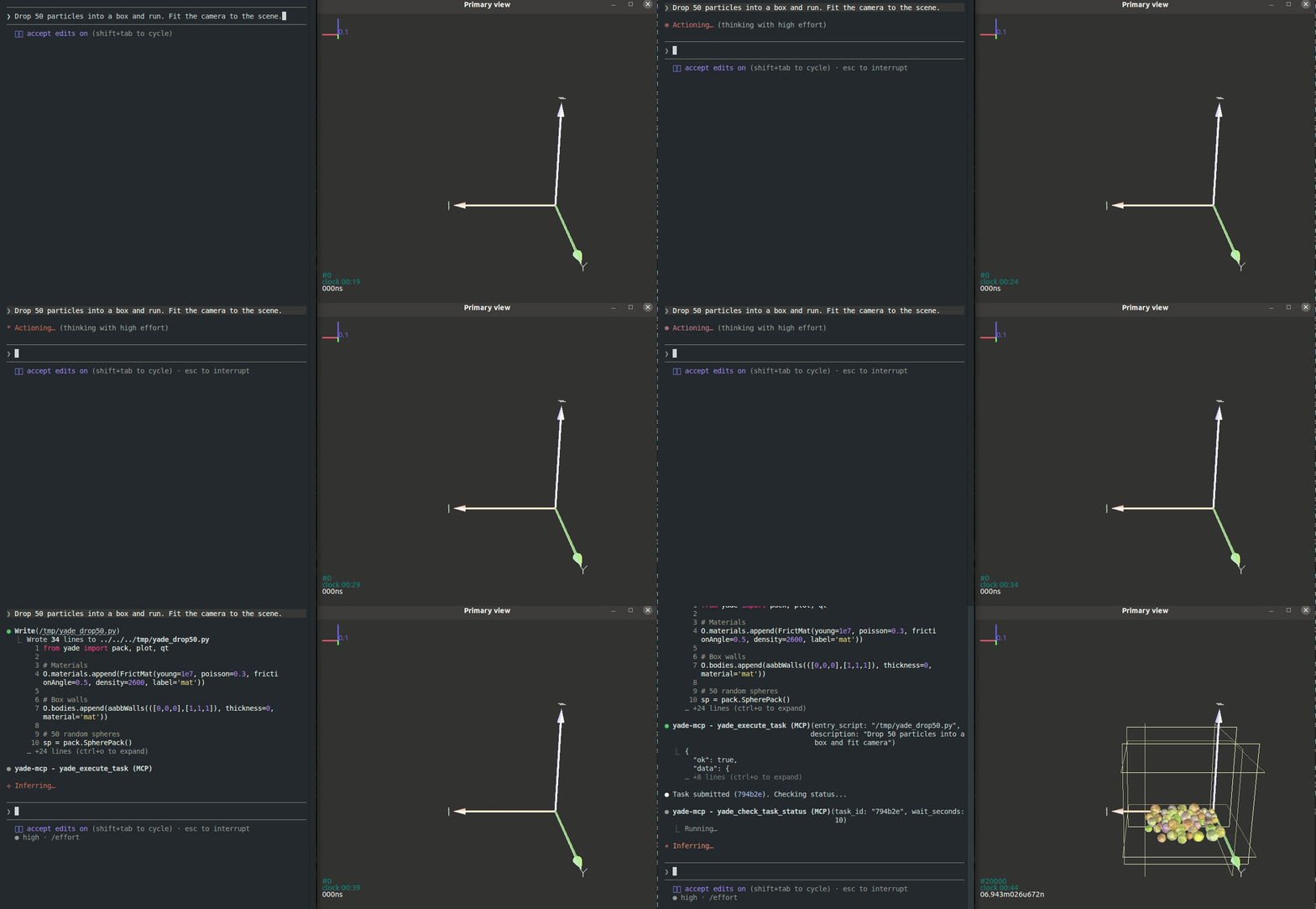
Tools (7)
Two documentation tools (no bridge needed) and five execution tools (bridge required):
| Tool | Purpose | Bridge |
|---|---|---|
yade_browse_api | Walk the YADE Python class tree | No |
yade_query_api | BM25 keyword search across the API | No |
yade_execute_code | Run Python in the live YADE process; returns synchronously | Yes |
yade_execute_task | Submit a script as a long-running background task | Yes |
yade_check_task_status | Inspect a running or finished task (output, status) | Yes |
yade_interrupt_task | Stop a running task at an iteration boundary, or cancel a queued one | Yes |
yade_list_tasks | List submitted tasks with metadata | Yes |
Example Prompts
- "Set up a triaxial compression test on a dense packing and plot deviatoric stress against axial strain"
- "Build an irregular particle as a level set body and drop it onto a plane"
- "The simulation is still running, check the unbalanced force without stopping it"
- "Look up how GlobalStiffnessTimeStepper picks the timestep, then add it to this model"
- "The command I just typed in the console raised an error, what went wrong?"
- "List what was run yesterday and summarize what each task produced"
First-time Setup
Prerequisites
- YADE installed
- uv installed. It provides the
uvxlauncher that agent clients use to runyade-mcp; without it the client reportsNo such file or directorywhen starting the server. - An AI agent: Claude Code, Codex CLI, Gemini CLI, or any MCP-capable client
Agentic Setup (Recommended)
Copy this to your AI agent and let it self-configure:
Fetch and follow this bootstrap guide end-to-end:
https://raw.githubusercontent.com/yusong652/yade-mcp/master/docs/agentic/yade-mcp-bootstrap.md
Manual Setup
1. Register the MCP server with your agent (use the line for yours):
# Claude Code
claude mcp add yade-mcp -- uvx yade-mcp

# Codex CLI
codex mcp add yade-mcp -- uvx yade-mcp

# Gemini CLI
gemini mcp add yade-mcp uvx yade-mcp
Or fill in the MCP config file by hand:
{
  "mcpServers": {
    "yade-mcp": {
      "command": "uvx",
      "args": ["yade-mcp"]
    }
  }
}
2. Install the bridge into YADE's Python.
YADE embeds one specific interpreter (the system python3 for the Debian and Ubuntu packages, or the one it was built against). A conda or venv Python is a different interpreter, and a package installed there is invisible to YADE. The reliable way to hit the right one is to install from inside YADE, where sys.executable is that interpreter. In the YADE console:
import sys, subprocess
subprocess.check_call([sys.executable, "-m", "pip", "install", "--user", "yade-mcp-bridge"])
Two things can go wrong here:
No module named pip: the interpreter has no pip. Install it with the system package manager, for examplesudo apt install python3-pip.externally-managed-environment(Debian 12, Ubuntu 23.04 and later): pip refuses--userby default. Add"--break-system-packages"after"--user"in the command above.
Then exit and restart YADE so the new package directory is picked up.
The bridge is proposed for inclusion in YADE itself (yade-dev/trunk !1187). Once it ships with YADE, this step goes away and the bridge starts with from yade import mcpbridge.
3. Start the bridge in the YADE console:
import yade_mcp_bridge
yade_mcp_bridge.start()
It prints one line: YADE MCP Bridge on http://localhost:9002, log: <cwd>/.yade-mcp/bridge.log.
Verify
Restart your AI agent and ask it to check that it is connected to YADE. It calls yade_execute_code; ok: true in the response means the whole chain works.
Daily Startup
Once first-time setup is done, each new YADE session only needs the bridge started again. In the YADE console:
import yade_mcp_bridge
yade_mcp_bridge.start()
The MCP client config persists.
Configuration
Port
The bridge listens on 9002 by default. To use another port, pass it to start():
yade_mcp_bridge.start(port=9008)
The MCP server connects to 9002 unless told otherwise, so register it with the matching URL:
{
  "mcpServers": {
    "yade-mcp": {
      "command": "uvx",
      "args": ["yade-mcp", "--bridge-url", "http://localhost:9008"]
    }
  }
}
Container
When YADE runs inside a container, bind the bridge to all interfaces so it is reachable from outside:
yade_mcp_bridge.start(host="0.0.0.0")
Publish the port when starting the container (for Docker, -p 9002:9002).
Features
- Live REPL in the running YADE process:
yade_execute_coderuns Python in the session's own namespace, so state persists between calls. It keeps working while a task runs, for reading intermediate results without stopping the simulation. - Task lifecycle: submit a script as a background task, tail its output, stop it at an iteration boundary, fix and resubmit. Tasks queue up and run one at a time, so a multi-stage pipeline can be submitted in one go.
- Task history across sessions: every task's script, output, and final state stay on record. A new agent session lists what was run and picks up without being told.
- Console input reaches the agent: lines you type at the YADE console arrive in the agent's context on its next call, so you can work at the console and with the agent at the same time.
- API documentation without a bridge: the class tree and a BM25 search over the YADE Python API work offline, from a corpus refreshed against current YADE releases.
- Multi-client: works with Claude Code, Codex CLI, Gemini CLI, GitHub Copilot CLI, OpenCode, toyoura-nagisa, and other MCP clients.
Troubleshooting
See Troubleshooting in the bootstrap guide.
Contributing
See CONTRIBUTING.md for development setup and guidelines.
License
MIT, see LICENSE.
Comments
New to MCP?
From what the protocol is to installing your first server, these answers cover most first questions.
An open protocol that defines how AI applications connect to external tools and data in a uniform way. Clients talk to the model; MCP servers provide tools, resources and prompt templates. They exchange standard messages, so one server can be reused by many clients.