
About Vibeflow
Vibeflow is a local-first kanban task manager for coding agents, with tasks stored as JSON files in the project repository. It combines sequenced, claimable work and review verification with UI annotations that capture selectors, URLs and source locations.
Key features
- 01Local kanban board with task files
- 02Create tickets from UI annotations
- 03Capture selector, URL and source location
- 04Organize parent and child tasks
- 05Claim next task and gate review
Use cases
- 01Turn a visible UI defect into a structured ticket
- 02Let an agent claim the next project task
- 03Track implementation through review and completion
MCP support
Vibeflow exposes task tools over MCP so agents can read and update tickets. Each server process resolves one project root at startup and supports stdio or HTTP transport.
Configuration
Local server config is the same for every client. Copy it into your client’s MCP config file.
Tools
Local servers expose tools only once running on your machine, and the maintainer has not provided a tool list.
Details
From the project READMEVibeflow
Task management for AI coding agents — with annotation and verification built in.

Vibeflow gives your coding agent sequenced, claimable work: tasks with hierarchy, an atomic --next claim, and a review gate with verification verdicts — on a local-first kanban board that stays in your repo. Clicking a UI element to file a ticket with its exact selector, URL, and source location is built in, so visual feedback arrives as structured tasks instead of prose.
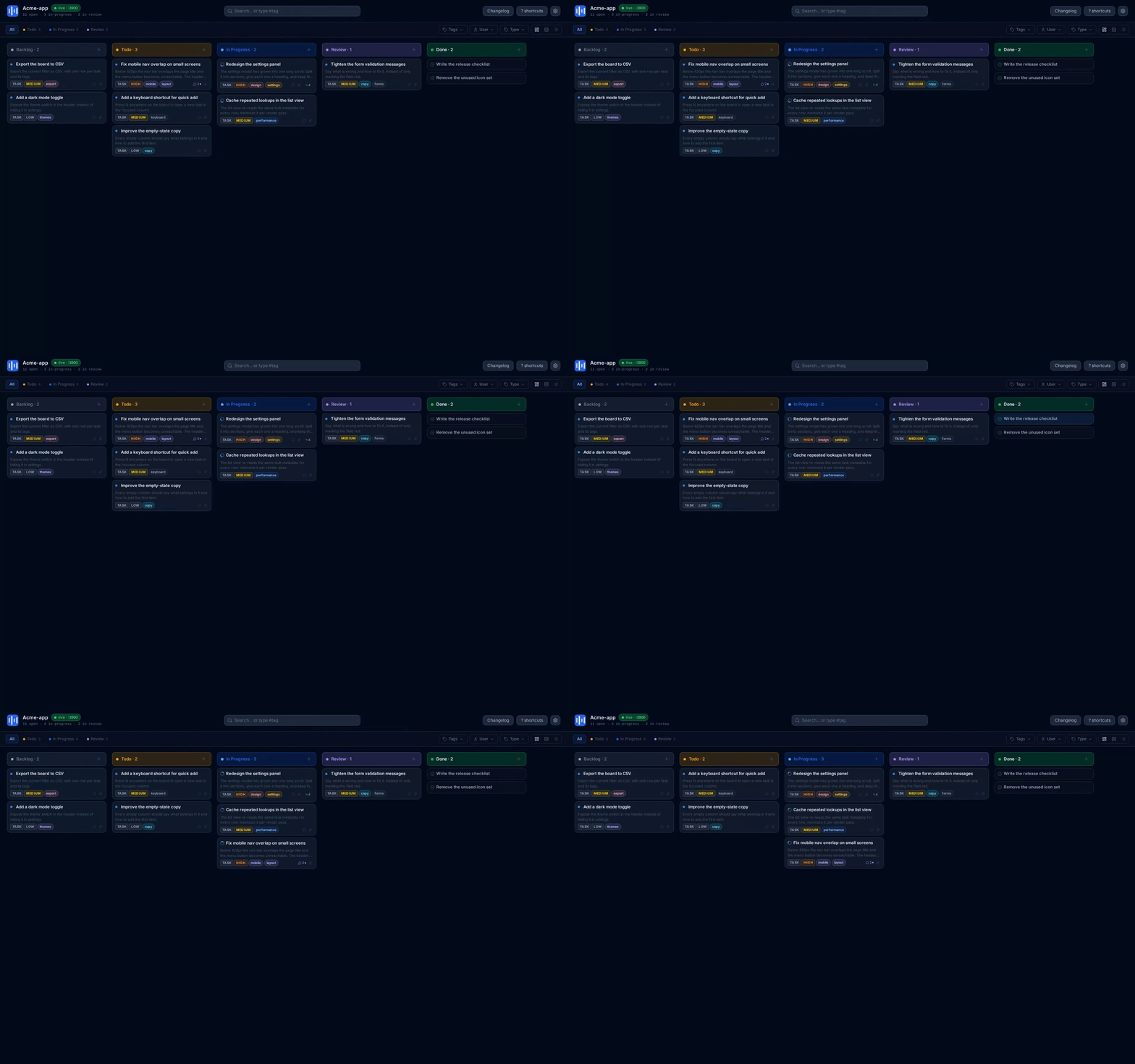
▶ Watch the full motion demo (MP4)
Why It Matters
AI agents write code fast, but understanding what to change is slow. Describing a UI issue in prose wastes tokens and produces wrong fixes.
Vibeflow turns visual feedback into structured tasks:
- Click any element → instant task with CSS selector, URL, and source file location
- Track on a Kanban board → see everything at a glance, drag between columns
- Agents implement with context → no guessing, no wrong elements, no wasted iterations
Perfect for small UI fixes, broken layouts, spacing issues, and anything where pointing is faster than explaining.
Install
Run it once with npx — nothing to install:
npx @vibeflow-tools/cli kanban
Or install it globally for day two. This adds the short alias vf:
npm install -g @vibeflow-tools/cli
vibeflow kanban                  # or: vf kanban
Requirements: Node.js >= 22. Apache-2.0 licensed. No account and no cloud — every task is a JSON file in your repo.
Quick Start
# 1. Start the local server and open the Kanban board
npx @vibeflow-tools/cli kanban

# 2. Annotate a running app: open http://localhost:3700/inject and drag the
#    bookmarklet onto your bookmarks bar (or use the script tag / console snippet)

# 3. Click elements in your app to create tasks — the CSS selector, URL and
#    source location are captured for you. You can also create tasks on the board.

# 4. Let your agent pick up the next task with full context
npx @vibeflow-tools/cli tasks --next
See It in Action
Drag tasks across the board — Backlog → Todo → In Progress → Review → Done. Drag a card to change its status and the board persists the new column and order, even after a reload. Tag, user and type filters keep their state while you move work, and every change is written straight to the task store — so the CLI and your agent see it immediately.
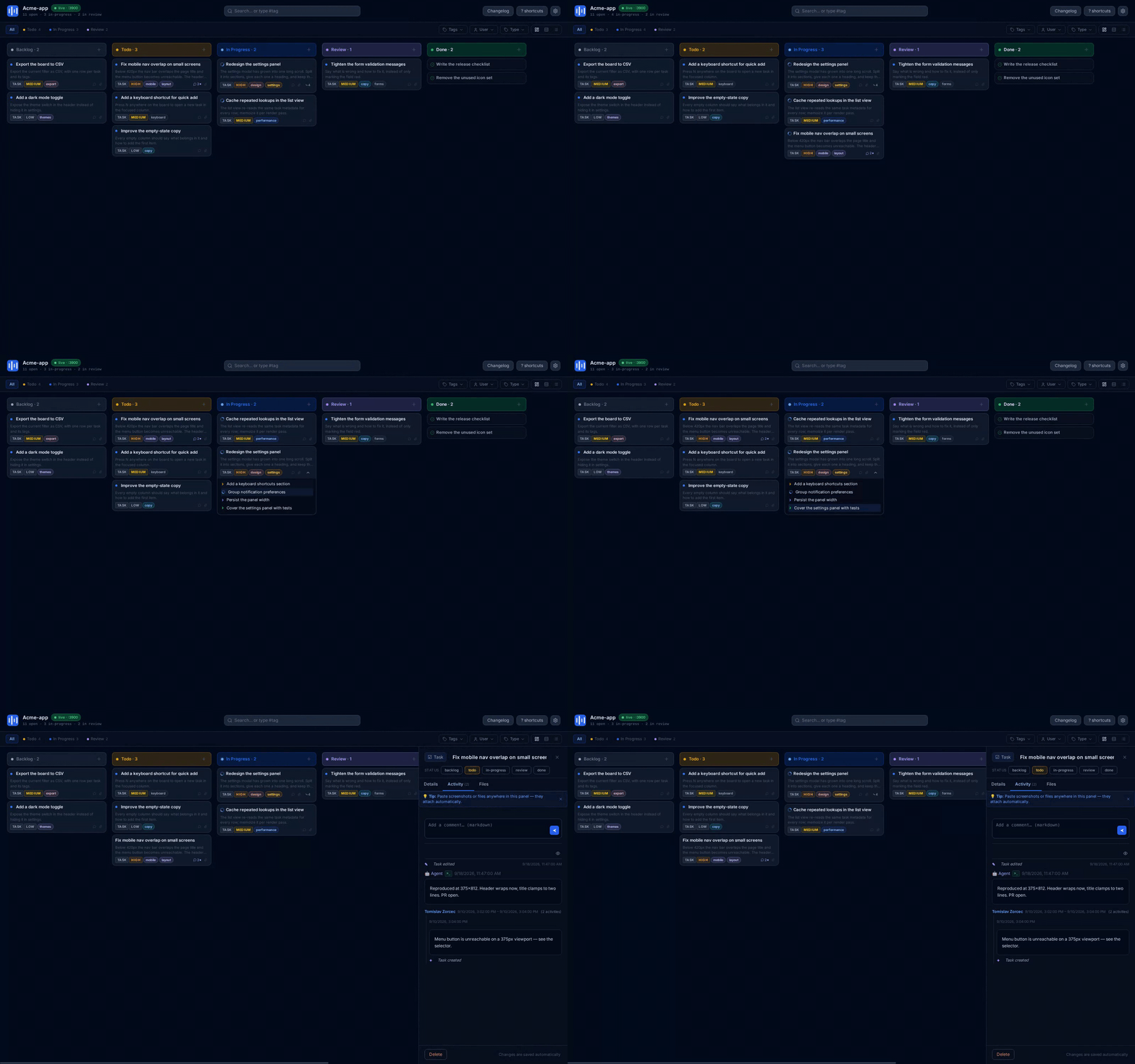
Break work into a parent / child tree — Turn an epic into child tasks that keep their own status, priority and history. Expand
the tree inline on the card, or create children from the terminal with
vibeflow tasks --add --title "..." --parent <id>. The same hierarchy comes back from
vibeflow tasks --get <id>, so an agent can pick up a leaf without losing the parent.
Get the whole ticket in one panel — Open any card for the full ticket: status, description, tags, priority, author, relations (children and related tasks), an activity feed and file attachments. Changes save automatically, and pasting a screenshot or file anywhere in the panel attaches it to the task instead of your Downloads folder.
MCP Server
Vibeflow exposes its task tools over MCP, so an agent can read and update tickets directly. Configure one server per project: a server resolves its project root once at startup and every tool call uses that root, so it cannot write into the wrong project.
stdio (recommended — no port, nothing to keep running):
{
  "mcpServers": {
    "vibeflow": {
      "command": "npx",
      "args": ["-y", "@vibeflow-tools/cli", "mcp", "--project", "/path/to/project"]
    }
  }
}
--project is required: a spawned client's working directory (often your home directory)
is never trusted, and the root is validated before anything is created. Put this config
with the project — .mcp.json at the repo root, or your editor's workspace config using
${workspaceFolder}.
HTTP (a server you keep running):
vibeflow serve --project ./my-project # MCP endpoint at /api/mcp
Loopback-only until you configure a token. Both transports mount the identical tool set; only the transport differs.
Do not run one global server with a per-call project argument — that is deliberately not supported. One process serves one root, resolved at startup.
A type:"Research" task is refused review with RESEARCH_REPORT_REQUIRED until a .md
report is attached, and over MCP the way to do that is attach_file with a .md filename
— the gate looks for a .md among a task's files, so the name is what counts. There is no
--report-file equivalent on this surface; the CLI flag is named in the refusal's
suggestion for CLI callers only. A Research task must not carry a verification verdict
(RESEARCH_VERIFY_NOT_ALLOWED) — it has no annotated UI to verify.
MCP results
A tool's result carries its payload as one JSON document in content[0].text — that holds for
every tool-level success and every tool-level refusal. There are exactly two shapes that are
not JSON: a protocol-level failure — arguments the tool's own schema rejects, or the name of a
tool that does not exist — comes back as result.isError === true with content[0].text =
MCP error -32602: … and no envelope to parse. So check isError first and parse the text as JSON
only when it is absent.
Those two protocol-level failures are told apart by what the message names, not by the code —
the SDK reports an unknown tool through the same input-validation path, so both carry -32602 even
though JSON-RPC reserves -32601 for "method not found":
| what you sent | the message names | the remedy |
|---|---|---|
| arguments the tool's schema rejects | the offending field (… at title) | send that field, with the type the schema asks for |
| a tool name that does not exist | the tool | read tools/list; the name you sent is not one this server exposes |
The schema-error class (-32602) — no vibeflow code, by design
An input the tool's own schema rejects (create_task with no title, attach_file with no
contentB64, list_tasks with limit:-1) is refused by the MCP SDK's input validation, before
any vibeflow handler runs. vibeflow therefore never sees the call and cannot attach a code or a
suggestion to it. What arrives is:
result.isError === true
content[0].text = "MCP error -32602: Input validation error: Invalid arguments for tool
                   create_task: Invalid input: expected string, received undefined at title"
Three properties, all deliberate and all load-bearing:
- It has no entry in the code table below, and never will. Every code in that table is a vibeflow
domain code that a handler produced on purpose.
-32602is the JSON-RPC invalid params code; it is not a member of vibeflow's vocabulary, and-32602will never appear as a row there. - It names the offending field (
… at title,… at contentB64) — the last word of the message is the field you got wrong. - Its code string is client-dependent, so do not key on it. Some clients normalise this class into
a string of their own (the Pi MCP adapter reports it as
call_failed, for instance). That label belongs to the client, not to vibeflow: the same refusal isMCP error -32602from a plain JSON-RPC client, and greping for one client's label in another's output is how a consumer concludes the behaviour differs when it does not.
Recognise the class by its shape, not by any code string: a result with isError === true whose
text carries an input-validation message naming a field. The remedy is always the same — send the
field it names, with the type the schema asks for. An unknown tool is NOT a member of this class: it
names no field, so the rule above does not match it, and its remedy is a different one (the table
above). Keying on the code alone would put the two in one bucket and send the reader after an input
field when the real mistake was the tool's name.
Because tools/list is the only place a client can read the contract before it fails, the input
shapes publish a description for every field an agent commonly gets wrong — id on each task tool
(most take a full id or a unique prefix), the
setVerify/verifyReason pair, limit, contentB64, the comment
body, and filename (its extension decides acceptance). Read them there; there is no second chance.
Three rules for the JSON case, all of them the CLI's own conventions:
-
A refusal is the CLI envelope.
{ok:false, error:{code, message, retryable, suggestion?}}— the same shapetasks --jsonwrites to stderr, so one parser reads both surfaces. A tool-level refusal does not setisError; it is an ordinary result whose JSON is{ok:false, …}. -
Every refusal carries a
suggestion, and it means "what to change". A code tells you which rule fired; the suggestion tells you the input that satisfies it.error.suggestionis a non-empty string on every tool-level refusal — including the genericcatchwrappers (LIST_TASKS_ERROR,GET_TASK_ERROR,CREATE_TASK_ERROR,UPDATE_TASK_ERROR,ADD_COMMENT_ERROR,ATTACH_FILE_ERROR,VERIFY_TASK_ERROR,PUSH_TASKS_ERROR,CLAIM_TASK_ERROR) — and it names both surfaces where the same gate is reachable: the MCP input or tool and the CLI flag. A shared gate's suggestion is read by the CLI and by MCPupdate_taskalike, so a CLI-only suggestion is an answer an MCP client cannot act on. (verify_taskis the one tool that returns the CLI verify engine's own codes —E_NOT_FOUND,E_NO_BASELINE,E_NO_SELECTORand the rest. Those codes are unchanged; where the engine attaches no text of its own, the tool substitutes a generic recovery line rather than returning a code with nothing to act on.) The one class with nosuggestionis the schema error above, which never reaches a handler. -
"Nothing to claim" is a success.
claim_next_taskon an empty board — or with a valid filter that matched no task — isokwith a payload ofnull, not an error. A claim's payload is theTaskitself, so an object means a task was claimed andnullmeans there was nothing to claim; that is the same answervibeflow tasks --next --jsongives withtask:nulland exit 0. ThedryRunpreview answers the same way, so a preview cannot disagree with the real call. There is noNO_TASKS_AVAILABLEcode. -
Non-failures you must know about ride
notices, an array of{code, message}objects and the same key the CLI puts on its--jsonsuccess payloads. A notice is a non-fatal signal, not a synonym for partial success — branch oncode, never on the array merely being present:code meaning DRY_RUNthis was a preview; nothing was written GIT_COMMIT_FAILEDthe task was written, the commit did not happen GIT_COMMITTEDinformational — the commit succeeded; messageis the shaA
dryRun:truepreview carriesnotices:[{code:"DRY_RUN", message:"Task would be updated"}](or the matching phrase —Task would be created/claimed,Comment would be added,File would be attached,Verification would run); a review transition carriesGIT_COMMITTEDwith the sha when its auto-commit succeeded and{code:"GIT_COMMIT_FAILED", message:"…"}when it did not. There is nostepskey on this surface any more, and no bare string innotices. (Thewarningstring is a different field and never appears here.)
Related Packages
- @vibeflow-tools/prototyping — in-app variant switching for React with URL persistence.
npm install @vibeflow-tools/prototyping - Live kanban demo — try the vibeflow board in your browser.
Commands
| Command | Description |
|---|---|
vibeflow kanban [dir] | Start the server and open the live Kanban board in your browser |
vibeflow serve [target] | Serve HTML files with live annotation overlay, or run API-only task server for existing apps |
vibeflow tasks | List, filter, create, edit, and comment on tasks |
vibeflow mcp [--project <dir>] | Run the MCP server over stdio (spawned by an MCP client) |
vibeflow telemetry | Manage CLI usage telemetry (opt-out at any time) |
vibeflow kanban [dir]
vibeflow kanban                   # open Kanban board for current directory
vibeflow kanban ./my-project      # open Kanban for a specific project
The Kanban board provides a visual task tracker with drag-and-drop columns, parent/child task trees, agent status display, and file attachments. Create tasks directly on the board or import them from annotated prototypes.
vibeflow serve [target]
vibeflow serve .                  # serve all HTML files in current directory
vibeflow serve dashboard.html     # serve a single file
vibeflow serve -p 4000 .          # custom port
vibeflow serve --no-open .        # don't open browser automatically
vibeflow serve                    # API-only mode — connects to an existing hosted app
Serve HTML prototypes with the annotation overlay — click any element to create a task with its CSS selector, URL, and source location.
vibeflow tasks
Full task management from the command line — designed to be agent-friendly.
# Pick the next task (auto-claims a todo task)
vibeflow tasks --next                             # picks highest-priority todo task
vibeflow tasks --next --type Bug                  # next bug task only

# List tasks
vibeflow tasks                                    # tasks (default: 5 most recent)
vibeflow tasks --limit 0                          # show all tasks (no limit)
vibeflow tasks --json                             # machine-readable JSON output

# Filter
vibeflow tasks --status todo                      # by status
vibeflow tasks --type Bug                         # by type (Task, Bug, Feature, Enhancement, Research)
vibeflow tasks --user [email protected]             # by author email
vibeflow tasks --tag frontend --tag urgent        # by tags (AND matching)

# Get full details of a single task
vibeflow tasks --get <id>                         # supports partial ID prefix

# Create a task, or a child of an existing one
vibeflow tasks --add --title "Fix header" --description "Button overflows on mobile"
vibeflow tasks --add --title "Adjust the tour copy" --parent <id>

# Edit a task
vibeflow tasks --edit <id> --set-status in-progress
vibeflow tasks --edit <id> --title "Updated title" --description "More detail"

# Verification verdict (agent attestation — pass/fail/cannot, one only)
vibeflow tasks --edit <id> --set-verify pass                   # task IS implemented correctly (green badge)
vibeflow tasks --edit <id> --set-verify fail                   # task is NOT correct (amber badge; blocks review)
vibeflow tasks --edit <id> --set-verify cannot --verify-reason "<why>"  # unverifiable here (no badge; reason recorded)
# Research tasks must NOT carry a verdict — they have no annotated UI to verify, and the CLI REJECTS it (RESEARCH_VERIFY_NOT_ALLOWED)

# Mark as review (requires implementation report; annotated URL+selector tasks also need a verdict)
vibeflow tasks --edit <id> --set-status review --set-verify pass \
  --commit-message "fix: header layout" \
  --comment "Fixed the alignment issue by adjusting flex-wrap"
JSON output (--json): one envelope, one ok discriminant. Success writes {ok:true, …payload}
to stdout — tasks → {ok:true, tasks:[…], hiddenChildren}, --get → {ok:true, task:{…}},
--add/--edit/--next → {ok:true, task:{…}, next_actions:[…]}. Failure writes
{ok:false, error:{code, message, retryable, suggestion}} to stderr and exits non-zero. Every
non-zero exit emits that envelope — a refusal that printed prose left a machine consumer with empty
stdout and no code. Under --json, stdout is empty or exactly one JSON document on every path,
with no exceptions.
"Nothing to work on" is a success. --next on an empty board — or with a valid filter
(--type Bug, --tag) that matched no todo task — writes
{ok:true, task:null, next_actions:[]} to stdout and exits 0. The key set is the same as a
successful claim's, so task === null is the branch: a claimed task is always an object. A filter that
matched nothing is the same situation as an empty board, not a special case. Without --json the
sentence No todo tasks found. Nothing to work on. and exit 0 are unchanged. The MCP tool
claim_next_task answers the identical situation the same way — see below. (This reverses an earlier
ruling that printed the sentence under --json; NO_TASKS_AVAILABLE no longer exists.)
--user is the exception and always was: tasks --next --user … refuses with E_USAGE (exit 2)
rather than reporting an empty board, because the filter is validated against a candidate-author list
that --next does not build. That refusal is pre-existing behaviour, unchanged by the empty-board
success above.
One code per meaning:
| code | meaning | retryable |
|---|---|---|
E_USAGE | a bad flag value, or an impossible flag combination (e.g. --report-file without --set-status review, --edit with no id and nothing to edit, --parent on the online board) | no |
TASK_NOT_FOUND | the task or parent task does not exist (same code as the MCP tools) | no |
E_NOT_FOUND | something else is missing, e.g. the --report-file path | no |
E_BACKEND_UNAVAILABLE | a call to the online backend failed — retryable: true only when the host was unreachable | only when unreachable |
E_NOT_AUTHENTICATED | no token, or the session was rejected (HTTP 401/403) | no |
E_COMMENT_SAVE | the task was written but requested text was NOT saved: the --comment, or the --verify-reason of a cannot verdict | no |
GIT_COMMIT_FAILED | in error.code nothing was committed; in notices[].code the task WAS written and only the commit did not happen | no |
REINDEX_WRITE_FAILED | --reindex-sort-keys planned sortKey writes and wrote NONE — no task file was changed | no |
REVIEW_COMMENT_REQUIRED, COMMIT_MESSAGE_REQUIRED, BRANCH_REQUIRED, VERIFY_REQUIRED, VERIFY_FAILED_ATTESTED, VERIFY_REASON_REQUIRED, RESEARCH_REPORT_REQUIRED, RESEARCH_VERIFY_NOT_ALLOWED | review-gate refusals (see vibeflow tasks --edit --set-status review) | no |
Codes are scoped per command, not global: TASK_NOT_FOUND on tasks means "no such task",
while E_NOT_FOUND on tasks means "no such FILE" (e.g. --report-file), and the two surfaces have
their own schemes. Read the code from the command you called.
This table is the domain-code vocabulary — every row is a refusal a vibeflow handler produced on
purpose, and every one of them carries a suggestion saying how to correct it. The schema-error class
is deliberately absent: an input the tool's own schema rejects is refused by the MCP SDK before
any handler runs, so it has no vibeflow code and no suggestion — see The schema-error class
(-32602) above for how to recognise it.
notices is the CLI's structured field for non-fatal signals the caller should know about,
discriminated by code — it is not a synonym for "partial success", and the array being present
does not by itself mean anything went wrong. On a success payload it is an optional array of
{code, message}, absent on a clean run:
| code | meaning |
|---|---|
GIT_COMMIT_FAILED | the task was written and only the post-review auto-commit did not happen |
REINDEX_INCOMPLETE | the sortKey re-keying landed but its post-assert did not pass |
SET_STATUS_DONE | a policy note: agents should mark work review; only a human marks a task done |
RESEARCH_NO_IMPLEMENT | a Research task has no implementation to hand over |
ALREADY_IN_PROGRESS | the task was already in-progress; nothing changed |
The array is always an array (never a bare object, never a plural notices/warnings split). The
local --edit path emits all of them; the online --edit path can only reach SET_STATUS_DONE (the
rest are decided against the LOCAL task file, which an online board has no equivalent of) — so read
notices as "an array that may or may not be there", never as a fixed set of codes. The MCP surface
also uses the name, for the same concept plus two of its own: DRY_RUN and GIT_COMMITTED, which the
CLI never emits (the CLI says nothing when a commit succeeds). See MCP results.
warning is a different field, and it is per-surface — a bare string everywhere, with a different
meaning on each of the two surfaces that have one:
- the online board's server-passthrough string on the online
--editpayload, and - the verify surface's capture-truncation note on a page-wide
vibeflow verify <id> <tool> --jsonresult (truncated:trueresults carry awarningexplaining the partial view).
So warning is never an object and never means "partial success": a consumer that branches on
notices[].code can never trip over it.
tasks --commit --json also carries autoPush: {attempted, ok, error?}. The auto-push runs in
BOTH modes — --json suppresses its progress lines, never the push — so this is how its outcome
reaches a machine consumer instead of as prose. attempted: false means there was nothing new to
push: a linked existing commit, or autoPush turned off in settings. A failed push is still
ok:true and exit 0, because the commit itself landed; a failed push can be retried separately.
Breaking as of 0.18.0: tasks --json used to return a bare array, --get --json a flat object,
success payloads carried success:true instead of ok:true, and an auto-commit failure exited 1
even though the task had been written. The local notice field is notices (an array), not warning.
vibeflow verify <id> only collects page-health evidence (the element resolves, no new console errors); it does not set a verdict. The agent judges correctness and attests with --set-verify when it moves the task to review — pass (implemented correctly), fail (not correct — blocks review), or cannot with --verify-reason (unverifiable here, recorded in the task's activity).
Task types: Task · Bug · Feature · Enhancement · Research
Task statuses: backlog → todo → in-progress → review → done
Priorities: Critical · High · Medium · Low
Synced store safety: the .vibeflow store is git-tracked and syncs across
machines — never git add -A it with an unresolved merge. A task file that
still contains conflict markers (<<<<<<< / ======= / >>>>>>>) is
unparseable, so the CLI quarantines it and the task silently vanishes from
every listing. The rule: resolve the merge, pull, verify, then add. The
pre-commit hook runs pnpm check:store (every .vibeflow/tasks JSON file
must parse and contain no conflict markers, failing with the offending
paths), and tasks --normalize reports unparseable and quarantined records
loudly instead of dropping them. A quarantined record is never silent
either: pull, list, and push each emit one warning per run with the
count and the first reason (on stderr and, under --json, in the envelope's
notices) — a warning, not a failure, so the exit code stays 0.
vibeflow telemetry
vibeflow telemetry              # show current status
vibeflow telemetry --disable    # opt out of usage tracking
vibeflow telemetry --enable     # opt back in
No PII is ever collected. User identity is hashed.
What is collected. One command_run event per invocation with a small,
coarse property set:
command— the top-level command (tasks,serve,kanban, …)subcommand— the mode within a command that has one:tasksemitslist/get/add/edit/next/reindex,serveemitsapi(API-only task server) orprototype(an HTML target was given)from_status/to_status— ontasks --editonly: the task's status before and after the edit, drawn frombacklog | todo | in-progress | review | done, so status transitions are queryable as a funnel
Never collected: task ids, titles, descriptions, file paths, selectors, URLs, or any other task content.
Browser Overlay
The overlay is a Shadow DOM panel injected into any page — HTML prototypes or live apps:
- Click-to-annotate — click any element to open a task form, pre-filled with CSS selector, URL, and source location
- Task sidebar — lists open tasks with status badges; click to jump to the annotated element
- Task indicators — numbered markers on annotated elements
- Real-time sync — over WebSocket with live file watching
- Screenshot capture — attach screenshots to tasks via the overlay
- Dark theme — polished dark UI, no configuration needed
- Keyboard shortcut —
Alt+Ato toggle annotation mode - CSP-safe injection — bookmarklet bypasses
script-srcrestrictions
Injection Methods
The overlay can be injected into any page three ways:
| Method | Best for | CSP-safe |
|---|---|---|
| Bookmarklet (recommended) | Any page, including production apps | Yes |
| Script tag | Pages you control the HTML of | No |
| DevTools console | Quick one-off sessions | Yes |
Visit /inject on your running server for ready-to-use bookmarklets and snippets.
How It Works
You browse your app  →  click to annotate  →  task created with context
          ↑                                         ↓
    browser reloads  ←  agent implements  ←  vibeflow tasks --next
- Overlay — embed the bookmarklet or script into your app, click any element to annotate
- Kanban — open the board to see all tasks at a glance, create new ones directly
- Tasks —
vibeflow tasks --nextpicks the highest-priority task with full context for your agent - Iterate — agent implements, browser reloads, annotate again
Agent Integration
Vibeflow tasks are formatted for AI agents with full context:
- CSS selectors — exact element targeting, no guesswork
- Source locations — file, line, and column where the element is defined
- Screenshots — visual context attached to tasks
- Comments — threaded discussions on each task
- File attachments — research reports, specs, and reference materials
- Git commits — changes linked back to tasks via
[proto:task-id]in commit messages
Agents can also run directly from the Kanban board via POST /api/agent/run, which spawns opencode with full task context.
API
A REST API and tRPC router are available at http://localhost:3700 for integrations and the browser overlay. Key endpoints:
/kanban— live Kanban boardGET/POST /api/tasks— list and create tasksGET/PATCH/DELETE /api/tasks/:id— manage individual tasksGET/POST /api/tasks/:id/comments— task commentsGET/POST/DELETE /api/tasks/:id/files— file attachmentsPOST /api/agent/run— spawn an AI agent for a task/inject— overlay injection helper page
See src/server/server.ts for the full API.
Contributing
pnpm install          # install dependencies
pnpm build            # build CLI
pnpm test             # unit tests
pnpm test:integration # integration tests (verify flow across a temp project)
pnpm test:e2e         # end-to-end tests
pnpm test:browser     # Playwright browser tests (kanban board, overlay)
pnpm test:coverage    # unit coverage only
pnpm test:coverage:e2e  # unit + e2e coverage MERGED (see below)
test:browser needs a browser once: npx playwright install chromium.
Required checks for a change
Each suite is reachable only through its own script — no script runs the
others — so a green pnpm test says nothing about e2e, integration, or
the browser suite. Before you commit a change, run all of them:
| Command | What it covers |
|---|---|
pnpm run lint:symbols | ESLint over packages/*/src/** |
pnpm --filter @vibeflow-tools/cli run lint | tsc --noEmit |
pnpm run test | unit |
pnpm run test:integration | integration (verify flow) |
pnpm run test:e2e | end-to-end (CLI spawned as a child process) |
pnpm run test:browser | browser (Playwright) — required for any UI change |
pnpm run build | tsup bundles for the shipped CLI |
The first three plus build are what the pre-commit hook runs. Integration,
e2e, and browser are not in the hook, so nothing but this list will tell you
they were skipped.
test:coverage reports what the in-process unit tests execute. That is not the whole
story for this package: src/index.ts is almost entirely command dispatch, and the
commands are exercised by the e2e suite, which spawns the CLI as a child process that
v8 coverage cannot follow — so src/index.ts sat at ~16% lines while hundreds of e2e
assertions ran through it. test:coverage:e2e fixes the measurement: it builds a
sourcemapped, unminified CLI into .coverage-cli/ (the shipped bundle is minified and its
source maps are deleted, so it cannot be attributed back to src/**), runs the e2e suite
against it with NODE_V8_COVERAGE, converts and remaps the child counters, and merges them
with the unit counters by source position into coverage/merged/ (text, json, lcov). It
prints the unit-only / e2e-only / merged numbers for src/index.ts on stdout. The merge
toolchain is already present as a transitive dependency of @vitest/coverage-v8; nothing
was added to package.json.
License
Apache-2.0 — see NOTICE for third-party attributions.
Comments
New to MCP?
From what the protocol is to installing your first server, these answers cover most first questions.
An open protocol that defines how AI applications connect to external tools and data in a uniform way. Clients talk to the model; MCP servers provide tools, resources and prompt templates. They exchange standard messages, so one server can be reused by many clients.