Skills
99,064 packaged capabilities and playbooks for agents. Install any of them with one command.

Development


Design and write deterministic multi-agent workflow scripts (.js files in .claude/workflows/) for Claude Code's Workflow tool. Use when a user wants to build, create, author, scaffold, or run a custom Claude Code workflow, orchestrate sub-agents (fan-out, pipeline, loop, judge-panel), or automate a repeatable multi-step task across fresh-context agents.




3D web graphics with Three.js (WebGL/WebGPU). Capabilities: scenes, cameras, geometries, materials, lights, animations, model loading (GLTF/FBX), PBR materials, shadows, post-processing (bloom, SSAO, SSR), custom shaders, instancing, LOD, physics, VR/XR. Actions: create, build, animate, and render 3D scenes/models. Keywords: Three.js, WebGL, WebGPU, 3D graphics, scene, camera, geometry, material, light, animation, GLTF, FBX, OrbitControls, PBR, shadow mapping, post-processing, bloom, SSAO, shader, instancing, LOD, WebXR, VR, AR, product configurator, data visualization, architectural walkthrough, interactive 3D, canvas. Use when creating 3D visualizations, building WebGL/WebGPU apps, loading 3D models, adding animations, implementing VR/XR, creating interactive graphics, or building product configurators

Core guide to the Yandex KIT e-commerce API (kit.yandex.ru store builder): authentication, base URL, rate limits, error contract, pagination and offline spec search/validation scripts. Use when a task involves the Yandex KIT API and no domain skill (catalog, orders, promotions, store, webhooks) clearly fits, or when you need auth, limits or error-handling basics. Russian triggers include: «что умеет API Яндекс КИТ», «найди операцию в API», «какой лимит запросов», «почему ошибка LIMIT_EXCEEDED», «как авторизоваться в Ките».

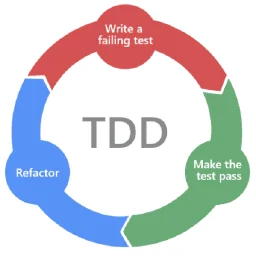
End-to-end ticket implementation with a multi-agent team using TDD. Retrieves JIRA ticket details and Figma designs, spawns a PO to write requirements, gets developer approval, then proposes a test plan for review. Once tests are approved, implements tests first (red), then production code to pass them (green). Use --no-jira to skip JIRA retrieval and use inline instructions instead. Use --headless for fully autonomous execution where a reviewer agent replaces human approval.

Rules, design tokens, card structures, motion physics, and component architecture for the Amicro UI library. Use whenever creating or modifying UI components, page sections, micro-interactions, or transition features in the Amicro repository

TypeScript / Python reference for the Claude Agent SDK (code.claude.com/docs/en/agent-sdk). Covers query(), ClaudeAgentOptions / Options, fallbackModel, maxTurns, maxBudgetUsd, custom tools (in-process MCP), createSdkMcpServer, hooks, permissions (canUseTool), subagents, sessions (resume / fork), streaming, structured outputs, Agent Skills (SKILL.md), slash commands (/compact, /clear), tool search, hosting / observability.



Manage ASC plugins that extend the CLI with custom event handlers using the `asc` CLI tool. Use this skill when: (1) Listing installed plugins: "asc plugins list" (2) Installing a plugin: "asc plugins install PATH" (3) Removing a plugin: "asc plugins uninstall --name NAME" (4) Enabling or disabling plugins: "asc plugins enable/disable --name NAME" (5) Testing a plugin manually: "asc plugins run --name NAME --event EVENT" (6) User asks to "create a plugin", "add Slack notifications", "wire up a Telegram bot on build upload", or "extend the CLI with a custom handler" (7) Explaining the plugin protocol (manifest.json + run executable + JSON stdin/stdout)


Babylon.js 8 3D engine development expertise with curated API patterns, code examples, and on-demand documentation access. Use when working with Babylon.js scenes, meshes, materials (PBR/Standard), cameras, lights, shadows, GUI (2D/3D), animations, physics (Havok), thin instances, glTF loading, post-processing, WebXR, procedural/code-built 3D models, or any 3D rendering task. Covers: (1) Scene setup and engine initialization (WebGL/WebGPU), (2) Mesh creation, transforms, instancing, and merging, (3) PBR and Standard materials with textures, (4) Camera types (ArcRotate, Universal, Follow), (5) Lighting and shadows, (6) 2D/3D GUI with AdvancedDynamicTexture, (7) Animation system and animation groups, (8) Asset loading (glTF, OBJ, STL), (9) Performance optimization and profiling, (10) ASRS/warehouse digital twin visualization patterns, (11) Procedural modeling: building high-quality 3D models from primitives with animation-ready parent/pivot hierarchies, CSG2 booleans, lathes, extrudes, and custom VertexData.


This skill should be used to create or update a C4 architecture diagram alongside an ADR, especially in LikeC4. PROACTIVELY activate on "add a C4 diagram", "create a context diagram", "container view", "LikeC4 model", "draw the architecture", "diagram this decision", "architecture diagram for the ADR", "visualize the components", "C4 view", or "Simon Brown C4." Provides: canonical-C4 Context and Container views from confirmed elements, relationship descriptions, and strict refusal of non-canonical diagram types.

Exposes Capacitor app features to Siri, Shortcuts, Spotlight, the Action button, Apple Intelligence, widgets and controls with native App Intents in ios/App/App, bridged to the web layer. Covers open-app intents routed through Universal Links / `OpenURLIntent` and @capacitor/app `appUrlOpen`, or a local plugin with a pending-route store; headless background intents; App Group / Preferences data sharing; AppShortcutsProvider phrases, AppEntity queries; iOS 26/27 APIs (`supportedModes` replacing `openAppWhenRun`, `continueInForeground`, `LongRunningIntent`, AppIntentsTesting) gated for Capacitor 8 (iOS 15) and 9 (iOS 16). Covers file placement, target membership, and UIScene (Capacitor 8.5+) URL delivery. Use for "add Siri shortcut", "Shortcuts action", "App Shortcuts", "control widget", or an intent that opens the app but the web view never navigates. Do not use for deep link setup (capacitor-deep-linking), push (capacitor-push-notifications), or Android shortcuts.
Migrates a Capacitor iOS app or plugin from the AppDelegate lifecycle to the UIScene lifecycle introduced in Capacitor 8.5 and required by Xcode 27. Audits first (custom AppDelegate URL/lifecycle code, CAPBridgeViewController subclasses, existing SceneDelegate.swift, Info.plist UIApplicationSceneManifest, project.pbxproj registration, plugin lifecycle observers, tmpWindow/TmpViewController), reports, then merges surgically or hands template-shaped projects to `npx cap migrate`. Use for "Capacitor 8.5 upgrade", "add SceneDelegate", "adopt UIScene", "CLIENT OF UIKIT REQUIRES UPDATE", deep links or appUrlOpen stopped firing after 8.5, "cap migrate skipped partial state", or as the prerequisite step before Capacitor 9. Do not use for Android, full major upgrades (use capacitor-app-upgrade-v8-to-v9), or new deep-link setup (use capacitor-deep-linking).

Use when reviewing Spring Boot 4 / Java 17+ code with concrete files or diffs — pull requests, modules, or pasted Java/Spring sources — for migration risks, architecture boundary leaks, JSpecify null-safety gaps, security flaws, performance regressions, or Spring Data pitfalls. Not for Kotlin-only code, non-Spring frameworks, or generic review advice without code context.

Guide a visible, verified code walkthrough in Neovim with Terminal Control and Navi, optionally recording the presentation with OBS or retaining terminal evidence. Use when the user wants an agent-led code tour, code-along, live source explanation, or recorded terminal walkthrough.

Shared vocabulary for designing deep modules. Use when the user wants to design or improve a module's interface, find opportunities for deepening, decide where seams go, make code more testable or easier for AI to navigate, or when other skills need deep module vocabulary.

Behavioral guidelines to reduce common LLM coding mistakes. Use when writing, modifying, or reviewing code — implementation tasks, code changes, refactoring, bug fixes, or feature development. Do NOT use for architecture design, documentation, or non-code tasks.

Scaffold a new Adobe Commerce app using the aio-commerce-sdk. Creates the base project structure and app.commerce.config file with metadata. Use when the user wants to create a new Commerce app from scratch or initialize a bare Commerce app project. After scaffolding, chains to appbuilder-project-init for Developer Console setup (project, workspace, API subscriptions) when the user wants to deploy. Does not configure extensibility domains — use commerce-app-eventing, commerce-app-webhooks, commerce-app-business-config, commerce-app-admin-ui, or commerce-app-storage for that

Fetch up-to-date documentation for any open-source library or framework. Use when the user asks to look up docs, check an API, find code examples, or verify how a feature works — especially with a specific library name, version migration, or phrases like 'what's the current way to...' or 'the API might have changed'. Also covers setup and configuration docs. Do NOT use for general programming concepts, internal project code, or version lookups (use deps-dev).

Craft CMS 5 content modeling — sections, entry types, fields, Matrix, relations, project config, and content architecture strategy. Covers choosing section types, designing entry types and field layouts, selecting field types, configuring Matrix and nested entries, relations and eager loading, and multi-site propagation.

Use this skill when authoring or extending an Unreal Engine toolset, a class of static, AI-callable functions registered with `ToolsetRegistry` and exposed through the unreal-mcp server. Trigger when the user wants to add, expose, or register a new tool method, create a new toolset, or extend an existing one such as `BlueprintTools`, `StaticMeshTools`, `ObjectTools`, `LevelTools`, or `MaterialTools`. Concrete triggers: 'add a tool to X', 'expose this via MCP', 'register a function so Claude/the agent can call it', 'wire this into the toolset registry', 'create a new toolset for Y', 'add a Python toolset', 'make this AI-callable'; adding a `static` method to a `*Tools.cpp/.h/.py` file; editing files under a `Toolsets/` folder; designing tool parameters, return types, or struct schemas for a toolset. SKIP for: invoking existing tools at runtime (use unreal-mcp instead), authoring an Agent Skill (use unreal-skill), generic refactors that happen to touch a toolset file but don't add or redesign a tool, or unrelated uses of the word 'toolset'.

Apply these opinionated C# conventions whenever writing or reviewing C# 12 / .NET 8+ code: nullable enabled with warnings as errors, records and primary constructors, pattern matching over cast chains, the Result pattern for expected failures, async all the way with CancellationToken, IOptions config, IHttpClientFactory, and never returning EF entities from an API.

CSS authoring guidance emphasizing web standards, accessibility, and performance. Use when writing, reviewing, or refactoring CSS. Provides patterns, snippets, and conventions that prioritize native CSS over frameworks, semantic structure, and maintainable code. Refer to references/patterns.md for specific patterns and snippets.


Systematically debug a Kernel cloud browser session — VM issues, network errors, Chrome crashes, page-load failures, and live-view problems. Use when a browser session misbehaves (e.g. ERR_HTTP2_PROTOCOL_ERROR, "browser not responding", blank/error pages, captcha or "checking your browser" blocks, live view not loading) and you have the session ID. Drives the Kernel CLI to inspect session status, screenshots, page state, VM logs, network connectivity, and telemetry events (which remain readable even after the session is deleted).

Safe systematic dependency upgrade with vulnerability scanning and rollback capability. Detects project ecosystem, audits outdated and vulnerable packages, presents a prioritized upgrade plan, and executes upgrades one at a time with test verification after each. Use when updating dependencies, fixing vulnerability alerts, or performing periodic dependency maintenance.

Create new DingTalk skills (dingtalk skill). Use this skill whenever the user mentions "create a new skill", "new skill", "develop a DingTalk skill", "add a DingTalk feature", "add DingTalk API support", "I need a DingTalk xxx skill", "DingTalk to-do", "DingTalk check-in", "DingTalk attendance", "DingTalk approval", "DingTalk calendar", and so on, wanting to package a DingTalk API domain into a reusable skill. This skill covers the complete skill creation workflow: SDK exploration → SDK Python testing → pure HTTP Python testing (both steps must pass) → writing SKILL.md. Do not create a skill unless all tests pass.


Django development best practices skill. Use this skill whenever working on Django projects — including creating models, writing views, building DRF APIs, designing URL patterns, writing tests, configuring settings, handling migrations, or reviewing Django code for correctness and performance. Also trigger for questions about ORM queries, N+1 problems, select_related/prefetch_related, authentication, permissions, middleware, signals, caching, Celery tasks, deployment, Docker, or Django project structure. If the task involves any Django or Django REST Framework code, activate this skill immediately.

Write django-modern-rest (dmr) code with the recommended patterns, covering controllers, routers, typed DTOs with msgspec or pydantic, auth, throttling, error handling, OpenAPI, and tests. Use whenever a project depends on django-modern-rest, imports `dmr`, or asks for a typed Django REST API, and when reviewing dmr code for mistakes.

Implements feature tasks by loading the project skills relevant to the task, reading PRD/TechSpec context, analyzing dependencies, executing the implementation with tests, and performing an automatic code review. Marks tasks as complete in tasks.md. Use when the user asks to implement a task, execute a task, or start working on a specific task number. Do not use for creating tasks, running QA, or bug fixing.

Look up CE.SDK Nuxt.js reference docs, guides, and configuration pages. Use when the user needs CE.SDK docs for Nuxt.js — configuration, UI customization, export options, feature guides, or getting-started instructions. Also triggered by "IMG.LY", "CreativeEditor", "CE.SDK", or "cesdk" when the user needs an existing Nuxt.js doc page. Not for writing code (use build) or concept explanations (use explain). <example> Context: User asks about Nuxt.js configuration user: "How do I configure the editor in Nuxt.js?" assistant: "I'll use /imgly-sdk:docs-nuxtjs to look up configuration options." </example> <example> Context: User needs Nuxt.js integration user: "How do I use CE.SDK in a Nuxt.js page?" assistant: "Let me use /imgly-sdk:docs-nuxtjs to find the relevant documentation." </example>




Validates .env files against code references and manifests for missing vars, type mismatches, insecure defaults, and unused entries. Triggers on: "validate env file", "check environment variables", "missing env vars", "check .env", "dotenv validation". NOT for secret scanning, use repo-sentinel.



Plan and build production-ready FastAPI endpoints with async SQLAlchemy, Pydantic v2 models, dependency injection for auth, and pytest tests. Uses interview-driven planning to clarify data models, authentication method, pagination strategy, and caching before writing any code.

Assemble a Data Capture Flow from a JSON spec and deploy it to a connected Field Service org via the Tooling Flow sObject (JSON Metadata, no XML). Use when given a data-capture spec JSON and asked to build or deploy a DataCaptureFlow.

Create distinctive, production-grade frontend interfaces with high design quality. Use this skill when the user asks to build web components, pages, artifacts, posters, or applications (examples include websites, landing pages, dashboards, React components, HTML/CSS layouts, or when styling/beautifying any web UI). Generates creative, polished code and UI design that avoids generic AI aesthetics

Scaffold, adapt, validate, and maintain example-rich full-stack product documentation: 10 product-level documents, 7 version documents, optional module PRD/Stitch/UI triplets, 5 delivery documents, and a detailed project README template family. Use when users ask to initialize a documentation repository, create product or version plans, write PRDs and architecture/UI documents, preserve and adapt detailed examples, audit document structure, or improve an existing product-docs tree, including Chinese requests such as 初始化文档、产品文档、写规划文档.

Evaluate project scope against timeline and resources. Triggers on: "scope creep", "feature list", "can we fit this in", "timeline pressure", "resource constraints", "cut list", "scope evaluation". Do NOT invoke for sprint planning (use game-sprint-plan) or general project status (use game-producer). Part of the AlterLab GameForge collection.

New to MCP?
From what the protocol is to installing your first server, these answers cover most first questions.
An open protocol that defines how AI applications connect to external tools and data in a uniform way. Clients talk to the model; MCP servers provide tools, resources and prompt templates. They exchange standard messages, so one server can be reused by many clients.