
Rootly MCP Server について
Rootly MCP Serverは、Cursor、Windsurf、Claudeなどで使うMCPクライアントにRootly APIを公開します。ホスト型またはローカルで動作し、OAuth2やトークン認証、ツールプロファイルや書き込み操作の設定に対応します。
主な機能
- 01ホスト型とセルフホスト型の実行
- 02OAuth2またはAPIトークン認証
- 03Streamable HTTPとCode Modeのトランスポート
- 04フルまたはスリムなツールプロファイル
- 05書き込みツールへのアクセス制御
- 06ツール許可リストの設定
活用シーン
- 01MCPクライアントをRootlyに接続
- 02Rootlyツールを絞り込んで選択
- 03読み取り専用ツールに制限
- 04Rootly APIトークンでローカル実行
MCP 対応
Rootly APIの操作をMCPツールとして公開します。クライアントはホスト型のStreamable HTTPまたはCode Modeエンドポイント、あるいはセルフホストしたサーバーに接続できます。
設定
リモートサーバーはインストール不要です。クライアントを選んで設定をコピーするか、ワンクリックで導入できます。
https://mcp.rootly.com/sseclaude mcp add --transport sse Rootly-MCP-server https://mcp.rootly.com/sse{"mcpServers":{"Rootly-MCP-server":{"type":"sse","url":"https://mcp.rootly.com/sse"}}}Cursor で開く{"servers":{"Rootly-MCP-server":{"type":"sse","url":"https://mcp.rootly.com/sse"}}}VS Code で開く{"mcpServers":{"Rootly-MCP-server":{"type":"sse","url":"https://mcp.rootly.com/sse"}}}{"mcpServers":{"Rootly-MCP-server":{"serverUrl":"https://mcp.rootly.com/sse"}}}コマンドはターミナルで実行し、JSON は各クライアントの MCP 設定に貼り付けて再起動します。認可が必要なサーバーは初回接続時にログインを求めます。
https://mcp.rootly.com/sse認証が必要ツール
詳細
Rootly MCP サーバー



Cursor、Windsurf、Claude などの MCP クライアント向けの、Rootly API 用 MCP サーバーです。
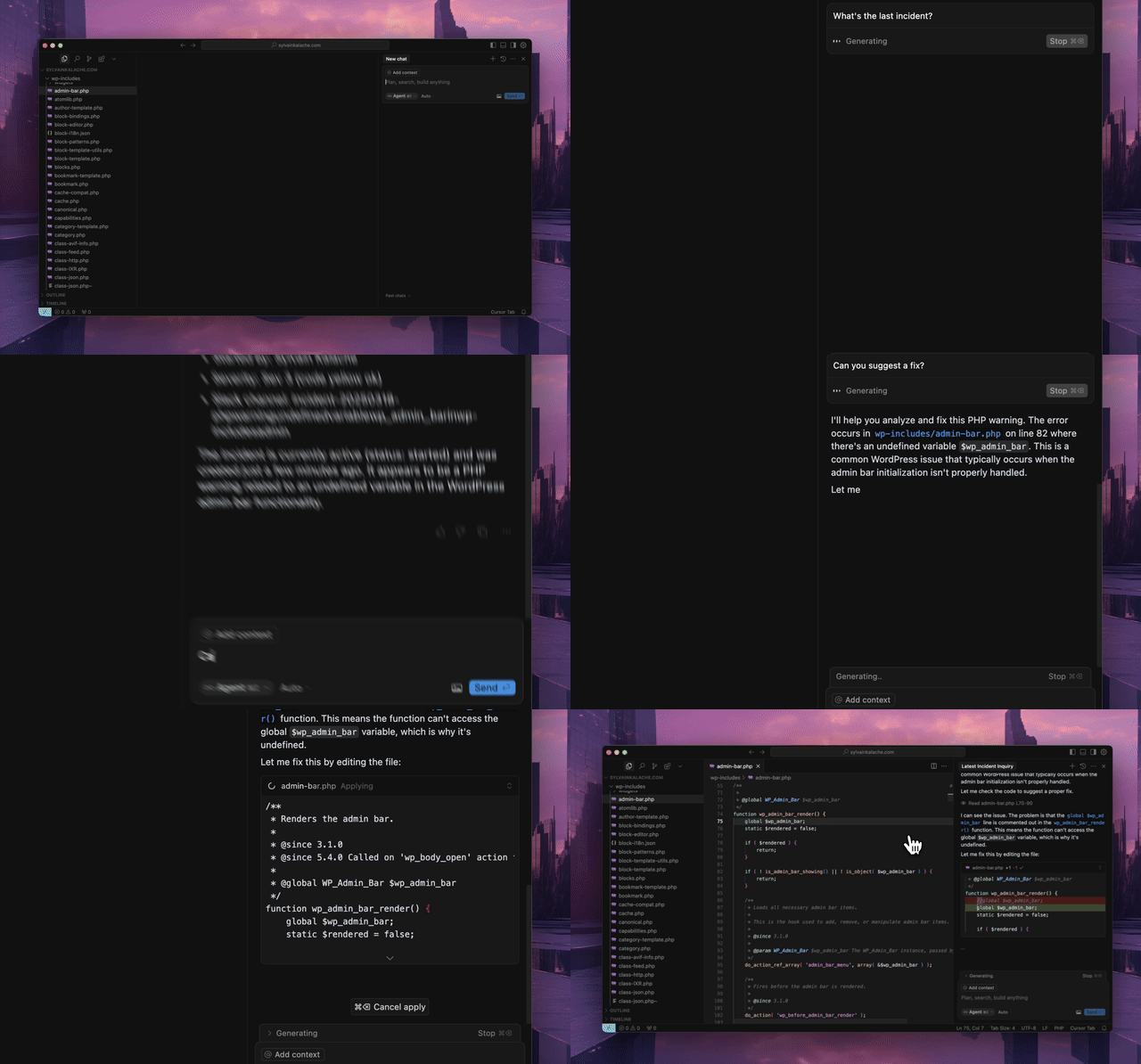
クイックスタート
ホスト型 MCP サーバーを使用します。ローカルへのインストールは不要です。
ホスト型トランスポートの選択肢
- ストリーム可能な HTTP(推奨):
https://mcp.rootly.com/mcp - コードモード:
https://mcp.rootly.com/mcp-codemode - SSE(非推奨、2026-11-20 以降に削除):
https://mcp.rootly.com/sse
警告
SSE は非推奨です。 ホスト型の
https://mcp.rootly.com/sseエンドポイントと、セルフホスト時の--transport sseオプションは、2026-11-20 以降に削除されます。クライアントをストリーム可能な HTTP(https://mcp.rootly.com/mcp)またはコードモード(https://mcp.rootly.com/mcp-codemode)に切り替えてください。ほとんどのクライアントでは、URL を変更し、クライアント設定にトランスポートの指定がある場合はhttp/streamable-httpに設定します。SSE の応答には、Deprecation、Sunset、およびLink: rel="successor-version"ヘッダーが付与されるようになりました。
ホスト型ツールプロファイル:
- フル(デフォルト): 上記の URL をそのまま使用します
- スリム(約 70 ツール): ホスト型 URL に
?tool_profile=slimを追加します。例:https://mcp.rootly.com/mcp?tool_profile=slim - ヘッダーでの指定:
X-Rootly-Tool-Profile: slimを送信します - サーバー全体のデフォルト:
ROOTLY_MCP_HOSTED_TOOL_PROFILE=full|slimを設定します - 完全なカスタム指定:
ROOTLY_MCP_ENABLED_TOOLS=...を設定します
リモート接続の一般的な設定
OAuth2 を使用する場合(推奨):
{
  "mcpServers": {
    "rootly": {
      "url": "https://mcp.rootly.com/mcp"
    }
  }
}
MCP クライアントが OAuth2 ログインを自動的に処理します。ブラウザーウィンドウが開き、Rootly で認証できます。API トークンは不要です。
API トークンを使用する場合:
{
  "mcpServers": {
    "rootly": {
      "url": "https://mcp.rootly.com/mcp",
      "headers": {
        "Authorization": "Bearer YOUR_ROOTLY_API_TOKEN"
      }
    }
  }
}
コードモード:
{
  "mcpServers": {
    "rootly": {
      "url": "https://mcp.rootly.com/mcp-codemode"
    }
  }
}
設定がまだ https://mcp.rootly.com/sse を参照している場合は、2026-11-20 より前に https://mcp.rootly.com/mcp に置き換えてください(SSE は非推奨です。上記を参照してください)。
エージェントのセットアップ
Claude Code
OAuth2 を使用(推奨):
claude mcp add --transport http rootly https://mcp.rootly.com/mcp

# Code Mode:
claude mcp add --transport http rootly-codemode https://mcp.rootly.com/mcp-codemode
API トークンを使用:
claude mcp add --transport http rootly https://mcp.rootly.com/mcp \
  --header "Authorization: Bearer YOUR_ROOTLY_API_TOKEN"
手動で設定 — プロジェクトのルートに .mcp.json を作成します:
{
  "mcpServers": {
    "rootly": {
      "type": "http",
      "url": "https://mcp.rootly.com/mcp"
    }
  }
}
Gemini CLI
拡張機能をインストールします:
gemini extensions install https://github.com/rootlyhq/rootly-mcp-server
または、~/.gemini/settings.json で手動設定します:
{
  "mcpServers": {
    "rootly": {
      "command": "uvx",
      "args": ["--from", "rootly-mcp-server", "rootly-mcp-server"],
      "env": {
        "ROOTLY_API_TOKEN": "<YOUR_ROOTLY_API_TOKEN>"
      }
    }
  }
}
Cursor
.cursor/mcp.json または ~/.cursor/mcp.json に追加します:
OAuth2 を使用(推奨):
{
  "mcpServers": {
    "rootly": {
      "url": "https://mcp.rootly.com/mcp"
    }
  }
}
API トークンを使用:
{
  "mcpServers": {
    "rootly": {
      "url": "https://mcp.rootly.com/mcp",
      "headers": {
        "Authorization": "Bearer <YOUR_ROOTLY_API_TOKEN>"
      }
    }
  }
}
Windsurf
~/.codeium/windsurf/mcp_config.json に追加します:
OAuth2 を使用(推奨):
{
  "mcpServers": {
    "rootly": {
      "serverUrl": "https://mcp.rootly.com/mcp"
    }
  }
}
API トークンを使用:
{
  "mcpServers": {
    "rootly": {
      "serverUrl": "https://mcp.rootly.com/mcp",
      "headers": {
        "Authorization": "Bearer <YOUR_ROOTLY_API_TOKEN>"
      }
    }
  }
}
Codex
~/.codex/config.toml に追加します:
OAuth2 を使用(推奨):
[mcp_servers.rootly]
url = "https://mcp.rootly.com/mcp"
API トークンを使用:
[mcp_servers.rootly]
url = "https://mcp.rootly.com/mcp"
bearer_token_env_var = "ROOTLY_API_TOKEN"
Claude Desktop
OAuth2 を使用(推奨):
claude_desktop_config.json に追加します:
{
  "mcpServers": {
    "rootly": {
      "url": "https://mcp.rootly.com/mcp"
    }
  }
}
Claude Desktop は OAuth2 ログインを自動的に処理します。
API トークンを使用(mcp-remote 経由):
{
  "mcpServers": {
    "rootly": {
      "command": "npx",
      "args": [
        "-y",
        "mcp-remote",
        "https://mcp.rootly.com/mcp",
        "--transport",
        "http",
        "--header",
        "Authorization: Bearer <YOUR_ROOTLY_API_TOKEN>"
      ]
    }
  }
}
Databricks
ホスト型サーバーを Unity Gateway に登録すると、Supervisor Agent、AI Playground、その他の Databricks エージェントから利用できます:
- ワークスペースで Unity Gateway > MCPs を開き、+ MCP をクリックして、Connect an existing MCP server を選択します。
- カタログとスキーマを選び、MCP に名前を付けて、URL
https://mcp.rootly.com/mcpを指定した新しい接続を作成します。 - 認証方法を選択します:
- Dynamic Client Registration(推奨): 各ユーザーが自分のアカウントで Rootly にサインインします。
- Bearer token: Rootly API トークンを貼り付けます。
- Create & load tools をクリックし、求められた場合は Login をクリックして、公開するツールを選択します。
または、Databricks SDK を使用して接続を作成します:
from databricks.sdk import WorkspaceClient
from databricks.sdk.service import catalog as c

WorkspaceClient().connections.create(
    name="rootly_connection",
    parent="schemas/main.default",
    connection_type=c.ConnectionType.HTTP,
    options={
        "host": "https://mcp.rootly.com",
        "port": "443",
        "base_path": "/mcp",
        "bearer_token": "<YOUR_ROOTLY_API_TOKEN>",
    },
)
フルプロファイルでは約 250 個のツールが公開されます。Unity Gateway のツール選択機能を使って、エージェントに必要なものだけを公開してください。Marketplace の掲載情報については、docs/databricks-marketplace.md を参照してください。
Rootly CLI
インシデント、アラート、サービス、オンコール業務向けのスタンドアロン CLI です。
Homebrew でインストールします:
brew install rootlyhq/tap/rootly-cli
または Go でインストールします:
go install github.com/rootlyhq/rootly-cli/cmd/rootly@latest
詳細については、Rootly CLI repository を参照してください。
代替インストール(ローカル)
ホスト型サービスを使用しない場合は、MCP サーバーをローカルで実行します。
前提条件
- Python 3.12 以降
uvパッケージマネージャーcurl -LsSf https://astral.sh/uv/install.sh | sh- Rootly API トークン
API トークンの種類
必要なアクセス権に応じてトークンの種類を選択します:
- Global API Key:Rootly インスタンス全体へのフルアクセスです。組織全体の状況を把握するのに最適です。
- Team API Key:そのチームが所有するエンティティに限定されたアクセスです。
- Personal API Key:作成したユーザーと同じアクセス権です。
組織全体を対象としたクエリや、データを変更するアクションには、Global API Key を推奨します。特に、ワークフローが複数のチーム、スケジュール、インシデントにまたがる場合に適しています。
uv を使用
{
  "mcpServers": {
    "rootly": {
      "command": "uv",
      "args": [
        "tool",
        "run",
        "--from",
        "rootly-mcp-server",
        "rootly-mcp-server"
      ],
      "env": {
        "ROOTLY_API_TOKEN": "<YOUR_ROOTLY_API_TOKEN>",
        "ROOTLY_MCP_ENABLE_WRITE_TOOLS": "true"
      }
    }
  }
}
セルフホストのトランスポートオプション
サーバープロセスごとに、トランスポートを1つ選択します。
- Streamable HTTP エンドポイントパス:
/mcp - SSE(非推奨。2026-11-20 以降に削除) エンドポイントパス:
/sse。--transport sseは起動時に非推奨の警告をログに記録します。代わりに--transport streamable-httpを使用してください。 - Code Mode(実験的) エンドポイントパス:ホスト型デュアルトランスポートモードでは
/mcp-codemode。1回のexecute呼び出しで実行できるツール呼び出しは最大50回です。変更するには、ROOTLY_CODE_MODE_MAX_TOOL_CALLSに正の整数を設定します。
ホスト型とセルフホスト型のどちらのデプロイでも、デフォルトで全ツールが公開されるようになりました。
- ホスト型のデフォルト:全ツール
- ホスト型のスリムプロファイル:
?tool_profile=slimを指定すると、使用頻度の高い約70個のツール - セルフホスト型のデフォルト:全ツール
どちらのデプロイでも読み取り専用ツールに制限するには、サーバーの起動時に --no-enable-write-tools を指定するか、ROOTLY_MCP_ENABLE_WRITE_TOOLS=false を設定します。
より小規模なリモートプロファイルを使用するホスト型クライアントでは、MCP URL に ?tool_profile=slim を追加するか、X-Rootly-Tool-Profile: slim を送信してください。
AgentCat と Sentry のテレメトリ
ホスト型デプロイでは、ROOTLY_MCPCAT_PROJECT_ID を設定すると、MCP テレメトリを AgentCat に送信できます。AgentCat のイベントも Sentry にエクスポートするには、デプロイのシークレットストアから SENTRY_DSN を指定します。省略可能な ENVIRONMENT のデフォルトは production、SENTRY_RELEASE のデフォルトはインストールされている Rootly MCP Server のバージョンです。エクスポーターが設定されている場合、Sentry のパフォーマンストレースが有効になります。
自由形式のイベントテキストは秘匿化され、Sentry に送信されるテレメトリからアクター名は省略されます。相関のために、安定した内部アクター ID は引き続き利用できます。
AgentCat の enable_tool_call_context と enable_report_missing オプションは無効です。SDK は、アナリティクス用の context パラメーターも get_more_tools フィードバックツールも追加しません。既存の秘匿化フックが適用される範囲で、引数、応答、タイミング、エラー、設定された ID 情報など、ツール呼び出しのテレメトリは引き続き有効です。
テレメトリは AgentCat v2(MCP 2026-07-28 仕様)で動作します。セッションの相関には SDK のフックモード(resolve_session_id)を使用し、サーバーがリクエストからセッションを導出します。キーは常に呼び出し元(認証済みユーザー、またはトークンのダイジェスト)から始まり、クライアントが送信する場合はそのクライアントの Mcp-Session-Id、送信しない場合は UTC の時間が続きます。ツールスキーマに session_id パラメーターやセッションに関する指示は追加されません。context または session_id を引き続き送信する、キャッシュ済みツールリストを持つクライアントは許容されます。余分な引数は検証前に削除されます。SDK は initialize イベントと tools/list イベントを公開しなくなりました。
ホスト型またはセルフホスト型のデフォルトプロファイルを完全に上書きするには、ROOTLY_MCP_ENABLED_TOOLS を設定するか(または --enabled-tools を渡し)、正確なツール名をカンマ区切りの許可リストで指定します。この変数を設定すると、デフォルトの選択が完全に置き換えられます。
セルフホスト型デプロイで特定の MCP ツールのみを公開するには、ROOTLY_MCP_ENABLED_TOOLS を設定するか(または --enabled-tools を渡し)、正確なツール名をカンマ区切りの許可リストで指定します。例:list_incidents,get_incident,get_server_version
PostHog MCP アナリティクス
POSTHOG_PROJECT_TOKEN を設定すると(任意で POSTHOG_HOST も設定できます。デフォルトは
https://us.i.posthog.com)、AgentCat と同じプライバシー設定で $mcp_* イベントが PostHog に送信されます。具体的には、context、conversation_id、llm_model パラメーターの注入なし、送信前の認証情報の除去、ホスト型ユーザーの識別には Rootly ユーザー ID のみを使用します。
AgentCat も設定されている場合は、両方が並行して動作します。posthog.mcp の MCP SDK 1.x のコードパスは AgentCat のミドルウェアを直接処理できないため、サーバーは事前にアダプターでラップします。ステートレスなホスト型トランスポートでは、PostHog のセッションは initialize で発行される Mcp-Session-Id ヘッダーによって関連付けられます。AgentCat のセッションリゾルバーもこのヘッダーを読み取るため(認証済みの呼び出し元に限定)、PostHog が有効な場合、AgentCat はクライアントの呼び出しを時間単位ではなく接続単位でグループ化します。
OpenAI Apps のドメイン検証
ホスト型デプロイでは、OpenAI プラグインディレクトリが使用する、認証不要のドメイン検証エンドポイントが公開されます。
- エンドポイント:
GET /.well-known/openai-apps-challenge - 環境変数:
ROOTLY_OPENAI_APPS_CHALLENGE_TOKEN
ROOTLY_OPENAI_APPS_CHALLENGE_TOKEN に、OpenAI の提出ポータルで生成されたトークンを設定してください。このエンドポイントは、そのトークンを text/plain(Cache-Control: no-store を付けて)でそのまま返し、変数が未設定または空の場合は 404 を返します。トークンはリクエスト時に環境変数から読み込まれます。ハードコードしたり、コミットしたりしないでください。このルートは、デュアルトランスポート(--transport both)と、プロファイル設定された Streamable HTTP のホスト型デプロイの両方で提供され、Bearer 認証の対象外です。
現在のセルフホスト構成で使用できる正確なツール名を確認するには、次を実行してください。
ROOTLY_API_TOKEN=<YOUR_ROOTLY_API_TOKEN> \
uv run python -m rootly_mcp_server --list-tools
これにより、ROOTLY_MCP_ENABLE_WRITE_TOOLS や ROOTLY_MCP_ENABLED_TOOLS を含む現在の設定を適用した後の、有効な MCP ツール名が出力されます。
セルフホストの許可リストをスモークテストします。
ROOTLY_API_TOKEN=<YOUR_ROOTLY_API_TOKEN> \
ROOTLY_MCP_ENABLED_TOOLS=list_incidents,get_incident,get_server_version \
uv run python -m rootly_mcp_server --transport streamable-http --log-level ERROR
次に、MCP クライアントを http://127.0.0.1:8000/mcp に接続し、tools/list が次の項目のみを返すことを確認してください。
get_server_version
get_incident
list_incidents
セルフホストのテストで特定の書き込みツールを含めるには、書き込みフラグと許可リストの両方を追加してください。
ROOTLY_API_TOKEN=<YOUR_ROOTLY_API_TOKEN> \
ROOTLY_MCP_ENABLE_WRITE_TOOLS=true \
ROOTLY_MCP_ENABLED_TOOLS=create_incident,create_workflow_task,list_teams \
uv run python -m rootly_mcp_server --transport streamable-http --log-level ERROR
Docker の実行例(Streamable HTTP):
docker run -p 8000:8000 \
  -e ROOTLY_TRANSPORT=streamable-http \
  -e ROOTLY_API_TOKEN=<YOUR_ROOTLY_API_TOKEN> \
  -e ROOTLY_MCP_ENABLE_WRITE_TOOLS=true \
  rootly-mcp-server
Docker の実行例(SSE、非推奨:2026-11-20 以降に削除予定です。上記の Streamable HTTP を使用してください):
docker run -p 8000:8000 \
  -e ROOTLY_TRANSPORT=sse \
  -e ROOTLY_API_TOKEN=<YOUR_ROOTLY_API_TOKEN> \
  rootly-mcp-server
Docker の実行例(デュアルトランスポート+Code Mode。提供される /sse エンドポイントも非推奨です):
docker run -p 8000:8000 \
  -e ROOTLY_TRANSPORT=both \
  -e ROOTLY_API_TOKEN=<YOUR_ROOTLY_API_TOKEN> \
  rootly-mcp-server
ワークフローに特化したツールのサブセット
ホスト型およびセルフホスト型の全機能では、200 以上のツールが公開されます。ワークフローごとに絞り込んだサブセットを使用する場合は、ROOTLY_MCP_ENABLED_TOOLS を使用してください。
🚨 インシデント対応(25 ツール)
緊急対応担当者およびインシデント指揮官に必須のツールです
ROOTLY_MCP_ENABLED_TOOLS="list_incidents,get_incident,create_incident,update_incident,search_incidents,find_related_incidents,suggest_solutions,create_incident_action_item,list_incident_action_items,update_incident_form_field_selection,list_teams,get_current_user,list_services,list_severities,get_alert,list_alerts,get_alert_by_short_id,list_escalation_policies,get_escalation_policy,list_on_call_roles,list_schedules,get_schedule_shifts,get_oncall_handoff_summary,get_shift_incidents,list_endpoints"
📅 オンコール管理(33 ツール)
スケジュール調整担当者およびオンコールマネージャー向けです
ROOTLY_MCP_ENABLED_TOOLS="list_schedules,get_schedule,update_schedule,get_schedule_shifts,list_shifts,create_schedule_rotation,update_schedule_rotation,list_schedule_rotations,get_schedule_rotation,list_schedule_rotation_users,update_schedule_rotation_user,create_on_call_shadow,update_on_call_shadow,list_on_call_shadows,create_override_shift,update_override_shift,list_override_shifts,list_on_call_roles,update_on_call_role,get_oncall_schedule_summary,get_oncall_shift_metrics,check_responder_availability,create_override_recommendation,list_teams,get_team,list_users,get_user,get_current_user,list_escalation_policies,update_escalation_policy,list_escalation_paths,update_escalation_path,list_escalation_levels"
📊 モニタリングとアラート(40 ツール)
可観測性を設定するプラットフォームチーム向けです
ROOTLY_MCP_ENABLED_TOOLS="list_alerts,get_alert,get_alert_by_short_id,create_alert_group,update_alert_group,list_alert_groups,create_alert_routing_rule,update_alert_routing_rule,list_alert_routing_rules,list_alert_events,get_alert_event,update_alert_event,create_heartbeat,update_heartbeat,list_heartbeats,get_heartbeat,create_pulse,update_pulse,list_pulses,get_pulse,create_dashboard,update_dashboard,list_dashboards,get_dashboard,create_dashboard_panel,update_dashboard_panel,list_status_pages,get_status_page,update_status_page,list_status_page_templates,get_status_page_template,list_communications_templates,update_communications_template,create_live_call_router,update_live_call_router,list_services,list_teams,get_current_user,list_environments,list_severities,list_endpoints"
📋 インシデント後の分析(30 ツール)
振り返りやプロセス改善を行う SRE 向けです
ROOTLY_MCP_ENABLED_TOOLS="get_incident,update_incident,find_related_incidents,suggest_solutions,list_incident_action_items,create_incident_action_item,update_incident_form_field_selection,create_post_incident_review,update_post_incident_review,list_post_incident_reviews,get_post_incident_review,create_retrospective_step,update_retrospective_step,list_retrospective_steps,create_retrospective_process,update_retrospective_process,list_retrospective_processes,create_playbook,update_playbook,list_playbooks,get_playbook,create_playbook_task,update_playbook_task,list_causes,get_cause,update_cause,list_incident_types,get_incident_type,update_incident_type,get_current_user"
📈 分析とレポート(15 ツール)
リーダーシップチームおよびメトリクスチーム向けです(読み取り専用が中心です)
ROOTLY_MCP_ENABLED_TOOLS="list_incidents,search_incidents,collect_incidents,list_teams,list_services,list_schedules,get_oncall_shift_metrics,get_shift_incidents,list_dashboards,get_dashboard,list_alerts,list_heartbeats,list_pulses,get_current_user,list_endpoints"
チームごとに複数の MCP インスタンスを使用する
ツールのサブセットを変えて、複数の MCP インスタンスを実行できます。
{
  "mcpServers": {
    "rootly-incident-response": {
      "command": "uvx", "args": ["--from", "rootly-mcp-server", "rootly-mcp-server"],
      "env": {
        "ROOTLY_API_TOKEN": "<token>",
        "ROOTLY_MCP_ENABLED_TOOLS": "list_incidents,get_incident,create_incident,find_related_incidents,suggest_solutions..."
      }
    },
    "rootly-oncall-management": {
      "command": "uvx", "args": ["--from", "rootly-mcp-server", "rootly-mcp-server"],
      "env": {
        "ROOTLY_API_TOKEN": "<token>",
        "ROOTLY_MCP_ENABLED_TOOLS": "list_schedules,update_schedule,create_override_shift,get_oncall_shift_metrics..."
      }
    }
  }
}
uvx を使用する場合
{
  "mcpServers": {
    "rootly": {
      "command": "uvx",
      "args": [
        "--from",
        "rootly-mcp-server",
        "rootly-mcp-server"
      ],
      "env": {
        "ROOTLY_API_TOKEN": "<YOUR_ROOTLY_API_TOKEN>"
      }
    }
  }
}
機能
- 動的なツール生成:Rootly の OpenAPI(Swagger)仕様から MCP リソースを自動的に作成します
- スマートページネーション:上限付きページネーションと簡潔なインシデント応答を使用し、コンテキストウィンドウのオーバーフローを防ぎます
- API フィルタリング:セキュリティとパフォーマンスのため、公開する API エンドポイントを制限します
- インテリジェントなインシデント分析:過去のインシデントデータを分析するスマートツールです
find_related_incidents:TF-IDF 類似度分析を使用して、過去の類似インシデントを検索しますsuggest_solutions:過去のインシデントの解決内容を分析し、実行可能な解決策を推奨します
- MCP リソース:AI のコンテキストとして、インシデント、チーム、オンコール状況、ワークフローガイドを構造化リソースとして公開します
- インテリジェントなパターン認識:サービス、エラーの種類、解決パターンを自動的に特定します
- オンコールの健全性統合(セルフホストのみ):スケジュールされた対応担当者のワークロードに関する健全性リスクを検出します
対応ツール
デフォルトで使用できるツールは、デプロイプロファイルによって異なります。
- ホスト型のデフォルト:約 218 ツール
- ホスト型のスリムプロファイル:約 70 ツール
- セルフホスト型のデフォルト:約 218 ツール
カスタムエージェント型ツール
check_oncall_health_risk- セルフホスト環境のみcheck_responder_availabilitycollect_incidentscreate_incident- エージェントのワークフロー向けに、対象を絞ったフィールドを指定して新しいインシデントを作成しますcreate_override_recommendationfind_related_incidentsget_incident- PIR 関連フィールドを含め、個別のインシデントを取得して直接確認しますget_alert_by_short_idget_oncall_handoff_summaryget_oncall_schedule_summaryget_oncall_shift_metricsget_server_versionget_shift_incidentslist_endpointslist_incidentslist_shiftssearch_incidentssuggest_solutionsupdate_incident- 重要度を検証しながらネイティブのインシデントフィールドを更新します。事後的なステータス変更には Rootly UI が必要です
OpenAPI 生成ツール
ツールの命名規則: すべてのツールで
snake_caseを使用します。以前のcamelCase名 (例:getScheduleShifts、listIncidents)はtools/listに表示されなくなりましたが、 非表示エイリアスとして引き続き呼び出せます。これらは透過的に、正規のsnake_case名へ ルーティングされます。設定とROOTLY_MCP_ENABLED_TOOLSの許可リストはsnake_case名に更新してください。従来の camelCase の許可リスト項目は 自動的に正規名へ変換されます。
list_workflow_runs
create_incident_action_item
create_incident_form_field_selection
create_workflow_task
get_alert
get_alert_event
get_alert_group
get_alert_routing_rule
get_alert_source
get_alert_urgency
get_catalog
get_catalog_entity
get_catalog_entity_property
get_catalog_property
get_cause
get_current_user
get_custom_form
get_environment
get_escalation_level
get_escalation_path
get_escalation_policy
get_form_field
get_form_field_option
get_functionality
get_functionality_incidents_chart
get_functionality_uptime_chart
get_incident_action_items
get_incident_form_field_selection
get_incident_type
get_on_call_role
get_on_call_shadow
get_override_shift
get_schedule
get_schedule_rotation
get_schedule_shifts
get_service
get_service_incidents_chart
get_service_uptime_chart
get_severity
get_status_page
get_status_page_template
get_team
get_team_incidents_chart
get_user
get_workflow
get_workflow_form_field_condition
get_workflow_group
get_workflow_task
list_alert_events
list_alert_groups
list_alert_routing_rules
list_alert_sources
list_alert_urgencies
list_alerts
list_all_incident_action_items
list_catalog_entities
list_catalog_entity_properties
list_catalog_properties
list_catalogs
list_causes
list_custom_forms
list_environments
list_escalation_levels
list_escalation_levels_paths
list_escalation_paths
list_escalation_policies
list_form_field_options
list_form_fields
list_functionalities
list_incident_action_items
list_incident_alerts
list_incident_form_field_selections
list_incident_types
list_observability_logs
list_observability_patterns
count_observability_logs
list_on_call_roles
list_on_call_shadows
list_override_shifts
list_schedule_rotation_active_days
list_schedule_rotation_users
list_schedule_rotations
list_schedules
list_services
list_severities
list_shifts
list_status_page_templates
list_status_pages
list_teams
list_users
list_workflow_form_field_conditions
list_workflow_groups
list_workflows
list_workflow_tasks
update_environment
update_escalation_level
update_escalation_path
update_escalation_policy
update_functionality
update_incident_type
update_on_call_role
update_on_call_shadow
update_override_shift
update_schedule
update_schedule_rotation
update_service
update_severity
update_team
update_workflow
update_incident_form_field_selection
update_workflow_task
大幅な拡張:このバージョンでは、コミュニケーション、ダッシュボード、プレイブック、インシデント後レビュー、モニタリング、高度なフォーム管理を対象とする50以上の新しいエンドポイントが追加されています。一方で、API キー管理、ユーザーの作成・削除、ロール管理、Webhook 設定など、セキュリティに関わる操作は慎重に除外しています。
削除操作は、デフォルトのツールセットでは引き続き無効です。
オンコールヘルス連携(セルフホスト環境のみ)
On-Call Health と連携し、スケジュールに登録された対応者の業務負荷に関する健康リスクを検出します。
check_oncall_health_risk は、フルプロファイルやスリムプロファイル、SSE、Streamable HTTP、Code Mode を含む、ホスト型 MCP サービスでは利用できません。ホスト型モードでは登録されないため、API キーや ROOTLY_MCP_ENABLED_TOOLS の許可リストを使って有効にすることはできません。通常のオンコールスケジュールおよびインシデント用ツールは引き続き利用できます。
セルフホスト環境では、この連携を引き続き利用できます。各デプロイメントで従業員に適切に通知し、データを適切に取り扱う責任は運用担当者にあります。
セットアップ
ONCALLHEALTH_API_KEY 環境変数を設定します:
{
  "mcpServers": {
    "rootly": {
      "command": "uvx",
      "args": ["--from", "rootly-mcp-server", "rootly-mcp-server"],
      "env": {
        "ROOTLY_API_TOKEN": "your_rootly_token",
        "ONCALLHEALTH_API_KEY": "och_live_your_key"
      }
    }
  }
}
使い方
check_oncall_health_risk(
    start_date="2026-02-09",
    end_date="2026-02-15"
)
リスクのあるユーザーのうち、スケジュールに登録されているユーザー、安全な代替要員の推奨、およびアクションの概要を返します。
スキルの例
ビルド済みの Claude Code スキル:
🚨 Rootly Incident Responder
このスキルでは、次のことができます:
- 本番環境のインシデントを、十分なコンテキストを踏まえて分析します
- ML ベースの類似性マッチングを使って、過去の類似インシデントを見つけます
- 過去に成功した解決策に基づいて、解決策を提案します
- タイムゾーンをまたいでオンコールチームと連携します
- インシデントと最近のコード変更やデプロイを関連付けます
- アクション項目と修復計画を作成します
- 信頼度スコアと所要時間の見積もりを提示します
クイックスタート:
# Copy the skill to your project
mkdir -p .claude/skills
cp examples/skills/rootly-incident-responder.md .claude/skills/

# Then in Claude Code, invoke it:
# @rootly-incident-responder analyze incident #12345
Rootly のツールと GitHub のコンテキストを使った、インシデント対応ワークフロー全体を紹介します。
オンコールシフトの指標
任意の期間のオンコールシフトの指標を、ユーザー、チーム、スケジュール別にまとめて取得します。主担当・副担当の追跡、シフト回数、時間数、オンコール日数が含まれます。
get_oncall_shift_metrics(
    start_date="2025-10-01",
    end_date="2025-10-31",
    group_by="user"
)
オンコール引き継ぎの概要
完全な引き継ぎ情報:現在および次のオンコール担当者と、各シフト中のインシデント。
# All on-call (any timezone)
get_oncall_handoff_summary(
    team_ids="team-1,team-2",
    timezone="America/Los_Angeles"
)

# Regional filter - only show APAC on-call during APAC business hours
get_oncall_handoff_summary(
    timezone="Asia/Tokyo",
    filter_by_region=True
)
地域で絞り込むと、指定したタイムゾーンで営業時間(午前9時~午後5時)にオンコールを担当する人のみが表示されます。
返される値:current_oncall、next_oncall、shift_incidents を含む schedules
コンテキスト用 MCP リソース
AI エージェントは、状況を把握するために次のリソースにアクセスできます。
incident://{incident_id}- 個別のインシデントに関する詳細情報team://{team_id}- チーム名、カラー、メタデータなどのチーム詳細rootly://incidents- すぐに参照できる最近のインシデント一覧rootly://oncall-status- すべてのスケジュールにおける現在のオンコール状況(インシデント対応に不可欠)rootly://workflow-guide- 一般的な操作の手順ごとのワークフローガイド
使用例:「現在のオンコール状況を確認して」 → AI が rootly://oncall-status リソースを読み取ります
インシデントのシフト
期間中のインシデントを、重大度/ステータス/タグで絞り込めます。
get_shift_incidents(
    start_time="2025-10-20T09:00:00Z",
    end_time="2025-10-20T17:00:00Z",
    severity="critical",  # optional
    status="resolved",    # optional
    tags="database,api"   # optional
)
返される内容:incidents の一覧と summary(件数、平均解決時間、グループ化)
貢献
開発環境のセットアップとガイドラインについては、CONTRIBUTING.md をご覧ください。
Postman で試す

Rootly AI Labs について
このプロジェクトは、システムの信頼性と運用の卓越性の未来を築いている Rootly AI Labs によって開発されました。オープンソースのインキュベーターとして、アイデアを共有し、実験し、コミュニティ全体に役立つソリューションを迅速にプロトタイプ化しています。

コメント
AI アプリケーションが外部のツールやデータソースに統一的な方法で接続するためのオープンなプロトコルです。クライアントはモデルとの対話を担い、MCP サーバーはツール・リソース・プロンプトテンプレートを提供します。標準メッセージでやり取りするため、1 つのサーバーを複数のクライアントで再利用できます。