
catalog-api について
catalog-apiは終了しており、商品検索と価格比較の機能は io.github.BuyWhere/buywhere-mcp に引き継がれています。同じサービスを利用する開発者は、後継プロジェクトを使用してください。
主な機能
- 01プロジェクトの提供終了
- 02後継プロジェクトへの機能移行
活用シーン
- 01io.github.BuyWhere/buywhere-mcpへの移行
- 02現行の商品検索サービスの確認
MCP 対応
本プロジェクトは終了しています。後継の io.github.BuyWhere/buywhere-mcp は、MCP の商品検索・比較ツールを提供します。
設定
ローカルサーバーの設定はどのクライアントでも共通です。コピーしてクライアントの MCP 設定ファイルに貼り付けてください。
このサーバーのパッケージやリモートエンドポイントはまだ取得できていません。プロジェクトの README の手順に従ってください。
ツール
ローカルサーバーのツールはマシン上で起動して初めて取得できます。メンテナーはまだツール一覧を提供していません。
詳細
BuyWhere MCP サーバー — AI エージェント向けの商品検索・価格比較
AI エージェントは BuyWhere を使って、シンガポールと米国の販売事業者の商品をリアルタイムで検索し、価格を比較して、お得な商品を見つけられます。
30 秒でインストール
export BUYWHERE_API_KEY=bw_live_xxxx
npx -y @buywhere/mcp-server
Claude Desktop、Cursor、VS Code Copilot、Cline、Windsurf、OpenCode、Codex、Continue.dev など、MCP 互換のあらゆるクライアントで使用できます。
- npm:https://www.npmjs.com/package/@buywhere/mcp-server
- GitHub:https://github.com/BuyWhere/buywhere-mcp
- MCP Registry:https://registry.modelcontextprotocol.io/?q=io.github.BuyWhere%2Fbuywhere-mcp

または登録もメールアドレスも不要で 3 秒で取得できます:POST /v1/auth/register · 従来のフォーム:buywhere.ai/api-keys







AI エージェント:このパッケージでできること
- 商品を検索:キーワード、カテゴリー、価格帯で、シンガポール、米国、マレーシア、タイ、ベトナムの市場を検索
- 商品を比較:Lazada、Shopee、Amazon、地域の小売業者の商品を一度のクエリで比較
- お得な商品を発見:複数通貨に対応したリアルタイムの価格追跡
- ショッピングエージェントを構築:プログラムで商品を推薦、比較し、商品へのリンクを提供
- 商品カタログを探索:対応市場向けの構造化された分類体系を利用
Model Context Protocol を介して AI エージェント向けの商品検索 API を提供します。店舗管理ではなく、AI エージェントによるコマースのために構築されています。
公式 MCP Registry 掲載項目:io.github.BuyWhere/buywhere-mcp
Claude Desktop、Cursor、VS Code Copilot、Cline、Windsurf、OpenCode、Codex、Continue.dev など、MCP 互換のあらゆるクライアントで動作します。Agent-to-Agent(A2A) プロトコルにも対応しています。
デモ
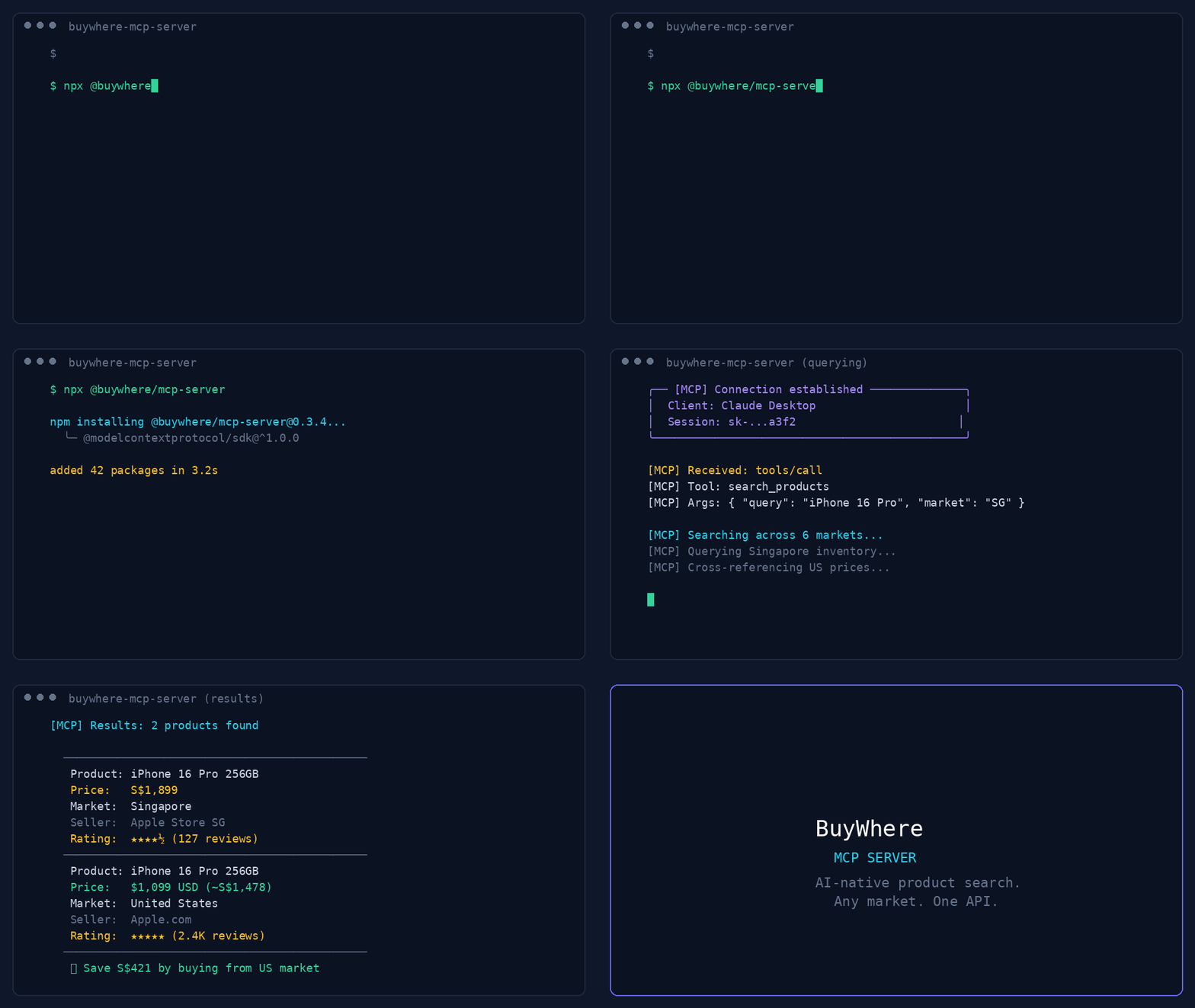
44 秒のデモ:商品検索、お得な商品の発見、価格比較、複数地域への対応。
User:   "Find me wireless earbuds under $50 available in Singapore"
Agent:  [calls search_products → returns 5 matching products]

User:   "Compare the top 3"
Agent:  [calls compare_products → side-by-side with best-value pick]
クイックスタート
登録もメールアドレスも不要で、3 秒でキーを取得できます:
# 1. Register (one call, returns api_key instantly)
curl -X POST https://api.buywhere.ai/v1/auth/register \
  -H "Content-Type: application/json" \
  -d '{"agent_name":"your-agent"}'
# → {"api_key":"bw_...","tier":"unverified","rate_limit":{"rpm":20,"daily":1000}}

# 2. Use the key
export BUYWHERE_API_KEY=bw_...
npx -y @buywhere/mcp-server
従来のメール登録(60 秒、手動承認)→ buywhere.ai/api-keys
チュートリアル
- パート 1:E コマース向け MCP — AI エージェントによるショッピングに欠けているインフラレイヤー — アーキテクチャと、エージェントに商品カタログ API が必要な理由
- パート 2:15 分で実用的なショッピングエージェントを構築する — 実践編:MCP サーバーを設定し、商品を検索して価格を比較し、動作するエージェントを構築します
ブログ記事
MCP アーキテクチャ、エージェントコマース、エコシステムについて詳しく知るには、BuyWhere Engineering Blog をご覧ください。
同じエンジニアリング関連コンテンツを Hashnode でも読むには、BuyWhere Hashnode blog mirror もご覧ください。
- E コマース向け MCP 2026 — AI エージェントが実際の商品を検索し、複数の市場で価格を比較する方法と、MCP が標準である理由
- 本番環境向け MCP サーバーの構築 — アーキテクチャ、ツール設計パターン、配布方法(月間約 1,050 件の npm ダウンロードを確認済み)
- MCP サーバーのエコシステム 2026 — MCP のあらゆるカテゴリをマッピング(40 以上の分野に 4,800 以上のサーバー)
- AI エージェントコマース:欠けているインフラ — エージェントネイティブ経済で、ショッピングがまだ構築されていない最後のレイヤーである理由
- 国境を越えた価格比較チュートリアル — BuyWhere MCP を使って 10 分でショッピングエージェントを構築します
ツール
| ツール | 説明 |
|---|---|
search_products | キーワード、カテゴリ、価格、国でカタログを検索します |
get_product | ID を指定して商品の詳細(価格、仕様、画像)を取得します |
compare_products | 2~10 件の商品を並べて比較します |
find_best_price | 商品を取り扱う販売業者の中から、配送可能な最安の商品情報を検索します |
get_deals | 大幅な値下げがあった商品を取得します |
list_categories | 利用可能な商品カテゴリの分類を一覧表示します |
find_similar | ベクトル類似度に基づいて類似商品を検索します |
ingest_products | カタログへの取り込み用に商品 URL を送信します(エージェント/販売業者向け) |
search_products_v2 | v2 検索。deliver_to(ISO 国コード)が必要です |
get_product_v2 | ID を指定して v2 商品詳細を取得します |
compare_products_v2 | v2 比較。deliver_to は任意です |
get_deals_v2 | v2 お買い得商品。deliver_to が必要です |
find_best_price_v2 | v2 最安価格。deliver_to が必要です |
リモート MCP:POST https://api.buywhere.ai/mcp(JSON-RPC 2.0、protocolVersion 2024-11-05、13 個のツール)。Glama の掲載ページ:https://glama.ai/mcp/servers/BuyWhere/buywhere-mcp
MCP クライアントの設定
フレームワークのクイックスタート:
- CrewAI:API キー · BuyWhere クイックスタート
- Mastra:API キー · BuyWhere クイックスタート
Claude Desktop
claude_desktop_config.json に追加します:
{
  "mcpServers": {
    "buywhere": {
      "command": "npx",
      "args": ["-y", "@buywhere/mcp-server"],
      "env": { "BUYWHERE_API_KEY": "bw_live_xxxx" }
    }
  }
}
Cursor / VS Code / Cline
MCP 設定ファイルに追加します:
{
  "mcpServers": {
    "buywhere": {
      "command": "npx",
      "args": ["-y", "@buywhere/mcp-server"],
      "env": { "BUYWHERE_API_KEY": "bw_live_xxxx" }
    }
  }
}
Windsurf
~/.windsurf/mcp.json に追加します:
{
  "mcpServers": {
    "buywhere": {
      "command": "npx",
      "args": ["-y", "@buywhere/mcp-server"],
      "env": { "BUYWHERE_API_KEY": "bw_live_xxxx" }
    }
  }
}
OpenCode / Codex
opencode.json に追加します:
{
  "mcpServers": {
    "buywhere": {
      "command": "npx",
      "args": ["-y", "@buywhere/mcp-server"],
      "env": { "BUYWHERE_API_KEY": "bw_live_xxxx" }
    }
  }
}
Continue.dev(VS Code / JetBrains)
~/.continue/config.json に追加します:
{
  "experimental": {
    "mcpServers": {
      "buywhere": {
        "command": "npx",
        "args": ["-y", "@buywhere/mcp-server"],
        "env": { "BUYWHERE_API_KEY": "bw_live_xxxx" }
      }
    }
  }
}
Mastra
Mastra は、MCP をネイティブにサポートする TypeScript ファーストの AI エージェントフレームワークです。
npm install @mastra/core @mastra/mcp
import { Mastra } from '@mastra/core';
import { MastraMCPClient } from '@mastra/mcp';

const buywhere = new MastraMCPClient({
  name: 'buywhere',
  server: {
    url: new URL('https://api.buywhere.ai/mcp'),
    requestInit: {
      headers: { 'Authorization': `Bearer ${process.env.BUYWHERE_API_KEY}` },
    },
  },
});

const agent = new Mastra({
  agents: {
    shoppingAgent: {
      instructions: 'You are a shopping assistant. Use BuyWhere to find and compare products.',
      tools: await buywhere.tools(),
    },
  },
});

const result = await agent.agents.shoppingAgent.generate(
  'Find me the best deal on a Sony WH-1000XM5 in Singapore'
);
完全なガイド:BuyWhere + Mastra の統合
LangChain
MCP アダプターを使って、LangChain エージェントで BuyWhere ツールを使用できます:
from langchain_mcp_adapters.client import MultiServerMCPClient
from langgraph.prebuilt import create_react_agent
from langchain_anthropic import ChatAnthropic

async def main():
    async with MultiServerMCPClient({
        "buywhere": {
            "url": "https://api.buywhere.ai/mcp",
            "transport": "streamable_http",
            "headers": {"Authorization": f"Bearer {BUYWHERE_API_KEY}"},
        }
    }) as client:
        tools = await client.get_tools()
        agent = create_react_agent(ChatAnthropic(model="claude-sonnet-4-5"), tools)
        result = await agent.ainvoke({"messages": [("user", "Find the cheapest Sony headphones in Singapore")]})
LlamaIndex
LlamaIndex MCP クライアントを使って BuyWhere に接続します:
from llama_index.tools.mcp import BasicMCPClient, McpToolSpec
from llama_index.agent.openai import OpenAIAgent

async def main():
    mcp_client = BasicMCPClient(
        command_or_url="https://api.buywhere.ai/mcp",
        headers={"Authorization": f"Bearer {BUYWHERE_API_KEY}"},
    )
    mcp_tool_spec = McpToolSpec(client=mcp_client)
    tools = mcp_tool_spec.to_tool_list()
    agent = OpenAIAgent.from_tools(tools)
    response = await agent.achat("Compare prices for iPhone 16 Pro across Singapore and US")
CrewAI
MCP ツール統合を使って、CrewAI エージェントで BuyWhere を使用します:
from crewai import Agent, Task, Crew
from crewai_tools import MCPServerAdapter

buywhere_server = MCPServerAdapter(
    server_params={
        "url": "https://api.buywhere.ai/mcp",
        "headers": {"Authorization": f"Bearer {BUYWHERE_API_KEY}"},
        "transport": "streamable-http",
    }
)

shopping_agent = Agent(
    role="Shopping Research Analyst",
    goal="Find the best deals across Singapore and US markets",
    tools=[buywhere_server],
)

task = Task(
    description="Find the best price for Sony WH-1000XM5 headphones across all available markets",
    agent=shopping_agent,
    expected_output="Product comparison with prices and merchant links",
)

crew = Crew(agents=[shopping_agent], tasks=[task])
result = crew.kickoff()
設定
| 変数 | デフォルト | 説明 |
|---|---|---|
BUYWHERE_API_KEY | (required) | API キー(登録不要:POST /v1/auth/register {"agent_name":"<name>"})— 即時に返され、メール認証も不要です |
BUYWHERE_API_URL | https://api.buywhere.ai/mcp | カスタム API ベース URL |
インストール
# Run directly (no install)
npx -y @buywhere/mcp-server

# Install globally
npm install -g @buywhere/mcp-server
buywhere-mcp
ユースケース
- ショッピングエージェント — 複数の市場で商品を検索、比較、推薦する AI エージェントを構築します
- 価格比較 — Lazada、Shopee、Amazon、地元の小売業者を対象に、1 回のクエリで複数市場の価格を比較します
- お買い得品の発見 — リアルタイムの価格と在庫情報を使って、最もお得な商品を見つけます
- E コマースの自動化 — MCP 対応アプリに商品検索を統合します
- 越境コマース — シンガポール、米国、マレーシア、タイ、ベトナムの市場間で価格を比較します
- エージェント間コマース — A2A プロトコルを介して、エージェント間でショッピングタスクを委任します
アーキテクチャ
Developer's AI Agent (Claude, Cursor, etc.)
  │
  ├── MCP Protocol (stdio)
  │
  ├── @buywhere/mcp-server
  │     ├── search_products(q, category, min_price, max_price, country_code, deliver_to)
  │     ├── get_product(product_id)
  │     ├── compare_products(product_ids[])
  │     ├── find_best_price(product_name, country_code, deliver_to)
  │     ├── get_deals(country_code, deliver_to, category)
  │     ├── list_categories()
  │     ├── find_similar(product_id)
  │     └── ingest_products(urls[])
  │
  └── BuyWhere API (api.buywhere.ai)
        └── Product catalog across SG, US, MY, TH, and VN merchants
開発
git clone https://github.com/BuyWhere/buywhere-mcp.git
cd buywhere-mcp
npm install
npm run build
npm start
BuyWhere を選ぶ理由
BuyWhere は AI エージェント向けの商品検索 API です。シンガポール、米国、マレーシア、タイ、ベトナムの販売業者の商品データを集約し、エージェントが使いやすい単一のインターフェースで提供します。店舗管理も Shopify 連携も不要です。商品をリアルタイムで検索、比較するだけです。
- 1 つの API — すべての市場、すべての小売業者に対応
- エージェントネイティブ — 初日から MCP 向けに構築
- リアルタイム — 最新の価格と在庫状況
- 開発者ファースト — SDK は不要で、サーバーを追加するだけです
相性の良いツール
以下の補完的な MCP パッケージを使うと、BuyWhere を強力なマルチツールワークフローへと拡張できます。
- @modelcontextprotocol/server-filesystem — ショッピング結果や商品調査をローカルファイルシステムに保存します。BuyWhere と組み合わせて、お買い得品リスト、価格比較、商品仕様を構造化ファイルとしてエクスポートできます。
- @supabase/mcp-server-supabase — お気に入りの商品、ユーザーの好み、価格アラートを Supabase に保存します。エージェントのセッションをまたいでショッピング履歴を保持できます。
- n8n-mcp — 価格監視のワークフローを自動化します。BuyWhere の価格を監視し、値下がり時に通知を送るノーコードパイプラインを構築できます。
- tavily-mcp — 購入前に商品を調査します。Tavily でレビューや比較情報を探し、BuyWhere で最新価格と購入リンクを取得できます。
- @playwright/mcp — ショッピングエージェントの操作を E2E テストします。ブラウザー自動化で、商品検索、価格比較、チェックアウトのフローが正しく動作することを確認できます。
プロトコル
| プロトコル | 対応状況 |
|---|---|
| MCP(Model Context Protocol) | 完全対応 — 10 個のツール、stdio トランスポート |
| A2A(エージェント間) | マルチエージェントのタスク委任 — エージェントカード |
貢献
問題の報告、PR の提出、機能の提案方法については、CONTRIBUTING.md を参照してください。
ブログ記事
MCP サーバーと BuyWhere エコシステムについて詳しく知ることができます。
- MCP サーバーの発見 — MCP サーバーの発見におけるギャップについて
- 本番環境向け MCP サーバーの構築 — MCP サーバーの本番環境向けベストプラクティス
- コンテキストウィンドウを有効活用する MCP サーバー — コンテキストウィンドウの価値を最大限に高める MCP サーバー
- MCP E コマースガイド — E コマース向け MCP の決定版ガイド
- BuyWhere MCP のローンチ — BuyWhere MCP サーバーのローンチを発表
- 2026 年の MCP サーバーエコシステム — 2026 年の MCP サーバーエコシステム完全ガイド
サポート
このプロジェクトが役に立った場合は、ぜひご協力ください。
- ⭐ リポジトリにスターを付ける — BuyWhere をほかの人が見つけやすくなります
- 🐛 バグや機能のリクエストはイシューを作成してください
- 💬 質問やアイデアはディスカッションを開始してください
- 📣 AI エージェントツールを開発しているほかの開発者にも共有してください
ライセンス
MIT
コメント
AI アプリケーションが外部のツールやデータソースに統一的な方法で接続するためのオープンなプロトコルです。クライアントはモデルとの対話を担い、MCP サーバーはツール・リソース・プロンプトテンプレートを提供します。標準メッセージでやり取りするため、1 つのサーバーを複数のクライアントで再利用できます。