
server-side-rendering-flutter-apps-with-rfw について
Flutter 開発者向けに、RFW を使って HTTP 経由でサーバーから UI を配信・更新する方法を解説するチュートリアルです。dart_frog のサーバーと Flutter クライアントを構築し、状態の送受信やローカルキャッシュも扱います。
主な機能
- 01HTTP 経由で RFW の UI バイナリを送信
- 02サーバー側で動的 UI を生成
- 03クライアントにカスタムウィジェットを登録
- 04リクエストヘッダーで状態を受け渡し
- 05オフライン表示用に UI をキャッシュ
活用シーン
- 01銀行アプリの画面更新
- 02航空券・ホテル・レンタカー予約アプリの構築
- 03チャットアプリのサーバー駆動 UI
- 04ユーザー別のマーケティングや実験 UI
インストール
コマンドをコピーしてターミナルで実行します。
npx skills add https:/インストール後、Claude Code で/server-side-rendering-flutter-apps-with-rfwを入力して読み込まれたか確認します。
詳細
RFW を使用した Flutter アプリのサーバーサイドレンダリング
この記事では、サーバーサイドレンダリング(SSR)を活用し、UI を動的に更新できる Flutter アプリの構築方法を説明します。
Flutter を始めたばかりの場合は、こちらの記事に沿って始めることができます。
この手法では、サーバーとクライアントでrfwパッケージを使用し、HTTP リクエストを通じてバイナリデータを送信します。
要約 最終的なソースはこちらこちらで確認できます。
はじめに
flutter_ssrという名前の新しいディレクトリを作成し、ターミナルでそのディレクトリに移動するか、お好みの IDE で開きます。
更新へのアプローチ
モバイルの世界にいる方なら、すべてのユーザーに最新バージョンを使ってもらうことがどれほど難しいかご存じでしょう。API やデータベーススキーマだけでも、古いバージョンを使っているユーザーがいるため、更新が非常に難しい場合があります(OS の制約が原因であることもあります)。
コードプッシュ
Shorebirdは、コードプッシュを通じてユーザーに更新を配信し、アプリをその場で更新するという興味深いアプローチを採用しています。UI とロジックの両方を更新できるのは利点ですが、コンテンツの更新が特定のユーザーまたはユーザーグループだけを対象としている場合はどうでしょうか。
サポート対象の最新バージョン
別の方法として、SLO/ポリシーを設け、直近のリリースを X 個だけサポートし、それより古いバージョンではアプリが動作しないようにすることができます。
モバイルでこの方法を使う場合は、AppCast経由でupgraderを使用するか、in_app_updateを使って Google Play API を利用し、アプリをバックグラウンドで更新するか、更新するまで使用できないようにします。
この方法には、ユーザーが最新バージョンを使っているか、サポート対象外であることを把握でき、新しい API を利用したり、更新をより簡単に展開したりできるという利点があります。一方で、ユーザーは更新にうんざりすることが増え、古いデバイスがサポートされない可能性もあります。
サーバー駆動の更新
すべてのアプリでサーバー上のデータをレンダリングする必要があるわけではありません。オフラインファーストのアプリケーションを構築する場合は、すべてをまずローカルで行いたいこともありますが、ここではサーバーファーストのアプリケーションを構築する場合を扱います。次にいくつかの例とユースケースを示します。
- 銀行口座
- 航空券/ホテル/レンタカーの予約
- チャットアプリケーション(インスタントメッセージ)
- マーケティングと A/B テスト
- データベースファーストのアプリケーション
これらの例はサーバーのみで動作することを意味するわけではありません。多くの場合、優れたオフライン体験を提供するため、データをローカルにキャッシュすることも必要です。
Flutter では、Web 上ではシングルページアプリケーション(SPA)、ストアではモバイル/デスクトップアプリとして、ユーザーにランタイムを配布します。つまり、更新のたびにすべてのロジックと UI を配布する必要があります。
この方法には、サーバー側でより多くのロジックを実行できるという利点があります。非常に負荷の高いリクエストはサーバー側で処理し、レンダリング済みの UI だけをクライアントに送信できる可能性もあります。クライアント側でレスポンスをキャッシュすれば、オフラインでの閲覧にも対応できます。一方、クライアントは最終的にサーバーと通信することが前提となるため、オフラインのみで動作するアプリケーションには適さない場合があります。
リモート Flutter ウィジェット(RFW)
Flutter チームは、クライアントとサーバーでウィジェットを作成し、それらを連携させるために必要なデータを送信するためのパッケージを提供しています。このパッケージはrfwと呼ばれています。
UI に加えてロジックを WASM として配布することも可能ですが、それはこの記事の対象外です
rfw パッケージでは、バイナリにコンパイルできるテキスト形式を使用し、状態の表現やイベントのディスパッチに利用します。
import core;
import material;

widget MaterialShop = Scaffold(
  appBar: AppBar(
    title: Text(text: ['Products']),
  ),
  body: ListView(
    children: [
      ...for product in data.server.games:
        Product(product: product)
    ],
  ),
);

widget Product = ListTile(
  title: Text(text: args.product.name),
  onTap: event 'shop.productSelect' { name: args.product.name, path: args.product.link },
);
複数のウィジェットを定義できます。Flutter で使い慣れている Dart API に似て見えるかもしれませんが、まったく同じではありません。
条件分岐ブロックや条件付きレンダリングはありません。その代わり、必要に応じて毎フレーム更新できるステートレスな形式です。
新しいプロジェクトを作成したときに生成される、次の Flutter カウンターアプリを見てみましょう。
class MyHomePage extends StatefulWidget {
  final String title;

  const MyHomePage({
    Key? key,
    required this.title,
  }) : super(key: key);

  @override
  State<MyHomePage> createState() => _MyHomePageState();
}

class _MyHomePageState extends State<MyHomePage> {
  int _counter = 0;

  void _incrementCounter() {
    setState(() {
      _counter++;
    });
  }

  @override
  Widget build(BuildContext context) {
    return Scaffold(
      appBar: AppBar(
        backgroundColor: Theme.of(context).colorScheme.inversePrimary,
        title: Text(widget.title),
      ),
      body: Center(
        child: Column(
          mainAxisAlignment: MainAxisAlignment.center,
          children: [
            const Text(
              'You have pushed the button this many times:',
            ),
            Text(
              '$_counter',
              style: Theme.of(context).textTheme.headlineMedium,
            ),
          ],
        ),
      ),
      floatingActionButton: FloatingActionButton(
        onPressed: _incrementCounter,
        tooltip: 'Increment',
        child: const Icon(Icons.add),
      ),
    );
  }
}
これを rfw で次のように表現できます。
import widgets;
import material;

widget root = Scaffold(
  appBar: AppBar(
    title: Text(text: ['Counter Example']),
    centerTitle: true,
    backgroundColor: data.colorScheme.inversePrimary,
  ),
  body: Center(
    child: Column(
      mainAxisAlignment: "center",
      children: [
        Text(text: ["You have pushed the button this many times:"]),
        Text(
          text: [data.counter.value],
          style: {
            fontSize: 20.0,
          },
        ),
      ],
    ),
  ),
  floatingActionButton: FloatingActionButton(
     onPressed: event "click" {},
     tooltip: ["Increment"],
     child: Icon(
        icon: 0xe047,
        fontFamily: 'MaterialIcons',
     ),
  ),
);
文字列の配列や、ウィジェットを定義するさまざまな方法があることに気づいたかもしれません。これは意図的なもので、API は Flutter SDK と完全に同じではありませんが、制約がある一方で、異なるトレードオフもあります。
アプリケーションで任意のカスタムウィジェットを定義し、デザインシステムで定義した UI のみを使用できます。これにより、サーバーは想定どおりの UI だけを生成できます。
テキスト形式で、行、列、コンテナーなどを使って UI 全体を作成することもできます。
サーバーのセットアップ
この例では、サーバーアプリケーションの作成にdart_frogを使用します。
先ほど作成したディレクトリで、次のコマンドを実行します。
dart_frog create server
flutter pub add rfw
これにより、サーバーのボイラープレートが生成され、必要な依存関係が追加されます。
今はテストディレクトリを削除しても、後で正しいレスポンスを確認できるように更新してもかまいません。
/server/routes/index.dartに移動し、ファイルを次のように更新します。
import 'package:dart_frog/dart_frog.dart';
import 'package:rfw/formats.dart';

Response onRequest(RequestContext context) {
  var count = context.request.headers['COUNTER_VALUE'] ?? '0';

  if (context.request.method == HttpMethod.post) {
    count = (int.parse(count) + 1).toString();
  }

  return Response.bytes(
    body: encodeLibraryBlob(parseLibraryFile(template)),
    headers: {'COUNTER_VALUE': count},
  );
}

const template = '''
import widgets;
import material;

widget root = Scaffold(
  appBar: AppBar(
    title: Text(text: ['Counter Example']),
    centerTitle: true,
    backgroundColor: data.colorScheme.inversePrimary,
  ),
  body: Center(
    child: Column(
      mainAxisAlignment: "center",
      children: [
        Text(text: ["You have pushed the button this many times:"]),
        Text(
          text: [data.counter.value],
          style: {
            fontSize: 20.0,
          },
        ),
      ],
    ),
  ),
  floatingActionButton: FloatingActionButton(
     onPressed: event "click" {},
     tooltip: ["Increment"],
     child: Icon(
        icon: 0xe047,
        fontFamily: 'MaterialIcons',
     ),
  ),
);
''';
これにより、先ほど定義した rfw のテキスト形式を文字列テンプレートに追加します。
このテンプレートを使ってencodeLibraryBlob(parseLibraryFile(template))を呼び出し、テキスト形式のバイナリ表現を作成できます。
また、クライアントとの間で状態を送受信するため、ヘッダーからCOUNTER_VALUEを取得しています。サーバーはステートレスであるか、ステートレスにすることでスケーリングが容易になるため、これによりセッションストレージやコンテキストのような仕組みが不要になります。
serverディレクトリに移動すると、次のステップで必要になる開発サーバーを起動できます。
dart_frog dev
次のように表示されます。
✓ Running on http://localhost:8080
クライアントのセットアップ
新しいターミナルタブで、ディレクトリのルートに移動し、次のコマンドを実行します。
flutter create app
flutter pub add rfw http
これにより、カウンターアプリのボイラープレートが生成され、必要な依存関係が追加されます。
rfw パッケージにはcoreウィジェットとmaterialウィジェットが含まれていますが、この例では、それらの呼び出し方と作成方法を示すため、手動で追加します。
app/lib/rfw/decoders.dartにあるファイルを作成し、次のように更新します。
import 'package:flutter/material.dart';
import 'package:rfw/rfw.dart';

class CustomArgumentDecoders {
  static ButtonStyle? outlinedButtonStyle(
    DataSource source,
    List<Object> key,
    BuildContext context,
  ) {
    if (!source.isMap(key)) {
      return null;
    }
    return OutlinedButton.styleFrom(
      foregroundColor: ArgumentDecoders.color(source, ['foregroundColor']),
      backgroundColor: ArgumentDecoders.color(source, ['backgroundColor']),
      disabledForegroundColor:
          ArgumentDecoders.color(source, [...key, 'disabledForegroundColor']),
      disabledBackgroundColor:
          ArgumentDecoders.color(source, [...key, 'disabledBackgroundColor']),
      shadowColor: ArgumentDecoders.color(source, [...key, 'shadowColor']),
      surfaceTintColor:
          ArgumentDecoders.color(source, [...key, 'surfaceTintColor']),
      elevation: source.v<double>(['elevation']),
      textStyle: ArgumentDecoders.textStyle(source, [...key, 'textStyle']),
      padding: ArgumentDecoders.edgeInsets(source, [...key, 'padding']),
      minimumSize: CustomArgumentDecoders.size(source, [...key, 'minimumSize']),
      fixedSize: CustomArgumentDecoders.size(source, [...key, 'fixedSize']),
      maximumSize: CustomArgumentDecoders.size(source, [...key, 'maximumSize']),
      side: ArgumentDecoders.borderSide(source, [...key, 'side']),
      shape: CustomArgumentDecoders.outlinedBorder(source, [...key, 'shape']),
      enabledMouseCursor: CustomArgumentDecoders.mouseCursor(
          source, [...key, 'enabledMouseCursor']),
      disabledMouseCursor: CustomArgumentDecoders.mouseCursor(
          source, [...key, 'disabledMouseCursor']),
      visualDensity:
          ArgumentDecoders.visualDensity(source, [...key, 'visualDensity']),
      tapTargetSize: ArgumentDecoders.enumValue<MaterialTapTargetSize>(
              MaterialTapTargetSize.values,
              source,
              [...key, 'tapTargetSize']) ??
          MaterialTapTargetSize.shrinkWrap,
      animationDuration: ArgumentDecoders.duration(
          source, [...key, 'animationDuration'], context),
      enableFeedback: source.v<bool>([...key, 'enableFeedback']),
      alignment: ArgumentDecoders.alignment(source, [...key, 'alignment']),
    );
  }

  static ButtonStyle? filledButtonStyle(
    DataSource source,
    List<Object> key,
    BuildContext context,
  ) {
    if (!source.isMap(key)) {
      return null;
    }
    return FilledButton.styleFrom(
      foregroundColor: ArgumentDecoders.color(source, ['foregroundColor']),
      backgroundColor: ArgumentDecoders.color(source, ['backgroundColor']),
      disabledForegroundColor:
          ArgumentDecoders.color(source, [...key, 'disabledForegroundColor']),
      disabledBackgroundColor:
          ArgumentDecoders.color(source, [...key, 'disabledBackgroundColor']),
      shadowColor: ArgumentDecoders.color(source, [...key, 'shadowColor']),
      surfaceTintColor:
          ArgumentDecoders.color(source, [...key, 'surfaceTintColor']),
      elevation: source.v<double>(['elevation']),
      textStyle: ArgumentDecoders.textStyle(source, [...key, 'textStyle']),
      padding: ArgumentDecoders.edgeInsets(source, [...key, 'padding']),
      minimumSize: CustomArgumentDecoders.size(source, [...key, 'minimumSize']),
      fixedSize: CustomArgumentDecoders.size(source, [...key, 'fixedSize']),
      maximumSize: CustomArgumentDecoders.size(source, [...key, 'maximumSize']),
      side: ArgumentDecoders.borderSide(source, [...key, 'side']),
      shape: CustomArgumentDecoders.outlinedBorder(source, [...key, 'shape']),
      enabledMouseCursor: CustomArgumentDecoders.mouseCursor(
          source, [...key, 'enabledMouseCursor']),
      disabledMouseCursor: CustomArgumentDecoders.mouseCursor(
          source, [...key, 'disabledMouseCursor']),
      visualDensity:
          ArgumentDecoders.visualDensity(source, [...key, 'visualDensity']),
      tapTargetSize: ArgumentDecoders.enumValue<MaterialTapTargetSize>(
              MaterialTapTargetSize.values,
              source,
              [...key, 'tapTargetSize']) ??
          MaterialTapTargetSize.shrinkWrap,
      animationDuration: ArgumentDecoders.duration(
          source, [...key, 'animationDuration'], context),
      enableFeedback: source.v<bool>([...key, 'enableFeedback']),
      alignment: ArgumentDecoders.alignment(source, [...key, 'alignment']),
    );
  }

  static ButtonStyle? textButtonStyle(
    DataSource source,
    List<Object> key,
    BuildContext context,
  ) {
    if (!source.isMap(key)) {
      return null;
    }
    return TextButton.styleFrom(
      foregroundColor: ArgumentDecoders.color(source, ['foregroundColor']),
      backgroundColor: ArgumentDecoders.color(source, ['backgroundColor']),
      disabledForegroundColor:
          ArgumentDecoders.color(source, [...key, 'disabledForegroundColor']),
      disabledBackgroundColor:
          ArgumentDecoders.color(source, [...key, 'disabledBackgroundColor']),
      shadowColor: ArgumentDecoders.color(source, [...key, 'shadowColor']),
      surfaceTintColor:
          ArgumentDecoders.color(source, [...key, 'surfaceTintColor']),
      elevation: source.v<double>(['elevation']),
      textStyle: ArgumentDecoders.textStyle(source, [...key, 'textStyle']),
      padding: ArgumentDecoders.edgeInsets(source, [...key, 'padding']),
      minimumSize: CustomArgumentDecoders.size(source, [...key, 'minimumSize']),
      fixedSize: CustomArgumentDecoders.size(source, [...key, 'fixedSize']),
      maximumSize: CustomArgumentDecoders.size(source, [...key, 'maximumSize']),
      side: ArgumentDecoders.borderSide(source, [...key, 'side']),
      shape: CustomArgumentDecoders.outlinedBorder(source, [...key, 'shape']),
      enabledMouseCursor: CustomArgumentDecoders.mouseCursor(
          source, [...key, 'enabledMouseCursor']),
      disabledMouseCursor: CustomArgumentDecoders.mouseCursor(
          source, [...key, 'disabledMouseCursor']),
      visualDensity:
          ArgumentDecoders.visualDensity(source, [...key, 'visualDensity']),
      tapTargetSize: ArgumentDecoders.enumValue<MaterialTapTargetSize>(
              MaterialTapTargetSize.values,
              source,
              [...key, 'tapTargetSize']) ??
          MaterialTapTargetSize.shrinkWrap,
      animationDuration: ArgumentDecoders.duration(
          source, [...key, 'animationDuration'], context),
      enableFeedback: source.v<bool>([...key, 'enableFeedback']),
      alignment: ArgumentDecoders.alignment(source, [...key, 'alignment']),
    );
  }

  static EdgeInsets? edgeInsets(DataSource source, List<Object> key) {
    if (!source.isMap(key)) {
      return null;
    }
    final all = source.v<double>([...key, 'all']);
    if (all != null) return EdgeInsets.all(all);
    final vertical = source.v<double>([...key, 'vertical']);
    final horizontal = source.v<double>([...key, 'horizontal']);
    if (vertical != null || horizontal != null) {
      return EdgeInsets.symmetric(
        vertical: vertical ?? 0,
        horizontal: horizontal ?? 0,
      );
    }
    final top = source.v<double>([...key, 'top']);
    final bottom = source.v<double>([...key, 'bottom']);
    final left = source.v<double>([...key, 'left']);
    final right = source.v<double>([...key, 'right']);
    return EdgeInsets.only(
      top: top ?? 0,
      bottom: bottom ?? 0,
      left: left ?? 0,
      right: right ?? 0,
    );
  }

  static Size? size(DataSource source, List<Object> key) {
    if (!source.isMap(key)) {
      return null;
    }
    return Size(
      source.v<double>([...key, 'width']) ?? 0.0,
      source.v<double>([...key, 'height']) ?? 0.0,
    );
  }

  static MouseCursor? mouseCursor(DataSource source, List<Object> key) {
    if (!source.isMap(key)) {
      return null;
    }
    final type = source.v<String>([...key, 'type']);
    final value = source.v<String>([...key, 'value']);
    if (type == 'system') {
      switch (value) {
        case 'alias':
          return SystemMouseCursors.alias;
        case 'none':
          return SystemMouseCursors.none;
        case 'basic':
          return SystemMouseCursors.basic;
        case 'click':
          return SystemMouseCursors.click;
        case 'forbidden':
          return SystemMouseCursors.forbidden;
        case 'wait':
          return SystemMouseCursors.wait;
        case 'progress':
          return SystemMouseCursors.progress;
        case 'contextMenu':
          return SystemMouseCursors.contextMenu;
        case 'help':
          return SystemMouseCursors.help;
        case 'text':
          return SystemMouseCursors.text;
        case 'verticalText':
          return SystemMouseCursors.verticalText;
        case 'cell':
          return SystemMouseCursors.cell;
        case 'precise':
          return SystemMouseCursors.precise;
        case 'move':
          return SystemMouseCursors.move;
        case 'grab':
          return SystemMouseCursors.grab;
        case 'grabbing':
          return SystemMouseCursors.grabbing;
        case 'noDrop':
          return SystemMouseCursors.noDrop;
        case 'alias':
          return SystemMouseCursors.alias;
        case 'copy':
          return SystemMouseCursors.copy;
        case 'disappearing':
          return SystemMouseCursors.disappearing;
        case 'allScroll':
          return SystemMouseCursors.allScroll;
        case 'resizeLeftRight':
          return SystemMouseCursors.resizeLeftRight;
        case 'resizeUpDown':
          return SystemMouseCursors.resizeUpDown;
        case 'resizeUpLeftDownRight':
          return SystemMouseCursors.resizeUpLeftDownRight;
        case 'resizeUpRightDownLeft':
          return SystemMouseCursors.resizeUpRightDownLeft;
        case 'resizeUp':
          return SystemMouseCursors.resizeUp;
        case 'resizeDown':
          return SystemMouseCursors.resizeDown;
        case 'resizeLeft':
          return SystemMouseCursors.resizeLeft;
        case 'resizeRight':
          return SystemMouseCursors.resizeRight;
        case 'resizeUpLeft':
          return SystemMouseCursors.resizeUpLeft;
        case 'resizeUpRight':
          return SystemMouseCursors.resizeUpRight;
        case 'resizeDownLeft':
          return SystemMouseCursors.resizeDownLeft;
        case 'resizeDownRight':
          return SystemMouseCursors.resizeDownRight;
        case 'resizeColumn':
          return SystemMouseCursors.resizeColumn;
        case 'resizeRow':
          return SystemMouseCursors.resizeRow;
        case 'zoomIn':
          return SystemMouseCursors.zoomIn;
        case 'zoomOut':
          return SystemMouseCursors.zoomOut;
        default:
      }
    }
    return null;
  }

  static LinearBorderEdge? linearBorderEdge(
      DataSource source, List<Object> key) {
    if (!source.isMap(key)) {
      return null;
    }
    return LinearBorderEdge(
      size: source.v<double>([...key, 'size']) ?? 1.0,
      alignment: source.v<double>([...key, 'alignment']) ?? 0.0,
    );
  }

  static OutlinedBorder? outlinedBorder(DataSource source, List<Object> key) {
    if (!source.isMap(key)) {
      return null;
    }
    final type = source.v<String>([...key, 'type']);
    switch (type) {
      case "RoundedRectangleBorder":
        return RoundedRectangleBorder(
          side: ArgumentDecoders.borderSide(source, [...key, 'side']) ??
              BorderSide.none,
          borderRadius:
              ArgumentDecoders.borderRadius(source, [...key, 'borderRadius']) ??
                  BorderRadius.zero,
        );
      case "BeveledRectangleBorder":
        return BeveledRectangleBorder(
          side: ArgumentDecoders.borderSide(source, [...key, 'side']) ??
              BorderSide.none,
          borderRadius:
              ArgumentDecoders.borderRadius(source, [...key, 'borderRadius']) ??
                  BorderRadius.zero,
        );
      case "ContinuousRectangleBorder":
        return ContinuousRectangleBorder(
          side: ArgumentDecoders.borderSide(source, [...key, 'side']) ??
              BorderSide.none,
          borderRadius:
              ArgumentDecoders.borderRadius(source, [...key, 'borderRadius']) ??
                  BorderRadius.zero,
        );
      case "CircleBorder":
        return CircleBorder(
          side: ArgumentDecoders.borderSide(source, [...key, 'side']) ??
              BorderSide.none,
          eccentricity: source.v<double>([...key, 'eccentricity']) ?? 0.0,
        );
      case "LinearBorder":
        return LinearBorder(
          side: ArgumentDecoders.borderSide(source, [...key, 'side']) ??
              BorderSide.none,
          start: CustomArgumentDecoders.linearBorderEdge(
              source, [...key, 'start']),
          end: CustomArgumentDecoders.linearBorderEdge(source, [...key, 'end']),
          top: CustomArgumentDecoders.linearBorderEdge(source, [...key, 'top']),
          bottom: CustomArgumentDecoders.linearBorderEdge(
              source, [...key, 'bottom']),
        );
      case "OvalBorder":
        return OvalBorder(
          side: ArgumentDecoders.borderSide(source, [...key, 'side']) ??
              BorderSide.none,
          eccentricity: source.v<double>([...key, 'eccentricity']) ?? 0.0,
        );
      case "StadiumBorder":
        return StadiumBorder(
          side: ArgumentDecoders.borderSide(source, [...key, 'side']) ??
              BorderSide.none,
        );
      case "StarBorder":
        return StarBorder(
          side: ArgumentDecoders.borderSide(source, [...key, 'side']) ??
              BorderSide.none,
          points: source.v<double>([...key, 'points']) ?? 5.0,
          innerRadiusRatio:
              source.v<double>([...key, 'innerRadiusRatio']) ?? 0.4,
          pointRounding: source.v<double>([...key, 'pointRounding']) ?? 0.0,
          valleyRounding: source.v<double>([...key, 'valleyRounding']) ?? 0.0,
          rotation: source.v<double>([...key, 'rotation']) ?? 0.0,
          squash: source.v<double>([...key, 'squash']) ?? 0.0,
        );
      default:
        break;
    }
    return null;
  }
}
これから定義するウィジェットに必要なカスタムデコーダーを作成します。
コアライブラリの定義
app/lib/rfw/core.dartにあるファイルを作成し、次のように更新します。
import 'package:flutter/gestures.dart';
import 'package:flutter/material.dart';
import 'package:rfw/rfw.dart';
LocalWidgetLibrary createCoreWidgets() =>
LocalWidgetLibrary(_coreWidgetsDefinitions);
Map<String, LocalWidgetBuilder> get _coreWidgetsDefinitions =>
<String, LocalWidgetBuilder>{
'AnimationDefaults': (BuildContext context, DataSource source) {
return AnimationDefaults(
duration: ArgumentDecoders.duration(source, ['duration'], context),
curve: ArgumentDecoders.curve(source, ['curve'], context),
child: source.child(['child']),
);
},
'Align': (BuildContext context, DataSource source) {
return AnimatedAlign(
duration: ArgumentDecoders.duration(source, ['duration'], context),
curve: ArgumentDecoders.curve(source, ['curve'], context),
alignment: ArgumentDecoders.alignment(source, ['alignment']) ??
Alignment.center,
widthFactor: source.v<double>(['widthFactor']),
heightFactor: source.v<double>(['heightFactor']),
onEnd: source.voidHandler(['onEnd']),
child: source.optionalChild(['child']),
);
},
'AspectRatio': (BuildContext context, DataSource source) {
return AspectRatio(
aspectRatio: source.v<double>(['aspectRatio']) ?? 1.0,
child: source.optionalChild(['child']),
);
},
'Center': (BuildContext context, DataSource source) {
return Center(
widthFactor: source.v<double>(['widthFactor']),
heightFactor: source.v<double>(['heightFactor']),
child: source.optionalChild(['child']),
);
},
'ColoredBox': (BuildContext context, DataSource source) {
return ColoredBox(
color: ArgumentDecoders.color(source, ['color']) ??
const Color(0xFF000000),
child: source.optionalChild(['child']),
);
},
'Column': (BuildContext context, DataSource source) {
return Column(
mainAxisAlignment: ArgumentDecoders.enumValue<MainAxisAlignment>(
MainAxisAlignment.values, source, ['mainAxisAlignment']) ??
MainAxisAlignment.start,
mainAxisSize: ArgumentDecoders.enumValue<MainAxisSize>(
MainAxisSize.values, source, ['mainAxisSize']) ??
MainAxisSize.max,
crossAxisAlignment: ArgumentDecoders.enumValue<CrossAxisAlignment>(
CrossAxisAlignment.values, source, ['crossAxisAlignment']) ??
CrossAxisAlignment.center,
textDirection: ArgumentDecoders.enumValue<TextDirection>(
TextDirection.values, source, ['textDirection']),
verticalDirection: ArgumentDecoders.enumValue<VerticalDirection>(
VerticalDirection.values, source, ['verticalDirection']) ??
VerticalDirection.down,
textBaseline: ArgumentDecoders.enumValue<TextBaseline>(
TextBaseline.values, source, ['textBaseline']),
children: source.childList(['children']),
);
},
'Container': (BuildContext context, DataSource source) {
return AnimatedContainer(
duration: ArgumentDecoders.duration(source, ['duration'], context),
curve: ArgumentDecoders.curve(source, ['curve'], context),
alignment: ArgumentDecoders.alignment(source, ['alignment']),
padding: ArgumentDecoders.edgeInsets(source, ['padding']),
color: ArgumentDecoders.color(source, ['color']),
decoration: ArgumentDecoders.decoration(source, ['decoration']),
foregroundDecoration:
ArgumentDecoders.decoration(source, ['foregroundDecoration']),
width: source.v<double>(['width']),
height: source.v<double>(['height']),
constraints: ArgumentDecoders.boxConstraints(source, ['constraints']),
margin: ArgumentDecoders.edgeInsets(source, ['margin']),
transform: ArgumentDecoders.matrix(source, ['transform']),
transformAlignment:
ArgumentDecoders.alignment(source, ['transformAlignment']),
clipBehavior: ArgumentDecoders.enumValue<Clip>(
Clip.values, source, ['clipBehavior']) ??
Clip.none,
onEnd: source.voidHandler(['onEnd']),
child: source.optionalChild(['child']),
);
},
'DefaultTextStyle': (BuildContext context, DataSource source) {
return AnimatedDefaultTextStyle(
duration: ArgumentDecoders.duration(source, ['duration'], context),
curve: ArgumentDecoders.curve(source, ['curve'], context),
style: ArgumentDecoders.textStyle(source, ['style']) ??
const TextStyle(),
textAlign: ArgumentDecoders.enumValue<TextAlign>(
TextAlign.values, source, ['textAlign']),
softWrap: source.v<bool>(['softWrap']) ?? true,
overflow: ArgumentDecoders.enumValue<TextOverflow>(
TextOverflow.values, source, ['overflow']) ??
TextOverflow.clip,
maxLines: source.v<int>(['maxLines']),
textWidthBasis: ArgumentDecoders.enumValue<TextWidthBasis>(
TextWidthBasis.values, source, ['textWidthBasis']) ??
TextWidthBasis.parent,
textHeightBehavior: ArgumentDecoders.textHeightBehavior(
source, ['textHeightBehavior']),
onEnd: source.voidHandler(['onEnd']),
child: source.child(['child']),
);
},
'Directionality': (BuildContext context, DataSource source) {
return Directionality(
textDirection: ArgumentDecoders.enumValue<TextDirection>(
TextDirection.values, source, ['textDirection']) ??
TextDirection.ltr,
child: source.child(['child']),
);
},
'Expanded': (BuildContext context, DataSource source) {
return Expanded(
flex: source.v<int>(['flex']) ?? 1,
child: source.child(['child']),
);
},
'FittedBox': (BuildContext context, DataSource source) {
return FittedBox(
fit: ArgumentDecoders.enumValue<BoxFit>(
BoxFit.values, source, ['fit']) ??
BoxFit.contain,
alignment: ArgumentDecoders.alignment(source, ['alignment']) ??
Alignment.center,
clipBehavior: ArgumentDecoders.enumValue<Clip>(
Clip.values, source, ['clipBehavior']) ??
Clip.none,
child: source.optionalChild(['child']),
);
},
'FractionallySizedBox': (BuildContext context, DataSource source) {
return FractionallySizedBox(
alignment: ArgumentDecoders.alignment(source, ['alignment']) ??
Alignment.center,
widthFactor: source.v<double>(['widthFactor']),
heightFactor: source.v<double>(['heightFactor']),
child: source.child(['child']),
);
},
'GestureDetector': (BuildContext context, DataSource source) {
return GestureDetector(
onTap: source.voidHandler(['onTap']),
onTapDown: source.handler(['onTapDown'],
(VoidCallback trigger) => (TapDownDetails details) => trigger()),
onTapUp: source.handler(['onTapUp'],
(VoidCallback trigger) => (TapUpDetails details) => trigger()),
onTapCancel: source.voidHandler(['onTapCancel']),
onDoubleTap: source.voidHandler(['onDoubleTap']),
onLongPress: source.voidHandler(['onLongPress']),
behavior: ArgumentDecoders.enumValue<HitTestBehavior>(
HitTestBehavior.values, source, ['behavior']),
child: source.optionalChild(['child']),
);
},
'GridView': (BuildContext context, DataSource source) {
return GridView.builder(
scrollDirection: ArgumentDecoders.enumValue<Axis>(
Axis.values, source, ['scrollDirection']) ??
Axis.vertical,
reverse: source.v<bool>(['reverse']) ?? false,
primary: source.v<bool>(['primary']),
shrinkWrap: source.v<bool>(['shrinkWrap']) ?? false,
padding: ArgumentDecoders.edgeInsets(source, ['padding']),
gridDelegate:
ArgumentDecoders.gridDelegate(source, ['gridDelegate']) ??
const SliverGridDelegateWithFixedCrossAxisCount(
crossAxisCount: 2),
itemBuilder: (BuildContext context, int index) =>
source.child(['children', index]),
itemCount: source.length(['children']),
addAutomaticKeepAlives:
source.v<bool>(['addAutomaticKeepAlives']) ?? true,
addRepaintBoundaries:
source.v<bool>(['addRepaintBoundaries']) ?? true,
addSemanticIndexes: source.v<bool>(['addSemanticIndexes']) ?? true,
cacheExtent: source.v<double>(['cacheExtent']),
semanticChildCount: source.v<int>(['semanticChildCount']),
dragStartBehavior: ArgumentDecoders.enumValue<DragStartBehavior>(
DragStartBehavior.values, source, ['dragStartBehavior']) ??
DragStartBehavior.start,
keyboardDismissBehavior:
ArgumentDecoders.enumValue<ScrollViewKeyboardDismissBehavior>(
ScrollViewKeyboardDismissBehavior.values,
source,
['keyboardDismissBehavior']) ??
ScrollViewKeyboardDismissBehavior.manual,
restorationId: source.v<String>(['restorationId']),
clipBehavior: ArgumentDecoders.enumValue<Clip>(
Clip.values, source, ['clipBehavior']) ??
Clip.hardEdge,
);
},
'Icon': (BuildContext context, DataSource source) {
return Icon(
ArgumentDecoders.iconData(source, []) ?? Icons.flutter_dash,
size: source.v<double>(['size']),
color: ArgumentDecoders.color(source, ['color']),
semanticLabel: source.v<String>(['semanticLabel']),
textDirection: ArgumentDecoders.enumValue<TextDirection>(
TextDirection.values, source, ['textDirection']),
);
},
'IconTheme': (BuildContext context, DataSource source) {
return IconTheme(
data: ArgumentDecoders.iconThemeData(source, []) ??
const IconThemeData(),
child: source.child(['child']),
);
},
'IntrinsicHeight': (BuildContext context, DataSource source) {
return IntrinsicHeight(
child: source.optionalChild(['child']),
);
},
'IntrinsicWidth': (BuildContext context, DataSource source) {
return IntrinsicWidth(
stepWidth: source.v<double>(['width']),
stepHeight: source.v<double>(['height']),
child: source.optionalChild(['child']),
);
},
'Image': (BuildContext context, DataSource source) {
return Image(
image: ArgumentDecoders.imageProvider(source, []) ??
const AssetImage('error.png'),
semanticLabel: source.v<String>(['semanticLabel']),
excludeFromSemantics:
source.v<bool>(['excludeFromSemantics']) ?? false,
width: source.v<double>(['width']),
height: source.v<double>(['height']),
color: ArgumentDecoders.color(source, ['color']),
colorBlendMode: ArgumentDecoders.enumValue<BlendMode>(
BlendMode.values, source, ['blendMode']),
fit: ArgumentDecoders.enumValue<BoxFit>(
BoxFit.values, source, ['fit']),
alignment: ArgumentDecoders.alignment(source, ['alignment']) ??
Alignment.center,
repeat: ArgumentDecoders.enumValue<ImageRepeat>(
ImageRepeat.values, source, ['repeat']) ??
ImageRepeat.noRepeat,
centerSlice: ArgumentDecoders.rect(source, ['centerSlice']),
matchTextDirection: source.v<bool>(['matchTextDirection']) ?? false,
gaplessPlayback: source.v<bool>(['gaplessPlayback']) ?? false,
isAntiAlias: source.v<bool>(['isAntiAlias']) ?? false,
filterQuality: ArgumentDecoders.enumValue<FilterQuality>(
FilterQuality.values, source, ['filterQuality']) ??
FilterQuality.low,
);
},
'ListBody': (BuildContext context, DataSource source) {
return ListBody(
mainAxis: ArgumentDecoders.enumValue<Axis>(
Axis.values, source, ['mainAxis']) ??
Axis.vertical,
reverse: source.v<bool>(['reverse']) ?? false,
children: source.childList(['children']),
);
},
'ListView': (BuildContext context, DataSource source) {
return ListView.builder(
scrollDirection: ArgumentDecoders.enumValue<Axis>(
Axis.values, source, ['scrollDirection']) ??
Axis.vertical,
reverse: source.v<bool>(['reverse']) ?? false,
primary: source.v<bool>(['primary']),
shrinkWrap: source.v<bool>(['shrinkWrap']) ?? false,
padding: ArgumentDecoders.edgeInsets(source, ['padding']),
itemExtent: source.v<double>(['itemExtent']),
prototypeItem: source.optionalChild(['prototypeItem']),
itemCount: source.length(['children']),
itemBuilder: (BuildContext context, int index) =>
source.child(['children', index]),
clipBehavior: ArgumentDecoders.enumValue<Clip>(
Clip.values, source, ['clipBehavior']) ??
Clip.hardEdge,
addAutomaticKeepAlives:
source.v<bool>(['addAutomaticKeepAlives']) ?? true,
addRepaintBoundaries:
source.v<bool>(['addRepaintBoundaries']) ?? true,
addSemanticIndexes: source.v<bool>(['addSemanticIndexes']) ?? true,
cacheExtent: source.v<double>(['cacheExtent']),
semanticChildCount: source.v<int>(['semanticChildCount']),
dragStartBehavior: ArgumentDecoders.enumValue<DragStartBehavior>(
DragStartBehavior.values, source, ['dragStartBehavior']) ??
DragStartBehavior.start,
keyboardDismissBehavior:
ArgumentDecoders.enumValue<ScrollViewKeyboardDismissBehavior>(
ScrollViewKeyboardDismissBehavior.values,
source,
['keyboardDismissBehavior']) ??
ScrollViewKeyboardDismissBehavior.manual,
restorationId: source.v<String>(['restorationId']),
);
},
'Opacity': (BuildContext context, DataSource source) {
return AnimatedOpacity(
duration: ArgumentDecoders.duration(source, ['duration'], context),
curve: ArgumentDecoders.curve(source, ['curve'], context),
opacity: source.v<double>(['opacity']) ?? 0.0,
onEnd: source.voidHandler(['onEnd']),
alwaysIncludeSemantics:
source.v<bool>(['alwaysIncludeSemantics']) ?? true,
);
},
'Padding': (BuildContext context, DataSource source) {
return AnimatedPadding(
duration: ArgumentDecoders.duration(source, ['duration'], context),
curve: ArgumentDecoders.curve(source, ['curve'], context),
padding: ArgumentDecoders.edgeInsets(source, ['padding']) ??
EdgeInsets.zero,
onEnd: source.voidHandler(['onEnd']),
child: source.optionalChild(['child']),
);
},
'Placeholder': (BuildContext context, DataSource source) {
return Placeholder(
color: ArgumentDecoders.color(source, ['color']) ??
const Color(0xFF455A64),
strokeWidth: source.v<double>(['strokeWidth']) ?? 2.0,
fallbackWidth: source.v<double>(['placeholderWidth']) ?? 400.0,
fallbackHeight: source.v<double>(['placeholderHeight']) ?? 400.0,
);
},
'Positioned': (BuildContext context, DataSource source) {
return AnimatedPositionedDirectional(
duration: ArgumentDecoders.duration(source, ['duration'], context),
curve: ArgumentDecoders.curve(source, ['curve'], context),
start: source.v<double>(['start']),
top: source.v<double>(['top']),
end: source.v<double>(['end']),
bottom: source.v<double>(['bottom']),
width: source.v<double>(['width']),
height: source.v<double>(['height']),
onEnd: source.voidHandler(['onEnd']),
child: source.child(['child']),
);
},
'Rotation': (BuildContext context, DataSource source) {
return AnimatedRotation(
duration: ArgumentDecoders.duration(source, ['duration'], context),
curve: ArgumentDecoders.curve(source, ['curve'], context),
turns: source.v<double>(['turns']) ?? 0.0,
alignment: (ArgumentDecoders.alignment(source, ['alignment']) ??
Alignment.center)
.resolve(Directionality.of(context)),
filterQuality: ArgumentDecoders.enumValue<FilterQuality>(
FilterQuality.values, source, ['filterQuality']),
onEnd: source.voidHandler(['onEnd']),
child: source.optionalChild(['child']),
);
},
'Row': (BuildContext context, DataSource source) {
return Row(
mainAxisAlignment: ArgumentDecoders.enumValue<MainAxisAlignment>(
MainAxisAlignment.values, source, ['mainAxisAlignment']) ??
MainAxisAlignment.start,
mainAxisSize: ArgumentDecoders.enumValue<MainAxisSize>(
MainAxisSize.values, source, ['mainAxisSize']) ??
MainAxisSize.max,
crossAxisAlignment: ArgumentDecoders.enumValue<CrossAxisAlignment>(
CrossAxisAlignment.values, source, ['crossAxisAlignment']) ??
CrossAxisAlignment.center,
textDirection: ArgumentDecoders.enumValue<TextDirection>(
TextDirection.values, source, ['textDirection']),
verticalDirection: ArgumentDecoders.enumValue<VerticalDirection>(
VerticalDirection.values, source, ['verticalDirection']) ??
VerticalDirection.down,
textBaseline: ArgumentDecoders.enumValue<TextBaseline>(
TextBaseline.values, source, ['textBaseline']),
children: source.childList(['children']),
);
},
'SafeArea': (BuildContext context, DataSource source) {
return SafeArea(
left: source.v<bool>(['left']) ?? true,
top: source.v<bool>(['top']) ?? true,
right: source.v<bool>(['right']) ?? true,
bottom: source.v<bool>(['bottom']) ?? true,
minimum: (ArgumentDecoders.edgeInsets(source, ['minimum']) ??
EdgeInsets.zero)
.resolve(Directionality.of(context)),
maintainBottomViewPadding:
source.v<bool>(['maintainBottomViewPadding']) ?? false,
child: source.child(['child']),
);
},
'Scale': (BuildContext context, DataSource source) {
return AnimatedScale(
duration: ArgumentDecoders.duration(source, ['duration'], context),
curve: ArgumentDecoders.curve(source, ['curve'], context),
scale: source.v<double>(['scale']) ?? 1.0,
alignment: (ArgumentDecoders.alignment(source, ['alignment']) ??
Alignment.center)
.resolve(Directionality.of(context)),
filterQuality: ArgumentDecoders.enumValue<FilterQuality>(
FilterQuality.values, source, ['filterQuality']),
onEnd: source.voidHandler(['onEnd']),
child: source.optionalChild(['child']),
);
},
'SingleChildScrollView': (BuildContext context, DataSource source) {
return SingleChildScrollView(
scrollDirection: ArgumentDecoders.enumValue<Axis>(
Axis.values, source, ['scrollDirection']) ??
Axis.vertical,
reverse: source.v<bool>(['reverse']) ?? false,
padding: ArgumentDecoders.edgeInsets(source, ['padding']),
primary: source.v<bool>(['primary']) ?? true,
dragStartBehavior: ArgumentDecoders.enumValue<DragStartBehavior>(
DragStartBehavior.values, source, ['dragStartBehavior']) ??
DragStartBehavior.start,
clipBehavior: ArgumentDecoders.enumValue<Clip>(
Clip.values, source, ['clipBehavior']) ??
Clip.hardEdge,
restorationId: source.v<String>(['restorationId']),
keyboardDismissBehavior:
ArgumentDecoders.enumValue<ScrollViewKeyboardDismissBehavior>(
ScrollViewKeyboardDismissBehavior.values,
source,
['keyboardDismissBehavior']) ??
ScrollViewKeyboardDismissBehavior.manual,
child: source.optionalChild(['child']),
);
},
'SizedBox': (BuildContext context, DataSource source) {
return SizedBox(
width: source.v<double>(['width']),
height: source.v<double>(['height']),
child: source.optionalChild(['child']),
);
},
'SizedBoxExpand': (BuildContext context, DataSource source) {
return SizedBox.expand(
child: source.optionalChild(['child']),
);
},
'SizedBoxShrink': (BuildContext context, DataSource source) {
return SizedBox.shrink(
child: source.optionalChild(['child']),
);
},
'Spacer': (BuildContext context, DataSource source) {
return Spacer(
flex: source.v<int>(['flex']) ?? 1,
);
},
'Stack': (BuildContext context, DataSource source) {
return Stack(
alignment: ArgumentDecoders.alignment(source, ['alignment']) ??
AlignmentDirectional.topStart,
textDirection: ArgumentDecoders.enumValue<TextDirection>(
TextDirection.values, source, ['textDirection']),
fit: ArgumentDecoders.enumValue<StackFit>(
StackFit.values, source, ['fit']) ??
StackFit.loose,
clipBehavior: ArgumentDecoders.enumValue<Clip>(
Clip.values, source, ['clipBehavior']) ??
Clip.hardEdge,
children: source.childList(['children']),
);
},
'Text': (BuildContext context, DataSource source) {
String? text = source.v<String>(['text']);
if (text == null) {
final StringBuffer builder = StringBuffer();
final int count = source.length(['text']);
for (int index = 0; index < count; index += 1) {
builder.write(source.v<String>(['text', index]) ?? '');
}
text = builder.toString();
}
return Text(
text,
style: ArgumentDecoders.textStyle(source, ['style']),
strutStyle: ArgumentDecoders.strutStyle(source, ['strutStyle']),
textAlign: ArgumentDecoders.enumValue<TextAlign>(
TextAlign.values, source, ['textAlign']),
textDirection: ArgumentDecoders.enumValue<TextDirection>(
TextDirection.values, source, ['textDirection']),
locale: ArgumentDecoders.locale(source, ['locale']),
softWrap: source.v<bool>(['softWrap']),
overflow: ArgumentDecoders.enumValue<TextOverflow>(
TextOverflow.values, source, ['overflow']),
textScaleFactor: source.v<double>(['textScaleFactor']),
maxLines: source.v<int>(['maxLines']),
semanticsLabel: source.v<String>(['semanticsLabel']),
textWidthBasis: ArgumentDecoders.enumValue<TextWidthBasis>(
TextWidthBasis.values, source, ['textWidthBasis']),
textHeightBehavior: ArgumentDecoders.textHeightBehavior(
source, ['textHeightBehavior']),
);
},
'Wrap': (BuildContext context, DataSource source) {
return Wrap(
direction: ArgumentDecoders.enumValue<Axis>(
Axis.values, source, ['direction']) ??
Axis.horizontal,
alignment: ArgumentDecoders.enumValue<WrapAlignment>(
WrapAlignment.values, source, ['alignment']) ??
WrapAlignment.start,
spacing: source.v<double>(['spacing']) ?? 0.0,
runAlignment: ArgumentDecoders.enumValue<WrapAlignment>(
WrapAlignment.values, source, ['runAlignment']) ??
WrapAlignment.start,
runSpacing: source.v<double>(['runSpacing']) ?? 0.0,
crossAxisAlignment: ArgumentDecoders.enumValue<WrapCrossAlignment>(
WrapCrossAlignment.values, source, ['crossAxisAlignment']) ??
WrapCrossAlignment.start,
textDirection: ArgumentDecoders.enumValue<TextDirection>(
TextDirection.values, source, ['textDirection']),
verticalDirection: ArgumentDecoders.enumValue<VerticalDirection>(
VerticalDirection.values, source, ['verticalDirection']) ??
VerticalDirection.down,
clipBehavior: ArgumentDecoders.enumValue<Clip>(
Clip.values, source, ['clipBehavior']) ??
Clip.none,
children: source.childList(['children']),
);
},
};
これにより、デザインシステムに属さないすべてのコアウィジェットを作成します。これらを分けておくと、コアウィジェットとは別にデザインシステムを更新できます。
Material ライブラリの定義
app/lib/rfw/material.dartにあるファイルを作成し、次のように更新します。
import 'package:flutter/gestures.dart';
import 'package:flutter/material.dart';
import 'package:rfw/rfw.dart';
import 'decoders.dart';
LocalWidgetLibrary createMaterialWidgets() =>
LocalWidgetLibrary(_materialWidgetsDefinitions);
Map<String, LocalWidgetBuilder> get _materialWidgetsDefinitions =>
<String, LocalWidgetBuilder>{
'AboutListTile': (context, source) {
return AboutListTile(
icon: source.optionalChild(['icon']),
applicationName: source.v<String>(['applicationName']),
applicationVersion: source.v<String>(['applicationVersion']),
applicationIcon: source.optionalChild(['applicationIcon']),
applicationLegalese: source.v<String>(['applicationLegalese']),
aboutBoxChildren: source.childList(['aboutBoxChildren']),
dense: source.v<bool>(['dense']),
child: source.optionalChild(['child']),
);
},
'AppBar': (context, source) {
return AppBar(
leading: source.optionalChild(['leading']),
automaticallyImplyLeading:
source.v<bool>(['automaticallyImplyLeading']) ?? true,
title: source.optionalChild(['title']),
actions: source.childList(['actions']),
elevation: source.v<double>(['elevation']),
shadowColor: ArgumentDecoders.color(source, ['shadowColor']),
shape: ArgumentDecoders.shapeBorder(source, ['shape']),
backgroundColor: ArgumentDecoders.color(source, ['backgroundColor']),
foregroundColor: ArgumentDecoders.color(source, ['foregroundColor']),
iconTheme: ArgumentDecoders.iconThemeData(source, ['iconTheme']),
actionsIconTheme:
ArgumentDecoders.iconThemeData(source, ['actionsIconTheme']),
primary: source.v<bool>(['primary']) ?? true,
centerTitle: source.v<bool>(['centerTitle']),
excludeHeaderSemantics:
source.v<bool>(['excludeHeaderSemantics']) ?? false,
titleSpacing: source.v<double>(['titleSpacing']),
toolbarOpacity: source.v<double>(['toolbarOpacity']) ?? 1.0,
toolbarHeight: source.v<double>(['toolbarHeight']),
leadingWidth: source.v<double>(['leadingWidth']),
toolbarTextStyle:
ArgumentDecoders.textStyle(source, ['toolbarTextStyle']),
titleTextStyle:
ArgumentDecoders.textStyle(source, ['titleTextStyle']),
);
},
'ButtonBar': (context, source) {
return ButtonBar(
alignment: ArgumentDecoders.enumValue<MainAxisAlignment>(
MainAxisAlignment.values, source, ['alignment']) ??
MainAxisAlignment.start,
mainAxisSize: ArgumentDecoders.enumValue<MainAxisSize>(
MainAxisSize.values, source, ['mainAxisSize']) ??
MainAxisSize.max,
buttonMinWidth: source.v<double>(['buttonMinWidth']),
buttonHeight: source.v<double>(['buttonHeight']),
buttonPadding: ArgumentDecoders.edgeInsets(source, ['buttonPadding']),
buttonAlignedDropdown:
source.v<bool>(['buttonAlignedDropdown']) ?? false,
layoutBehavior: ArgumentDecoders.enumValue<ButtonBarLayoutBehavior>(
ButtonBarLayoutBehavior.values, source, ['layoutBehavior']),
overflowDirection: ArgumentDecoders.enumValue<VerticalDirection>(
VerticalDirection.values, source, ['overflowDirection']),
overflowButtonSpacing: source.v<double>(['overflowButtonSpacing']),
children: source.childList(['children']),
);
},
'Card': (context, source) {
return Card(
color: ArgumentDecoders.color(source, ['color']),
shadowColor: ArgumentDecoders.color(source, ['shadowColor']),
elevation: source.v<double>(['elevation']),
shape: ArgumentDecoders.shapeBorder(source, ['shape']),
borderOnForeground: source.v<bool>(['borderOnForeground']) ?? true,
margin: ArgumentDecoders.edgeInsets(source, ['margin']),
clipBehavior: ArgumentDecoders.enumValue<Clip>(
Clip.values, source, ['clipBehavior']) ??
Clip.none,
semanticContainer: source.v<bool>(['semanticContainer']) ?? true,
child: source.optionalChild(['child']),
);
},
'CircularProgressIndicator': (context, source) {
return CircularProgressIndicator(
value: source.v<double>(['value']),
color: ArgumentDecoders.color(source, ['color']),
backgroundColor: ArgumentDecoders.color(source, ['backgroundColor']),
strokeWidth: source.v<double>(['strokeWidth']) ?? 4.0,
semanticsLabel: source.v<String>(['semanticsLabel']),
semanticsValue: source.v<String>(['semanticsValue']),
);
},
'Divider': (context, source) {
return Divider(
height: source.v<double>(['height']),
thickness: source.v<double>(['thickness']),
indent: source.v<double>(['indent']),
endIndent: source.v<double>(['endIndent']),
color: ArgumentDecoders.color(source, ['color']),
);
},
'Drawer': (context, source) {
return Drawer(
elevation: source.v<double>(['elevation']) ?? 16.0,
semanticLabel: source.v<String>(['semanticLabel']),
child: source.optionalChild(['child']),
);
},
'DrawerHeader': (context, source) {
return DrawerHeader(
duration: ArgumentDecoders.duration(source, ['duration'], context),
curve: ArgumentDecoders.curve(source, ['curve'], context),
decoration: ArgumentDecoders.decoration(source, ['decoration']),
margin: ArgumentDecoders.edgeInsets(source, ['margin']) ??
const EdgeInsets.only(bottom: 8.0),
padding: ArgumentDecoders.edgeInsets(source, ['padding']) ??
const EdgeInsets.fromLTRB(16.0, 16.0, 16.0, 8.0),
child: source.optionalChild(['child']),
);
},
'ElevatedButton': (context, source) {
return ElevatedButton(
onPressed: source.voidHandler(['onPressed']),
onLongPress: source.voidHandler(['onLongPress']),
autofocus: source.v<bool>(['autofocus']) ?? false,
clipBehavior: ArgumentDecoders.enumValue<Clip>(
Clip.values, source, ['clipBehavior']) ??
Clip.none,
child: source.child(['child']),
);
},
'InkWell': (context, source) {
return InkWell(
onTap: source.voidHandler(['onTap']),
onDoubleTap: source.voidHandler(['onDoubleTap']),
onLongPress: source.voidHandler(['onLongPress']),
onTapDown: source.handler(['onTapDown'],
(VoidCallback trigger) => (TapDownDetails details) => trigger()),
onTapCancel: source.voidHandler(['onTapCancel']),
radius: source.v<double>(['radius']),
borderRadius: ArgumentDecoders.borderRadius(source, ['borderRadius'])
?.resolve(Directionality.of(context)),
customBorder: ArgumentDecoders.shapeBorder(source, ['customBorder']),
enableFeedback: source.v<bool>(['enableFeedback']) ?? true,
excludeFromSemantics:
source.v<bool>(['excludeFromSemantics']) ?? false,
autofocus: source.v<bool>(['autofocus']) ?? false,
child: source.optionalChild(['child']),
);
},
'LinearProgressIndicator': (context, source) {
return LinearProgressIndicator(
value: source.v<double>(['value']),
color: ArgumentDecoders.color(source, ['color']),
backgroundColor: ArgumentDecoders.color(source, ['backgroundColor']),
minHeight: source.v<double>(['minHeight']),
semanticsLabel: source.v<String>(['semanticsLabel']),
semanticsValue: source.v<String>(['semanticsValue']),
);
},
'ListTile': (context, source) {
return ListTile(
leading: source.optionalChild(['leading']),
title: source.optionalChild(['title']),
subtitle: source.optionalChild(['subtitle']),
trailing: source.optionalChild(['trailing']),
isThreeLine: source.v<bool>(['isThreeLine']) ?? false,
dense: source.v<bool>(['dense']),
visualDensity:
ArgumentDecoders.visualDensity(source, ['visualDensity']),
shape: ArgumentDecoders.shapeBorder(source, ['shape']),
contentPadding:
ArgumentDecoders.edgeInsets(source, ['contentPadding']),
enabled: source.v<bool>(['enabled']) ?? true,
onTap: source.voidHandler(['onTap']),
onLongPress: source.voidHandler(['onLongPress']),
selected: source.v<bool>(['selected']) ?? false,
focusColor: ArgumentDecoders.color(source, ['focusColor']),
hoverColor: ArgumentDecoders.color(source, ['hoverColor']),
autofocus: source.v<bool>(['autofocus']) ?? false,
tileColor: ArgumentDecoders.color(source, ['tileColor']),
selectedTileColor:
ArgumentDecoders.color(source, ['selectedTileColor']),
enableFeedback: source.v<bool>(['enableFeedback']),
horizontalTitleGap: source.v<double>(['horizontalTitleGap']),
minVerticalPadding: source.v<double>(['minVerticalPadding']),
minLeadingWidth: source.v<double>(['minLeadingWidth']),
);
},
'Scaffold': (context, source) {
final Widget? appBarWidget = source.optionalChild(['appBar']);
final List<Widget> persistentFooterButtons =
source.childList(['persistentFooterButtons']);
return Scaffold(
appBar: appBarWidget == null
? null
: PreferredSize(
preferredSize: Size.fromHeight(
source.v<double>(['bottomHeight']) ?? 56.0),
child: appBarWidget,
),
body: source.optionalChild(['body']),
floatingActionButton: source.optionalChild(['floatingActionButton']),
persistentFooterButtons:
persistentFooterButtons.isEmpty ? null : persistentFooterButtons,
drawer: source.optionalChild(['drawer']),
endDrawer: source.optionalChild(['endDrawer']),
bottomNavigationBar: source.optionalChild(['bottomNavigationBar']),
bottomSheet: source.optionalChild(['bottomSheet']),
backgroundColor: ArgumentDecoders.color(source, ['backgroundColor']),
resizeToAvoidBottomInset:
source.v<bool>(['resizeToAvoidBottomInset']),
primary: source.v<bool>(['primary']) ?? true,
drawerDragStartBehavior:
ArgumentDecoders.enumValue<DragStartBehavior>(
DragStartBehavior.values,
source,
['drawerDragStartBehavior']) ??
DragStartBehavior.start,
extendBody: source.v<bool>(['extendBody']) ?? false,
extendBodyBehindAppBar:
source.v<bool>(['extendBodyBehindAppBar']) ?? false,
drawerScrimColor:
ArgumentDecoders.color(source, ['drawerScrimColor']),
drawerEdgeDragWidth: source.v<double>(['drawerEdgeDragWidth']),
drawerEnableOpenDragGesture:
source.v<bool>(['drawerEnableOpenDragGesture']) ?? true,
endDrawerEnableOpenDragGesture:
source.v<bool>(['endDrawerEnableOpenDragGesture']) ?? true,
restorationId: source.v<String>(['restorationId']),
);
},
'VerticalDivider': (context, source) {
return VerticalDivider(
width: source.v<double>(['width']),
thickness: source.v<double>(['thickness']),
indent: source.v<double>(['indent']),
endIndent: source.v<double>(['endIndent']),
color: ArgumentDecoders.color(source, ['color']),
);
},
'FilledButton': (context, source) {
return FilledButton(
onPressed: source.voidHandler(['onPressed']),
onLongPress: source.voidHandler(['onLongPress']),
autofocus: source.v<bool>(['autofocus']) ?? false,
clipBehavior: ArgumentDecoders.enumValue<Clip>(
Clip.values, source, ['clipBehavior']) ??
Clip.none,
style: CustomArgumentDecoders.filledButtonStyle(
source, ['style'], context),
child: source.child(['child']),
);
},
'FilledButtonIcon': (context, source) {
return FilledButton.icon(
onPressed: source.voidHandler(['onPressed']),
onLongPress: source.voidHandler(['onLongPress']),
autofocus: source.v<bool>(['autofocus']) ?? false,
clipBehavior: ArgumentDecoders.enumValue<Clip>(
Clip.values, source, ['clipBehavior']) ??
Clip.none,
style: CustomArgumentDecoders.filledButtonStyle(
source, ['style'], context),
icon: source.child(['icon']),
label: source.child(['label']),
);
},
'FilledButtonTonal': (context, source) {
return FilledButton.tonal(
onPressed: source.voidHandler(['onPressed']),
onLongPress: source.voidHandler(['onLongPress']),
autofocus: source.v<bool>(['autofocus']) ?? false,
clipBehavior: ArgumentDecoders.enumValue<Clip>(
Clip.values, source, ['clipBehavior']) ??
Clip.none,
style: CustomArgumentDecoders.filledButtonStyle(
source, ['style'], context),
child: source.child(['child']),
);
},
'FilledButtonTonalIcon': (context, source) {
return FilledButton.tonalIcon(
onPressed: source.voidHandler(['onPressed']),
onLongPress: source.voidHandler(['onLongPress']),
autofocus: source.v<bool>(['autofocus']) ?? false,
clipBehavior: ArgumentDecoders.enumValue<Clip>(
Clip.values, source, ['clipBehavior']) ??
Clip.none,
style: CustomArgumentDecoders.filledButtonStyle(
source, ['style'], context),
icon: source.child(['icon']),
label: source.child(['label']),
);
},
'TextButton': (context, source) {
return TextButton(
onPressed: source.voidHandler(['onPressed']),
onLongPress: source.voidHandler(['onLongPress']),
autofocus: source.v<bool>(['autofocus']) ?? false,
clipBehavior: ArgumentDecoders.enumValue<Clip>(
Clip.values, source, ['clipBehavior']) ??
Clip.none,
style: CustomArgumentDecoders.textButtonStyle(
source, ['style'], context),
child: source.child(['child']),
);
},
'TextButtonIcon': (context, source) {
return TextButton.icon(
onPressed: source.voidHandler(['onPressed']),
onLongPress: source.voidHandler(['onLongPress']),
autofocus: source.v<bool>(['autofocus']) ?? false,
clipBehavior: ArgumentDecoders.enumValue<Clip>(
Clip.values, source, ['clipBehavior']) ??
Clip.none,
style: CustomArgumentDecoders.textButtonStyle(
source, ['style'], context),
icon: source.child(['icon']),
label: source.child(['label']),
);
},
'OutlinedButton': (context, source) {
return OutlinedButton(
onPressed: source.voidHandler(['onPressed']),
onLongPress: source.voidHandler(['onLongPress']),
autofocus: source.v<bool>(['autofocus']) ?? false,
clipBehavior: ArgumentDecoders.enumValue<Clip>(
Clip.values, source, ['clipBehavior']) ??
Clip.none,
style: CustomArgumentDecoders.outlinedButtonStyle(
source, ['style'], context),
child: source.child(['child']),
);
},
'OutlinedButtonIcon': (context, source) {
return OutlinedButton.icon(
onPressed: source.voidHandler(['onPressed']),
onLongPress: source.voidHandler(['onLongPress']),
autofocus: source.v<bool>(['autofocus']) ?? false,
clipBehavior: ArgumentDecoders.enumValue<Clip>(
Clip.values, source, ['clipBehavior']) ??
Clip.none,
style: CustomArgumentDecoders.outlinedButtonStyle(
source, ['style'], context),
icon: source.child(['icon']),
label: source.child(['label']),
);
},
'FloatingActionButton': (context, source) {
return FloatingActionButton(
onPressed: source.voidHandler(['onPressed']),
tooltip: source.v<String>(['tooltip']),
foregroundColor: ArgumentDecoders.color(source, ['foregroundColor']),
backgroundColor: ArgumentDecoders.color(source, ['backgroundColor']),
focusColor: ArgumentDecoders.color(source, ['focusColor']),
hoverColor: ArgumentDecoders.color(source, ['hoverColor']),
splashColor: ArgumentDecoders.color(source, ['splashColor']),
heroTag: source.v<String>(['heroTag']),
elevation: source.v<double>(['elevation']),
focusElevation: source.v<double>(['focusElevation']),
hoverElevation: source.v<double>(['hoverElevation']),
highlightElevation: source.v<double>(['highlightElevation']),
disabledElevation: source.v<double>(['disabledElevation']),
mini: source.v<bool>(['mini']) ?? false,
shape: ArgumentDecoders.shapeBorder(source, ['shape']),
clipBehavior: ArgumentDecoders.enumValue<Clip>(
Clip.values, source, ['clipBehavior']) ??
Clip.none,
autofocus: source.v<bool>(['autofocus']) ?? false,
mouseCursor:
CustomArgumentDecoders.mouseCursor(source, ['mouseCursor']),
materialTapTargetSize:
ArgumentDecoders.enumValue<MaterialTapTargetSize>(
MaterialTapTargetSize.values,
source,
['materialTapTargetSize']),
isExtended: source.v<bool>(['isExtended']) ?? false,
enableFeedback: source.v<bool>(['enableFeedback']),
child: source.child(['child']),
);
},
'FloatingActionButtonExtended': (context, source) {
return FloatingActionButton.extended(
onPressed: source.voidHandler(['onPressed']),
tooltip: source.v<String>(['tooltip']),
foregroundColor: ArgumentDecoders.color(source, ['foregroundColor']),
backgroundColor: ArgumentDecoders.color(source, ['backgroundColor']),
focusColor: ArgumentDecoders.color(source, ['focusColor']),
hoverColor: ArgumentDecoders.color(source, ['hoverColor']),
splashColor: ArgumentDecoders.color(source, ['splashColor']),
heroTag: source.v<String>(['heroTag']),
elevation: source.v<double>(['elevation']),
focusElevation: source.v<double>(['focusElevation']),
hoverElevation: source.v<double>(['hoverElevation']),
highlightElevation: source.v<double>(['highlightElevation']),
disabledElevation: source.v<double>(['disabledElevation']),
shape: ArgumentDecoders.shapeBorder(source, ['shape']),
clipBehavior: ArgumentDecoders.enumValue<Clip>(
Clip.values, source, ['clipBehavior']) ??
Clip.none,
autofocus: source.v<bool>(['autofocus']) ?? false,
mouseCursor:
CustomArgumentDecoders.mouseCursor(source, ['mouseCursor']),
materialTapTargetSize:
ArgumentDecoders.enumValue<MaterialTapTargetSize>(
MaterialTapTargetSize.values,
source,
['materialTapTargetSize']),
isExtended: source.v<bool>(['isExtended']) ?? true,
enableFeedback: source.v<bool>(['enableFeedback']),
label: source.child(['label']),
icon: source.child(['icon']),
);
},
'FloatingActionButtonSmall': (context, source) {
return FloatingActionButton.small(
onPressed: source.voidHandler(['onPressed']),
tooltip: source.v<String>(['tooltip']),
foregroundColor: ArgumentDecoders.color(source, ['foregroundColor']),
backgroundColor: ArgumentDecoders.color(source, ['backgroundColor']),
focusColor: ArgumentDecoders.color(source, ['focusColor']),
hoverColor: ArgumentDecoders.color(source, ['hoverColor']),
splashColor: ArgumentDecoders.color(source, ['splashColor']),
heroTag: source.v<String>(['heroTag']),
elevation: source.v<double>(['elevation']),
focusElevation: source.v<double>(['focusElevation']),
hoverElevation: source.v<double>(['hoverElevation']),
highlightElevation: source.v<double>(['highlightElevation']),
disabledElevation: source.v<double>(['disabledElevation']),
shape: ArgumentDecoders.shapeBorder(source, ['shape']),
clipBehavior: ArgumentDecoders.enumValue<Clip>(
Clip.values, source, ['clipBehavior']) ??
Clip.none,
autofocus: source.v<bool>(['autofocus']) ?? false,
mouseCursor:
CustomArgumentDecoders.mouseCursor(source, ['mouseCursor']),
materialTapTargetSize:
ArgumentDecoders.enumValue<MaterialTapTargetSize>(
MaterialTapTargetSize.values,
source,
['materialTapTargetSize']),
enableFeedback: source.v<bool>(['enableFeedback']),
child: source.child(['child']),
);
},
'FloatingActionButtonLarge': (context, source) {
return FloatingActionButton.large(
onPressed: source.voidHandler(['onPressed']),
tooltip: source.v<String>(['tooltip']),
foregroundColor: ArgumentDecoders.color(source, ['foregroundColor']),
backgroundColor: ArgumentDecoders.color(source, ['backgroundColor']),
focusColor: ArgumentDecoders.color(source, ['focusColor']),
hoverColor: ArgumentDecoders.color(source, ['hoverColor']),
splashColor: ArgumentDecoders.color(source, ['splashColor']),
heroTag: source.v<String>(['heroTag']),
elevation: source.v<double>(['elevation']),
focusElevation: source.v<double>(['focusElevation']),
hoverElevation: source.v<double>(['hoverElevation']),
highlightElevation: source.v<double>(['highlightElevation']),
disabledElevation: source.v<double>(['disabledElevation']),
shape: ArgumentDecoders.shapeBorder(source, ['shape']),
clipBehavior: ArgumentDecoders.enumValue<Clip>(
Clip.values, source, ['clipBehavior']) ??
Clip.none,
autofocus: source.v<bool>(['autofocus']) ?? false,
mouseCursor:
CustomArgumentDecoders.mouseCursor(source, ['mouseCursor']),
materialTapTargetSize:
ArgumentDecoders.enumValue<MaterialTapTargetSize>(
MaterialTapTargetSize.values,
source,
['materialTapTargetSize']),
enableFeedback: source.v<bool>(['enableFeedback']),
child: source.child(['child']),
);
},
'InteractiveViewer': (context, source) {
return InteractiveViewer(
clipBehavior: ArgumentDecoders.enumValue<Clip>(
Clip.values, source, ['clipBehavior']) ??
Clip.none,
alignPanAxis: source.v<bool>(['alignPanAxis']) ?? false,
panAxis: ArgumentDecoders.enumValue<PanAxis>(
PanAxis.values, source, ['panAxis']) ??
PanAxis.free,
boundaryMargin:
CustomArgumentDecoders.edgeInsets(source, ['boundaryMargin']) ??
EdgeInsets.zero,
constrained: source.v<bool>(['constrained']) ?? true,
maxScale: source.v<double>(['maxScale']) ?? 2.5,
minScale: source.v<double>(['minScale']) ?? 0.8,
interactionEndFrictionCoefficient:
source.v<double>(['interactionEndFrictionCoefficient']) ??
0.0000135,
panEnabled: source.v<bool>(['panEnabled']) ?? true,
scaleEnabled: source.v<bool>(['scaleEnabled']) ?? true,
scaleFactor: source.v<double>(['scaleFactor']) ?? 0.8,
alignment:
ArgumentDecoders.alignment(source, ['alignment']) as Alignment?,
trackpadScrollCausesScale:
source.v<bool>(['trackpadScrollCausesScale']) ?? false,
child: source.child(['child']),
);
},
};
この例ではMaterialウィジェットを使用していますが、fluent_uiやmacos_uiパッケージのコンポーネントを使うことも、独自のデザインシステムを使うこともできます。
rfw のコアを定義できたので、アプリのロジックと UI を追加していきましょう。
rfw パッケージには material と core が直接含まれているため、このように定義せずに、そのままインポートできます。
サーバーへの接続
app/lib/main.dart にある以下のファイルを作成して更新します。
import 'package:flutter/material.dart';

import 'network.dart';

void main() {
  runApp(const MyApp());
}

class MyApp extends StatelessWidget {
  const MyApp({super.key});

  @override
  Widget build(BuildContext context) {
    return MaterialApp(
      title: 'Flutter SSR Example',
      debugShowCheckedModeBanner: false,
      theme: ThemeData(
        colorScheme: ColorScheme.fromSeed(seedColor: Colors.deepPurple),
        useMaterial3: true,
      ),
      home: const NetworkExample(),
    );
  }
}
次に、app/lib/network.dart にある以下のファイルを作成して更新します。
import 'package:flutter/material.dart';
import 'package:http/http.dart' as http;

import 'package:rfw/rfw.dart';

import 'rfw/material.dart' as m;
import 'rfw/core.dart' as c;

class NetworkExample extends StatefulWidget {
  const NetworkExample({super.key});

  @override
  State<NetworkExample> createState() => _NetworkExampleState();
}

class _NetworkExampleState extends State<NetworkExample> {
  final Runtime _runtime = Runtime();
  final DynamicContent _data = DynamicContent();
  bool loaded = false;
  int count = 0;
  final route = Uri.parse('http://localhost:8080/');

  @override
  void initState() {
    super.initState();
    _update();
  }

  @override
  void reassemble() {
    super.reassemble();
    _update();
  }

  static const coreName = LibraryName(['widgets']);
  static const materialName = LibraryName(['material']);
  static const remoteName = LibraryName(['remote']);

  void _update() async {
    _runtime.update(coreName, c.createCoreWidgets());
    _runtime.update(materialName, m.createMaterialWidgets());
    await fetchWidget();
    if (mounted) setState(() => loaded = true);
  }

  Future<void> fetchWidget() async {
    final res = await http.get(route, headers: {
      'COUNTER_VALUE': count.toString(),
    });
    if (res.statusCode == 200) {
      count = int.tryParse(res.headers['counter_value'].toString()) ?? count;
      _data.update('counter', <String, Object>{'value': '$count'});
      _runtime.update(remoteName, decodeLibraryBlob(res.bodyBytes));
    }
  }

  void onEvent(String name, DynamicMap arguments) async {
    debugPrint('user triggered event "$name" with data: $arguments');
    if (name == 'click') {
      final res = await http.post(route, headers: {
        'COUNTER_VALUE': count.toString(),
      });
      if (res.statusCode == 200) {
        count = int.tryParse(res.headers['counter_value'].toString()) ?? count;
        _data.update('counter', <String, Object>{'value': '$count'});
        _runtime.update(remoteName, decodeLibraryBlob(res.bodyBytes));
      }
    }
  }

  @override
  Widget build(BuildContext context) {
    final colors = Theme.of(context).colorScheme;
    _data.update('colorScheme', <String, Object>{
      'inversePrimary': colors.inversePrimary.value,
      'inverseSurface': colors.inverseSurface.value,
      'onInverseSurface': colors.onInverseSurface.value,
      'primary': colors.primary.value,
      'onPrimary': colors.onPrimary.value,
      'primaryContainer': colors.primaryContainer.value,
      'onPrimaryContainer': colors.onPrimaryContainer.value,
      'secondary': colors.secondary.value,
      'onSecondary': colors.onSecondary.value,
      'secondaryContainer': colors.secondaryContainer.value,
      'onSecondaryContainer': colors.onSecondaryContainer.value,
      'tertiary': colors.tertiary.value,
      'onTertiary': colors.onTertiary.value,
      'tertiaryContainer': colors.tertiaryContainer.value,
      'onTertiaryContainer': colors.onTertiaryContainer.value,
      'error': colors.error.value,
      'onError': colors.onError.value,
      'errorContainer': colors.errorContainer.value,
      'onErrorContainer': colors.onErrorContainer.value,
      'background': colors.background.value,
      'onBackground': colors.onBackground.value,
      'surface': colors.surface.value,
      'onSurface': colors.onSurface.value,
      'outline': colors.outline.value,
      'outlineVariant': colors.outlineVariant.value,
      'scrim': colors.scrim.value,
      'shadow': colors.shadow.value,
    });
    if (!loaded) {
      return const Center(child: CircularProgressIndicator());
    }
    const root = FullyQualifiedWidgetName(remoteName, 'root');
    return Container(
      color: Theme.of(context).scaffoldBackgroundColor,
      child: RemoteWidget(
        runtime: _runtime,
        data: _data,
        widget: root,
        onEvent: onEvent,
      ),
    );
  }
}
ここでは多くの処理を行っていますが、簡単に言うと、サーバーに接続し、作成したローカルウィジェットを定義するとともに、サーバーに送信して応答に応じて更新するローカルのカウンター状態を作成しています。
DynamicContent _data はフレームごとに更新される可能性があるため、build メソッド内で、アプリの現在のテーマからローカルの色を設定しています。
_data.update('colorScheme', <String, Object>{
      'inversePrimary': colors.inversePrimary.value,
      'inverseSurface': colors.inverseSurface.value,
      'onInverseSurface': colors.onInverseSurface.value,
      'primary': colors.primary.value,
      'onPrimary': colors.onPrimary.value,
      'primaryContainer': colors.primaryContainer.value,
      'onPrimaryContainer': colors.onPrimaryContainer.value,
      'secondary': colors.secondary.value,
      'onSecondary': colors.onSecondary.value,
      'secondaryContainer': colors.secondaryContainer.value,
      'onSecondaryContainer': colors.onSecondaryContainer.value,
      'tertiary': colors.tertiary.value,
      'onTertiary': colors.onTertiary.value,
      'tertiaryContainer': colors.tertiaryContainer.value,
      'onTertiaryContainer': colors.onTertiaryContainer.value,
      'error': colors.error.value,
      'onError': colors.onError.value,
      'errorContainer': colors.errorContainer.value,
      'onErrorContainer': colors.onErrorContainer.value,
      'background': colors.background.value,
      'onBackground': colors.onBackground.value,
      'surface': colors.surface.value,
      'onSurface': colors.onSurface.value,
      'outline': colors.outline.value,
      'outlineVariant': colors.outlineVariant.value,
      'scrim': colors.scrim.value,
      'shadow': colors.shadow.value,
    });
UI を最初に読み込むときは、サーバーから最新のデータを取得するために GET リクエストを送信します。サーバーから取得できない場合は、キャッシュ内の最新データ(または rootBundle)を使用します。
Future<void> fetchWidget() async {
    final res = await http.get(route, headers: {
      'COUNTER_VALUE': count.toString(),
    });
    if (res.statusCode == 200) {
      count = int.tryParse(res.headers['counter_value'].toString()) ?? count;
      _data.update('counter', <String, Object>{'value': '$count'});
      _runtime.update(remoteName, decodeLibraryBlob(res.bodyBytes));
    }
  }
ヘッダーを設定して読み取ることで、状態をサーバーに送信し、更新に応じて応答できます。
UI のイベントに応答して、リクエストを実行することもできます。
void onEvent(String name, DynamicMap arguments) async {
    debugPrint('user triggered event "$name" with data: $arguments');
    if (name == 'click') {
      final res = await http.post(route, headers: {
        'COUNTER_VALUE': count.toString(),
      });
      if (res.statusCode == 200) {
        count = int.tryParse(res.headers['counter_value'].toString()) ?? count;
        _data.update('counter', <String, Object>{'value': '$count'});
        _runtime.update(remoteName, decodeLibraryBlob(res.bodyBytes));
      }
    }
  }
ここでは POST リクエストの応答を使って UI を更新していますが、代わりに fetchWidget メソッドをもう一度呼び出して最新データを取得し、ヘッダーを使ってデータを更新することもできます。
アプリケーションを実行するには、flutter run を実行してください。また、MacOS デスクトップをターゲットにする場合は、適切なネットワーク権限を設定してください。
問題がなければ、次のように表示されます。
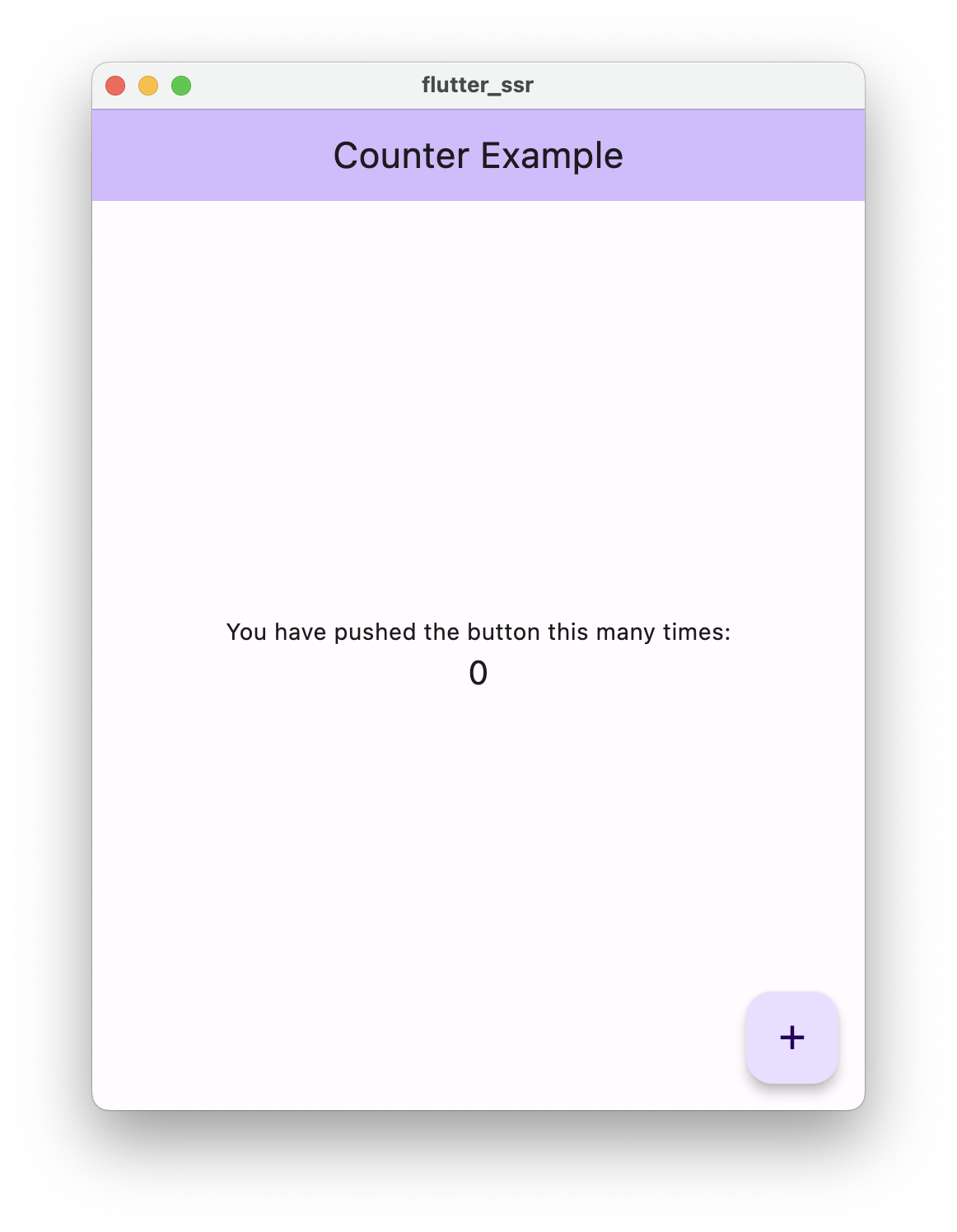
ボタンを押すたびにネットワークリクエストが実行され、UI にはサーバー上で処理されたロジックが反映されます。
データベースを呼び出し、応答に基づいて UI を更新することもできます。
まとめ
この例でできることはほかにもたくさんありますが、フォーマットを詳しく調べた結果、ほかの人が理解し、いくつかの例を確認できると役立つと思いました。
完成したコードはこちらにあります。