
shieldcn-badges について
shieldcn-badgesは、READMEやドキュメントを作成する人向けのエージェントスキルです。shadcn/ui風のバッジやグループ、チャート、ヘッダー、スポンサーページ、コントリビューター画像の追加方法を案内します。
主な機能
- 01shadcn/ui風バッジの作成
- 02複数バッジのグループ化
- 03チャートとヘッダーの追加
- 04スポンサーページと貢献者画像の追加
- 05READMEの視覚改善ガイド
活用シーン
- 01READMEにプロジェクト状況のバッジを追加
- 02Shields.ioのバッジをshieldcnに移行
- 03プロジェクトのヘッダーとバッジ行を作成
- 04ドキュメントにダウンロード数やコミット情報を表示
インストール
コマンドをコピーしてターミナルで実行します。
npx skills add https:/インストール後、Claude Code で/shieldcn-badgesを入力して読み込まれたか確認します。
詳細
shieldcn バッジ
shieldcn を使って、美しい shadcn/ui スタイルのバッジ、 バッジグループ、チャート、ヘッダー、スポンサーグリッド、コントリビューター画像を README やドキュメントに追加できます。
ベース URL:https://shieldcn.dev
このスキルをインストールする
Skills CLI を使って shieldcn リポジトリからインストールします。
npx skills add jal-co/shieldcn
便利なバリエーション:
# Install globally instead of only the current project
npx skills add jal-co/shieldcn --global

# Install for a specific agent supported by the Skills CLI
npx skills add jal-co/shieldcn --agent AGENT_NAME

# Use once without installing
npx skills use jal-co/shieldcn@shieldcn-badges
インストールを確認します。
npx skills list
エージェントへの依頼内容
スキルをインストールした後、次のプロンプトから1つコピーしてください。角括弧で囲まれた値を 実際のプロジェクトの情報に置き換えます。
優れたバッジ行
Add a polished shieldcn badge row to my README for [owner/repo]. Include npm
version/downloads if this package is published as [package], GitHub stars,
license, CI status, and last commit. Center the row, make badges clickable, and
use a subtle shadcn style that works on GitHub light and dark themes.
Replace the existing Shields.io badges in this README with shieldcn equivalents.
Keep the same links where possible, remove stale or duplicate badges, and keep
the final row to 3-6 high-signal badges.
Migrate the existing Shields.io badges in this README to shieldcn, but undo any
split-style/two-tone badges. Use single-surface shieldcn badges instead: remove
split=true, labelColor, and other split-label styling unless a split badge is
explicitly needed for readability.
Create a compact shieldcn badge group for [owner/repo] with stars, license,
contributors, and last commit. Use one grouped image when that is cleaner than
separate badges.
Add release-quality README badges for a TypeScript library named [package]. I
want npm version, monthly downloads, license, types, GitHub stars, CI, and a
small branded static badge if it improves the visual hierarchy.
ヘッダーとヒーローセクション
Design the top of my README using shieldcn: add an adaptive header banner for
[project name], a one-sentence tagline, and a centered badge row. Use GitHub
<picture> markup so the header and badges adapt to light/dark mode.
Add a left-aligned shieldcn header to my README with title [title], subtitle
[subtitle], logo [simple-icons slug], and a graph/grid style that fits a
technical open-source project.
チャートと視覚的な実績
Add a shieldcn npm download chart for [package] to the README. Use a concise
caption and choose chart dimensions that work well on GitHub mobile.
Add a shieldcn lifetime commit chart for [github username]. If multiple users
are listed, compare them in one chart and explain what the chart shows.
大規模な README の作業
Improve this README's above-the-fold impression with shieldcn. Keep the content
accurate, add a header, badges, and one chart only where they help, and avoid
visual clutter.
I want to generate a whole README visually. Point me to shieldcn README Studio
and explain which blocks I should use for this project.
エージェントのワークフロー
このスキルを README/ドキュメントの作業で読み込んだ場合:
- 編集する前に、既存の README とパッケージのメタデータを確認します。
- プロジェクトの種類(ライブラリ、アプリ、CLI、ドキュメントサイト、テンプレート、スキル)を特定します。
- 効果の高いバッジだけを選びます。ページ上部に表示するバッジは、通常3〜6個にします。
owner、repo、パッケージ名、ワークフロー名、リンクには実際の値を使います。- Markdown の画像には SVG を優先します。表示先のホストが SVG をブロックする場合に限り PNG を使います。
- 外部ページを示すバッジは、
<a>で囲んでクリックできるようにします。 - GitHub の README で行を中央揃えにするには、
<p align="center">を使います。 - ヘッダー/チャート/バッジでライトモードとダークモード用の URL を明示する必要がある場合は、GitHub の
<picture>マークアップを使います。 - ユーザーの README にプレースホルダーを残さないでください。プレースホルダーを使えるのは、例や下書きのみです。
- ユーザーがアセットを数点ではなく README 全体を求めている場合は、README Studio(
https://shieldcn.dev/studio)を提案します。
URL の基本
https://shieldcn.dev/{provider}/{...params}.svg          SVG badge/image
https://shieldcn.dev/{provider}/{...params}.png          PNG badge/image
https://shieldcn.dev/{provider}/{...params}.json         raw resolved data
https://shieldcn.dev/{provider}/{...params}/shields.json Shields.io-compatible JSON
Markdown のパターン:
[](https://link)

GitHub のアダプティブなパターン:
<p align="center">
  <picture>
    <source media="(prefers-color-scheme: dark)" srcset="https://shieldcn.dev/header/graph.svg?title=Acme&subtitle=Build+faster&logo=react&mode=dark" />
    <img alt="Acme" src="https://shieldcn.dev/header/graph.svg?title=Acme&subtitle=Build+faster&logo=react&mode=light" />
  </picture>
</p>
よく使われるバッジのエンドポイント
GitHub
どちらのルート形式も使えます:/github/{topic}/{owner}/{repo} と
/github/{owner}/{repo}/{topic}。
| バッジ | エンドポイント | 例 |
|---|---|---|
| スター | /github/stars/{owner}/{repo} | /github/stars/vercel/next.js |
| フォーク | /github/forks/{owner}/{repo} | /github/forks/vercel/next.js |
| ライセンス | /github/license/{owner}/{repo} | /github/license/vercel/next.js |
| リリース | /github/release/{owner}/{repo} | /github/release/vercel/next.js |
| CI ステータス | /github/ci/{owner}/{repo} | /github/ci/vercel/next.js |
| イシュー | /github/issues/{owner}/{repo} | /github/issues/vercel/next.js |
| オープン中の PR | /github/open-prs/{owner}/{repo} | /github/open-prs/vercel/next.js |
| コントリビューター | /github/contributors/{owner}/{repo} | /github/contributors/vercel/next.js |
| 最終コミット | /github/last-commit/{owner}/{repo} | /github/last-commit/vercel/next.js |
| ウォッチャー | /github/watchers/{owner}/{repo} | /github/watchers/vercel/next.js |
| ダウンロード数 | /github/dt/{owner}/{repo} | /github/dt/vercel/next.js |
| Dependabot | /github/dependabot/{owner}/{repo} | /github/dependabot/vercel/next.js |
CI は ?workflow=name&branch=main に対応しています。
パッケージレジストリ
| バッジ | エンドポイント | 例 |
|---|---|---|
| npm バージョン | /npm/{package} | /npm/react |
| npm バージョンタグ | /npm/v/{package}/{tag} | /npm/v/next/canary |
| npm 週間ダウンロード数 | /npm/dw/{package} | /npm/dw/react |
| npm 月間ダウンロード数 | /npm/dm/{package} | /npm/dm/react |
| npm 年間ダウンロード数 | /npm/dy/{package} | /npm/dy/react |
| npm 総ダウンロード数 | /npm/dt/{package} | /npm/dt/react |
| npm ライセンス | /npm/license/{package} | /npm/license/react |
| npm 型定義 | /npm/types/{package} | /npm/types/react |
| npm 依存パッケージ数 | /npm/dependents/{package} | /npm/dependents/react |
| PyPI バージョン | /pypi/{package} | /pypi/flask |
| PyPI 月間ダウンロード数 | /pypi/dm/{package} | /pypi/dm/flask |
| Crates.io バージョン | /crates/{crate} | /crates/serde |
| Docker Hub プル数 | /docker/pulls/{image} | /docker/pulls/library/nginx |
| JSR バージョン | /jsr/{@scope}/{name} | /jsr/@std/path |
| Bundlephobia minzip | /bundlephobia/minzip/{package} | /bundlephobia/minzip/react |
| Homebrew バージョン | /homebrew/{formula} | /homebrew/node |
| Maven バージョン | /maven/{groupId}/{artifactId} | /maven/org.apache.maven/maven-core |
| Packagist バージョン | /packagist/v/{vendor}/{package} | /packagist/v/laravel/framework |
| RubyGems バージョン | /rubygems/{gem} | /rubygems/rails |
| NuGet バージョン | /nuget/{package} | /nuget/Newtonsoft.Json |
| Pub.dev バージョン | /pub/{package} | /pub/flutter |
| CocoaPods バージョン | /cocoapods/{pod} | /cocoapods/Alamofire |
npm のスコープ付きパッケージでは、スコープ全体を含めてください:/npm/v/@scope/package。
ソーシャル、品質、スキル
| バッジ | エンドポイント | 例 |
|---|---|---|
| Discord オンライン人数 | /discord/{serverId} | /discord/1316199667142496307 |
| 招待リンク経由の Discord メンバー数 | /discord/members/{inviteCode} | /discord/members/nextjs |
| Reddit 登録者数 | /reddit/subscribers/r/{subreddit} | /reddit/subscribers/r/reactjs |
| Bluesky フォロワー数 | /bluesky/followers/{handle} | /bluesky/followers/bsky.app |
| YouTube チャンネル登録者数 | /youtube/subscribers/{channelId} | /youtube/subscribers/UCxxxxxx |
| Mastodon フォロワー数 | /mastodon/followers/{instance}/{acct} | /mastodon/followers/mastodon.social/Gargron |
| Hacker News カルマ | /hackernews/{userId} | /hackernews/pg |
| Codecov | /codecov/{service}/{owner}/{repo} | /codecov/gh/vercel/next.js |
| VS Code インストール数 | /vscode/installs/{publisher}/{ext} | /vscode/installs/esbenp/prettier-vscode |
| WakaTime | /wakatime/{username} | /wakatime/@user |
| スキルのインストール数 | /skills/installs/{owner}/{repo}/{skill} | /skills/installs/vercel-labs/agent-skills/vercel-react-best-practices |
| スキルのランク | /skills/rank/{owner}/{repo}/{skill} | /skills/rank/vercel-labs/agent-skills/vercel-react-best-practices |
| トレンドスキルのランク | /skills/trending/{owner}/{repo}/{skill} | /skills/trending/vercel-labs/agent-skills/vercel-react-best-practices |
| 人気スキルのランク | /skills/hot/{owner}/{repo}/{skill} | /skills/hot/vercel-labs/agent-skills/vercel-react-best-practices |
カスタムバッジとグループバッジ
| 種類 | エンドポイント | 例 |
|---|---|---|
| 静的 | /badge/{label}-{message}-{color} | /badge/build-passing-brightgreen |
| 動的 JSON | /badge/dynamic/json?url=...&query=... | 任意の JSON API を取得 |
| HTTPS エンドポイント | /https/{hostname}/{path} | JSON エンドポイントをプロキシ |
| バッジグループ | /group/{badge1}+{badge2}.svg | /group/github/vercel/next.js/stars+github/vercel/next.js/license.svg |
バッジグループは、複数のバッジを連結し、shadcn ButtonGroup 風の1つの画像として表示します。 README の行が視覚的にごちゃつく場合や、バッジが同じリンクを共有する場合に使用してください。
バッジのスタイル設定
クエリパラメーターを ?key=value&key2=value2 の形式で追加します。
| パラメーター | 値 | デフォルト | 備考 |
|---|---|---|---|
variant | default、secondary、outline、ghost、destructive、branded | default | shadcn Button のバリアント |
size | xs、sm、default、lg | sm | バッジのサイズ |
mode | dark、light | dark | 明示的なカラーモード |
theme | zinc、slate、blue、green、rose、orange、violet、purple、cyan、emerald | — | テーマのアクセントカラー |
font | inter、geist、geist-mono、jetbrains-mono、fira-code、roboto、space-grotesk | inter | フォントファミリー |
split | true、false | false | ラベルと値を2色で表示するバッジ |
logo | SimpleIcons のスラッグ、ri:Name、data:image/svg+xml;base64,...、false | auto | アイコンのソース |
logoColor | # なしの16進数 | auto | アイコンの色 |
label | 文字列 | auto | ラベルテキストを上書き |
color | # なしの16進数 | — | バッジのメインカラー |
labelColor | # なしの16進数 | — | 分割表示するラベルの背景色 |
valueColor | # なしの16進数 | — | 値のテキスト色 |
labelTextColor | # なしの16進数 | — | ラベルのテキスト色 |
labelOpacity | 0〜1 | 0.7 | 分割バッジのラベルの不透明度 |
gradient | カンマ区切りの16進数カラー、角度は任意 | — | 例:ff6b6b,4ecdc4,135 |
statusDot | true、false | CI では自動 | ステータスドットを表示 |
animate | pulse、glow、shimmer、none | none | SVG のみのアニメーション |
height、fontSize、radius、padX、iconSize、gap、labelGap | 数値 | サイズごと | 詳細な調整 |
スタイルの推奨事項:
variant=secondaryは、落ち着いたプロフェッショナルな README のバッジ行に最も安全なデフォルトです。variant=brandedは、すべてのバッジではなく、1〜2個のブランドバッジに最適です。split=trueは、ラベルと値を区別したいステータスとデータの組み合わせに適しています。mode=light/mode=darkは、GitHub の README でテーマに応じて切り替えるために<picture>内で使うと便利です。gradient=とanimate=は控えめに使用してください。アクセントとして使うものであり、デフォルトの見た目ではありません。
チャート
チャートは、shadcn カードのようなスタイルの、持ち運び可能な SVG/PNG 画像として表示されます。
スター履歴チャートは廃止されました。GitHub がスターゲイザー API をリポジトリの管理者/コラボレーターに制限したためです(2026年6月)。/chart/github/stars/... の URL は 100×1 の透明な画像を表示します。代わりに、イシュー、コミット、または npm のダウンロード数のチャートを使用してください。通常のスター 数 バッジは引き続き使えます。
/chart/github/issues/{owner}/{repo}.svg      issues over time
/chart/github/commits/{user}.svg             lifetime contribution commits
/chart/npm/{package}.svg                     npm download history
/chart/json.svg?values=10,25,40,30,60        inline values
/chart/json.svg?url=...&query=...            remote JSON values
Markdown の例:
[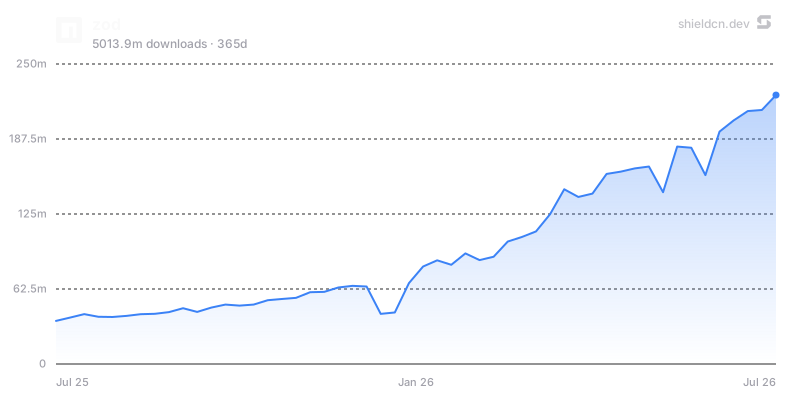](https://www.npmjs.com/package/zod)
チャートのパラメーター:theme、font、color、fill、area、width、height、title、icon、iconColor、mode、bg/background、border、yScale、yMin、yMax、yTicks、xTicks、および npm チャートの場合は days。
チャートは、時間の経過に伴う導入状況、ダウンロード数の推移、イシューの量、コントリビューションの履歴など、伝えたいことがある場合に使ってください。装飾だけを目的にチャートを追加するのは避けてください。
ヘッダー
ヘッダーは、1つの URL からリポジトリのバナーを表示します。
/header/{preset}.svg?title=Acme&subtitle=A+delightful+toolkit
/header/{preset}.png?title=Acme&subtitle=A+delightful+toolkit
/header/{preset}.json?title=Acme&subtitle=A+delightful+toolkit
プリセット:surface、gradient、dots、grid、graph、glow、transparent。
共通パラメーター:title、subtitle、logo、logoColor、theme、size、width、height、align、font、border、radius、bg、gradient、pattern、glow、accent、titleColor、subtitleColor、image、overlay、tint、watermark。
中央揃えのヘッダーの例:
<p align="center">
  <img src="https://shieldcn.dev/header/gradient.svg?title=Acme&subtitle=A+delightful+toolkit&logo=react" alt="Acme" />
</p>
技術/製品の README のヒーローバナーには align=left を、ロゴ、フレームワーク、ポートフォリオ形式のプロジェクトには align=center を使用してください。すでにスタイルが設定されたページに埋め込む場合は、bg=transparent を使用してください。
スポンサーとコントリビューターの画像
/sponsors/{login}.svg
/contributors/{owner}/{repo}.svg
どちらも SVG/PNG に対応し、ヘッダーと同じカード背景システムを使用できます。対応するパラメーターは preset、theme、bg、gradient、pattern、glow、image、overlay、tint、accent、radius、border、watermark です。コントリビューター画像は、limit、min、names などの設定にも対応しています。
これらはメインのイントロの下、またはコミュニティ関連のセクションの近くに配置し、最初のバッジ行には置かないでください。
README Studio
README 全体を視覚的に作成または再デザインする場合は、ユーザーに
README Studio(https://shieldcn.dev/studio)を案内してください。
README Studio は、並べ替え可能なブロック(Text/Markdown、
Header、Badges、Chart、Table、Image)を備えた Figma 風のエディターです。GitHub Flavored
Markdown を整った形式でエクスポートでき、Adaptive トグルを使うと、バッジ、ヘッダー、チャートが
閲覧者のライト/ダークテーマに対応する GitHub の <picture> 要素としてエクスポートされます。
ユーザーが README 全体、ビジュアルエディター、README ジェネレーターを求めている場合や、 特定のバッジ/画像を少し編集するのではなく、大幅な再デザインを求めている場合は、Studio を提案してください。
品質ルール
- 対象のホストが PNG を必要とする場合を除き、Markdown の画像には
.svgを使用してください。 - 先頭のバッジ行は、重要度の高いバッジを 3~6 個に絞ってください。
- バッジは関連するリンク先にリンクしてください。
- 落ち着いたバッジ行には
variant=secondaryを優先し、brandedは選択的に使用してください。 - 見た目の一致が重要な場合は、
<picture>とmode=light/mode=darkを使用してください。 - 独自のロゴによって明瞭さが大きく向上する場合を除き、プロバイダーの自動アイコンを使用してください。
- 代替テキストは人が読みやすいものにしてください(例:
npm version、GitHub stars、CI status)。 - 実際のドキュメントを編集する際は、ブラウザーまたは
curl -Iで生成した URL をテストしてください。 - バッジ URL にプライベートトークンやシークレットをハードコードしないでください。
- README の最終出力に、例示用のプレースホルダーを残さないでください。
ドキュメント
- ドキュメント全文:https://shieldcn.dev/docs
- API リファレンス:https://shieldcn.dev/docs/api-reference
- バッジビルダー:https://shieldcn.dev
- README Studio:https://shieldcn.dev/studio
- Studio のドキュメント:https://shieldcn.dev/docs/studio
- チャートのドキュメント:https://shieldcn.dev/docs/charts
- ヘッダーのドキュメント:https://shieldcn.dev/docs/headers
- スポンサーのドキュメント:https://shieldcn.dev/docs/sponsors
- コントリビューターのドキュメント:https://shieldcn.dev/docs/contributors