
关于 Agentmemory
Agentmemory 是面向 AI Agent 的可视化记忆管理器,支持本地使用或通过 Supabase 同步。它提供混合搜索、记忆关系图,以及多种格式的导入和导出。
主要功能
- 01添加、搜索和管理记忆
- 02混合搜索与相似记忆查找
- 03以图形查看记忆关系
- 04导入和导出多种格式
- 05本地存储或云端同步
适用场景
- 01跨编码工具复用项目上下文
- 02查找相似记忆以补充上下文
- 03导出 Agent 规则或会话数据
MCP 相关
提供本地 stdio 和云端 Streamable HTTP 两种 MCP 服务模式,包含 9 个工具和 3 个资源,可供兼容的 AI 工具连接。
配置
远程服务无需本地安装。选择你使用的客户端,复制配置或使用一键安装。
https://agentmemory-dusky.vercel.app/mcpclaude mcp add --transport http Agentmemory https://agentmemory-dusky.vercel.app/mcp{"mcpServers":{"Agentmemory":{"type":"http","url":"https://agentmemory-dusky.vercel.app/mcp"}}}在 Cursor 中打开{"servers":{"Agentmemory":{"type":"http","url":"https://agentmemory-dusky.vercel.app/mcp"}}}在 VS Code 中打开{"mcpServers":{"Agentmemory":{"type":"http","url":"https://agentmemory-dusky.vercel.app/mcp"}}}{"mcpServers":{"Agentmemory":{"serverUrl":"https://agentmemory-dusky.vercel.app/mcp"}}}命令在终端中运行;JSON 粘贴到对应客户端的 MCP 配置后重启。需要授权的服务会在首次连接时提示登录。
工具
详细介绍
AgentMemory.fyi
AI Agent 的可视化记忆管理器。为 Claude Code、Cursor、Cline、Continue 提供唯一事实来源。



* Vercel 上的托管预览版 — 使用电子邮件或 GitHub 登录即可试用。通过 Supabase RLS,你的数据仅对你的账户可见。有关自托管或仅限本地模式,请参阅下方的快速开始。
屏幕截图
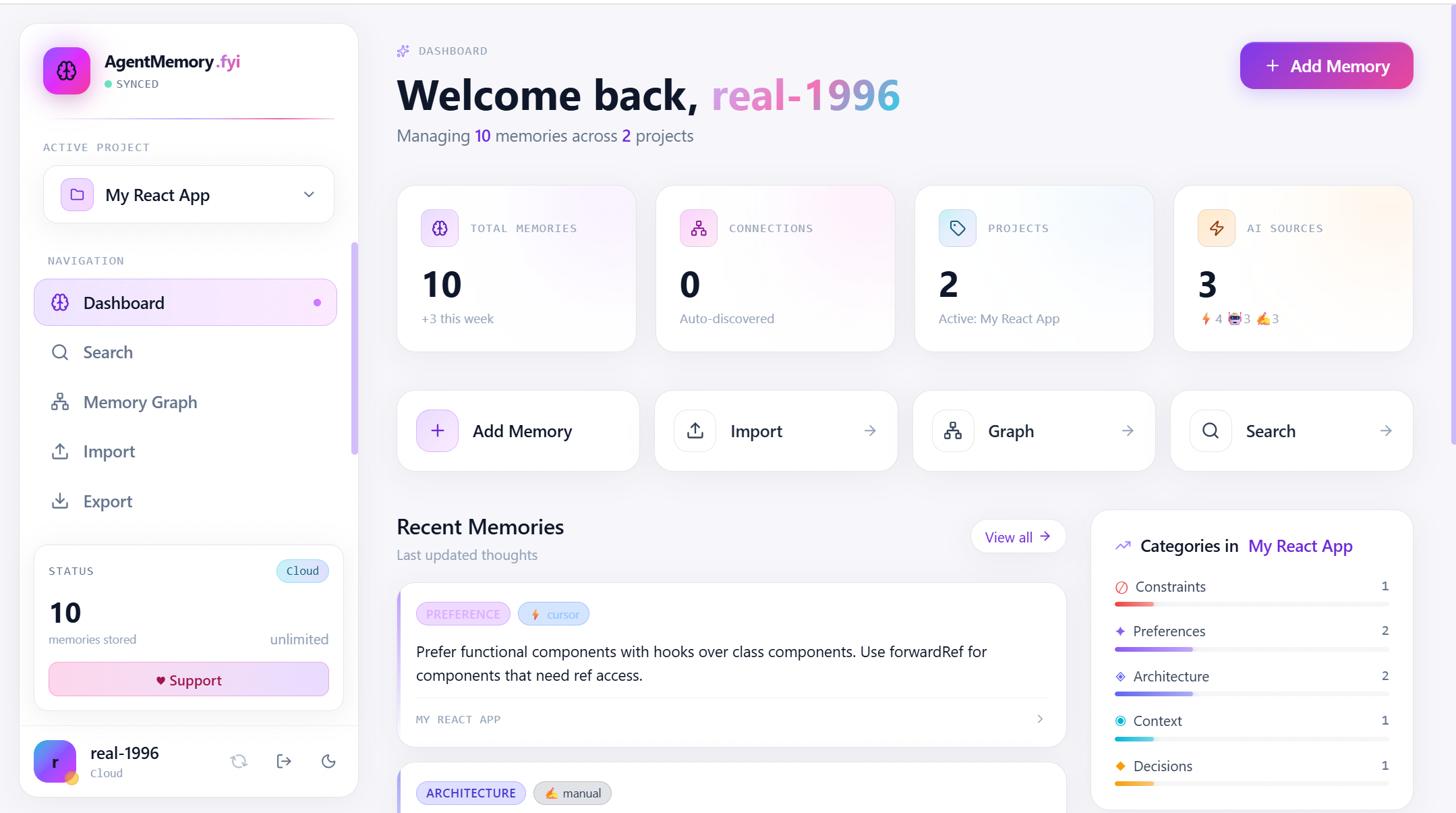
仪表板 — 一目了然的统计数据、近期记忆、类别分布和快捷操作
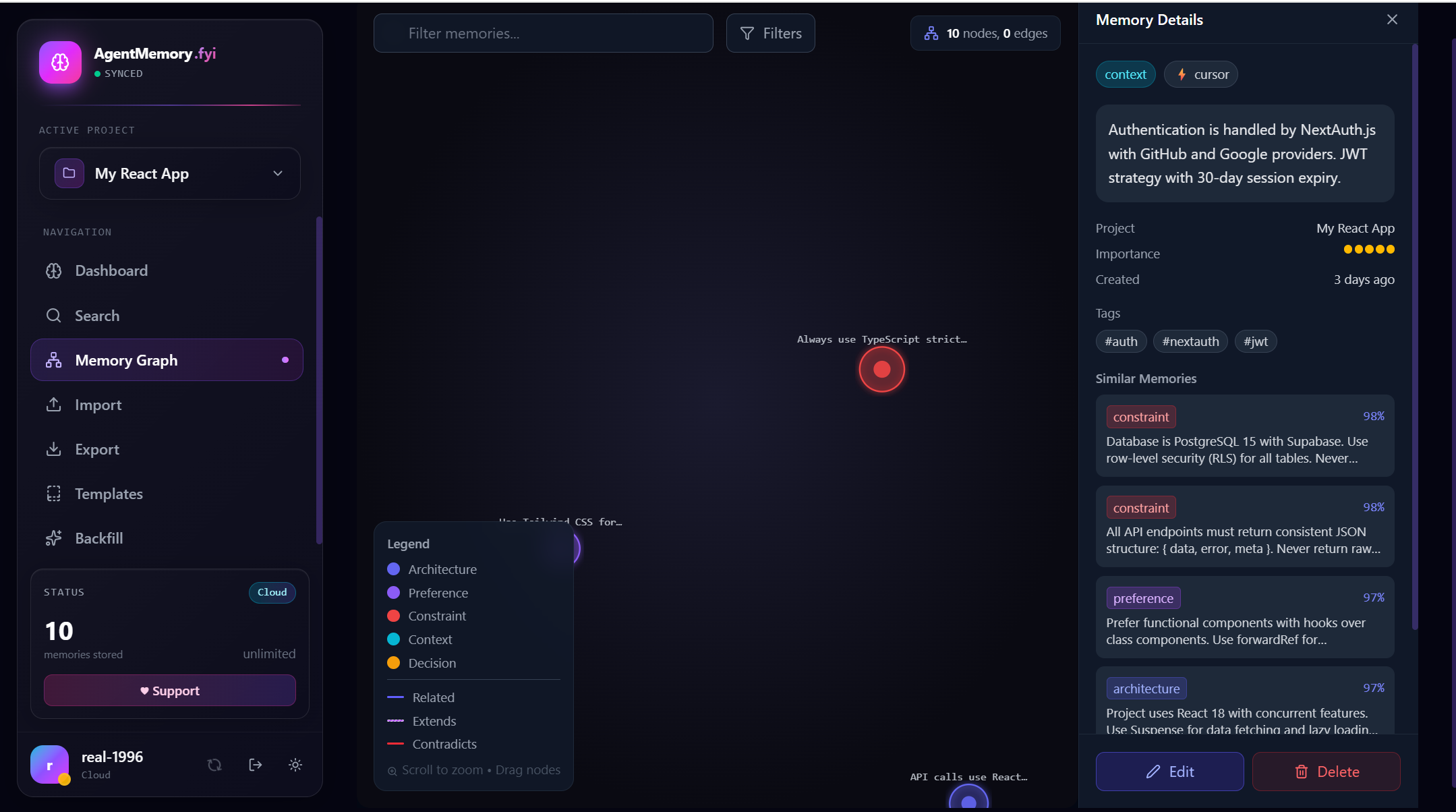
记忆图谱 — D3 力导向视图,包含内嵌的记忆详情面板,以及按向量距离排序的相似记忆(匹配度 98% / 97%)
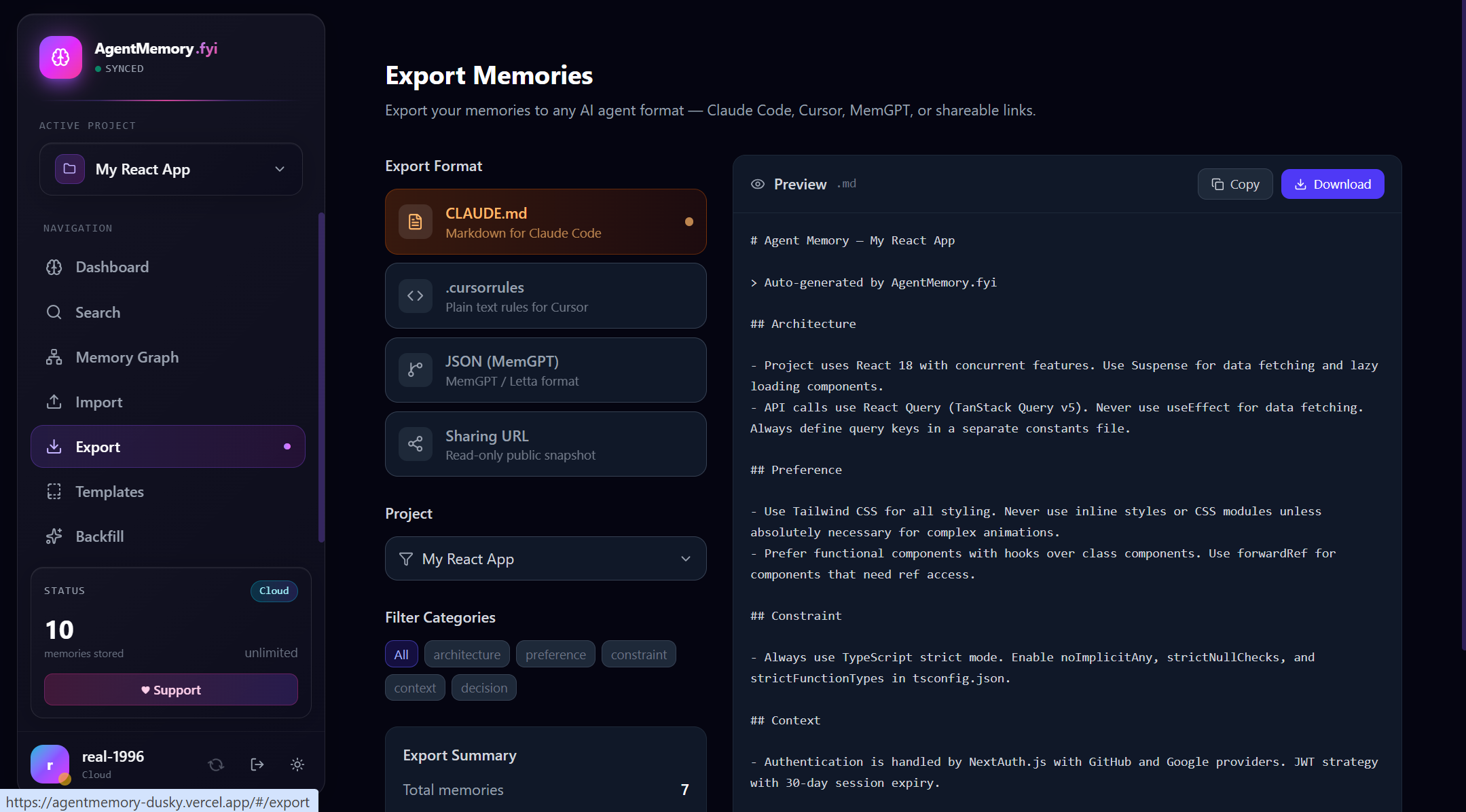
导出 — 一键导出为 CLAUDE.md、.cursorrules、MemGPT JSON 或可分享的只读 URL,并提供实时预览和类别筛选
永久 100% 免费
AgentMemory 基于 MIT 协议开源。没有付费墙、没有高级套餐、没有任何限制。
- 人人免费 — 记忆数量和项目数量均无限制
- 可自托管 — 永久在本地运行,无遥测、无锁定
- 原生支持 MCP — 可作为 Model Context Protocol 服务,适用于 Claude Desktop、Cursor、Cline、Continue、Windsurf、Roo Code、Kilo Code、Zed、Aider、Goose、Warp、Codex CLI、Gemini CLI、GitHub Copilot CLI、Qwen Code CLI、Google Antigravity、AWS Kiro、Droid、OpenCode、OpenClaw 和 pi-mono。请参阅下方的连接到你的 AI 工具。
- 可视化 — 以图谱视图展示所有记忆及其语义关系
- 可移植 — 可导入/导出为
.cursorrules、CLAUDE.md、MemGPT JSON、Claude Code.jsonl会话 - 可选云同步 — 登录后通过 Supabase 在不同设备间同步记忆
支持项目
AgentMemory 由开发者利用业余时间构建并维护。如果它为你节省了时间,不妨考虑支持开发:
- 在 DonationAlerts 捐赠 — 银行卡、SBP、YooMoney、加密货币等 100 多种方式
- 为仓库点星 — 最好的零美元捐赠
- 报告错误或提出功能请求
- 贡献 PR
- 在 Twitter / Reddit / HackerNews 上分享
快速开始
Web UI(仅限本地模式)
npm install
npm run dev
# → http://localhost:5173
无需任何后端即可运行。记忆存储在 localStorage(浏览器)或 ~/.agentmemory/(stdio MCP)中。
MCP 服务(stdio,本地)
npm run mcp
在 claude_desktop_config.json 中配置(脚本通过 tsx 运行 mcp/index.ts — 无需构建步骤):
{
  "mcpServers": {
    "agentmemory": {
      "command": "npx",
      "args": ["tsx", "/absolute/path/to/agentmemory/mcp/index.ts"],
      "env": { "AGENTMEMORY_HOME": "/absolute/path/to/storage" }
    }
  }
}
9 个工具:add_memory、search_memories、list_memories、find_similar、delete_memory、list_projects、switch_project、get_project_context、import_jsonl、backfill_embeddings。3 个资源:agentmemory://rules、agentmemory://graph、agentmemory://projects。100% 免费,无需许可证密钥。
连接到你的 AI 工具
AgentMemory 以两种模式提供相同的 MCP 服务:
- 本地 stdio — 通过
tsx运行mcp/index.ts;Agent 进程会将其作为子进程调用。最适合能访问你计算机文件系统的桌面工具。 - 云端 HTTP — 位于
https://<your-host>/mcp的 Streamable HTTP 端点(Vercel 默认)。最适合托管工具、Web 客户端,以及在多台计算机之间共享同一份记忆。用户的 Supabase JWT 放在Authorization: Bearer <jwt>中。
以下代码片段假设你的克隆位于 /absolute/path/to/agentmemory。本地 stdio 命令使用 tsx 直接运行 MCP 服务——无需构建步骤。
两个可重复使用的参考代码片段
// LOCAL — stdio
{
  "command": "npx",
  "args": ["tsx", "/absolute/path/to/agentmemory/mcp/index.ts"],
  "env": { "AGENTMEMORY_HOME": "/absolute/path/to/storage" }
}
// CLOUD — HTTP
{
  "url": "https://your-app.vercel.app/mcp",
  "headers": { "Authorization": "Bearer <supabase-jwt>" }
}
如需获取 Supabase JWT,请登录托管的 AgentMemory Web UI,然后在 DevTools 中运行 JSON.parse(localStorage.getItem('sb-<project>-auth-token') || 'null') 并复制 access_token。JWT 有效期约为 1 小时;每次会话后重新运行该命令以刷新。
目录
| # | 工具 | 配置文件 | 模式 |
|---|---|---|---|
| 1 | Claude Desktop | claude_desktop_config.json | stdio / http |
| 2 | Cursor | .cursor/mcp.json | stdio / http |
| 3 | Cline | Cline 侧边栏 → MCP Servers | stdio / http |
| 4 | Continue | ~/.continue/config.yaml | stdio / http |
| 5 | Roo Code | .roo/mcp.json | stdio / http |
| 6 | Kilo Code | Kilo 侧边栏 → MCP Servers | stdio / http |
| 7 | Windsurf | ~/.codeium/windsurf/mcp_config.json | stdio / http |
| 8 | Zed | ~/.config/zed/settings.json | stdio / http |
| 9 | Aider | --mcp-server 标志 | stdio |
| 10 | Goose | ~/.config/goose/config.yaml | stdio / http |
| 11 | Warp | Warp Drive → MCP Servers | stdio / http |
| 12 | OpenAI Codex CLI | ~/.codex/config.toml | stdio / http |
| 13 | Google Gemini CLI | ~/.gemini/settings.json | stdio / http |
| 14 | GitHub Copilot CLI | ~/.config/github-copilot/mcp.json | stdio / http |
| 15 | Qwen Code CLI | ~/.qwen/settings.json | stdio / http |
| 16 | Google Antigravity | .antigravity/mcp.json | stdio / http |
| 17 | AWS Kiro | .kiro/settings/mcp.json | stdio / http |
| 18 | Droid (Factory) | ~/.droid/mcp.json | stdio / http |
| 19 | OpenCode | opencode.json / ~/.config/opencode/config.json | stdio / http |
| 20 | OpenClaw & pi-mono | ~/.openclaw/openclaw.json / ~/.pi/config.json | stdio / http |
1. Claude Desktop
~/Library/Application Support/Claude/claude_desktop_config.json(mac) · %APPDATA%\Claude\claude_desktop_config.json(win) · ~/.config/Claude/claude_desktop_config.json(linux)。
{
  "mcpServers": {
    "agentmemory": {
      "command": "npx",
      "args": ["tsx", "/absolute/path/to/agentmemory/mcp/index.ts"],
      "env": { "AGENTMEMORY_HOME": "/absolute/path/to/storage" }
    }
  }
}
重启 Claude Desktop。连接器面板应显示 9 个 🔧 工具和 3 个 📄 资源。
2. Cursor
工作区中的 .cursor/mcp.json(项目级)或 ~/.cursor/mcp.json(全局)。
{
  "mcpServers": {
    "agentmemory": {
      "command": "npx",
      "args": ["tsx", "/absolute/path/to/agentmemory/mcp/index.ts"],
      "env": { "AGENTMEMORY_HOME": "/absolute/path/to/storage" }
    }
  }
}
Cursor Settings → Features → MCP。如果服务未显示,请点击 Refresh。
3. Cline
VSCode 扩展。打开 Cline 侧边栏 → ⚙️ Settings → MCP Servers → Configure MCP Servers → 编辑 cline_mcp_settings.json:
{
  "mcpServers": {
    "agentmemory": {
      "command": "npx",
      "args": ["tsx", "/absolute/path/to/agentmemory/mcp/index.ts"],
      "env": { "AGENTMEMORY_HOME": "/absolute/path/to/storage" },
      "disabled": false
    }
  }
}
Cline 会在文件保存时自动重新加载。记忆工具会显示在聊天中的 🔧 图标下。
4. Continue
~/.continue/config.yaml(YAML;Continue 1.0+):
mcpServers:
  - name: agentmemory
    command: npx
    args:
      - tsx
      - /absolute/path/to/agentmemory/mcp/index.ts
    env:
      AGENTMEMORY_HOME: /absolute/path/to/storage
如需使用云端模式,请替换为 transport: http + url + headers(参见 Continue MCP 文档)。
5. Roo Code
工作区中的 .roo/mcp.json,或通过 Roo 侧边栏 → MCP → Edit Global MCP:
{
  "mcpServers": {
    "agentmemory": {
      "command": "npx",
      "args": ["tsx", "/absolute/path/to/agentmemory/mcp/index.ts"],
      "env": { "AGENTMEMORY_HOME": "/absolute/path/to/storage" }
    }
  }
}
6. Kilo Code
Kilo 是 OpenCode 的分支,因此使用相同的 schema。打开 Kilo 侧边栏 → MCP Servers → Edit Global MCP,或在工作区中打开 .kilocode/mcp.json:
{
  "mcpServers": {
    "agentmemory": {
      "command": "npx",
      "args": ["tsx", "/absolute/path/to/agentmemory/mcp/index.ts"],
      "env": { "AGENTMEMORY_HOME": "/absolute/path/to/storage" }
    }
  }
}
云端模式下,将该条目替换为 { "url": "https://...", "headers": { "Authorization": "Bearer ..." } }。
7. Windsurf
~/.codeium/windsurf/mcp_config.json:
{
  "mcpServers": {
    "agentmemory": {
      "command": "npx",
      "args": ["tsx", "/absolute/path/to/agentmemory/mcp/index.ts"],
      "env": { "AGENTMEMORY_HOME": "/absolute/path/to/storage" }
    }
  }
}
重启后,可在 Windsurf Settings → Cascade → MCP Servers 中看到它。
8. Zed
~/.config/zed/settings.json(注意:Zed 使用 context_servers,而不是 mcpServers):
{
  "context_servers": {
    "agentmemory": {
      "command": {
        "path": "npx",
        "args": ["tsx", "/absolute/path/to/agentmemory/mcp/index.ts"],
        "env": { "AGENTMEMORY_HOME": "/absolute/path/to/storage" }
      }
    }
  }
}
云端模式下,使用 "settings": { "url": "https://...", "headers": { "Authorization": "Bearer ..." } } 替代 command。请参阅 Zed 上下文服务文档。
9. Aider
Aider 0.73+ 新增了对 MCP 的支持。通过命令行传入服务(每个服务使用一个 --mcp-server):
aider --mcp-server "npx tsx /absolute/path/to/agentmemory/mcp/index.ts AGENTMEMORY_HOME=/path/to/storage"
也可以在 ~/.aider.conf.yml 中配置:
mcp-servers: |
  agentmemory: npx tsx /absolute/path/to/agentmemory/mcp/index.ts AGENTMEMORY_HOME=/path/to/storage
Aider 会在启动时列出可用工具;在聊天中使用 /tool agentmemory__add_memory ... 调用它们。
10. Goose
~/.config/goose/config.yaml — extensions 是 Goose 对 MCP 服务的称呼:
extensions:
  agentmemory:
    type: stdio
    cmd: npx
    args: ["tsx", "/absolute/path/to/agentmemory/mcp/index.ts"]
    envs:
      AGENTMEMORY_HOME: /absolute/path/to/storage
    enabled: true
云端模式:设置 type: streamable_http、uri: https://your-app.vercel.app/mcp、headers.Authorization: "Bearer <jwt>"、envs: {}。
11. Warp
Warp Drive → Settings → AI → Manage MCP Servers → + Add:
| 字段 | 值 |
|---|---|
| 名称 | agentmemory |
| 命令 | npx tsx /absolute/path/to/agentmemory/mcp/index.ts |
| 环境变量 | AGENTMEMORY_HOME=/absolute/path/to/storage |
Warp 还支持 ~/.warp/mcp_config.json,以便在多台机器间同步 — 使用与 Claude Desktop 相同的 mcpServers schema。
12. OpenAI Codex CLI
~/.codex/config.toml:
[mcp_servers.agentmemory]
command = "npx"
args = ["tsx", "/absolute/path/to/agentmemory/mcp/index.ts"]
env = { AGENTMEMORY_HOME = "/absolute/path/to/storage" }
云端模式下,将表替换为:
[mcp_servers.agentmemory]
url = "https://your-app.vercel.app/mcp"
http_headers = { Authorization = "Bearer <supabase-jwt>" }
使用 codex mcp list 验证。
13. Google Gemini CLI
~/.gemini/settings.json:
{
  "mcpServers": {
    "agentmemory": {
      "command": "npx",
      "args": ["tsx", "/absolute/path/to/agentmemory/mcp/index.ts"],
      "env": { "AGENTMEMORY_HOME": "/absolute/path/to/storage" }
    }
  }
}
如果为每个服务设置了 trust: true,则默认受信任。请参阅 Gemini CLI MCP 文档。
14. GitHub Copilot CLI
新版 copilot CLI(取代旧版 gh copilot)。~/.config/github-copilot/mcp.json:
{
  "mcpServers": {
    "agentmemory": {
      "type": "stdio",
      "command": "npx",
      "args": ["tsx", "/absolute/path/to/agentmemory/mcp/index.ts"],
      "env": { "AGENTMEMORY_HOME": "/absolute/path/to/storage" }
    }
  }
}
也可以在运行时以内联方式传入:copilot --additional-mcp-config @/absolute/path/to/config.json。聊天中,工具名称会自动添加 agentmemory__ 前缀。
15. Qwen Code CLI
Alibaba 的 qwen CLI(Qwen3-Coder)。~/.qwen/settings.json(或根据构建版本使用 ~/.qwen-cli/settings.json):
{
  "mcpServers": {
    "agentmemory": {
      "command": "npx",
      "args": ["tsx", "/absolute/path/to/agentmemory/mcp/index.ts"],
      "env": { "AGENTMEMORY_HOME": "/absolute/path/to/storage" }
    }
  }
}
16. Google Antigravity
在工作区中使用 .antigravity/mcp.json(项目级),或使用 ~/.antigravity/mcp.json(全局):
{
  "mcpServers": {
    "agentmemory": {
      "command": "npx",
      "args": ["tsx", "/absolute/path/to/agentmemory/mcp/index.ts"],
      "env": { "AGENTMEMORY_HOME": "/absolute/path/to/storage" }
    }
  }
}
云端模式:替换为 { "url": "https://your-app.vercel.app/mcp", "headers": { "Authorization": "Bearer <supabase-jwt>" } }。Antigravity 会在打开工作区时加载该文件。
17. AWS Kiro
在工作区中使用 .kiro/settings/mcp.json(项目级),或使用 ~/.kiro/settings/mcp.json(全局):
{
  "mcpServers": {
    "agentmemory": {
      "command": "npx",
      "args": ["tsx", "/absolute/path/to/agentmemory/mcp/index.ts"],
      "env": { "AGENTMEMORY_HOME": "/absolute/path/to/storage" }
    }
  }
}
如果服务无法访问,Kiro Settings → MCP Servers 中会显示刷新按钮。
18. Droid (Factory)
~/.droid/mcp.json(全局)或 .factory/mcp.json(项目级):
{
  "mcpServers": {
    "agentmemory": {
      "command": "npx",
      "args": ["tsx", "/absolute/path/to/agentmemory/mcp/index.ts"],
      "env": { "AGENTMEMORY_HOME": "/absolute/path/to/storage" }
    }
  }
}
运行 droid mcp list 验证是否已加载。在 TUI 中,使用 @agentmemory 调用工具。
19. OpenCode
项目根目录下的 opencode.json,或用于全局配置的 ~/.config/opencode/config.json:
{
  "$schema": "https://opencode.ai/config.json",
  "mcp": {
    "agentmemory": {
      "type": "local",
      "command": ["npx", "tsx", "/absolute/path/to/agentmemory/mcp/index.ts"],
      "environment": { "AGENTMEMORY_HOME": "/absolute/path/to/storage" },
      "enabled": true
    }
  }
}
云端模式下,替换为 "type": "remote"、"url": "https://your-app.vercel.app/mcp"、"headers": { "Authorization": "Bearer <supabase-jwt>" }。在提示词中使用 use the agentmemory tool 来调用。
20. OpenClaw 和 pi-mono
这些是个人 AI 助手,而非编码 IDE——它们将 MCP 服务作为技能接入,让 AgentMemory 成为助手的长期记忆。
OpenClaw — ~/.openclaw/openclaw.json:
{
  "mcpServers": {
    "agentmemory": {
      "command": "npx",
      "args": ["tsx", "/absolute/path/to/agentmemory/mcp/index.ts"],
      "env": { "AGENTMEMORY_HOME": "/absolute/path/to/storage" }
    }
  }
}
使用 openclaw gateway restart 重启网关。在 Telegram/WhatsApp/Discord 中,助手现在可以在不同会话间保留记忆——只要说“记住我喜欢深色模式”,它就会记住。
pi-mono(Mario Zechner 的 pi CLI)— ~/.pi/config.json:
{
  "mcpServers": {
    "agentmemory": {
      "command": "npx",
      "args": ["tsx", "/absolute/path/to/agentmemory/mcp/index.ts"],
      "env": { "AGENTMEMORY_HOME": "/absolute/path/to/storage" }
    }
  }
}
运行 pi,并让 Agent 使用 search_memories 搜索此前的上下文。
故障排除
| 症状 | 解决方法 |
|---|---|
mcp/index.ts 上出现 ENOENT | 使用绝对路径;在 JSON 中 ~ 不会展开 |
command not found: tsx | 执行 npm i -g tsx,或将 npx tsx 替换为 node --import tsx |
| 工具始终不显示 | 重启客户端。某些客户端(Cline、Kilo、Roo)需要显式开启“启用”开关 |
云端出现 401 Unauthorized | JWT 已过期;从网页 UI 的 DevTools localStorage 中重新复制 |
云端出现 429 Too Many Requests | 已达到 RATE_LIMIT_PER_HOUR;等待,或通过 backfill_embeddings 降低请求频率 |
Cannot find module '@modelcontextprotocol/...' | 在 agentmemory 仓库根目录运行 npm install |
功能
记忆衰减与访问跟踪
记忆遵循指数衰减曲线(strength = 0.5^(days/30) × importance/5),每次读取时都会获得提升。每条记忆属于四个层级之一,并以彩色徽章显示在卡片上:
| 层级 | 强度 | 颜色 | 含义 |
|---|---|---|---|
| hot | ≥ 0.70 | 红色 | 最近创建或经常访问 |
| warm | ≥ 0.40 | 琥珀色 | 仍然相关 |
| cold | ≥ 0.15 | 蓝色 | 正在淡化,但为提供上下文而保留 |
| dead | < 0.15 | 灰色 | 自动列为遗忘候选 |
runAutoForget()在应用启动时运行,并删除符合以下任一条件的记忆:TTL 已过期,或(strength < 0.05 AND access_count < 3),或(importance ≤ 2 AND age > 180 days)。MemoryCard在挂载时调用touchMemory(id),增加access_count并刷新last_accessed_at。- 在所有后端中均有效:本地(zustand)、Supabase(Postgres 的
strength列,以及useAuth中的runAutoForget)。
混合搜索(BM25 + Vector + Graph,通过 RRF)
三个来源通过 src/utils/rrf.ts 中的 Reciprocal Rank Fusion(k=60)进行融合:
| 来源 | 权重 | 运行位置 | 实现方式 |
|---|---|---|---|
| Vector(余弦) | 0.6 | 服务端(云端)/ 本地 | pgvector + HuggingFace Inference API,384 维 MiniLM-L6-v2(免费,无需信用卡) |
| BM25 | 0.4 | 两者 | pg_trgm 三元组相似度(服务端)或 Porter 词干化倒排索引(本地) |
| Graph | 0.3 | 两者 | 通过 relations 表进行 1 跳扩展(服务端)或使用内存中的边(本地) |
每个来源的顶级结果会合并,使用 RRF(d) = Σᵢ wᵢ / (k + rankᵢ(d)) 计算得分,并返回前 N 个结果。本地 BM25 索引按 (count, max(updated_at)) 缓存,并在每次添加/更新/删除/自动遗忘时失效。
在云端 MCP 上启用语义搜索——在 huggingface.co 注册(免费),获取读取令牌:https://huggingface.co/settings/tokens,并在 Vercel 上设置 HUGGINGFACE_API_KEY。api/mcp.ts 中的无服务器处理程序会实例化 createHuggingFaceEmbedder(token),并将其注入 SupabaseBackend。执行 add_memory 时,内容会被嵌入并存储为 vector(384);执行 search_memories 时,查询会被嵌入,semantic_search_memories RPC 会通过 HNSW 索引执行余弦搜索。
如果没有密钥,服务仍可运行——只是会跳过 Vector 来源,RRF 将变为双路融合(BM25 + graph)。
回填旧记忆——启用嵌入器后,现有行的 embedding = NULL。重复运行 backfill_embeddings MCP 工具,直到 remaining = 0:
backfill_embeddings({ limit: 64 })
backfill_embeddings({ limit: 64 })
…
每次调用都会产生 ⌈N/32⌉ 次嵌入 API 调用,并遵循每用户速率限制。60s 的无服务器超时足以处理约 3 个 HF 批次,即每次调用约 96 条记忆。
速率限制——Supabase 架构会添加 api_rate_limits 表和 consume_rate_limit(p_user_id, p_cost, p_max) RPC。每次嵌入调用(搜索查询、记忆插入、回填批次)都会从滑动 1 小时窗口中原子地消耗 ceil(texts/32) 个单位。默认上限为 RATE_LIMIT_PER_HOUR=100,在 HF 每月 30k 的免费额度内,可为约 30 位活跃用户留出充足余量。将环境变量设为 0 可禁用此限制。如果达到上限,MCP 调用会返回 isError: true,并附上准确的重置时间戳。
从 Claude Code 会话导入 JSONL
将 Claude Code 会话文件(~/.claude/projects/-my-project/<uuid>.jsonl)拖放到导入页面,或调用 MCP import_jsonl 工具。解析器会:
- 每行读取一个 JSON 对象
- 丢弃
tool_use/tool_result块(仅保留user/assistant消息) - 筛选用户消息:长度为 20–600 个字符,丢弃 system-reminders 和 shell 命令(
ok、./run-build.sh等) - 使用正则提示自动分类:
decision>constraint>preference>architecture>context(默认) - 从
#hashtags和文件扩展名提示中提取标签(*.ts→typescript) - 每个文件最多导入 200 条记忆
MCP 用法(stdio 和 HTTP 模式均可使用):
{
  "name": "import_jsonl",
  "arguments": {
    "path": "/Users/you/.claude/projects/-my-project/abc123.jsonl"
  }
}
返回 { imported: N, total: M, user_messages: K, accepted: K }。
云端同步(Supabase + Vercel)
约 5 分钟即可运行自己的私有同步后端。
1. 创建 Supabase 项目
- 前往 supabase.com → 新建项目
- 项目创建完成后,打开 SQL Editor → 粘贴
supabase/schema.sql的内容 → 运行- 该架构会启用 pgvector 扩展,并在首次运行时创建
embedding vector(384)列和 HNSW 索引
- 该架构会启用 pgvector 扩展,并在首次运行时创建
- 在 Authentication → Providers 中启用 Email(魔法链接)和 GitHub(可选——分步说明请参阅下方 §1a)
- 在 Settings → API 中复制
Project URL和anon密钥 5.(可选,用于语义搜索)在 huggingface.co 注册,并在 https://huggingface.co/settings/tokens 创建读取令牌
1a. 启用 GitHub 登录(可选)
在身份验证页面,只需点击一次即可使用 GitHub 登录,跳过电子邮件魔法链接往返流程。设置约需 5 分钟。
步骤 1 — 创建 GitHub OAuth App
- 前往 https://github.com/settings/developers → New OAuth App
- 填写:
- Application name:
AgentMemory(或填写任意名称) - Homepage URL:已部署的 URL(例如
https://agentmemory-dusky.vercel.app),或本地开发时使用http://localhost:5173 - Authorization callback URL:下一步从 Supabase 复制此 URL,之后再回来编辑
- Application name:
- 点击 Register application
- 在下一页,点击 Generate a new client secret。复制 Client ID 和 Client secret(之后将无法再次查看密钥)
步骤 2 — 在 Supabase 中接入
- 返回 Supabase Dashboard → Authentication → Providers → GitHub
- 开启 Enable Sign in with GitHub
- 粘贴步骤 1 中的 Client ID 和 Client Secret
- 点击 Save
- 在 Authentication → URL Configuration 中,将网站 URL 添加到 Site URL 和 Additional Redirect URLs:
http://localhost:5173(开发环境)https://your-app.vercel.app(生产环境)
- Supabase 现在会显示项目的规范 Callback URL,格式类似
https://<project-ref>.supabase.co/auth/v1/callback。返回 GitHub OAuth App,将其粘贴到 Authorization callback URL
步骤 3 — 测试
在应用中打开 /auth → 点击 Continue with GitHub → 页面应跳转到 GitHub,授权后返回应用并完成登录。侧边栏中的头像会切换为你的 GitHub 头像,左下角会出现 Sign out 按钮。
自托管注意事项:你提供服务的每个自定义域名都必须添加到 Supabase 的 Additional Redirect URLs,否则 OAuth 会拒绝
redirectTo参数。若未添加,Supabase 会返回redirect_uri not in allowlist错误。
2. 配置环境
将 public/.env.example 复制到 .env(或在 Vercel 上设置变量):
VITE_SUPABASE_URL=https://your-project.supabase.co
VITE_SUPABASE_ANON_KEY=eyJhbGc...
SUPABASE_URL=https://your-project.supabase.co
SUPABASE_ANON_KEY=eyJhbGc...
# Optional: enables pgvector semantic search via HuggingFace Inference API (free tier)
HUGGINGFACE_API_KEY=hf_xxxxxxxxxxxxxxxxxxxxxxxx
# Optional: per-user embedding rate limit (default 100/hr, protects HF free tier)
RATE_LIMIT_PER_HOUR=100
# Service role key NOT used — RLS scopes everything to auth.uid()
3. 部署到 Vercel
npm i -g vercel
vercel
# accept defaults; add the SUPABASE_* env vars when prompted
Web 应用是位于根目录的静态单文件构建(dist/index.html)。
MCP 服务通过 /mcp 和 /api/mcp 提供为无服务器函数。
4. 使用远程 MCP
客户端(Claude Desktop、Cursor、自定义客户端)可以通过 HTTP 连接到你托管的 MCP 服务。在 Authorization: Bearer <jwt> 标头中发送用户的 Supabase JWT:
{
  "mcpServers": {
    "agentmemory-cloud": {
      "url": "https://your-app.vercel.app/mcp",
      "headers": {
        "Authorization": "Bearer <supabase-access-token>"
      }
    }
  }
}
该函数通过 Supabase 验证 JWT,然后使用 RLS 查询 Postgres,确保每位用户只能看到自己的数据。用户请求无需使用 service-role key——RLS 会负责处理。
架构
src/
  store/memoryStore.ts        # Zustand store + pure logic helpers (hybridSearch, decay)
  utils/
    bm25.ts                   # BM25 inverted index
    rrf.ts                    # Reciprocal Rank Fusion
    stemmer.ts                # Compact Porter stemmer
    memoryDecay.ts            # calculateStrength, tierOf, touchMemory, runAutoForget
    jsonlImport.ts            # Claude Code session parser
  lib/supabase.ts             # Supabase browser client
  lib/cloudSync.ts            # Pull/push helpers used by memoryStore
  hooks/useAuth.ts            # Wires Supabase auth state to the store
  components/
    MemoryCard.tsx            # Tier badge + touch-on-mount
    Layout.tsx                # Sidebar with sign-in / cloud status
  pages/
    AuthPage.tsx              # Magic-link + GitHub OAuth sign-in
    ImportPage.tsx            # .jsonl + .md/.txt/.cursorrules dropzone
    SupportPage.tsx           # Donate CTA

mcp/
  server.ts                   # Transport-agnostic MCP server (9 tools + 3 resources)
  embeddings.ts               # HuggingFace Inference API wrapper (MiniLM-L6-v2, 384-dim)
  backends/
    local.ts                  # Reads/writes the zustand store on disk
    supabase.ts               # RRF search (BM25+vector+graph), embeds on add, RLS-scoped via caller's JWT
  index.ts                    # Stdio entrypoint (uses LocalBackend)

api/
  mcp.ts                      # Vercel serverless handler (Streamable HTTP)

supabase/
  schema.sql                  # Tables, RLS policies, search_memories / find_similar_memories RPCs
本地模式和云模式共用相同的 Memory 类型和 memoryStore 操作。唯一的区别在于是否将变更同步到 Supabase。
开发
npm run dev                 # Vite dev server
npm run build               # Production web build
npm run mcp                 # Run stdio MCP server (tsx, no build step)
npm run typecheck:mcp       # tsc --noEmit on the MCP workspace
npx tsc --noEmit            # tsc --noEmit on the web workspace
许可证
MIT — 参见 LICENSE。
评论
一个开放协议,规定了 AI 应用如何以统一方式连接外部工具与数据源。客户端负责与模型对话,MCP 服务负责提供工具、资源和提示模板,两者通过标准消息通信,同一个服务可以被不同客户端复用。