
关于 Contexo
Contexo 是面向团队的 AI Agent 项目知识同步工具,将研究结论、决策和取舍保存为带版本记录的页面。其基于 Git 的服务保留提交历史,并在双方修改同一页面时显式处理冲突,避免覆盖本地或队友的编辑。
主要功能
- 01按项目组织 Markdown 知识页面
- 02同步本地与团队页面
- 03记录提交历史和作者
- 04检测冲突并显式解决
- 05查看页面差异与演变
适用场景
- 01共享团队成员的 Agent 研究结论
- 02同步项目决策与被否决方案
- 03追踪知识页面的修改来源
MCP 相关
Contexo 提供基于 stdio 的 MCP 服务,Agent 可调用同步工具将项目知识推送至服务端或拉取队友变更。CLI 还可配置 Claude、Cursor、VS Code 和 Codex 等客户端。
配置
本地服务的配置在各客户端中通用,复制后粘贴到客户端的 MCP 配置文件即可。
我们还没有获取到这个服务的安装包或远程地址,请按项目 README 中的说明安装。
工具
本地服务需要在你的电脑上运行后才能读取工具,维护者暂未提供工具列表。
详细介绍




Contexo
面向 AI Agent 知识的 GitHub,按项目隔离。
当一位开发者与 AI Agent 深入研究某个主题时,由此产生的决策、否决的方案和走过的弯路都只留在其会话中。Contexo 让团队共享提炼后的知识,让每位队友的 Agent 都从相同的基线出发,无需重新推导(或得出更差的结论)。
工作原理
每个项目都有一个 .contexo/ 目录,其中包含 Markdown 页面(采用与 llm-wiki 相同的分层结构:raw/sessions/、wiki/concepts/、wiki/entities/、wiki/analyses/,以及始终加载的 index.md)。页面使用 YAML 前置元数据记录作者、Agent、标签和 reasoning_summary。
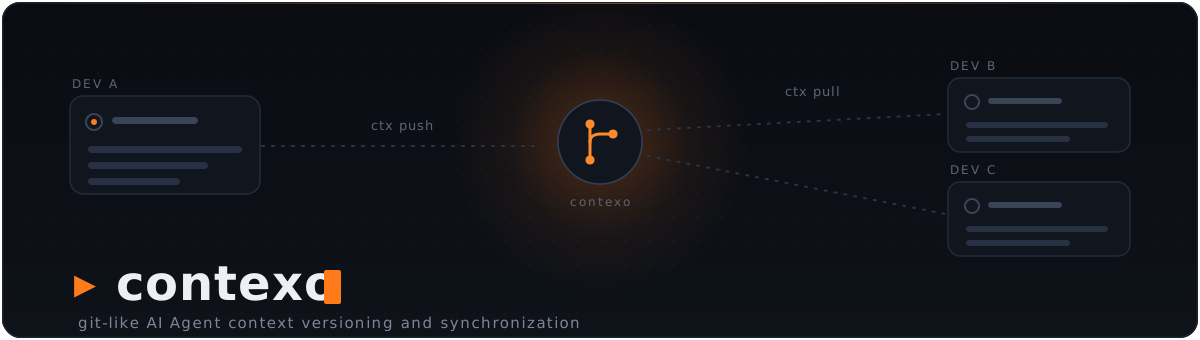
ctx push 会将你修改过的页面上传到 Contexo 服务。ctx pull 会拉取队友的更改。服务底层是一个 Git 仓库——每个推送的页面都会成为一个带有作者署名的真实提交,你可以免费获得历史记录和时间线,而且这两条命令都不会覆盖他人的工作:如果双方都修改了某个页面,该页面就会成为冲突,需要你显式处理(参见安全同步)。
Agent 通过 MCP 工具使用自然语言发起同步:当用户说 “将我的 Stripe 知识同步到 contexthub” 时,Agent 会直接调用 ctx_push(feature="stripe")。
流程
Dev A's Claude  →  writes wiki/concepts/stripe-subscription.md
                   (including "## Rationale" — what was considered & rejected)
                ↘
                  ctx push --feature stripe   →   Contexo server (git-backed)
                                                  Dev A authored sha abc123
                                                ↗
Dev B's Claude  ←  ctx pull                ←
                ↓
                  MCP: reads ctx://index, then ctx://wiki/stripe-subscription
                  Sees Dev A's decision and the options Dev A rejected.
                  Doesn't repeat the dead-ends.
CLI
设置
ctx init [--no-vscode]         Create .contexo/, wire MCP (Claude; Cursor + VS Code if found), install Stop hook
ctx detach [--keep-knowledge]  Reverse `ctx init` (purges .contexo/ by default)
ctx login                      Browser flow: sign in once, mint a token, done
                               (alias for `ctx auth login`; --no-browser to paste)
ctx login [--server <url>] [--dashboard <url>] [--token <pat>] [--browser|--no-browser]
          [--repo <id>] [--name <name>] [--email <email>]
ctx join <invite-key>          Join an existing repo with a ctxi_… invite key
ctx remote set <url>           Point at a Contexo server
ctx remote set-repo [<id>]     Set the repo ID (interactive picker if omitted)
ctx remote get                 Show current server + repo
--server 和 --dashboard 默认使用托管服务(https://api.contexo.live
和 https://app.contexo.live)。--token 会跳过浏览器,--no-browser 会提示
你粘贴令牌,而 --browser 会强制使用浏览器流程,无需终端。
--name / --email 用于设置提交作者。
令牌会发送给哪个服务。 令牌只会发送到保存该令牌的服务。如果
.contexo/config.json 中指定的服务与凭据对应的服务不同,ctx 会使用凭据对应的服务,
并在 ctx status 中发出警告(在 status --json 中显示为
server_url_mismatch)。没有服务 URL 的全局凭据绝不会发送到任何地方:
在你运行 ctx auth login --server <url> 之前,命令会以 server_unresolved 失败。
对于可自托管的服务,运行 ctx auth login --server <url> 时需要指定
--dashboard <its dashboard>(浏览器流程),或者指定 --token <a token that server issued>;
如果项目配置指定了非托管服务,而托管仪表板会生成该令牌,浏览器登录会拒绝执行。
同步
ctx status [--json] [--offline]        Each page's local, base and server state (--offline: no request)
ctx pull [--json]                      Bring in teammates' changes; never overwrites a local edit
                                       (--full is still accepted and does nothing)
ctx push [<path>...] [--json] [-m <msg>] [--dry-run] [--no-distill]
         [--feature X] [--tag Y] [--type concept|entity|source|analysis]
         [--yes] [--show-diff] [--no-preview]
ctx show <path> --at base|server|<sha>  Print a page's raw bytes: its last-synced base,
                                        the server's version, or the version at a commit
ctx resolve <path> --ours|--theirs [--if-server-sha <sha>] [--json]
ctx repair [--dry-run] [--json]        Backfill missing base snapshots, fix wrongly recorded shas
ctx log                                Server timeline (who changed what when)
ctx push 只会发送自上次同步以来你修改或创建的页面,或者只发送你指定的
<path>。发送前,它会将每个页面预览为 [NEW] 或 [EDIT](内容未更改时显示
[SAME]),并逐节概述推送会在服务端造成的更改。如果出现任何 [EDIT] 行,它会询问
Proceed? [y/N];没有终端时则会拒绝操作:
$ ctx push -m "Note usage_record_summaries caching"
About to push 1 page(s) to chompchat:
  [EDIT]  wiki/concepts/stripe-subscription.md  (frontmatter, ~ Decision)
✖ push: refusing to alter existing pages in non-interactive mode; pass --yes to confirm
try  ctx push --yes
传入 --yes 可跳过提示(非交互式使用时必须传入),传入 --show-diff
可内联查看完整的逐节差异,或者传入 --no-preview 可跳过预览往返。
--dry-run 会打印相同的列表,但不会发送或写入任何内容。
--json 不会提示或预览(它会隐含启用 --yes 和 --no-preview)。
查看页面的演变
ctx history <slug> [--type=...] [--limit=N]    Commit timeline for one page
ctx diff <slug> [--from=<sha>] [--to=<sha>]    Section-aware diff between two
                [--type=...] [--json] [--blame]versions (defaults to parent..head)
ctx diff <slug> --local                        Diff your local copy vs server HEAD
                                               (what `ctx push` would change)
ctx evolution <slug> [--limit=N] [--show-diff] Full trajectory in one call: every
                     [--type=...] [--json]     commit + its per-commit diff
                     [--blame]
--blame 会为每个章节标注最初引入其标题的提交
(适用于 ctx diff 和 ctx evolution)——有助于回答
“谁写了这一节?”这类问题。
Agent 集成
ctx mcp                        Start the MCP server for the local agent (stdio)
ctx mcp install [--tool=X]     Wire the MCP server into an agent: claude|cursor|vscode|codex|all
ctx mcp uninstall [--tool=X]   Remove the MCP server wiring
ctx mcp status                 Show agent integrations (MCP + capture hook)
ctx mcp guide                  How to add Contexo to other agents (Windsurf, OpenCode, Hermes, ...)
ctx hooks install|uninstall|status [--tool=claude|codex|cursor|all]   Manage the capture hook
ctx capture status             Show pending capture buffers
支持的 Agent(MCP)
| Agent | 它读取的 MCP 配置 | 配置方式 |
|---|---|---|
| Claude Code | ./.mcp.json(项目级) | ctx init |
| Cursor | ./.cursor/mcp.json(项目级) | 检测到 Cursor 时运行 ctx init,否则运行 ctx mcp install --tool=cursor |
| VS Code | ./.vscode/mcp.json(项目级,servers 键) | 检测到 VS Code 时运行 ctx init(检测 ~/.vscode 或 PATH 中的 code),否则运行 ctx mcp install --tool=vscode;传入 ctx init --no-vscode 可选择不配置 |
| Codex | ~/.codex/config.toml(全局) | ctx mcp install --tool=codex(修改全局文件前会提示) |
ctx mcp 服务是基于标准输入/输出运行的纯 MCP,因此任何支持 MCP 的 Agent 都可以使用它。
ctx init 只会自动配置项目本地配置(始终配置 Claude;检测到 Cursor 和
VS Code 时也会配置)——Codex 的全局配置需要通过 ctx mcp install --tool=codex 选择启用。
VS Code 的配置项会运行 ctx mcp --root ${workspaceFolder};.vscode/ 通常会
提交到版本库,因此队友需要将 ctx 加入 PATH。VS Code 也会读取为 Claude Code
写入的 .mcp.json:使用 VS Code 默认的
chat.mcp.collisionBehavior: "disable" 时,.vscode/mcp.json 中的配置项会生效,你会
看到一个 contexo 服务;使用 "suffix" 时会看到两个,因此可以运行
ctx mcp uninstall --tool=vscode 移除其中一个。
对于其他 Agent 或运行框架(Windsurf、OpenCode、Hermes、OpenClaw 等),运行
ctx mcp guide 可查看各工具对应的确切 MCP 配置。现在,Claude Code、Codex 和 Cursor
都支持逐轮 捕获(Stop hook)(运行 ctx hooks install --tool=…;检测到 Agent 时,ctx init 也会自动安装)。
维护
ctx update [--check]           Self-update to the latest release (--check: report only)
ctx version [--short|--json]   Print the installed version (--json: contract version + capabilities)
终端输出
ctx 在终端中会为输出添加颜色,其他情况下则输出纯文本,
因此通过管道传输和重定向的内容仍可解析。机器接口——ctx mcp、
ctx capture turn、shell 补全、--json 和 ctx version --short——
始终不会包含样式。
NO_COLOR=1        Disable colour entirely (honoured automatically)
CTX_THEME=light   Use the light-background palette (default: dark)
CTX_ASCII=1       Use ASCII marks instead of ✔ ▲ ✖ ● (for consoles lacking the glyphs)
安全同步
ctx 会在 .contexo/.sync/ 中保存它同步的每个页面的基础快照——也就是你和服务器上次达成一致的版本。该目录通过自己的 .gitignore(内容为 *)忽略自身,因此永远不会进入项目的 git 历史记录。它还存放已记录的冲突、同步锁,以及 ctx resolve --theirs 创建的备份。此目录由 ctx 写入;请勿手动编辑。
将每个工作文件与其基础快照及服务器上的文件列表进行比较后,每个页面会处于以下九种状态之一(ctx status、ctx status --json):
| 状态 | 含义 |
|---|---|
unchanged | 与基础快照相同,且服务器未发生变化。 |
modified | 你编辑了此页面;服务器未发生变化。ctx push 会发送此页面。 |
new | 仅在你的计算机上(从未同步过,或已从服务器删除)。ctx push 会创建此页面。 |
incoming | 队友修改了此页面,而你没有修改。ctx pull 会更新此页面。 |
incoming_new | 仅在服务器上。ctx pull 会创建此页面。 |
conflict | 自基础快照以来,双方都修改了此页面(both_modified),或双方都创建了同一路径(both_added)。使用 ctx resolve 处理。 |
deleted_local | 你删除了已同步的页面。删除不会同步:push 会跳过此页面,pull 也不会将其恢复。 |
invalid | 文件无法解析或验证,或者其路径与 frontmatter 不匹配。请修复文件。 |
unverified | 没有可用的基础快照,因此 ctx 无法判断是谁做了哪些更改。请运行 ctx repair。 |
Pull 永远不会覆盖本地编辑。 它会更新你未改动的页面、创建服务器上的新页面,并接纳内容已匹配的页面。本地有编辑、存在冲突、无效或已在本地删除的页面会保持不变,并列在跳过项中,每项都会注明用于处理的命令;即使有跳过项,退出码仍为 0:
$ ctx pull
Pulled 0 page(s), adopted 0; HEAD=f3420bd8
Skipped 1 page(s):
  wiki/concepts/stripe-subscription.md: conflicts with the server version; run ctx resolve wiki/concepts/stripe-subscription.md --theirs|--ours
- Push 只发送更改过的内容——已修改和新增的页面,或仅发送你指定的路径。新页面会携带创建保护(
expect_absent):如果队友先创建了同一路径,你会遇到冲突,而不会覆盖对方的页面。队友在此期间修改过的页面绝不会被覆盖。 - 冲突会一直保留,直到你解决为止。 使用
ctx show <path> --at server(以及--at base)进行比较,然后运行ctx resolve <path> --ours(保留你的文件,并以服务器版本为基础重新应用;之后再 push),或--theirs(采用服务器版本;若本地文件不同,会先保存到.contexo/.sync/backup/下)。--if-server-sha <sha>会在服务器当前版本不再是该 sha 时以stale拒绝操作。 - 从较旧版本的 ctx 升级? 较旧版本不会保存基础快照。首次在线运行
ctx status时会回填这些快照;无法验证的页面会保持unverified(警告base_repair_skipped),不会 push 或 pull,因此请运行ctx repair(先运行ctx repair --dry-run查看它将执行的操作)。 push、pull、resolve和repair会持有.contexo/.sync/lock。第二次运行会等待(10 s,或CONTEXO_LOCK_TIMEOUT指定的时长),然后以busy失败。
通过 Agent 分享概念页面(蒸馏保护)。 当尚未蒸馏的 Agent 捕获会话处于待处理状态(过去 6 小时内捕获缓冲区非空),且批次中包含 concept 或 analysis 页面时,ctx push 会以 distill_required 拒绝执行(使用 --json 时退出码为 9,否则为 1),并打印一段可粘贴到 Agent 中的提示词。请改为通过 Agent 分享这些页面:其 ctx_push 会先将会话蒸馏为 source 页面(决策记录),然后再 push。--no-distill 和 CONTEXO_DISTILL_DISABLE=1 是为了与 Agent 工具保持一致而提供的,不建议使用。
机器输出(--json)
status、push、pull、resolve、repair 和 version 接受 --json,并遵循 contract v1(ctx version --json 会报告 "contract_version": 1)。
每次运行都会向 stdout 写入且仅写入一个 JSON 文档(ctx.status.v1、ctx.push.v1、ctx.pull.v1、ctx.resolve.v1、ctx.repair.v1、ctx.version.v1);ctx show 会写入原始页面字节。status --json 会在文档中报告服务端问题(remote.error),并且仍以 0 退出。
失败时 stdout 为空(有冲突的 push 除外,它仍会写入文档并以 6 退出),stderr 的最后一行是错误信封:
{"schema":"ctx.error.v1","exit_code":N,"error":{"code","message","advice":[],"retryable","http_status"?,"details"?}}
advice 列出可解决问题的 shell 命令([],绝不会是 null);只有 HTTP 响应导致错误时才会出现 http_status;details 仅适用于下方列出的代码。错误信封仅在使用 --json 时打印,ctx show 除外(它始终使用机器模式)。未使用 --json 时,失败会保留人类可读文本,并以 1 退出。一次记录的运行:
$ ctx resolve wiki/concepts/stripe-subscription.md --ours --if-server-sha 0000000000000000000000000000000000000000 --json
{"schema":"ctx.error.v1","exit_code":6,"error":{"code":"stale","message":"resolve wiki/concepts/stripe-subscription.md: the server is at e25e68145898fbdce342e81ad01d1e46476c939c, not 0000000000000000000000000000000000000000","advice":[],"retryable":false,"details":{"path":"wiki/concepts/stripe-subscription.md","expected_sha":"0000000000000000000000000000000000000000","server_sha":"e25e68145898fbdce342e81ad01d1e46476c939c"}}}
(stdout 为空,退出码为 6。)code 是权威值;退出码由它决定(未知代码的退出码为 1):
| Exit | code | retryable | Meaning |
|---|---|---|---|
| 0 | — | — | 成功 |
| 1 | internal | no | 意外失败(以及人类可读模式下的所有失败) |
| 3 | usage | no | 标志或参数无效 |
| 3 | invalid_path | no | 路径不是有效的页面路径 |
| 4 | not_authenticated | no | 没有凭据:ctx auth login |
| 4 | auth_rejected | no | 服务端拒绝了令牌(401) |
| 4 | forbidden | no | 无权操作此仓库(403) |
| 5 | not_initialized | no | 没有 .contexo/:ctx init |
| 5 | repo_not_configured | no | 没有仓库 ID:ctx remote set-repo <id> |
| 5 | server_unresolved | no | 找不到这些凭据对应的服务端 URL:ctx auth login --server <url> |
| 6 | conflict | no | 队友的更改造成冲突 |
| 6 | stale | no | --if-server-sha 与服务端不再匹配 |
| 7 | network | yes | 无法连接到服务端 |
| 7 | server_error | yes | 5xx,或无法解码的响应 |
| 7 | rate_limited | yes | 429 |
| 8 | repo_not_found | no | 服务端上不存在该仓库 |
| 8 | page_not_found | no | 页面不存在 |
| 8 | base_unavailable | no | --at base 没有基础快照:ctx repair |
| 8 | sha_not_found | no | --at <sha> 指定的提交未知 |
| 9 | distill_required | no | distill 防护拒绝了推送:通过你的 Agent 分享 |
| 9 | not_resolvable | no | 对状态无法通过该策略解决的页面执行了 ctx resolve(例如,对 incoming 页面使用 --ours) |
| 10 | server_unsupported | no | 服务端缺少某项功能(请用 v0.7.0 重新构建) |
| 10 | not_implemented | no | 预发布占位实现;请更新 ctx |
| 11 | quota_exceeded | no | 已达到计划限额(402) |
| 12 | busy | yes | 另一个 ctx 进程持有 .contexo/.sync/lock |
退出码 2 不会被主动使用:它表示 Go 运行时发生了 panic。
按代码分类的 details:
code | details 字段 |
|---|---|
distill_required | pages(被拒绝批次中的概念/分析页面)、sessions(待处理的捕获会话)、agent_prompt(可粘贴到 Agent 聊天中的文本) |
conflict | paths |
stale | path、expected_sha、server_sha |
not_resolvable | path、state、strategy |
server_unsupported | missing(服务端缺少的功能) |
busy | pid、host、command、started_at(持有锁的进程) |
quota_exceeded | quota_code、limit、upgrade_url(可选) |
功能。 ctx version --json 是握手接口:调用方检查 contract_version 和功能列表,绝不检查版本字符串。v0.7.0 构建会按以下顺序列出 11 项 v1 功能,然后列出可选的 repair:
$ ctx version --json
{
  "schema": "ctx.version.v1",
  "contract_version": 1,
  "version": "0.7.0-rc.1",
  "commit": "73669d4",
  "date": "unknown",
  "dev_build": false,
  "os": "darwin",
  "arch": "arm64",
  "capabilities": [
    "status.json",
    "status.offline",
    "show.base",
    "show.server",
    "show.sha",
    "pull.json",
    "push.json",
    "push.paths",
    "push.distill_guard",
    "resolve",
    "errors.envelope",
    "repair"
  ]
}
status.json / status.offline(ctx status --json [--offline])、show.base /
show.server / show.sha(ctx show --at base|server|<sha>)、pull.json、
push.json、push.paths(ctx push <path>...)、push.distill_guard(
蒸馏保护机制和 --no-distill)、resolve、errors.envelope(上文的信封和
退出代码),以及 repair(可选,不在 v1 列表中)。
参考:docs.contexo.live/cli/json-output
和 internal/syncops/CONTRACT.md。
MCP
资源(只读):
ctx://index— 始终加载的知识索引ctx://tags— 标签 → 页面映射ctx://wiki/{slug}— 概念/实体/分析页面ctx://raw/{session-id}—raw/sessions/下的原始会话ctx://search?q=&type=&tag=— 子串 + 标签/类型筛选
工具(可由 Agent 调用,共 10 个):
ctx_write_page— 写入包含前置元数据和 Rationale 章节的知识页面(列出考虑过的选项,以及拒绝其他选项的原因)ctx_push、ctx_pull、ctx_status— 使用与 CLI 相同的安全引擎,与团队服务同步ctx_history、ctx_diff— 在编辑页面前查看页面的演变(结构化、按章节感知的差异,而非基于行的 git diff)ctx_evolution— 一次调用即可查看页面的完整演变轨迹(每次提交及差异),适用于编辑前了解完整脉络ctx_capture_session— 提供本地捕获缓冲区和模板,让 Agent 能在会话中途写入source页面(决策记录)ctx_migrate— 批量导入现有知识库(编目、选择、导入)ctx_generate— 根据代码库生成知识库种子(通过 Graphify)
当 Agent 读取 ctx://wiki/<slug>,且该页面自上次同步后已在服务端发生更改时,响应会在前面附加一个 <DRIFT_NOTICE> 块,概述新增内容 — Agent 无需记得检查,就能在编辑前获知内容偏移。设置 CONTEXO_DRIFT_DISABLE=1 可关闭此检查。ctx status 会将此类页面显示为 incoming(如果你也编辑过,则显示为 conflict);传入 --offline 可跳过服务端请求(旧的 --no-drift 标志仍作为隐藏别名保留)。
ctx_push 绝不会覆盖队友的更改。当某个页面在本地和服务端都发生更改时,工具会返回 <MERGE_REQUIRED> 指令,其中包含祖先版本、你的版本和服务端版本,以及双方更改过的章节;本地同步状态不会改变,因此该页面仍处于冲突状态。Agent 使用 ctx_write_page 写入合并后的页面,然后调用 ctx_push 并传入 resolved=["<path>"],这会保留合并后的内容,将其基于已展示的服务端版本重新定基,然后推送。如果此时服务端再次发生更改,Agent 会收到新的 <MERGE_REQUIRED>,且不会覆盖任何内容。
ctx_pull 同样安全:它绝不会覆盖你编辑过的页面;双方都更改过的页面会以 <MERGE_REQUIRED> 的形式返回。
编辑器扩展(VS Code、Cursor、Windsurf)
预览版。 Contexo 编辑器扩展(
contexo.contexo) 要求 ctx 0.7.0 或更高版本(契约 v1);随 v0.7.0 版本发布。
它会添加 Source Control 视图和 .contexo/ 知识树,并通过上述机器契约(status --json、
pull --json、push --json、show、resolve)调用已安装的 ctx。它会检查 ctx version --json(契约版本和功能,不检查版本号),并在你的 ctx 版本过旧时提供
更新 ctx。
- VS Code Marketplace:https://marketplace.visualstudio.com/items?itemName=contexo.contexo
- Open VSX(Cursor、Windsurf 和其他基于 VS Code 的编辑器):https://open-vsx.org/extension/contexo/contexo
- 概览:https://contexo.live/vscode/
- 指南:https://docs.contexo.live/guides/vscode/
安装
提供适用于 Linux 和 macOS(amd64 + arm64)以及 Windows(amd64)的预编译二进制文件。无需 Go 工具链。
最简单的方式(一行命令,自动处理 PATH):
# macOS / Linux
curl -fsSL https://raw.githubusercontent.com/sugihAF/Contexo/main/scripts/install.sh | sh

# Windows (PowerShell)
iwr -useb https://raw.githubusercontent.com/sugihAF/Contexo/main/scripts/install.ps1 | iex
这些命令会从最新的 GitHub Release 下载经过校验和验证的二进制文件,将其放入用户可写目录(~/.local/bin,或 Windows 上的 %LOCALAPPDATA%\Programs\contexo),并在需要时将该目录添加到 PATH。可重复执行,不会造成问题。
手动安装(自行下载二进制文件): 从 Releases 页面下载适用于你平台的压缩包,根据 checksums.txt 验证文件,解压 ctx,并将其放入 PATH。
使用 Go 安装(如果你已经有工具链):
go install github.com/sugihAF/contexo/cmd/ctx@latest
通过
go install构建的版本会显示为dev,且无法自行更新——请使用脚本重新安装(或再次运行go install)来升级。
更新
ctx update           # download + install the latest release in place
ctx update --check   # just report whether a newer version exists
ctx version          # show the installed version
ctx update 会在替换新二进制文件前验证其校验和。在交互式命令中,如果有更新版本,ctx 也会打印一行提示——设置 CONTEXO_NO_UPDATE_CHECK=1 可关闭此提示。
更新后,请重启 Agent 会话(Claude Code、Cursor、Codex、
VS Code 等):正在运行的 ctx mcp 进程会继续使用旧代码,直到 Agent
将其重启。从早于 0.7.0 的版本升级时,还需在每个项目中在线运行一次
ctx status,然后运行 ctx repair --dry-run(参见
安全同步)。
从源码构建(服务端 + CLI):
# Linux / macOS
go build -o bin/ctx ./cmd/ctx
go build -o bin/contexo-server ./cmd/contexo-server

# Windows (PowerShell)
go build -o bin\ctx.exe .\cmd\ctx
go build -o bin\contexo-server.exe .\cmd\contexo-server
ctx CLI 可在任何地方运行。contexo-server 二进制文件是团队的 Contexo 实例运行的程序——通常通过 docker/ 中的 Docker 配置运行。
运行服务端(主机安装):
# Linux / macOS
CONTEXO_DATA_ROOT=/var/contexo/repos PORT=8080 ./bin/contexo-server

# Windows (PowerShell)
$env:CONTEXO_DATA_ROOT="C:\contexo\repos"; $env:PORT="8080"; .\bin\contexo-server.exe
服务端会调用 git,因此 git 必须位于 PATH 中。Docker 镜像(docker/Dockerfile)已包含它。
自托管?请将 contexo-server 重新构建为 v0.7.0(托管服务已完成更新)。v0.7.0 服务端新增了空操作写入时的单页 sha(write.path_sha)、读取过去某次提交的内容(pages.at)、创建保护机制(push.expect_absent)、X-Contexo-Capabilities 和 X-Contexo-Server-Version 标头,以及通过 X-Contexo-Client 标头进行的推送归属标记。ctx 0.7.0 仍可与安全性较低的旧版服务端配合使用:ctx status 会发出 server_outdated 警告,ctx show --at <sha> 则会报错 server_unsupported。
卸载
按项目卸载——从特定项目中移除 Contexo:
ctx detach                   # prompts before purging .contexo/, MCP entries (Claude/Cursor/VS Code/Codex), .gitignore line, Stop hook
ctx detach --keep-knowledge  # remove the integration but preserve .contexo/
ctx detach -y                # skip the confirmation
如果本地页面尚未推送,ctx detach 会发出警告,以便你先运行 ctx push。
仅卸载 CLI——删除安装程序放置的二进制文件:
# macOS / Linux
rm ~/.local/bin/ctx

# Windows (PowerShell)
Remove-Item "$env:LOCALAPPDATA\Programs\contexo\ctx.exe"

# installed with `go install` instead? remove it from there:
rm "$(go env GOPATH)/bin/ctx"      # ctx.exe on Windows
文档
完整文档——涵盖每个 CLI 命令和 MCP 工具,并附有详细示例—— 请见 docs.contexo.live。
docs/usage.md— 管理员设置 + 开发者入门 + 日常工作流docs/vision.md— Contexo 的介绍和页面格式internal/syncops/CONTRACT.md—--json机器接口约定(v1)
重新生成文档中的命令概览
文档站点会根据真实 cobra 树的 JSON 快照生成标志表和 MCP 架构,因此参考内容不会与代码脱节。每当命令、标志或 MCP 工具发生变化时,都要重新生成——这是发布流程的一部分:
go run -ldflags "-X github.com/sugihAF/contexo/internal/version.Version=$(git describe --tags --abbrev=0 | sed 's/^v//')" \
  ./cmd/ctxdocs > ../contexo-landing/apps/docs/src/data/contexo-cli.json
-ldflags 标记很重要:如果没有它,快照会记录 "version": "dev",文档站点的“generated against ctx ”标题就会回退。重新生成后,也要重新捕获终端记录——在 contexo-landing 检出目录中运行
npm run capture --workspace apps/docs——否则站点仍会显示上一版本的输出。
cmd/ctxdocs 仅用于构建时:.goreleaser.yaml 只构建 ./cmd/ctx,因此它不会包含在发布二进制文件中。
评论
一个开放协议,规定了 AI 应用如何以统一方式连接外部工具与数据源。客户端负责与模型对话,MCP 服务负责提供工具、资源和提示模板,两者通过标准消息通信,同一个服务可以被不同客户端复用。