
关于 Snowflake Cortex MCP Server - NodeJS
Snowflake Cortex MCP Server - NodeJS 向 MCP 客户端提供 Snowflake Cortex AI 功能,涵盖非结构化数据搜索、结构化数据查询和 Agent 编排。
主要功能
- 01使用 Cortex Search 查询非结构化数据
- 02使用 Cortex Analyst 查询结构化数据
- 03通过 Cortex Agent 编排检索
- 04流式传输并解析响应
适用场景
- 01搜索 Snowflake 非结构化数据以用于 RAG
- 02通过语义模型查询结构化数据
- 03从结构化和非结构化数据源检索
MCP 相关
该 MCP 服务向 MCP 客户端提供 Cortex Search、Cortex Analyst 和 Cortex Agent 工具。客户端在本地启动服务,工具通过 REST API 连接 Snowflake 服务。
配置
本地服务的配置在各客户端中通用,复制后粘贴到客户端的 MCP 配置文件即可。
我们还没有获取到这个服务的安装包或远程地址,请按项目 README 中的说明安装。
工具
本地服务需要在你的电脑上运行后才能读取工具,维护者暂未提供工具列表。
详细介绍
Snowflake Cortex AI 模型上下文协议(MCP)服务
此 Snowflake MCP 服务为 Snowflake Cortex AI 功能提供工具,将这些功能引入 MCP 生态系统。连接到 MCP 客户端(例如 Claude for Desktop、fast-agent、Agentic Orchestration Framework)后,用户便可使用这些 Cortex AI 功能。
MCP 服务目前支持以下 Cortex AI 功能:
- Cortex Search:查询 Snowflake 中的非结构化数据,常用于检索增强生成(RAG)应用。
- Cortex Analyst:通过丰富的语义建模查询 Snowflake 中的结构化数据。
- Cortex Agent:跨结构化和非结构化数据检索的 Agent 协调器
运行:
yarn dev
MCP 服务并非与 Next.js API 后端相同:
- MCP 服务
  - Runs as a sidecar/service.
  - Communicates with an MCP client (like VS Code, Cursor, Claude Desktop).
  - Protocol is `stdio`/`sockets`, not HTTP.
  - Tools are exposed via `server.tool("name", handler)`.
  - Goal: provide AI clients with structured capabilities (SQL exec, search, etc).
- Next.js API 路由
  - Exposes HTTP endpoints (`/api/runAgent`).
  - Clients are browsers, Postman, other web services.
  - Protocol is HTTP/JSON.
  - Goal: power web apps, user-facing dashboards, external integrations.
So putting MCP directly inside Next.js **doesn’t make sense** (MCP clients won’t connect to a Next.js API route).
Getting Started
Connecting to Snowflake
The MCP server uses the Snowflake Cortex / REST API for all authentication and connection methods. Please refer to the official Snowflake documentation for comprehensive authentication options and best practices.
Connection parameters can be passed as environment variables. The server supports Programmtic Access Token to make all API calls.
Payload Builder: Dynamically Creating Agent Requests
The MCP server provides a Payload Builder utility to dynamically construct requests for Cortex Agents. This eliminates hardcoding tool definitions, resources, or queries, making your integrations flexible and maintainable.
How It Works
[你的查询]  --->  buildAgentConfig()  --->  MCP 负载
                                 |
                                 v
                          [工具定义]
                                 |
                                 v
                           [工具资源]
                                 |
                                 v
                        [Cortex Agent 服务]
                                 |
                                 v
                    [结构化 / 流式响应]
- Query: The user’s natural language input.
- Tool Definitions: Each tool’s
name,type, and optionalresources. - Tool Resources: Keyed by tool name (snake_case), includes semantic models, search indexes, etc.
- MCP Server: Consumes the payload and orchestrates the tools.
- Response: Streamed via SSE, parsed using
processSSEResponse.
Example Usage
import { buildAgentConfig, ToolDefinition } from "./mcp/payloadBuilder";
import { runCortexAgentQuery } from "./mcp/MCP";

const toolDefinitions: ToolDefinition[] = [
  {
    name: "Text2SQL",
    type: "cortex_analyst_text_to_sql",
    resources: { semantic_model_file: process.env.SEMANTIC_MODEL_VIEW }
  },
  {
    name: "Vehicles_Search",
    type: "cortex_search",
    resources: {
      name: process.env.VEHICLES_SEARCH_SERVICE,
      id_column: "relative_path",
      title_column: "title",
      max_results: 10
    }
  },
  { name: "sql_execution_tool", type: "sql_exec" }
];

const query = "Show me the top selling brands by total sales quantity in TX for Books in 2003";

// Build payload dynamically
const payload = buildAgentConfig(toolDefinitions, query);

// Run agent query
const result = await runCortexAgentQuery(payload, process.env.SNOWFLAKE_PAT);

console.error(result);
要点
- 精确匹配:
tool_spec.name必须与tool_resources中的 snake_case 键匹配。 - 环境变量: 使用
.env动态配置语义视图、搜索服务等。 - 流式响应: MCP 会返回流式数据;始终使用
processSSEResponse()安全地解析。 - 扩展工具: 将新工具添加到
toolDefinitions,构建器会自动将其包含在负载中。
本节将帮助开发者快速了解如何以编程方式生成负载,并避免 tool_resources 不匹配等常见错误。
与 MCP 客户端搭配使用
此 MCP 服务与客户端无关,可与大多数支持 MCP 工具基本功能以及(可选)资源的 MCP 客户端配合使用。以下是一些示例。
Claude Desktop
要将此服务作为 MCP 客户端集成到 Claude Desktop,请将以下内容添加到应用的服务配置中。默认位置如下:
- macOS:~/Library/Application Support/Claude/claude_desktop_config.json
- Windows:%APPDATA%\Claude\claude_desktop_config.json
设置服务配置文件的路径并配置连接方式。
{
  "mcpServers": {
    "Cortex Agent AI": {
      "command": "ABSOLUTE_PATH\\npx.cmd",
      "args": [
        "tsx",
        "--watch",
        "--env-file",
        "ABSOLUTE_PATH\\.env",
        "ABSOLUTE_PATH\\src\\mcp\\MCP.ts"
      ]
    }
  }
}
在聊天中将 MCP 服务添加为上下文。
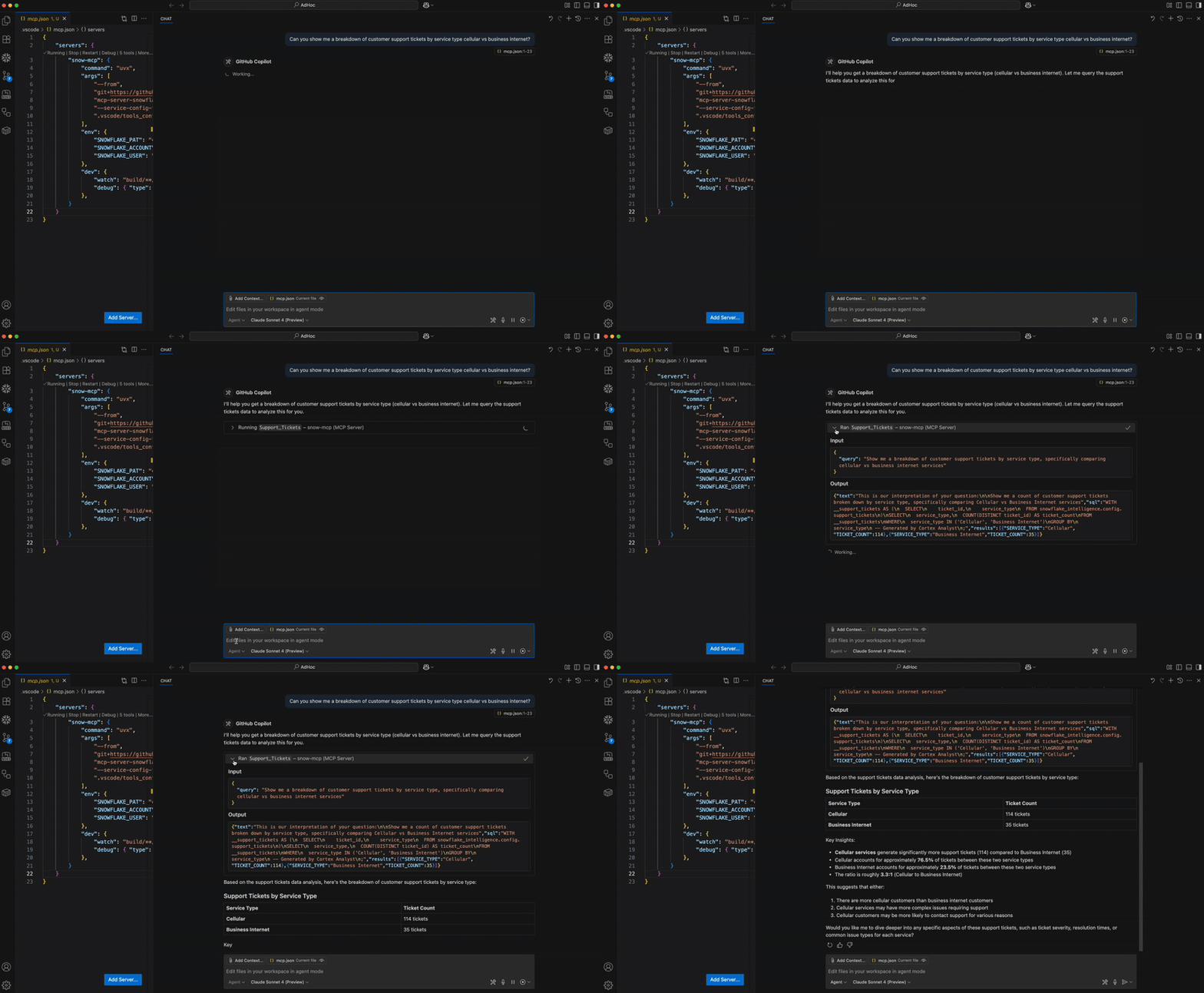
Microsoft Visual Studio Code + GitHub Copilot
有关前提条件、环境设置、分步指南和说明,请参阅此博客。
故障排除
运行 MCP Inspector
建议使用 MCP Inspector 对 MCP 服务进行故障排除。运行以下命令启动 Inspector。
`yarn inspector`

OR

`npx @modelcontextprotocol/inspector tsx --env-file .env dist/mcp/MCP.js`
了解更多:INSPECTOR.md
常见问题
如何连接到 Snowflake?
- 使用 Programmatic Access Token(PAT)。将其设置为环境变量 SNOWFLAKE_PAT。
如何试用?
- 这个 MCP 服务旨在作为 MCP 生态系统的一部分使用。可以将其视为一组工具。你需要一个 MCP 客户端来充当编排器。更多信息请参阅 MCP 简介。
这个服务部署在哪里?它部署在 Snowpark Container Services 中吗?
- 这个 MCP 服务中的所有工具都是托管服务,可通过 REST API 访问。无需单独部署远程服务。相反,当前版本的服务旨在由 MCP 客户端(例如 Claude Desktop、Cursor、fast-agent 等)启动。配置 MCP 客户端连接到该服务后,应用程序会为你启动服务。未来版本的 MCP 服务可能会部署为远程服务。
我调用工具时遇到了权限错误。
- 如果使用 Programmatic Access Tokens,请注意,它们不会评估次要角色。创建令牌时,请选择一个有权访问所有服务及其底层对象的角色,或者选择任意角色。若要更改此属性,需要创建新的 PAT。
我可以添加多少个 Cortex Search 或 Cortex Analysts?
- 你可以添加多个这两种服务的实例。MCP 客户端会根据用户的提示词确定使用哪个或哪些实例。
评论
一个开放协议,规定了 AI 应用如何以统一方式连接外部工具与数据源。客户端负责与模型对话,MCP 服务负责提供工具、资源和提示模板,两者通过标准消息通信,同一个服务可以被不同客户端复用。