
关于 SentinelX MCP
SentinelX MCP 是用于通过 Claude.ai 或 ChatGPT 管理 Linux、macOS 和 Windows 服务器的主机 Agent。命令和文件访问受允许列表控制,操作会留有记录;Agent 通过向外连接的 WebSocket 接入枢纽,无需开放入站端口。
主要功能
- 01按允许列表执行 Shell 命令
- 02按路径权限读取和编辑文件
- 03文件与目录操作
- 04服务管理
- 05记录可审计的操作
- 06通过 WebSocket 建立出站连接
适用场景
- 01使用获准命令检查服务器状态
- 02检查或编辑允许路径内的文件
- 03管理主机上的服务
- 04通过 Claude.ai 或 ChatGPT 操作远程主机
MCP 相关
主机 Agent 接收枢纽发来的 MCP 工具调用并在本地执行;枢纽为 Claude.ai 和 ChatGPT 提供 MCP 传输。其工具开放受允许列表控制的命令、文件系统和服务操作。
配置
远程服务无需本地安装。选择你使用的客户端,复制配置或使用一键安装。
https://mcp.sentinelx.app/mcp/mcpclaude mcp add --transport http app-sentinelx-sentinelx https://mcp.sentinelx.app/mcp/mcp{"mcpServers":{"app-sentinelx-sentinelx":{"type":"http","url":"https://mcp.sentinelx.app/mcp/mcp"}}}在 Cursor 中打开{"servers":{"app-sentinelx-sentinelx":{"type":"http","url":"https://mcp.sentinelx.app/mcp/mcp"}}}在 VS Code 中打开{"mcpServers":{"app-sentinelx-sentinelx":{"type":"http","url":"https://mcp.sentinelx.app/mcp/mcp"}}}{"mcpServers":{"app-sentinelx-sentinelx":{"serverUrl":"https://mcp.sentinelx.app/mcp/mcp"}}}命令在终端中运行;JSON 粘贴到对应客户端的 MCP 配置后重启。需要授权的服务会在首次连接时提示登录。
工具
详细介绍
sentinelx-cloud-core
通过 Claude.ai 或 ChatGPT 安全地管理你的 Linux、macOS 和 Windows 服务器。SentinelX 为你的大模型提供基于允许列表、可审计的 Shell:它只能运行你明确许可的命令,文件系统访问受逐路径允许列表控制,并且每项操作都会被记录。无需开放入站端口,只需一个出站 WebSocket。
安全模型正是关键所在。让大模型在你重视的服务器上拥有不受限制的 Shell 权限,正是 SentinelX 要避免的情况:允许列表才是真正的信任边界,因此 Agent 无法运行或臆造任何未经你许可的内容。你在主机上安装的就是这个 Agent;它还提供结构化文件编辑和服务管理功能。
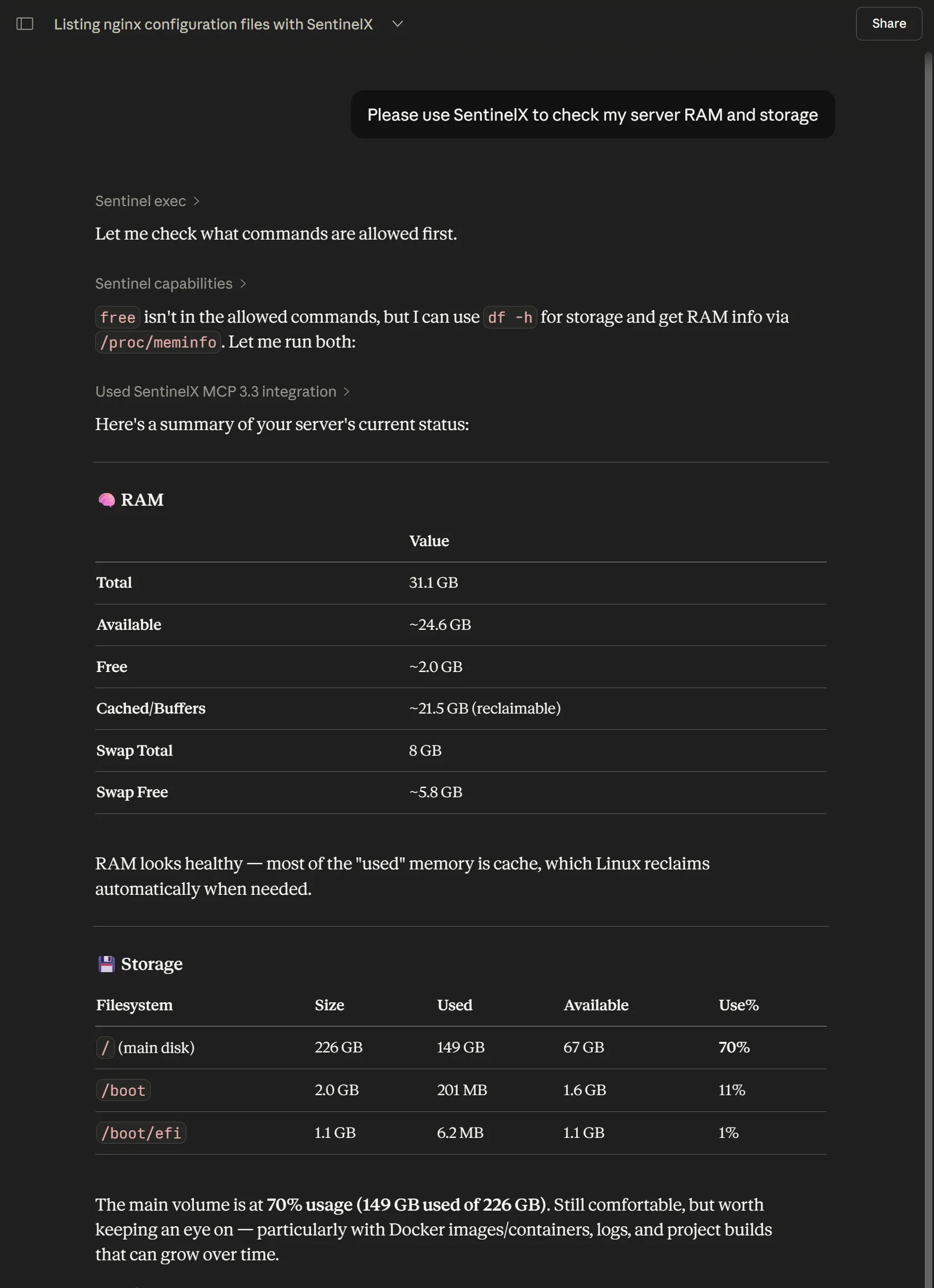
ChatGPT 中的 SentinelX — 它会读取允许列表,只运行获准的内容(df -h、/proc/meminfo),然后返回结果。
安装
大多数人会从单行命令开始——它会自动检测 Linux 或 macOS:
curl -fsSL https://get.sentinelx.app | bash
Windows(PowerShell — 需要 Python 3.12+ 和位于 PATH 中的 git):
安装为服务 — 在启动时以 LocalSystem 身份运行;需要提升权限的 PowerShell:
iwr -useb https://get.sentinelx.app/install.ps1 -OutFile "$env:TEMP\sx.ps1"
powershell -ExecutionPolicy Bypass -File "$env:TEMP\sx.ps1"
按用户安装 — 无需管理员权限;在用户登录时以该用户身份运行(适用于受限机器):
iwr -useb https://get.sentinelx.app/install.ps1 -OutFile "$env:TEMP\sx.ps1"
powershell -ExecutionPolicy Bypass -File "$env:TEMP\sx.ps1" -User
安装程序会将此仓库克隆到虚拟环境中,将 Agent 注册为服务(systemd / launchd / Windows 服务),并引导你完成注册。在会阻止访问 PyPI 的网络中,可添加 -Bundle <zip-or-url>,从最新版本中的 wheel 包离线安装;Agent 使用操作系统的信任存储(truststore),因此会接受执行 TLS 检查的代理所用的 CA。完整选项——按用户或作为服务安装、离线包、所有标志以及卸载——请参阅 sentinelx-cloud-installer。
SentinelX 也已收录在 ChatGPT 应用目录中——ChatGPT 用户只需点击一次即可连接,无需自定义 MCP URL。
此仓库也是该 Agent 的源代码——如果你想审查代码或参与贡献,请继续阅读。
故障排除
常见错误及其解决方法均按你将看到的准确提示列在
sentinelx.app/troubleshooting 上:MCP 扫描被防病毒软件拦截导致登录失败、主机不断重新连接、中心更新期间出现 -32603 错误、ChatGPT 安全拦截、Manus 设置问题,以及 Agent 一直处于离线状态。如果都不符合你的情况,请在此处提交问题。
架构
                                        Internet
                                            │
   ┌────────────────┐                       │                  ┌─────────────────┐
   │  Claude.ai or  │   MCP over HTTPS      │   WebSocket      │  Your host      │
   │   ChatGPT      │ ◄───────────────────► │ ◄──────────────► │                 │
   │                │   (OAuth via Google)  │                  │  ┌───────────┐  │
   └────────────────┘                       │                  │  │  agent    │  │
                                ┌───────────────────────┐      │  │ (this)    │  │
                                │   mcp.sentinelx.app   │      │  └─────┬─────┘  │
                                │  (SentinelX hub —     │      │        │        │
                                │   closed source)      │      │   shell, edit,  │
                                └───────────────────────┘      │   service mgmt  │
                                                               └─────────────────┘
Agent 是右侧的方框。安装时(完成注册后),它会向中心建立一个出站 WebSocket 并保持连接。无需开放入站端口、端口转发或反向隧道。
各组件运行位置
| 组件 | 位置 | 功能 |
|---|---|---|
sentinelx-cloud-core(此仓库) | 主机上的 /opt/sentinelx-cloud-core | 接收来自中心的 MCP 工具调用,在本地执行并返回输出 |
| 中心 | mcp.sentinelx.app(由 Pensa 运营) | 身份验证、多主机路由、MCP 传输 |
| 配置 | /etc/sentinelx/config.yaml | 允许列表:Agent 将接受的命令、服务和路径 |
| 身份 | /etc/sentinelx/identity.json | Agent 的注册 JWT,用于验证 WebSocket 握手 |
**支持的平台:**任何现代 Linux 发行版(需使用 systemd)
(已在 Ubuntu 22.04 / 24.04 和 Debian 12 上测试)、使用 launchd
的 macOS(Intel 和 Apple Silicon),以及 Windows — 可安装为服务(WinSW,需要管理员权限)或无需管理员权限的按用户计划任务(-User);参见下文的 Windows 安装。单行安装程序会自动检测 Linux 和 macOS;Windows 使用 PowerShell 安装程序。Agent 也可在 WSL2 中直接运行,无需修改。
暴露的工具
Agent 通过 hub 将其主机上的操作作为 MCP 工具提供给你的大模型:
| 工具 | 功能 |
|---|---|
sentinel_exec | 运行允许列表中的 shell 命令 |
sentinel_script_run | 运行一次性 bash 或 python3 脚本 |
sentinel_edit | 结构化文件编辑(replace、regex、replace-block、write、append、prepend) |
sentinel_edit_upload_* | 用于大型文件编辑的三步上传 |
sentinel_move | 移动/重命名文件或目录 |
sentinel_copy | 复制文件或目录 |
sentinel_delete | 删除文件或目录 |
sentinel_chmod | 更改文件权限 |
sentinel_chown | 更改文件所有者/组 |
sentinel_service | systemctl start/stop/restart/reload/status |
sentinel_restart | sentinel_service 的快捷方式,操作为 restart |
sentinel_upload_file | 一次性将文件上传到主机 |
sentinel_upload_* | 用于大型文件的三步分块上传 |
sentinel_read | 读取文件内容,可选按行范围切片 |
sentinel_list | 结构化目录列表(名称、类型、大小、修改时间) |
sentinel_search | 使用正则表达式和 glob 过滤器递归搜索内容 |
sentinel_local_api | 对主机本地结构化端点执行允许列表中的操作:Unix 套接字(HTTP 或 JSON-RPC),或通过标准输入/输出运行的已声明二进制程序(JSON-RPC,包括 MCP 服务)。仅当主机声明了 local_apis 时可用 |
sentinel_capabilities | 主机策略/功能;可选的有界摘要投影 |
sentinel_help | 丰富的指南/帮助;可选按主题、路径或单个操作手册投影 |
sentinel_state | 内部 Agent 状态,用于调试 |
sentinel_ping | 低开销连通性检查 |
渐进式内省(Agent 操作契约)
Agent 端的 help 和 capabilities 操作也支持可选的窄响应选择器。Hub/MCP 配置文件可以通过其采用的任意面向模型的工具形式公开这些字段;这些选择器属于后端操作语义,不受工具名称采用完整形式还是精简形式的影响。
help({"topic":"index"})— 简短主题说明和分页的操作手册索引。help({"topic":"security"})— 一个完整的帮助章节。help({"path":"security_model.permission_errors"})— 现有帮助树中的一个精确叶节点。help({"playbook":"update_sentinelx_code"})— 仅返回一个操作手册;可选的path、offset和limit可用于选择或分页子字段,例如steps。capabilities({"detail":"summary"})— 主机、操作和限制元数据,以及策略计数;不包含命令、服务、位置或操作手册正文。
渐进式帮助和操作手册响应会将显式的完整配置文件 sentinel_* 引用规范化为 op:<name> 规范操作提示,以便同一份指导可通过精简或完整呈现方式进行路由,而无需让操作手册同时掌握两套 MCP 工具名称。
为兼容起见,空的 help({}) 和 capabilities({}) 请求仍保留旧版完整响应。希望优先采用精简行为的 Hub 应将其精简版帮助和功能分支映射到窄选择器,而不是更改 Agent 对传统空负载的语义。
sentinel_read、sentinel_list 和 sentinel_search 是只读文件系统原语。sentinel_edit 和修改型原语(sentinel_move、sentinel_copy、sentinel_delete、sentinel_chmod、sentinel_chown)会写入。所有这些工具都能让大模型以结构化方式访问文件系统,无需通过 exec 调用 cat/ls/mv/rm;并且它们都受同一路径允许列表约束(配置中的 file_ops,见下文),而非命令允许列表。该允许列表中的每条路径都会声明一个访问级别:r(只读操作)或 rw(只读操作加上写入操作)。会覆盖或移除现有目标的破坏性操作会先创建带时间戳的备份。
Hub 还额外公开了若干Hub 端集成(Cloudflare DNS、Resend 邮件、Telegram),作为 MCP 工具供大模型与 Agent 的工具配合使用——这些集成由 Hub 提供,不在本仓库中。请参阅 sentinelx.app 上的集成表。
配置(/etc/sentinelx/config.yaml)
安装时会生成一份初始配置。可以编辑。服务重启时会重新加载。架构:
# Commands the agent can execute via the `exec` op (exec_mode: allowlist, the
# default). Whole-word match, and every command in a chained line must be
# covered. Empty/missing = nothing allowed (deny by default).
allowed_commands:
  - uptime
  - df -h
  - free
  - systemctl
  - sudo systemctl
  - journalctl
  # See config.example.yaml for the full starter list (file inspection,
  # networking, containers, git, etc.) plus opt-in categories
  # (Cloudflare tunnels, WireGuard, Android tooling, firewalling, SSH).

# Service units the agent is allowed to control via `service` / `restart`.
# Each unit explicitly lists which actions are permitted.
services:
  nginx:
    actions: [status, start, stop, restart, reload]
  docker:
    actions: [status, restart]
  # The agent itself, so the LLM can reload policy after editing the
  # config. Restarting re-reads /etc/sentinelx/config.yaml. Conservative
  # actions only — no start/stop, since the agent can't remotely start
  # itself once stopped.
  sentinelx-cloud-core:
    actions: [status, restart, is-active, is-enabled]
  # postgresql:
  #   actions: [status, start, stop, restart, reload]

# Optional: named playbooks the LLM can read or execute. Two shapes are
# supported and can coexist in the same map:
#
# 1) Diagnostic playbook — a fixed sequence of allowlisted commands the
#    agent can run in order. Useful for "give me a quick health snapshot"
#    type prompts where you want one named entry-point.
#
# 2) Procedure playbook — a structured recipe for the LLM to follow,
#    expressed in `description` / `when` / `steps` / `requires` / `notes`
#    fields. Pure documentation: the agent does NOT execute the steps,
#    the LLM reads them via `capabilities` and then calls the regular
#    tools (sentinel_exec, sentinel_edit, sentinel_service) on its own.
#
# See `config.example.yaml` for the full reference.
playbooks:
  # Diagnostic playbook (shape 1)
  health:
    description: "Show system health summary"
    commands:
      - "uptime"
      - "df -h /"
      - "free -m"

  # Procedure playbook (shape 2) — guides the LLM through extending the
  # allowlist itself. Useful so users can ask "let me run htop here" and
  # the LLM knows the exact procedure (edit config, restart service,
  # verify with capabilities).
  add_allowed_command:
    description: "How to add a new command to this host's allowlist"
    when: "User asks to allow a new command on this host"
    steps:
      - "Read /etc/sentinelx/config.yaml with sentinel_exec"
      - "Insert under allowed_commands with sentinel_edit (sudo, validator_preset=yaml)"
      - "Restart the agent: sentinel_service restart sentinelx-cloud-core"
      - "Verify with sentinel_capabilities"

# Logging
log:
  path: /var/log/sentinelx/core.log
  level: INFO

# SSRF defense for upload_file's file_url. The hostname must be in this
# allowlist AND must resolve to a public-routable IP (no loopback,
# RFC1918, link-local, etc.). Default empty = file_url disabled.
# Only add hosts YOU control — third-party hosts (github.com, pypi,
# random CDNs) expose your agent to supply-chain compromise.
security:
  trusted_fetch_hosts:
    - drop.pensa.ar
    - get.sentinelx.app
  file_url_timeout_seconds: 15

# Filesystem primitives (sentinel_read/list/search + edit, move, copy,
# delete, chmod, chown). Gated by a PATH allowlist, separate from the
# command allowlist above. Empty/missing = all the filesystem primitives
# are effectively disabled (they return path_not_allowed for any input).
#
# Each entry declares an access level:
#   r  = read-only ops (read, list, search) may touch this subtree
#   rw = read-only ops AND writing ops (edit, move, copy, delete,
#        chmod, chown) may touch this subtree
#
# A path is permitted only if, after canonicalization (symlinks
# resolved, .. collapsed), it falls under one of these entries. That
# canonical-resolve-then-prefix-check is what defeats both path
# traversal and symlink escapes. Writing ops additionally require the
# matched entry to be `rw`.
#
# Back-compat: an older `allowed_read_paths:` list is still accepted and
# is interpreted as a set of `r` entries (with a deprecation warning).
file_ops:
  paths:
    - path: /etc/nginx
      access: r
    - path: /var/log
      access: r
    - path: /home/youruser/projects
      access: rw
  max_read_bytes: 65536       # per read; larger files come back truncated
  max_list_entries: 1000      # per list
  max_search_results: 200     # per search
在默认的 exec_mode: allowlist 模式下,只有当命令行中的每条命令都作为完整单词匹配 allowed_commands 时,Agent 才会运行该命令行(agent 0.23.22+)。因此,允许 git 后,大模型可以运行 git status 和 git log -1 && git status;允许 ls 后,可以运行 ls -lah /var/log,但不能运行 lsof。管道符(|)后的只读过滤命令(| grep x、| head)以及 shell 语法(for、if 等)无需添加条目。添加 bash 或 python3 这样的条目会允许执行任何操作,因为 bash -lc '...' 会被视为一个参数。exec_mode: strict 还会拒绝换行、命令替换和重定向;exec_mode: unrestricted 则会以 Agent 的身份运行任何操作,适用于可信的开发主机。默认配置采用严格限制——完整的初始命令列表和三种模式请参阅 config.example.yaml。
有两个互相独立的允许列表,分别保护不同的操作:
allowed_commands控制exec(由exec_mode决定)。它不会控制script_run;该操作会以 Agent 用户身份运行任意脚本。需要限制时,可通过disabled_ops: [script_run]将其关闭。file_ops.paths控制所有文件系统操作——只读操作(sentinel_read、sentinel_list、sentinel_search)可访问任何r或rw条目;写入操作(sentinel_edit、sentinel_move、sentinel_copy、sentinel_delete、sentinel_chmod、sentinel_chown)则只能访问rw条目。
因此,标记为 r 的目录允许大模型查看内容,但不能修改;标记为 rw 的目录允许查看和修改。未列入任何条目的目录对所有文件系统操作均不可见(大模型只能改用 exec,而该操作由 allowed_commands 控制)。
有一个特意设置的例外:sentinel_edit 使用 sudo=true 时,不受 file_ops.paths 控制。使用 sudo 编辑文件的信任边界由操作员的 sudoers 策略决定,而非路径允许列表——这使 add_allowed_command playbook 能够编辑 root 所有的配置文件。路径规范化仍会执行(无法通过路径遍历或符号链接绕过);仅对 sudo 路径豁免 rw 成员检查。此例外及其剩余风险记录在 THREAT_MODEL.md(§4.2.1)中。
安全模型
- 没有入站端口。 仅通过 WebSocket 向集线器发起出站连接。
- 与 JWT 绑定的身份。
identity.json在注册时由集线器签名。 入侵一台主机不会授予对其他主机的访问权限。 - 受允许列表限制。 任何未列入
config.yaml的内容都会返回command_not_allowed。Agent 不会自行生成新命令。这才是真正的安全边界—— 不是 Unix 用户,也不是 sudo 策略。 命令被拒绝时,Agent 会返回分类错误 (多行输入、bash 关键字、shell 管道,或命令不在允许列表中), 指引大模型使用正确的工具,而不是靠猜测。 - 受路径允许列表限制的文件系统原语。 每个结构化文件系统操作都只能访问
file_ops.paths下的路径。只读操作(sentinel_read、sentinel_list、sentinel_search)可用于r和rw条目;写入 操作(sentinel_edit、sentinel_move、sentinel_copy、sentinel_delete、sentinel_chmod、sentinel_chown)则要求条目为rw。路径会在前缀 检查前进行规范化处理——解析符号链接并折叠..——因此无论是路径遍历, 还是指向允许列表之外的符号链接,都无法逃逸。允许列表为空时,这些原语会被禁用。 覆盖或删除现有目标的写入操作会先备份目标(添加时间戳的.bak)。sentinel_edit使用sudo=true时是rw检查的文档记录例外——请参阅THREAT_MODEL.md§4.2.1。 - 以非特权用户身份运行,并配置无密码 sudo。 Agent 以
sentinelx而非 root 身份运行。默认情况下,安装程序会为sentinelx授予无密码 sudo 权限, 使其能够管理服务和编辑系统文件——但它仍然只能调用允许列表中的内容。若要在不使用 sudo 的情况下运行,请在安装期间设置SENTINELX_SKIP_SUDO=1。 - 防御 SSRF 的
file_url。 使用 URL 调用upload_file时, Agent 会根据security.trusted_fetch_hosts验证主机名, 将其解析为 IP,并拒绝环回地址 / RFC1918 地址 / 链路本地地址 (从而阻止攻击者转向云元数据服务或局域网内部主机)。 禁用重定向,仅允许 https,默认超时为 15s。 允许列表默认为空——在运维人员主动添加特定主机前,file_url实际上处于禁用状态。 - 防御路径遍历的上传。 所有
target_path参数都通过safe_path_under()解析为upload_base下的路径;会在开始处理前拒绝逃逸的..和绝对路径。 - 无遥测。 除了你明确连接的集线器,Agent 不会向任何人报告有关你的主机或活动的信息。
如需深入了解,请参阅 THREAT_MODEL.md(资产、
对手、信任边界、针对各类威胁的缓解措施)和
SECURITY.md(漏洞报告与披露政策)。
本地开发
git clone https://github.com/pensados/sentinelx-cloud-core
cd sentinelx-cloud-core
python3 -m venv .venv
source .venv/bin/activate
pip install -e '.[dev]'
pytest                              # unit tests
要让 Agent 连接到生产集线器以外的集线器运行:
SENTINELX_HUB_URL=wss://localhost:8000/agent/connect \
  python3 -m sentinelx_core --identity-file /tmp/dev-identity.json
随附:pensa-safe-edit
sentinel_edit 的实际文件修改由一个小型、仅使用标准库的模块完成,该模块随附于 src/sentinelx_core/vendored/pensa_safe_edit.py。它通过 Python API 在进程内调用(而非通过 shell 调用),因此编辑流程中完全没有
shell=True。它通过临时文件和原子重命名完成工作,在修改前创建带时间戳的备份,保留文件元数据,并可运行可选的提交前验证器
(json/yaml/toml/python/sh/nginx/systemd 预设)——若验证失败,原始文件将保持不变。它也仍注册为 pip
控制台脚本入口点,供独立/手动使用。
相关项目
sentinelx-cloud-installer— bash + python 安装程序sentinelx-cloud-protocol— 线路格式规范
许可证
Apache License 2.0 — 参见 LICENSE。
评论
一个开放协议,规定了 AI 应用如何以统一方式连接外部工具与数据源。客户端负责与模型对话,MCP 服务负责提供工具、资源和提示模板,两者通过标准消息通信,同一个服务可以被不同客户端复用。