
关于 Bilinc
Bilinc 是面向 AI Agent 的托管记忆服务,提供用于 Bilinc Cloud 的 Python SDK、命令行工具和 MCP 适配器。它记录记忆来源与版本,并支持修订、检查点和回滚。
主要功能
- 01保存带来源和版本的记忆
- 02检索以往上下文与决策
- 03修订或忘记已存记忆
- 04追踪变更及其来源
- 05创建快照、比较并回滚
适用场景
- 01在 Agent 运行出错后恢复状态
- 02审计记忆由谁或什么写入
- 03在团队中共享 Agent 记忆
- 04高风险操作前检查以往决策
MCP 相关
Bilinc 提供 stdio MCP 适配器和托管远程 MCP 端点。其工具支持客户端读写记忆、查看历史记录,以及管理快照和回滚;只读连接仅开放读取工具。
配置
远程服务无需本地安装。选择你使用的客户端,复制配置或使用一键安装。
https://mcp.bilinc.space/mcpclaude mcp add --transport http atakanelik34-bilinc https://mcp.bilinc.space/mcp{"mcpServers":{"atakanelik34-bilinc":{"type":"http","url":"https://mcp.bilinc.space/mcp"}}}在 Cursor 中打开{"servers":{"atakanelik34-bilinc":{"type":"http","url":"https://mcp.bilinc.space/mcp"}}}在 VS Code 中打开{"mcpServers":{"atakanelik34-bilinc":{"type":"http","url":"https://mcp.bilinc.space/mcp"}}}{"mcpServers":{"atakanelik34-bilinc":{"serverUrl":"https://mcp.bilinc.space/mcp"}}}命令在终端中运行;JSON 粘贴到对应客户端的 MCP 配置后重启。需要授权的服务会在首次连接时提示登录。
工具
详细介绍

Bilinc





为 AI Agent 提供托管记忆。 保存 Agent 学到的内容,在行动前回忆这些内容,查看每条记忆的编写者和变更记录,并在运行出错时回滚。
PyPI 上的 bilinc 包包含 Python SDK、bilinc 命令行和面向 Bilinc Cloud 的 stdio MCP 适配器。源代码位于 ReARCLabs/bilinc;托管服务不属于该软件包的一部分。
60 秒快速开始
无需 Python,即可使用 Claude、ChatGPT 或 Codex。 在 Claude 中,打开 自定义 → 连接器 → 添加自定义连接器,将其命名为 Bilinc,然后粘贴 https://mcp.bilinc.space/mcp。登录并选择只读或读写权限。在 Claude Code 中:
claude mcp add --transport http --scope user bilinc https://mcp.bilinc.space/mcp
ChatGPT 和 Codex 也可以使用相同地址:远程 MCP 指南。
Python、命令行或任何 MCP 客户端。
pip install -U bilinc
bilinc login        # browser sign-in, free, no card required
bilinc quicktest    # one hosted commit, one recall and a status check
bilinc login 会以仅所有者可访问的权限,为这台计算机保存 API 密钥;密钥不会出现在 URL 或终端中。若无法使用浏览器,请运行 bilinc login --device。对于 CI 和脚本,请设置 BILINC_API_KEY。
Bilinc 的定位
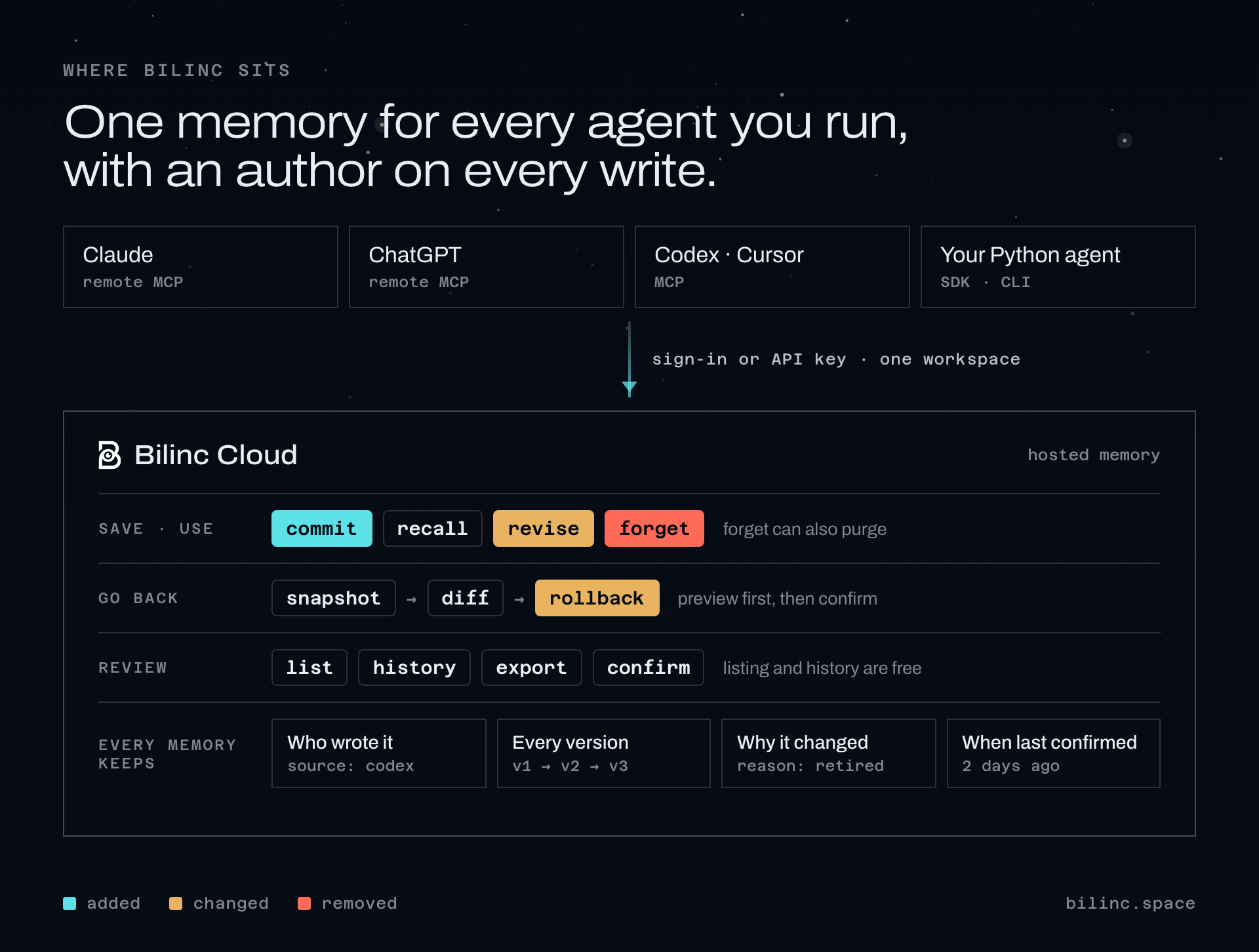
每次写入都会记录来源,并返回一个可传回的版本号;如果记忆在你读取后发生了变化,系统就会拒绝此次更改。遗忘操作需要提供原因,修订操作则可以附带原因。在远程连接器中,回忆结果会显示每条记忆的上次确认时间,并将超过复核期限的条目标记为可能已过时;此检查不会隐藏或删除任何内容。
相似不代表当前有效
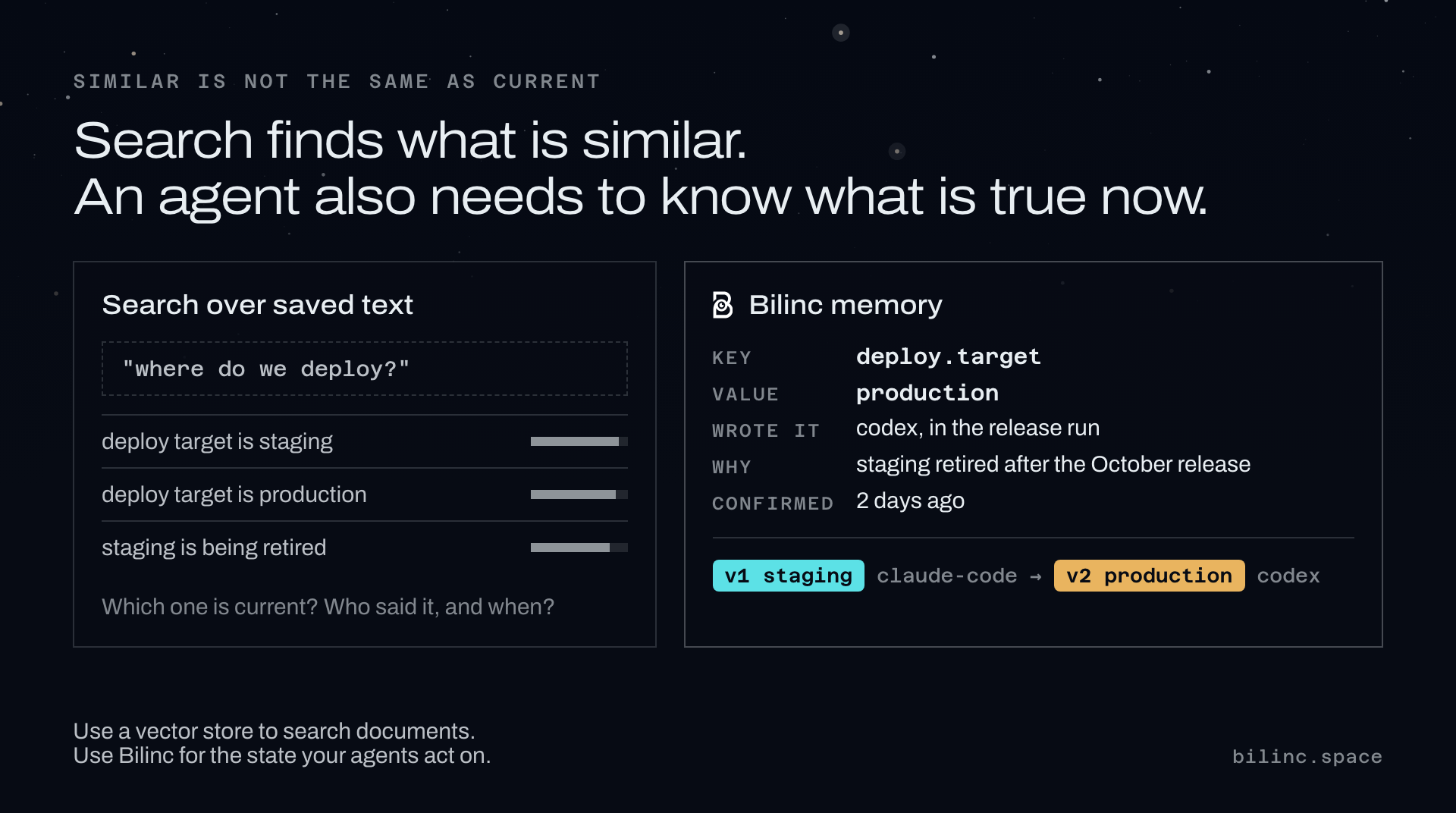
以下情况适合使用 Bilinc:
- 长期运行的 Agent(编码、支持、研究或个人助手)需要在执行高风险操作前获取早先的决策;
- 你需要了解哪次运行、哪个工具或哪个人编写了某项 Agent 状态;
- 一次错误运行写入了错误状态,而你需要能够恢复的方式,而不是手动清理;
- 多个 Agent 或团队成员共用一份记忆,并且你需要按键访问控制和可见的使用记录。
以下情况则应考虑其他方案:你只需要对文档进行语义搜索(向量数据库是更简单的工具);你需要 Apache-2.0 许可、完全可自托管的运行时(此软件包仅支持云端,采用 BUSL-1.1 许可);或者你希望记忆层同时充当 Agent 框架。
Python SDK
from bilinc import CloudClient

client = CloudClient()  # reads BILINC_API_KEY or the key saved by `bilinc login`

# Write, and keep the version for optimistic concurrency.
written = client.commit("agent.goal", {"ship": "reliable memory"}, memory_type="semantic")
results = client.recall("agent goal", limit=5)

# Correct something you already know. Fails if the key does not exist.
client.revise("agent.goal", {"ship": "verifiable memory"},
              reason="scope corrected", expected_version=written["entryVersion"])

# Checkpoint before risky work, then see what changed.
snapshot = client.create_snapshot(label="before-autonomous-run")["snapshot"]
client.diff(snapshot["id"])

# Recover. The preview is free; executing needs its token.
preview = client.rollback_preview(snapshot["id"], reason="undo bad agent run")
client.rollback(snapshot["id"], confirmation_token=preview["confirmationToken"],
                reason="undo bad agent run")

# Review what is stored. Listing, history and export are free reads.
for entry in client.iter_memories(prefix="agent."):
    print(entry["key"], entry["updatedAt"])
client.history("agent.goal")
client.confirm("agent.goal")   # still accurate; costs one write

# Take a memory out of use. A reason is required and recorded.
client.forget("agent.goal", reason="superseded by the planner service")
CLI
bilinc status                          # plan, capabilities, limits, usage
bilinc commit --key agent.goal --value '{"ship":"reliable memory"}'
bilinc recall --query "agent goal"
bilinc revise --key agent.goal --value '{"ship":"verifiable memory"}' --reason "scope corrected"
bilinc list --prefix agent.            # keys, types, update times, value previews
bilinc history agent.goal              # recorded changes, newest first
bilinc snapshot create --label before-autonomous-run
bilinc diff --from-snapshot snap_...
bilinc export -o bilinc-export.json    # full values; the file is readable only by you
bilinc forget --key agent.goal --reason "superseded by the planner service"
回滚分两步完成,且 execute 从不提示确认,因此可安全用于自动化:
bilinc rollback preview --snapshot snap_... --reason "undo bad agent run"
bilinc rollback execute --snapshot snap_... --reason "undo bad agent run" \
  --confirmation-token <token-from-preview>
MCP 适配器
stdio 适配器适用于任何 MCP 客户端:Claude Code、Codex、Cursor、Hermes Agent、opencode 等。执行 bilinc login 后,让 CLI 写入配置:
bilinc mcp install --client claude-code     # prints a ready `claude mcp add ...` command
bilinc mcp install --client claude-desktop  # prints the config and where Claude Desktop keeps it
bilinc mcp install                          # plain mcpServers JSON for any other client
配置中不包含密钥;适配器会读取 bilinc login 保存的密钥。在没有保存密钥的机器上,添加 "env": { "BILINC_API_KEY": "..." }。
| 工具 | 功能 |
|---|---|
commit_mem | 保存持久状态及其来源;返回一个版本。 |
recall | 执行操作前查找先前的上下文和决策。 |
revise | 更正现有记忆,不会创建记忆。 |
forget | 停止使用某条记忆。具有破坏性;必须提供原因。 |
status | 工作区、方案、功能、限制和用量。永不计费。 |
snapshot | 在执行高风险操作前保存检查点,或列出检查点。 |
diff | 将检查点与另一检查点或当前状态进行比较。 |
rollback | 恢复检查点:先免费预览,再确认执行。 |
list_memories | 浏览已存储的内容。免费。 |
history | 查看一条记忆的变更,按时间从新到旧排列。免费。 |
confirm | 记录一条记忆仍然准确。一次写入。 |
远程连接器位于 https://mcp.bilinc.space/mcp,提供 10 个工具;只读连接仅列出 4 个读取工具。客户端指南:Claude Code · Codex · Cursor · 任何 MCP 客户端。
忘记与彻底清除
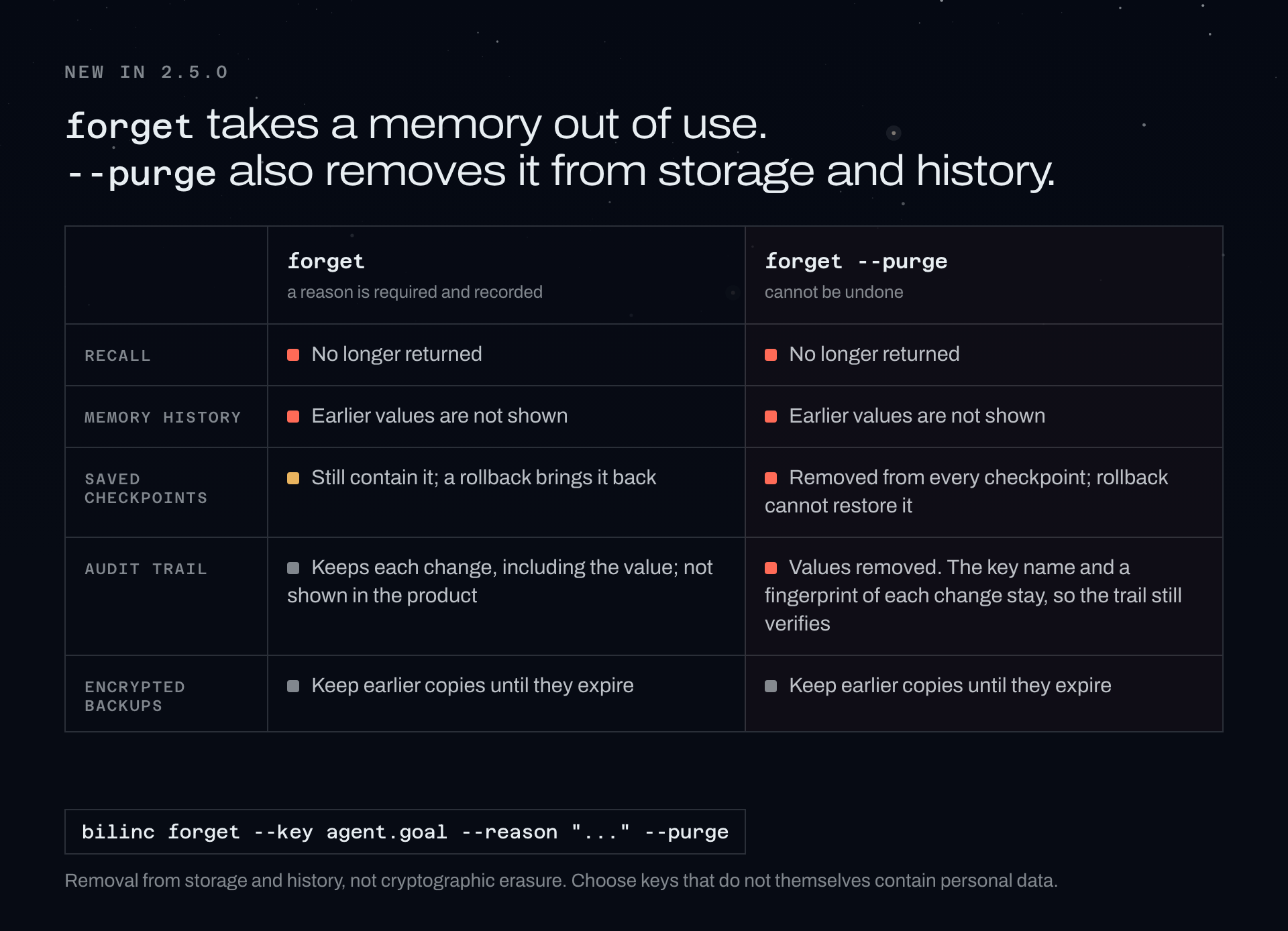
自 2.5.0 起:client.forget(key, reason=..., purge=True)、bilinc forget --key ... --reason ... --purge,或在 REST API 中设置 "purge": true,也会从存储和历史记录中移除该记忆的已存储内容。此操作适用于先前已忘记的记忆,且无法撤销。关于保留哪些内容以及保留时长,请参阅隐私政策。
托管 API
所有端点均位于 https://bilinc.space 下。记忆操作需要 API 密钥和有效的 Bilinc Cloud 方案;免费方案无需绑定银行卡。
| 端点 | 说明 |
|---|---|
GET /api/cloud/health | 公开的服务健康状态。无需密钥,永不计费。 |
GET /api/cloud/status | 查看一个密钥可以执行哪些操作。永不计费。 |
POST /api/cloud/memory/commit · recall · revise | 写入、读取、更正。 |
POST /api/cloud/memory/forget | 具有破坏性。必须提供原因;"purge": true 也会移除已存储内容。 |
GET · POST /api/cloud/memory/snapshots | 列出检查点(免费)或创建检查点。 |
POST /api/cloud/memory/diff | 比较检查点。免费。 |
POST /api/cloud/memory/rollback/preview | 免费。返回确认令牌。 |
POST /api/cloud/memory/rollback | 具有破坏性。需要该令牌。 |
对于任何可能重试的写入,请发送 Idempotency-Key 标头:相同的键和相同的负载会重放原始结果,且只计费一次;不同的负载会被拒绝,并返回 409 idempotency_conflict。如果保存内容包含凭据(例如 API 密钥、令牌或私钥),则会被拒绝并返回 secret_detected,且绝不会回显该值。
2.6.0 版本更新
- 列表排序:按时间从新到旧或从旧到新列出记忆,并按保存记忆的应用筛选。SDK、CLI、
bilincMCP 适配器和仪表板均支持此功能。 - 土耳其语搜索:托管搜索不区分大小写,并忽略土耳其语带点和不带点的 I 以及变音符号,因此搜索
girisimci可以找到Girişimci。 - 写入结果更清晰:存储看起来像凭据的字段并对其进行脱敏时,响应会指出具体字段。
- 从 MCP 适配器清除:
bilincstdio MCP 适配器的forget工具支持purge。
每次发布的更新:更新日志。
链接
- bilinc.space · 文档 · 安装指南 · 定价(免费套餐,无需银行卡) · 更新日志 · 信任
- 对比:向量记忆 · Mem0 · Zep · Letta
- 指南:什么是 AI Agent 记忆? · 回滚 Agent 记忆写入 · 审计 Agent 记住的内容
- 面向机器:llms.txt · ai-index.json
反馈与安全
问题、错误和想法:GitHub Issues。请将安全问题私下发送至 [email protected](参见 security.txt)。请勿在 issues 和截图中包含记忆值、API 密钥和生产日志。
许可证
Business Source License 1.1,由 ReARC Labs Inc. 授权。参见 LICENSE。
评论
一个开放协议,规定了 AI 应用如何以统一方式连接外部工具与数据源。客户端负责与模型对话,MCP 服务负责提供工具、资源和提示模板,两者通过标准消息通信,同一个服务可以被不同客户端复用。