
关于 atomicreps
atomicreps 是面向编码 Agent 用户的 MCP 服务,会针对代码改动提出简短的选择题并判定答案。它支持设置主题和练习频率,并可用于 Claude Code、GitHub Copilot、Cursor、Windsurf、Codex 等 MCP 客户端。
主要功能
- 01针对已完成代码改动提问
- 02选择题作答并提供解析
- 03设置主题、难度和频率
- 04屏蔽主题并查看进度摘要
- 05通过命令行配置 MCP 客户端
适用场景
- 01在编码 Agent 完成任务后回忆修复内容
- 02复习编码过程中涉及的主题
- 03跟踪练习连续记录和会话进度
MCP 相关
编辑器通过 `npx atomicreps mcp` 启动 stdio MCP 服务。其工具支持客户端请求问题、提交答案、查看进度和修改设置。
配置
远程服务无需本地安装。选择你使用的客户端,复制配置或使用一键安装。
https://atomicreps.com/mcpclaude mcp add --transport http atomicreps-atomicreps https://atomicreps.com/mcp{"mcpServers":{"atomicreps-atomicreps":{"type":"http","url":"https://atomicreps.com/mcp"}}}在 Cursor 中打开{"servers":{"atomicreps-atomicreps":{"type":"http","url":"https://atomicreps.com/mcp"}}}在 VS Code 中打开{"mcpServers":{"atomicreps-atomicreps":{"type":"http","url":"https://atomicreps.com/mcp"}}}{"mcpServers":{"atomicreps-atomicreps":{"serverUrl":"https://atomicreps.com/mcp"}}}命令在终端中运行;JSON 粘贴到对应客户端的 MCP 配置后重启。需要授权的服务会在首次连接时提示登录。
工具
详细介绍
atomicreps


针对你刚刚构建的内容,回答一个简短问题。可在 Claude Code、GitHub Copilot、Cursor、Windsurf、Codex 或任何 MCP 客户端中使用。
你描述一个错误,编码 Agent 修改代码,然后 Atomic Reps 会针对这次修改提出一个选择题。你凭记忆选一个字母作答,服务会为你判分。
两分钟演示:在 Claude Code 中修复四个错误,每修复一个就回答一道题。
https://github.com/user-attachments/assets/521c1bb3-9f75-4c25-8b71-ed763de7debc
快速开始
需要 Node 24+ 和一个免费账户。如果 Node 版本较旧,每条命令都会显示所需版本, 而不会启动。
npx atomicreps
首次运行时会启动设置向导:
- 选择要练习的内容、频率和难度。
- 登录:终端会显示一个代码,你需要在 atomicreps.com/connect 输入它。
- 选择编辑器。
connect只会写入你勾选的条目。
然后继续工作。当 Agent 完成一项更改了文件的任务后, 问题会在它的答复之后出现:
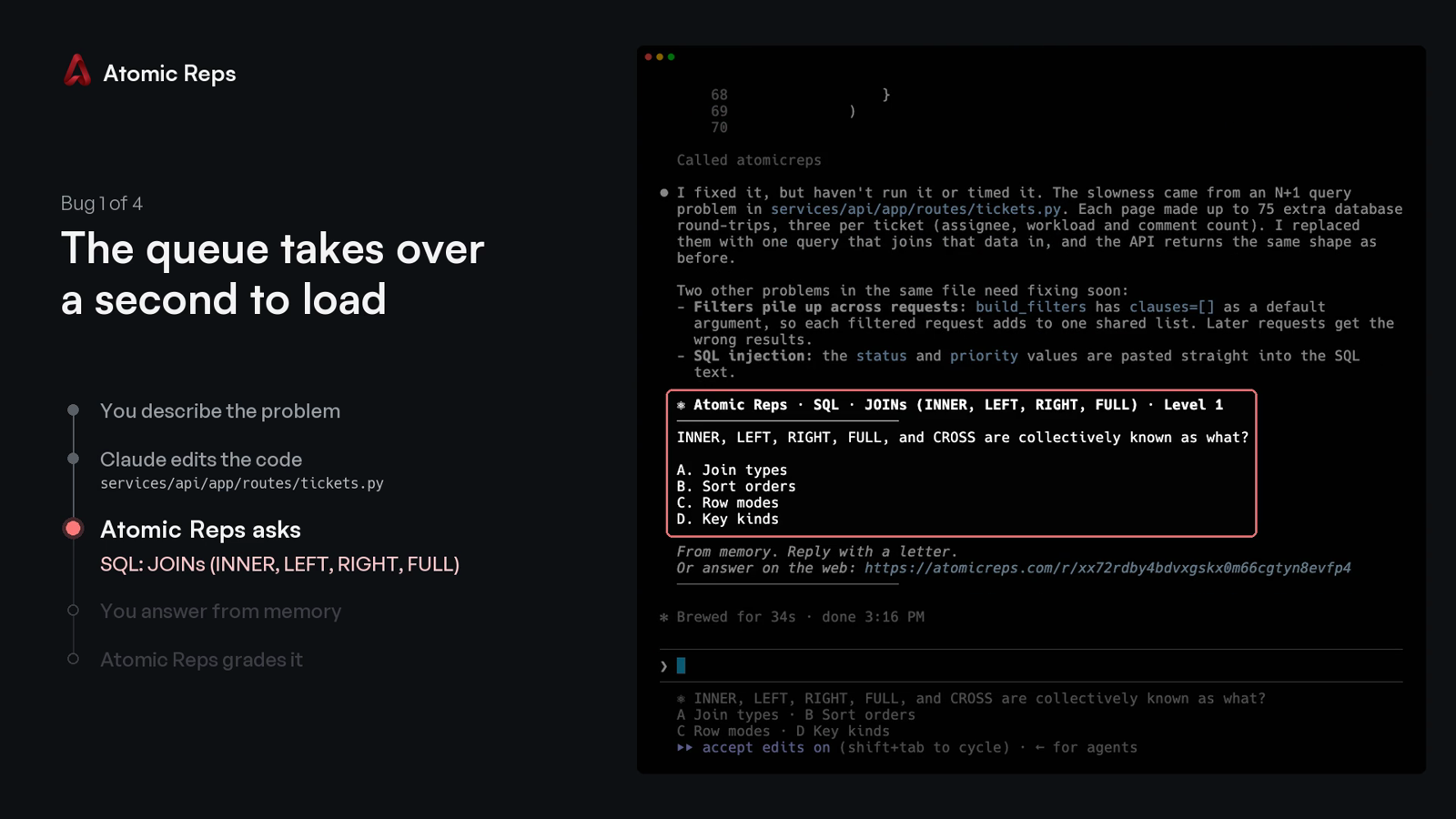
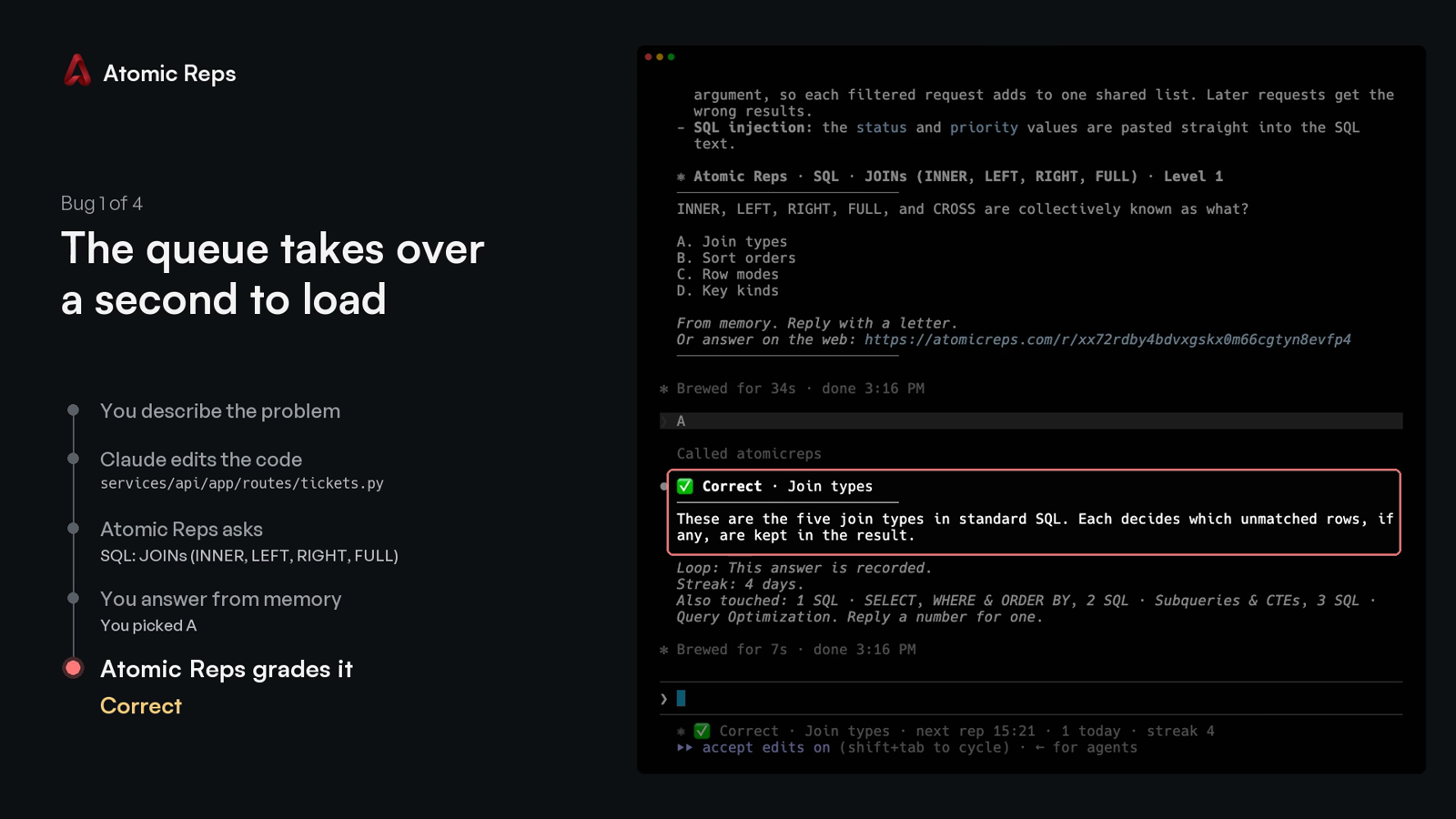
输入字母。判定结果会附带一行解释,下一行会列出本次会话涉及的其他主题,最多三个:
首次运行之后,每次启动都会打开终端界面:显示你的连续记录、本次会话、 主题、静音项和速率。
命令
npx atomicreps            the terminal screen; the setup wizard on the first run
npx atomicreps setup      the setup wizard again: areas, topics, how often, how hard
npx atomicreps login      sign in from a browser with a typed code
npx atomicreps connect    register the server with your editor
npx atomicreps connect --pin   pin the launch args to this installed version, for a command you can commit
npx atomicreps mcp        the stdio MCP server process (what the editor launches)
npx atomicreps doctor     token, server ping, version, when the next rep may come, allowlist
npx atomicreps why        the last ten times a question could have appeared, and why it did or did not
npx atomicreps logout     forget the token on this machine
npx atomicreps logout --purge   also forget your reps and status, and offer to undo connect
在任何命令后添加 --alpha 即可使用 staging 环境。它有独立的令牌和缓存,
因此你可以同时登录 staging 和生产环境。
直接运行 connect 会写入 npx -y atomicreps mcp,每次启动时都会解析为
最新版本。运行 connect --pin 则会写入 npx -y atomicreps@<version> mcp,即此 CLI 正在运行的版本,方便组织审核一条确切的命令并将其提交,而不必相信 npx 每次都会获取相同版本。
Claude Code
npx atomicreps connect 会显示四个 Claude Code 选项:
- Claude Code 会在用户级别注册服务。
- …并在每轮结束时提问 会将
Stophook 和UserPromptSubmithook 添加到~/.claude/settings.json。Claude 完成一轮 且修改了文件后,问题会直接显示在终端中,不会让 Claude 额外再进行一轮, 你接下来输入的字母会被判分。你已有的 hook 会保留。 - …并允许使用它的四个工具 会将
rep、answer、me和settings添加到permissions.allow,这样首次提问时就不会被权限提示打断。 - …并添加 Claude Code 状态行 会在提示词下方显示待回答的问题。 如果你已有状态行,它仍会先显示。
不使用 connect 时,仅运行服务:
claude mcp add --scope user atomicreps -- npx -y atomicreps mcp
GitHub Copilot
npx atomicreps connect 会将 VS Code 和 Copilot CLI 显示为选项。不使用它时:
code --add-mcp '{"name":"atomicreps","type":"stdio","command":"npx","args":["-y","atomicreps","mcp"]}'
copilot mcp add atomicreps -- npx -y atomicreps mcp
JetBrains、Visual Studio、Xcode 和 Eclipse 中的 Copilot 会从各自的
mcp.json(Settings,然后选择 MCP)读取相同条目。团队可以将其提交为
.vscode/mcp.json,让每个克隆版本都包含该配置:
{
  "servers": {
    "atomicreps": { "type": "stdio", "command": "npx", "args": ["-y", "atomicreps", "mcp"] }
  }
}
Copilot 会读取服务的说明,并在任务结束时调用 rep,与 Cursor 和 Codex 的行为相同。批准这四个工具一次后,它们会一直保持已批准状态。
Cursor、Windsurf、Codex 和其他客户端
connect 会向 ~/.cursor/mcp.json 或
~/.codeium/windsurf/mcp_config.json 添加一个条目,并为 Codex 运行
codex mcp add。这些文件中已有的内容都会保留。手动配置:
codex mcp add atomicreps -- npx -y atomicreps mcp
{
  "mcpServers": {
    "atomicreps": { "command": "npx", "args": ["-y", "atomicreps", "mcp"] }
  }
}
其他任何 MCP 客户端都使用同一条命令:npx -y atomicreps mcp。connect 中的
"I'll set it up myself" 选项会显示该命令,但不会写入任何内容。
rep 的服务方式
编码 Agent 完成任务后,会调用一次 rep,用几个词说明改动内容。服务端会选择一个问题,或者不选问题,然后由 Agent 原样展示给你。用一个字母作答,或者忽略它。
判定结果下方的一行会列出本次会话涉及的最多三项其他内容。数字用于询问其中一项。“Never Swift”会永久屏蔽某个主题。“Not this topic”会屏蔽该主题三十天。“Unmute Swift”会取消屏蔽。 “How am I doing”会打印你的摘要。
节奏由服务端而非 Agent 控制。服务端会设置自动 rep 之间的最短间隔、每日上限,以及屏蔽和关闭选项。如果在问题出现后的几秒内输入答案,服务端会拒绝。rep 中绝不会包含答案。每次失败都会返回无 rep,而不是错误;doctor 会说明原因。
工具
| 工具 | 功能 |
|---|---|
rep({ touched?, ask?, topic?, kind?, exclude? }) | 提出一个问题、一个见解,或不返回任何内容;ask 接受一个来自选项的标识符 |
answer({ pick, id? }) | 判定结果、解释和选项行 |
me({ show? }) | summary、skills、reps、streak 或 mutes |
settings({ intensity?, topics?, levels?, prefer?, mute?, muteMinutes?, days?, unmute?, dialog? }) | 频率、固定主题、难度范围、偏好领域、屏蔽项和对话框 |
标识符的格式为 topic 或 topic.subskill(react.hooks_core)。50 个子技能 slug 会在不同主题中重复,因此名称中始终包含主题。
settings({ dialog: true }) 会在编辑器的原生对话框中询问字母,而不是在聊天中询问。它会阻塞当前轮次,因此只能作为设置,绝不会是默认选项。
隐私
调用 rep 时会离开你设备的内容:带少量权重的目录标识符,以及公共目录已知的包名、文件扩展名和文件夹名。你 Agent 提供的 touched 词语会在你的设备上与标识符匹配;词语本身绝不会发送。未知包名会被丢弃。私有名称(@acme/react-internal)会以其公共别名(react)发送。我们绝不会发送你的代码、文件内容或提示词。登录前,npx atomicreps setup 会为你的仓库打印确切的负载。
npx atomicreps mcp 会将编辑器发出的每条 JSON-RPC 消息连同你的令牌转发给 Atomic Reps 服务端。答案会以相同方式返回。
只有当 ATOMICREPS_API 指向 Atomic Reps 地址或回环地址时,才会使用该变量,因为你的令牌会发送到它指向的地址。其他地址都会被忽略,并由 doctor 报告;设置 ATOMICREPS_UNSAFE_ORIGIN=1 可覆盖此行为。
登录
npx atomicreps 会打印一个代码。登录后,在 atomicreps.com/connect 输入该代码;转发的链接不会批准任何操作。令牌会保存在 ~/.config/atomicreps/config.json(模式为 0600)中,并以 arep_ 为前缀,方便机密扫描器找到。你可以在账户页面撤销令牌。logout 会清除令牌;logout --purge 还会删除此设备缓存的 reps 和状态,然后列出 connect 写入的所有编辑器条目(两个渠道),并移除你勾选的条目。
信任边界以及如何报告漏洞:SECURITY.md。
自行检查
dist/cli.js 仅由这些文件构建而成,不含其他内容。该软件包没有运行时依赖项。
npm install
npm run build    # writes dist/cli.js from src
npm test         # the behaviour described above, as tests
若要与 npm 提供的版本进行比较:运行 npm pack atomicreps,然后将其中的 dist/cli.js 与你刚构建的版本并排查看。客户端发送的所有内容都在 src/api.ts 中。它从你的仓库读取的所有内容都在 src/infer.ts 中。
MIT。
评论
一个开放协议,规定了 AI 应用如何以统一方式连接外部工具与数据源。客户端负责与模型对话,MCP 服务负责提供工具、资源和提示模板,两者通过标准消息通信,同一个服务可以被不同客户端复用。