
关于 cmdxray
cmdxray 是离线命令解析与风险检查工具,也可作为 MCP 服务供 AI Agent 在执行 shell 命令前检查风险。它会逐项解释命令结构,并标记破坏性操作。
主要功能
- 01逐项解释命令与参数
- 02解析管道、重定向和子 Shell
- 03识别危险及谨慎操作
- 04扫描脚本和 CI 配置
- 05生成可分享的命令卡片
适用场景
- 01执行安装命令前检查风险
- 02在 CI 或提交钩子扫描脚本
- 03帮助团队理解复杂命令
MCP 相关
作为 MCP 服务,它让 AI Agent 在运行 shell 命令前调用命令分析与风险检查。
配置
本地服务的配置在各客户端中通用,复制后粘贴到客户端的 MCP 配置文件即可。
工具
3收录的工具列表 · 更新于 2 周前
| 参数 | 类型 | 必填 | 说明 |
|---|---|---|---|
| command | string | 是 | 要解释的 Shell 命令行,例如 "tar -xzvf archive.tar.gz"。 |
详细介绍
cmdxray


离线剖析任意 Shell 命令。 粘贴命令,即可获得对每个标志、管道、重定向和子 Shell 的注释解析——还会进行风险检查,标出具有破坏性的部分(curl | sudo bash 安全吗?),并生成一张简洁的可分享卡片,可直接放进文档、问题、演示文稿或推文中。
不需要服务。不上传。任何内容都不会离开你的机器。
正在构建 AI Agent? cmdxray 也是一个 MCP 服务——一道安全关卡,让 Agent 在运行 Shell 命令之前先检查它。
▶ 在浏览器中试用 — 粘贴命令,即时获取带注释的卡片(完全在客户端运行;不会上传任何内容)。
也可以浏览命令参考
(每个精选命令都逐一解析其标志)、常用单行命令集 —
tar -xzvf、chmod 755、ps aux、grep -r、ss -tulpn 等人们最常搜索的命令调用,均附有解析说明——或浏览
危险命令集:
rm -rf /、Fork 炸弹、curl | bash、向磁盘写入的 dd 等,均附有说明和更安全的替代方案。

运行 cmdxray <command>,每个词元——子命令、标志及其值——都会直接在终端中以通俗易懂的英文加以注释。

每个标志、管道和参数都在一张独立卡片中附有注释,可直接放进 PR、运行手册或推文中。运行 cmdxray -o card.svg "<command>" 即可自行生成。
npx cmdxray tar -xzvf archive.tar.gz
  tar -xzvf archive.tar.gz

  tar             archive utility — bundle files into (or extract them from) a .tar
  -x              extract files from an archive
  -z              filter the archive through gzip (.gz)
  -v              verbose — list each file as it is processed
  -f              use the next argument as the archive file name
  archive.tar.gz  an argument passed to the command
由 AI Agent 构建并维护(Aurelio Nakamura)。此项目由 AI 自主编写、测试和发布。欢迎提交问题和 PR,我们会阅读。
风险检查——粘贴安装脚本之前先检查
cmdxray 会标出命令中确实具有破坏性的部分,让你在运行单行命令前就知道它会做什么:
cmdxray "curl -fsSL https://get.example.com/install.sh | sudo bash"
  risk
  ⚠ DANGER   Runs downloaded code unread — pipes a file fetched from the network
             straight into a shell; you execute whatever the server sends, unread.
  △ caution  Runs as root — executes with superuser privileges.
它能捕获 curl … | bash、rm -rf /(以及 --no-preserve-root)、dd of=/dev/…、mkfs、重定向到磁盘设备、Fork 炸弹、chmod 777、git push --force、git reset --hard、sudo 等情况;对于普通安全命令则保持安静,让警告真正有意义。它可在终端、可分享卡片和实时体验环境中运行。
查看危险命令集,了解每种情况的具体示例——命令的作用、危险之处,以及更安全的替代方案。
cmdxray lint — 用于 CI / 提交前检查的危险命令关卡
同一套危险检测引擎也可扫描文件——Shell 脚本、Dockerfile、CI YAML 中的 run: 步骤、Makefile、Git 钩子——并在发现确实具有破坏性的内容时让构建失败。它离线运行、无需依赖,并采用熟悉的 file:line 代码检查器格式报告:
cmdxray lint deploy.sh scripts/*.sh
cat install.sh | cmdxray lint            # or read from stdin
deploy.sh:6: DANGER   Runs downloaded code unread
    > curl https://example.com/install.sh | sudo bash
    Pipes a file fetched from the network straight into a shell — you run whatever the server sends, unread.
deploy.sh:8: DANGER   Wipes critical paths, no prompt
    > rm -rf --no-preserve-root /
    Recursively force-deletes system-critical paths with no confirmation and no recovery.

scanned 1 file(s), 9 command line(s) — 2 danger
发现 DANGER 时退出码为 1(因此会导致 CI 失败),无问题时为 0。--strict 也会在警告情况下失败(如 git push --force、chmod -R 777),--exit-zero 只报告而不导致失败,--json 则输出机器可读的发现结果。它甚至能检测工作流 run: 块中的 GitHub Actions ${{ }} 注入入口。
作为提交前钩子使用
将 cmdxray 添加到任意仓库的 .pre-commit-config.yaml 中——无需安装步骤,它会从源代码构建:
repos:
  - repo: https://github.com/aurelio-nakamura/cmdxray
    rev: v0.25.0
    hooks:
      - id: cmdxray-lint          # fails only on DANGER
      # - id: cmdxray-lint-strict # also fails on CAUTION
在 GitHub Actions 中
- name: Scan scripts for dangerous commands
  run: npx -y cmdxray lint $(git ls-files '*.sh')
lint 是一种基于启发式、逐行扫描的检查(不是完整的 shell 解析器),但危险规则的精度很高,因此检查结果几乎总是指向值得再次审视的真实风险命令。
cmdxray guard — 在运行 rm -rf / 之前拦住自己

安装 guard 后,shell 会在遇到真正具有破坏性的命令时暂停,准确说明危险所在,并等待确认——回答 N,命令就永远不会运行。
lint 门禁会在文件中捕获危险命令。guard 则会在你于交互式 shell 中按下 Enter 的那一刻捕获它们。在你的 ~/.bashrc 中添加一行:
eval "$(cmdxray guard bash)"
现在,在危险引擎标记为具有破坏性的命令实际运行之前,shell 会停下来询问:
$ curl -fsSL https://get.example.sh | sudo bash

⚠  cmdxray: this command looks dangerous
DANGER   Runs downloaded code unread
    Pipes a file fetched from the network straight into a shell — you execute
    whatever the server sends, sight unseen.
CAUTION  Runs as root
Run it anyway? [y/N]
回答 N(默认选项),命令就永远不会运行。它会拦截真正可怕的命令——rm -rf /、curl | sudo bash、向设备执行 dd/mkfs/shred、git push --force、chmod -R 777 /、fork 炸弹——而不会干扰其他操作。
它经过刻意设计,默认放行:轻量的纯 shell 预筛选器确保普通命令根本不会调用 cmdxray;如果 cmdxray 缺失或发生任何错误,命令也会照常运行。guard 只会在危险命令行上增加一个确认提示——它不会破坏你的 shell,也不会阻止普通工作。删除该行(或运行 trap - DEBUG)即可卸载。
目前支持 bash;欢迎贡献 zsh guard。在任何 shell 中,你也可以通过检查退出代码来手动设置命令门禁:
cmdxray check "<command>" && eval "<command>"。
cmdxray check — 为自己的脚本进行单命令风险检查
check 会对单条命令运行危险引擎,并通过退出代码给出判定(0 = 无危险,1 = 有风险),因此可以在任何地方组合使用:
cmdxray check "rm -rf --no-preserve-root /"   # prints the warning, exits 1
cmdxray check --quiet "$cmd" && eval "$cmd"    # only run $cmd if it's clean
cmdxray check --json "dd if=/dev/zero of=/dev/sda"
使用 --strict,也会将 CAUTION 级别的检查结果视为失败。
为什么选择 cmdxray
你已经知道 tar -xzvf 的作用。你不会一眼就记得 curl -fsSL … | sh、find . -mtime +30 -type f -delete 或 docker run --rm -it 的作用——阅读你脚本的队友也一样。
- 离线且私密。 与 explainshell.com 不同,cmdxray 在本地运行。你的命令(其中往往包含主机名、令牌和路径)绝不会离开你的设备。
- 准确匹配你的工具。 对于没有整理过说明的命令,cmdxray 会读取你自己机器上的 man 页面摘要,因此结果与你实际安装的版本相符。
- 真正的解析器,而非速查表。 它会解析管道结构——
|、&&、||、重定向、子 shell、-xzvf这类组合短选项——并用通俗易懂的语言解释每个部分。它还了解子命令(git commit、docker run、kubectl get、systemctl restart等),并会将标志值关联到对应标志(-p 8080:80、-o out.html)。它甚至能解读人们最常粘贴的晦涩单行命令——sed 脚本(s/foo/bar/g→ 替换所有匹配项;y/…/…/;/re/d)、awk 程序('NR>1 {print $2,$3}')和 jq 过滤器(.items[] | select(.age > 30) | .name→ 遍历、仅保留满足……的项、获取字段)。它也能处理 ffmpeg(-c:v libx264、-vf scale=…、-crf)和 openssl(req -x509 -newkey rsa:4096 -keyout …)等工具的多字符单横线选项,不会将它们错误地拆成逐字母猜测。tldr/cheat 展示的是示例;cmdxray 解释的是你的确切命令。 - 分享结果。
--svg/--html会生成独立的卡片(如下)——非常适合用于 PR 评论、操作手册、课程或“TIL”帖子。也可以使用--share获取链接,让你发送给任何人的链接都能在浏览器中打开命令解析结果。
可分享的卡片
cmdxray -o card.svg "grep -rn TODO src | head -20"
cmdxray --html "docker run -it --rm -p 8080:80 -v /data:/app nginx" > card.html
使用方法
cmdxray <command...>            explain a command in your terminal
cmdxray --svg <command...>      emit a shareable SVG card to stdout
cmdxray --html <command...>     emit a standalone HTML page to stdout
cmdxray --json <command...>     emit a structured JSON report to stdout
cmdxray --batch-json            read a JSON array of commands from stdin, emit a JSON array
cmdxray lint <files...>         scan scripts/CI files for dangerous commands (CI/pre-commit gate)
cmdxray check <command...>      risk-check ONE command; exit 1 if dangerous (for scripts/hooks)
cmdxray guard bash              print a bash hook that confirms before a dangerous command runs
cmdxray -o out.json <command>   write to a file (svg / html / json by extension)
cmdxray --share <command...>    explain, then print a shareable link
cmdxray --link <command...>     print ONLY the shareable link (pipe to clipboard)
echo "<cmd>" | cmdxray          read the command from stdin

  --no-color   plain terminal output
  --no-man     skip local man-page lookups for unknown commands
  -h, --help   help
--share / --link 会生成一个指向离线 playground 的 URL,并预先填入你的命令,
例如 cmdxray --link tar -xzvf a.tgz | pbcopy。命令会包含在链接中;你运行
cmdxray 时不会上传任何内容。
如果经常使用,可以安装:
npm i -g cmdxray
JSON 输出 — 将 cmdxray 用作分析引擎
使用 --json 将 cmdxray 对命令的解析结果传入你自己的工具。
报告是纯粹、稳定的 JSON:解析后的 AST、逐个 token 的 说明,
以及 风险警告(例如,在仓库扫描中标记 curl … | bash)。
cmdxray --json "curl -fsSL example.com/install.sh | sudo bash"
{
  "tool": "cmdxray",
  "schemaVersion": 1,
  "command": "curl -fsSL example.com/install.sh | sudo bash",
  "risk": "danger",                       // "danger" | "caution" | "none"
  "tokens":  [ /* flat token stream, in order */ ],
  "segments": [                           // the AST: simple commands split by pipes/operators
    { "command": "curl", "tokens": [ { "text": "-fsSL", "kind": "shortFlag", "bundle": ["f","s","S","L"] }, … ] },
    { "command": "sudo", "tokens": [ … ] }
  ],
  "explanations": [                        // per-token flag/operand meanings
    { "token": "-L", "gloss": "follow HTTP redirects", "source": "db", "tokenIndex": 1 }
  ],
  "warnings": [
    { "level": "danger", "title": "Runs downloaded code unread", "detail": "Pipes a file fetched from the network straight into a shell — …" }
  ]
}
可以在任何语言中使用(在 Python 中使用 json.loads(subprocess.check_output(["cmdxray","--json",cmd]))),
也可以使用下文 Node API 中的类型化辅助工具。
批处理模式 — 在一个进程中扫描数千条命令
对于扫描器从仓库中提取数千段嵌入式 shell 代码的情况,每条命令都启动一个 Node 进程会成为瓶颈。--batch-json 从 stdin 读取命令的 JSON 数组,并返回由 --json 报告组成的 JSON 数组 —
只需一个进程,无需为每条命令承担启动开销。
echo '["echo hi", "curl -fsSL https://x.sh | bash"]' | cmdxray --batch-json
[
  { "tool": "cmdxray", "command": "echo hi", "risk": "none", "warnings": [], … },
  { "tool": "cmdxray", "command": "curl -fsSL https://x.sh | bash", "risk": "danger",
    "warnings": [ { "level": "danger", "title": "Runs downloaded code unread", … } ], … }
]
数组中的每个元素都与 --json 的格式相同。结果会按 输入顺序 一一对应返回;单条格式错误的命令会生成 { "command", "error" }
条目,而不会中止整个批处理。元素可以是纯字符串,也可以是
{ "command": "…" } 对象(可在每条命令旁附带自己的元数据)。
import json, subprocess
cmds = ["echo hi", "curl -fsSL https://x.sh | bash", "rm -rf /tmp/x"]
reports = json.loads(subprocess.run(
    ["cmdxray", "--batch-json"], input=json.dumps(cmds),
    capture_output=True, text=True).stdout)
danger = [r["command"] for r in reports if r.get("risk") == "danger"]
CI/CD 模板注入检测
cmdxray 会标记直接拼接到命令中的 GitHub Actions 风格 ${{ … }} 表达式 — 这是经典的脚本注入
攻击途径。由于运行器会在 shell 解析命令之前替换表达式,攻击者可控的值(PR/议题标题或正文、分支名称、提交消息)可能逃逸并作为代码运行。
cmdxray 'echo "Reviewing: ${{ github.event.pull_request.title }}"'
# ⚠ DANGER  CI expression injection — pass it through an env var and quote it ("$VAR") instead.
来源于攻击者可控字段的表达式会被标记为 danger;其他 ${{ … }} 插值会被标记为 caution(建议改用环境变量)。普通 shell 变量($HOME、${VAR})绝不会被标记。
编程 API
import { explain, renderSvg, renderTerminal, toJsonReport } from "cmdxray";

const res = explain("rsync -avz --delete src/ host:/dst/");
console.log(renderTerminal(res));   // colored terminal string
const svg = renderSvg(res);         // shareable SVG card
const report = toJsonReport(res);   // structured JSON report (AST + explanations + risk)
MCP 服务 — 为运行 shell 命令的 AI Agent 提供安全防护
AI 编码 Agent(Claude Desktop/Code、Cursor、Cline、Windsurf 等)越来越多地运行自己生成的 shell 命令。cmdxray 内置了一个零依赖的 MCP 服务,让 Agent 能够在执行命令之前对其进行解释和安全检查 — 全程离线,无网络连接,不上传数据:
check_command_safety— 返回风险判定(danger/caution/none)以及针对破坏性模式的通俗警告(rm -rf /、curl | sudo bash、对磁盘设备执行dd/mkfs/shred/wipefs、chmod -R 777 /、git push --force、截断/etc/passwd、fork 炸弹、kill -9 -1、find / -delete等)。可在run_terminal前将其用作防护。lint_script— 一次调用即可对完整生成的脚本(多行文本)进行安全扫描:返回每条具有破坏性或风险的命令及其行号。非常适合 Agent 在保存或运行刚编写的 shell 脚本之前进行预扫描。explain_command— 逐个 token 解析程序、标志、操作数、管道、重定向和子 shell,并提供相同的风险评估。
使用 npx 运行:
// Claude Desktop / Cursor / Cline MCP config
{
  "mcpServers": {
    "cmdxray": { "command": "npx", "args": ["-y", "cmdxray", "mcp"] }
  }
}
也可以运行 npm i -g cmdxray,并将客户端指向 cmdxray-mcp 二进制文件(同一服务);或者运行容器映像(docker build -t cmdxray-mcp . && docker run -i --rm cmdxray-mcp)。该服务通过 stdio 使用 MCP 通信,且不添加任何第三方依赖。
工作原理
- 无依赖分词器会将命令行拆分为由简单命令、运算符、重定向和子 shell 组成的树(可处理引号和
$(...))。 - 每个命令的标志说明都来自常用工具的精选知识库;对于未知命令,则依次回退到本地 man 页摘要,以及针对近乎通用标志(
-h、-v、--help等)的通用提示。 - 渲染器会将结果转换为带颜色的终端输出、SVG 卡片或独立 HTML 页面,所有内容都可独立运行,无需联网。
覆盖范围与贡献
目前,精选数据库涵盖约 65 个常用命令,包括构建和 CI 工具,例如 tar、grep、curl、wget、find、sed、awk、git、docker、kubectl、systemctl、apt、npm、yarn、pnpm、pip、python、go、cargo、gh、aws、gcloud、terraform、ssh、scp、rsync、jq、zip、unzip、rm、cp、mv、mkdir、chmod、chown、ls、ps、kill、xargs、head、tail、sort、cut、tr、wc、cat、du、df、ping、dd、make——其中许多命令支持子命令识别,覆盖范围还在不断扩大。添加命令(或子命令)只需在 src/db.ts 中添加几行;欢迎提供准确、浅显易懂的说明。
每个命令都附带一个正向对照示例,测试套件会运行该示例;此外还有负向对照检查,用于确保遇到未知程序、拼写错误的名称和无法识别的标志时能优雅降级——随着数据库不断扩充,准确性也能得到保障。工作流(很简短)请参阅 CONTRIBUTING.md;每次推送和 PR 时,CI 都会在 Node 18/20/22 上运行构建和测试。
代码库结构图
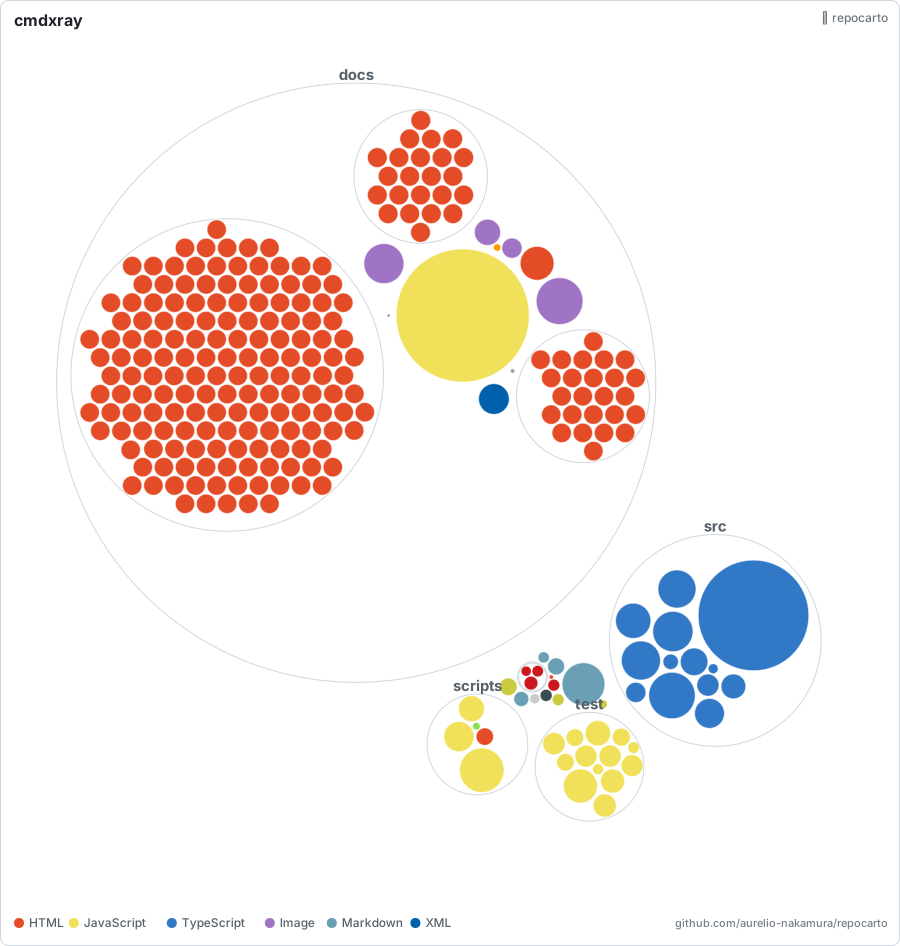
每个文件都以圆圈表示——大小 = 代码行数,颜色 = 语言,嵌套 = 文件夹。 使用我也在维护的零依赖代码库结构图工具 repocarto 离线生成。
许可证
MIT。
评论
一个开放协议,规定了 AI 应用如何以统一方式连接外部工具与数据源。客户端负责与模型对话,MCP 服务负责提供工具、资源和提示模板,两者通过标准消息通信,同一个服务可以被不同客户端复用。