
关于 Tavero
Tavero 是面向使用编码 Agent 的团队的本地 CLI 和 MCP 服务,用于保持 React 界面一致。它扫描运行中的应用,将界面问题关联到源码位置,并提供设计令牌上下文和审核决策。
主要功能
- 01按手机、平板和桌面宽度扫描 React 应用
- 02将渲染元素追溯到组件和源码行
- 03检查按钮、卡片、颜色和设计尺度
- 04提供含预期令牌与证据的问题
- 05在本地面板审核并记录决策
- 06生成 Agent 上下文和 HTML 报告
适用场景
- 01查找不同路由间不一致的按钮样式
- 02定位硬编码颜色和偏离尺度的间距
- 03向编码 Agent 提供精确到源码的修复任务
- 04审核视觉差异是否符合预期
MCP 相关
Tavero 通过 stdio 作为 MCP 服务运行,提供扫描、查询问题、组件、令牌和设计上下文的九种工具。它可配置给 Claude Code、Cursor、Codex 和 Gemini 等客户端。
配置
本地服务的配置在各客户端中通用,复制后粘贴到客户端的 MCP 配置文件即可。
工具
9收录的工具列表 · 更新于 5 天前
| 参数 | 类型 | 必填 | 说明 |
|---|---|---|---|
| budget | integer | 否 | 大致的 token 预算,默认值为 1500 |
详细介绍

Tavero
让 Agent 编写的界面保持一致。
taveroui.com · 文档 · 演示


Tavero 会扫描正在运行的 React 应用,找出按钮、卡片、颜色和间距中的偏差,并将每项修复内容连同文件、行号和应使用的 token 一起交给编码 Agent。它在你的机器上运行,可作为命令行工具、供 Claude Code、Cursor、Codex 和其他 Agent 使用的 MCP 服务,以及一个由你决定哪些设计符合预期的本地面板。
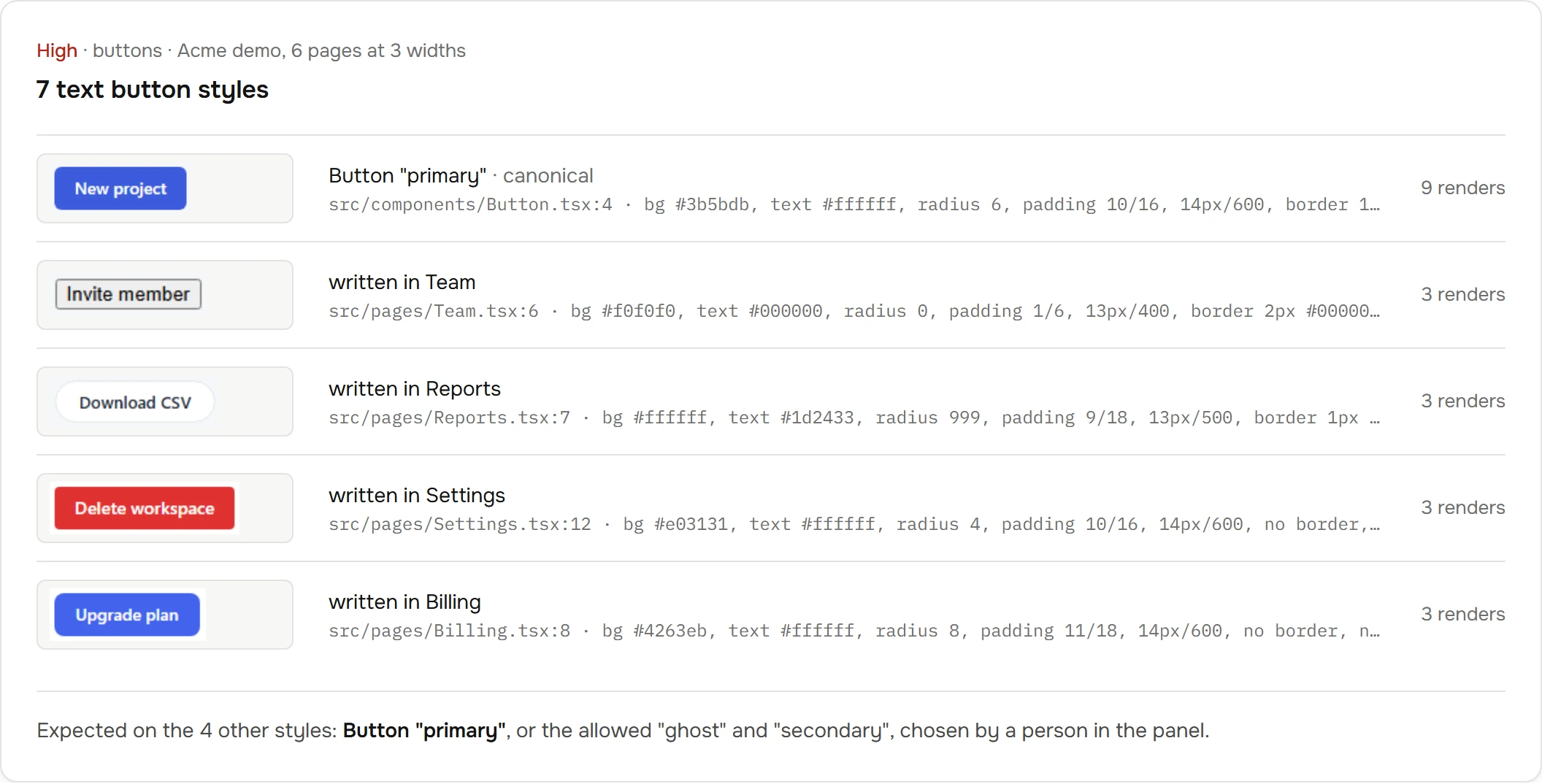
来自此仓库中 Acme 演示项目(demo/acme)的真实发现:以三种宽度扫描了六个页面。
工作原理
- 扫描。 Tavero 会在 Chromium 中以手机、平板和桌面宽度打开你的开发服务器;如果应用需要登录,也会使用你的登录信息。
- 归属。 每个可见元素都会映射到渲染它的 React 组件和源代码行,这些信息来自 React 自带的开发模式数据。项目中不会添加任何内容。
- 查找。 四条规则会将渲染结果与 token 及其自身进行比较:按钮、卡片、颜色和比例。
- 修复。 每条发现都包含一项任务:问题是什么、位置在哪(文件:行号)、当前值,以及预期的 token 或组件。Agent 会修复问题,你可以在几秒内重新扫描单条路由,并检查问题是否已解决。
快速开始
需要 Node 20 或更高版本,以及一个在开发模式下运行的 Vite 或 Next React 19 应用。
npm i -D tavero
npx playwright install chromium                      # once per machine
npx tavero login --url http://localhost:5173/login   # once, if the app has a login
npx tavero scan --url http://localhost:5173
npx tavero findings
id            sev     rule     decision  title                                                         evidence
f_c75ac3d6a2  high    buttons            7 text button styles                                          7
f_36cb934b5e  high    scales             13 distinct padding values, 1 declared                        12
f_94269275c1  medium  buttons            Two text button styles differ only in radius, paddingY, pa…   2
f_057122e1f9  medium  buttons            4 place(s) write <button> directly in page or section mark…   4
… 30 more, use --page 2
npx tavero finding f_ff30adc07c   # evidence: file:line, current value, expected token, crops
npx tavero context                # a ~1,500-token brief of the design system for an agent
npx tavero report                 # a self-contained HTML report
Tavero 只会写入 <project>/.tavero/。每条读取命令都支持 --json,文本输出最多为 20 行,便于放入 Agent 的上下文中。
在 Agent 中使用
tavero mcp 是一个基于 stdio、提供九种工具的 MCP 服务。打印客户端配置,并粘贴到相应位置:
npx tavero mcp --print-config claude       # Claude Code: .mcp.json
npx tavero mcp --print-config cursor       # .cursor/mcp.json
npx tavero mcp --print-config codex        # .codex/config.toml
npx tavero mcp --print-config gemini       # .gemini/settings.json
npx tavero mcp --print-config antigravity  # .agents/mcp_config.json
npx tavero mcp --print-config vscode       # .vscode/mcp.json (GitHub Copilot)
npx tavero mcp --print-config windsurf     # ~/.codeium/windsurf/mcp_config.json
然后将 docs/AGENTS.snippet.md 粘贴到 AGENTS.md、CLAUDE.md 或 GEMINI.md,这样 Agent 在编写界面前就会先读取设计上下文。SKILL.md 是一份包含完整工作流的 Agent Skill。
以下是 Claude Code 在 Acme 演示项目中的一段录制运行,全程未使用 shell,用时 29 秒:
› tavero_context
  Action button is Button from src/components/Button.tsx (props: variant)
› tavero_findings rule=colors
  f_ff30adc07c  Color #4263eb is not a project token
› tavero_finding f_ff30adc07c
  src/app.css:33  literal #4263eb in source
  expected  --acme-primary #3b5bdb (ΔE 3.5)
  edit src/app.css:33  background: #4263eb → var(--acme-primary)
› tavero_scan routes=/billing rules=colors
› tavero_diff
  resolved  f_ff30adc07c  Color #4263eb is not a project token
  resolved  f_18862a0332  Hardcoded color #4263eb in 1 place(s)
  new  0
| 工具 | 用途 |
|---|---|
tavero_context | 设计系统概要;编写界面前调用 |
tavero_findings、tavero_finding | 按严重程度从高到低列出问题;查看单个问题时提供证据、预期值和准确的重新扫描调用 |
tavero_scan | 扫描应用;修复后仅扫描已修改的 routes 和 rules。实时传输进度,可取消 |
tavero_diff | 显示上次扫描以来已解决、新增和未变化的问题 |
tavero_components、tavero_component、tavero_show、tavero_tokens | 组件清单、裁剪图路径、token |
规则
| 规则 | 报告内容 |
|---|---|
buttons | 不同的文本和图标按钮样式及渲染它们的组件、近似重复的按钮对、在按钮组件外编写的 <button> |
cards (初步) | 不同的卡片样式、近似重复项、以内联方式构建的类卡片容器 |
colors | 设计令牌之外的颜色及最接近的令牌和 ΔE、使用自有调色板的项目中的 Tailwind 默认颜色、近似相同的颜色对、带文件和行号的硬编码字面值 |
scales | 与设计令牌声明的比例不符的圆角半径、内边距、间距、字体大小、字重和阴影值 |
判断哪些是有意为之
npx tavero ui --open # http://127.0.0.1:4747
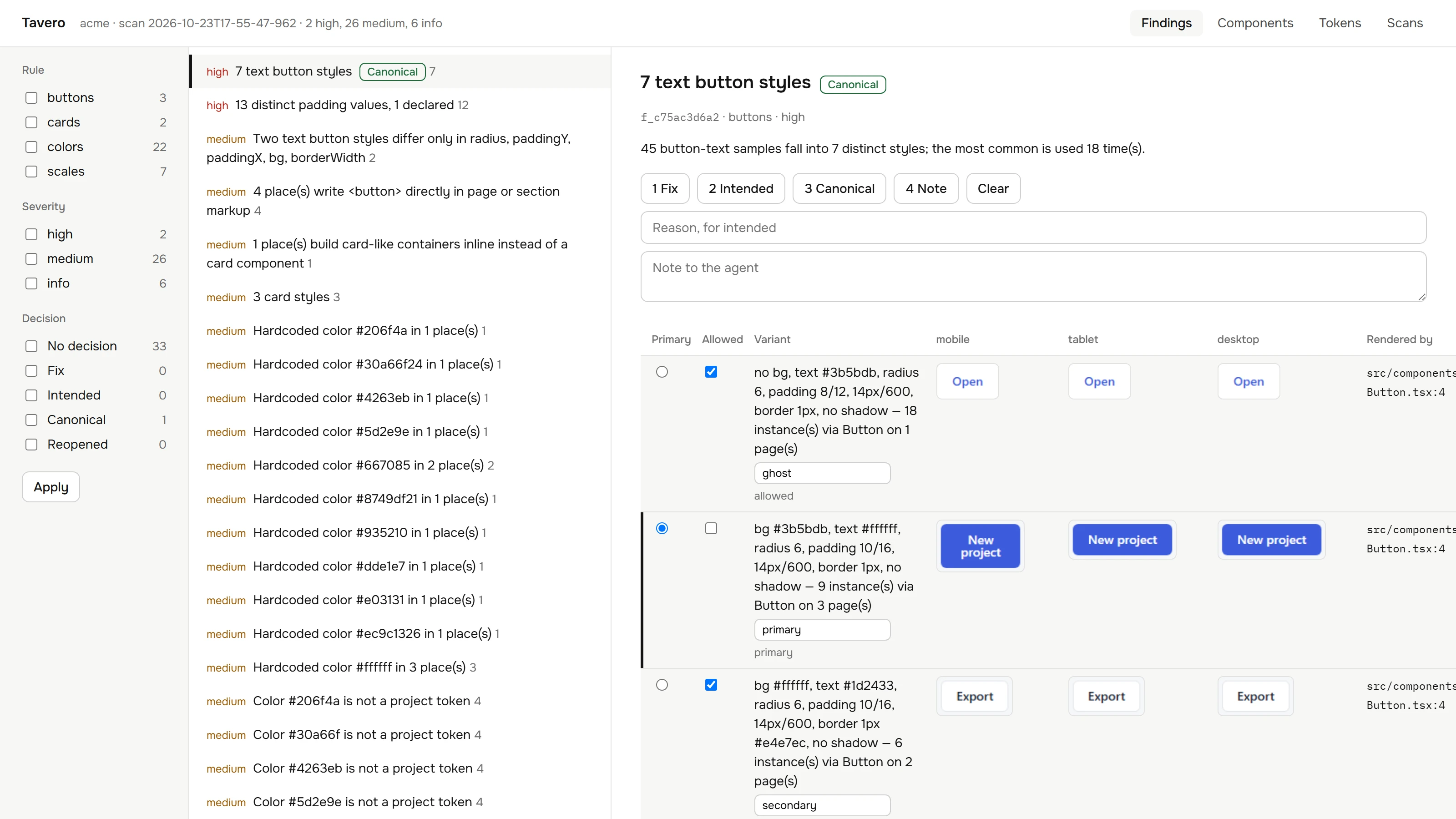
面向 Agent 使用者的本地面板。使用键盘逐项查看发现项并作出判断。Agent 会在下次调用时看到每项决定,无需重新扫描。
| 决定 | Agent 会看到什么 |
|---|---|
| 修复 | 该发现项会优先显示,并标记为已确认工作 |
| 有意为之 | 隐藏,直到该发现项出现在新的位置 |
| 规范 | 对按钮和卡片变体而言:参考变体及允许的变体,可选择命名(例如“主要”“幽灵”);其他变体会将其标记为 expected |
| 备注 | 随发现项一同传达的消息 |
决定保存在 .tavero/decisions.json 中,并以稳定的发现项 ID 为键。提交该文件即可与团队及其 Agent 共享这些决定。npx tavero ui --export ./panel 会生成面板的静态只读副本。
要求与限制
- 开发模式下的 React 19,运行于 Vite 或 Next(App Router、Turbopack)。React 18 保留不同的调试数据,目前尚不受支持。
- 从 CSS 自定义属性和 Tailwind 3 或 4 主题中读取设计令牌。
- 卡片检测基于启发式方法,因此
cards规则标记为初步。 - Tavero 在本地运行,不会向任何地方发送数据。无需账号,也没有遥测。
开发
npm ci
npx playwright install chromium
npm test             # unit and Playwright runtime tests; starts the test apps itself
npm run typecheck
npm run build
网站位于 site/(Next.js 静态导出)。运行 npm run site:install && npm run site:dev 即可启动;运行 npm run site:audit 可执行其检查:在网站本身运行 Tavero,确保高危和中危发现项均为 0,并运行 Lighthouse、axe 和三个宽度的测试。
src/
  core/      scan orchestration, aggregates, query API, decisions, diff, stable ids
  project/   framework detection
  static/    tokens, Tailwind theme and palette, hardcoded colors, component index
  runtime/   dev server, session, crawl, in-page collector, attribution, crops
  rules/     signatures and the four rules
  context/   the agent-facing brief
  report/    HTML report
  mcp/       MCP server, tools, client configs
  ui/        local panel and static export
  cli/       the command line
demo/acme/   a small dashboard with deliberate drift, used by tests and the website
test/        unit and runtime tests with mini Vite and Next apps
design/      design tokens shared by the panel and the website
site/        the website
提交拉取请求前,请参阅 CONTRIBUTING.md。
许可证
评论
一个开放协议,规定了 AI 应用如何以统一方式连接外部工具与数据源。客户端负责与模型对话,MCP 服务负责提供工具、资源和提示模板,两者通过标准消息通信,同一个服务可以被不同客户端复用。