
关于 buywhere-mcp
buywhere-mcp 是面向 AI Agent 的 MCP 服务,可跨五个市场搜索和比较商家商品,并提供实时价格及按配送地筛选的发现功能。
主要功能
- 01按关键词、类别、价格和国家搜索商品
- 02并排比较 2–10 件商品
- 03查找可配送的最低价商品
- 04发现优惠和相似商品
- 05浏览类别目录并提交商品链接
适用场景
- 01构建跨市场商品推荐 Agent
- 02一次查询比较多家零售商价格
- 03查找降价商品和高性价比选项
- 04在兼容 MCP 的应用中加入商品搜索
MCP 相关
向 MCP 客户端提供商品搜索、比较、优惠发现和目录工具,支持 stdio 与远程 MCP 接口。
配置
远程服务无需本地安装。选择你使用的客户端,复制配置或使用一键安装。
https://api.buywhere.ai/mcpclaude mcp add --transport http buywhere-buywhere https://api.buywhere.ai/mcp{"mcpServers":{"buywhere-buywhere":{"type":"http","url":"https://api.buywhere.ai/mcp"}}}在 Cursor 中打开{"servers":{"buywhere-buywhere":{"type":"http","url":"https://api.buywhere.ai/mcp"}}}在 VS Code 中打开{"mcpServers":{"buywhere-buywhere":{"type":"http","url":"https://api.buywhere.ai/mcp"}}}{"mcpServers":{"buywhere-buywhere":{"serverUrl":"https://api.buywhere.ai/mcp"}}}命令在终端中运行;JSON 粘贴到对应客户端的 MCP 配置后重启。需要授权的服务会在首次连接时提示登录。
https://api.buywhere.ai/mcp需要授权工具
13| 参数 | 类型 | 必填 | 说明 |
|---|---|---|---|
| q | string | 否 | 关键词搜索查询 |
| mode | enum | 否 | 搜索模式:keyword=仅 FTS(默认,与 REST /v1/products/search 一致),semantic=仅向量搜索,hybrid=FTS+向量的 RRF 混合。向量 DB 或 FLOWAI_EMBED_API_KEY 不可用时回退到 keyword。keyword | semantic | hybrid |
| limit | integer | 否 | 结果数(最大 100,默认值为 20) |
| query | string | 否 | q 的别名(为方便 Agent 而接受;请使用 q)。否则,调用方传入 `query` 时会得到 0 行以及由 reltuples 推导的总数——参见 BUY-75287。 |
| domain | string | 否 | 按商家平台筛选(例如 lazada、shopee、amazon) |
| market | string | 否 | country_code 的别名(已弃用,请使用 country_code)。 |
| offset | integer | 否 | 分页偏移量 |
| region | string | 否 | 按地区筛选(sea、us、eu、au) |
| compact | boolean | 否 | 返回针对 Agent 优化的紧凑结构:structured_specs、comparison_attributes、normalized_price_usd。响应大小约减少 40%。建议用于 Agent 工具调用。 |
| country | string | 否 | country_code 的别名(已弃用,请使用 country_code)。 |
| category | string | 否 | 按商品类别名称筛选(例如 "Laptops"、"Smartphones"、"Televisions")。用于排除配件并获取实际商品。 |
| max_price | number | 否 | 最高价格(货币根据 country_code 推断,默认为 SGD) |
| min_price | number | 否 | 最低价格(货币根据 country_code 推断,默认为 SGD) |
| deliver_to | string | 否 | 面向买家的场景必须将此项视为必填:最终用户的 ISO-3166 国家/地区代码(例如 "SG"、"US")。不提供时,结果不会按配送情况排序,且可能无法配送。优先于 country_code/country。 |
| country_code | enum | 否 | 按 ISO 国家/地区代码筛选。还可推断价格筛选器的默认货币(SG→SGD、US→USD、VN→VND、TH→THB、MY→MYR)。SG | US | VN | TH | MY |
详细介绍
BuyWhere MCP Server — 面向 AI Agent 的商品搜索与价格比较
AI Agent 使用 BuyWhere 实时搜索商品、比较价格,并在新加坡和美国商家中发现优惠。
30 秒完成安装
export BUYWHERE_API_KEY=bw_live_xxxx
npx -y @buywhere/mcp-server
可与 Claude Desktop、Cursor、VS Code Copilot、Cline、Windsurf、OpenCode、Codex、Continue.dev 以及任何兼容 MCP 的客户端搭配使用。
- npm:https://www.npmjs.com/package/@buywhere/mcp-server
- GitHub:https://github.com/BuyWhere/buywhere-mcp
- MCP Registry:https://registry.modelcontextprotocol.io/?q=io.github.BuyWhere%2Fbuywhere-mcp

或者 3 秒即可获取,无需注册、无需邮箱:POST /v1/auth/register · 旧版表单:buywhere.ai/api-keys







AI Agent:使用此软件包即可
- 搜索商品:按关键词、类别或价格范围搜索新加坡、美国、马来西亚、泰国和越南市场的商品
- 比较商品:通过单次查询比较 Lazada、Shopee、Amazon 和本地零售商的商品
- 查找优惠:发现优惠并跟踪实时价格,支持多种货币
- 构建购物 Agent:以编程方式推荐、比较商品并提供商品链接
- 探索商品目录:查看面向受支持市场的结构化分类体系
通过 Model Context Protocol 为 AI Agent 提供商品搜索 API。专为 AI Agent 电商场景打造,而非店铺管理。
官方 MCP Registry 条目:io.github.BuyWhere/buywhere-mcp
可与 Claude Desktop、Cursor、VS Code Copilot、Cline、Windsurf、OpenCode、Codex、Continue.dev 以及任何兼容 MCP 的客户端搭配使用。还支持 Agent-to-Agent (A2A) 协议。
演示
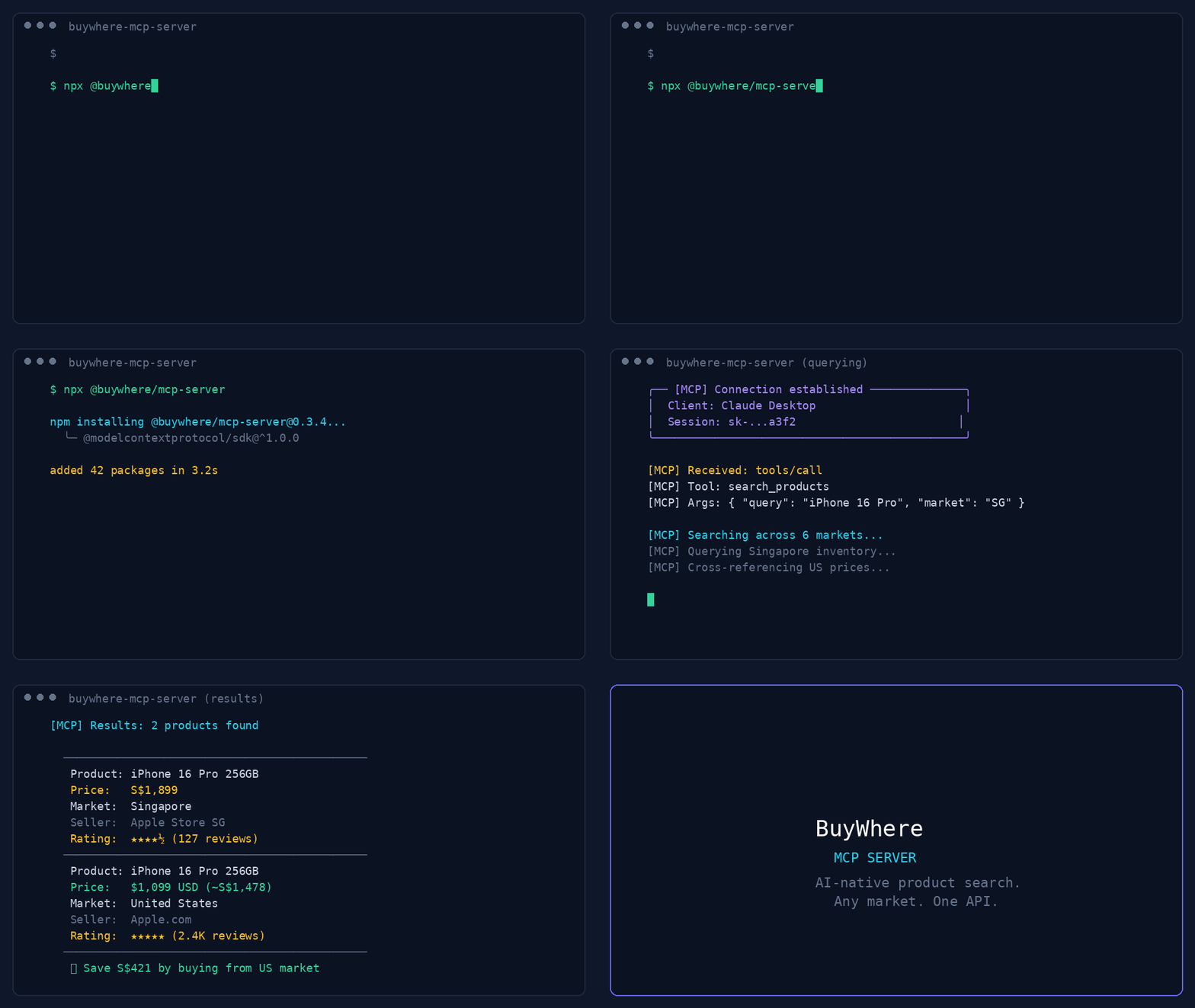
44 秒演示:商品搜索、优惠发现、价格比较和多地区支持。
User:   "Find me wireless earbuds under $50 available in Singapore"
Agent:  [calls search_products → returns 5 matching products]

User:   "Compare the top 3"
Agent:  [calls compare_products → side-by-side with best-value pick]
快速开始
3 秒即可获取密钥——无需注册、无需邮箱:
# 1. Register (one call, returns api_key instantly)
curl -X POST https://api.buywhere.ai/v1/auth/register \
  -H "Content-Type: application/json" \
  -d '{"agent_name":"your-agent"}'
# → {"api_key":"bw_...","tier":"unverified","rate_limit":{"rpm":20,"daily":1000}}

# 2. Use the key
export BUYWHERE_API_KEY=bw_...
npx -y @buywhere/mcp-server
旧版邮箱注册(60 秒,需手动审批)→ buywhere.ai/api-keys
教程
- 第 1 部分:电商领域的 MCP——AI Agent 购物缺失的基础设施层 — 架构,以及 Agent 为什么需要商品目录 API
- 第 2 部分:15 分钟内构建一个真正的购物 Agent — 实践:设置 MCP 服务、搜索商品、比较价格并构建可运行的 Agent
博客文章
阅读 BuyWhere 工程博客,深入了解 MCP 架构、Agent 商务和生态系统。
也可以关注 BuyWhere 的 Hashnode 博客镜像,在 Hashnode 上阅读相同的工程内容。
- 2026 年电商领域的 MCP — AI Agent 如何搜索真实商品、比较不同市场的价格,以及 MCP 为何是标准
- 构建生产级 MCP 服务 — 架构、工具设计模式和分发(经验证,每月约 1,050 次 npm 下载)
- 2026 年 MCP 服务生态系统 — MCP 的所有类别一览(40 多个领域中的 4,800 多个服务)
- AI Agent 商务:缺失的基础设施 — 为什么购物是 Agent 原生经济中最后一个尚未构建的层
- 跨境比价教程 — 使用 BuyWhere MCP,10 分钟内构建购物 Agent
工具
| 工具 | 描述 |
|---|---|
search_products | 按关键词、类别、价格和国家搜索目录 |
get_product | 按 ID 获取完整商品详情(价格、规格、图片) |
compare_products | 并排比较 2–10 件商品 |
find_best_price | 查找不同商家中可配送该商品的最低价商品列表 |
get_deals | 获取价格大幅下降的商品 |
list_categories | 可用商品类别分类体系 |
find_similar | 通过向量相似度查找相似商品 |
ingest_products | 提交商品 URL 以导入目录(Agent/商家) |
search_products_v2 | v2 搜索;需要 deliver_to(ISO 国家代码) |
get_product_v2 | 按 ID 获取 v2 商品详情 |
compare_products_v2 | v2 比较;deliver_to 为可选项 |
get_deals_v2 | v2 优惠;需要 deliver_to |
find_best_price_v2 | v2 最优价格;需要 deliver_to |
远程 MCP:POST https://api.buywhere.ai/mcp(JSON-RPC 2.0,protocolVersion 2024-11-05,13 个工具)。Glama 列表:https://glama.ai/mcp/servers/BuyWhere/buywhere-mcp
MCP 客户端配置
框架快速入门:
- CrewAI:API 密钥 · BuyWhere 快速入门
- Mastra:API 密钥 · BuyWhere 快速入门
Claude Desktop
添加到 claude_desktop_config.json:
{
  "mcpServers": {
    "buywhere": {
      "command": "npx",
      "args": ["-y", "@buywhere/mcp-server"],
      "env": { "BUYWHERE_API_KEY": "bw_live_xxxx" }
    }
  }
}
Cursor / VS Code / Cline
添加到 MCP 设置文件:
{
  "mcpServers": {
    "buywhere": {
      "command": "npx",
      "args": ["-y", "@buywhere/mcp-server"],
      "env": { "BUYWHERE_API_KEY": "bw_live_xxxx" }
    }
  }
}
Windsurf
添加到 ~/.windsurf/mcp.json:
{
  "mcpServers": {
    "buywhere": {
      "command": "npx",
      "args": ["-y", "@buywhere/mcp-server"],
      "env": { "BUYWHERE_API_KEY": "bw_live_xxxx" }
    }
  }
}
OpenCode / Codex
添加到 opencode.json:
{
  "mcpServers": {
    "buywhere": {
      "command": "npx",
      "args": ["-y", "@buywhere/mcp-server"],
      "env": { "BUYWHERE_API_KEY": "bw_live_xxxx" }
    }
  }
}
Continue.dev (VS Code / JetBrains)
添加到 ~/.continue/config.json:
{
  "experimental": {
    "mcpServers": {
      "buywhere": {
        "command": "npx",
        "args": ["-y", "@buywhere/mcp-server"],
        "env": { "BUYWHERE_API_KEY": "bw_live_xxxx" }
      }
    }
  }
}
Mastra
Mastra 是一个以 TypeScript 为先、原生支持 MCP 的 AI Agent 框架。
npm install @mastra/core @mastra/mcp
import { Mastra } from '@mastra/core';
import { MastraMCPClient } from '@mastra/mcp';

const buywhere = new MastraMCPClient({
  name: 'buywhere',
  server: {
    url: new URL('https://api.buywhere.ai/mcp'),
    requestInit: {
      headers: { 'Authorization': `Bearer ${process.env.BUYWHERE_API_KEY}` },
    },
  },
});

const agent = new Mastra({
  agents: {
    shoppingAgent: {
      instructions: 'You are a shopping assistant. Use BuyWhere to find and compare products.',
      tools: await buywhere.tools(),
    },
  },
});

const result = await agent.agents.shoppingAgent.generate(
  'Find me the best deal on a Sony WH-1000XM5 in Singapore'
);
完整指南:BuyWhere + Mastra 集成
LangChain
通过 MCP 适配器在 LangChain Agent 中使用 BuyWhere 工具:
from langchain_mcp_adapters.client import MultiServerMCPClient
from langgraph.prebuilt import create_react_agent
from langchain_anthropic import ChatAnthropic

async def main():
    async with MultiServerMCPClient({
        "buywhere": {
            "url": "https://api.buywhere.ai/mcp",
            "transport": "streamable_http",
            "headers": {"Authorization": f"Bearer {BUYWHERE_API_KEY}"},
        }
    }) as client:
        tools = await client.get_tools()
        agent = create_react_agent(ChatAnthropic(model="claude-sonnet-4-5"), tools)
        result = await agent.ainvoke({"messages": [("user", "Find the cheapest Sony headphones in Singapore")]})
LlamaIndex
通过 LlamaIndex MCP 客户端连接 BuyWhere:
from llama_index.tools.mcp import BasicMCPClient, McpToolSpec
from llama_index.agent.openai import OpenAIAgent

async def main():
    mcp_client = BasicMCPClient(
        command_or_url="https://api.buywhere.ai/mcp",
        headers={"Authorization": f"Bearer {BUYWHERE_API_KEY}"},
    )
    mcp_tool_spec = McpToolSpec(client=mcp_client)
    tools = mcp_tool_spec.to_tool_list()
    agent = OpenAIAgent.from_tools(tools)
    response = await agent.achat("Compare prices for iPhone 16 Pro across Singapore and US")
CrewAI
通过 MCP 工具集成,在 CrewAI Agent 中使用 BuyWhere:
from crewai import Agent, Task, Crew
from crewai_tools import MCPServerAdapter

buywhere_server = MCPServerAdapter(
    server_params={
        "url": "https://api.buywhere.ai/mcp",
        "headers": {"Authorization": f"Bearer {BUYWHERE_API_KEY}"},
        "transport": "streamable-http",
    }
)

shopping_agent = Agent(
    role="Shopping Research Analyst",
    goal="Find the best deals across Singapore and US markets",
    tools=[buywhere_server],
)

task = Task(
    description="Find the best price for Sony WH-1000XM5 headphones across all available markets",
    agent=shopping_agent,
    expected_output="Product comparison with prices and merchant links",
)

crew = Crew(agents=[shopping_agent], tasks=[task])
result = crew.kickoff()
配置
| 变量 | 默认值 | 描述 |
|---|---|---|
BUYWHERE_API_KEY | (必需) | API 密钥(无需注册:POST /v1/auth/register {"agent_name":"<name>"})— 即时返回,无需邮箱验证 |
BUYWHERE_API_URL | https://api.buywhere.ai/mcp | 自定义 API 基础 URL |
安装
# Run directly (no install)
npx -y @buywhere/mcp-server

# Install globally
npm install -g @buywhere/mcp-server
buywhere-mcp
使用场景
- 购物 Agent — 构建可跨市场搜索、比较和推荐商品的 AI Agent
- 价格比较 — 通过单次查询比较 Lazada、Shopee、Amazon 和本地零售商的多市场价格
- 发现优惠 — 实时查找性价比最高的商品及其价格和库存
- 电商自动化 — 将商品搜索集成到任何兼容 MCP 的应用中
- 跨境商务 — 比较新加坡、美国、马来西亚、泰国和越南市场的价格
- Agent 间商务 — 通过 A2A 协议在 Agent 之间委派购物任务
架构
Developer's AI Agent (Claude, Cursor, etc.)
  │
  ├── MCP Protocol (stdio)
  │
  ├── @buywhere/mcp-server
  │     ├── search_products(q, category, min_price, max_price, country_code, deliver_to)
  │     ├── get_product(product_id)
  │     ├── compare_products(product_ids[])
  │     ├── find_best_price(product_name, country_code, deliver_to)
  │     ├── get_deals(country_code, deliver_to, category)
  │     ├── list_categories()
  │     ├── find_similar(product_id)
  │     └── ingest_products(urls[])
  │
  └── BuyWhere API (api.buywhere.ai)
        └── Product catalog across SG, US, MY, TH, and VN merchants
开发
git clone https://github.com/BuyWhere/buywhere-mcp.git
cd buywhere-mcp
npm install
npm run build
npm start
为什么选择 BuyWhere?
BuyWhere 是面向 AI Agent 的商品搜索 API。我们将来自新加坡、美国、马来西亚、泰国和越南商家的商品数据汇总到一个适用于 Agent 的界面中 — 无需管理店铺,也无需集成 Shopify。只需实时搜索和比较商品。
- 一个 API — 覆盖所有市场和零售商
- 原生支持 Agent — 从第一天起就为 MCP 构建
- 实时数据 — 实时价格和库存情况
- 开发者优先 — 无需 SDK,只需添加服务即可
搭配使用效果出色
这些互补的 MCP 软件包可将 BuyWhere 扩展为强大的多工具工作流:
- @modelcontextprotocol/server-filesystem — 将购物结果和商品调研保存到本地文件系统。与 BuyWhere 搭配使用,可将优惠清单、价格比较和商品规格导出为结构化文件。
- @supabase/mcp-server-supabase — 在 Supabase 中存储收藏商品、用户偏好和价格提醒。跨 Agent 会话保留购物历史记录。
- n8n-mcp — 自动化价格监控工作流。构建无代码流程,监控 BuyWhere 价格,并在降价时触发通知。
- tavily-mcp — 购买前调研商品。使用 Tavily 查找评价和比较信息,再使用 BuyWhere 获取当前价格和购买链接。
- @playwright/mcp — 对购物 Agent 交互进行端到端测试。在浏览器自动化中验证商品搜索、价格比较和结账流程是否正常运行。
协议
| 协议 | 支持情况 |
|---|---|
| MCP(Model Context Protocol) | 完全支持 — 10 个工具,stdio 传输 |
| A2A(Agent-to-Agent) | 多 Agent 任务委派 — Agent 卡片 |
参与贡献
请参阅 CONTRIBUTING.md,了解如何报告问题、提交 PR 和提出功能建议。
博客文章
进一步了解 MCP 服务和 BuyWhere 生态系统:
- MCP 服务发现 — 了解 MCP 服务发现方面的不足
- 构建生产级 MCP 服务 — MCP 服务的生产实践
- 值得占用上下文窗口的 MCP 服务 — 最大化上下文窗口价值的 MCP 服务
- MCP 电商指南 — MCP 电商权威指南
- BuyWhere MCP 发布 — 宣布 BuyWhere MCP 服务正式发布
- 2026 年 MCP 服务生态系统 — MCP 服务生态系统完整指南
支持
如果你觉得这个项目有用:
许可证
MIT
评论
一个开放协议,规定了 AI 应用如何以统一方式连接外部工具与数据源。客户端负责与模型对话,MCP 服务负责提供工具、资源和提示模板,两者通过标准消息通信,同一个服务可以被不同客户端复用。