
关于 arabicfmt-mcp
arabicfmt-mcp 是面向 JavaScript 和 TypeScript 的阿拉伯语格式化库,覆盖 22 个阿拉伯国家的货币、数字、日期及 RTL 文本处理。输入资料未说明其 MCP 功能。
主要功能
- 01格式化阿拉伯货币与精度
- 02格式化回历日期
- 03数字转阿拉伯语文字
- 04支票金额文字化
- 05处理 RTL 与双向文本
适用场景
- 01生成阿拉伯语发票金额
- 02展示本地化的回历日期
- 03解析东方阿拉伯数字
- 04修复混排文本的方向问题
配置
本地服务的配置在各客户端中通用,复制后粘贴到客户端的 MCP 配置文件即可。
工具
17收录的工具列表 · 更新于 3 周前
| 参数 | 类型 | 必填 | 说明 |
|---|---|---|---|
| amount | number | 是 | 要格式化的货币金额。 |
| locale | string | 否 | BCP-47 区域设置,例如 'ar'、'ar-SA'、'en'。默认值为 'ar'。 |
| currency | string | 否 | ISO 4217 货币代码,例如 'SAR'、'AED'、'KWD'。默认值为 SAR 区域的默认货币。 |
| numerals | enum | 否 | 数字系统:'latn'(1234)、'arab'(东阿拉伯数字 ١٢٣٤)或 'arabext'(波斯语/乌尔都语数字 ۱۲۳۴)。latn | arab | arabext |
详细介绍
arabicfmt
面向阿拉伯语的 JavaScript 和 TypeScript 格式化
货币符号 · 回历/伊斯兰历 · 数字转文字 · تفقيط · 6 种复数形式 · RTL/双向文本 —
适用于阿拉伯国家联盟全部 22 个国家,零依赖,并提供完整的 TypeScript 类型。
أرقامٌ وعملاتٌ وتواريخُ هجريةٌ ولغةٌ عربيةٌ سليمة — في سطرٍ واحد.





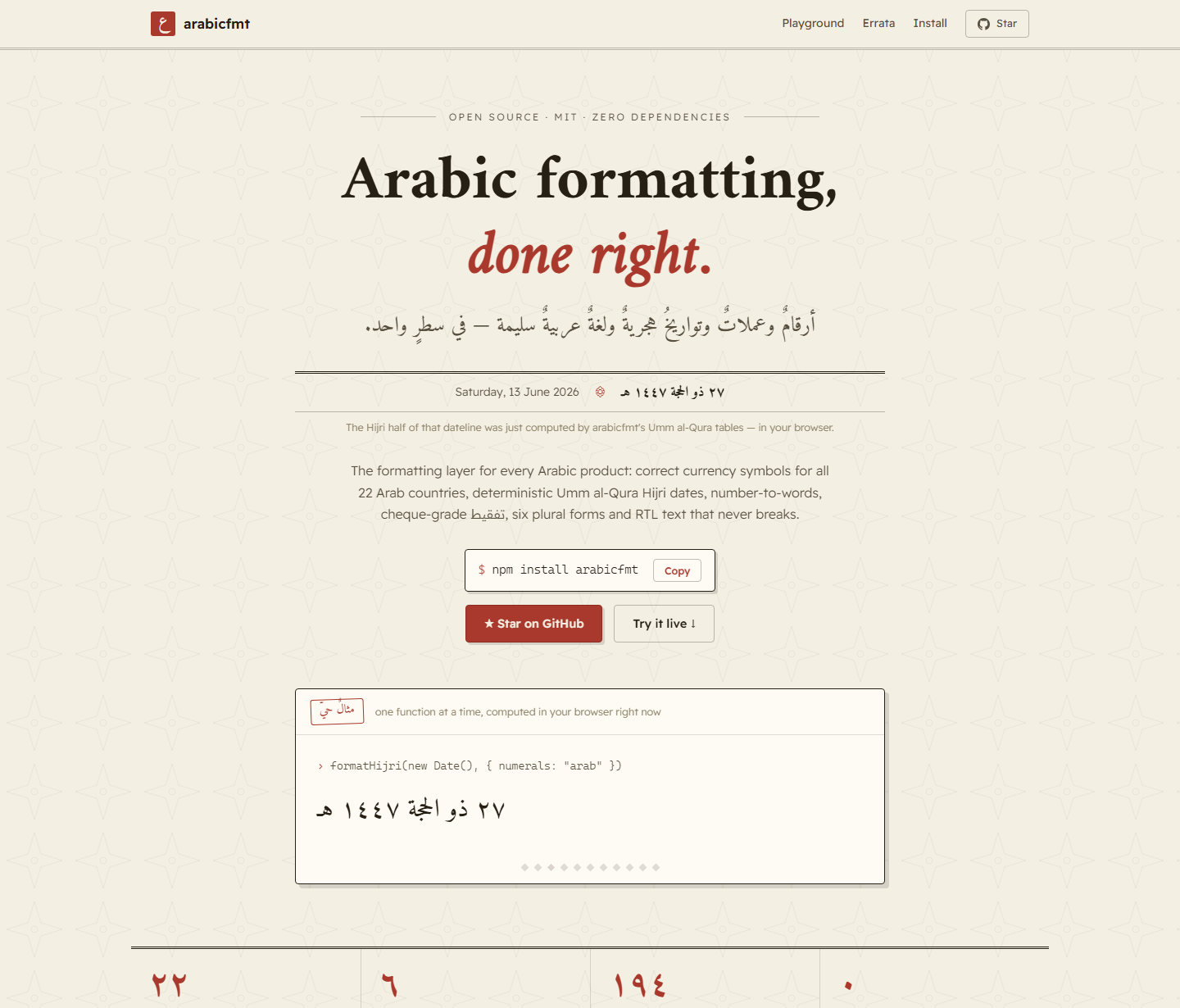
arabicfmt 是唯一一款能在一个零依赖包中处理完整阿拉伯语格式化需求的 JavaScript 库,涵盖货币符号、数字精度、回历/伊斯兰历日期、RTL 双向文本、阿拉伯语数字转文字和 تفقيط,并提供完整的 TypeScript 类型。适用于 Node、浏览器、Deno、Bun 和 React Native。
0.1.5 新增: Unicode 17.0/18.0 过渡期的所有货币符号——SAR
U+20C1、MVRU+20C2、AEDU+20C3、OMRU+20C4——以及真正渲染这些符号所需的工具:类型化部分、生成的@font-face、价格区间和日期感知型过渡注册表。
npm install arabicfmt
其他库存在的问题
| 问题 | 其他库 | arabicfmt |
|---|---|---|
| 沙特里亚尔 U+20C1 | 输出 ﷼(U+FDFC)——这是伊朗里亚尔 | 正确使用 U+20C1,并提供安全的文本回退 |
| Unicode 18.0 货币符号(MVR/AED/OMR) | 未编码,或仍使用旧缩写 | 提供全部四种符号,以及 transitionStatus() 和生成的 @font-face |
| 为新符号设置样式 | 用正则表达式从格式化字符串中提取符号 | formatCurrencyToParts()——符号本身就是一个带类型的部分 |
| 伊拉克第纳尔(IQD)小数位数 | 0(CLDR 实用标准) | 3 位小数——ISO 4217 法律标准 |
| 回历日期输出 | 在 Node、Chrome、Safari 和 Hermes 中各不相同 | 冻结的 Umm al-Qura 表——在所有引擎中完全一致 |
| 阿拉伯语复数 | 1–2 种形式;阿拉伯语法律上需要 6 种 | 完整的 CLDR 6 种形式系统(zero/one/two/few/many/other) |
| 将数字转换为阿拉伯语文字 | 没有零依赖的解决方案 | arabicToWords(1234) → "ألف ومئتان وأربعة وثلاثون" |
| 将金额转换为支票大写金额(تفقيط) | 自行实现,容易弄错语法 | spellCurrency(1234.5, {currency:"SAR"}) → "ألف ومئتان وأربعة وثلاثون ريالاً وخمسون هللةً" |
| 序数(ترتيبية) | 缺失或不区分性别 | arabicOrdinal(25) → "الخامس والعشرون",支持性别区分 |
| 口语时长 | Intl.DurationFormat 支持度很低 | formatDuration(7_500_000) → "ساعتان وخمس دقائق",支持完整的语法一致 |
| RTL 句子错乱 | 电话号码会在句子中间翻转 | 自动用 Unicode 隔离符包裹 LTR 文本段 |
| 东阿拉伯数字解析 | parseInt("١٢٣") → NaN | parseNumber("١٬٢٣٤٫٥٦") → 1234.56 |
| 阿拉伯语 URL slug | 清除后变为空,或出现乱码 | slugify("مدينة جدة") → "mdynh-jdh" |
| IBAN / 沙特身份证校验 | 会接受错误号码的正则表达式 | 真正的 ISO 7064 mod-97 + Luhn 校验和 |
安装
npm install arabicfmt
# or
yarn add arabicfmt
# or
pnpm add arabicfmt
要求: Node.js ≥ 18 · TypeScript ≥ 4.7(可选)· 零运行时依赖。
浏览器 / CDN — 无需构建步骤
每个版本都会自动镜像到 jsDelivr 和 unpkg CDN。直接从 URL 导入可用于浏览器的 ESM 包——无需安装,也无需打包器:
<script type="module">
  import { formatCurrency, formatHijri } from "https://cdn.jsdelivr.net/npm/arabicfmt/+esm";

  console.log(formatCurrency(1234.5, { currency: "SAR", numerals: "arab" })); // ١٬٢٣٤٫٥٠ ر.س
  console.log(formatHijri(new Date(), { numerals: "arab" }));                 // ٢٧ ذو الحجة ١٤٤٧ هـ
</script>
子路径也可用——例如,https://cdn.jsdelivr.net/npm/arabicfmt/dist/currency/index.js 仅用于货币模块。生产环境请固定版本,例如 [email protected]。
快速开始
import {
  formatCurrency,      // correct symbol + precision for every Arab currency
  formatCurrencyRange, // "1,000.00 – 5,000.00 ر.س"
  formatCurrencyToParts, // typed parts — font-scope just the new Unicode sign
  transitionStatus,    // "none" | "announced" | "encoded" for any date
  signFontFaceCSS,     // the scoped @font-face the new signs need
  formatCompact,       // 1,200,000 → "1.2M" / "١٫٢ مليون"
  arabicToWords,       // 1234 → "ألف ومئتان وأربعة وثلاثون"
  spellCurrency,       // تفقيط: 1234.5 SAR → "...ريالاً وخمسون هللةً"
  arabicOrdinal,       // 25 → "الخامس والعشرون"
  formatDuration,      // 7_500_000ms → "ساعتان وخمس دقائق"
  formatFileSize,      // 1536 → "1.5 كيلوبايت"
  formatRelativeTime,  // "منذ ٣ أيام"
  formatList,          // ["أحمد","علي"] → "أحمد وعلي"
  parseCurrency,       // "١٬٢٣٤٫٥٠ ر.س" → 1234.5
  arabicPlural,        // full 6-form Arabic plural selection
  sortArabic,          // Arabic-locale collation
  slugify,             // "مدينة جدة" → "mdynh-jdh" (URL slugs)
  isValidIBAN,         // ISO 7064 mod-97 IBAN checksum
  isValidSaudiId,      // Saudi national ID / Iqama check digit
  isolateForeign,      // fix broken RTL sentences
  normalizeForSearch,  // search-key normalization
  detectLocale,        // auto-detect from browser / Node environment
} from "arabicfmt";

import { formatHijri, toHijri } from "arabicfmt/umalqura"; // deterministic Hijri calendar

// Currency
formatCurrency(1.2,   { currency: "KWD" });                      // "1.200 د.ك"
formatCurrency(1234,  { locale: "ar-SA", numerals: "arab" });    // "١٬٢٣٤٫٠٠ ر.س"
formatCurrency(-500,  { currency: "SAR", accounting: true });    // "(500.00 ر.س)"
formatCurrencyRange(1000, 5000, { currency: "SAR" });            // "1,000.00 – 5,000.00 ر.س"
formatCompact(1_500_000, { locale: "ar", numerals: "arab" });    // "١٫٥ مليون"

// The Unicode currency-sign transition, as data
transitionStatus("AED");                          // "encoded" (Unicode 18.0)
transitionStatus("AED", new Date("2026-01-01"));  // "announced"
transitionStatus("KWD");                          // "none" — Kuwait has no sign
signFontFaceCSS({ src: "/fonts/signs.woff2" });   // @font-face … unicode-range: U+20C1…U+20C4

// Number to Arabic words
arabicToWords(1234);                     // "ألف ومئتان وأربعة وثلاثون"
arabicToWords(1_000_000);               // "مليون"
arabicToWords(5, { gender: "female" }); // "خمس"

// Spell money for invoices & cheques (التفقيط)
spellCurrency(1234.5, { currency: "SAR" });
// "ألف ومئتان وأربعة وثلاثون ريالاً وخمسون هللةً"
spellCurrency(100, { currency: "SAR", suffix: true }); // "مئة ريال فقط لا غير"

// Ordinals — gender-aware
arabicOrdinal(1);                        // "الأول"
arabicOrdinal(25);                       // "الخامس والعشرون"
arabicOrdinal(1, { gender: "female" });  // "الأولى"

// Duration & file size
formatDuration(7_500_000);               // "ساعتان وخمس دقائق"
formatFileSize(1536);                    // "1.5 كيلوبايت"

// Lists
formatList(["أحمد", "محمد", "علي"]);                    // "أحمد ومحمد وعلي"
formatList(["تفاح", "موز"], { type: "disjunction" });   // "تفاح أو موز"

// Hijri dates (deterministic — same output on Node, Chrome, Safari, Hermes)
formatHijri(new Date("2025-09-23"));                            // "1 ربيع الآخر 1447 هـ"
formatHijri(new Date("2025-09-23"), { numerals: "arab" });     // "١ ربيع الآخر ١٤٤٧ هـ"
toHijri(new Date("2025-09-23"));                               // { year: 1447, month: 4, day: 1 }

// Relative time
formatRelativeTime(new Date(Date.now() - 3 * 86400_000));      // "منذ 3 أيام"

// Parse formatted strings back to numbers
parseCurrency("١٬٢٣٤٫٥٠ ر.س");   // 1234.5
parseCurrency("(500.00 SAR)");    // -500

// RTL
isolateForeign("اتصل على +1 (555) 234-5678 الآن"); // phone stays intact in RTL

// Locale auto-detection
detectLocale(); // "ar-SA" in a Saudi browser, "ar-EG" in Node with LANG=ar_EG
货币格式化
符号策略:symbolMode
沙特里亚尔于 2025 年 9 月获得了自己的 Unicode 符号(U+20C1)。大多数库要么输出错误的连字(U+FDFC,即伊朗里亚尔),要么回退到 SAR。arabicfmt 让你完全掌控:
import { formatCurrency, resolveCurrencySymbol, getCurrencyInfo } from "arabicfmt/currency";
formatCurrency(1234.5, { currency: "SAR" });
// → "1,234.50 ر.س" (auto: safe text symbol, renders everywhere today)
formatCurrency(1234.5, { currency: "SAR", symbolMode: "new" });
// → "1,234.50 " (U+20C1 — use with a webfont; see webfont guide below)
formatCurrency(1234.5, { currency: "SAR", symbolMode: "code" });
// → "1,234.50 SAR" (ISO code — for accounting tables)
symbolMode | SAR | AED | OMR | 适用场景 |
|---|---|---|---|---|
auto (默认) | ر.س | U+20C3 | U+20C4 | 默认值。AED/OMR 使用专用符号;SAR 使用安全的文本形式 |
new | U+20C1 | U+20C3 | U+20C4 | 强制使用专用符号(需要字体支持) |
text | ر.س | د.إ | ر.ع. | 始终使用安全的文本符号——可在所有地方正常显示 |
code | SAR | AED | OMR | ISO 代码 |
Unicode 18.0(2026 年 9 月 16 日): AED(U+20C3)、OMR(U+20C4)和 MVR (U+20C2)符号现已处于
live状态,auto会优先使用它们。今天需要最高 兼容性?请使用symbolMode: "text"。根据设计,沙特里亚尔仍默认使用 安全的文本形式。完整表格请参阅 过渡说明。
正确的小数精度——阿拉伯国家联盟全部 22 个国家
在构建时根据 CLDR 48.2.0 生成,并且每次构建都会验证:
formatCurrency(1.2, { currency: "KWD" });  // "1.200 د.ك"  ← 3 decimals
formatCurrency(1.2, { currency: "BHD" });  // "1.200 د.ب"  ← 3 decimals
formatCurrency(1.2, { currency: "IQD" });  // "1.200 ع.د"  ← 3 decimals (ISO 4217, not CLDR's 0)
formatCurrency(500, { currency: "KMF" });  // "500 ف.ج.ق"  ← 0 decimals
formatCurrency(500, { currency: "SAR" });  // "500.00 ر.س" ← 2 decimals
| 小数位数 | 货币 |
|---|---|
| 3 | KWD、BHD、OMR、JOD、IQD、LYD、TND |
| 0 | DJF、KMF |
| 2 | SAR、AED、QAR 等 |
所有货币选项
// Resolve from locale region — no need to know the currency code
formatCurrency(99.9, { locale: "ar-BH" }); // "99.900 د.ب"
formatCurrency(1234, { locale: "ar-AE", numerals: "arab", symbolMode: "text" }); // "١٬٢٣٤٫٠٠ د.إ" (auto → U+20C3 sign)
// Accounting notation (negatives in parentheses)
formatCurrency(-1234.5, { currency: "SAR", accounting: true }); // "(1,234.50 ر.س)"
// Hide/override
formatCurrency(100, { currency: "SAR", showSymbol: false, fractionDigits: 0 }); // "100"
// Currency metadata
getCurrencyInfo("SAR");
// {
// code: "SAR", digits: 2,
// symbols: { auto: "ر.س", text: "ر.س", code: "SAR", new: "" },
// unicode: { codepoint: "U+20C1", unicodeVersion: "17.0", live: true, autoDefault: false },
// displayName: "ريال سعودي"
// }
价格范围
import { formatCurrencyRange } from "arabicfmt/currency";
formatCurrencyRange(1000, 5000, { currency: "SAR" })
// "1,000.00 – 5,000.00 ر.س" ← one symbol, the way ranges are actually set
formatCurrencyRange(1000, 5000, { currency: "SAR", symbolEach: true })
// "1,000.00 ر.س – 5,000.00 ر.س"
formatCurrencyRange(1.2, 2, { currency: "KWD" })
// "1.200 – 2.000 د.ك" ← both ends share the currency's precision
formatCurrencyRange(1000, 5000, { currency: "SAR", numerals: "arab" })
// "١٬٠٠٠٫٠٠ – ٥٬٠٠٠٫٠٠ ر.س"
formatCurrencyRange(50, 50, { currency: "AED" }) // "50.00 " — collapses
formatCurrencyRange(500, 100, { currency: "SAR" }) // throws: reversed range
如需使用默认空格连接的 en dash 以外的分隔符,请传入 rangeSeparator({ rangeSeparator: " إلى " });若范围位于混合方向的句子中,请传入 isolate: true,以包裹整个范围。
渲染新货币符号
全新的货币符号需要两样字符串无法提供的东西:限定到其码位的 Web 字体,以及一种只将 符号 包装在使用该字体的元素中的方式。两者都只需调用一次。
1. parts API — 货币领域对应于
Intl.NumberFormat.prototype.formatToParts 的 API:
import { formatCurrencyToParts } from "arabicfmt/currency";
formatCurrencyToParts(1234.5, { currency: "SAR", symbolMode: "new" });
// [ { type: "integer", value: "1" },
// { type: "group", value: "," },
// { type: "integer", value: "234" },
// { type: "decimal", value: "." },
// { type: "fraction", value: "50" },
// { type: "literal", value: " " },
// { type: "currency", value: "", symbolMode: "new",
// codepoint: "U+20C1", needsFont: true } ]
当且仅当某个部分包含专用 Unicode 符号时,needsFont 才为 true,因此组件不必对格式化后的字符串进行模式匹配(双向文本 bug 正是这样产生的):
<span dir="rtl">
  {formatCurrencyToParts(total, { currency: "SAR", symbolMode: "new" }).map(
    (part, i) =>
      part.needsFont
        ? <span key={i} className="riyal-sign">{part.value}</span>
        : <span key={i}>{part.value}</span>,
  )}
</span>
部分类型与 Intl 一致(integer、group、decimal、fraction、
minusSign、plusSign、literal),此外 arabicfmt 还添加了四种类型:currency、
parenthesis(会计格式)、isolate(双向文本控制符)和 rangeSeparator。
2. @font-face 规则 — 自动生成,并带有 unicode-range,因此从未显示货币符号的页面无需承担额外开销:
import { signFontFaceCSS } from "arabicfmt/currency";

signFontFaceCSS({ src: "/fonts/currency-signs.woff2" });
// @font-face {
//   font-family: "Arabicfmt Signs";
//   src: url("/fonts/currency-signs.woff2") format("woff2");
//   font-display: swap;
//   unicode-range: U+20C1, U+20C2, U+20C3, U+20C4;
// }

// Saudi riyal only, into a family name you already use:
signFontFaceCSS({ src: "/fonts/riyal.woff2", family: "Riyal", currencies: ["SAR"] });
// unicode-range: U+20C1;
由于范围限定为这些码位,浏览器只会在实际绘制其中某个码位时下载字体,不会影响正文。将该字体放在字体栈首位,其余字体作为回退:
:root { font-family: "Arabicfmt Signs", "Noto Naskh Arabic", sans-serif; }
signUnicodeRange() 只返回范围字符串("U+20C1, U+20C2, U+20C3, U+20C4"),适用于 CSS-in-JS。这两个辅助函数都会拒绝任何可能逃逸出规则的内容,因此配置中的 URL 无法注入 CSS。
数字格式化
import {
  formatNumber, formatCompact, formatPercent,
  toArabicDigits, toExtendedArabicDigits, toLatinDigits,
  parseNumber, parseCurrency,
  arabicToWords,
  formatRelativeTime,
} from "arabicfmt/number";

// Standard
formatNumber(1_234_567.89, { locale: "en" });              // "1,234,567.89"
formatNumber(1234.5,       { numerals: "arab" });           // "١٬٢٣٤٫٥"

// Compact / short notation — dashboards and data cards
formatCompact(1_500_000);                                   // "1.5M"
formatCompact(1_500_000, { locale: "ar" });                 // "1.5 مليون"
formatCompact(1_500_000, { locale: "ar", numerals: "arab" }); // "١٫٥ مليون"

// Percent
formatPercent(0.853, { locale: "en" });                    // "85.3%"

// Three numeral systems: latn (default), arab, arabext
formatNumber(1234.5, { numerals: "arab" });                // "١٬٢٣٤٫٥"  Eastern Arabic
formatNumber(1234.5, { numerals: "arabext" });             // "۱٬۲۳۴٫۵"  Persian/Urdu

// Transliteration
toArabicDigits("Order #2026");                             // "Order #٢٠٢٦"
toExtendedArabicDigits("2026");                            // "۲۰۲۶"
toLatinDigits("٢٠٢٦");                                     // "2026"  (handles Persian ۰–۹ too)

// Parsing — round-trip support
parseNumber("١٬٢٣٤٫٥٦");         // 1234.56  (Eastern Arabic digits + separators)
parseNumber("1,234.56");          // 1234.56  (Western)
parseCurrency("١٬٢٣٤٫٥٠ ر.س");  // 1234.5
parseCurrency("(500.00 SAR)");   // -500      (accounting notation)

// Relative time
formatRelativeTime(new Date(Date.now() - 3 * 86400_000));            // "منذ 3 أيام"
formatRelativeTime(new Date(Date.now() + 3600_000), new Date(), { locale: "en" }); // "in 1 hour"
数字转阿拉伯语词语(arabicToWords)
将整数转换为对应的阿拉伯语词语形式——支持性别一致以及所有六个数量级。
import { arabicToWords } from "arabicfmt";

// Basic
arabicToWords(0)       // "صفر"
arabicToWords(1)       // "واحد"
arabicToWords(2)       // "اثنان"
arabicToWords(11)      // "أحد عشر"
arabicToWords(25)      // "خمسة وعشرون"
arabicToWords(100)     // "مئة"
arabicToWords(350)     // "ثلاثمئة وخمسون"

// Thousands
arabicToWords(1000)    // "ألف"
arabicToWords(2000)    // "ألفان"
arabicToWords(5000)    // "خمسة آلاف"
arabicToWords(11000)   // "أحد عشر ألفاً"
arabicToWords(100000)  // "مئة ألف"

// Millions / billions
arabicToWords(1_000_000)    // "مليون"
arabicToWords(2_000_000)    // "مليونان"
arabicToWords(5_000_000)    // "خمسة ملايين"
arabicToWords(1_000_000_000)// "مليار"

// Large composite
arabicToWords(1_234_567)
// "مليون ومئتان وأربعة وثلاثون ألفاً وخمسمئة وسبعة وستون"

// Gender agreement — feminine noun (ليرة، روبية…)
arabicToWords(3, { gender: "female" })  // "ثلاث"
arabicToWords(5, { gender: "female" })  // "خمس"

// Negative
arabicToWords(-42)  // "سالب اثنان وأربعون"

// Decimals — opt in (default truncates, stays backward compatible)
arabicToWords(3.14, { fraction: "digits" })  // "ثلاثة فاصلة واحد أربعة"
arabicToWords(3.14, { fraction: "number" })  // "ثلاثة فاصلة أربعة عشر"

// Common fractions (denominators 2–10)
import { arabicFraction } from "arabicfmt";
arabicFraction(1, 2)  // "نصف"
arabicFraction(3, 4)  // "ثلاثة أرباع"
arabicFraction(2, 3)  // "ثلثان"
用文字拼写金额 — التفقيط
spellCurrency 是每张阿拉伯语发票、支票和合同都需要的 tafqit:它会将数字金额转换为完整的法定阿拉伯语表述,拆分主要单位和次要单位,并对每个名词进行变格,使其符合正确的语法一致关系(单数/双数/复数/宾格)。
import { spellCurrency } from "arabicfmt";

spellCurrency(1234.5, { currency: "SAR" })
// "ألف ومئتان وأربعة وثلاثون ريالاً وخمسون هللةً"

// Unit agreement is automatic (العدد والمعدود)
spellCurrency(1,   { currency: "SAR" })   // "ريال واحد"      (singular)
spellCurrency(2,   { currency: "SAR" })   // "ريالان"         (dual)
spellCurrency(3,   { currency: "SAR" })   // "ثلاثة ريالات"   (plural, 3–10)
spellCurrency(11,  { currency: "SAR" })   // "أحد عشر ريالاً" (accusative, 11–99)
spellCurrency(100, { currency: "SAR" })   // "مئة ريال"       (genitive singular)

// Minor-unit precision comes from CLDR — KWD = 1000 fils, SAR = 100 halalas
spellCurrency(1.5, { currency: "KWD" })   // "دينار واحد وخمسمئة فلس"
spellCurrency(0.75, { currency: "SAR" })  // "خمس وسبعون هللةً"

// Cheque-ready ending and locale-derived currency
spellCurrency(100, { currency: "SAR", suffix: true }) // "مئة ريال فقط لا غير"
spellCurrency(-5,  { locale: "ar-AE" })               // "سالب خمسة دراهم"
已为阿拉伯联盟的全部 22 种货币(SAR、AED、KWD、BHD、QAR、OMR、JOD、EGP、IQD、LYD、TND、DZD、MAD、SDG、LBP、SYP、YER、SOS、DJF、KMF、MRU)内置完整的阿拉伯语名词范式。可通过导出的 CURRENCY_WORDS 表进行查看或扩展。
序数 — الأعداد الترتيبية
import { arabicOrdinal } from "arabicfmt";

arabicOrdinal(1)    // "الأول"
arabicOrdinal(2)    // "الثاني"
arabicOrdinal(10)   // "العاشر"
arabicOrdinal(11)   // "الحادي عشر"
arabicOrdinal(25)   // "الخامس والعشرون"

// Gender agreement
arabicOrdinal(1, { gender: "female" })   // "الأولى"
arabicOrdinal(25, { gender: "female" })  // "الخامسة والعشرون"

// Indefinite (drop the article ال)
arabicOrdinal(3, { definite: false })    // "ثالث"
arabicOrdinal(25, { definite: false })   // "خامس وعشرون"
时长 — 阿拉伯语文字形式
formatDuration 会将时间跨度转换为口语化的阿拉伯语形式,并确保每个单位都符合正确的双数/复数/宾格一致关系——这是(支持度仍然很低的)Intl.DurationFormat 无法提供的。
import { formatDuration } from "arabicfmt";

formatDuration(7_500_000)                  // "ساعتان وخمس دقائق"  (2h 5m)
formatDuration(90, { input: "s" })         // "دقيقة واحدة وثلاثون ثانيةً"
formatDuration(3_600_000, { largest: 1 })  // "ساعة واحدة"
formatDuration(2 * 86_400_000)             // "يومان"
formatDuration(500)                        // "أقل من ثانية"

// Restrict the units considered
formatDuration(125 * 60_000, { units: ["minute"], largest: 1 })
// "مئة وخمس وعشرون دقيقةً"
largest(默认为 2)用于限制显示的单位数量,按从大到小排列。想自行控制名词一致关系?countedNoun(n, forms) 已导出,可用于任何自定义量词名词。
文件大小 — 阿拉伯语数据单位
import { formatFileSize } from "arabicfmt";

formatFileSize(0)                          // "0 بايت"
formatFileSize(1536)                       // "1.5 كيلوبايت"
formatFileSize(5 * 1024 * 1024)            // "5 ميجابايت"
formatFileSize(1_500_000, { base: 1000 })  // "1.5 ميجابايت"  (decimal/SI)
formatFileSize(2048, { numerals: "arab" }) // "٢ كيلوبايت"
formatFileSize(2048, { unitStyle: "latin" })// "2 KB"
单位依次为 بايت · كيلوبايت · ميجابايت · جيجابايت · تيرابايت · بيتابايت,
可使用 base: 1024(二进制,默认值)或 base: 1000(十进制)。
阿拉伯语复数规则(6 种形式)
阿拉伯语有六种复数形式,超过任何其他主要语言。标准国际化库只支持 1–2 种形式,因此无法正确处理阿拉伯语。
import { arabicPluralForm, arabicPlural } from "arabicfmt";

// Get the CLDR form name
arabicPluralForm(0)    // "zero"
arabicPluralForm(1)    // "one"
arabicPluralForm(2)    // "two"
arabicPluralForm(5)    // "few"   (3–10)
arabicPluralForm(15)   // "many"  (11–99)
arabicPluralForm(100)  // "other"

// Select the right string
const forms = {
  zero:  "لا كتب",
  one:   "كتاب واحد",
  two:   "كتابان",
  few:   "كتب",       // 3–10
  many:  "كتاباً",    // 11–99
  other: "كتاب",
};

arabicPlural(0,   forms)  // "لا كتب"
arabicPlural(1,   forms)  // "كتاب واحد"
arabicPlural(2,   forms)  // "كتابان"
arabicPlural(5,   forms)  // "كتب"
arabicPlural(25,  forms)  // "كتاباً"
arabicPlural(100, forms)  // "كتاب"
回历/伊斯兰历日期
提供两个 API 完全相同的引擎:
arabicfmt/date | arabicfmt/umalqura | |
|---|---|---|
| 算法 | 表格算术 | 官方 Umm al-Qura 历表 |
| 准确度 | ±1–2 天 | 精确 |
| 包体积 | 极小(无历表) | 较大(冻结的 ICU 历表) |
| 范围 | 任意年份 | 回历 1300–1599 年 |
| 确定性 | 是 | 是 — 在 Node/Chrome/Safari/Hermes 上结果相同 |
import { toHijri, fromHijri, formatHijri, umalquraToGregorian } from "arabicfmt/umalqura";

// Convert
toHijri(new Date("2025-09-23"))        // { year: 1447, month: 4, day: 1 }
umalquraToGregorian(1447, 9, 1)        // JavaScript Date — first day of Ramadan 1447

// Format — Arabic
formatHijri(new Date("2025-09-23"))
// "1 ربيع الآخر 1447 هـ"

formatHijri(new Date("2025-09-23"), { numerals: "arab" })
// "١ ربيع الآخر ١٤٤٧ هـ"

// Format — English
formatHijri(new Date("2025-09-23"), { locale: "en" })
// "1 Rabi al-Thani 1447 AH"

// Format — ISO-style numeric
formatHijri(new Date("2025-09-23"), {
  locale: "en", month: "2-digit", day: "2-digit", order: "ymd", era: false,
})
// "1447/04/01"
月份和星期名称表
import {
  HIJRI_MONTHS_AR,     // Arabic Hijri month names
  HIJRI_MONTHS_EN,     // English Hijri month names
  GREGORIAN_MONTHS_AR, // Arabic Gregorian month names (يناير، فبراير…)
  GREGORIAN_MONTHS_EN,
  ARABIC_WEEKDAYS_AR,  // Arabic weekday names (الأحد، الاثنين…)
  ARABIC_WEEKDAYS_EN,
} from "arabicfmt/date";

HIJRI_MONTHS_AR[8]        // "رمضان"  (index 0 = Muharram)
GREGORIAN_MONTHS_AR[0]    // "يناير"  (index 0 = January)
ARABIC_WEEKDAYS_AR[5]     // "الجمعة" (index 0 = Sunday)
双向文本(RTL)辅助工具
防止电话号码和英文单词在阿拉伯语句子中顺序错乱:
import { detectDirection, isolate, isolateForeign, stripBidi } from "arabicfmt/bidi";

// Before fix: "+1 (555) 234-5678" flips the area code in RTL context
// After fix:  the phone number is wrapped in Unicode isolates — sentence intact
isolateForeign("اتصل على +1 (555) 234-5678 الآن");

detectDirection("مرحبا");   // "rtl"
detectDirection("Hello");   // "ltr"

isolate("9:41 AM");         // FSI … PDI isolate around a mixed run
stripBidi(dirtyStr);        // remove every Unicode bidi control character
面向阿拉伯语搜索的文本规范化
即使阿拉伯语文本在音标符号、alef 变体、hamza 和 taa marbuta 方面存在差异,也能进行匹配:
import {
  stripTashkeel,
  normalizeArabic,
  normalizeForSearch,
  sortArabic,
  compareArabic,
} from "arabicfmt/text";

stripTashkeel("مُحَمَّد")        // "محمد"
normalizeArabic("الأحمد")        // "الاحمد"  (alef variants unified)

// Robust search — these two strings produce the same key:
normalizeForSearch("مُؤسَّسة") === normalizeForSearch("موسسه")  // true

// Arabic-locale collation
sortArabic(["ياسر", "أحمد", "بسام"])   // ["أحمد", "بسام", "ياسر"]
["ج", "أ", "ب"].sort(compareArabic)    // ["أ", "ب", "ج"]
列表格式化
将值连接成符合阿拉伯语语法的列表。封装 Intl.ListFormat,并在不支持它的运行时中优雅降级。
import { formatList } from "arabicfmt";

formatList(["أحمد", "محمد", "علي"])                      // "أحمد ومحمد وعلي"
formatList(["تفاح", "موز", "برتقال"], { type: "disjunction" }) // "تفاح أو موز أو برتقال"
formatList([1, 2, 3], { numerals: "arab" })              // "١ و٢ و٣"
转写与 URL slug
将阿拉伯文转写为易读的拉丁文字,或转换为适用于路由、文件名和 CMS 永久链接的 URL 安全 slug。结果是确定性的——只有文本带有元音符号(附带 tashkeel)时才会显示短元音。
import { transliterate, slugify } from "arabicfmt";

transliterate("مُحَمَّد")    // "muhammad"   (vowelled)
transliterate("محمد")        // "mhmd"       (bare → consonant-only)
transliterate("الرياض")      // "alryad"
transliterate("غرفة ٢٠١")    // "ghrfh 201"  (digits converted)

slugify("مدينة جدة")                      // "mdynh-jdh"
slugify("الرياض 2026")                    // "alryad-2026"
slugify("Hello العالم", { separator: "_" }) // "hello_alalm"
slugify("Hello World", { lowercase: false }) // "Hello-World"
注意:这是一种实用、近似可逆的转写方式,并非严格的学术转写(DIN 31635 / ISO 233)。它适用于 slug、搜索键和易读 ID。
验证 — IBAN 与沙特 ID
进行真实的校验和检查,而非依赖正则表达式猜测。isValidIBAN 使用 ISO 7064 mod-97
算法,并根据 SWIFT 注册表检查长度;isValidSaudiId 使用 Luhn 校验位并区分公民与居民。
import { isValidIBAN, formatIBAN, isValidSaudiId, saudiIdType } from "arabicfmt";

isValidIBAN("SA03 8000 0000 6080 1016 7519")  // true
isValidIBAN("SA03 8000 0000 6080 1016 7510")  // false (bad checksum)
formatIBAN("SA0380000000608010167519")        // "SA03 8000 0000 6080 1016 7519"

isValidSaudiId("1012345672")                  // true
saudiIdType("1012345672")                     // "citizen"
saudiIdType("2100000005")                     // "resident"  (Iqama)
SA、AE、KW、BH、QA、JO、LB、EG、IQ、PS、TN、MR、LY(以及常见合作国家)的注册表长度均会强制检查。未知国家的 IBAN 会通过校验和及通用的 15–34 位长度范围进行验证,绝不会仅凭结构就被接受。
框架用法
React / Next.js
import { formatCurrency, detectLocale } from "arabicfmt";
import { formatHijri } from "arabicfmt/umalqura";

export function PriceTag({ amount, currency }: { amount: number; currency: string }) {
  const locale = detectLocale();
  return (
    <span dir="rtl">
      {formatCurrency(amount, { currency, locale })}
    </span>
  );
}

export function HijriDate({ date }: { date: Date }) {
  return <time>{formatHijri(date, { numerals: "arab" })}</time>;
}
Vue 3
import { formatCurrency } from "arabicfmt";

// composable
export function useArabicCurrency(currency: string) {
  return (amount: number) =>
    formatCurrency(amount, { currency, numerals: "arab" });
}
Node.js / Express
import { formatCurrency, detectLocale } from "arabicfmt";
import { formatHijri } from "arabicfmt/umalqura";

app.get("/invoice/:id", (req, res) => {
  const locale = req.headers["accept-language"]?.split(",")[0] ?? "ar-SA";
  const total  = formatCurrency(order.total, { locale });
  const date   = formatHijri(order.date, { locale: "ar" });
  res.json({ total, date });
});
Locale 自动检测
import { detectLocale } from "arabicfmt";

// Browser: reads navigator.language
// Node.js: reads LANG / LANGUAGE / LC_ALL / LC_MESSAGES env vars
// Fallback: "ar"

const locale = detectLocale(); // "ar-SA", "ar-EG", "en-US", …
formatCurrency(1234, { locale });
子路径导入 — 支持 tree-shaking
只选择所需内容,以获得尽可能小的打包体积:
import { formatCurrency, spellCurrency } from "arabicfmt/currency";
import { formatNumber, arabicToWords, formatDuration, formatFileSize } from "arabicfmt/number";
import { formatHijri, toHijri }  from "arabicfmt/date";       // tabular core (tiny)
import { formatHijri, toHijri }  from "arabicfmt/umalqura";   // accurate, opt-in
import { isolateForeign }        from "arabicfmt/bidi";
import { normalizeForSearch, arabicPlural, slugify } from "arabicfmt/text";
import { isValidIBAN, isValidSaudiId }      from "arabicfmt/validate";
各入口点的实测开销(esbuild --bundle --minify,gzip 压缩后 — v0.1.5):
| 导入 | 内容 | min + gzip |
|---|---|---|
arabicfmt | 以下全部内容 | 13.2 kB |
arabicfmt/currency | 22 种货币、تفقيط、parts、范围、转换注册表 | 7.6 kB |
arabicfmt/number | 单词、序数、分数、解析、时长等 | 3.6 kB |
arabicfmt/umalqura | 300 年的官方 Umm al-Qura 表 | 2.4 kB |
arabicfmt/text | 规范化、复数形式、排序规则、列表、slug | 1.7 kB |
arabicfmt/date | 表格式 Hijri 核心 | 1.6 kB |
arabicfmt/bidi | 方向检测 + 隔离符 | 0.8 kB |
arabicfmt/validate | IBAN + 沙特 ID 校验和 | 0.7 kB |
完整的阿拉伯文格式化工具栈,体积比单张小图片还小。
完整 API 参考
按模块列出所有公共函数。完整签名和选项见上文各章节及随包提供的 TypeScript 类型。
| 模块 | 函数 |
|---|---|
arabicfmt/currency | formatCurrency · formatCurrencyToParts · formatCurrencyRange · spellCurrency · getCurrencyInfo · resolveCurrencySymbol · transitionStatus · getCurrencyTransition · listCurrencyTransitions · signFontFaceCSS · signUnicodeRange |
arabicfmt/number | formatNumber · formatPercent · formatCompact · parseNumber · parseCurrency · toArabicDigits · toExtendedArabicDigits · toLatinDigits · shapeDigits · arabicToWords · arabicOrdinal · arabicFraction · countedNoun · formatDuration · formatFileSize · formatRelativeTime |
arabicfmt/umalqura | formatHijri · toHijri · fromHijri · gregorianToUmalqura · umalquraToGregorian |
arabicfmt/date | formatHijri · toHijri · fromHijri (表格式核心) |
arabicfmt/text | stripTashkeel · removeTatweel · normalizeArabic · normalizeForSearch · arabicPlural · arabicPluralForm · sortArabic · compareArabic · createArabicCollator · formatList · transliterate · slugify |
arabicfmt/bidi | isolateForeign · isolate · wrapLTR · wrapRTL · stripBidi · detectDirection · isRTL · charDirection |
arabicfmt/validate | isValidIBAN · formatIBAN · normalizeIBAN · isValidSaudiId · saudiIdType |
arabicfmt (根模块) | 重新导出以上所有内容 + detectLocale |
MCP 服务 — 让 AI Agent 使用 arabicfmt
AI Agent(Claude Desktop、Claude Code、Cursor)可通过
arabicfmt-mcp Model Context Protocol 服务直接调用 arabicfmt —
提供 21 个工具(format_currency、format_currency_range、currency_transition、
spell_currency、format_hijri、arabic_to_words、isolate_foreign、
validate_iban 等)。将其添加到客户端的 mcpServers 配置中:
{
  "mcpServers": {
    "arabicfmt": { "command": "npx", "args": ["-y", "arabicfmt-mcp"] }
  }
}
源码和完整工具列表:mcp/。
示例
每项功能的可运行脚本都位于 examples/:
cd examples && npm install
node currency.mjs   # or numbers / words / dates / text / bidi / validate
工程特性
| 依赖项 | 零运行时依赖 |
| 体积 | 整个库约为 13.2 kB(min+gzip);子路径导入从 0.7 kB 起 |
| 格式 | ESM + CJS 双格式,完整的 .d.ts / .d.cts 类型 |
| Tree-shaking | "sideEffects": false — 只为导入的内容付费 |
| 数据源 | CLDR 48.2.0 + ICU — 在构建时验证,而非手工输入 |
| 测试覆盖 | 242 项测试 — 货币过渡、部分结果、范围、精度、伊斯兰历、复数、文字、tafqit、时长、IBAN/ID |
| 平台 | Node ≥ 18、所有常青浏览器、React Native / Hermes、Deno、Bun |
| 发布方式 | npm 来源证明(GitHub Actions 证明) |
Unicode 货币符号过渡
截至 Unicode 18.0 已全部完成 — 于 2026 年 9 月 16 日发布
本轮有四种货币从临时缩写改用专属 Unicode 符号,arabicfmt 已支持这四种货币。请注意,以下列表中没有科威特:科威特从未发行过第纳尔符号 — KWD 仍为 د.ك / KD,且 transitionStatus("KWD") 返回 "none"。
| 货币 | 符号 | 码位 | Unicode | 公布日期 | auto 默认值 |
|---|---|---|---|---|---|
| 沙特里亚尔(SAR) | | U+20C1 | 17.0(2025 年 9 月 9 日) | SAMA,2025 年 2 月 20 日 | 文本 ر.س(保守选择) |
| 马尔代夫卢菲亚(MVR) | | U+20C2 | 18.0(2026 年 9 月 16 日) | MMA,2022 年 7 月 3 日 | 符号 |
| 阿联酋迪拉姆(AED) | | U+20C3 | 18.0(2026 年 9 月 16 日) | CBUAE,2025 年 3 月 27 日 | 符号 |
| 阿曼里亚尔(OMR) | | U+20C4 | 18.0(2026 年 9 月 16 日) | CBO,2025 年 11 月 19 日 | 符号 |
卢菲亚并非阿拉伯国家联盟货币,但它在同一批次中完成编码,并位于货币符号区块中迪拉姆和里亚尔之间 — 纳入它可以保持范围连续,因此一个 unicode-range 就能覆盖整个过渡范围。
由于系统字体对全新符号的支持情况仍不一致,symbolMode: "text" 始终返回安全的缩写;按照设计,沙特里亚尔的 auto 默认值仍为文本符号。
将过渡作为数据
编码不等于渲染。符号写入标准后,系统字体可能还要数月甚至数年才能绘制它;在此期间发布产品的团队都必须决定要打印什么。该时间线可供查询:
import {
transitionStatus,
listCurrencyTransitions,
getCurrencyTransition,
} from "arabicfmt/currency";
transitionStatus("SAR") // "encoded"
transitionStatus("SAR", new Date("2025-03-01")) // "announced" — SAMA had it, Unicode didn't
transitionStatus("AED", new Date("2026-01-01")) // "announced"
transitionStatus("KWD") // "none" — no sign exists
listCurrencyTransitions({ unicodeVersion: "18.0" }).map((t) => t.code);
// ["MVR", "AED", "OMR"]
getCurrencyTransition("OMR");
// {
// code: "OMR", sign: "", codepoint: "U+20C4", name: "OMANI RIAL SIGN",
// unicodeVersion: "18.0", unicodeReleased: "2026-09-16",
// announced: "2025-11-19", authority: "Central Bank of Oman (CBO)",
// autoDefault: true, textSymbol: "ر.ع.",
// }
transitionStatus 接受一个时间点,因此可以重新渲染历史发票,并使用其开具日期对应的正确符号。
在线演示
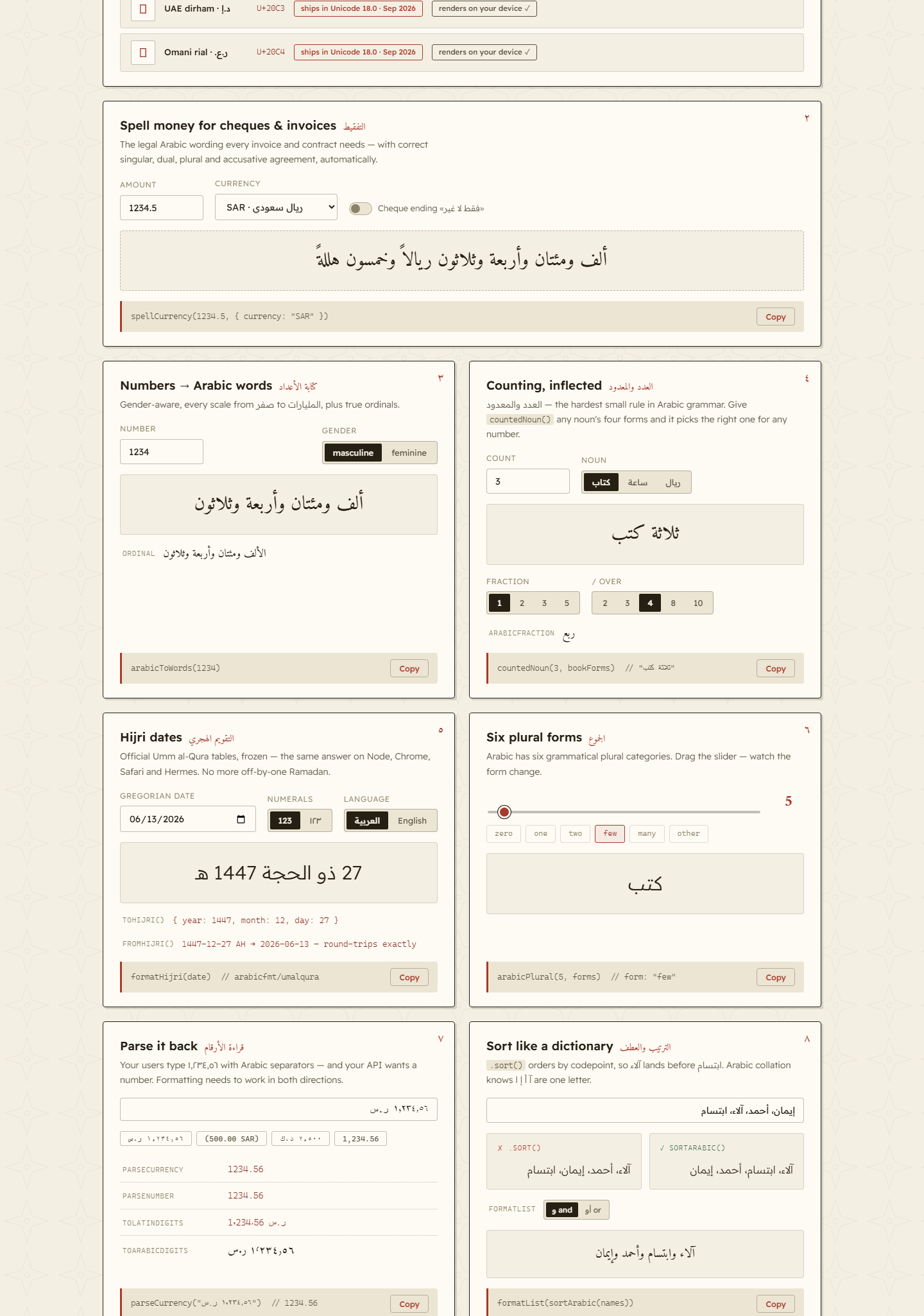
arabicfmt.vercel.app — 整个库都可在浏览器中交互使用并实时计算。更改任意输入,即可实时查看阿拉伯语内容更新:货币工作室、تفقيط、伊斯兰历转换器、复数、RTL 修复等。
在本地运行:
cd demo && npm install && npm run dev
参与贡献
欢迎在 GitHub 提交问题和拉取请求。
许可证
MIT — 可免费用于商业和个人用途。
作者及更多项目
由 cc1a2b 构建并维护。
如果 arabicfmt 为你节省了时间,请在 GitHub 上**为它点星** — 这有助于其他阿拉伯语开发者找到它。欢迎探索我的**其他开源项目**,或通过 issue 提交想法、错误报告和功能请求。
评论
一个开放协议,规定了 AI 应用如何以统一方式连接外部工具与数据源。客户端负责与模型对话,MCP 服务负责提供工具、资源和提示模板,两者通过标准消息通信,同一个服务可以被不同客户端复用。