
关于 Open Ephemeris
Open Ephemeris 是基于 NASA JPL DE440 星历数据的占星计算 MCP 服务,面向占星研究与图表分析用户,涵盖本命盘、行运、人类图、吠陀占星和八字。除结构化计算结果外,部分工具还可在支持 MCP Apps 的客户端中呈现交互式图表。
主要功能
- 01计算本命盘与行运
- 02生成日月食及月相信息
- 03支持人类图、吠陀盘与八字
- 04提供择时、合盘和迁移盘计算
- 05在兼容客户端展示交互式图表
适用场景
- 01计算出生资料对应的本命盘
- 02查看未来数月的行星行运
- 03生成 Human Design 或八字图表
- 04以交互式图表浏览行星与宫位
MCP 相关
该服务通过 MCP 提供占星、天文历算与相关图表工具,支持托管的 Streamable HTTP 端点及本地 stdio 配置。兼容客户端可使用 API key 或 OAuth 连接;支持 MCP Apps 的客户端还能显示交互式图表。
配置
远程服务无需本地安装。选择你使用的客户端,复制配置或使用一键安装。
https://mcp.openephemeris.com/mcpclaude mcp add --transport http com-openephemeris-open-ephemeris https://mcp.openephemeris.com/mcp{"mcpServers":{"com-openephemeris-open-ephemeris":{"type":"http","url":"https://mcp.openephemeris.com/mcp"}}}在 Cursor 中打开{"servers":{"com-openephemeris-open-ephemeris":{"type":"http","url":"https://mcp.openephemeris.com/mcp"}}}在 VS Code 中打开{"mcpServers":{"com-openephemeris-open-ephemeris":{"type":"http","url":"https://mcp.openephemeris.com/mcp"}}}{"mcpServers":{"com-openephemeris-open-ephemeris":{"serverUrl":"https://mcp.openephemeris.com/mcp"}}}命令在终端中运行;JSON 粘贴到对应客户端的 MCP 配置后重启。需要授权的服务会在首次连接时提示登录。
工具
详细介绍
Open Ephemeris MCP Server




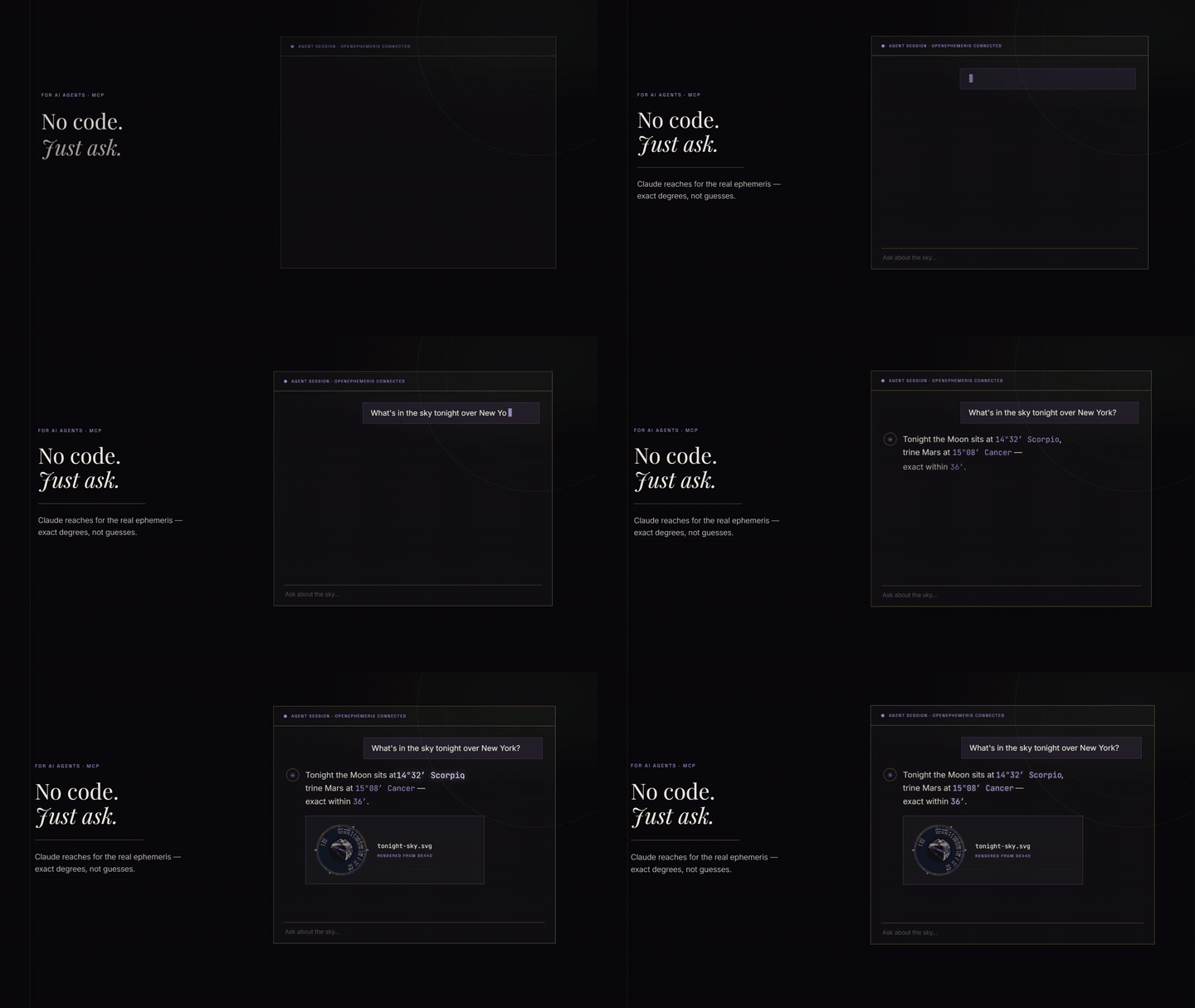
在 Claude 中使用: 将 https://mcp.openephemeris.com/mcp 添加为自定义连接器(OAuth Client ID 和 Secret 留空),或从 Claude 目录安装 Open Ephemeris 插件。在浏览器中登录即可创建免费账户并获得 150 个点数。
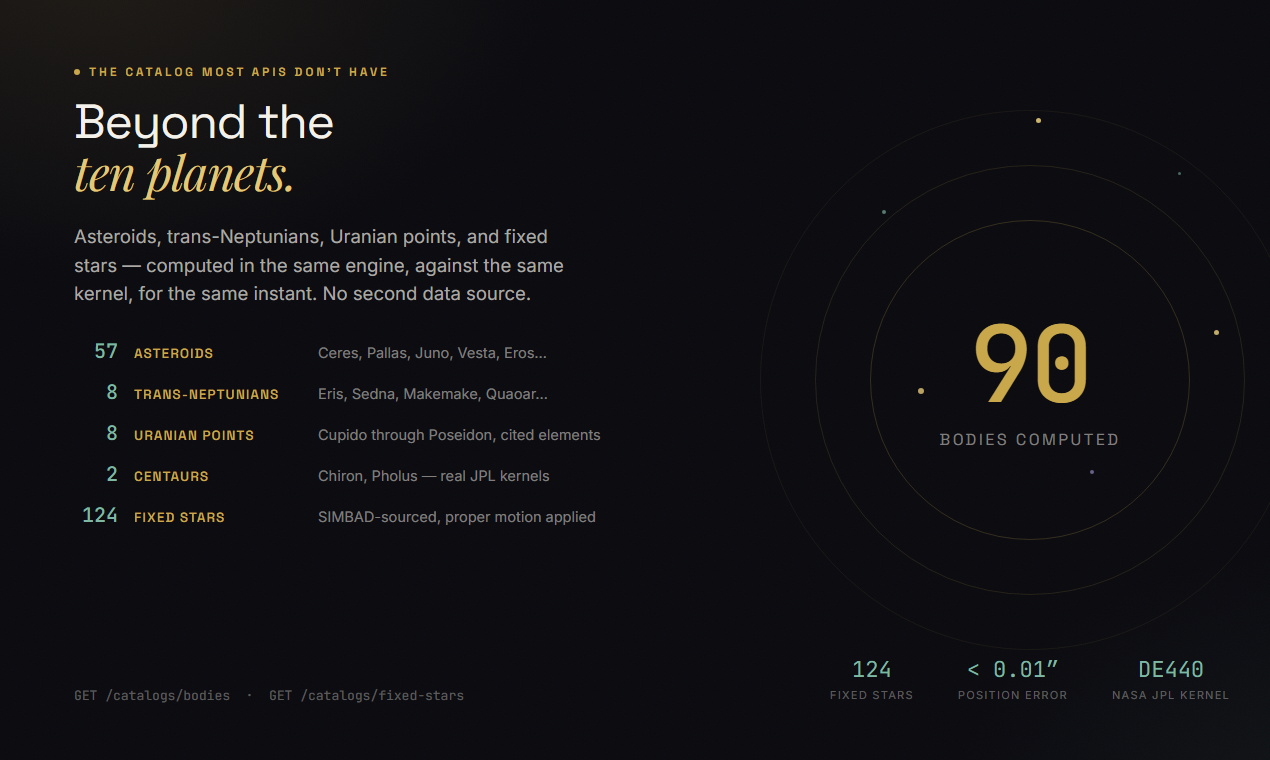
Open Ephemeris 的 Model Context Protocol 服务——由 NASA JPL DE440 星历表驱动的类型化占星工具。行星位置、日期和度数绝无幻觉。覆盖 1,100 年的天文数据。
托管端点: https://mcp.openephemeris.com/mcp(Streamable HTTP,MCP 2025-11-25 规范)
快速开始
快速安装
Claude Code,一条命令:
claude mcp add openephemeris -- npx -y @openephemeris/mcp-server
任何支持托管 URL 的客户端(Claude Web、ChatGPT、自定义 Agent):使用 https://mcp.openephemeris.com/mcp,并在 X-API-Key 标头中发送 API 密钥。其他客户端见下文。
从代码连接(Streamable HTTP)
import { StreamableHTTPClientTransport } from "@modelcontextprotocol/sdk/client/streamableHttp.js"
import { Client } from "@modelcontextprotocol/sdk/client/index.js"

const transport = new StreamableHTTPClientTransport(
  new URL("https://mcp.openephemeris.com/mcp"),
  { requestInit: { headers: { "X-API-Key": "your-openephemeris-api-key" } } }
)

const client = new Client({ name: "my-app", version: "1.0.0" }, { capabilities: {} })
await client.connect(transport)
一键安装(Cursor)

将 Cursor MCP 设置中的
YOUR_API_KEY_HERE替换为从 https://openephemeris.com/dashboard 获取的 API 密钥。
Cursor deeplink 负载:
{
  "command": "npx",
  "args": [
    "-y",
    "@openephemeris/mcp-server"
  ],
  "env": {
    "OPENEPHEMERIS_PROFILE": "dev",
    "OPENEPHEMERIS_BACKEND_URL": "https://api.openephemeris.com",
    "OPENEPHEMERIS_API_KEY": "YOUR_API_KEY_HERE"
  }
}
手动安装(stdio MCP 客户端)
{
  "mcpServers": {
    "openephemeris": {
      "command": "npx",
      "args": ["-y", "@openephemeris/mcp-server"],
      "env": {
        "OPENEPHEMERIS_PROFILE": "dev",
        "OPENEPHEMERIS_BACKEND_URL": "https://api.openephemeris.com",
        "OPENEPHEMERIS_API_KEY": "YOUR_API_KEY_HERE"
      }
    }
  }
}
平台指南
每个平台的详细设置步骤见 SETUP.md。
| 客户端 | 安装方式 | 配置位置 |
|---|---|---|
| Claude Code | CLI | claude mcp add openephemeris -- npx -y @openephemeris/mcp-server |
| Cursor | 一键 deeplink 或手动安装 | ~/.cursor/mcp.json |
| Claude Desktop(macOS) | 手动安装 | ~/Library/Application Support/Claude/claude_desktop_config.json |
| Claude Desktop(Windows) | 手动安装 | %APPDATA%\Claude\claude_desktop_config.json |
| Windsurf | 手动安装 | ~/.codeium/windsurf/mcp_config.json(或旧版 ~/.codeium/mcp_config.json) |
| ChatGPT | 一键安装 | 在 ChatGPT 应用目录中打开 Open Ephemeris |
| Claude Web / 远程客户端 | 托管 URL | https://mcp.openephemeris.com/mcp |
客户端安装步骤
- Cursor
- 点击上方的“在 Cursor 中安装”按钮,然后在 Cursor MCP 设置中替换
YOUR_API_KEY_HERE。 - 如果希望手动设置,请将“手动安装”中的
mcpServers.openephemeris块粘贴到~/.cursor/mcp.json。
- 点击上方的“在 Cursor 中安装”按钮,然后在 Cursor MCP 设置中替换
- Claude Desktop(macOS/Windows)
- 打开上表中对应平台的配置文件。
- 添加“手动安装”中的相同
mcpServers.openephemeris块。 - 重启 Claude Desktop。
- Windsurf
- 打开
~/.codeium/windsurf/mcp_config.json(或旧版路径~/.codeium/mcp_config.json)。 - 添加“手动安装”中的
mcpServers.openephemeris块。 - 重启 Windsurf。
- 打开
仅支持远程连接的客户端(Claude Web、ChatGPT 等)
服务托管在 https://mcp.openephemeris.com/mcp,完全支持 Streamable HTTP(MCP 2025-11-25 规范)。仅支持远程连接的客户端可以直接连接 — 无需桥接/代理:
- Claude Web:将
https://mcp.openephemeris.com/mcp添加为自定义连接器 URL — 将 OAuth Client ID 和 Secret 留空。服务使用 OAuth 2.1 + PKCE(动态客户端注册),因此 Claude 会自动通过浏览器弹窗处理身份验证。 - ChatGPT:Open Ephemeris 是 ChatGPT 应用目录中的已批准应用。打开
此应用页面,点击 Install plugin,批准登录(这也会创建你的
免费 Open Ephemeris 账户),然后在任意聊天中输入
@Open Ephemeris。图表会以内嵌方式呈现, 与在 Claude 中完全相同。想自行配置?Settings → Plugins → Advanced → Developer mode → + Create app 支持使用 OAuth 身份验证的https://mcp.openephemeris.com/mcp— 无需填写客户端 ID 或 Secret。 - Legacy SSE:已于 3.20.0 弃用 — 请使用
/mcp上的 Streamable HTTP
MCP 客户端中的身份验证和升级行为
- 凭据缺失/无效(
401):工具调用失败,并提示用户前往https://openephemeris.com/login?signup=true&redirect=%2Fdashboard%3Ftab%3Daccount注册/登录,然后在https://openephemeris.com/dashboard?tab=account创建/管理密钥。 - 端点受套餐限制(
403):工具调用会返回需要升级的提示,并附上https://openephemeris.com/pay及仪表板账单/密钥管理链接。 - 额度不足(
402):工具调用会返回一键充值链接(Explorer 的 150 个免费额度为一次性额度,不会重置;套餐额度会在每个账单周期续订),以及仪表板用量链接。失败的调用(任何4xx/5xx)都会退款。 - 突发/速率限制(
429):工具调用会返回重试指南和仪表板用量监控链接。
你可以询问的内容
"Calculate a natal chart for 1990-04-15 at 2:30 PM in Chicago."
"Find all Saturn transits to my natal Sun in the next 6 months."
"Get the current moon phase and void-of-course status."
"Find the next solar eclipse visible from Tokyo."
"Find the best time to sign a contract in March — electional window."
"Generate a Human Design chart for my birth data."
"What is my Vedic (sidereal) chart?"
"Calculate my Chinese BaZi (Four Pillars) chart."
"Show me my Astrocartography power lines — where is my Venus line on the map?"
"Find all ACG lines within 3° of Paris for my chart."
"Calculate a synastry chart between two people."
"Find the next Venus Star Point and my relationship to it."
"What are the active planetary stations in the next 3 months?"
"Calculate primary directions for the next 5 years."
"Find my Firdaria time lord period."
"What is the sidereal time and delta-T right now?"
交互式图表
其中 9 个工具不会以 JSON 作答。它们会在对话中打开一张图表——根据同一计算结果绘制而成的真实图表,你可以点击查看。
这比听起来重要得多。以 JSON 返回的本命盘只是一串数字,你得先懂这些数字才能看懂。将同一张图表呈现为星盘轮盘,你就可以直接指着它看。点击一颗行星,就能了解它所处的位置;点击一个宫位,就能了解其中有什么。图表会一直显示在屏幕上,你可以继续对话,而且反复查看不会额外消耗额度。
这些工具需要由支持 MCP Apps 的宿主提供。Claude 和 ChatGPT 都支持,而且两者呈现的是同一个小组件——无需单独构建 ChatGPT 版本。MCP Apps(SEP-1865)由 Anthropic 和 OpenAI 共同编写,并于 2026 年 1 月成为首个官方 MCP 扩展,因此一个 ui:// 资源就能同时服务两者。在 ChatGPT 中,可从应用目录安装;在 Claude 中,添加连接器(参见 SETUP.md)。
在不支持应用的客户端中,这些工具仍然可用;你会获得底层数据,而不是图表,因此一切照常运行,只是看不到轮盘。
| 工具 | 打开内容 | 可点击的内容 | 额度 |
|---|---|---|---|
explore_natal_chart | 本命盘轮盘——行星、宫位、相位、角度 | 行星、宫位、相位线;使用新设置重新计算 | 1 |
explore_bi_wheel | 同一轮盘上的两张图表:行运、合盘、推运 | 任一轮盘上的行星、宫位,以及两者之间的相位 | 2(太阳回归盘/月亮回归盘为 6) |
explore_human_design | 人类图身体图,可切换为曼陀罗视图 | 中心、闸门、通道、行星、变量 | 4 |
explore_human_design_transit | 将今日行星叠加到本命身体图上 | 被行运激活的通道 | 5 |
explore_human_design_connection | 合并两张身体图,并对每条共享通道进行分类 | 按类型查看连接通道 | 5 |
explore_vedic_chart | 南印度风格的 Rashi 方格——恒星黄道落点和 Lagna | 每个 Rashi 的落点和 Nakshatra | 3 |
explore_bazi_chart | 四柱命盘(四柱命盘)——年、月、日、时 | 每一柱 | 3 |
explore_transit_timeline | 按日期排列的即将发生的行运触发 | 各项触发 | 最多 1 年为 6(按时间跨度计价) |
explore_moon_phase | 月相刻度盘——照明程度、月相、星座、月亮空亡 | 重新计算另一个时刻 | 3 |
像问别人一样提出请求即可:“给我看看我的星盘”、“把今天的行运叠加到我的人类图上”、“现在月亮是什么状态”。模型会选择相应的应用。
还有两点值得了解。星盘轮盘和双轮盘都支持点击相位线,而不只是点击相位线连接的两颗行星——因此,想知道“这条线为什么重要”,只需点击一下,无需先听一大段说明。身体图的曼陀罗切换功能会将整张图表重新排布为同心圆环,无需再次调用 API,因此切换视图不消耗额度。
工具一览
| 类别 | 工具 | 级别 |
|---|---|---|
| 本命盘 | ephemeris_natal_chart | Explorer |
| 行运预测 | ephemeris_transits | Explorer |
| 行运盘快照 | ephemeris_natal_transits | Explorer |
| 星座换座 / 行星到达度数 | ephemeris_ingresses | Explorer |
| 月相 / VOC | ephemeris_moon_phase | Explorer |
| 下一次可见日食 | ephemeris_next_eclipse | Explorer |
| 择时窗口 | ephemeris_electional | Pro |
| 时刻分析 | electional_moment_analysis | Explorer |
| 停滞追踪器 | electional_station_tracker | Explorer |
| 相位搜索 | electional_aspect_search | Pro |
| 人类图 | human_design_chart | Explorer |
| 人类图合盘 | human_design_composite | Explorer |
| 人类图行运叠加 | explore_human_design_transit | Explorer |
| 人类图行运时间线(日期范围内的闸门) | human_design_transit_timeline | Explorer |
| 人类图扩展配置(小行星、角度、阿拉伯点、恒星) | human_design_extended | Explorer(深度字段为 Pro) |
| 人类图关系(比较盘) | explore_human_design_connection | Explorer |
| 人类图 Penta | human_design_penta | Explorer |
| 人类图回归 / 对分 | hd_planetary_return, hd_opposition | Explorer |
| 吠陀占星盘 | vedic_chart | Explorer |
| 八字(中国) | chinese_bazi | Explorer |
| 比较盘 | ephemeris_synastry | Explorer |
| 组合盘 | ephemeris_composite | Explorer |
| 移居盘 | ephemeris_relocation | Explorer |
| 推运盘 | ephemeris_progressed_chart | Explorer |
| 太阳回归盘 | ephemeris_solar_return | Explorer |
| 月亮回归盘 | ephemeris_lunar_return | Explorer |
| 行星回归盘 | ephemeris_planetary_return | Explorer |
| 占星地图能量线 | acg_power_lines | Pro |
| 指定地点的 ACG 命中 | acg_hits | Pro |
| 金星星点 | venus_star_points + 4 more | Explorer |
| 星盘轮盘图 | ephemeris_chart_wheel | Explorer |
| 双轮盘图 | ephemeris_bi_wheel | Explorer |
| 尊贵状态 / 中点 / 恒星 | ephemeris_dignities, ephemeris_midpoints, ephemeris_fixed_stars | Explorer |
工具模型
- 常见工作流(本命盘、行运、月相、日食、比较盘、移居盘、择时、人类图)优先使用类型化工具。
- 通用工具:
find_calculation按普通词语搜索允许列表中的操作,并返回路径、输入、示例和额度消耗(dev_list_allowed会列出所有操作,位于核心功能之外);dev_read_api调用允许列表中的 GET(读取)操作,dev_write_api调用允许列表中的 POST/PUT/PATCH/DELETE(写入/计算)操作,二者均通过method + path指定。读取和写入分别使用独立工具,因此安全的读取接口不会与会改变状态的写入操作共用工具。 - 安全模型:默认拒绝,并在
config/dev-allowlist.json中显式配置允许列表。 - 拒绝前缀会屏蔽敏感路由系列(
/auth、/billing、/admin等)。
dev_read_api / dev_write_api 输入
| 参数 | 类型 | 必填 | 描述 |
|---|---|---|---|
method | dev_read_api:GET · dev_write_api:POST|PUT|PATCH|DELETE | 否 | HTTP 方法(默认为该工具的自然方法) |
path | string | 是 | 绝对 API 路径,例如 /ephemeris/natal-chart |
query | object | 否 | 查询参数 |
body | object | 否 | 非 GET 请求的 JSON 请求体 |
preset | full|simple | 否 | 便捷映射到 query.preset |
format | json|llm|llm_v2 | 否 | 便捷映射到 query.format(llm_v2 会规范化为 llm) |
output_mode | full|simple|llm|llm_v2 | 否 | 用于旧版兼容的字段 |
环境变量
| 变量 | 必填 | 描述 |
|---|---|---|
OPENEPHEMERIS_API_KEY | 是(除非使用服务密钥/JWT) | Open Ephemeris 的 API 密钥 |
ASTROMCP_API_KEY | 否 | OPENEPHEMERIS_API_KEY 的旧别名(会作为后备选项检查) |
OPENEPHEMERIS_BACKEND_URL | 否 | 默认为 https://api.openephemeris.com |
OPENEPHEMERIS_PROFILE | 否 | 默认为 dev |
OPENEPHEMERIS_TOOLS | 否 | core(默认)会公开一组精简的日常工具;full 会公开所有工具。请参阅工具范围 |
OPENEPHEMERIS_TELEMETRY | 否 | 设置为 0/false/off 以停用匿名使用情况报告。DO_NOT_TRACK=1 也有效。请参阅遥测 |
OPENEPHEMERIS_JWT | 否 | Bearer 令牌身份验证 |
OPENEPHEMERIS_DEV_ALLOWLIST_PATH | 否 | 覆盖允许列表文件路径 |
MCP_USER_ID | 否 | 每个实例的用户标识符 |
旧别名(ASTROMCP_*、MERIDIAN_*)仍受支持。
遥测
此服务会报告匿名使用情况,以便我们了解哪些工具值得维护,哪些工具存在问题。报告三种事件:会话开始、工具调用、工具错误。
**发送的内容:**工具名称、耗时、错误状态、连接的 MCP 客户端(例如 Claude Desktop、Cursor)及其版本、服务版本,以及会话的稳定 ID:API 密钥的单向 SHA-256 前缀,或通过 OAuth 登录时的账户 ID。
**绝不会发送的内容:**您的 API 密钥或令牌、出生数据、日期、姓名、坐标、工具参数或工具结果。绝不会发送请求或响应正文。
关闭方式——以下任一方式均可,且会在发送任何内容之前检查:
OPENEPHEMERIS_TELEMETRY=0
# or the cross-tool standard
DO_NOT_TRACK=1
工具范围
默认情况下,服务公开的是一组精简的核心工具,用于日常场景,而非整个目录。大型工具列表会占用上下文,并降低模型选择工具的效果,因此默认配置针对真实对话进行了优化:每种传统提供一个交互式应用,每个领域提供主要数据工具,另加地理编码和受允许列表限制的通用代理。
**不会移除任何工具。**工具范围仅对 tools/list 进行筛选——所有工具都会保留注册状态,也始终可以通过名称调用。只要您知道要用哪个工具,直接调用即可,无论它是否列出,都能正常工作。
如需公开完整目录:
OPENEPHEMERIS_TOOLS=full npx -y @openephemeris/mcp-server
对于远程 HTTP 服务,可在连接器 URL 后追加 ?profile=full(或发送 X-OE-Tool-Surface: full):
https://mcp.openephemeris.com/mcp?profile=full
按传统划分的工具集
如果你专研某种传统,请直接按名称选择,而不是使用通用默认选项。你可以完整获得该传统的工具集——包括核心工具集未涵盖的长尾工具——同时只需占用一小部分上下文。
OPENEPHEMERIS_TOOLS=hd npx -y @openephemeris/mcp-server        # Human Design
OPENEPHEMERIS_TOOLS=astrology,moon npx -y @openephemeris/mcp-server
https://mcp.openephemeris.com/mcp?profile=hd,bazi
| 工具集 | 涵盖内容 | 工具数 | 约占用的 token 数 |
|---|---|---|---|
astrology | 本命、行运、入宫、比较盘、推运、返照、迁居、时间主星、尊贵、半中点、阿拉伯点、恒星、组合盘、出生时间敏感性 | 38 | 17,700 |
hd | 人类图盘、行运与行运时间线、扩展落点、关系图、Penta、人体图 | 19 | 8,500 |
bazi | 四柱、十神、五行平衡、大运、合盘、紫微斗数 | 16 | 8,100 |
electional | 择时窗口、角度交越、停滞、时刻分析 | 12 | 4,300 |
acg | 占星地理学线与交点 | 9 | 3,400 |
vedic | Jyotish Rashi 盘、大运、分盘、Ashtakoota 配对 | 10 | 3,400 |
moon | 月相、空亡、日月食 | 11 | 3,300 |
venus | 金星星点、相位、距日角、停滞 | 13 | 3,200 |
mundane | 入宫与朔望盘、地理占星盘 | 9 | 2,600 |
| — | 核心(默认) | 39 | 19,800 |
| — | 完整 | 81 | 39,100 |
每种选择还会包含地理编码(location_search、timezone_resolve)、account_usage,以及受允许列表限制的代理——因此始终可以解析出生地,不会有任何功能被搁置。
用逗号组合;未知名称会被忽略,而非拒绝,因此拼写错误会缩小可用范围,而不是导致连接器失效。与 core/full 一样,这只会筛选 tools/list——每个工具仍可按名称调用。
这很重要:每次请求时,工具定义都会重新发送给模型。astrology,moon 会比默认选项多公布几个工具,但每条消息可少占用约 700 个 token,同时覆盖更多传统内容。
会话初始化时,可用范围即固定——此服务不会公布 tools.listChanged,因此切换需要重新连接。在任何可用范围下,find_calculation 都会搜索通用代理可访问的所有操作。
贡献与支持
- 结果有误?提交 issue——请附上工具、输入内容和预期结果。
- **想要贡献?**请参阅 CONTRIBUTING.md。集成示例和新技能是最有用的贡献内容。
- **发现安全问题?**请通过私下渠道报告——参阅 SECURITY.md。
- **工具超时?**请先查看 status.openephemeris.com。
如果这避免了大模型自信地捏造土星位置,请点个 ⭐,帮助其他人找到它。
法律声明
此软件包采用 MIT License 授权。不过,使用此软件包访问 Open Ephemeris API 即表示使用该服务,并受 Open Ephemeris Terms of Service 约束。使用此软件包即表示你同意这些条款。另请参阅 Privacy Policy 和 Acceptable Use Policy。
开发
此服务端源代码由一个私有单体代码仓库维护;本仓库包含公开文档、插件、技能和示例。欢迎提交错误报告和贡献——请参阅 CONTRIBUTING.md。
架构
┌─────────────────────────────────────────────────────────┐
│                    MCP Clients                          │
│  Codex · Gemini   · Claude Web · ChatGPT · Remote apps  │
└──────────────────┬──────────────────────────────────────┘
                   │ Streamable HTTP (MCP 2025-11-25)
                   │ https://mcp.openephemeris.com/mcp
                   │
┌─────────────────────────────────────────────────────────┐
│          Cursor · Claude Desktop · Windsurf             │
└──────────────────┬──────────────────────────────────────┘
                   │ stdio JSON-RPC
                   │ npx @openephemeris/mcp-server
                   │
              ┌────▼────────────────────┐
              │  openephemeris-mcp      │
              │  Node.js MCP Server     │
              │  typed tools            │
              │  auth: Key > JWT        │
              └────────────┬────────────┘
                           │ HTTPS
                           ▼
              ┌────────────────────────┐
              │  Open Ephemeris API    │
              │  api.openephemeris.com │
              │  NASA JPL DE440        │
              │  1,100 years of data   │
              └────────────────────────┘
运行时快照(生成)
由 npm run sync:readme 根据 config/dev-allowlist.json 和实时工具注册表生成。
- 允许的操作:140
- 方法:
GET=45、POST=95、PUT=0、PATCH=0、DELETE=0 - 已注册的工具(
OPENEPHEMERIS_PROFILE=dev):103 - 类型化工具:
account_usage、acg_hits、acg_power_lines、auth_login、auth_logout、auth_status、bazi_annual_pillar、bazi_chart、bazi_compatibility、bazi_element_balance、bazi_luck_pillars、bazi_recalculate、bazi_ten_gods、bi_wheel_on_cross_aspect_click、bi_wheel_on_house_click、bi_wheel_on_planet_click、bi_wheel_recalculate、bi_wheel_synopsis、bodygraph_recalculate、chart_wheel_on_aspect_click、chart_wheel_on_house_click、chart_wheel_on_planet_click、chart_wheel_recalculate、chinese_bazi、electional_angle_crossings、electional_aspect_search、electional_moment_analysis、electional_station_tracker、ephemeris_angles_points、ephemeris_aspect_check、ephemeris_bi_wheel、ephemeris_chart_wheel、ephemeris_composite、ephemeris_composite_midpoint、ephemeris_dignities、ephemeris_electional、ephemeris_fixed_stars、ephemeris_hermetic_lots、ephemeris_house_cusps、ephemeris_ingresses、ephemeris_lunar_return、ephemeris_midpoints、ephemeris_moon_phase、ephemeris_natal_batch、ephemeris_natal_chart、ephemeris_natal_transits、ephemeris_next_eclipse、ephemeris_next_lunar_phase、ephemeris_overlay、ephemeris_planet_position、ephemeris_planetary_return、ephemeris_progressed_chart、ephemeris_relocation、ephemeris_retrograde_status、ephemeris_solar_return、ephemeris_synastry、ephemeris_time_lords、ephemeris_time_sensitivity、ephemeris_transits、explore_bazi_chart、explore_bi_wheel、explore_human_design、explore_human_design_connection、explore_human_design_transit、explore_moon_phase、explore_natal_chart、explore_transit_timeline、explore_vedic_chart、geodetic_chart、hd_connection_matrix、hd_on_center_click、hd_on_channel_click、hd_on_connection_channel_click、hd_on_gate_click、hd_on_planet_click、hd_on_transit_channel_click、hd_on_variable_click、hd_opposition、hd_planetary_return、human_design_bodygraph、human_design_chart、human_design_composite、human_design_extended、human_design_penta、human_design_transit_timeline、location_search、moon_phase_recalculate、mundane_chart、timezone_resolve、vedic_chart、vedic_chart_recalculate、vedic_matching、venus_eight_year_star、venus_elongations、venus_phase、venus_star_points、venus_star_points_conjunctions、venus_stations、ziwei_chart - 通用工具:
dev_list_allowed、dev_read_api、dev_write_api、find_calculation
允许列表类别
| 类别 | 操作数 | 示例 |
|---|---|---|
acg | 14 | POST /acg/aspects, POST /acg/ccg |
calendar | 3 | GET /calendar/astrology/cross-quarter, GET /calendar/astrology/lunar-standstill |
catalogs | 3 | GET /catalogs/bodies, GET /catalogs/fixed-stars |
chinese | 12 | POST /chinese/bazi, POST /chinese/bazi/annual-pillar |
comparative | 5 | POST /comparative/composite, POST /comparative/composite/midpoint |
eclipse | 6 | GET /eclipse/besselian-elements, GET /eclipse/lunar/global |
electional | 6 | GET /electional/angle-crossings, GET /electional/aspect-search |
ephemeris | 42 | GET /ephemeris/agro/calendar, GET /ephemeris/agro/daily |
health | 2 | GET /health, GET /health/detailed |
human-design | 11 | POST /human-design/chart, POST /human-design/composite |
location | 2 | GET /location/autocomplete, GET /location/reverse |
mundane | 1 | POST /mundane/chart |
predictive | 14 | POST /predictive/eclipses/natal-hits, POST /predictive/primary-directions |
root | 1 | GET / |
tidal | 1 | GET /tidal/forcing |
time | 6 | GET /time/delta-t, GET /time/equation-of-time |
timezone | 3 | GET /timezone/coverage, POST /timezone/lookup |
vedic | 5 | POST /vedic/chart, POST /vedic/kp |
visualization | 3 | POST /visualization/bi-wheel, POST /visualization/bodygraph |
为什么 AI Agent 选择 Open Ephemeris?
大多数大模型(如 Claude 和 ChatGPT)都难以处理天文计算(三角函数、儒略日转换和行星查询)。Open Ephemeris 是一个安全的远程计算引擎。
将大模型与 Open Ephemeris MCP 服务配合使用,您的 Agent 即可即时访问:
- 零幻觉坐标:直接使用 NASA JPL DE440 进行亚角秒级计算,覆盖 1,100 年的天文数据。
- 针对大模型优化的令牌(
format=llm):我们将标准的 25,000 令牌 JSON 星盘响应压缩为精简文本块,视端点而定,可降低 50–73% 的推理成本。 - 开箱即用的占星学功能层:内置支持 Astrocartography geoJSON 线、Hermetic Lots、Fixed Stars 和复杂的 Human Design 矩阵生成。
评论
一个开放协议,规定了 AI 应用如何以统一方式连接外部工具与数据源。客户端负责与模型对话,MCP 服务负责提供工具、资源和提示模板,两者通过标准消息通信,同一个服务可以被不同客户端复用。