
关于 Rhylthyme
Rhylthyme MCP server 可将烹饪、实验室流程、活动和锻炼等多轨计划转换为可执行时间线,面向使用 AI 助手规划流程的人。它会验证计划、分析时间安排与资源冲突,并发布供手机查看的实时时间线。
主要功能
- 01构建多轨计划
- 02验证计划结构
- 03分析时间安排与资源冲突
- 04发布实时交互时间线
- 05提供烹饪、实验室、活动和健身端点
适用场景
- 01安排多道菜同时完成
- 02规划含重叠孵育步骤的实验流程
- 03协调活动筹备与时间节点
- 04设计多人共享器材的训练计划
MCP 相关
该 MCP 服务向客户端提供计划验证、时间表分析和可视化等工具,并按烹饪、实验室、活动、健身等场景提供端点。客户端可连接托管服务;账户功能通过 OAuth 2.1 或登录令牌授权。
配置
远程服务无需本地安装。选择你使用的客户端,复制配置或使用一键安装。
https://mcp.rhylthyme.com/mcpclaude mcp add --transport http com-rhylthyme-rhylthyme https://mcp.rhylthyme.com/mcp{"mcpServers":{"com-rhylthyme-rhylthyme":{"type":"http","url":"https://mcp.rhylthyme.com/mcp"}}}在 Cursor 中打开{"servers":{"com-rhylthyme-rhylthyme":{"type":"http","url":"https://mcp.rhylthyme.com/mcp"}}}在 VS Code 中打开{"mcpServers":{"com-rhylthyme-rhylthyme":{"type":"http","url":"https://mcp.rhylthyme.com/mcp"}}}{"mcpServers":{"com-rhylthyme-rhylthyme":{"serverUrl":"https://mcp.rhylthyme.com/mcp"}}}命令在终端中运行;JSON 粘贴到对应客户端的 MCP 配置后重启。需要授权的服务会在首次连接时提示登录。
工具
19| 参数 | 类型 | 必填 | 说明 |
|---|---|---|---|
| program | object | 是 | 程序 JSON:{programId, name, environmentType?, actors?, tracks: [{trackId, name, steps: [{stepId (unique program-wide), name, task?, duration, startTrigger, replicates?, choice?}]}], resourceConstraints: [{task, maxConcurrent}], metadata?}。duration:{type:'fixed', seconds} | {type:'variable', minSeconds, maxSeconds, defaultSeconds} | {type:'indefinite', defaultSeconds};seconds 可以是数字或类似 '5m'、'1h30m' 的字符串。startTrigger:{type:'programStart'} | {type:'programStartOffset', offsetSeconds} | {type:'afterStep', stepId, offsetSeconds?, event?:'start', instances?:'each'|'all'} | {type:'afterStepWithBuffer', stepId, bufferSeconds} | {type:'manual'}。同一轨道中的步骤不会重叠;每个 task 都需要 resourceConstraint。规则和示例:rhylthyme://guide/authoring;完整 schema:rhylthyme://schema/program。 |
详细介绍
Rhylthyme MCP 服务


一个用于安排由人执行的计划的 Model Context Protocol 服务:烹饪多道菜并让它们同时完成、执行含有重叠孵育步骤的实验台操作规程、组织活动、进行锻炼。Agent 描述流程,服务会验证并分析生成的计划,然后将其发布为 rhylthyme.com 上的实时时间线,供人们在手机上查看并执行。
本仓库是运行于 mcp.rhylthyme.com 的服务源代码。它与 rhylthyme-server 应用中的 mcp-api/ 代码相同,并在此附上所需的静态资源,方便阅读、测试和自托管。
试试看:请求一套锻炼计划
连接服务(在 claude.ai、Claude Desktop 或移动端中,从 Claude Connectors Directory 添加
Rhylthyme;在 Claude Code 中,先运行 /plugin marketplace add rhylthyme/rhylthyme-mcp,
然后运行 /plugin install rhylthyme@rhylthyme;在其他任何地方,将
https://mcp.rhylthyme.com/gym/mcp 添加为连接器),然后用日常语言描述你的需求:
两个人在车库健身房锻炼:一只壶铃、一根引体向上杆、一根跳绳。 30 分钟,做两轮,而且不能有人站着等器材。 做成 Rhylthyme 时间线。
你不用写 JSON。助手会来写,服务则会确保内容无误。使用这条提示词后,Claude 调用了三个工具:
| 调用 | 返回内容 |
|---|---|
validate_program | ✅ Program is valid — 2 tracks, 20 steps, 30m makespan. |
analyze_schedule | Resource conflicts: none. 每个站点的容量都是 1,这证明 Alex 和 Sam 不会在同一时刻都需要用壶铃 |
visualize_schedule | 一个链接:gym.rhylthyme.com?share=4995ef1b88744e80,其中有休息计时器和间歇提示音,还有一张供聊天中查看的文本图表: |
                0                       15m                    30m
Alex           │░Warm-…░▒S…▒░Pu…░▒Ju…▒░░░▒Sw…▒░Pu…░▒Ju…▒░░░▒St…▒│
Sam            │░Warm-…░▒P…▒░Ju…░▒Sw…▒░░░▒Pu…▒░Ju…░▒Sw…▒░░░▒St…▒│
询问“给我看看图片”,preview_timeline 就会在聊天中返回一张图片。
若想按站点着色,让轮换安排一目了然,请保存助手编写的计划(我们的版本位于 examples/recipe/garage-circuit.json),然后运行:
npx -y github:rhylthyme/rhylthyme-timeline garage-circuit.json -o garage-circuit.png \
  --style web --palette tableau --color-by task
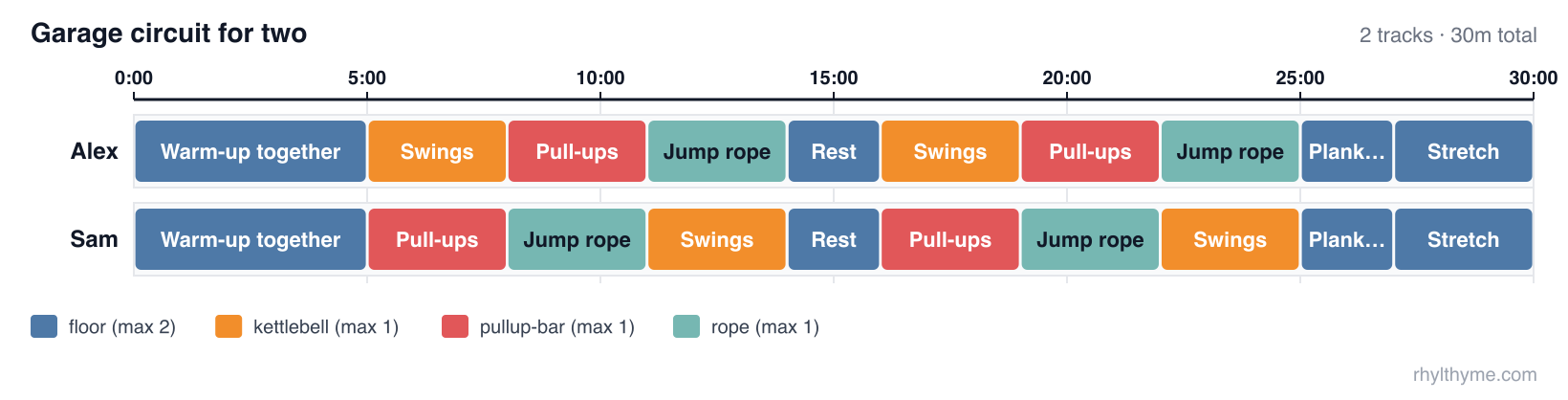
接着可以继续提出要求:“加上第三个人”“我们只有 20 分钟”“把跳绳换成波比跳”。助手会编辑计划,服务会再次检查。
本仓库与 rhylthyme
两个仓库的功能相关,容易混淆。本仓库是AI 助手对话的服务。rhylthyme(原名 rhylthyme-cli-runner)是由人输入的命令。
| rhylthyme-mcp | rhylthyme | |
|---|---|---|
| 它是什么 | MCP 服务:AI 助手调用的工具 | 命令行程序:rhylthyme 命令 |
| 谁在使用 | Claude、ChatGPT、Cursor 或任何 MCP 客户端,代表某个人使用 | 在终端操作的人、脚本或 CI |
| 运行位置 | 托管在 mcp.rhylthyme.com;无需安装 | 在你的机器上:pip install rhylthyme |
| 语言 | JavaScript (Node 20+) | Python 3.12+ |
| 输入 | 助手在对话中构建的程序 | 磁盘上的程序文件(JSON 或 YAML) |
| 验证程序 | validate_program | rhylthyme validate(可离线运行) |
| 时间安排、冲突、截止时间 | analyze_schedule | rhylthyme analyze(会请求服务) |
| 发布实时日程 | visualize_schedule | rhylthyme publish(会请求服务) |
| 使用计时器运行日程 | 不支持:它会返回网页日程的链接 | rhylthyme run,一个交互式终端运行器 |
| 运行记录、校准 | 读取保存在账户中的运行记录 | 在本地记录;rhylthyme runs、rhylthyme calibrate |
| 目录搜索、导入、账户库 | 支持 | 不支持 |
| 仓库中还包含 | rhylthyme-mcp PyPI 包(连接托管服务的 stdio 桥接工具)、Claude 插件市场 | Claude 技能的源代码、提示词评估工具及其结果、rhylthyme mcp-test |
它们的配合方式:命令行工具是此服务的一个客户端。rhylthyme analyze、publish、generate 和 mcp-test 会调用 mcp.rhylthyme.com 上的 MCP;rhylthyme validate、run、runs 和 calibrate 则不会访问网络。两者都有各自的验证器,用于验证相同的程序架构(此处用 JavaScript,另一处用 Python),因此程序发布时会再次检查。
如果要连接助手、读取或自托管服务,或修改工具,请使用本仓库。如果你有程序文件和终端、想在终端使用计时器,或想保留运行记录,请使用 rhylthyme。
请区分这两个名称:PyPI 上的 rhylthyme-mcp 是此服务的 stdio 桥接工具(命令为 rhylthyme-mcp,源代码位于 python/);PyPI 上的 rhylthyme 是命令行工具(命令为 rhylthyme;在 0.5.0 之前以 rhylthyme-cli-runner 的名称发布)。程序格式本身定义在 rhylthyme-spec 中,示例见 rhylthyme-examples。
端点
| URL | 服务名称 | 提供 |
|---|---|---|
https://mcp.rhylthyme.com/mcp | rhylthyme-mcp | 通用日程安排 |
https://mcp.rhylthyme.com/kitchen/mcp | rhylthyme-kitchen-mcp | cook_recipe、whats_for_dinner |
https://mcp.rhylthyme.com/lab/mcp | rhylthyme-lab-mcp | run_protocol、random_protocol、Benchling 导入 |
https://mcp.rhylthyme.com/events/mcp | rhylthyme-events-mcp | plan_event、random_event_template |
https://mcp.rhylthyme.com/gym/mcp | rhylthyme-gym-mcp | start_workout、surprise_workout |
传输方式:无状态的 Streamable HTTP。访问公共目录或使用纯工具无需登录;账户工具通过 OAuth 2.1 使用用户的 Rhylthyme 账户,或者在不支持 OAuth 的客户端中粘贴 login 工具提供的令牌。在 initialize 时会发送描述工作流的服务 instructions。
快速入门:通过命令行创建时间线
rhylthyme CLI 可以直接驱动此服务:用自然语言描述你的需求,即可获得实时时间线 URL、程序文件,或两者兼得。
pip install rhylthyme                        # Python 3.12+
rhylthyme login                              # opens rhylthyme.com in your browser
rhylthyme generate "roast chicken, potatoes and green beans for 6" \
    -e kitchen --by 19:00 --with "one oven, four burners, one cook"
login 会通过浏览器为你登录,并将会话交给 127.0.0.1 上的一次性监听器。登录信息保存在 ~/.config/rhylthyme/credentials.json(模式为 0600)中,并会自动续期,因此只需登录一次。然后,generate 会调用此服务上的两个工具:
import_text会在-e指定的端点(/kitchen/mcp、/lab/mcp……)上,将请求转换为经过验证的多轨程序。它会在服务端运行四轮模型调用,因此需要登录;耗时 20–60 秒,且每天有调用次数上限。visualize_schedule会发布该程序,并返回对应子域名上的实时时间线 URL。
它会输出 ASCII 甘特图、行程安排和 URL。更多示例:
# A lab protocol from a file; save the program and run it in the terminal
rhylthyme generate -e lab -f western_blot.txt -o blot.json --run

# Pipe a run sheet in; print only the URL
pbpaste | rhylthyme generate -e events --by "doors at 18:30" -q

# Program JSON only, no published timeline; machine-readable output
rhylthyme generate -e gym "45 minute upper-body circuit, two people, one bench" --no-publish --json
| 标志 | 含义 |
|---|---|
-e, --env | generic(默认)、kitchen、lab、events 或 gym。选择端点和时间线站点。 |
--by | 所有事项必须完成的时间:19:00、dinner at 7pm。 |
--with | 用你自己的话说明设备和人员限制。 |
-f, --file | 从文件读取请求或源文本;也可使用 - 从标准输入读取。 |
-o, --output | 保存程序 JSON。 |
--run | 随后在终端运行器中运行程序。 |
--open | 在浏览器中打开实时时间线。 |
--no-publish、--json、-q | 跳过发布;输出 JSON;仅输出 URL。 |
要端到端检查某个服务(此服务或你自己的部署):
rhylthyme mcp-test                                   # all five hosted endpoints, read-only
rhylthyme mcp-test --url http://localhost:3000/mcp -e generic --publish
rhylthyme whoami 会显示已保存的登录信息;rhylthyme logout 会将其清除。在没有浏览器的机器上,将 RHYLTHYME_TOKEN 设置为从 https://www.rhylthyme.com/mcp/auth 获取的访问令牌(有效期约一小时),或运行 rhylthyme login --token <token>。RHYLTHYME_MCP_URL 用于指定 CLI 连接的可自托管服务。
连接
Claude Code
claude mcp add --transport http rhylthyme https://mcp.rhylthyme.com/mcp
claude mcp add --transport http rhylthyme-kitchen https://mcp.rhylthyme.com/kitchen/mcp
Claude Desktop / claude.ai:选择 Customize → Connectors,搜索 Rhylthyme 并点击 Connect。要连接上方的其他 URL 之一,请选择 Customize → Connectors → Add → Add custom connector → 粘贴 URL → Continue。公共工具可立即使用;只有在需要保存到自己的账户时,才运行 login。
Claude Code 插件(托管服务,以及一个用于指导 Claude 编写、验证和分析日程的技能):
这是两个命令。先单独发送第一条:
/plugin marketplace add rhylthyme/rhylthyme-mcp
待显示已添加市场后,再发送第二条:
/plugin install rhylthyme@rhylthyme
ChatGPT:选择 Settings → Apps & Connectors → Advanced settings → 开启 Developer mode,然后使用上方的某个 URL 作为 MCP 服务 URL,Create 一个连接器。没有连接器时,ChatGPT 无法调用这些工具,只能改为浏览网站。
Cursor(.cursor/mcp.json):
{ "mcpServers": { "rhylthyme": { "url": "https://mcp.rhylthyme.com/kitchen/mcp" } } }
Claude API(MCP 连接器,单次请求):
import anthropic
client = anthropic.Anthropic()
resp = client.beta.messages.create(
    model="claude-opus-5", max_tokens=16000,
    betas=["mcp-client-2025-11-20"],
    mcp_servers=[{"type": "url", "url": "https://mcp.rhylthyme.com/kitchen/mcp", "name": "rhylthyme"}],
    tools=[{"type": "mcp_toolset", "mcp_server_name": "rhylthyme"}],
    messages=[{"role": "user", "content": "Plan Thanksgiving for 8 with one oven, dinner at 6pm."}],
)
审查导入结果。 review_program(账户工具)会让模型对照源内容检查已导入的程序,并返回问题,例如时长错误、步骤缺失、顺序不当,或总时长与源内容不符。在 import_from_source 或 import_text 之后调用它,按建议修改,然后重新验证。
只能启动命令的客户端:pip install rhylthyme-mcp 会安装 rhylthyme-mcp 命令,这是一个 stdio 桥接程序,会将每个请求转发到托管服务(源代码位于 python/):
{ "mcpServers": { "rhylthyme": { "command": "rhylthyme-mcp", "args": ["kitchen"] } } }
完全没有 MCP 客户端(使用 shell 的 Agent、脚本):此服务无状态,因此无需握手,也无需账户即可发送单个 POST 请求。
curl -s https://mcp.rhylthyme.com/mcp \
  -H 'Content-Type: application/json' -H 'Accept: application/json' \
  -d '{"jsonrpc":"2.0","id":1,"method":"tools/call",
       "params":{"name":"validate_program","arguments":{"program":{"programId":"x","name":"x","tracks":[]}}}}'
以相同方式调用 visualize_schedule,即可在 result.structuredContent.url 中获取实时时间线 URL。也可使用上方快速入门中的 CLI。
工具
| 工具 | 注释 | 功能 |
|---|---|---|
validate_program | 只读、纯函数 | 结构和调度检查(重复/缺失 ID、悬空引用、循环、同一轨道内重叠、未指定资源约束的任务、无法解析的时长、选择引用)。每项检查结果都包含 code、message 和 fix 提示。返回结构化输出。 |
analyze_schedule | 只读、纯函数 | 每个步骤的解析后开始/结束时间、总工期、决定总工期的依赖链、资源冲突时间段、每条轨道的浮动时间,以及并发峰值与声明的参与者数量对比。传入 finishAt 或 startAt(ISO 8601)可指定实际开始时间。返回结构化输出。 |
visualize_schedule | 发布 | 验证程序(若程序无效则拒绝,除非设置 allowInvalid),创建分享记录,并返回 Markdown 预览(封面图片、设备、食材、ASCII 甘特图、行程安排、日程检查)、内嵌的时间线 PNG 和实时 URL。返回结构化输出。 |
preview_timeline | 发布分享记录 | 仅返回时间线 PNG,不含文字。 |
search_public_recipes | 只读 | 在公开目录中进行关键词搜索;environment 用于选择厨房(默认)、实验室、活动或健身房。返回结构化输出。 |
load_public_recipe | 只读 | 返回目录条目的完整摘要和实时 URL。 |
cook_recipe / run_protocol / plan_event / start_workout | 只读 | 每个垂直领域各执行一次:匹配度最高的目录条目 → 实时 URL。 |
whats_for_dinner / random_protocol / random_event_template / surprise_workout | 只读 | 从每个垂直领域的目录中随机选取条目。 |
import_from_source | 只读 | Spoonacular、TheMealDB、protocols.io、Cooklang、Opentrons Protocol API 脚本、Benchling → 已验证的程序 JSON。search 无需令牌;import 和 random 需要用户的令牌。 |
create_environment | 纯函数 | 设备限制和参与者类型 → 环境 JSON。 |
login | — | 返回登录 URL,然后验证粘贴的令牌。 |
list_my_programs、load_program、save_program | 账户 | 用户自己的库;save_program 会先进行验证。 |
get_renderer_source | 只读 | Apache-2.0 时间线渲染器的源代码,适用于沙盒会阻止外部脚本的 HTML 工件。 |
每个工具都设置了注释(readOnlyHint、destructiveHint、idempotentHint、openWorldHint);其中四个工具还声明了 outputSchema 并返回 structuredContent。失败时会设置 isError,并说明下一步该怎么做。
资源和提示词
rhylthyme://schema/program:程序 JSON Schema(0.3.0-alpha)rhylthyme://guide/authoring:单页编写规则、触发器词汇表、如何让多条轨道同时结束、重复工作(replicates、每个实例的instances: "each"链、"all"屏障和maxInFlight)、选择分支rhylthyme://guide/tools:每个工具描述的完整版。工具列表本身控制在约 3,600 个 token,方便保持连接rhylthyme://examples/{breakfast_schedule, lab_experiment, stir_fry_with_choice, hiit_cardio_workout, corporate_presentation, cookies_three_trays}:完整有效的程序(cookies_three_trays是 0.3.0-alpha 中展示每实例/在途工作机制的示例)- 提示词
plan_schedule(goal, finishAt?, constraints?):引导模型完成搜索 → 构建 → 验证 → 分析 → 可视化,并在约束步骤中提及replicates/instances/maxInFlight
程序的样子
{
  "schemaVersion": "0.1.0",
  "programId": "eggs-and-toast",
  "name": "Eggs and toast",
  "tracks": [
    { "trackId": "eggs", "name": "Eggs", "steps": [
      { "stepId": "whisk", "name": "Whisk", "task": "prep",
        "duration": { "type": "fixed", "seconds": 60 },
        "startTrigger": { "type": "programStart" } },
      { "stepId": "cook", "name": "Cook", "task": "stove",
        "duration": { "type": "variable", "minSeconds": 120, "maxSeconds": 240, "defaultSeconds": 180 },
        "startTrigger": { "type": "afterStep", "stepId": "whisk" } } ] },
    { "trackId": "toast", "name": "Toast", "steps": [
      { "stepId": "toast", "name": "Toast", "task": "toaster",
        "duration": { "type": "fixed", "seconds": 180 },
        "startTrigger": { "type": "afterStep", "stepId": "cook", "event": "start", "offsetSeconds": 60 } } ] }
  ],
  "resourceConstraints": [
    { "task": "prep", "maxConcurrent": 1 },
    { "task": "stove", "maxConcurrent": 2 },
    { "task": "toaster", "maxConcurrent": 1 }
  ]
}
同一条轨道中的步骤按顺序运行;并行工作需放在不同轨道中;每个 task 都需要资源约束;时长和偏移量可使用秒数或 "5m" 这样的字符串。触发器:programStart、programStartOffset、afterStep(结束时触发,或使用 event: "start",并可设置正负偏移量)、afterStepWithBuffer、manual、onAbort,或 {logic: all|any, triggers}。
时长类型:fixed、variable(由执行者提前结束)、indefinite(由执行者结束)。
自托管
git clone https://github.com/rhylthyme/rhylthyme-mcp
cd rhylthyme-mcp
npm install            # Node 20 or newer
npm test                 # SDK in-memory + HTTP entry-point tests, no network
PORT=3000 npm start      # http://localhost:3000/mcp and the four vertical paths
npm run stdio            # the same server over stdio (add kitchen, lab, events or gym)
Stdio 客户端会将其作为本地进程运行,例如在 Claude Desktop 中:
{"command": "node", "args": ["/path/to/rhylthyme-mcp/src/stdio.js"]}。
Docker:docker build -t rhylthyme-mcp . && docker run -p 3000:3000 rhylthyme-mcp。
Vercel:在仓库根目录运行 vercel;vercel.json 会将端点
路径重写到函数。
自托管能做什么、不能做什么:验证、时序分析、渲染器、资源和提示词都在你的进程中运行。目录搜索、
分享(visualize_schedule)、导入和账户工具会调用公共
API https://www.rhylthyme.com(mcp-api/index.js 中的 API_BASE),因此
仍依赖托管服务。PNG 预览路由
/api/og/timeline.png 还需要 SUPABASE_URL 和
SUPABASE_ANON_KEY 才能读取共享方案;其他功能均不需要。
目录结构
mcp-api/index.js:工具、资源和提示词注册;垂直领域检测;OG 图片路由;Vercel 处理程序mcp-api/schedule.js:验证器和分析器(纯函数)static/js/timeline-render.js:时序引擎和 SVG 甘特图(也以@rhylthyme/timeline发布)static/schema/、static/examples/:资源src/index.js:独立 HTTP 运行程序src/stdio.js:独立 stdio 运行程序(相同的工具、资源和提示词)mcp-api/server.json:MCP 注册清单.claude-plugin/marketplace.json、plugins/rhylthyme/:Claude 插件市场和插件(claude plugin validate .);其中的技能是 rhylthyme 中skills/rhylthyme的核验副本python/:PyPI 软件包rhylthyme-mcp,用于连接托管服务的 stdio 桥接程序(cd python && PYTHONPATH=src pytest tests)
已知限制
login会向用户提供一个 URL,并要求用户粘贴一个短时有效的访问令牌,之后该令牌会作为工具参数传递;此流程不属于 MCP 的 OAuth 2.1 流程。要求已认证服务使用 OAuth 的宿主仍可使用所有公共工具。search_public_recipes一次只搜索一个环境;通用端点默认使用 kitchen。- 工具注释是自行声明的提示;宿主可能会忽略它们。
许可证
与 Rhylthyme 的其余部分相同,采用 Apache-2.0。(本仓库在 2026 年 9 月之前采用 MIT 许可证。)
评论
一个开放协议,规定了 AI 应用如何以统一方式连接外部工具与数据源。客户端负责与模型对话,MCP 服务负责提供工具、资源和提示模板,两者通过标准消息通信,同一个服务可以被不同客户端复用。