
关于 Digma Code Observability MCP Server
Digma Code Observability MCP Server 将 Digma 的代码可观测性与动态分析数据提供给 Agent,面向代码审查和性能排查。它结合运行时使用情况与分布式追踪,帮助发现代码问题及受变更影响的服务。
主要功能
- 01结合预生产环境数据审查代码变更
- 02定位拖慢应用的代码和查询
- 03利用运行时数据检查变更影响
- 04根据运行数据生成相关测试
适用场景
- 01审查分支中的运行时问题
- 02找出最严重的性能问题
- 03评估函数改动影响的服务与代码
- 04检查 Staging 环境中的新问题
MCP 相关
作为 MCP 服务,它向 Claude、Cursor 等 MCP 客户端提供 Digma 可观测性数据。可通过部署提供的 SSE URL 连接,也可借助 SuperGateway 转接。
配置
本地服务的配置在各客户端中通用,复制后粘贴到客户端的 MCP 配置文件即可。
工具
本地服务需要在你的电脑上运行后才能读取工具,维护者暂未提供工具列表。
详细介绍
Digma 代码可观测性 MCP 服务
一种模型上下文协议(MCP)服务实现,借助 Digma 的代码可观测性和动态代码分析,让 Agent 能够访问可观测性洞察
主要功能 🚀
- 🗣️ 借助可观测性进行代码审查: 检查 PR 分支中是否存在预生产环境可观测性发现的问题。
- 🔎 通过动态代码分析查找代码低效之处: 找出导致应用变慢的代码或查询问题
- 🔭 利用分布式追踪中的代码运行时使用数据: 检查是否存在破坏性变更,或生成相关测试
提示词示例 💬
help me review the code changes in this branch by looking at related runtime issuesI want to improve the performance of this app. What are the three most severe issues I can fix?I'm making changes to this function, based on runtime data. What other services and code would be affected?Are there any new issues in this code based on the Staging environment?Which database queries have the most impact on the application performance?
实际演示 📺
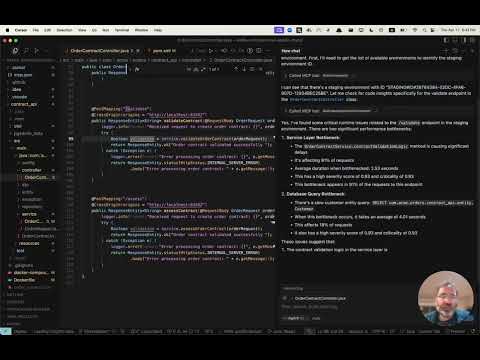
获取抢先体验 👀
Digma 会对可观测性数据进行预处理,以识别问题、跟踪代码性能和运行时数据,从而进行动态代码分析。 访问我们的 MCP 页面,注册抢先体验我们的 MCP 服务。
安装 ⚙️
配置你的 MCP 客户端(Claude、Cursor 等),以使用 Digma MCP。
Digma 部署包含 MCP SSE 服务。你可以在客户端中使用其 URL 进行配置,也可以使用 SuperGateway 等 MCP 工具,将其作为命令行工具运行。
MCP URL 路径由 Digma API 密钥组成,格式如下:
https://<DIGMA_API_URL>/mcp/<DIGMA_API_TOKEN>>/sse
MCP XML 示例
如果你的客户端支持 SSE 服务,可以使用以下语法:
{
  "mcpServers": {
    "digma": {
    "url": "https://<DIGMA_API_URL>/mcp/DIGMA_API_TOKEN>/sse",

      }
    // ... other servers might be here ...
  }
}
要将 MCP 服务用作命令行工具,请使用 SuperGateway 工具连接到如下所示的 URL:
{
  "digma": {
    "command": "npx",
    "args": [
      "-y",
      "supergateway",
      "--sse",
      "https://<DIGMA_API_URL>/mcp/DIGMA_API_TOKEN>/sse"
    ]
  }
}
使用规则 👨💼
Agent 会自主决定何时按需使用 Digma 提供的数据。不过,某些客户端支持设置规则和策略,以建立更规范的流程。
以下是一个规则文件示例,你可以将其添加到 Cursor 的 .cursor/rules 目录中
# Digma Memory File - Code Review Instructions

## Runtime Analysis Settings
- Environment: TEST

## Code Review Protocol
1. For any code or branch review request:
   - Get the list of changed files and methods in the current branch using `git diff`
   - Check for ALL runtime issues in TEST environment (not just for the method in context)
   - Check if any runtime issue may be related to the changed code
   - Check the runtime usage of the changed methods (based on the `git diff`)
   - Check if any of the changed methods (based on the `git diff`) have a high risk based on their performance impact
   - Synthesize the data with standard code review analysis


## Note
This file is used by the AI assistant to maintain consistent review protocols across sessions.
许可证 📜
MIT 许可证。请参阅 LICENSE 文件。
评论
一个开放协议,规定了 AI 应用如何以统一方式连接外部工具与数据源。客户端负责与模型对话,MCP 服务负责提供工具、资源和提示模板,两者通过标准消息通信,同一个服务可以被不同客户端复用。